Releases: ugurkocde/TenuVault
Release list
Nightly 2026-10-02 12:25 UTC

TenuVault nightly: licensing reliability
Reliability
- License activation and refresh now use Electron’s networking stack, including configured system proxies. This improves connectivity on managed networks.
- Firewall block pages, malformed responses, and unrecognized service errors preserve valid cached licenses until their normal expiry. Genuine revoked or expired licenses are still rejected.
- Connection failures now show clearer certificate, proxy, timeout, and network guidance without exposing request data.
Installation and updates
Enable Get Nightly Builds in Settings to receive nightly updates. Turning it off lets you return to the current stable release, including when stable has an older version number.
This is a prerelease for testing between stable releases. Prefer stable for routine use. The README download buttons always download the latest stable installer directly, with an additional Intel Mac link.
Verification
The release passed automated tests and packaged-app smoke checks on Windows and macOS. Installers are signed; macOS builds are notarized. Licensing was also tested against the production service, including activation, restart persistence, revocation, expiry, and deactivation. A controlled proxy check verified that the new networking path uses its configured proxy; not every corporate network configuration has been tested.
Nightly 2026-10-02 09:22 UTC
Changes
Desktop backup and recovery
TenuVault brings Intune backup, restore and drift detection into a desktop application for Windows and macOS. Administrators can keep configuration backups on their own machine, compare snapshots, and review restore operations from one interface. The documentation shipped with this source explains supported policy types, permissions, storage and recovery procedures.
Release channels
Signed Windows installers and signed, notarized macOS builds are distributed from this repository. Stable is the default for stable installations. Enable Settings > Updates > Get nightly builds to receive previews between stable releases, such as 0.2.1-nightly.… after 0.2.0.
Turn the option off to download the current stable release immediately, even if its version is older than the installed nightly. Changing channels cancels a pending download and replaces any ready update from the previous channel. Select Restart and update when the selected release is ready, or let it install when you quit. Ordinary updates within a channel do not downgrade the application.
Windows MSI installations are managed deployments and do not self-update. Deploy a newer MSI through your normal software distribution process. Automatic updates for the setup installer and macOS application also respect the administrator's update policy.
Repository migration and upgrade notes
This is the first release from the new TenuVault desktop repository, which starts with a clean source history. Earlier development builds point to the previous repository for updates. Install a build from this repository to move to the new update feed; the application identity and package name are unchanged.
The original PowerShell tool is maintained separately at TenuVault-PowerShell. The website and desktop licensing service remain separate from this repository.
Launch verification
While this repository is private, unauthenticated update checks cannot reach its releases. Public-feed access and a complete installed-app update cycle still need verification after the repository is made public. A successful release build and application smoke test do not establish that end-to-end result.
Source changes
- Support immediate nightly-to-stable switching in 0.2.0 (#1)
- Initial TenuVault desktop application and documentation (87b9bdd)
Downloads
| Platform | Installer |
|---|---|
| Windows (x64 and Arm) | TenuVault-0.2.1-nightly.20261002092217-win.exe |
| Windows x64 | TenuVault-0.2.1-nightly.20261002092217-win-x64.exe |
| Windows Arm | TenuVault-0.2.1-nightly.20261002092217-win-arm64.exe |
| Windows MSI (Intune, Configuration Manager) | TenuVault-0.2.1-nightly.20261002092217-win-x64.msi |
| macOS Apple silicon | TenuVault-0.2.1-nightly.20261002092217-mac-arm64.dmg |
| macOS Intel | TenuVault-0.2.1-nightly.20261002092217-mac-x64.dmg |
Windows installers are signed with Azure Trusted Signing; macOS apps are signed with a Developer ID and notarized by Apple.
TenuVault 0.2.0 · First Public Release
Meet TenuVault 0.2.0
The first official public release of TenuVault.
Back up, restore and review your Microsoft Intune configuration from a desktop app for Windows and macOS. Keep your backups in storage you control, see exactly what changed, and recover with a reviewed plan.
Get started · Documentation · Plans and features · Website
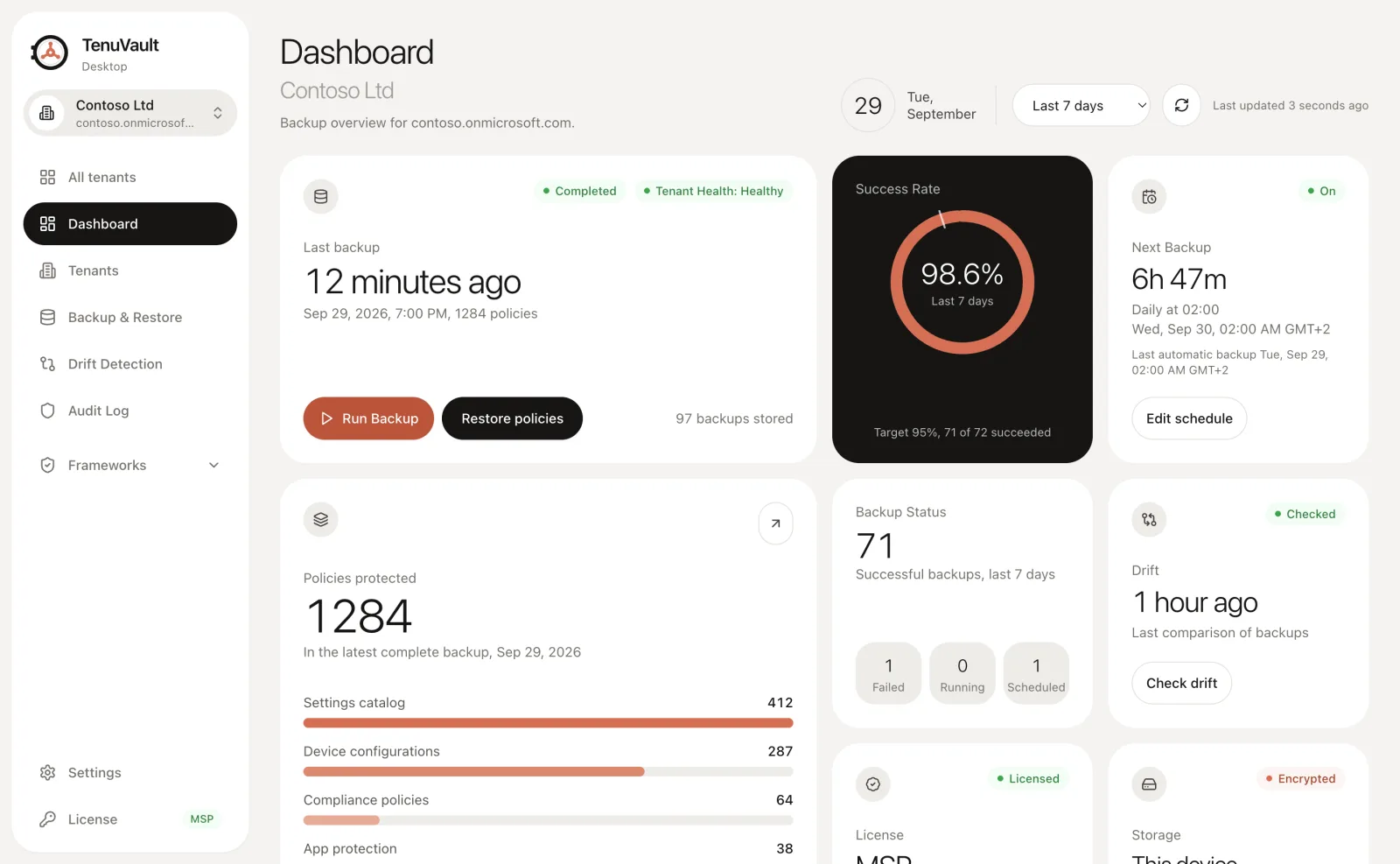
Dashboard preview with fictional demo data.
Download TenuVault
| Platform | Download |
|---|---|
| Windows | Setup for x64 and Arm64 |
| macOS · Apple silicon | Download DMG |
| macOS · Intel | Download DMG |
| Managed Windows deployment | x64 MSI for Intune and Configuration Manager |
Windows installers are signed. macOS apps are signed and notarized by Apple. Architecture-specific Windows installers and macOS ZIP files are also available under Assets.
🔑 Reliable license activation
- License checks now use the operating system's proxy and certificate configuration through Electron's networking stack.
- Firewall block pages and malformed service responses keep a valid cached license intact until its normal expiry.
- Activation errors give clearer guidance for certificate, proxy and connection problems.
Already installed 0.2.0? Download and reinstall this corrected build to receive these fixes. The version number remains 0.2.0, so an existing 0.2.0 installation may not offer an automatic update.
🗄️ Back up your Intune configuration
- On-demand backups with a scope picker for the configuration you want to protect.
- Broad configuration coverage: Settings Catalog, device configuration, Administrative Templates, compliance, endpoint security, scripts and remediations, update profiles, apps and app protection, enrollment, and tenant administration. Supported assignments are included with their policies.
- Scheduled backups: weekly scheduling in Community, with daily scheduling in Pro and MSP. Run in the background while the app is open or in the system tray, with optional start at login and catch-up after a missed schedule.
- Storage you control: encrypted backups on your device, or your own Azure storage account with Pro and MSP.
- Backup history and retention: browse snapshots, inspect individual objects, choose retention, and export complete backups as ZIP files.
↩️ Restore with a clear view of the changes
- Create separate policy copies to inspect or recover configuration without replacing the original policy.
- Restore multiple items, replace supported policies in place, recreate deleted items, and restore supported assignments with Pro and MSP.
- Review before applying: see which items match, which will be overwritten, and which need to be recreated.
- Dependency-aware recovery: restore supporting objects before the policies that reference them and review per-item results.
- Recovery readiness: identify missing mappings, external artifacts and manual steps before a restore.
- Cross-tenant copies for MSPs: copy configuration into connected target tenants as unassigned policies, with reviewed dependencies.
- Portable recovery: save and import recovery keys and import complete backup ZIP exports into local storage for review and restore.
Explore restore and recovery →
🔎 Detect drift and understand what changed
- Compare backup snapshots and inspect added, removed and modified configuration down to individual settings.
- Filter findings and export results as JSON or CSV.
- Restore an earlier version as a copy, or revert supported drifted policies in place with Pro and MSP.
- Use the tenant dashboard to see backup health, recent activity, protected policies and drift status.
🧩 Deploy and maintain OpenIntuneBaseline
- New Deployment, Existing Deployment comparison and Policy Validation for Windows, macOS, Windows 365 and BYOD.
- Load the current upstream OpenIntuneBaseline content, review the selection, and back up before deployment.
- Create new policies unassigned, with per-run undo.
- Update outdated policies in place and fix policy drift with Pro and MSP.
- Deploy to additional connected tenants with MSP.
📐 Compare configuration with security frameworks
- Ten built-in technical mappings: NIST CSF 2.0, NIST SP 800-53 Rev. 5, NIST SP 800-171 Rev. 2 and Rev. 3, ASD Essential Eight, Cyber Essentials, ISO/IEC 27001:2022, SOC 2, BSI IT-Grundschutz and UK MOD Def Stan 05-138.
- Compare against the UK NCSC Device Security Guidance Windows pack.
- Import your own reviewed policy packs for Microsoft Security Baselines, DISA STIG and Custom Baselines.
- Inspect expected and observed settings, source policies, assignment evidence and collection gaps.
- Export PDF reports, CSV and JSON locally. These non-CIS comparisons and reports are included in Community.
- For supported imported policy packs, create missing settings as new, unassigned policies.
Framework results describe configuration evidence. They do not certify compliance or prove device enforcement. CIS Benchmarks and CIS Controls are marked Coming soon and are unavailable in this release.
🛠️ Build your own company baseline
With My baselines in Pro and MSP:
- Start from OpenIntuneBaseline or the Settings Catalog policies in a complete tenant backup.
- Edit settings and policies in versioned baselines, with change notes and retained history.
- Compare your baseline with a tenant or supported framework.
- Review upstream OIB updates with a three-way comparison that preserves your customizations and highlights conflicts.
- Deploy through a reviewed change set, with a backup first, write verification and reviewed rollback.
📋 Review governance, changes and operational health
Pro and MSP include dedicated workspaces for:
- Baseline scores: summarize saved native framework comparisons, show evaluated coverage and unknowns separately, and follow comparable assessment trends.
- Conflicts and hygiene: find candidate conflicting settings, duplicate profiles, unassigned policies and broken references. Record acknowledgements or false positives with a reason, without automatically changing policies.
- Standards and customizations: record organization-specific baseline choices. MSP adds reusable, versioned standards with separate customer overlays and exceptions.
- Dev to Prod: promote selected Settings Catalog policies between tenants through reviewed change sets, with a backup and a fresh target check before applying. Assignments are excluded.
- Baseline upgrades: compare upstream updates with your local changes, resolve conflicts, and apply through a confirmed change set with backup and read-back.
- Health review: schedule checks for stale backups and opt into notifications to an endpoint you configure, with a preview of what is sent. Reviews run while TenuVault is running.
🏢 Work across tenants and keep operation history
- Connect tenants with guided setup, switch between them, and organize them with names and tags.
- See sign-in, licensing, storage and scheduling status from the All tenants overview.
- Run Backup Selected and Check all drift comparisons across tenants with MSP.
- Review TenuVault's operation history with Pro and MSP: actor, action, affected resource and success, partial or failure results.
- Search, filter and export that history as JSON or CSV.
- Share a Pro or MSP license with other admins in the same tenant without sharing the license key.
Explore tenant management → · Explore the audit log →
🔐 Built for your admin workstation
- Sign in with your own admin account through an app registration in your tenant, without a client secret. Your MFA and Conditional Access requirements apply.
- Tenant configuration and Microsoft access tokens stay between your device, Microsoft and your chosen storage. License verification is handled separately.
- Local backups use AES-256-GCM, with key protection from Windows DPAPI or the macOS Keychain.
- Export a recovery-key bundle so encrypted backups can be recovered on another device.
- Deploy through your organization's tooling and control automatic updates with Windows or macOS policy.
Explore security and data flows →
🔄 Stable releases and optional nightlies
Stable 0.2.0 is the default channel. To try previews between stable releases, enable Settings → Updates → Get nightly builds. When a download is ready, choose Restart and update.
Turn nightly builds off to return to the current stable release, even when it is older than the installed nightly. Switching channels replaces the pending update with the release from your selected channel.
Managed deployment: Windows MSI installations do not self-update. Deploy newer MSI versions through your software distribution pro...