Repository navigation
Releases: ukr8b3g-cmyk/MossImage-BBOX-Prompter
Release list
MOSS BBOX Prompter v1.0.8

What's new
- Align selected BBOXes left, center, right, top, middle or bottom; distribute horizontal/vertical gaps evenly. Locked boxes are protected, with Undo/Redo.
- Set typeface, weight, text color and additional appearance per Text color. Shared settings remain the default; individual styles apply in literal mode without changing the visible wording.
- Choose colors with the free picker or a compact 256-swatch preset grid (16 × 16). Direct color-name and HEX entry remain available. The popup does not resize the node.
Existing node IDs, sockets, saved widget order and workflows remain compatible. Typeface/color settings are descriptive generation hints, not guaranteed font rendering.
Downloads
- MOSS_BBOX_Standard.json: Standard workflow.
- MOSS_BBOX_DMD.json: DMD LoRA workflow.
- MOSS_BBOX_Workflows_1.0.8.zip: both JSONs and ComfyUI_00238_.webp, the reference image. These templates are unchanged from v1.0.7.
Update through ComfyUI Manager, or open your existing custom_nodes/MOSS-BBOX-Prompter folder and run git pull. Restart ComfyUI and refresh the browser afterward. No separate Krea2 installation is required.
Validation
Python 51 tests and JavaScript 40 tests passed, with Ruff, syntax and source-package checks. Local CPU browser fixtures cover arrangement, locks, Undo/Redo, Text styles, both pickers and save/reload. The user separately confirmed operation. No new GPU generation was run. Registry availability and moderation status are checked separately.
v1.0.7 — Box locking and Canvas reference image
Changes
- Lock/unlock selected BBOXes beside X/Y/W/H. Locked boxes remain selectable and reject movement, resize, numeric edits and deletion. Saved with workflows; Undo/Redo supported.
- Connect Load Image IMAGE to Canvas reference_image for a reference underlay without running generation. Default OFF, opacity 50%; loading or toggling display keeps Canvas dimensions unchanged.
- Match image size sits beside the display toggle. It explicitly fits dimensions to a multiple of 16 and scales boxes, with Undo/Redo. The reference is a layout aid and does not condition generation.
- Japanese/English help and README include wiring instructions and the supplied usage screenshot.
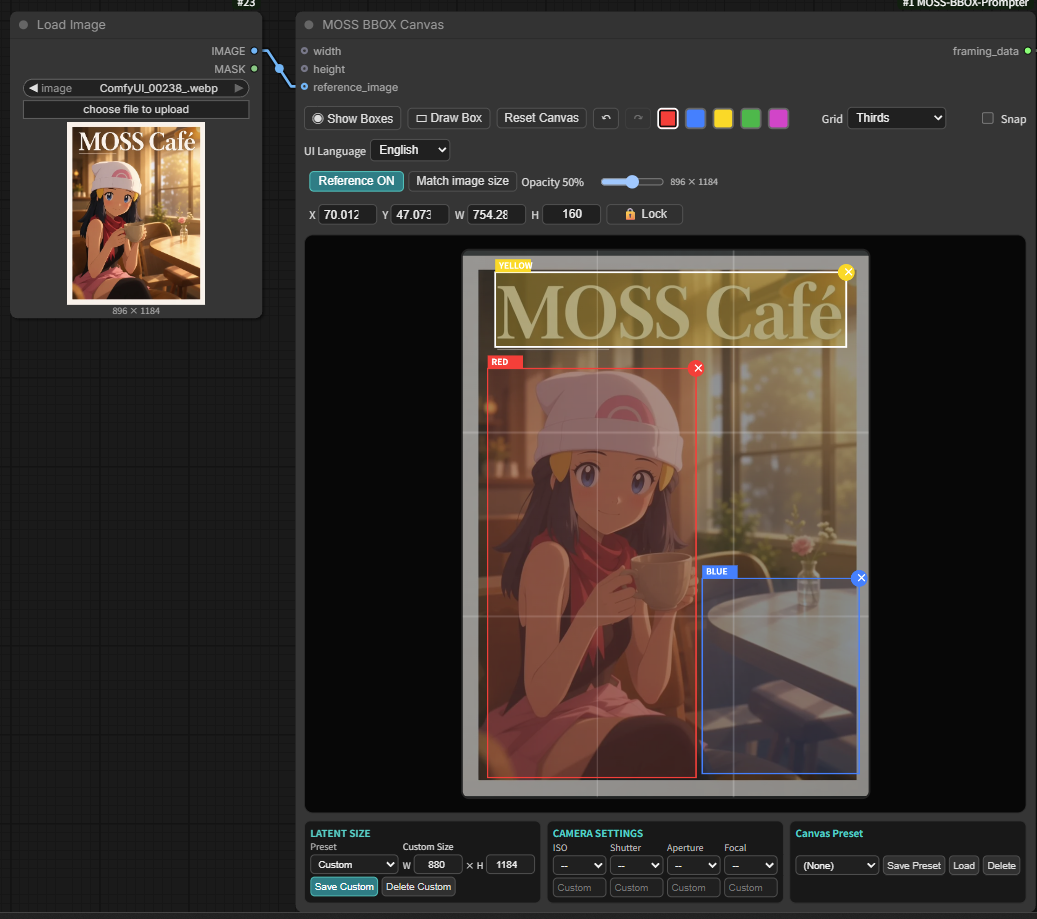
Load Image → IMAGE connects to Canvas → reference_image. Reference ON shows the image beneath the boxes; Opacity adjusts visibility. Match image size is optional. Lock protects selected boxes.
Workflows
Download MOSS_BBOX_Workflows_1.0.7.zip for both JSONs and ComfyUI_00238_.webp. Upload/select that WebP in Load Image (or copy it into ComfyUI/input/). Individual Standard/DMD JSONs are also attached.
- Standard: LoRA OFF, 25 steps, CFG 2.5.
- DMD: LoRA ON, 8 steps, CFG 1.
Both use Canvas 880 × 1184, reference display OFF at 50%, connected BBOX Preview and WebP saving. Choose installed model/LoRA names if they differ.
New reference-input workflows require nodes 1.0.7+. Existing workflows remain compatible; older release assets are retained.
Validation
47 Python and 36 JavaScript regressions passed locally, including old workflow output compatibility. Isolated Chromium covered locks, reference display, opacity, explicit sizing, Undo/Redo, save/reload and corrupt-data protection. Actual CPU tensor tests preserved grayscale/RGB/RGBA inputs with CUDA uninitialized. The user confirmed operation in ComfyUI. No additional GPU generation is claimed.
Restart ComfyUI and refresh its browser page after updating to register the new optional image input.
v1.0.6 — Multiple selection and group editing
Changes
- With Draw Box OFF, Ctrl-click (Cmd-click on macOS) adds/removes boxes from the selection. Selected boxes have white borders.
- Drag inside any selected box to move the selection together; Alt-drag duplicates all selected boxes with fresh IDs and their original colors/prompts.
- Group bounds and snapping preserve relative spacing. Arrow keys move the selection by 1 px, or 10 px with Shift.
- Each group drag or duplication is one Undo/Redo edit. Selection changes preserve Redo. Escape clears selection or cancels a drag; Delete removes selected boxes.
- Numeric edits and corner resizing still edit one box. Selection is session-only; existing UI, sockets and workflow formats are preserved.
- Japanese/English help and README explain the new operations.
Workflows
Download MOSS_BBOX_Standard.json or MOSS_BBOX_DMD.json below. Both include a connected BBOX Preview and WebP saving. Their contents are unchanged from v1.0.5.
Validation
45 Python and 34 JavaScript tests, syntax, Ruff and archive checks passed for the implementation. The isolated browser fixture covered group edits, boundaries, snapping, Undo/Redo, cancellation and save/reload. The user also confirmed operation in ComfyUI. No additional GPU test is claimed for this version bump.
Save your workflow and refresh the ComfyUI browser page after updating to load the new frontend.
v1.0.5 — Alt duplication, Shift aspect lock and Draw Box fix
Changes
- Alt-drag duplicates a BBOX; Alt-click still cycles through overlapping boxes. Copies keep the same color/prompt and support Undo/Redo.
- Hold Shift while dragging an existing corner to preserve its aspect ratio. Release Shift for free resizing; aspect locking takes priority over snapping.
- Fixed Draw Box so it toggles ON/OFF correctly, including workflows saved with drawing enabled. Switch it OFF to select, move, resize or duplicate existing boxes.
- Updated Japanese/English hover help and README instructions.
Workflows
Download MOSS_BBOX_Standard.json or MOSS_BBOX_DMD.json below. Both include the connected BBOX Preview and WebP saving, unchanged from v1.0.4. Existing node IDs, sockets and workflow formats remain compatible.
Validation
The implementation passed 45 Python and 31 JavaScript tests, syntax, Ruff and archive checks. Isolated browser regression tests covered gestures, Draw Box toggling, Undo/Redo and persistence; the user also confirmed operation in ComfyUI. This release adds no new GPU-generation claim.
After updating, save your workflow and refresh the ComfyUI browser page to load the new frontend.
v1.0.4 — Help, stable layout and updated workflows
Changes
- Added Japanese/English hover explanations that follow the ComfyUI language, plus detailed Preview connection and Export setting documentation.
- Fixed BBOX Preview disappearing when zooming out.
- Reserved the coordinate-input row so selecting or drawing BBOXes does not resize the Canvas interior.
- Replaced the Standard and DMD templates with maintainer-supplied workflows containing a connected BBOX Preview and WebP saving.
- Existing node IDs, sockets and workflow formats remain compatible. No separate Krea2 installation is required; classic ComfyUI UI is supported.
Workflows
Download MOSS_BBOX_Standard.json or MOSS_BBOX_DMD.json from Assets below. Standard: 25 steps / CFG 2.5, LoRA disabled. DMD: 8 steps / CFG 1, LoRA strength 0.7. Select your locally installed model, CLIP, VAE and LoRA filenames; rgthree-comfy is required. Preview appears inside the Preview node after execution. Show Boxes and Opacity change only the display overlay.
Verification
Python 45 tests and JavaScript 27 tests passed, along with syntax, Registry warning and package checks. The workflow replacement was checked by CPU/static validation; no new GPU generation was performed for this release. Prior GPU results are separately recorded in TEST_REPORT.md.
Older release files remain available.
MOSS BBOX Prompter v1.0.0
MOSS BBOX Prompter 1.0.0 is the standalone Canvas, Prompter and Export node package for MOSS-Image, with a UI adapted from the MIT-licensed Krea2 BBOX Prompter Suite.
This release standardizes the package and release version at 1.0.0. It contains the same runtime code and workflow files as 0.1.4.
Canvas improvements introduced in 0.1.4
- Undo / Redo: restore drawing, movement, resizing, deletion and Canvas resets. Each Canvas keeps up to 60 edits per editing session.
- Keyboard controls: Ctrl/Cmd+Z to undo; Ctrl+Y or Ctrl/Cmd+Shift+Z to redo while the Canvas or history buttons have focus.
- Overlapping boxes: Alt+click cycles through covered boxes. A white outline marks the selected box; drag normally to move it. Selection preserves box order and prompt output.
- Canvas shortcuts avoid triggering ComfyUI's workflow-level Undo. Normal text/number editing remains available.
Compatibility and validation
- Existing node IDs, sockets, saved state and both bundled workflows are preserved.
- Standalone operation; no separate Krea2 installation required. Traditional ComfyUI UI is supported without enabling Nodes 2.0.
- 38 Python tests and 13 JavaScript unit tests passed, along with syntax, Registry warning and source ZIP checks.
- Browser fixtures and real ComfyUI frontend checks passed for both Standard and DMD workflows. The new Canvas checks submitted no GPU-generation jobs.
Canvas history is session-only, is not stored in workflow files, and is cleared on workflow load.
README and installation · Standard workflow · DMD workflow · Validation record