
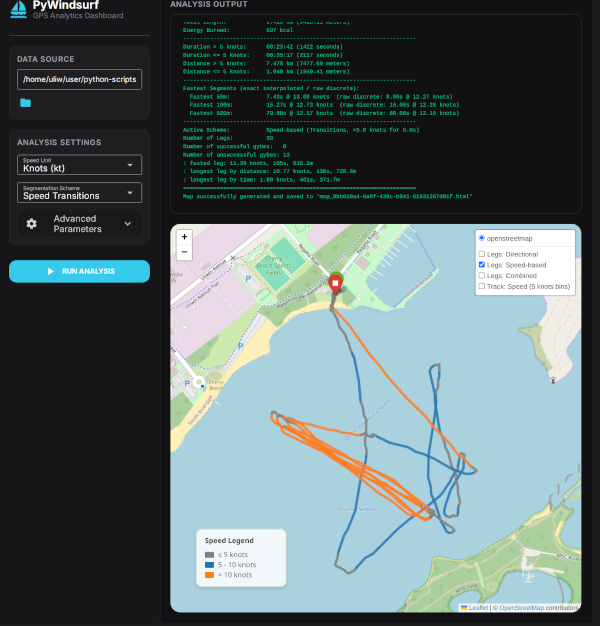
PyWindsurf is a Python-based GPS data analysis tool specifically designed for
windsurfing and other water sports. It parses Garmin/Fit/Strava .tcx track
files, automatically segments your session into active legs and turns,
calculates key statistics (e.g., number of gybes, number of gybes on foil/plane,
fastest 50m, 100m, 500m runs), and generates interactive Leaflet maps with
speed-binned color track lines.
It includes both a command-line interface (CLI) and an elegant, desktop-friendly graphical dashboard (GUI) built with NiceGUI.
Note: To export track files from your Apple Watch, you need third party software, like https://www.rungap.com/ or https://apps.apple.com/ca/app/healthfit/
-
Detailed GPS Session Analysis:
- Computes total duration, distance, and energy burned (calories).
- Generates speed statistics below/above customizable active speed cutoffs.
- Measures fastest exact segments: Fastest 50m, 100m, and 500m runs using high-accuracy mathematical interpolation.
-
Automated Turn & Leg Segmentation:
- Speed-based transitions: Detects when you drop off plane (e.g. slow down below threshold for gybes or tacks).
- Direction-based turns: Pinpoints curvature peaks and heading changes.
- Identifies individual run legs and calculates stats for each leg.
-
Interactive Maps (Folium / Leaflet):
- Visualizes your complete route on an interactive OpenStreetMap.
- Color-codes track lines based on speed bins (e.g. knots or km/h).
- Places markers at detected turn/transition points with hover tooltip metadata.
- Displays a dynamic, toggleable speed legend in the viewport.
-
Multi-User Isolated GUI Dashboard:
- A dark-theme dashboard with side-by-side controls, map viewer, and scrollable terminal log output.
- Session-specific map files are generated and automatically cleaned up when client tabs are closed.
- Built-in local file explorer for easy navigation of your folders.
If you have a working python installation simply use pip:
pip install pywindsurfYou can download pre-compiled standalone executables for your operating system directly from the Releases page on GitHub:
| Platform | Processor Architecture | Executables (CLI / GUI) |
|---|---|---|
| Windows | Intel/AMD (x86_64) | pywindsurf-windows-x86_64.exe / pywindsurf-gui-windows-x86_64.exe |
| Linux | Intel/AMD (x86_64) | pywindsurf-linux-x86_64 / pywindsurf-gui-linux-x86_64 |
| macOS | Apple Silicon (M1/M2/M3/M4) | pywindsurf-macos-silicon / pywindsurf-gui-macos-silicon |
- Download the appropriate binary from the Releases page.
- Open a terminal and navigate to the directory where you downloaded the file.
- Grant executable permissions to the binary:
chmod +x pywindsurf-gui-linux-x86_64
- Start the application:
./pywindsurf-gui-linux-x86_64
- Download the
.exebinary from the Releases page. - Double-click the file to run it, or launch the CLI version from Command Prompt/PowerShell.
- Note: Windows Defender SmartScreen might block execution with a warning since the binary is unsigned. To bypass this, click More info and then Run anyway.
- Download the binary from the Releases page.
- Open a terminal and navigate to the download directory.
- Grant executable permissions:
chmod +x pywindsurf-gui-macos-silicon
- Clear the macOS Gatekeeper quarantine flag so you can run the unsigned binary:
xattr -d com.apple.quarantine pywindsurf-gui-macos-silicon
- Run the binary from the terminal:
Alternative Bypass: You can also go to System Settings > Privacy & Security, scroll down to the security section, and click Open Anyway next to the warning indicating the app was blocked.
./pywindsurf-gui-macos-silicon
To start the dashboard locally:
python3 pywindsurf_gui.pyThis will start the local server and automatically open a tab in your default browser at http://localhost:8080.
- Select File: Click the folder icon next to Data Source to browse your local directory and select a
.tcxfile. - Adjust Settings: Configure your speed units (Knots vs. km/h), segmentation scheme, and parameters.
- Run: Click Run Analysis to render the interactive map and populate the analysis output console on the right side of the screen.
You can run the analyzer directly in your terminal:
python3 pywindsurf.py [path_to_tcx_file]If the file path is omitted, the script will automatically process the first .tcx file it finds in the current directory.
-u/--unit: Select speed unit (knotsorkmh, default:knots).-c/--scheme: Choose segmentation scheme (speed,direction, orboth, default:speed).--cutoff-speed: Threshold speed for summary statistics in selected unit (default:5.0).-m/--map: Save path for the folium HTML map (default:map.html). Usenoneto disable mapping.
For all CLI parameters, run:
python3 pywindsurf.py --help- Segment Length (m): Length used to calculate general headings along the track (default:
100.0m). - Angle Threshold (°): Heading change angle needed to trigger turn detection (default:
90.0°). - Curvature Window (m): Lookahead/lookback distance window to pinpoint the center/apex of a turn (default:
10.0m). - Merge Distance (m): Minimun distance threshold required between separate gybes to prevent double-marking (default:
30.0m). - Speed Threshold: Critical speed value separating active planning vs. taxi (default:
5.0). - Speed Duration (s): Minimum consecutive time required to confirm a state transition (default:
5.0s). - Bin Interval: Speed gap width used for map color segment divisions (default:
5.0).
- Co-authored and packaged with the assistance of Antigravity, an agentic AI coding assistant designed by the Google DeepMind team.