A local, zero-hosting proxy that shows you, live in your terminal, exactly what your AI coding agent sends over the wire. Every file, every secret, every domain, every token. Nothing leaves your machine.




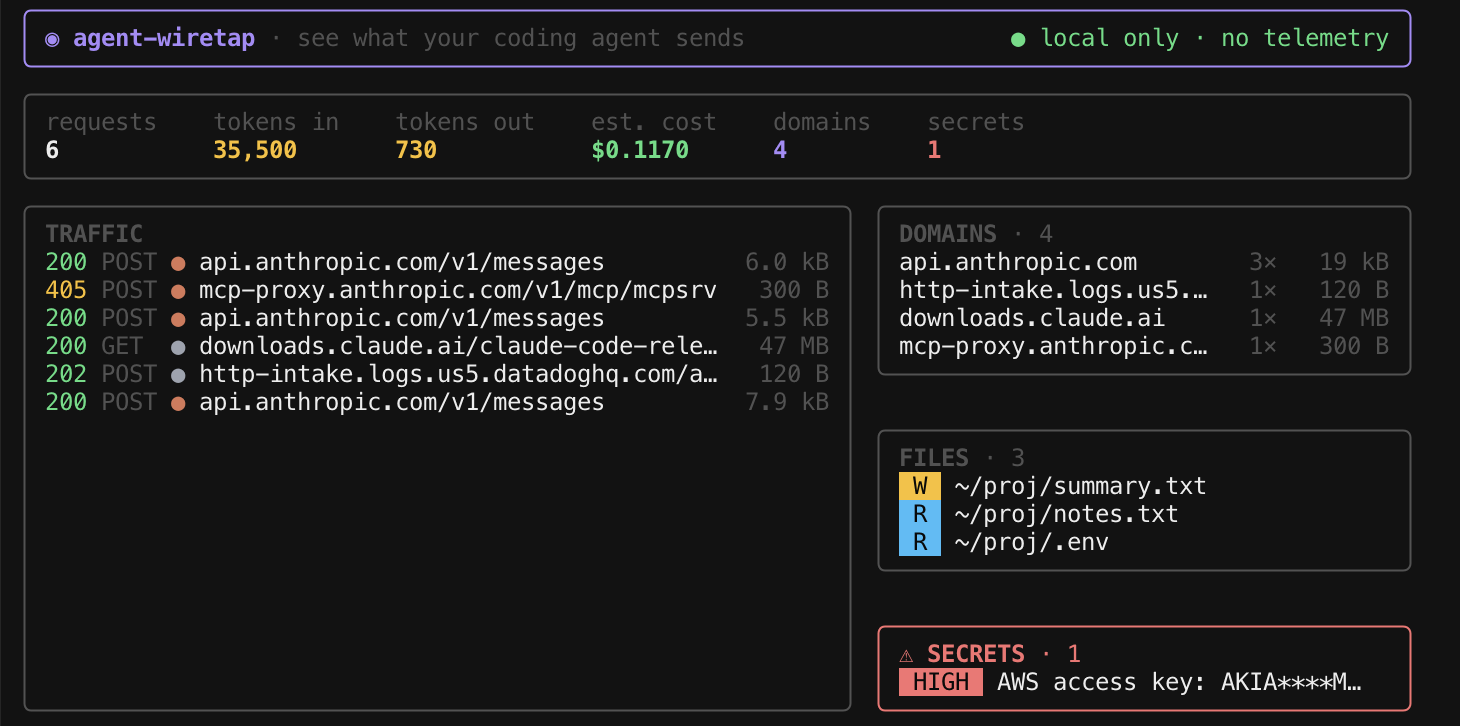
No install step. Just run it with npx (needs Node 22+):
npx agent-wiretap -- claudeThat's it. Your agent runs exactly as normal; when it exits you get a summary of everything it sent.
You've handed an AI agent your whole filesystem and an API key. Do you actually
know what it reads, what it uploads, and who it talks to? agent-wiretap puts a
one-way mirror in front of it so you can watch. It works with Claude Code, Codex,
or anything else that honors standard proxy environment variables.
- files: every file the agent read or wrote, and every shell command it ran, reconstructed from its own tool calls
- secrets: a scanner over outbound traffic that flags AWS keys, private-key
blocks, GitHub/Slack tokens, Google API keys, JWTs, and
.env-style values, plus any touched file whose name is sensitive by convention (.env,id_rsa,*.pem, and so on) - domains: every host contacted, with request counts and bytes (you may be surprised what your agent phones home to)
- cost: token counts and an estimated USD cost, from a per-model price table
A coding agent's own terminal UI and a live dashboard can't both own the screen at once, so there are two modes:
Wrapper mode runs your agent normally with its UI intact, captures quietly in the background, and prints a summary card on exit:
npx agent-wiretap -- claudeAmbient mode takes over this terminal to show the live dashboard, and prints env vars to export in a second terminal where you run your agent:
npx agent-wiretap
# copy the printed exports into another terminal, then run your agent thereOn first run it generates a local CA and starts a transparent HTTPS-intercepting proxy, then sets the environment variables that get an agent to route through it and trust that CA:
| Variable | Trusted by |
|---|---|
HTTPS_PROXY / HTTP_PROXY / ALL_PROXY |
anything following standard proxy conventions |
NODE_EXTRA_CA_CERTS |
Node-based agents (e.g. Claude Code) |
SSL_CERT_FILE |
Rust/reqwest-based agents (e.g. Codex CLI) |
An agent that doesn't recognize one simply ignores it. Every request is passed through to its real destination unmodified. Nothing is blocked, delayed, or altered.
This is a tool for watching your own traffic on your own machine. It is built to be trustworthy:
- It makes zero network calls of its own. No telemetry, no account, no cloud.
The domains you see in the dashboard are your agent's traffic;
agent-wiretapnever sends anything anywhere. - Captured traffic is never written to disk. It's decoded in memory, shown to you, and discarded.
- The cost figure is a local estimate, not a charge. It's what those tokens would cost at pay-as-you-go API rates. It does not bill you or count against a subscription plan.
The one artifact it writes is a local CA certificate, needed to decrypt your
agent's HTTPS so it can be inspected. It lives in your OS config directory (e.g.
~/Library/Preferences/agent-wiretap-nodejs/ on macOS) with owner-only
permissions, never leaves your machine, and is never committed to this repo. This
is the same trust model as any developer proxy (mitmproxy, Charles, HTTP Toolkit).
To remove it, delete that directory.
Isn't this just mitmproxy or HTTP Toolkit? Those are general-purpose HTTP debuggers. agent-wiretap is purpose-built for coding agents: it decodes the LLM traffic into the things you actually care about (files read and written, secrets leaving your machine, tools called, token cost) and sets up the agent's proxy trust for you with a single command.
Does it slow the agent down? No. It's a local passthrough proxy; every request goes to its real destination unmodified. The only overhead is one extra local TLS hop.
Which agents does it work with? Anything that honors standard proxy environment variables. Deep semantic parsing (files, secrets, per-request tokens) currently covers Claude Code and OpenAI-style traffic; other agents still get host, status, size, and a domain breakdown.
Is my code or my prompts sent anywhere? No. Everything is decoded in memory on your machine and shown only to you. agent-wiretap makes no network calls of its own.
npm install
npm run typecheck
npm test          # 42 tests
npm run dev -- -- claude   # run from source instead of the built package
npm run buildMIT