What happened?
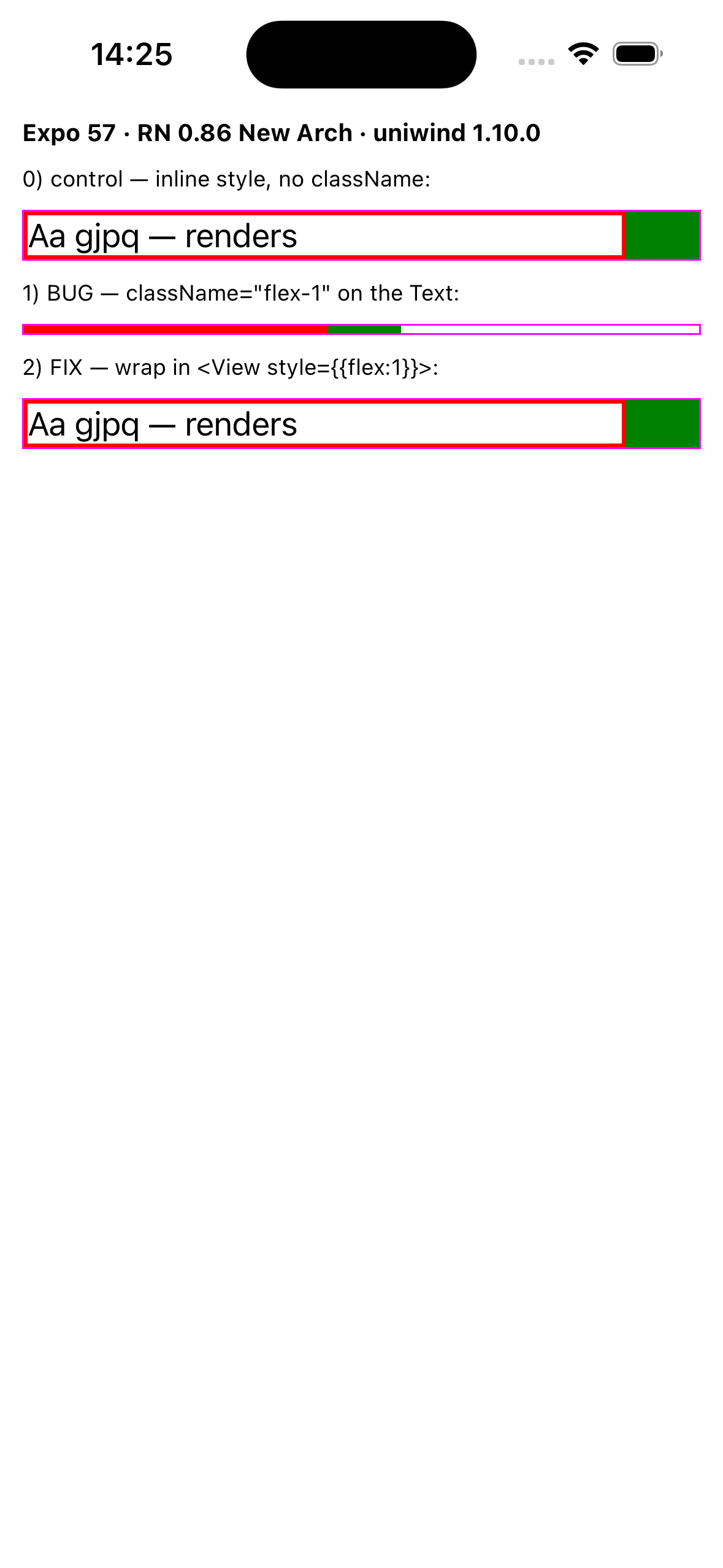
On the React Native New Architecture (Fabric), applying the flex-1 className to a <Text> makes it measure zero layout height. The text's width still resolves — only its height collapses, so the text disappears and following siblings pile up.
The same style applied inline (style={{ flex: 1 }}) renders correctly — so the trigger is the flex-1 className path, not the flex value itself. A related case: a <View className="flex-1"> that fills a flexible parent (e.g. a flex-1 SafeAreaView → flex-1 View screen shell) also collapses its descendant <Text>; switching those wrappers to inline style={{ flex: 1 }} fixes it.
In the repro, a red border hugs each text (tall box = has height, thin line = collapsed). Rows 0 and 2 render at full height; row 1 — the only one with className="flex-1" on the <Text> — collapses to a line:
Note on the mechanism: uniwind emits flex-1 (flex: 1 1 0%) as { flexGrow: 1, flexShrink: 1, flexBasis: "0%" } — the flex: 1 shortcut in the transformer only fires when flexBasis === '"0%"', but the processed value is "0%". A percentage flexBasis: "0%" collapsing content to zero is a known failure mode elsewhere (react-native-web #574 / #1264, fixed there via auto/point basis); RN's native flex: 1 uses a point basis of 0. That said, for <Text> the collapse happens for any flex applied via className (a flex-grow-only override still collapses), which points to a Fabric text-measurement interaction rather than purely the basis value. Looks adjacent to #542, but here it is fully deterministic and hits <Text> directly.
Expected: className="flex-1" on a <Text> behaves like inline style={{ flex: 1 }} — text keeps its intrinsic height and grows along the main axis.
Actual: the <Text> measures zero height and disappears.
Workaround: Views → style={{ flex: 1 }} instead of className="flex-1"; Text → don't flex the <Text>, wrap it in <View style={{ flex: 1 }}> and leave the <Text> un-flexed.
Steps to Reproduce
- Clone the repro repo (bare Expo 57 app, no monorepo, no custom components):
git clone https://github.com/viniciuslk/uniwind-flex1-text-repro
npm installnpm start and open in Expo Go (SDK 57) on iOS, New Architecture enabled.- Observe the three rows in
App.tsx: the control (inline style={{flex:1}}) and the wrapped-Text row render; the row with className="flex-1" on the <Text> collapses to zero height.
Snack or Repository Link
https://github.com/viniciuslk/uniwind-flex1-text-repro
Uniwind version
1.10.0
React Native Version
0.86.0
Platforms
iOS
Expo
Yes
Additional information 〰
What happened?
On the React Native New Architecture (Fabric), applying the
flex-1className to a<Text>makes it measure zero layout height. The text's width still resolves — only its height collapses, so the text disappears and following siblings pile up.The same style applied inline (
style={{ flex: 1 }}) renders correctly — so the trigger is theflex-1className path, not the flex value itself. A related case: a<View className="flex-1">that fills a flexible parent (e.g. aflex-1SafeAreaView→flex-1Viewscreen shell) also collapses its descendant<Text>; switching those wrappers to inlinestyle={{ flex: 1 }}fixes it.In the repro, a red border hugs each text (tall box = has height, thin line = collapsed). Rows 0 and 2 render at full height; row 1 — the only one with
className="flex-1"on the<Text>— collapses to a line:Note on the mechanism: uniwind emits
flex-1(flex: 1 1 0%) as{ flexGrow: 1, flexShrink: 1, flexBasis: "0%" }— theflex: 1shortcut in the transformer only fires whenflexBasis === '"0%"', but the processed value is"0%". A percentageflexBasis: "0%"collapsing content to zero is a known failure mode elsewhere (react-native-web #574 / #1264, fixed there viaauto/point basis); RN's nativeflex: 1uses a point basis of0. That said, for<Text>the collapse happens for any flex applied via className (aflex-grow-only override still collapses), which points to a Fabric text-measurement interaction rather than purely the basis value. Looks adjacent to #542, but here it is fully deterministic and hits<Text>directly.Expected:
className="flex-1"on a<Text>behaves like inlinestyle={{ flex: 1 }}— text keeps its intrinsic height and grows along the main axis.Actual: the
<Text>measures zero height and disappears.Workaround: Views →
style={{ flex: 1 }}instead ofclassName="flex-1"; Text → don't flex the<Text>, wrap it in<View style={{ flex: 1 }}>and leave the<Text>un-flexed.Steps to Reproduce
git clone https://github.com/viniciuslk/uniwind-flex1-text-repronpm installnpm startand open in Expo Go (SDK 57) on iOS, New Architecture enabled.App.tsx: the control (inlinestyle={{flex:1}}) and the wrapped-Text row render; the row withclassName="flex-1"on the<Text>collapses to zero height.Snack or Repository Link
https://github.com/viniciuslk/uniwind-flex1-text-repro
Uniwind version
1.10.0
React Native Version
0.86.0
Platforms
iOS
Expo
Yes
Additional information 〰