Repository navigation
Releases: vaduur/LibertyRecompAndroid
Release list
LibertyRecompAndroid 0.5.7.1

Install the game from the launcher, now as a stable release.
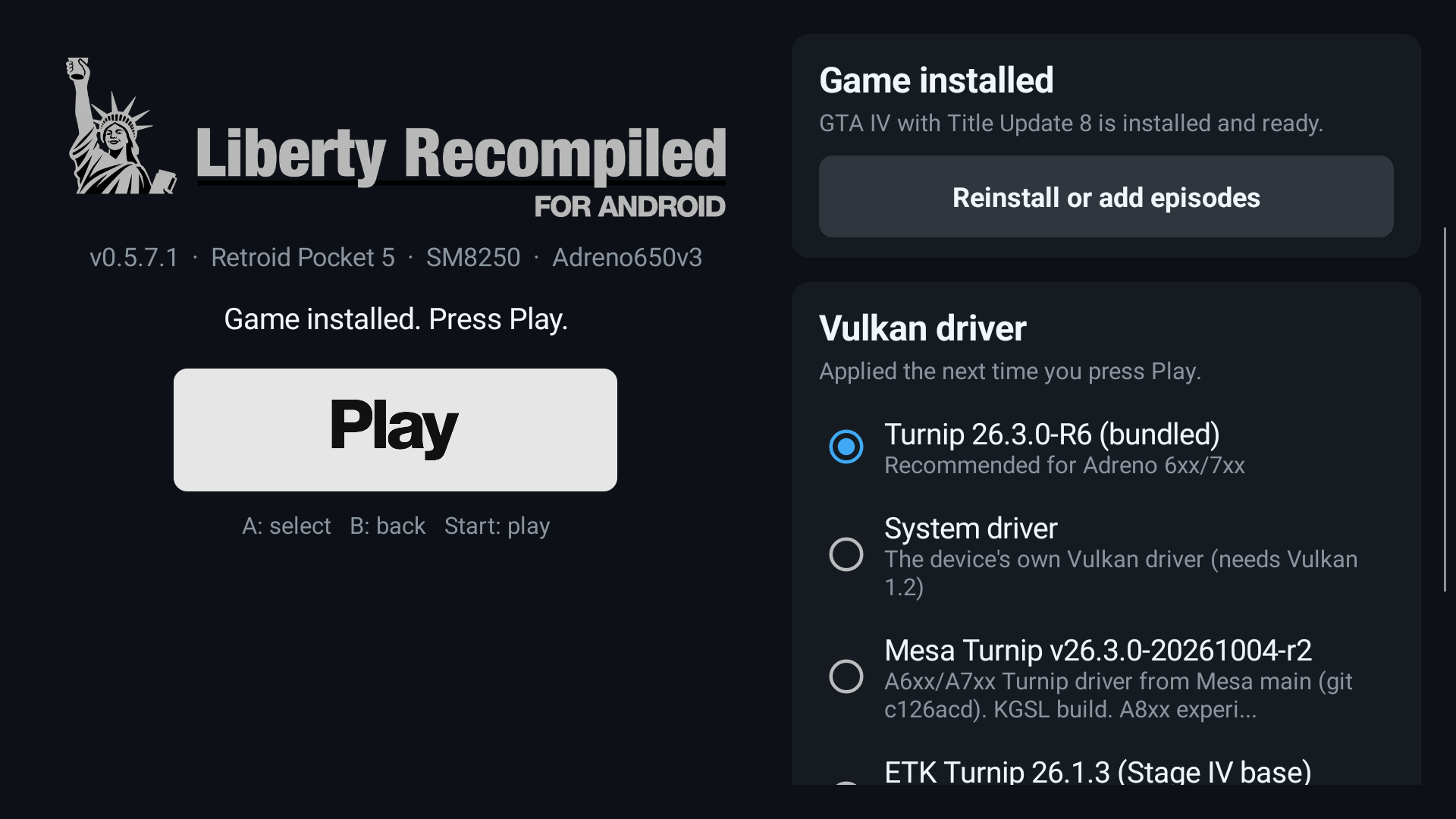
- Game panel in the launcher: choose the disc image (
.iso), Title Update 8 and, optionally, the episodes from anywhere on the device or an SD card. The disc is checked as soon as you pick it, and Install shows a progress bar. Picking files outside the app's folder needs All files access once; without it, theAndroid/data/com.libertyrecomp/files/install/folder still works. - Wide screens: the launcher no longer cuts the logo in half on 20:9 and 21:9 phones.
- New logo lettering and Play button.
- Android 10 to 12: Turnip (bundled or imported) is accepted there now. Before, the "needs Vulkan 1.2" error appeared, for example on the Snapdragon 855 (#3).
- Also included: the Vulkan driver picker with .zip import, the system-driver fallback, the error dialog and
last_launch.txt.
Install over any earlier version; the installed game and saves are kept. Walkthrough: INSTALL.md.
LibertyRecompAndroid 0.5.7.3
Pre-release: crash reports, so a crash can be reported without a PC.
- If the game crashes, the launcher shows a red card the next time it opens: The game crashed - a crash report was saved. The report is in
Android/data/com.libertyrecomp/files/crash_reports/. - Share report sends the report as text to any app (Telegram, Discord, mail). Please attach it to your issue.
- The report contains the device, GPU and driver details, where the game crashed (signal and backtrace) and the game's last log lines.
- The game's own log is now on by default (warnings and errors), which makes the reports more useful.
If the game closes right after Play on your device (for example on Adreno 7xx), install this version, reproduce the crash and send the report. Install over any earlier version; the installed game and saves are kept.
LibertyRecompAndroid 0.5.7.2
Pre-release: on-screen Xbox gamepad for playing without a controller.
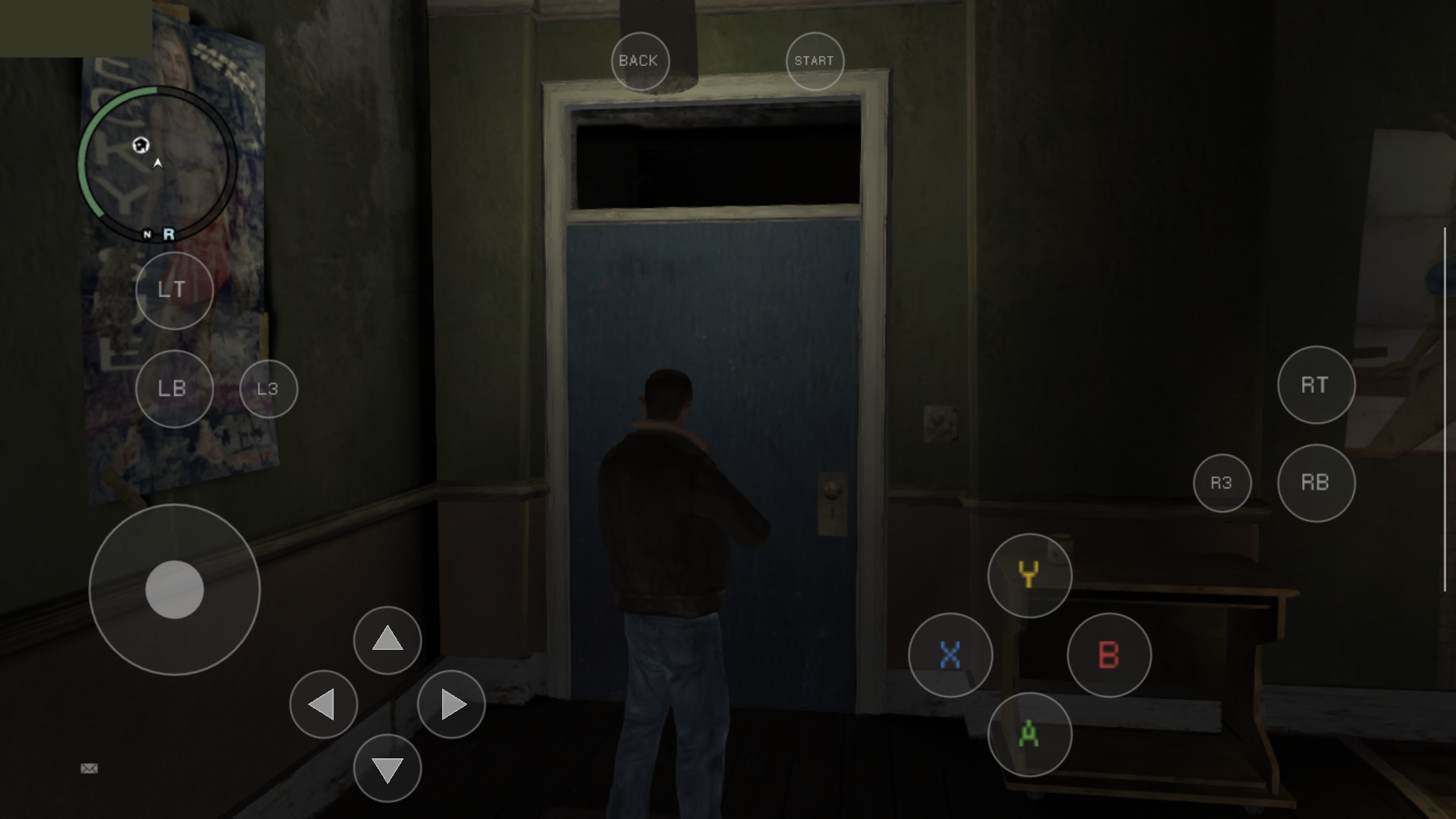
- Without a controller, a translucent Xbox 360 controller appears on screen. Connect a gamepad and it disappears; disconnect it and it comes back.
- Left stick: touch anywhere on the left half of the screen. Camera: touch anywhere on the right half; it works like a controller's right stick.
- A/B/X/Y, D-pad, LT/LB, RT/RB, L3/R3, Back and Start are fixed buttons, and several fingers work at once. Menus are driven with the same buttons.
- The old context-sensitive touch layout is still available with
--gta4_touch_layout=contextinargs.txt. - On handhelds (Retroid Pocket and similar) the overlay now appears by itself when the built-in controller is switched off. Their built-in buttons no longer count as a keyboard and mouse.
Install over any earlier version; the installed game and saves are kept. Details: Controls.
LibertyRecompAndroid 0.5.6.3
Adds a launcher screen; includes everything from 0.5.6.2.
- The app now always opens on a launcher with the game status and a Play button. The gamepad works on it: the D-pad moves, A selects, B closes and Start plays.
- Vulkan driver picker: choose the bundled Turnip, the device's own driver, or import a driver .zip (AdrenoTools/Turnip packages) through the system file picker. The selected driver is used the next time you press Play.
- The game runs in its own process, so a driver change always takes effect. If you leave the game with Home, the app icon brings you back to it.
- From 0.5.6.2: if the selected driver cannot run your GPU, the app falls back to the system driver. If no driver works, it explains why instead of closing, and it writes
last_launch.txtfor bug reports.
Install over 0.5.6.1 or 0.5.6.2; the game and saves are kept. Details are in INSTALL.md.
LibertyRecompAndroid 0.5.6.1
First public build of the Android port.
- Runs GTA IV (Xbox 360, USA disc + Title Update 8) natively on Snapdragon/Adreno 6xx–7xx devices, tested on Retroid Pocket 5 (SD865)
- Native 720p, FXAA, 30 FPS with VSync; console draw distance, shadows and shadow map size
- Bundled Mesa Turnip 26.3.0-R6 driver
- Not supported: Mali, Immortalis, Xclipse, PowerVR
Installation: docs/android/INSTALL.md
Settings: docs/android/ADVANCED.md
No game files are included — you need your own copy.
LibertyRecompAndroid 0.5.6.4
Pre-release with a fix for Android 10, 11 and 12.
- On Android 10 to 12, the system Vulkan loader reports version 1.1 even when the Turnip driver behind it supports 1.3. The driver check wrongly rejected Turnip because of that, so the app fell back to the stock driver and showed the "needs Vulkan 1.2" error, for example on the Snapdragon 855 / Adreno 640 in #3. Turnip (bundled or imported) is now accepted there.
- Everything from 0.5.6.3 is included: the launcher, the driver picker with .zip import, and the system-driver fallback.
This was tested on Android 13 (Retroid Pocket 5) only. Feedback from Android 10 to 12 devices is very welcome in Issues; please attach Android/data/com.libertyrecomp/files/last_launch.txt.
Install over any earlier version; the game and saves are kept.