Releases: vakahnke/seedcorn
Release list
Seedcorn 1.2.0: Lessons learned

Lessons learned. A template could tell you it "worked in 9 of 11 closed-out runs" and nothing about the other two, which is the most useful thing it knows. Now it can.
When you close out a project, the question fits how the plan worked: What went wrong? When would you not use this plan? for a run that did not work. What you type goes straight onto the template's page, under its track record, signed with your name or as Anonymous, with how that run went. The plan's owner adds notes of their own, and the next person sees all of it again at the moment they start a project from the plan.
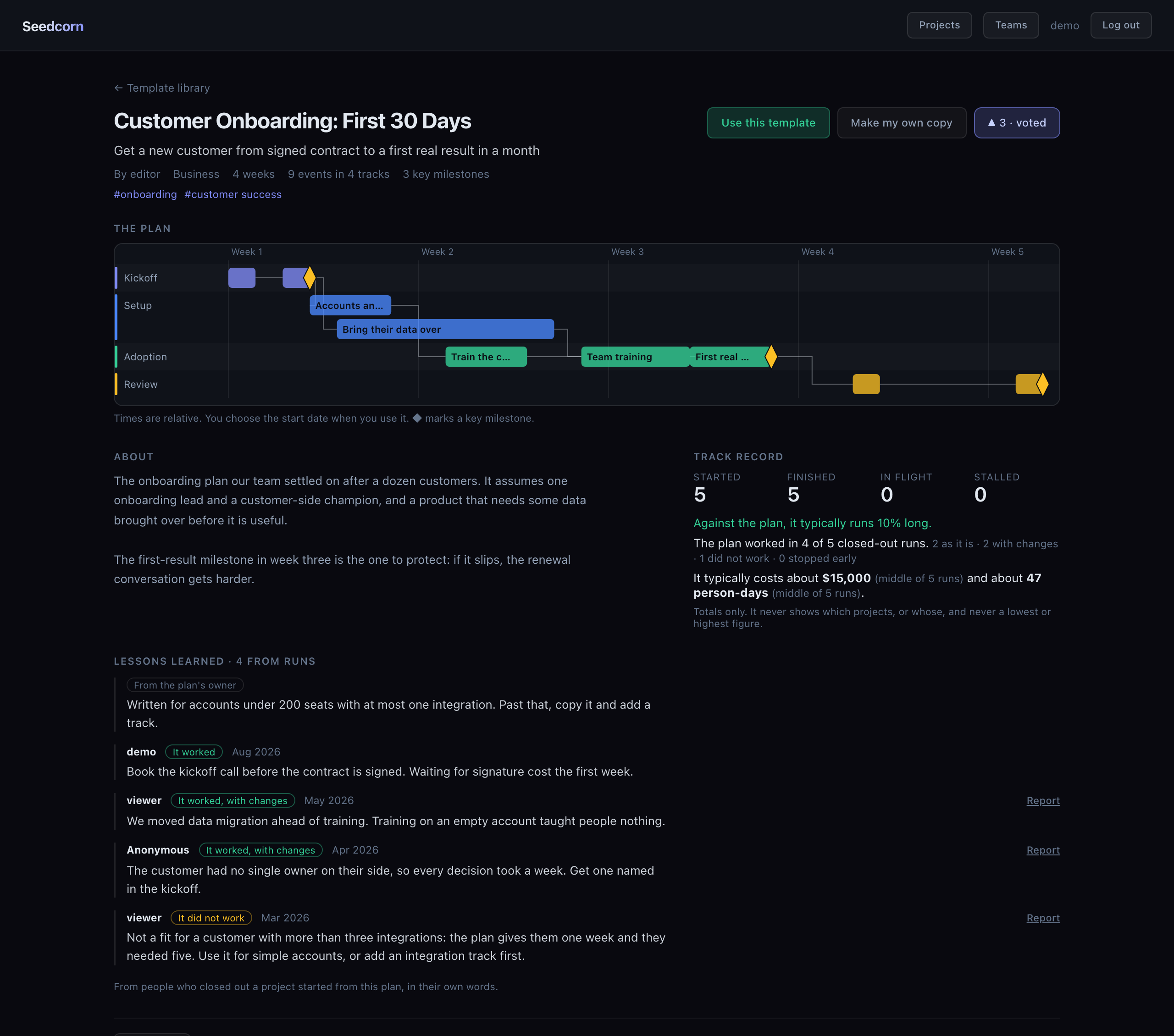
Try it: https://demo.seedcorn.io (sign in as demo / demo12345)
Added
- Lessons learned. A template said "worked in 9 of 11 closed-out runs" and nothing about the
other two. Now what people type when they close out a project appears on the template's page,
under the track record: their words, how that run went, the month, and their username or
Anonymous, never the project's name or its cost. Anonymous means nobody is told, the
template's owner and admins included. - The close-out asks a question that fits the answer: What went wrong? When would you not use this
plan? for a run that did not work, What stopped it? for one that stopped early. - A template's owner can add up to seven notes of their own, shown first and copied with the
template, and can take a lesson down (not reword it). Admins can take down any lesson, built-in
templates included, and a lesson can be reported like a comment. - Starting a project from a template shows the owner's notes and the five newest lessons under the
start date. load_sample --clearnow also reseeds the shared library template and its runs, which include
lessons, a run that did not work and an owner's note.
Changed
- The close-out's two tick boxes, "Send this to the template's owner" and "Also post it as a
comment", are gone: a typed lesson goes to Lessons learned, and the dialog says so. Lessons sent
or posted before stay where they are, and nothing earlier is published. The API ignores
lesson_to_ownerandpost_as_commentfrom older clients instead of refusing them. - README: a shorter first line, the meaning of the name up front, and shorter cost and sharing
bullets that link to the user guide.
Upgrading
- One migration,
projects/0013_lessons_learned, which only adds columns and a table. It runs by
itself when the backend container starts. No settings change.
Seedcorn 1.1.0: Timeline is now Seedcorn
Timeline is now Seedcorn. Same project, same Apache 2.0 license, same code and data. The old repository address redirects here, and existing clones keep working.
Seedcorn is the grain a farmer keeps back from this harvest to plant the next one. That is what a plan that worked is: you run a project, adjust the plan as you go, and hand the version that got you there to whoever does it next.
This release also brings the template library, a track record for every template, and the close-out that lets a template learn what its runs cost and how well the plan worked.
Try it: https://web-production-28ba24.up.railway.app (sign in as demo / demo12345)
Timeline is now Seedcorn
- The project has a new name. "Timeline" described one view of the app and could not be found
by searching. Seedcorn is the grain a farmer keeps back from this harvest to plant the next one,
which is what a plan that worked is: you run a project, adjust the plan as you go, and hand the
version that got you there to whoever does it next. Nothing else changes: same code, same Apache
2.0 license, same data, same URLs inside the app. The repository moved to
github.com/vakahnke/seedcorn; the old address redirects, and existing clones keep working. - If you host your own copy, the name now shown in the app, in emails and in exports is "Seedcorn".
SetAPP_NAME(server) andVITE_APP_NAME(app build) to keep the old name or use your own.
Mail filters built on "[Timeline]" in the subject need updating. Calendar entries already
imported keep updating: their IDs never contained the product's name. - The word "Timeline" still names the timeline view, as before.
Added
- A template library. A saved template can be shared with chosen teams or with everyone on
the server, and the new Templates page lets people search, filter and sort what they can see.
Each template has its own page with the plan drawn out, upvotes, comments and "make my own
copy". Projects now remember the template they were started from, which gives every template a
track record: started, finished, in flight, stalled, and how finished runs ran against the plan
once three have finished. Totals only, and a project's owner can keep it out of the count. - Sharing a template is a review step: you see every note and to-do title that would be shared,
anything that looks like an email address, phone number or link is pointed out, and you can
leave out notes or to-dos or share without your name. - Closing out a project. When the last event in a project that came from a template reaches
100%, its owner is offered three optional questions: how the plan worked (it worked, it worked
with changes, it did not work, we stopped early), what it cost in money and/or person-days, and
what to change next time. "Not now" is remembered, and Close out… is always in the gear menu.
A template then shows "worked in 9 of 11 closed-out runs" and "typically costs about $14,000",
under stricter rules than the time figure: a middle figure only, never a lowest or highest, three
figures in one currency before anything appears, rounded, never converted, and a per-run switch
to keep the numbers out.DEFAULT_CURRENCYsets the currency offered first. - The project a template was saved from counts as its first run, so a new template starts with
one real data point instead of none. Saving a finished project as a template offers its
close-out there and then. That first run never enters the plan-versus-actual figure, since its
length is the plan's length. - Lessons reach the template's owner. "What would you change next time?" can be sent to the
owner of the template the project came from (text and date only, never which project) and,
separately, posted as a comment under your own name. Both are your choice on each close-out. - The product's name now comes from one place on each side:
APP_NAMEfor the server (emails,
exported status reports, calendar files) andfrontend/brand.jsonorVITE_APP_NAMEfor the
app. Anyone hosting their own copy can put their own name on it. Nothing looks different. TEMPLATE_LIBRARY(instance,teamsoroff) lets an operator cap how far templates can be
shared. Flagged templates and comments appear in the Django admin.
Changed
- A saved template is now the plan, not the record of one run. Saving a finished project as a
template keeps key-milestone flags and each event's to-do list, and no longer carries progress:
a project started from it begins at zero percent with every to-do open and assigned to you.
Templates saved earlier also start at zero. - The README leads with what the project is for: plan it, try the plan, adjust it as you go, and
share the successful result.
Fixed
- An event about 140px wide could not be Ctrl/⌘-dragged by its centre, because the hover buttons
sat there.
Timeline 1.0.0
Timeline 1.0.0 is the first tagged release: a self-hosted team project planner built around a canvas-drawn Gantt timeline, with a board, and one-click status reports you can export as editable PowerPoint.
Try it: live demo (demo / demo12345), or run it yourself:
git clone https://github.com/vakahnke/Timeline.git && cd Timeline
SEED_DEMO=1 docker compose up --build      # then open http://localhost:5173
The first tagged release. Everything below is in it.
Planning
- A canvas-drawn Gantt timeline: drag to pan, Ctrl/⌘-drag to move an event, drag an edge to
resize, smooth zoom from months to minutes, a minimap, dependency arrows, and the critical path
highlighted automatically. Undo and redo for every change. - Three views of one plan: Timeline, List, and a Board that groups tasks by status.
- Events with notes, percent complete, key-milestone flag, predecessors and successors, sub-tasks
with owners and due dates, and a comment thread. The API refuses dependency loops. - Project templates: 21 built-ins for business, engineering and hobby projects, plus your own
saved templates, instantiated at a start date you choose. - Works on a phone: drag to pan, pinch to zoom, press and hold to move an event, grab dots to
resize. The layout survives rotation.
Status report
- A one-page status report filled in from the schedule: a status derived by rule with the rule
printed, a drafted headline, the decision you need, five numbers against a reference, a
simplified timeline, what finished, what is next, and the top risks. Click any text to reword it. - Print or save as a PDF (16:9 slide, or a Letter/A4 handout), or download a native, fully
editable PowerPoint file. - Optional, per report: slip against a frozen baseline, "what moved since last report", and a
milestone trend chart. Per-project limits for At risk and Off track. - On a phone: a Report tab, the slide shown whole, and a readable version below it.
Working with other tools
- Export to iCalendar (
.ics) for Outlook, Google Calendar and Apple Calendar. - Export to Microsoft Project XML, validated against Microsoft's published schema.
- A documented REST API (OpenAPI, Swagger and ReDoc) behind everything the app does.
Teams and access
- Private projects with four roles (viewer, commenter, editor, owner), teams that grant access to
a whole group at once, and a workload view across members. - Authorization is decided on the server from the caller's current membership, never from anything
the client sends, with an adversarial test suite to keep it that way. - Password reset by email, account approval for new sign-ups, and a people directory that only
shows the people you already work with.
Running it
SEED_DEMO=1 docker compose up --buildgives a working instance with sample projects in about
two minutes. Production compose file with nginx and gunicorn; a single-container image for
platforms like Railway.- Django 6.1, React 19, Vite 8, PostgreSQL 15+. Dependabot, secret scanning and CI are enabled.
New here? The issues marked good first issue are a good place to start.