Grasp is a bridge software that provides a GraphQL endpoint wrapping SPARQL endpoints.
Grasp works as follows:
- Grasp receives a GraphQL query from a client.
- Grasp compiles a predefined handlebars template into a SPARQL query (or queries).
- Grasp sends the query to a SPARQL endpoint (or endpoints).
- The SPARQL endpoints return the results to Grasp.
- Grasp reforms the results to fit the given GraphQL query.
- Grasp sends the results back to the client.
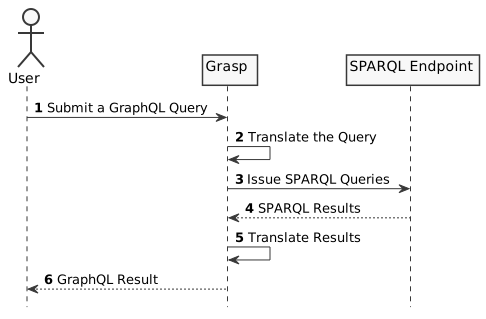
Grasp requires a GraphQL schema with some specific notations, which are carefully designed to keep full-compatibility with the GraphQL specification. More specifically, we need to define a SPARQL endpoint URL and a SPARQL query handlebars template per concept, or a Type in GraphQL terms. We also use GraphQL decorators for metadata (described later).
Let's look at a simple example.
- Node.js 16.14 or later
Clone this repository with git clone or something similar, and run
$ cd grasp
$ npm install
$ RESOURCES_DIR=./examples npm run dev
This loads the example resource definitions from ./example.
Visit http://localhost:4000. You will see GraphQL Playground.
Note: You can change the port to listen on with PORT environment variable. Other configurations are described at Configuration section.
Write a GraphQL query below in the query editor (left pane):
query {
  dataset(iri: "http://purl.jp/bio/03/dbcatalog/nbdc00012") {
    iri
    title_en
    references {
      iri
      title
    }
  }
}
Then, press Ctrl+Enter. The query will be issued and results will be shown (on right pane).
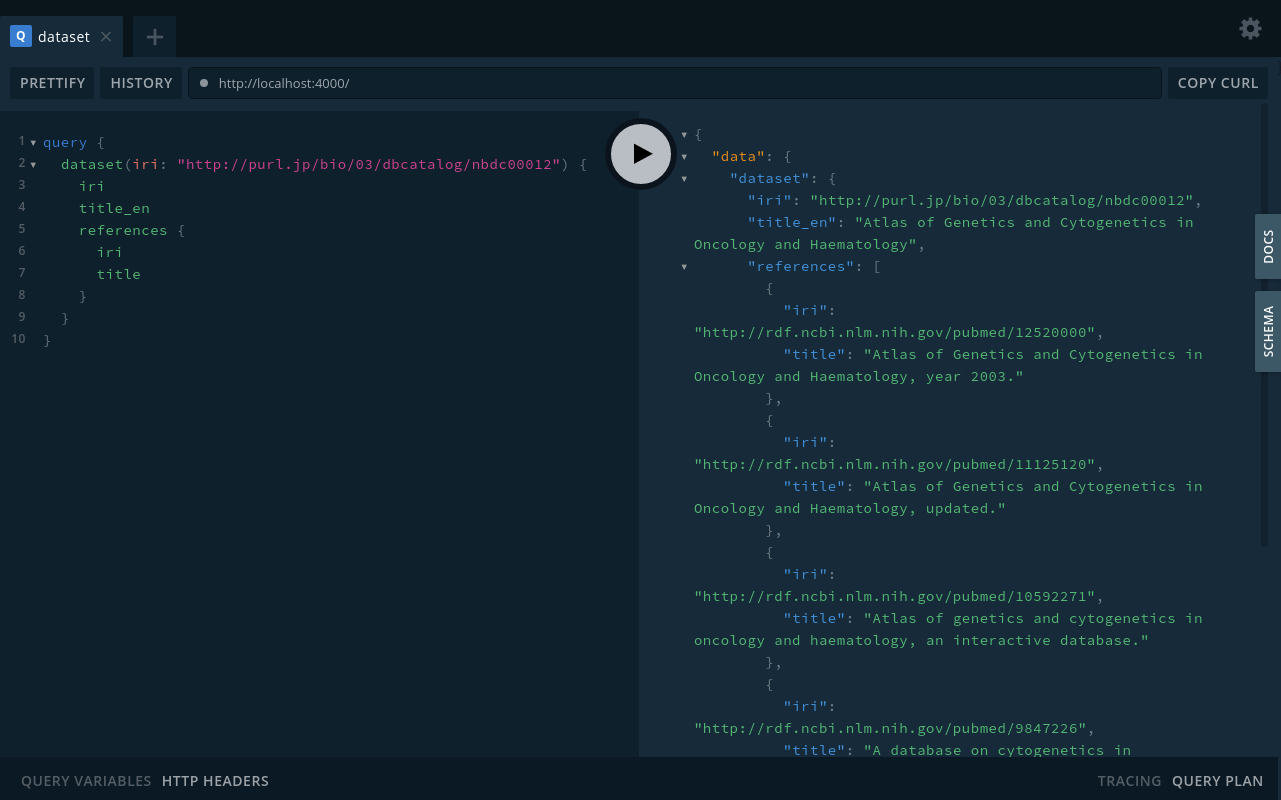
Now we've queried Integbio Database Catalog/RDF with GraphQL. Let's see how it works.
From a local build:
$ docker build -t grasp:latest . $ docker run --rm -it -p 4000:4000 -v /full/path/to/resources:/app/resources grasp:latest
From published image:
Important
Published docker images contain a very old version of Grasp. We are working on releasing a recent one.
$ docker run --rm -it -p 4000:4000 -v /full/path/to/resources:/app/resources ghcr.io/dbcls/grasp:
And access localhost:4000. See available image tags at dbcls/grasp.
The GraphQL query was translated into SPARQL queries and sent to a SPARQL endpoint, then the SPARQL results were returned to Grasp, finally the results were reformed into the GraphQL result.
Grasp does those translation according to a GraphQL schema (type definition), SPARQL Endpoint URL and SPARQL query, which a Grasp admin (who sets up Grasp) provides. We refer to this as resource in Grasp. There are two main methods of defining a resource:
- using a GraphQL comment
- using directives
Let us dig into the definition.
You will see the resource definition at examples/dataset.graphql.
SPARQL Endpoint URL and SPARQL query are written in the GraphQL comment of the type in a special form. SPARQL Endpoint is specified after the --- endpoint --- line. SPARQL query is placed after the --- sparql --- line.
Example:
"""
--- endpoint ---
https://integbio.jp/rdf/sparql

--- sparql ---
PREFIX : <https://github.com/dbcls/grasp/ns/>
PREFIX skos: <http://www.w3.org/2004/02/skos/core#>

CONSTRUCT {
  ?iri :iri   ?iri;
  :label      ?label;
  :alt_label  ?alt_label ;
}
WHERE
{
  { ?iri a skos:Concept }
  OPTIONAL { ?iri skos:prefLabel ?label }
  OPTIONAL { ?iri skos:altLabel ?alt_label }

  {{#if iri}}
  VALUES ?iri { {{join (as-iriref iri) " "}} }
  {{/if}}
}
"""
type Concept {
  iri: ID!
  label: String
  alt_label: String
}Alternatively, you can use the following directive:
directive @grasp(service: String, template: String) on OBJECT
endpoint: the SPARQL Endpoint URL or name of the defined servicesparql: filename of the SPARQL query handlebars template
Example:
type Concept @grasp(endpoint: "https://integbio.jp/rdf/sparql", sparql: "Concept.sparql") {
  iri: ID!
  label: String
  alt_label: String
}When a SPARQL endpoint requires more details than a simple URL,
for instance, when the endpoint requires security credentials,
the endpoint parameters can be configured using a services.json file an/or by setting environment variables.
Important
When a services.json file and environment variables are used together, the values set by environment variables gain preference.
Set the SERVICES_FILE environment variable, so Grasp can locate the configuration file.
{
    "dbpedia": {
        "url": "http://dbpedia.org/sparql/",
        "graph": "http://dbpedia.org",
        "user": "",
        "password": "",
        "token":""
    },
}Instead of using a services.json file, you can pass variables as well. The above example can be written using the following environment variables:
GRASP_dbpedia_url=http://dbpedia.org/sparql/
GRASP_dbpedia_graph=http://dbpedia.orgPossible parameters:
url: the url of the endpointgraph: the named graph to queryuser: username in case authentication is neededpassword: password in case authentication is neededtoken: bearer token in case authentication is needed
Currently, only basic auth is supported.
Each endpoint configuration is identified by a unique key (in the example: dbpedia-sparql).
This key can be used in the GraphQL type definitions to refer to the right endpoint.
Via a GraphQL comment:
"""
--- endpoint ---
dbpedia-sparql

--- sparql ---
PREFIX : <https://github.com/dbcls/grasp/ns/>
PREFIX skos: <http://www.w3.org/2004/02/skos/core#>

CONSTRUCT {
  ?iri :iri   ?iri;
  :label      ?label;
  :alt_label  ?alt_label ;
}
WHERE
{
  { ?iri a skos:Concept }
  OPTIONAL { ?iri skos:prefLabel ?label }
  OPTIONAL { ?iri skos:altLabel ?alt_label }

  {{#if iri}}
  VALUES ?iri { {{join (as-iriref iri) " "}} }
  {{/if}}
}
"""
type Concept {
  iri: ID!
  label: String
  alt_label: String
}
Via directives:
type Concept @grasp(endpoint: "dbpedia-sparql", sparql: "Concept.sparql") {
  iri: ID!
  label: String
  alt_label: String
}
Creating a SPARQL query handlebars template
The query returns a RDF graph by the CONSTRUCT query form. The graph has triples which consist of the IRI identifying the object, the predicate corresponding to the field name of the object, and its value.
See the first part of the SPARQL query:
PREFIX : <https://github.com/dbcls/grasp/ns/>
PREFIX dcterms: <http://purl.org/dc/terms/>
PREFIX db: <http://purl.jp/bio/03/dbcatalog/>
PREFIX foaf: <http://xmlns.com/foaf/0.1/>
CONSTRUCT {
  ?iri :iri ?iri .
  ?iri :title_ja ?title_ja .
  ?iri :title_en ?title_en .
  # ...
} WHERE {
  # ...
  {{#if iri}}VALUES ?iri { {{join (as-iriref iri) " "}} }{{/if}}
}
Here, we can see that the Dataset object has fields iri, title_ja and title_en, whereiri works as an identifier.
We use predicates with the special namespace (https://github.com/dbcls/grasp/ns/) in order to specify the field names.
The last part,
{{#if iri}}VALUES ?iri { {{join (as-iriref iri) " "}} }{{/if}}
should look complicated. Let us explain.
In the first place, the reason why this is needed is that Grasp requires this SPARQL query to return certain triples. More specifically, whose subject is any of iri (possibly iri contains multiple values).
The SPARQL query is actually written in Handlebars template. This part can be roughly interpreted as "If iri is given, render the VALUE-clause to select bindings by the iri (possibly contains multiple IRIs): VALUES ?iri {<http://example.com/...> <http://example.com/...>}".
if is a built-in helper of Handlebars. The argument of if helper, in this case iri, is falsy (that is, not passed to the query), it isn't rendered.
join is a helper defined by helpers-for-handlebars, which is included in Grasp, that concatenates the elements of the first argument using the second argument as the delimiter.
as-iriref is a helper defined by Grasp that wraps the elements of the second parameter with < and >.
Taken together, this part consequently selects triples by iri, if iri given. For more about the use of Grasp-defined helpers, see the later section.
After the comment block, we have Dataset GraphQL object type as follows. This corresponds to the above-mentioned SPARQL query.
type Dataset {
  iri: String!
  title_ja: String!
  title_en: String
Note: ! means that the field is non-nullable. See https://graphql.org/learn/schema/#lists-and-non-null
for detail.
Now we've defined the Dataset object type. In addition, we need to define a field to query type in order to fetch a Dataset with a GraphQL query. We're showing the corresponding part of examples/index.graphql:
type Query {
  # ...
  dataset(iri: String!): Dataset
  # ...
}
Here, we've defined the dataset field to fetch a Dataset.
SPARQL results may have multiple values for one field. In the previous example, as for iri, title_ja and title_en, Grasp returns only one value arbitrarily picked from found values.
If you want to have all values in GraphQL results, you need to use a list type in GraphQL schema:
type SequenceStatisticsReport {
  # ...
  contributor: [String!]!
  # ...
}
With this definition, you can all values for contributor field in a list of Strings.
You might notice that we have references in a Dataset object in the GraphQL result:
{
  "data": {
    "dataset": {
      "iri": "http://purl.jp/bio/03/dbcatalog/nbdc00012",
      "title_en": "Atlas of Genetics and Cytogenetics in Oncology and Haematology",
      "references": [
        {
          "iri": "http://rdf.ncbi.nlm.nih.gov/pubmed/12520000",
          "title": "Atlas of Genetics and Cytogenetics in Oncology and Haematology, year 2003."
        },
        {
          "iri": "http://rdf.ncbi.nlm.nih.gov/pubmed/11125120",
          "title": "Atlas of Genetics and Cytogenetics in Oncology and Haematology, updated."
        },
        ...
      }
    }
  }
}
In examples/dataset.graphql, references field is defined as follows:
type Dataset {
   # ...
   references: [Pubmed!]!
   # ...
}
In this case, Grasp issues two SPARQL queries to complete a GraphQL query to fetch Dataset including all its references field. The first is to fetch a Dataset, with references having their IRIs. The second is to fetch references using the IRIs. The second query is processed according to your Pubmed resource definition (examples/pubmed.graphql). Grasp combines these SPARQL results from these queries into the final GraphQL response.
We cannot handle relations with a blank node in the previously mentioned way, as the blank node can't be pointed with an IRI. In order to handle such relations, we introduce embedded resources.
Consider the following case:
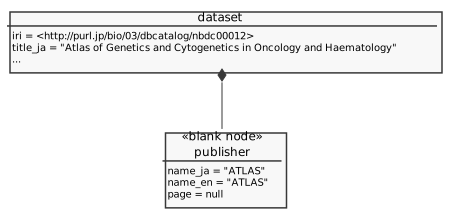
In examples/pubmed.graphql, we have the following definition of Publisher:
type Dataset {
  # ...
  publisher: Publisher
  # ...
}
The Publisher resource is defined as follows:
type Publisher @embedded {
  name_ja: String
  name_en: String
  page: String
}
Note that Publisher doesn't have a special comment containing an endpoint definition and SPARQL query, and that we marked Publisher as @embedded. When resolving resources with @embedded, Grasp doesn't fetch the resource with a separate query. Instead, fills the fields from the query of its parent resource.
The following query fetches Dataset. In this query, values of publisher are fetched all together:
CONSTRUCT {
  ?iri :iri ?iri .
  ?iri :title_ja ?title_ja .
  # ...
  ?iri :publisher ?publisher .
  ?publisher :name_ja ?publisher_name_ja .
  ?publisher :name_en ?publisher_name_en .
  ?publisher :page ?publisher_page .
  # ...
}
# ...
WHERE
{
  # ...
  OPTIONAL { ?iri dcterms:publisher ?publisher . }
  OPTIONAL { ?publisher rdfs:label ?publisher_name_ja . FILTER (lang(?publisher_name_ja) = "ja") }
  OPTIONAL { ?publisher rdfs:label ?publisher_name_en . FILTER (lang(?publisher_name_en) = "en") }
  OPTIONAL { ?publisher foaf:page ?publisher_page . }
  # ...
}
This query returns triples representing a Dataset and representing the Publisher of the Dataset at the same time. Grasp distinguish them by their subjects (of a graph generated by the CONSTRUCT query form) and build GraphQL objects.
Note that we need to return graph containing triples whose 1) subject points the embedded resource and 2) predicate reflects its field name. ?publisher is bound to the blank node representing the Publisher.
You can add your own definitions in the directory specified with RESOURCES_DIR (default is ./resources).
The resource definition files must start with [0-9a-zA-Z] and end with .graphql. The other files in the directory are ignored.
You need to restart Grasp to reload the definitions. You can use npm run watch to restart the server automatically.
Consider that you want to query a Dataset with an id (like dcterms:identifier). Add the following field definition into the Query:
type Query {
  # ...
  datasetById(id: String): Dataset
}
If we issue the following GraphQL query:
query {
  datasetById(id: "NBDC00012") {
    ...
  }
}
The SPARQL template is written in Handlebars.
In this case, we can obtain "NBDC00012" with {{id}} notation in the SPARQL query.
You can also use Handlebars' built-in helpers such as if and each.
See https://handlebarsjs.com/guide/ for details.
Consider you are defining a GraphQL query, which takes multiple values as a parameter. The field in Query should be like below:
type Query {
  datasetsByIds(ids: [String!]): [Dataset!]!
}
Here, you want to issue a SPARQL query like:
VALUES ?id { "NBDC00012" "NBDC00013" }In this case, instead of doing simple interpolation (as previously mentioned),
you can also use join and as-strings helpers:
Here, as-string wraps elements of the given array with " (double-quotations).
join combines them using the first argument as the delimiter.
Consider another example of generating an IN clause from a parameter like this:
FILTER (?iri IN (<http://...>, <http://...>))You can write the template using helpers as follows:
Note that we've specified , as the delimiter for join.
as-iriref works almost same as as-string except wrapping the elements with < and >.
Grasp also includes the 'array', 'comparison', 'string', and 'object' helper libraries from helpers-for-handlebars.
Grasp supports authorization via a third-party web service.
The Authorization header from the request is proxied to an URL set in AUTH_URL.
When the proxied request returns the statuscode set in AUTH_RESPONSE_CODE, Grasp returns a 401.
If AUTH_URL is not set, authorization is disabled and the Graphql endpoint is publicly accessible.
In case the SPARQL service uses the same credentaisl, you can also make grasp proxy the Authorization header to the SPARQL services by setting PROXY_AUTH_HEADER to true.
Some triple stores limit the number of returned results to a fixed amount.
The most prominent one is Openlink Virtuoso, where the default value is 10000.
Grasp can circumvent these limits by requesting the query in consecutive pages (using SPARQL's OFFSET and LIMIT).
When the number of returned triples equals the number set in ENDPOINT_RESULT_LIMIT, a consecutive page is requested.
You can disable paging alltogether by setting ENDPOINT_RESULT_LIMIT to 0 or less.
Note
Grasp has a safeguard in place that prevents a page from being requested over and over again. If this happens, Grasp will throw an error. This probably indicates the SPARQL template was not properly implemented or the endpoint is not behaving as expected.
Grasp can be configured with the following environment variables.
(default: 4000)
Port to listen on.
(default: /)
If you want to run Grasp on other than / (say, /foo), configure ROOT_PATH to point the path.
(default: Infinity)
Grasp issues queries in batches to reduce number of queries. This may result in too large query to be processed by some SPARQL endpoints. You can use MAX_BATCH_SIZE in order to avoid this problem by restricting the number of items to fetch.
(default: resources)
Load resources from the specified directory.
(default: services.json)
Load sparql endpoints from the specified config file.
(default: 60000)
Set the time in milliseconds that SPARQL queries live in the cache.
(default: 20)
Set the max number of SPARQL queries that are stored in the cache. You can disable the cache by setting this to 0.
Set a service parameter. Possible values for <key> are found in the service parameters section.
(default: 10000)
Set the maximum number of results that the endpoint will return for a query. This is typically used when using Openlink Virtuoso.
Any value of 0 or less will disable this behaviour.
Set the url of a third-party authorization web service that validates the request Authorization header.
If this is not set, authorization is disabled.
(default: 401)
Set the HTTP status code that the third-party authentication web service returns when rejecting access.
(default: false)
Proxy the Authorization header to the SPARQL services. Note that this will use a single set of credentials for all SPARQL services.
The Gitlab CI is responsible for building and updating the grasp deployments.
- A push to a feature branch with a merge request will trigger a build and deployment of
int - A push to the
mainbranch will trigger a build and deployment ofqas - A git-tag will trigger a build and deployment of
prd
npm version patch|minor|majorgit push --tags- The pipeline will now build the correct
prdversion