Releases: viveksthul15/braceview
Release list
Braceview 1.3.0

Braceview now opens text, logs, config files and code — and Ctrl+N gives you a scratch tab.
| Platform | Get it |
|---|---|
| Windows 10 / 11 | Microsoft Store — one click, updates itself, no SmartScreen warning |
| Windows, installer | Braceview-Setup-1.3.0.exe |
| Windows, portable | Braceview-Portable-1.3.0.exe — no install |
| Chrome / Edge | Chrome Web Store |
| macOS, Apple Silicon | Braceview-1.3.0-mac-arm64.dmg |
| macOS, Intel | Braceview-1.3.0-mac-x64.dmg |
Added
- Text, logs, config files and code.
.txt,.log,.env,.ini,.properties,.toml,.yaml,.xmland around 45 source-code extensions, with syntax colours loaded only for the language the file actually needs. - Filter a log down to the lines you care about. Type in the filter box and the rest disappears, while the gutter keeps the real line numbers so you still know where you are. Type
:420in the same box to jump to a line. - Scratch tab (
Ctrl+N). An empty tab with no file behind it: paste JSON or CSV in and Braceview says what it looks like, then one click turns the tab into the full tree or table. Nothing is written to disk. - Braceview adds itself to "Open with" for text, log and config files. Code extensions are left alone on purpose — your editor keeps those.
Changed
- Wide tables and code blocks use the whole window. Prose keeps a comfortable reading width; anything too wide for it — a six-column table, a long line of code, a diagram — spreads out instead of being squeezed or cut off.
- Reading width (narrow, normal, full) has its own Width button in the toolbar.
Fixed
- A failure while starting up can no longer look like a silent crash: the window always appears, problems are reported, and a graphics-driver failure retries once without hardware acceleration.
macOS: the build is ad-hoc signed, not notarised. First launch needs System Settings → Privacy & Security → Open Anyway.
Windows: the Store version installs without any warning. The standalone installer isn't code-signed, so SmartScreen may say "Windows protected your PC" — More info → Run anyway.
Checksums for every file are in SHA256SUMS.txt.
Braceview 1.2.1
Braceview 1.2.1 — tuned for big files.
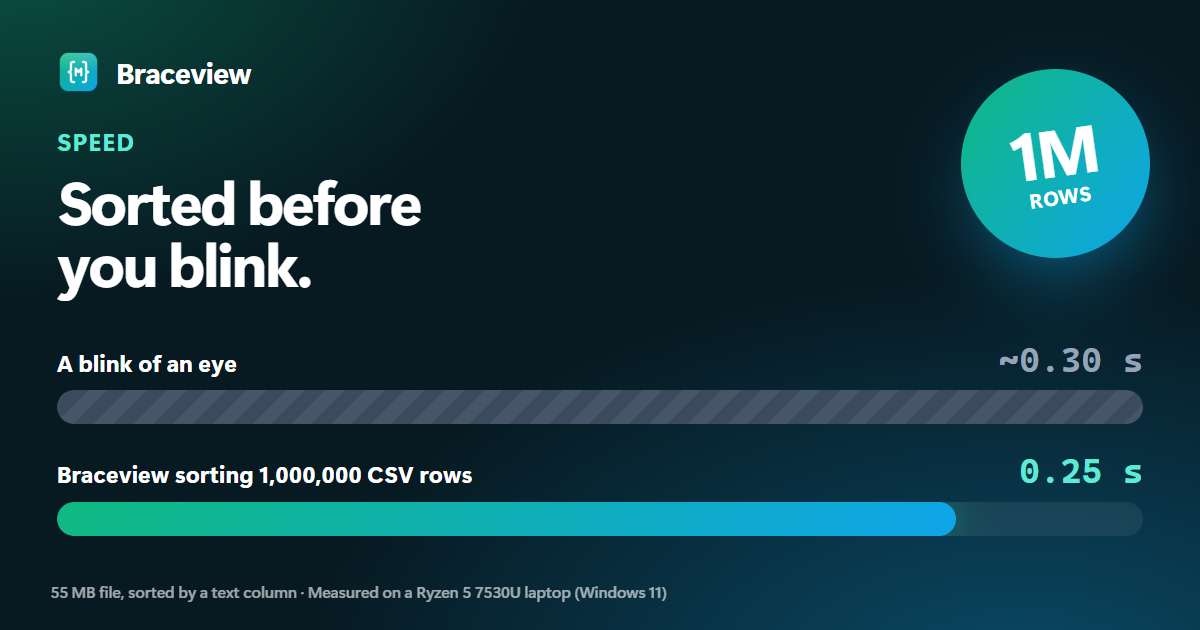
Speed, on an everyday Ryzen 5 laptop
| Sort a million CSV rows (55 MB) by a text column | 0.25 s |
| Column statistics on a million rows | 0.35 s |
| Double-click to a 20 MB JSON tree | 1.8 s |
| Open a 600-section Markdown report | 2.1 s |
| CPU while it sits open | ~0% |
- Long Markdown documents stay light: sections you haven't scrolled to yet cost almost nothing.
- Code-editor grammars load only when a code block needs them, in the app and the extension.
- The Chrome extension doesn't need the
scriptingpermission.
How it was measured, and every other number: BENCHMARKS.md.
Download
| You're on | Download |
|---|---|
| Windows 10 / 11 | Microsoft Store (no warnings, auto-updates) — or Braceview-Setup-1.2.1.exe, or the portable exe |
| Mac with Apple Silicon (M1–M4) | Braceview-1.2.1-mac-arm64.dmg |
| Mac with Intel | Braceview-1.2.1-mac-x64.dmg |
| Chrome / Edge | Add to Chrome — or the zip for manual install |
First launch
- Windows: the installer isn't code-signed yet. If SmartScreen appears, click More info → Run anyway.
- Mac: the app isn't notarized yet. Open it once and click Done on the warning, then System Settings → Privacy & Security → Open Anyway.
Upgrading? Run the new installer (Windows) or replace the app (Mac); settings and recent files are kept. For the unpacked extension, unzip over the old folder and click Reload on chrome://extensions.
Checksums (SHA-256)
eb1e8517fc2a4cac678f720d95b1127eed5be8d366fd82faa15d2e46c67fd8a1  Braceview-Setup-1.2.1.exe
911be53360680e82ecb3e215e894da9f8b1c940108e36f2e95560eadb1e6e057  Braceview-Portable-1.2.1.exe
58f27472c8119f2b9f6d333d1002209c979a4f8a615ab3577f358c7f948baa73  Braceview-1.2.1-mac-arm64.dmg
790baaa4346a498681aca698ba648246d4db3dd1fda930f01900089e6ff0d3b6  Braceview-1.2.1-mac-x64.dmg
90adea793a182e9406bd2c30d7100a4900e69c591a1316131e655818d578e7b3  Braceview-1.2.1-mac-arm64.zip
f8d40d762a45669ea92506c716dc042dc6ecb046c9b0a32e48d331ca6329a344  Braceview-1.2.1-mac-x64.zip
b74bc4c3c42812547bdd8ba5082b2191f42815a290c9329bc02e725766680602  braceview-extension-1.2.1.zip
Braceview 1.2.0
Braceview 1.2.0 — now on Mac, with a new look.
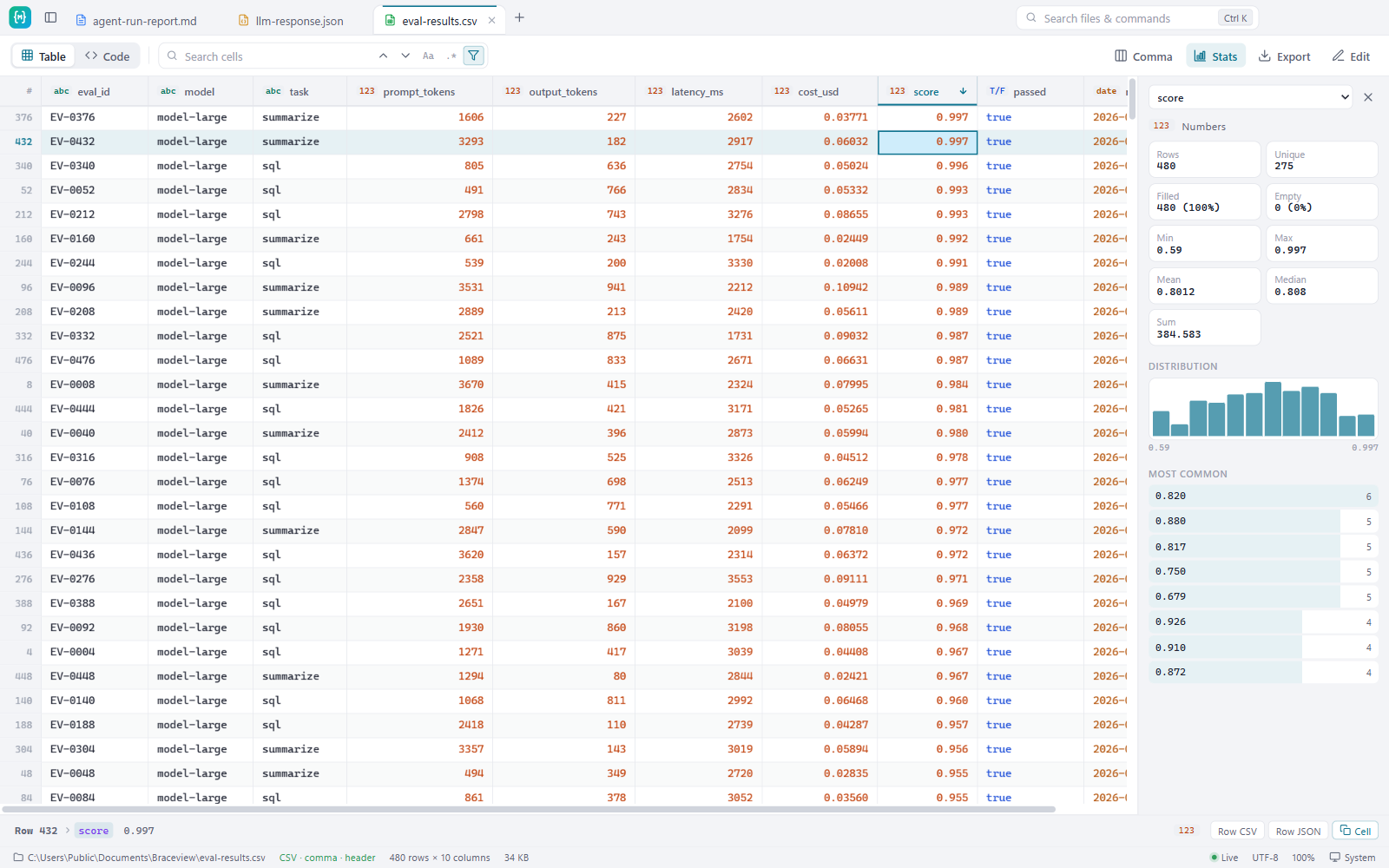
What's new
- macOS app for Apple Silicon and Intel. Double-click a
.json,.csvor.mdfile in Finder to open it. - New Aurora look — a green-to-blue icon and matching accents in light and dark themes, including diagrams.
- Website with downloads, FAQ and privacy policy: https://viveksthul15.github.io/braceview/
Also in Braceview: JSON tree with search and JSONPath, CSV tables with column statistics that handle 200,000 rows, Markdown with diagrams and math, and a Chrome/Edge extension. Full history in the changelog.
Download
| You're on | Download |
|---|---|
| Windows 10 / 11 | Braceview-Setup-1.2.0.exe — or the portable exe (no install) |
| Mac with Apple Silicon (M1–M4) | Braceview-1.2.0-mac-arm64.dmg |
| Mac with Intel | Braceview-1.2.0-mac-x64.dmg |
| Chrome / Edge | braceview-extension-1.2.0.zip — install steps |
First launch
- Windows: the installer isn't code-signed yet. If SmartScreen appears, click More info → Run anyway.
- Mac: the app isn't notarized yet. Open it once and click Done on the warning, then System Settings → Privacy & Security → Open Anyway.
Upgrading on Windows? Run the new installer; your settings and recent files are kept.
Checksums (SHA-256)
8303ed02d961ac75cbaf5c3ceaedbe5c268f9631a5b6608b4f48aff0b0778f6a  Braceview-Setup-1.2.0.exe
8ee0ed72904f881e8e73c9c84c0e67a51018a43029c0954b18dbee5fdb41b264  Braceview-Portable-1.2.0.exe
b7dbf4b3142d6986ecbd8a54e399ebf8fd6f5ef07300bc6934873afb791409b6  Braceview-1.2.0-mac-arm64.dmg
358edec35c1028ca597188c4788f4d5a12ffc765bd904c70799f6d6a61fe0a84  Braceview-1.2.0-mac-x64.dmg
48cb318910b779a48d2d68944440e7835a6c49c8c8fb644b7bbd9618226936d6  Braceview-1.2.0-mac-arm64.zip
956e15fc2ceffcfa0073f1cd62b12ea47d31a91ce419e73cc57f6331494c7d6a  Braceview-1.2.0-mac-x64.zip
276e2d009c12817a49dd8e4652a1ee7b24ec3ccb48323cdba70a6633f3d2b3a2  braceview-extension-1.2.0.zip
Found a problem? Open an issue.