This repository was archived by the owner on May 18, 2026. It is now read-only.
Add resources (steps) info in workload get#99
Merged
Conversation


Contributor
Author
|
|
Contributor
Author
|
|
Contributor
Author
|
|

 warango4
changed the title
warango4
changed the title

shashwathi
reviewed
May 5, 2022
Contributor
 shashwathi
left a comment
shashwathi
left a comment
shashwathi
left a comment
There was a problem hiding this comment.
Something to think about
- If a resource doesnt have conditions set, should we print them or ignore them?
- If we choose to print, then what is the Ready string suppose to have?
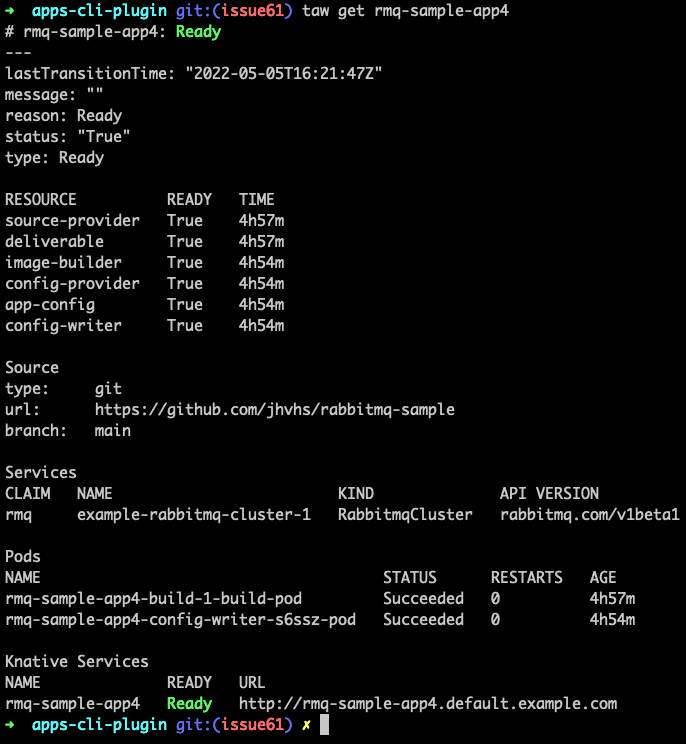
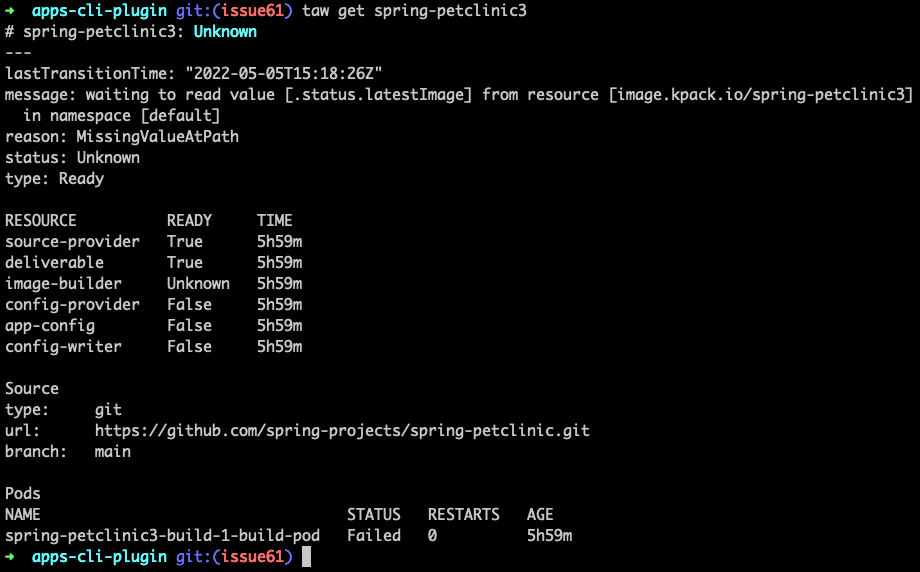
Adding resource info in workload get command. There is a list which shows the name of each resource, its status and its age.
The status is taken from the condition of the resource which type is 'Ready'.

According to Cartographer:
'Conditions describing this resource's reconcile
state. The top level condition is of type `Ready`, and follows
these Kubernetes conventions:
https://github.com/kubernetes/community/blob/master/contributors/devel/sig-architecture/api-conventions.md#typical-status-properties'

There are going to be some follow up commits changing the current output of workload get command.
One to display supply chain info and other to display issues in workload

Signed-off-by: Wendy Arango <warango@vmware.com>

rashedkvm
reviewed
May 9, 2022
shashwathi
reviewed
May 9, 2022
shashwathi
reviewed
May 10, 2022
shashwathi
reviewed
May 10, 2022
rashedkvm
approved these changes
May 12, 2022

warango4
pushed a commit
to warango4/apps-cli-plugin
that referenced
this pull request
May 17, 2022

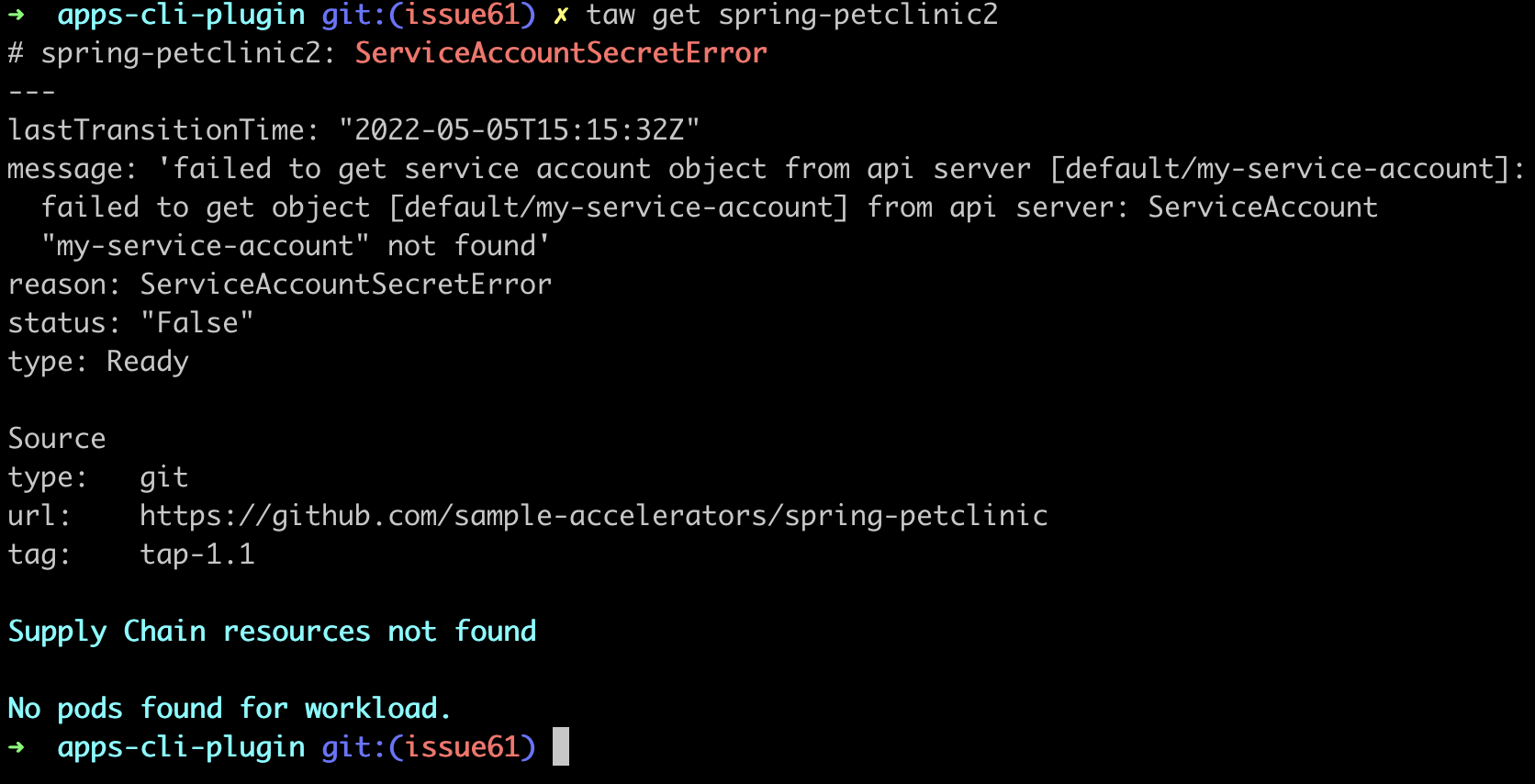
In this feat, the way the workload status used to be displayed changes to show specifically the supply chain info (name) and the workload status on its Ready condition.
If there is no supply chain reference, but there is a Ready condition that surfaces the workload status, on row "name", `<none>` is going to be displayed.
If there is no Ready condition, but a supply chain reference, then rows "ready" and "last update" are left blank.
If there are no conditions and no supply chain reference, a message indicating this situation is displayed.

Follow-up of PR vmware-tanzu#99 for issue vmware-tanzu#61

Signed-off-by: Wendy Arango <warango@vmware.com>
warango4
pushed a commit
to warango4/apps-cli-plugin
that referenced
this pull request
May 17, 2022
In this feat, the way the workload status used to be displayed changes to show specifically the supply chain info (name) and the workload status on its Ready condition.
If there is no supply chain reference, but there is a Ready condition that surfaces the workload status, on row "name", `<none>` is going to be displayed.
If there is no Ready condition, but a supply chain reference, then rows "ready" and "last update" are left blank.
If there are no conditions and no supply chain reference, a message indicating this situation is displayed.

Follow-up of PR vmware-tanzu#99 for issue vmware-tanzu#61

Signed-off-by: Wendy Arango <warango@vmware.com>
warango4
pushed a commit
to warango4/apps-cli-plugin
that referenced
this pull request
May 17, 2022
In this feat, the way the workload status used to be displayed changes to show specifically the supply chain info (name) and the workload status on its Ready condition.
If there is no supply chain reference, but there is a Ready condition that surfaces the workload status, on row "name", `<none>` is going to be displayed.
If there is no Ready condition, but a supply chain reference, then rows "ready" and "last update" are left blank.
If there are no conditions and no supply chain reference, a message indicating this situation is displayed.

Follow-up of PR vmware-tanzu#99 for issue vmware-tanzu#61

Signed-off-by: Wendy Arango <warango@vmware.com>
warango4
pushed a commit
to warango4/apps-cli-plugin
that referenced
this pull request
May 17, 2022
In this feat, the way the workload status used to be displayed changes to show specifically the supply chain info (name) and the workload status on its Ready condition.
If there is no supply chain reference, but there is a Ready condition that surfaces the workload status, on row "name", `<none>` is going to be displayed.
If there is no Ready condition, but a supply chain reference, then rows "ready" and "last update" are left blank.
If there are no conditions and no supply chain reference, a message indicating this situation is displayed.

Follow-up of PR vmware-tanzu#99 for issue vmware-tanzu#61

Signed-off-by: Wendy Arango <warango@vmware.com>
This file contains hidden or bidirectional Unicode text that may be interpreted or compiled differently than what appears below. To review, open the file in an editor that reveals hidden Unicode characters.
Learn more about bidirectional Unicode characters
Sign up for free
to subscribe to this conversation on GitHub.
Already have an account?
Sign in.
5 participants


Add this suggestion to a batch that can be applied as a single commit.This suggestion is invalid because no changes were made to the code.Suggestions cannot be applied while the pull request is closed.Suggestions cannot be applied while viewing a subset of changes.Only one suggestion per line can be applied in a batch.Add this suggestion to a batch that can be applied as a single commit.Applying suggestions on deleted lines is not supported.You must change the existing code in this line in order to create a valid suggestion.Outdated suggestions cannot be applied.This suggestion has been applied or marked resolved.Suggestions cannot be applied from pending reviews.Suggestions cannot be applied on multi-line comments.Suggestions cannot be applied while the pull request is queued to merge.Suggestion cannot be applied right now. Please check back later.
Pull request
What this PR does / why we need it
Adding resource info in workload get command. There is a list which shows the name of each resource, its status and its age.
The status is taken from the condition of the resource which type is 'Ready'.
According to Cartographer:
There are going to be some follow up commits changing the current output of workload get command.
One to display supply chain info and other to display issues in workload
Which issue(s) this PR fixes
Fixes #61
Describe testing done for PR
Additional information or special notes for your reviewer
IMPORTANT NOTE:
Current Carto's release version does not support the
Conditionsfield in workloads' resources.To test this PR, you'll need to install Cartographer from their main branch.
First, make sure your
coreutilsare installed, because the script will needrealpath, which comes within. To do so, you can simply typebrew install coreutils.Clone Carto's repo (https://github.com/vmware-tanzu/cartographer) and go to the branch you need to install it from.
Export the following variables
REGISTRY, which needs to point to the registry the image is going to be published on.Ex:
$ export REGISTRY=gcr.io/tanzu-framework-playground/test/carto-testRELEASE_VERSION, you can set this to make sure Carto's version installed in your cluster is the one you're expecting.Ex:
$ export RELEASE_VERSION=v0.5.0(current Carto official released version is 0.3.0)DOCKER_CONFIG, which needs to point to your docker config json file.A way to check where this file is, is using
$ gcloud auth configure-docker, which will show where theconfig.jsonfile is in the systemEx:
$ export DOCKER_CONFIG=/Users/wendyarango/.dockerNote: do not add to the path the name of the file, in this case
config.json, because it will induce an error. Just use the path to the folder where the file is.Inside Carto's folder, run the following
$ ./hack/setup.sh cartographerSigned-off-by: Wendy Arango warango@vmware.com