Feature/Table of Contents#48
Conversation


✅ Deploy Preview for elated-hoover-5c29bf ready!
To edit notification comments on pull requests, go to your Netlify site settings. |
![github-actions[bot]](https://avatars.githubusercontent.com/in/15368?s=60&v=4)

 amandascm
left a comment
amandascm
left a comment
amandascm
left a comment
There was a problem hiding this comment.
LGTM ✨ really nice docs too
Some details that caught my attention:
-
The TOC is showing some subtopics of Billing Options API Guide with ':' character. It made me question if it should be filtered out of the headers that are shown by the table.
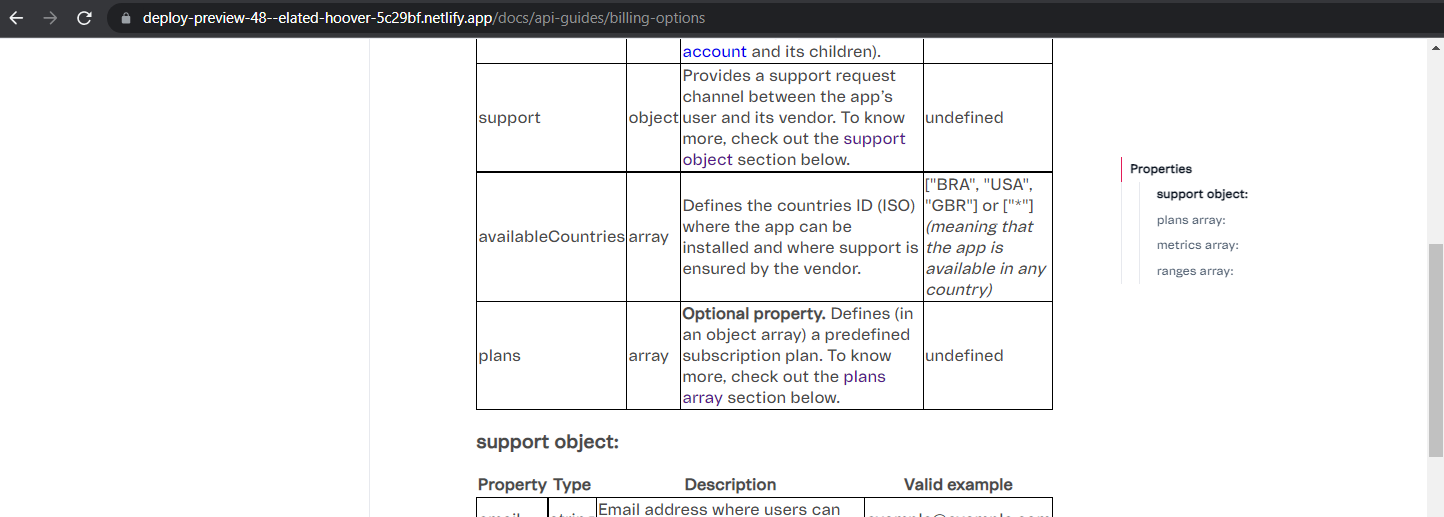
-
Now about the following quote, also in the Billing Options API Guide, if I am anywhere on the page below the
'plans array:'subtopic and click on the'support object:'at the TOC it always redirects me correctly to the desired topic, but it shows the'plans array:'as active item. As it looks more like a pattern or like there is a prioritization of the later content in the TOC topics order, I thought it was an important observation to register here.do keep in mind that clicking the link to a heading that is too close to another one may have the effect of making the other heading show as active in the Table of Contents
toc-review.mp4

@amandascm, I just talked to João and he told me to remove the ':' character. He also said that we can figure out later which other special characters we'll need to remove. So, for now, I changed the code to remove only ':' from the titles.
The reason that happens is because two things happen when you click one of the titles inside the table of contents, not necessarily in that order:
I think that the second thing happens after the first most oftenly because the Intersection Observer API detects those changes after every some amount of time, while the first function is called almost instantly. That being said, one solution to avoid that problem is making the top scroll padding (how far from the top of the page a heading must be shown if clicked) match the bottom root margin (how far from the bottom of the page a heading must be to be considered 100% visible) attribute of the React Intersection Observer (by match, I mean those values must sum up to 100vh). The problem with that approach is that we have to balance those attributes and we may end up taking too long to say a heading is visible or showing a heading too far from the top of the page when the user clicks it. For now, I used 20vh of top scroll padding and 80vh of bottom root margin. Can you review it again, please? |

 JoaoMontenegr0
left a comment
JoaoMontenegr0
left a comment
JoaoMontenegr0
left a comment
There was a problem hiding this comment.
Perfeito!
Se puder, testa com mais de um grande tópico contendo também subtópicos, isso nos ajudará a ver possíveis problemas de design. Se for possível, adiciona uma animação semelhante a do Contributors para não ficar uma transição bruta entre o grande tópico e a exibição de seus subtópicos.


86e0f6a to
d9e8fc9
Compare


…name headers to headings
d9e8fc9 to
7c68d91
Compare

7 participants


What is the purpose of this pull request?
To add a Table of Contents to the API Guide documentation pages.
Documented here
What problem is this solving?
The lack of a component for rendering a Table of Contents. The Table of Contents helps the reader keep track of where they are in the article and navigate to specific sections faster.
How should this be manually tested?
Go to this page and try scrolling up and down. The Table of Contents should update to show in which part of the article you're at. Try clicking in the links inside the Table of Contents, you should be taken to the corresponding section of the documentation and the Table of Contents should update accordingly (do keep in mind that clicking the link to a heading that is too close to another one may have the effect of making the other heading show as active in the Table of Contents).
Screenshots or example usage
Types of changes