Repository navigation
Releases: w-cook/tracescope-qt-log-inspector
Release list
TraceScope v1.0.0 — First Stable Release

TraceScope v1.0.0 — First Stable Release
TraceScope v1.0.0 is the first stable release of a native, offline log investigation workbench for Windows and Linux.
TraceScope helps developers, QA engineers, and technical support teams turn application, service, and diagnostic log files into structured investigations. Import supported formats, narrow the evidence that matters, explore patterns, document findings, compare investigation sessions, follow changing files, and share results—all without centralized log collection or hosted infrastructure.
This release completes the expansion roadmap spanning Phases 0–16, transforming the original JSON Lines telemetry inspector into a configurable desktop investigation application.
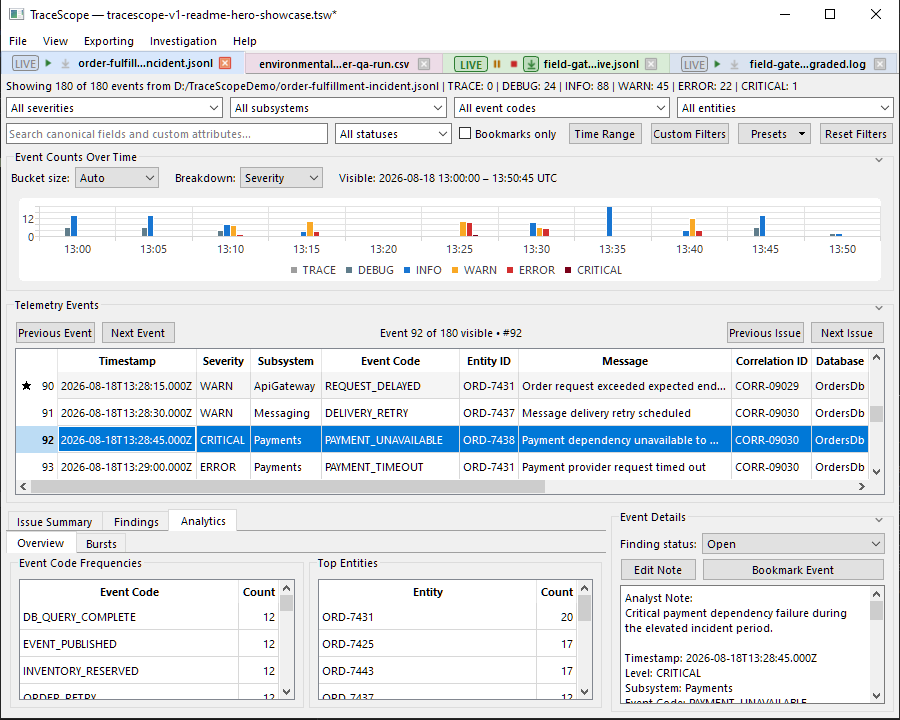
What TraceScope can do
Import and normalize different log formats
TraceScope brings different source formats into a common investigation model without requiring every source to provide the same fields.
- Import JSON Lines, Structured JSON, CSV, TSV, Key-Value/logfmt, Syslog RFC 3164 and RFC 5424, IIS W3C, Structured XML, and XML-formatted Windows Events.
- Import Apache/Nginx access logs and other compatible text formats through reusable regex-based profiles.
- Configure canonical-field mappings, custom attributes, severity aliases, timestamp rules, and source-specific parsing behavior through versioned import profiles.
- Preserve original source content and source-location metadata alongside normalized records.
- Import larger files using background processing, progress feedback, and cooperative cancellation.
The six canonical fields—timestamp, severity, subsystem, event code, entity ID, and message—are individually optional. Features that require unavailable fields are limited appropriately, while unrelated investigation capabilities remain usable.
Investigate, navigate, and analyze evidence
TraceScope provides a structured workflow for moving from large record sets to relevant evidence.
- Combine severity, subsystem, event-code, entity, time-range, text-search, and custom-field filters.
- Save reusable filter presets and apply contextual filters directly from eligible Event Table cells.
- Navigate between records, warnings, errors, and surrounding context in the current filtered and sorted investigation.
- Explore scalable timelines with automatic or manual resolution and fine-resolution navigation.
- Review deterministic event-code and entity frequencies, subsystem trends, severity activity, and configurable burst detection.
- Drill down from analytical summaries and timeline results to their contributing records.
- Bookmark records, add analyst notes, and classify findings as Open, Resolved, or Dismissed.
TraceScope highlights patterns and provides access to supporting evidence. It does not claim to automatically diagnose incidents or establish root causes.
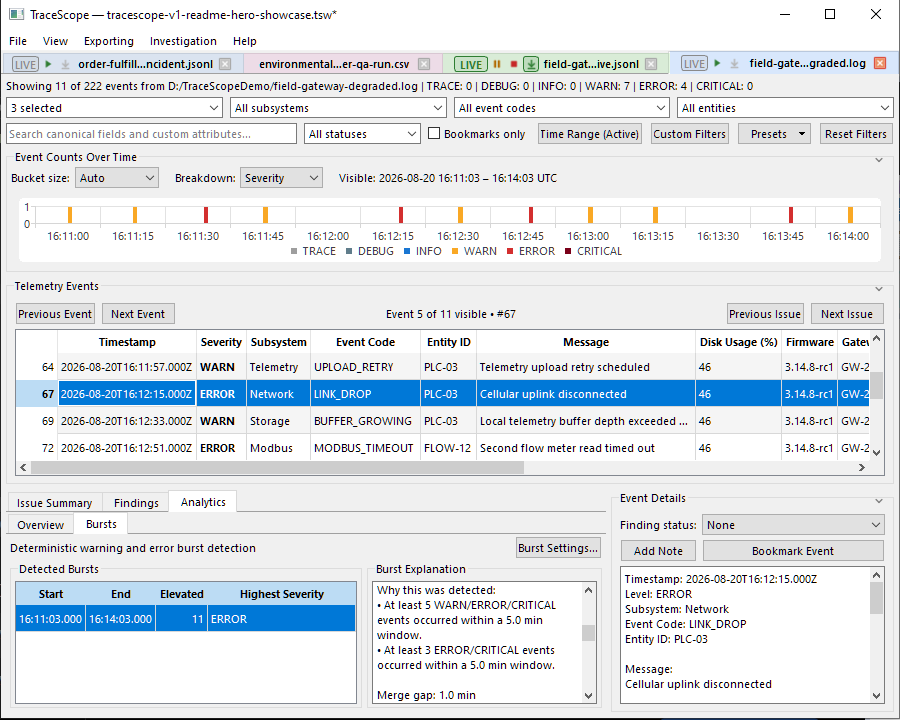
Follow changing log files
Live Following allows TraceScope to continue admitting complete records into an existing investigation session while an external application writes to its source file.
- Start, pause, resume, and stop Live Following.
- Use Follow Newest independently to keep the Event Table and timeline positioned near newly arriving visible records.
- Continue filtering, navigating, annotating, and analyzing evidence as additional records arrive.
- Defer incomplete trailing records and supported structured-document fragments until complete records become available.
- Handle rotated source families while retaining each physical file's provenance.
- Track same-path truncation and replacement through explicit source generations.
- Preserve admitted evidence so later source changes do not silently erase the investigation.
TraceScope remains an independent file observer. It does not require direct integration with the applications producing the logs.
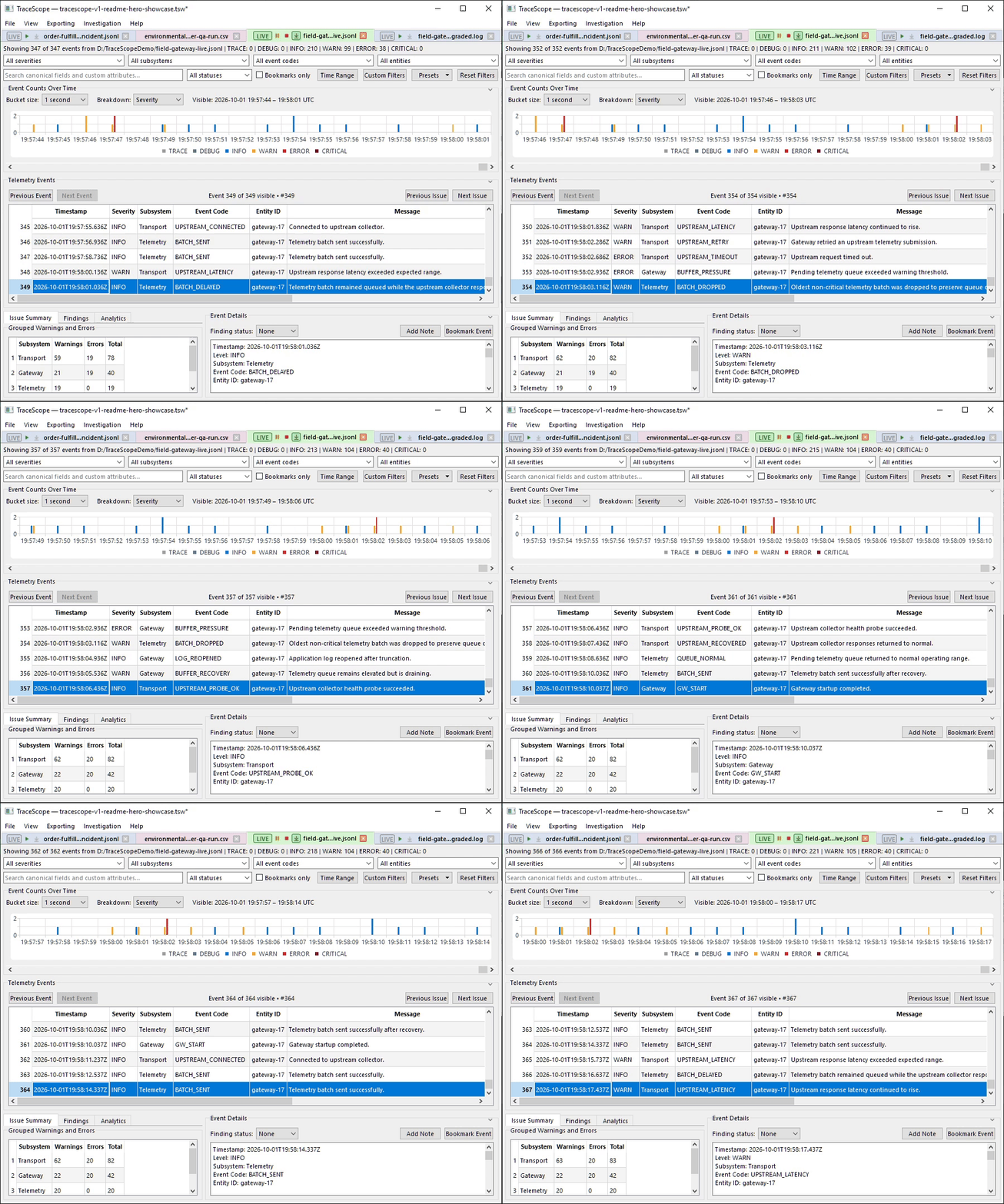
Compare investigation sessions
TraceScope supports directional Baseline → Comparison analysis for related investigation sessions.
- Compare the complete currently admitted record populations from two sessions, independently of their other active filters.
- Optionally capture either session's active time range to create independently time-scoped comparisons.
- Review differences in severity counts, event codes, elevated subsystem/entity activity, compatible shared custom fields, and optional burst analysis.
- Interpret all directional differences consistently as Comparison − Baseline.
- Preserve the resulting analytical results, selected evidence scope, and source context in an immutable comparison document.
Comparison documents remain unchanged as their source investigation sessions are subsequently filtered, reloaded, or updated through Live Following. They capture analytical results rather than embedding complete copies of both underlying record populations.
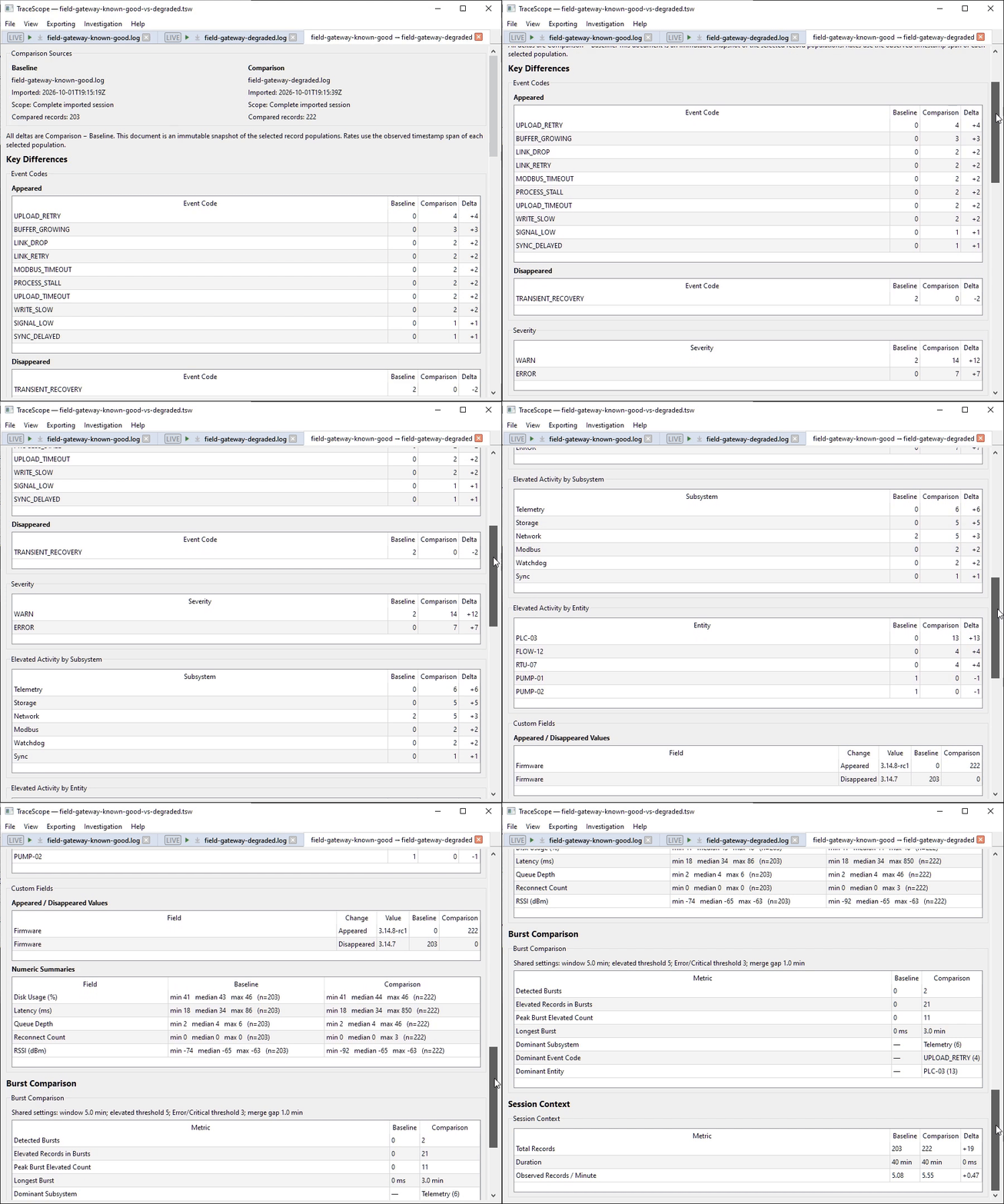
Preserve investigation evidence and workspace state
Investigation sessions and comparison documents can be organized across multiple native TraceScope windows while remaining part of the same workspace.
- Save and restore investigation sessions, filters, bookmarks, analyst notes, finding statuses, comparison documents, and supported presentation state.
- Restore document ordering, active documents, window arrangements, and layout information.
- Preserve admitted evidence through managed investigation snapshots within saved workspaces.
- Save standalone
.tsinvinvestigation snapshots when normalized evidence needs to remain available independently of the original source file. - Recover from missing or changed sources using explicit source relocation, snapshot recovery, reconnection, and source-authority workflows.
- Use SourceBacked, SnapshotBacked, and Hybrid backing modes to keep source and evidence authority explicit.
A saved workspace consists of its .tsw file and companion .sessions/ folder. A standalone .tsinv snapshot preserves normalized evidence and associated import/source context, but does not replace the complete workspace's annotations, filters, comparisons, or layout state.
Export and share investigation results
TraceScope offers several ways to share evidence without transferring an entire editable workspace.
- Copy individual records from Event Details as structured JSON or formatted text.
- Export filtered investigation records and explicitly classified findings as CSV files.
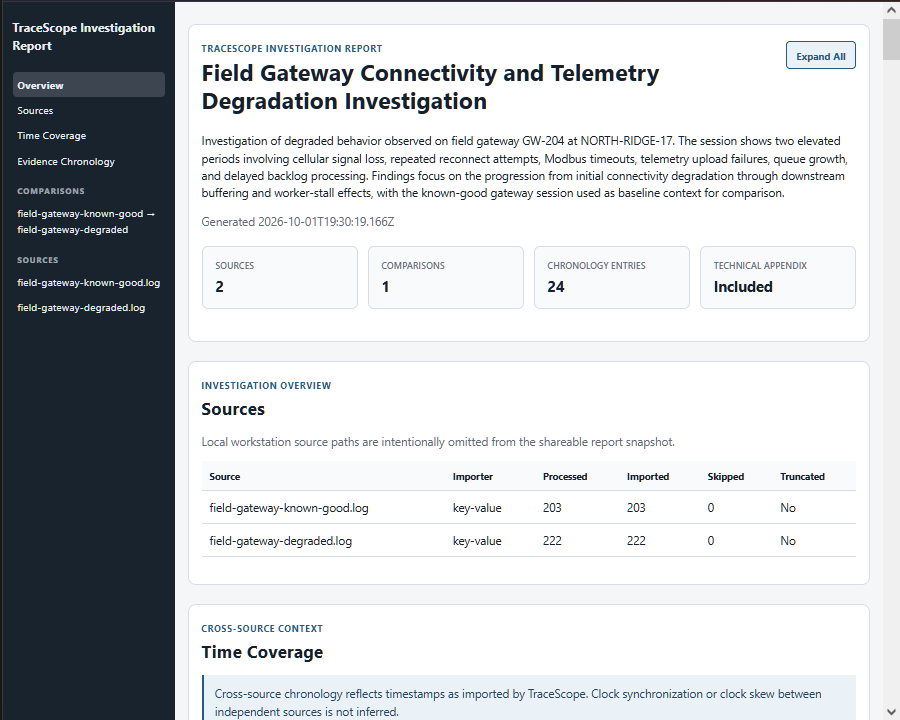
- Generate self-contained HTML reports from selected investigation sessions and comparison documents.
- Include source context, deterministic analysis, findings, supporting evidence, and optional technical information.
- Navigate and expand report content in a browser without requiring external services.
- Print reports or save them as PDF through the browser.
Each HTML report captures a point-in-time result. Later changes to investigation sessions or comparison documents do not alter an exported report.
View the example HTML investigation report · View its PDF print
What's new and finalized in v1.0.0
Phase 16 completed the final application-wide consistency, usability, reliability, and release preparation work.
Workspace and evidence safety
- Completed the equal-window workspace model, allowing native top-level TraceScope windows to operate as equivalent workspace peers.
- Improved document transfer, window closing, empty-workspace behavior, and workspace lifecycle handling.
- Added unsaved-workspace-change tracking and safeguards against accidental loss of documents or uncommitted snapshot evidence.
Interface scaling and responsive layouts
- Implemented persisted, live-adjustable Interface Scale settings across major UI surfaces.
- Improved high-DPI presentation, table headers, row heights, bookmark indicators, tab controls, and Event Details.
- Added collapsible investigation sections with constrained-height capacity handling.
- Improved narrow, split-screen, and portrait-oriented layouts and protected important panels against unintended collapse.
- Preserved manual Event Table column sizing across scaling changes and workspace restoration.
Investigation workflow
- Added Event Table contextual filtering.
- Added analytics frequency drilldowns.
- Extended Follow Newest behavior to timeline navigation.
- Improved live-selection behavior and retention of view-follow preferences across transient errors.
- Added independent time-range scoping for Baseline and Comparison sessions.
Reporting
- Improved HTML report navigation and responsive presentation.
- Added expandable report content and supporting-evidence controls.
- Refined comparison presentation and browser print layouts.
Documentation and release preparation
- Completed the v1.0 user guides and technical documentation.
- Updated the README, documentation hub, screenshots, demonstrations, and example reports.
- Reviewed product claims, implementation boundaries, an...
TraceScope v0.16.0 — Live File Following & Source Continuity
TraceScope v0.16.0 completes Phase 15 — Live File Following.
This release extends TraceScope's existing file-oriented investigation workflow to actively growing log sources while preserving the application's offline, deterministic investigation model. Live evidence enters the same sortable/filterable investigation used for static files, can participate in existing analysis and findings workflows, and can be preserved durably when the external source changes or disappears.
Prerelease: TraceScope is still progressing toward the stable
v1.0.0release.v0.16.0is a development milestone intended for evaluation, testing, and portfolio demonstration.
Live File Following
Supported sources can now remain open in TraceScope while another application continues writing to them.
Live investigations support:
- incremental record admission without rebuilding the complete investigation table
- active filters that continue applying as new records arrive
- coalesced refreshes of timeline, analytics, summaries, findings, and other derived views
- Pause, Resume, and Stop controls
- optional Follow Newest behavior for keeping the event table anchored to arriving visible records
- incomplete trailing writes that are held until the producer completes the record
- same-path truncation and replacement handling through explicit source generations
- structured JSON, structured XML, and Windows Event XML sources whose outer containers are still being written
The demonstration below uses the deterministic Field Gateway Live Degradation scenario and shows live evidence entering the normal investigation workflow while Follow Newest remains active.
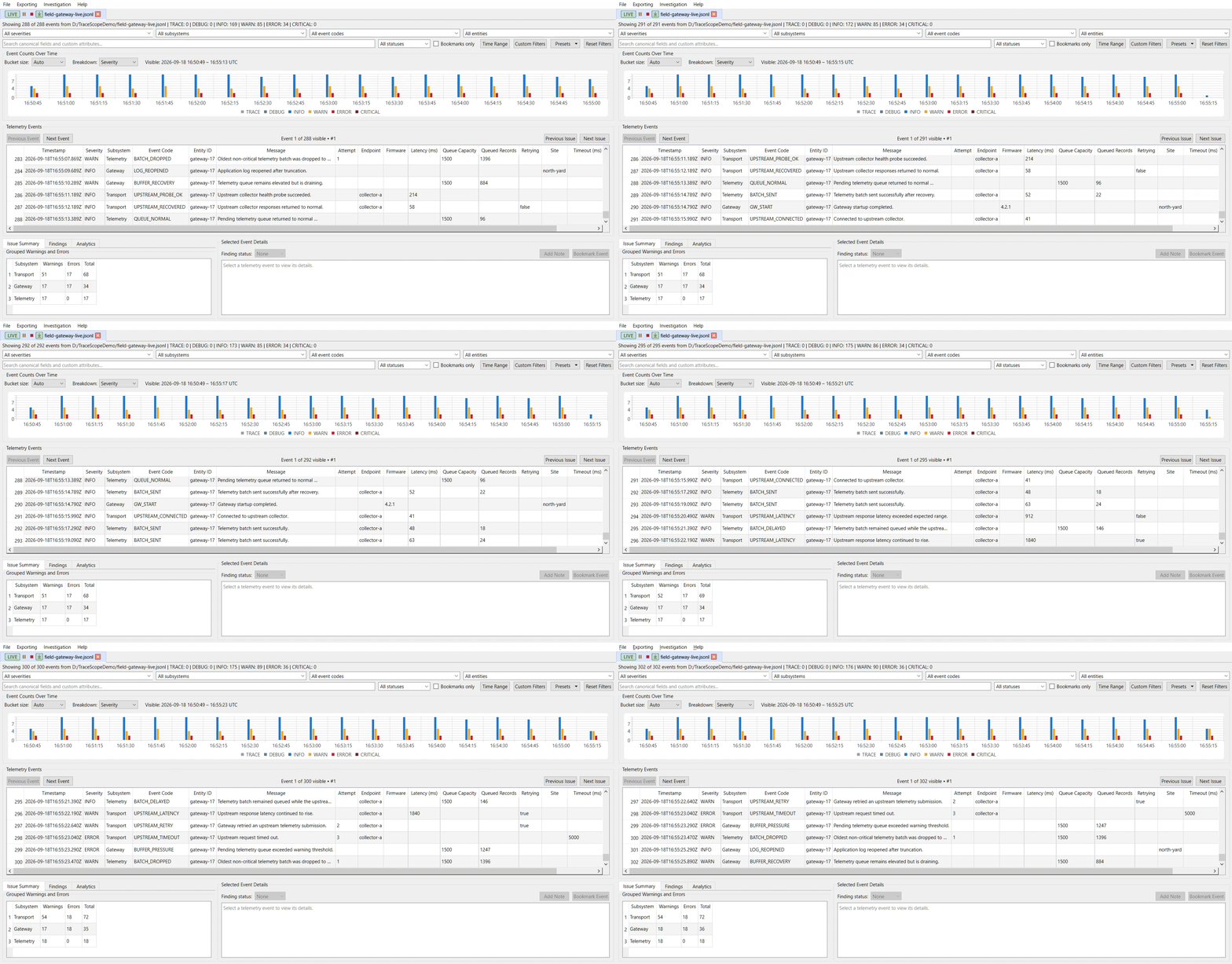
Live following remains part of the normal investigation workspace rather than introducing a separate monitoring interface.
Rotated Source Families
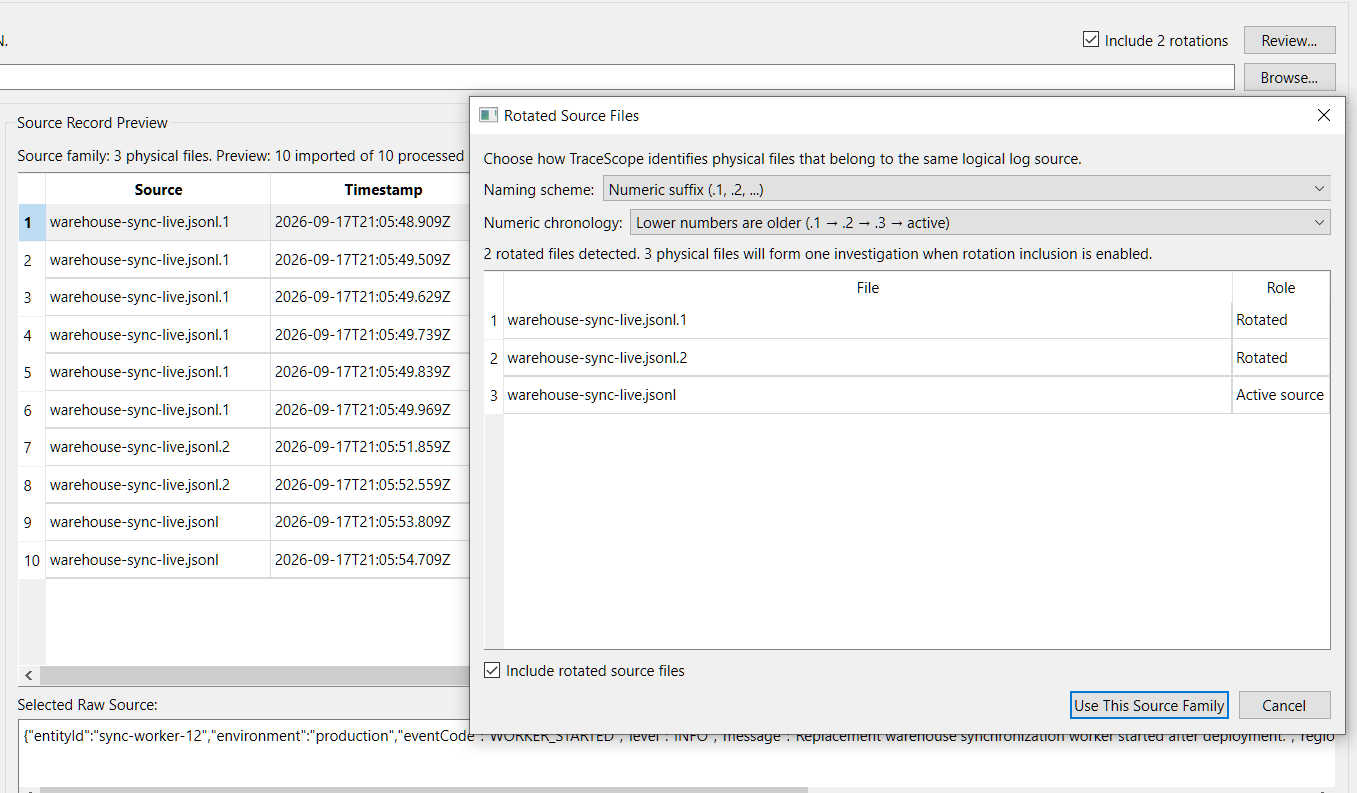
TraceScope can discover and import rotated files as members of one logical source family while retaining each physical file's independent identity.
Supported rotation configuration includes:
- numeric suffixes such as
.1,.2,.3 - numeric ordering before the extension
- date/timestamp-based naming
- reusable custom regex-based naming schemes
- configurable physical-file chronology
The active file remains the live-follow target while rotated files remain independently identifiable investigation evidence.
Durable Investigation Snapshots
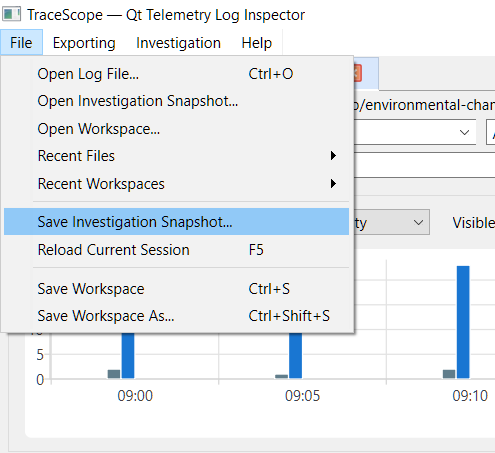
v0.16.0 adds standalone versioned .tsinv investigation snapshots.
A .tsinv snapshot preserves the normalized evidence admitted to an investigation together with its import profile, import diagnostics and counts, source-truncation state, and available source-continuity metadata. This allows evidence to survive independently of the current external log file after rotation, truncation, replacement, relocation, or cleanup.
A standalone .tsinv is deliberately not a complete workspace. Broader investigation state—including bookmarks, analyst notes, finding states, active filters, comparison documents, and UI/layout state—is persisted by .tsw workspaces.
Standalone snapshot commands are available directly from the File menu.
Explicit Source Continuity
TraceScope makes the relationship between preserved evidence and an external source explicit through three backing states:
- SourceBacked — blue: the external source is authoritative.
- Hybrid — green: durable snapshot evidence is preserved while a verified external source remains connected and can contribute continuation records.
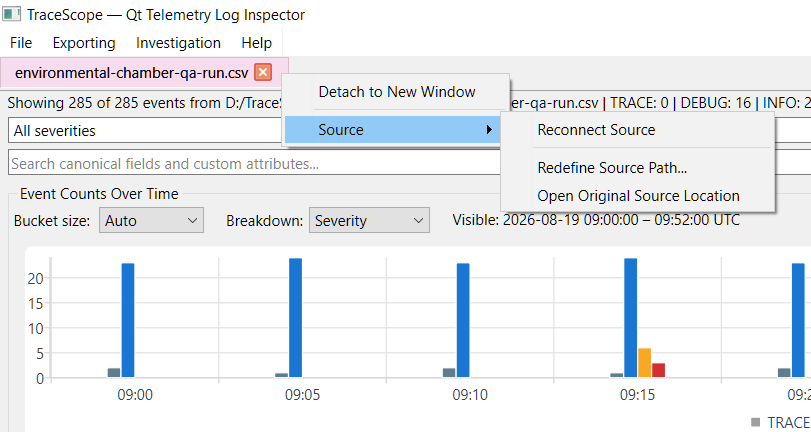
- SnapshotBacked — berry: the saved TraceScope snapshot is authoritative, so retained evidence no longer depends on the external source remaining available or unchanged.
Source lifecycle transitions are deliberately user-controlled rather than inferred silently.
A SourceBacked investigation can preserve its complete currently admitted evidence as a durable snapshot while retaining explicit source-path management.
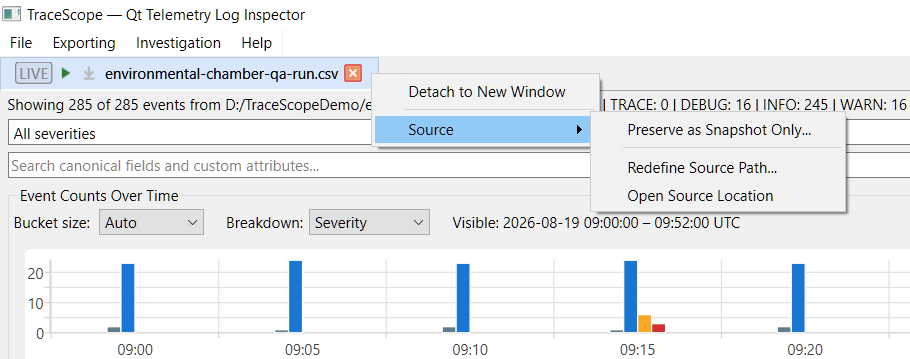
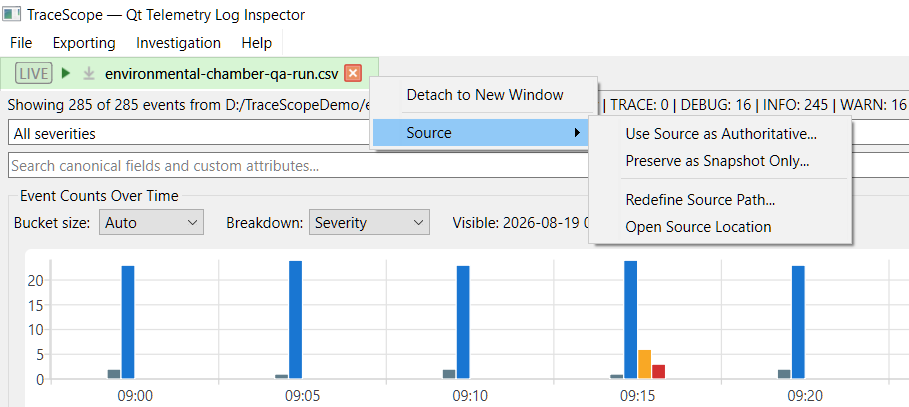
A Hybrid investigation can explicitly:
- Use Source as Authoritative
- Preserve as Snapshot Only
- Redefine Source Path
- open the current source location
A SnapshotBacked investigation can reconnect to a verified continuing source and transition to Hybrid without silently replacing its preserved evidence.
Applicable bookmarks, notes, and finding states remain tied to stable record identities when the corresponding evidence survives these transitions.
Stable Point-in-Time Comparisons and Reports
Live investigations do not change the meaning of artifacts that were already captured.
Session comparisons remain immutable point-in-time snapshots even if a source investigation later:
- receives additional live records
- reloads from disk
- reconnects to a source
- changes backing mode
- undergoes another source-lifecycle transition
Generated HTML reports follow the same rule: report content is captured before rendering and does not silently update afterward.
The representative Field Gateway report is available as a directly viewable offline-report example:
View the Field Gateway Investigation Report
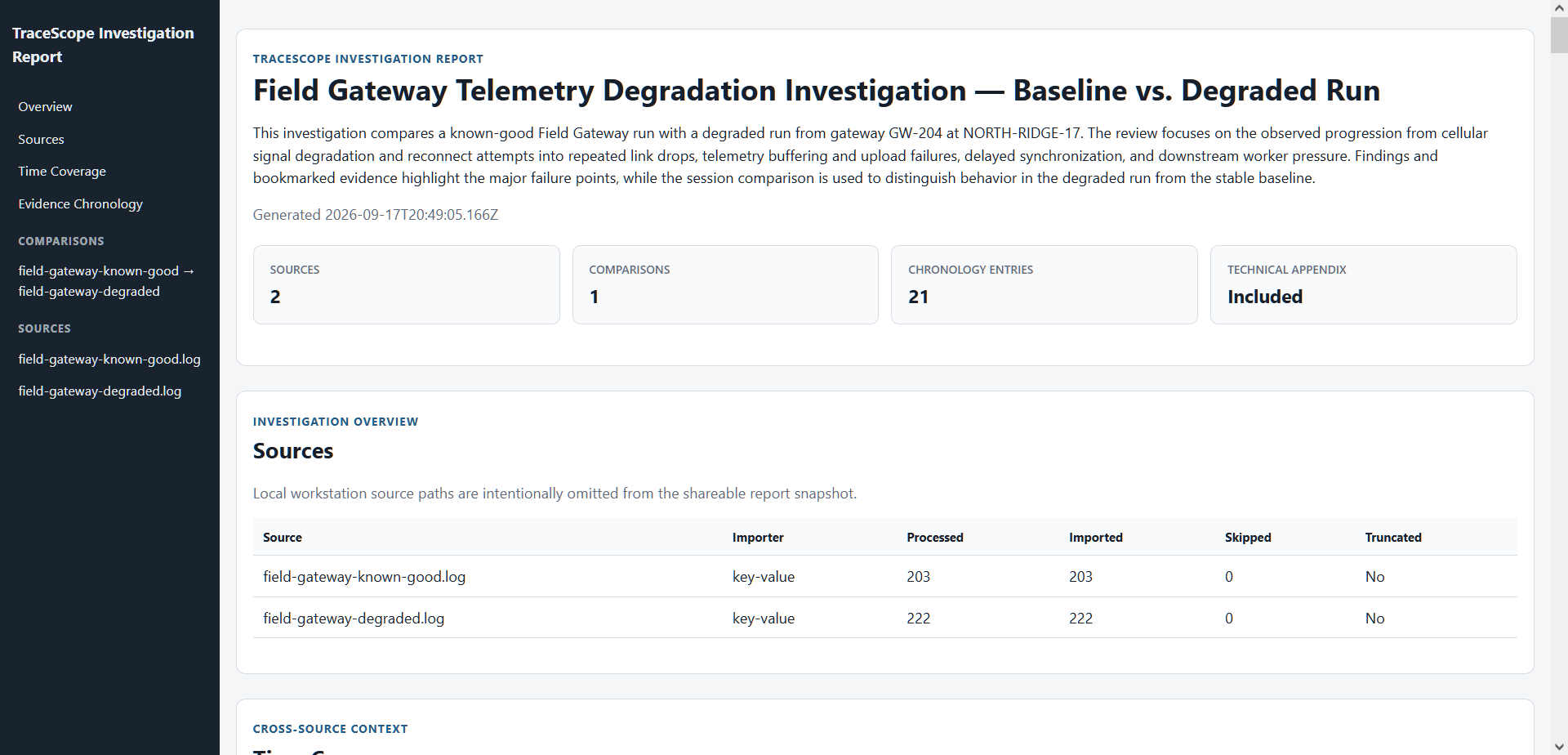
Deterministic Live-Log Generator
This release also adds a standalone TraceScope Live-Log Generator used to reproduce active-file behavior during development, verification, and demonstrations.
The generator remains completely independent of TraceScope:
semantic scenario → generic player → renderer → physical file → TraceScope
TraceScope does not communicate with the generator directly. It observes only the files the utility produces.
The deterministic scenario library can exercise:
- ordinary append growth
- controlled waits
- partial writes
- truncation
- same-path replacement
- physical file rotation
- degraded/recovery sequences
- structured open-container writing
- access-log traffic
- multiple supported source formats
A thin Qt Widgets launcher provides scenario, destination, format, playback-speed, looping, and start/stop controls while the command-line generator performs the actual file writing independently.
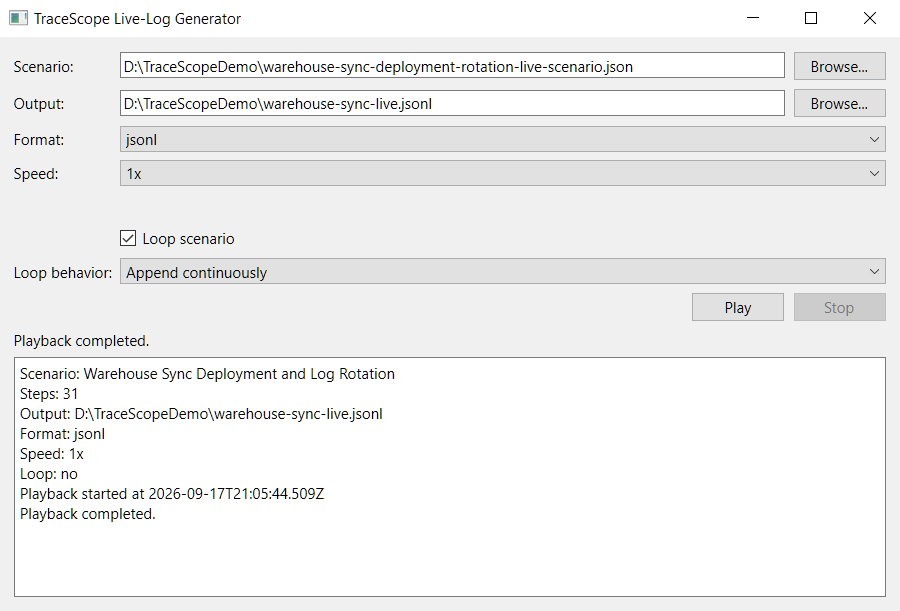
The generator source is included in the tagged v0.16.0 source tree under tools/live-log-generator/.
A separately packaged Windows x64 convenience build is also attached to this release. It was assembled locally from the tagged generator source and smoke-tested again after extraction. It is supplemental to the main TraceScope application packages and was not produced by the primary application release workflow.
No Linux generator convenience package is provided for v0.16.0. Linux users should build the generator from the tagged source with Qt 6 and CMake. Windows and Linux generator convenience packages are planned as part of the final v1.0.0 packaging work.
Documentation and Presentation
The project documentation provides a visual and technical walkthrough of the v0.16.0 application, including:
- current README and capability documentation
- completed Phase 15 roadmap documentation
- an updated Feature Screenshot Gallery organized around the investigation workflow from import through analysis, persistence, and handoff
- an animated Field Gateway live-follow demonstration
- documentation of SourceBacked, Hybrid, and SnapshotBacked behavior
- clarification of the boundary between
.tsinvevidence snapshots and.tswworkspace persistence - dedicated Live-Log Generator documentation covering scenarios, supported renderers, verification boundaries, and distribution
See the Feature Screenshot Gallery for the visual walkthrough.
Downloads
The release provides:
TraceScope-v0.16.0-windows-x64.zipTraceScope-v0.16.0-linux-x86_64.AppImageTraceScope-v0.16.0-samples.zipTraceScope-v0.16.0-live-log-generator-windows-x64.zip
The primary Windows and Linux TraceScope packages are portable builds.
The samples package contains the demonstration material packaged for the original v0.16.0 release.
The Live-Log Generator Windows...
TraceScope v0.15.0 — Reporting and Export
TraceScope v0.15.0 completes Phase 14 — Reporting and Export, expanding the investigation workflow from in-application analysis into deterministic, self-contained handoff artifacts that can be shared with developers, QA engineers, field-support teams, and other technical users.
This prerelease adds structured findings export, selected-record copy formats, and offline HTML reports for both investigation sessions and immutable session comparisons.
Reporting and Export
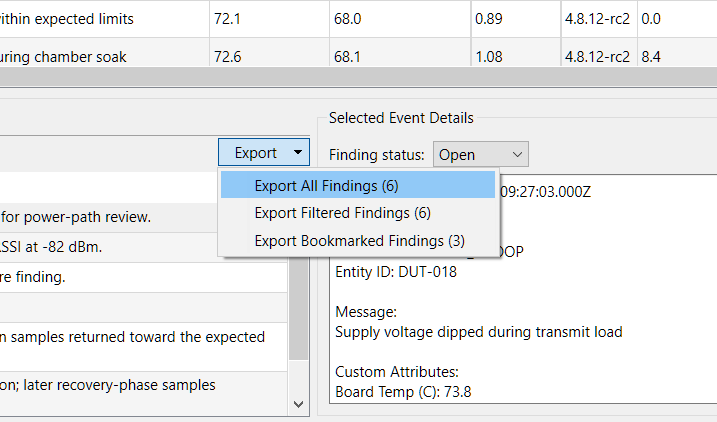
TraceScope can now:
- copy the selected record as structured JSON
- copy the selected record as formatted human-readable text
- export all, filtered, or bookmarked findings to CSV
- expose export actions through the active workspace document
- generate self-contained offline HTML investigation reports
- include multiple sessions and comparison documents in a single report
- optionally include supporting evidence and technical import/profile details
- preserve immutable report state at the moment export begins
- write reports atomically so incomplete output does not replace a valid file
Self-Contained Investigation Reports
HTML reports preserve useful investigation context without requiring TraceScope, a hosted backend, or external assets.
Reports can include:
- report title and investigation context
- explicit generation timestamp
- source and session context
- captured record counts and time coverage
- deterministic timeline and grouped analysis
- event-code and entity frequencies
- timestamp cadence
- detected warning/error bursts
- findings, bookmarks, and analyst notes
- supporting evidence records
- direct links from investigator annotations to matching evidence
- optional technical import/profile appendix
Source paths are omitted from the main report presentation to make exported artifacts more appropriate for sharing.
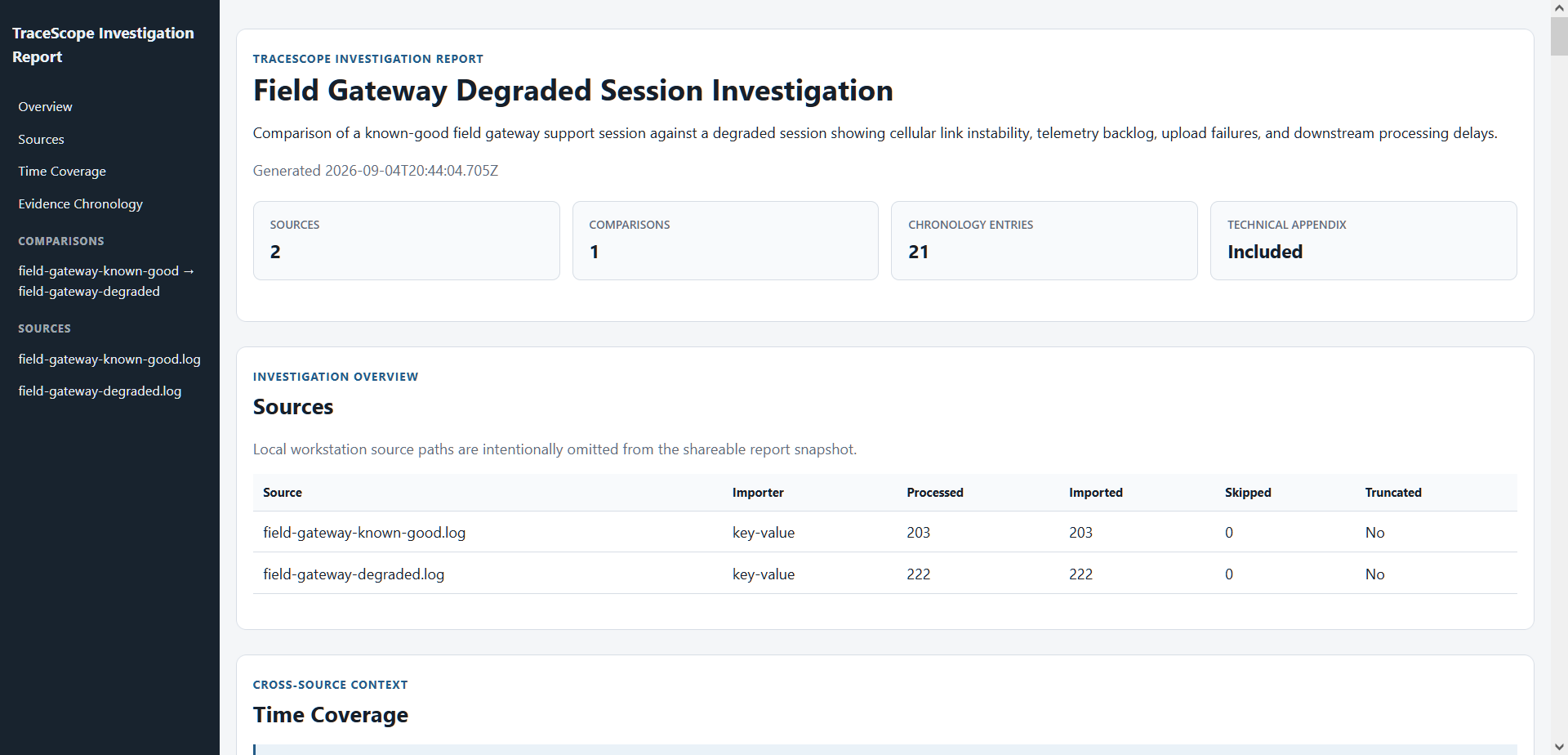
A representative generated Field Gateway investigation report is published for direct browser viewing:
View the representative Field Gateway investigation report
Comparison Reporting
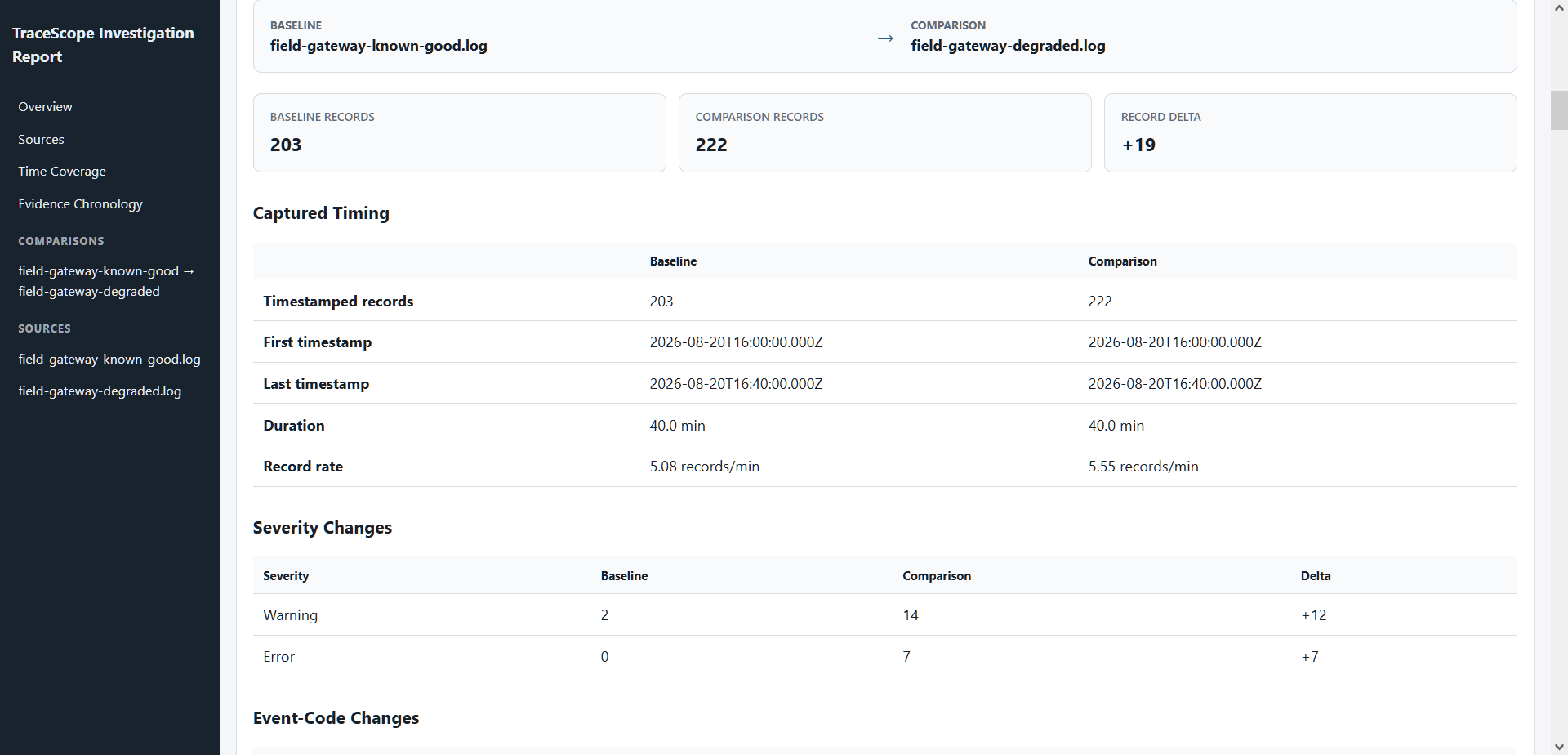
Immutable Baseline → Comparison documents can now leave TraceScope as part of an offline report.
Comparison reporting includes:
- baseline and comparison session context
- timing and record-rate differences
- severity changes
- event-code differences
- elevated subsystem activity
- elevated entity activity
- categorical and numeric custom-field differences
- shared-settings burst comparison
Missing dimensions are reported as unavailable rather than silently treated as zero, and comparison output remains descriptive rather than claiming automated diagnosis or root cause.
Investigation Workflow Improvements
Phase 14 also includes:
- document-scoped export menus for investigation and comparison documents
- immutable report configuration and snapshot models separated from live widgets
- improved separation between visible investigation state and deterministic analysis population
- responsive report navigation
- direct annotation-to-evidence navigation
- automatic expansion and highlighting of linked supporting evidence
- improved report table density and readability
- capability-aware omission and unavailable-state handling
- additional regression coverage for capture, serialization, escaping, comparison rendering, evidence navigation, and deterministic output
Documentation
The README, Expansion Roadmap, and Feature Screenshot Gallery have been refreshed for v0.15.0, including updated investigation scenarios and current screenshots covering import, filtering, analytics, findings, multi-session workspaces, comparison, persistence, export, and reporting.
Download
Portable Windows and Linux packages, along with the platform-neutral sample bundle, are attached to this prerelease.
The included samples are fictional and self-contained and are intended to demonstrate TraceScope's investigation workflows without requiring external services.
v0.15.0 is a prerelease milestone.
Phase 15 — Live and Long-Running Investigation is next, building on the immutable session, comparison, persistence, and reporting foundations completed through this release.
TraceScope v0.14.0 — Workspace and Profile Persistence
TraceScope v0.14.0 — Workspace and Profile Persistence
TraceScope v0.14.0 completes Phase 13 — Workspace and Profile Persistence, adding local workspace save/restore so multi-session investigations can be resumed across application restarts.
Highlights
- save and reopen complete TraceScope workspaces using a versioned local JSON format
- restore loaded sessions with the source and import-profile context required to reproduce each investigation
- persist bookmarks, analyst notes, finding status, active filters, and session presentation state
- persist immutable Baseline → Comparison snapshots independently of their original live sessions
- restore comparison presentation state
- restore workspace document ordering and the active document
- restore detached workspace grouping, window geometry, maximized state, and main-window geometry
- recover workspaces with missing source files by locating moved files or skipping unavailable sessions
- preserve the currently open workspace when restoration is cancelled or cannot safely proceed
- add Open Workspace, Save Workspace, and Save Workspace As workflows
- add persistent Recent Workspaces history alongside recent files and profiles
- support workspace Open/Save shortcuts while detached TraceScope windows are focused
- cleanly close detached workspace windows when the main application window exits
- expand serialization round-trip and compatibility coverage for persisted workspace state
Workspace restoration remains source-based and reproducible: source files are re-imported using their saved import-profile context rather than embedding a separate database or opaque copy of the imported dataset.
Missing source files do not require discarding an otherwise recoverable workspace. TraceScope can locate a moved source, skip the unavailable session, or cancel restoration before replacing the currently open investigation.
Comparison documents remain immutable snapshots. Their saved analysis does not silently change if an original source session is unavailable, reloaded, or later modified.
Roadmap
With Phase 13 complete, development moves to Phase 14 — Reporting and Export, targeted for v0.15.0.
The next phase expands the existing CSV handoff workflow with findings export, selected-record copy actions, and offline HTML investigation and comparison reports built from immutable point-in-time report state.
Live File Following now follows as Phase 15 so reporting can first complete the current investigation workflow while retaining a clean future path for mutable live sessions and live comparisons.
Downloads
This prerelease includes:
TraceScope-v0.14.0-windows-x64.zipTraceScope-v0.14.0-linux-x86_64.AppImageTraceScope-v0.14.0-samples.zip
The Windows and Linux packages are portable native desktop builds. The samples archive contains the repository's demonstration logs and reusable import profiles.
All release artifacts were produced through the project's cross-platform CI/release workflow and smoke-tested after download.
TraceScope v0.13.0 — Session Comparison and Detachable Workspaces
TraceScope v0.13.0 — Session Comparison and Detachable Workspaces
This prerelease completes Phase 12 — Session Comparison, adding structured Baseline → Comparison analysis for related investigations along with a detachable multi-window workspace for arranging sessions and comparisons side by side.
v0.13.0 also improves TraceScope's behavior in horizontally constrained and portrait-oriented desktop layouts, making the multi-window workflow practical on split-screen and multi-monitor setups.
Session Comparison
TraceScope can now create a dedicated comparison document from two complete imported sessions using an explicit Baseline → Comparison orientation.
Comparisons are built from immutable snapshots of the complete imported sessions rather than their current filtered views. Later filter changes, reloads, or source-session closure therefore do not silently change the meaning of an existing comparison.
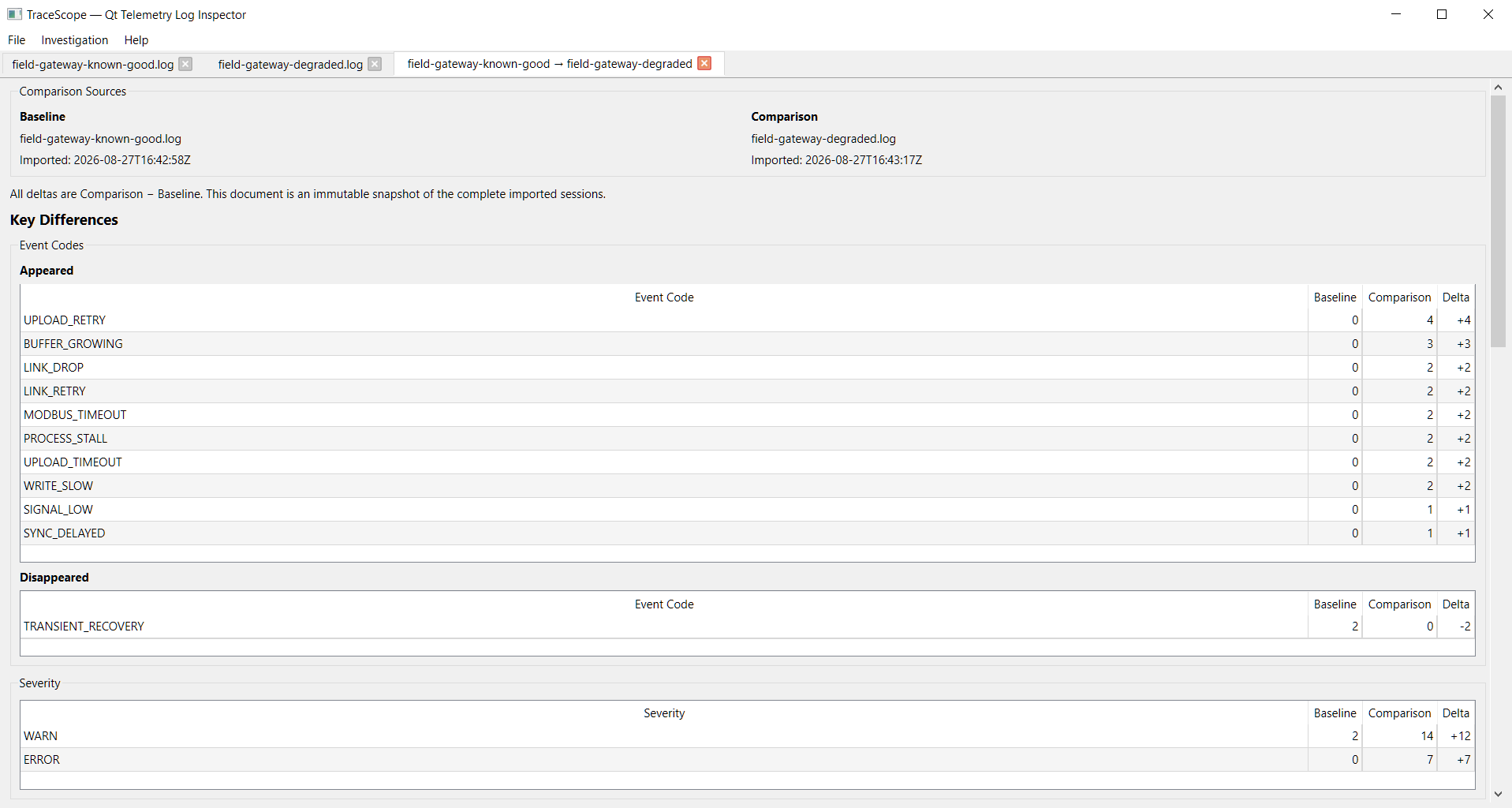
Comparison analysis prioritizes investigation-relevant differences including:
- event codes that appeared, disappeared, or changed in frequency
- severity-count changes
- elevated subsystem activity
- elevated entity activity
- conservative shared custom-field differences
- optional burst comparison
- session-level totals, duration, and event rate
All deltas use Comparison − Baseline orientation.
Missing dimensions are reported as unavailable rather than interpreted as zero, unchanged or low-value output is omitted, and comparison results remain descriptive rather than claiming root cause or causal diagnosis.
Explicit Comparison Setup
Comparison creation keeps its semantics visible before analysis begins:
- choose Baseline and Comparison independently
- swap orientation directly in the setup dialog
- prevent comparison of a session with itself
- optionally compare burst behavior
- use one shared burst-detection configuration for both sessions
When burst comparison is requested, TraceScope applies the same explicit settings to both complete session snapshots so differences are evaluated on a consistent basis.
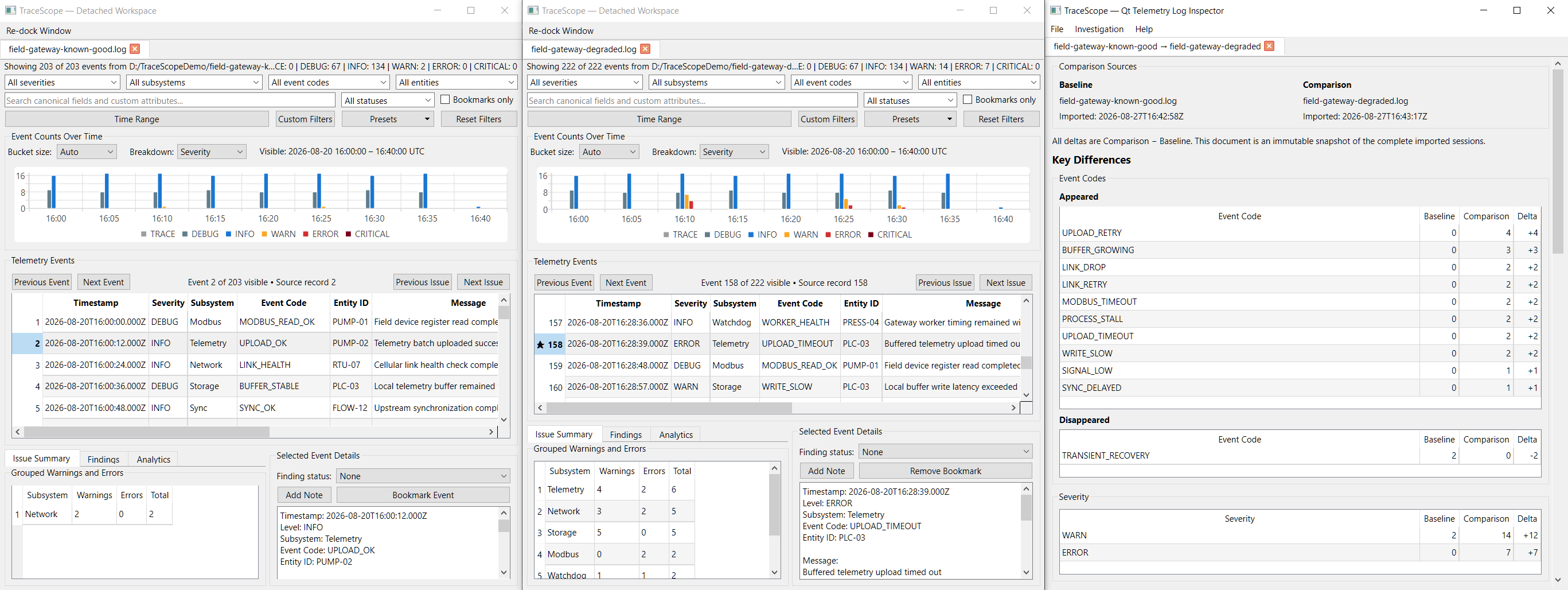
Detachable Multi-Window Workspace
Investigation sessions and comparison documents are now first-class workspace documents that can be:
- reordered within a workspace
- dragged out into independent windows
- moved between detached windows
- grouped with multiple documents in one detached window
- dragged back into the main workspace
- re-docked as an entire detached document group
This makes workflows such as keeping a known-good session, degraded session, and their comparison visible simultaneously practical without duplicating or losing investigation state.
Constrained and Portrait Workspaces
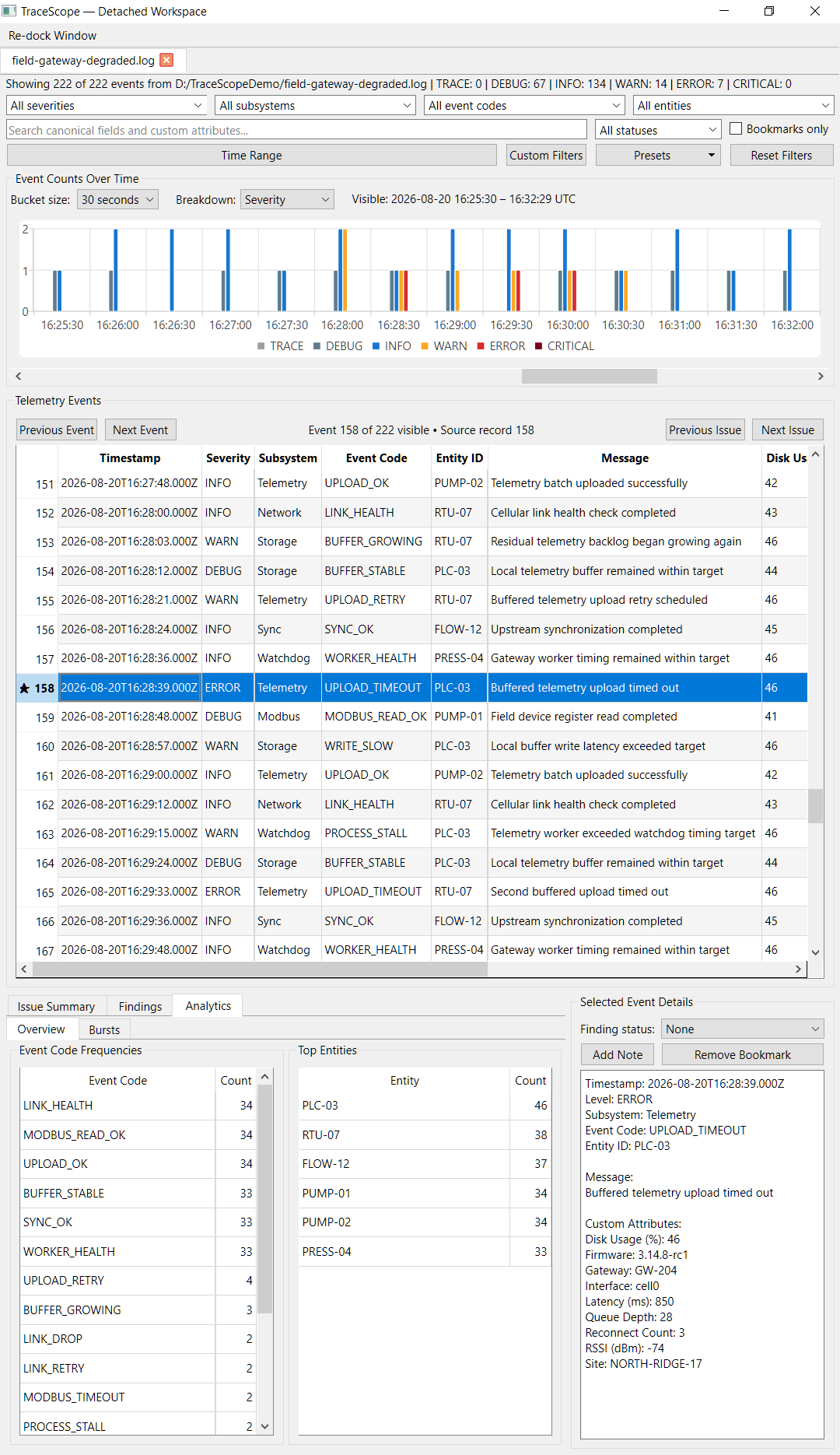
The new multi-window workflow exposed several places where the investigation interface assumed a wide desktop window. v0.13.0 includes responsive improvements specifically for narrower desktop workspaces.
Updates include:
- session summaries that elide instead of forcing window width
- filter controls that reflow as horizontal space decreases
- grouped review surfaces that can shrink without imposing large minimum widths
- Selected Event Details controls that stack when needed
- adaptive review/detail splitter proportions
- fine-resolution timelines that reduce the visible bucket window while preserving the selected resolution
- responsive timeline rendering during window resizing
These changes are intended for practical split-screen and portrait-monitor use rather than as a separate mobile-style interface.
Highlights
- Added immutable complete-session comparison snapshots
- Added explicit Baseline → Comparison orientation
- Added comparison orientation swapping
- Added impact-prioritized Event Code comparison
- Added severity-count comparison
- Added elevated subsystem and entity comparison
- Added conservative shared custom-field comparison
- Added optional burst comparison using shared settings
- Added session-context comparison for totals, duration, and event rate
- Distinguishes unavailable comparison dimensions from valid zero-valued results
- Keeps comparison documents independent of later source-session changes
- Added generic detachable workspace-document infrastructure
- Added drag-out, cross-window movement, and re-docking workflows
- Added support for multiple documents inside detached workspace windows
- Added responsive narrow-width filter layouts
- Added responsive session-summary presentation
- Added width-aware fine-resolution timeline windows
- Improved Analytics / Findings and Selected Event Details behavior at constrained widths
- Added comparison-dialog regression coverage for defaults, orientation, validation, and shared burst settings
- Refreshed the README, roadmap, and complete Feature Screenshot Gallery
Existing Investigation Workflow
Session comparison remains integrated with TraceScope's existing offline investigation workflow rather than operating as a separate analysis product.
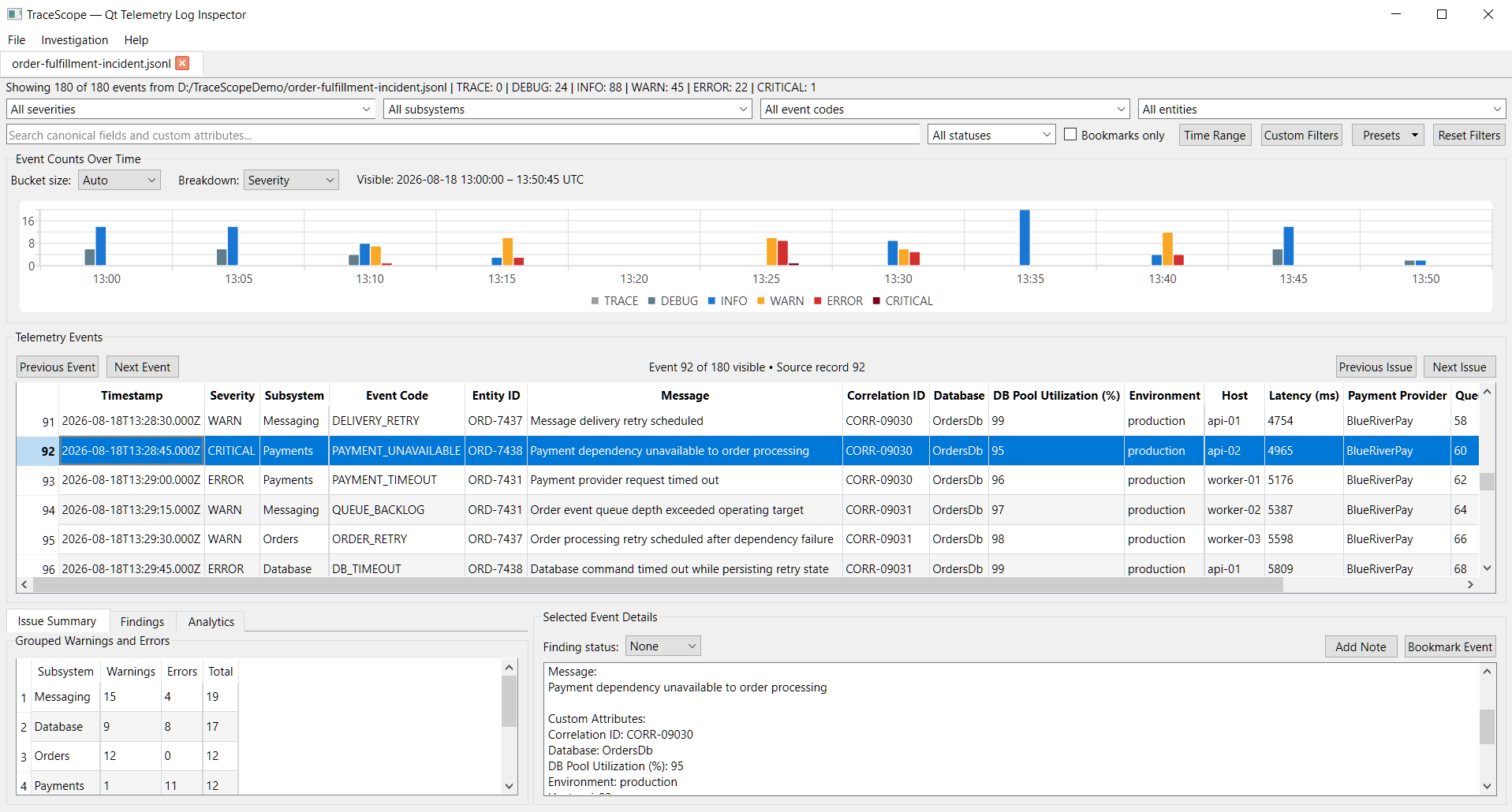
Individual sessions continue to provide:
- reusable import profiles and mapped previews
- canonical and dynamic custom fields
- multi-criteria filtering and named presets
- scalable timeline navigation
- deterministic analytics
- explainable burst detection
- bookmarks, analyst notes, and finding states
- recent-file workflows
- filtered CSV export
- responsive large-file import and cancellation
Documentation and Samples
The product screenshot set and Feature Screenshot Gallery have been refreshed for v0.13.0, including new coverage for:
- comparison setup
- comparison results
- detachable multi-window workflows
- constrained/portrait workspaces
- large-file progress
- recent files
- filtered CSV export
The matched fictional Field Gateway Known Good / Degraded samples provide a reproducible session-comparison workflow, while the existing Order Fulfillment and Environmental Chamber scenarios continue to demonstrate filtering, analytics, bursts, findings, and export.
See the repository documentation for the full supported-format boundary, import-profile workflow, performance measurements, feature gallery, and remaining roadmap.
Verification
The v0.13.0 Windows and Linux release packages were produced by the tagged CI build. The downloaded release artifacts were smoke-tested after packaging before publication.
Downloads
TraceScope-v0.13.0-windows-x64.zipTraceScope-v0.13.0-linux-x86_64.AppImageTraceScope-v0.13.0-samples.zip
TraceScope v0.12.0 — Analytics and Burst Detection
TraceScope v0.12.0 — Analytics and Burst Detection
This prerelease adds deterministic, explainable investigation analytics and configurable warning/error burst detection to TraceScope's existing filtering, timeline, findings, and multi-session workflows.
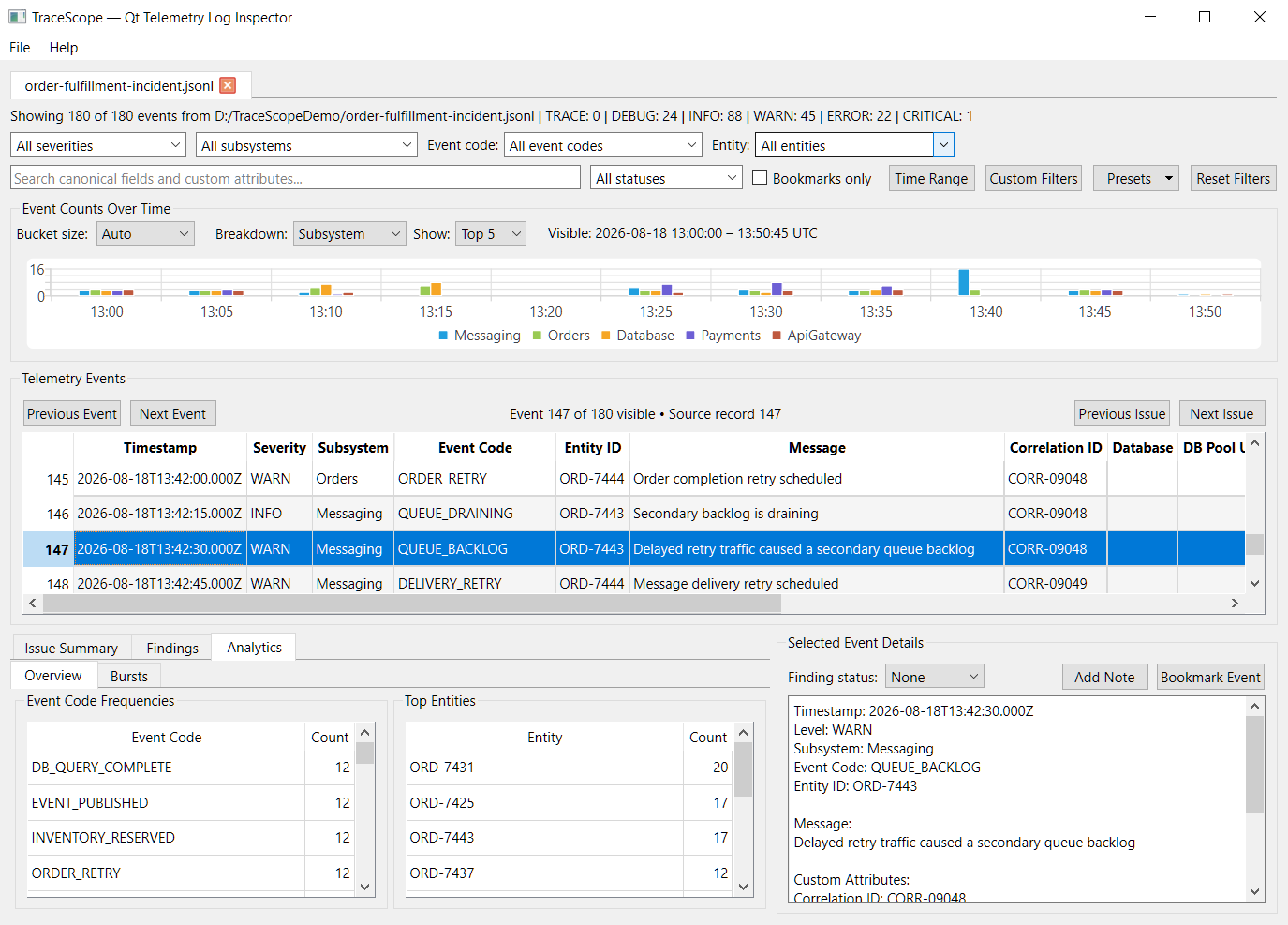
Analytics Overview
TraceScope now provides deterministic event-code frequencies and Top Entities when those canonical fields are available. Timeline analysis can also break activity down by severity or by the most frequent subsystems.
Deterministic Burst Detection
WARN, ERROR, and CRITICAL activity can now be grouped into explainable investigation bursts using explicit thresholds and timing rules.
Auto mode derives timing from the investigation's timestamp cadence, while Manual mode allows direct control. Each detected burst explains why it qualified and summarizes contributing severities, subsystems, event codes, entities, and source records.
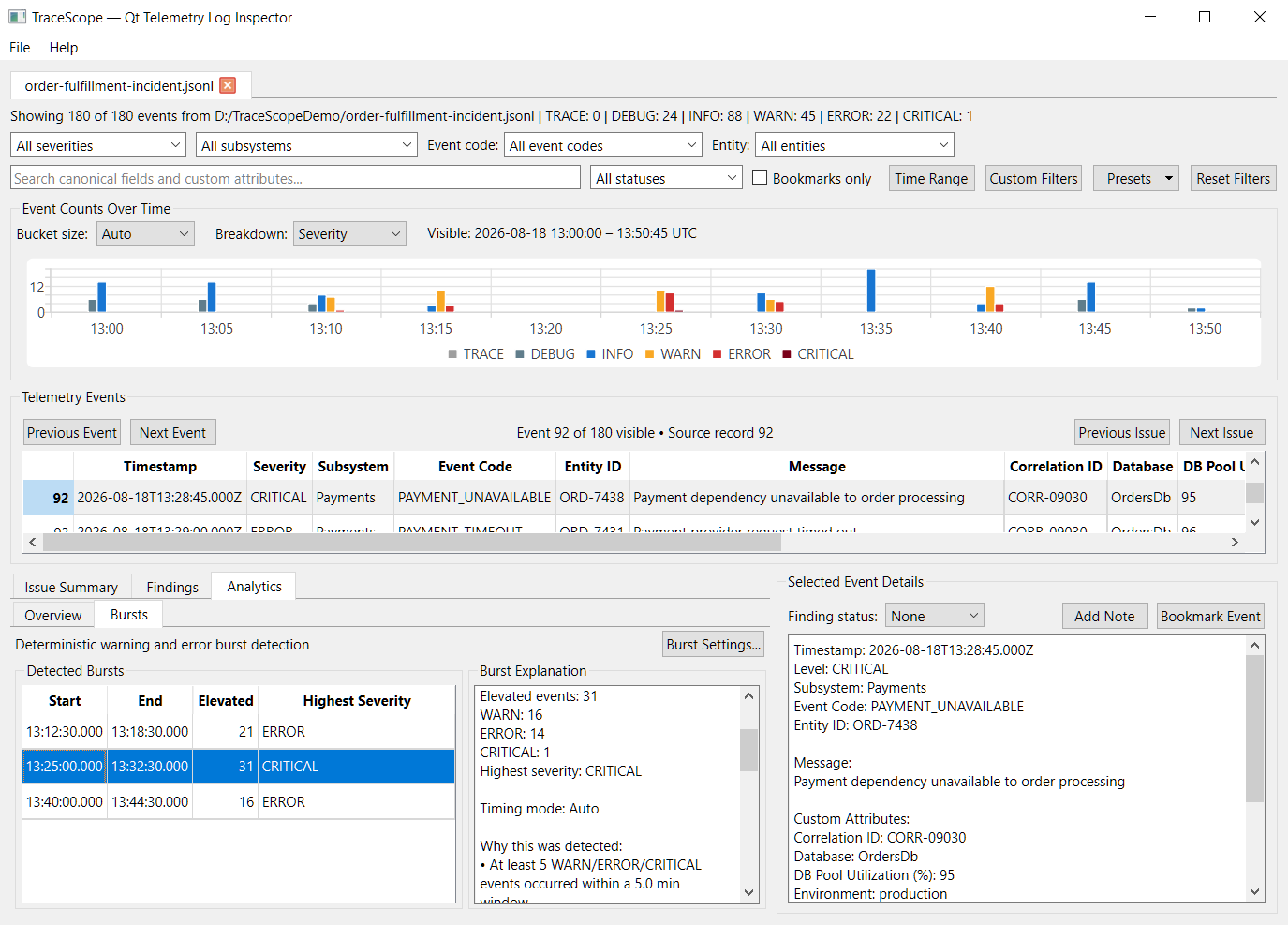
Burst detection is deterministic analysis. It is not presented as AI anomaly detection, automated root-cause diagnosis, or a replacement for centralized observability platforms.
Timeline Trends
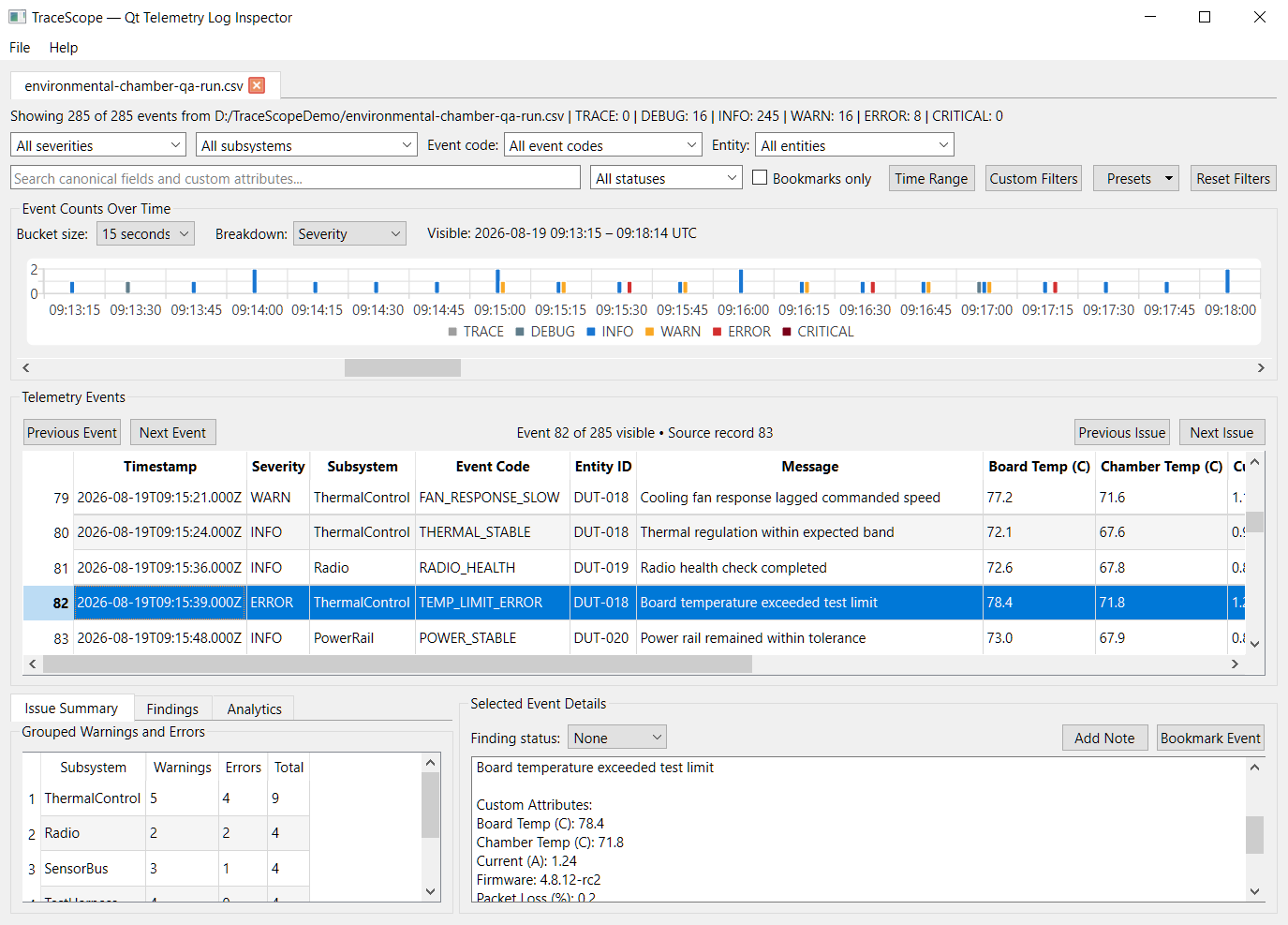
The existing scalable timeline now supports Severity and Subsystem breakdowns, including Top 5 / Top 10 subsystem presentation. Severity series also use explicit semantic colors for clearer informational, warning, error, and critical activity.
Fine-resolution timelines continue to use bounded windowed rendering and horizontal navigation rather than materializing unbounded bucket ranges.
Highlights
- Added deterministic event-code frequency analysis
- Added deterministic entity frequency analysis with Top Entities presentation
- Added severity and subsystem timeline breakdowns
- Added scalable Top 5 / Top 10 subsystem trend visualization
- Added adaptive investigation cadence analysis
- Added configurable WARN / ERROR / CRITICAL burst detection
- Added Auto and Manual burst timing modes
- Added transparent burst explanations including:
- severity counts
- trigger reasons
- timing settings
- contributing source records
- subsystem frequencies
- event-code frequencies
- entity frequencies
- Added burst drill-down while preserving unrelated active filters
- Added semantic severity colors to timeline visualization
- Preserved analytics and timeline presentation state independently per session
- Corrected event-table source-record numbering so it remains consistent with Findings and navigation context
New Investigation Samples
This release adds larger fictional scenarios intended to demonstrate realistic TraceScope workflows:
- Order Fulfillment Incident — business-application degradation involving database saturation, retries, payment/dependency failures, recovery, and messaging backlog
- Environmental Chamber QA Run — engineering-test data covering thermal instability, power/radio faults, recovery, and cooldown validation
- Field Gateway Known Good / Degraded — matched industrial-gateway support captures covering cellular instability, Modbus timeouts, telemetry buffering, and recovery behavior
Reusable import profiles are included where applicable.
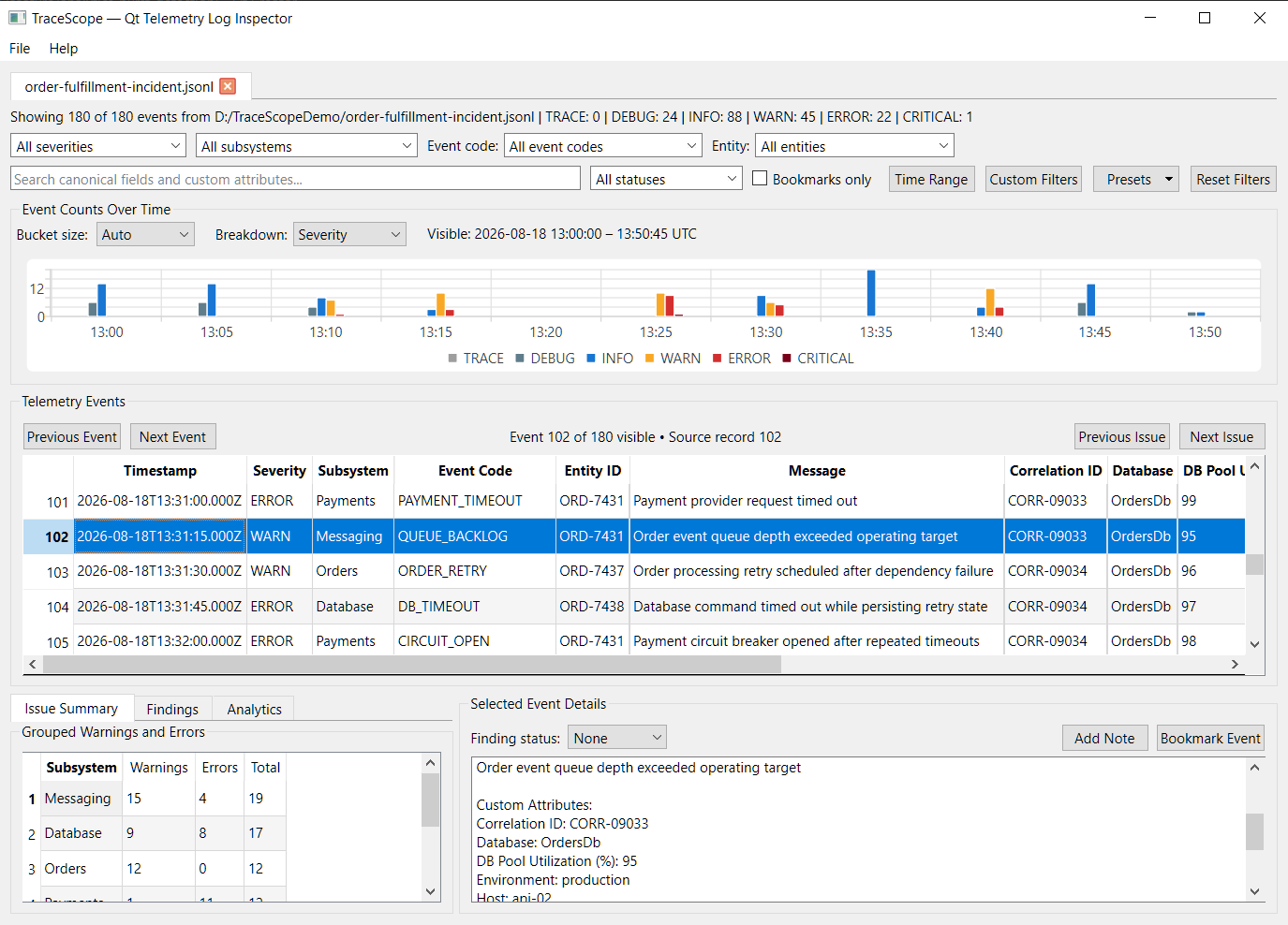
Investigation Workspace
The new analytics remain integrated with TraceScope's existing filtering, navigation, findings, source inspection, multi-session workspace, and export workflow rather than operating as a separate dashboard.
Documentation
- Restructured the README around prospective-user workflows and downloads
- Added a complete Feature Screenshot Gallery
- Refreshed the product screenshot set
- Updated the expansion roadmap for completed Phase 11 work and active Phase 12 development
See the repository documentation for the full supported-format boundary, import-profile workflow, performance notes, feature screenshots, and remaining roadmap.
Downloads
TraceScope-v0.12.0-windows-x64.zipTraceScope-v0.12.0-linux-x86_64.AppImageTraceScope-v0.12.0-samples.zip
TraceScope v0.11.0 — Bookmarks, Notes, and Findings
TraceScope v0.11.0 adds lightweight investigation state so engineers can preserve conclusions and important evidence while working through diagnostic sessions.
Highlights
- Added event bookmarks tied to stable record identities
- Added bookmark-only filtering and compact bookmark indicators in the event table
- Added multiline analyst notes with a modeless, wrapped note editor
- Added finding statuses: Open, Resolved, and Dismissed
- Added finding-status filtering alongside the existing investigation filters
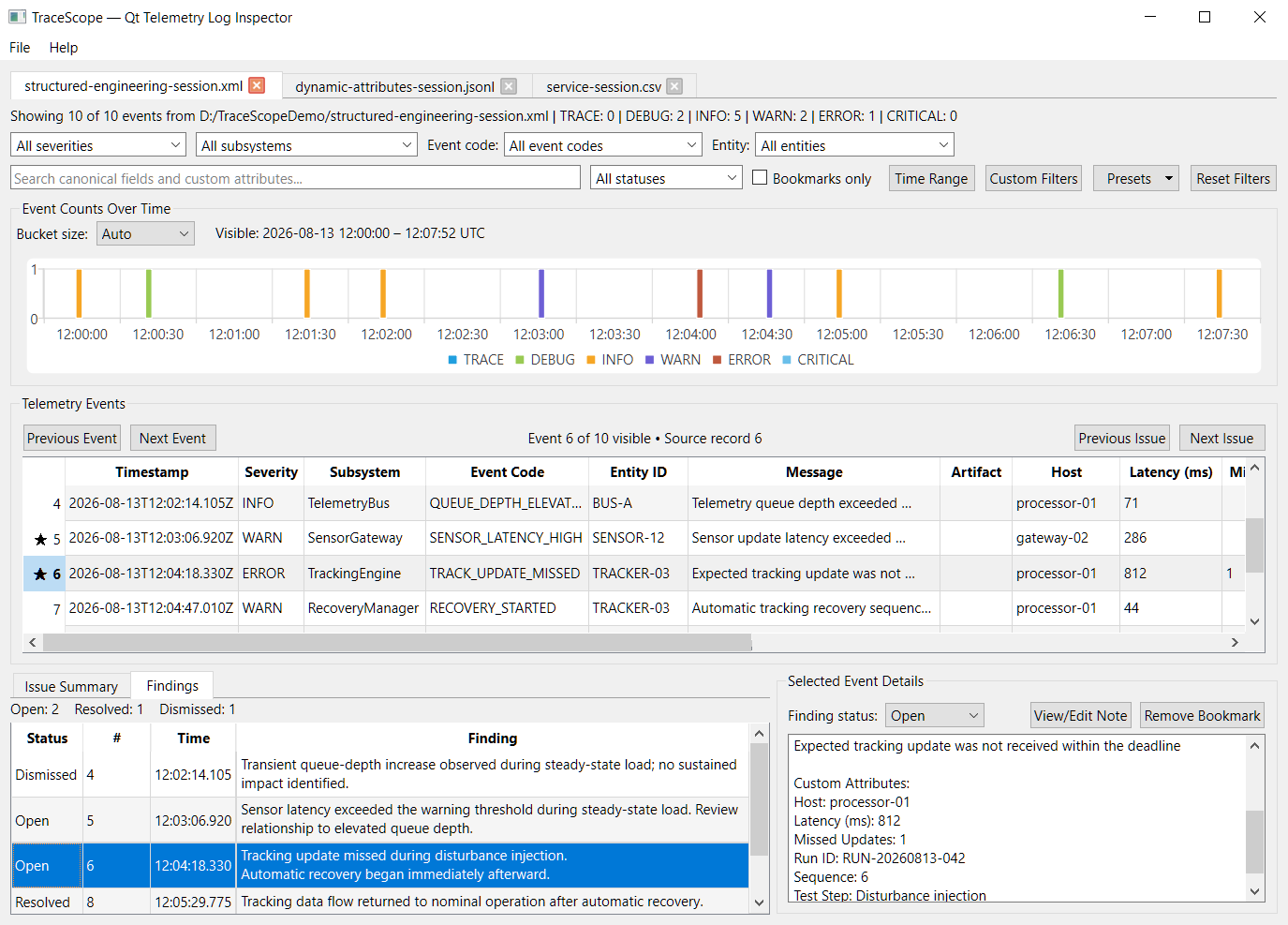
- Added a dedicated Findings review panel with status counts, source context, timestamps, and wrapped analyst notes
- Added double-click navigation from findings back to their exact source records
- Added filter adaptation when a finding's source record is hidden by the current investigation criteria
- Preserved applicable investigation state across in-place session reloads when stable record identities remain
- Expanded automated coverage for investigation state, filtering, and source-record navigation
- Refreshed the application screenshots and documentation for the completed Phase 10 workflow
Investigation annotations in v0.11.0 remain local to the current application session. Saving and reopening complete investigation workspaces is planned for a later persistence phase.
Findings Workflow
The new Findings view turns bookmarks, notes, and finding statuses into a compact investigation record while keeping the underlying source events directly accessible.
Verification
- Windows and Linux CI builds pass
- Full automated test suite passes on both platforms
- Windows and Linux release artifacts were downloaded and smoke tested
- Representative bookmark, note, finding, filtering, navigation, session-switching, and reload workflows were manually verified
Phase 10 — Bookmarks, Notes, and Findings is complete. Development now moves to Phase 11 — Analytics and Burst Detection.
TraceScope v0.10.0 — Advanced Filtering and Navigation
TraceScope v0.10.0 completes Phase 9 of the expansion roadmap with a substantially deeper investigation workflow for narrowing large normalized record sets and moving efficiently through relevant events.
Highlights
- Added multi-select severity filtering
- Added optional time-range filtering
- Added event-code filtering when event-code data is available
- Added entity filtering when entity data is available
- Added dynamic exact-value custom-field filtering
- Added custom-field filter shortcuts directly from event-table cells
- Added one-click filter reset
- Added persistent named filter presets backed by local application settings
- Preserved independent filter state across investigation sessions
- Batched complete filter-state application to avoid repeated proxy resets on large investigations
- Added previous/next visible-event navigation
- Added previous/next WARN, ERROR, and CRITICAL navigation with wraparound
- Added visible-event position and source-record context
- Added drill-down from grouped warning/error summaries
- Added timeline bucket drill-down by time and, where applicable, severity
- Preserved existing active filters when drill-down further narrows an investigation
- Refined the main investigation layout to accommodate the expanded filtering and navigation workflow
- Refreshed documentation and screenshots for the
v0.10.0interface
Canonical fields remain optional. Controls that depend on severity, event code, entity ID, timestamps, or other canonical data appear only when the active investigation supports them, while custom-field filtering and unrelated investigation features remain available independently.
The release also preserves the multi-session workspace, responsive background import, progress and cancellation behavior, scalable fine-resolution timeline navigation, and representative cross-format ingestion introduced in earlier prereleases.
Verification
- Full automated test suite passes locally
- Windows and Linux CI verification completed
- Manual regression testing completed across filtering, presets, navigation, sorting, drill-down, session switching, timeline behavior, and representative large investigations
- Downloaded Windows and Linux release artifacts were smoke tested
- Packaged sample archive was verified
Downloads
TraceScope-v0.10.0-windows-x64.zipTraceScope-v0.10.0-linux-x86_64.AppImageTraceScope-v0.10.0-samples.zip
This remains a prerelease while the broader TraceScope expansion continues toward v1.0.0.
TraceScope v0.9.0 — Multi-Session Investigation Workspace
TraceScope v0.9.0 expands the desktop investigation workflow from a single active source into a multi-session workspace.
Multiple imported log sessions can now remain open in the same application instance, allowing related application, service, device, QA, field-support, or engineering-test logs to be investigated side by side without repeatedly replacing the current source.
This remains a prerelease while TraceScope continues toward v1.0.0.
Multi-Session Investigation Workspace
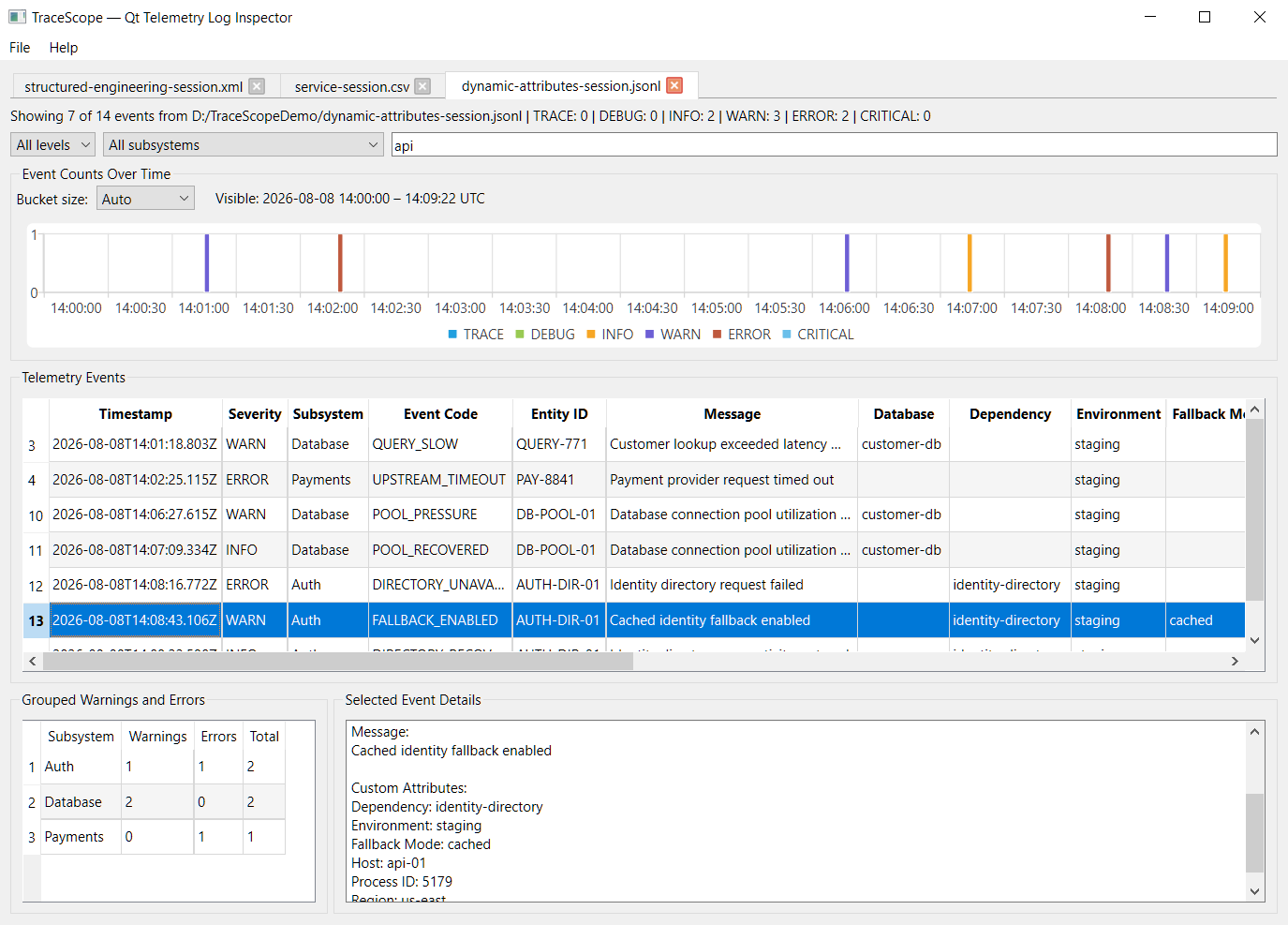
v0.9.0 adds:
- multiple simultaneously open investigation sessions
- tab-based session switching and closing
- independent per-session investigation state
- preservation of per-session filters and search state
- per-session source metadata, import profile, and import diagnostics
- active-session reloading without creating a duplicate tab
- reload cancellation that preserves the existing investigation
- refreshed source metadata after reload
- optimized switching between larger investigations
- cached session-derived data and table column widths where useful
- a clean empty state after the final session is closed
Each session owns its own investigation controller and record/model state, allowing TraceScope to move between related evidence without rebuilding the investigation each time.
Recent Files and Profiles
TraceScope now keeps bounded, persistent histories for recently used source files and import profiles.
Recent Files
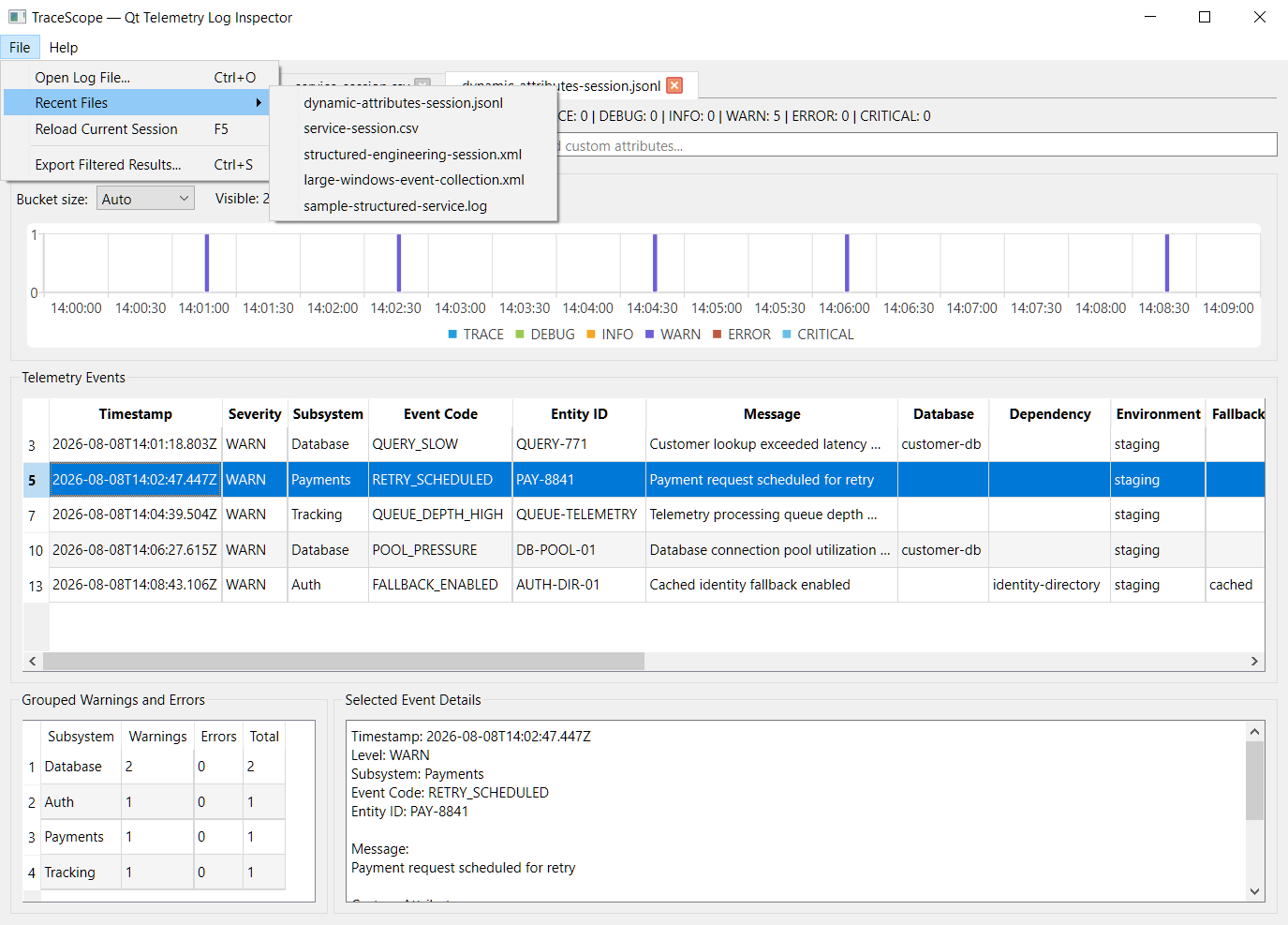
Recent files:
- persist across application restarts
- are ordered most-recent-first
- move back to the top when reused instead of creating duplicates
- are removed when a missing or renamed source is detected
- reopen through the normal Import Configuration workflow rather than silently importing a source
Recent Profiles
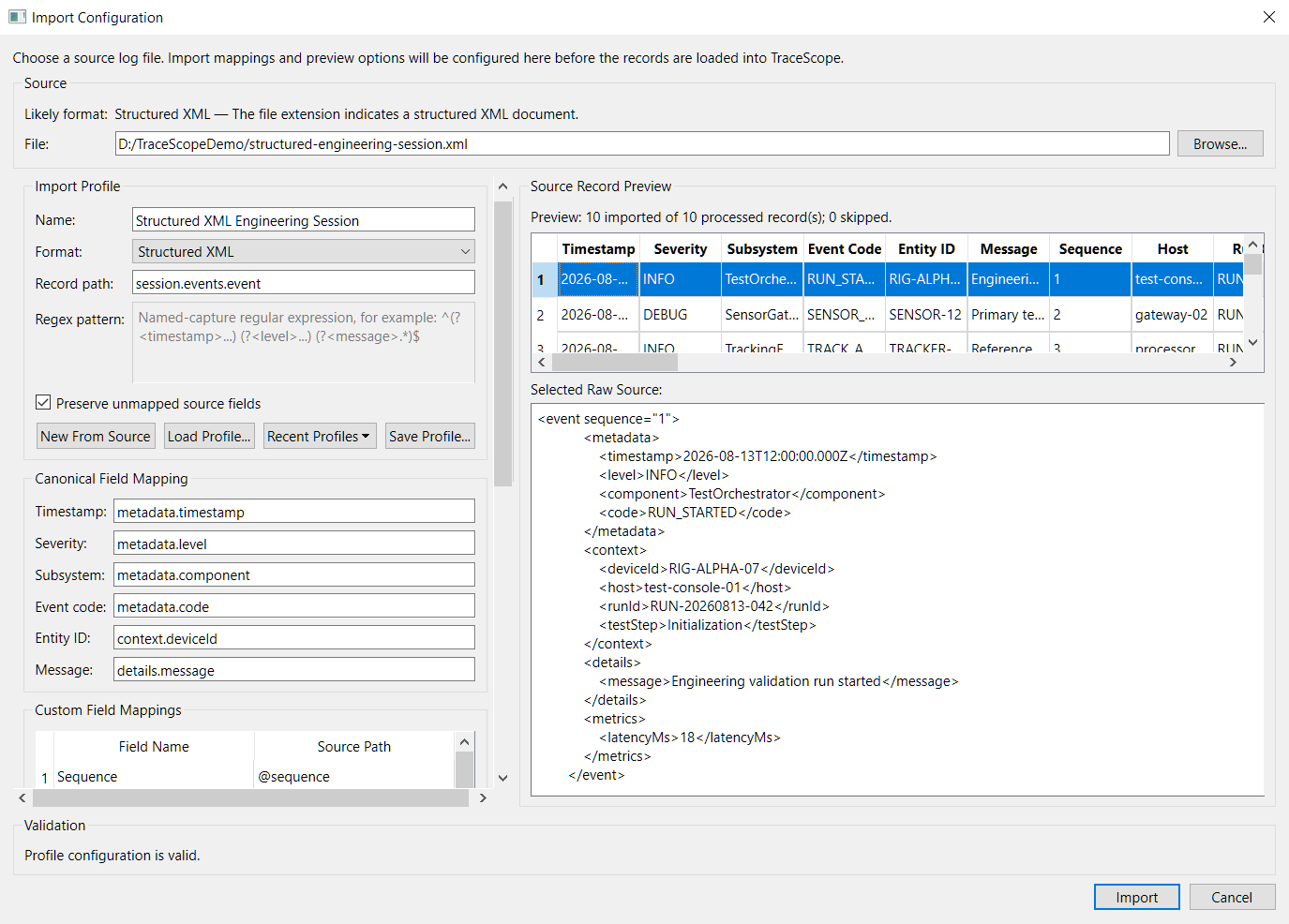
Recent profiles use the same validated loading path as manually selected profiles. Invalid or unsupported profiles are not applied, and stale profile entries are removed when detected.
Existing Investigation Workflow
The multi-session workspace builds on the existing TraceScope workflow, including:
- JSON Lines, structured JSON, CSV, TSV, key-value/logfmt, Syslog, IIS W3C, structured XML, and reusable regex-based import profiles
- Windows Event XML detection and presets
- configurable canonical and custom-field mappings
- reusable versioned import profiles
- mapping-aware source preview
- dynamic source-specific table columns
- severity and subsystem filtering
- full-record text search
- selected-record inspection and raw-source viewing
- grouped warning/error analysis
- automatic and manual timeline resolutions from millisecond through day scale
- windowed fine-resolution timeline navigation
- filtered CSV export
- background large-file imports with progress and cooperative cancellation where supported
Large-file behavior continues to be documented conservatively from measured scenarios rather than presented as a universal maximum-size or throughput guarantee.
Verification
The v0.9.0 milestone was verified with a full local regression pass covering:
- opening, switching, closing, and reloading multiple sessions
- independent session filters, search state, sorting, timeline state, and selected-record behavior
- switching between normal and large investigations
- reload cancellation and preservation of the previous investigation
- Recent Files and Recent Profiles persistence, ordering, deduplication, and stale-entry cleanup
- drag-and-drop import
- import configuration and preview
- filtering and search
- timeline navigation
- selected-record inspection
- filtered CSV export
The automated CTest suite now contains 28 test executables, including dedicated coverage for investigation sessions, workspace management, and recent-item persistence.
Windows and Linux builds and tests run through GitHub Actions.
Downloads
This prerelease provides:
TraceScope-v0.9.0-windows-x64.zipTraceScope-v0.9.0-linux-x86_64.AppImageTraceScope-v0.9.0-samples.zip
The Windows ZIP and Linux AppImage are portable application packages. The samples ZIP provides the demonstration logs and reusable import profiles separately for inspection or reuse.
See the repository README for setup and usage details, the expansion roadmap for the remaining path toward v1.0.0, and the performance notes for measured large-file scenarios and their interpretation boundaries.
Development now continues with Phase 9 — Advanced Filtering and Navigation.
TraceScope v0.8.0 — Responsive Large-File Import
TraceScope v0.8.0 — Responsive Large-File Import
TraceScope v0.8.0 makes larger file-based investigations substantially more practical while preserving the configurable offline workflow established in earlier releases.
The release moves import processing outside the UI thread, adds progress reporting and cooperative cancellation, introduces streamed source reading for supported importers, protects Import Configuration from expensive automatic previews of large structured documents, and expands the timeline so both fine-grained and long-duration investigations remain usable.
Responsive Import
Large imports now run outside the UI thread so the TraceScope interface remains responsive while records are parsed and prepared for investigation.
This release adds:
- background import processing with Qt Concurrent
- streamed source reading for supported line-oriented and XML import paths
- determinate progress reporting when meaningful incremental progress is available
- indeterminate progress for complete-document processing such as structured JSON
- cooperative cancellation for streamed imports
- preservation of the existing investigation when an import is cancelled rather than displaying partial results
- immediate reuse of the application after cancellation
The implementation does not claim constant-memory behavior. Normalized records, raw-source values, dynamic attributes, and active investigation state remain available in memory after import.
Large Structured-Document Preview
Import Configuration now avoids automatically parsing large structured JSON and XML documents for preview on the UI thread.
For large structured documents:
- automatic preview is disabled to keep configuration responsive
- preview can still be explicitly requested
- requested previews run in the background
- obsolete preview work is cancelled when the source or profile changes
- bounded preview limits remain in effect
- multiline Raw Source inspection is vertically resizable
Scalable Timeline Navigation
Timeline behavior was expanded as part of the large-file work so high-resolution timestamps do not create impractically large charts.
The timeline now supports:
- automatic interval selection
- manually selected millisecond-, second-, minute-, hour-, and day-scale resolutions
- bounded visible windows for fine-resolution timelines
- horizontal navigation through overflowing timelines
- live visible-range feedback while scrolling
- stable Y-axis scaling while navigating
- readable range-aware labels
- persistent axis and legend visibility
- preservation of empty filtered intervals within the displayed range
This timeline work was originally planned for a later analytics phase but was moved forward because it was necessary for practical large-file investigation.
Measured Performance Scenarios
Release-build performance was measured using representative end-to-end investigation workflows rather than parser-only throughput tests.
On the documented Windows test system, measured scenarios included:
- JSON Lines — 220,000 records, 109.4 MiB, median 7.2 s
- CSV — 180,000 records, 30.7 MiB, median 3.0 s
- IIS W3C — 180,000 records, 19.6 MiB, median 9.2 s
- Windows Event XML — 90,000 records, approximately 102 MiB, median 14.8 s
- structured JSON — 120,000 records, 64.1 MiB, median 6.5 s
The interface remained responsive during and after all measured imports.
These are observations from one documented test system, not maximum supported file-size, record-count, memory, or throughput guarantees. Full methodology, environment details, cancellation checks, and interpretation limits are documented in docs/performance.md.
Documentation and Presentation
The release also includes:
- detailed performance documentation
- an updated expansion roadmap reflecting the Phase 7 implementation
- refreshed screenshots for the existing investigation workflow
- a new fine-resolution timeline-navigation screenshot
- a new responsive large-file import screenshot
- updated README capabilities and release documentation
Verification
- Release build passes locally
- full automated test suite passes
- Windows and Linux CI passes
- portable Windows package verified and smoke-tested
- Linux AppImage verified and smoke-tested
- packaged samples verified
- large JSON Lines and Windows Event XML cancellation manually verified
- representative large-file scenarios manually verified for responsiveness
- downloaded
v0.8.0release-candidate artifacts smoke-tested before publication
Downloads
TraceScope-v0.8.0-windows-x64.zipTraceScope-v0.8.0-linux-x86_64.AppImageTraceScope-v0.8.0-samples.zip
This remains a prerelease milestone. With responsive large-file import now established, the next development phase focuses on a multi-session investigation workspace so related logs can be kept open and investigated together.