Release 0.84.0

August 25, 2026
July 22, 2026
Tip: These notes are also available at https://docs.wandb.ai/release-notes/server-releases#v0-84-0.
W&B Server 0.84 simplifies API key handling for organizations and teams, with centralized management and bulk delete. Weave adds inline rendering from BYOB storage, refreshed Agents and Signals views, and more. Rounding out the release: configurable reference lines on scatter plots, Azure workload identities for BYOB storage in preview, and faster query-panel loading for runs with many sparse metrics.
Support and end of life
- W&B Server v0.72 has reached end of life.
Features
Support and end of life
- W&B Server v0.72 has reached end of life.
Features
-
Line plots now use a single scale across all runs in a plot. Hovering over a run shows the same X-axis value for all runs that logged the metric at the same step:
- When runs log on the same cadence, hovering displays a consistent x-axis value.
- When runs like distributed runs have different logging cadences, they can show different x-values because their nearest logged points genuinely differ. Comparison is meaningful because values still come from the same bucket boundaries.
-
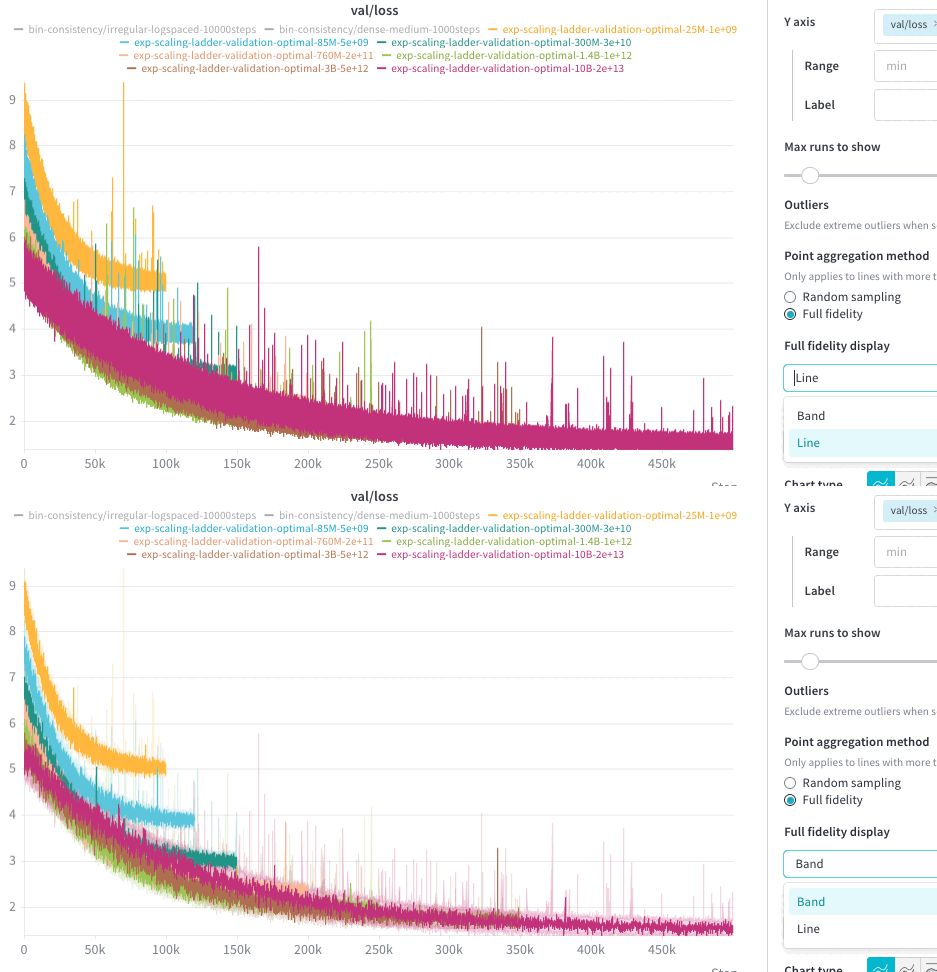
Customize how your line plots display full-fidelity data by specifying the panel’s mode in the Data settings tab of a workspace, section, or panel.
- Band mode shows the range of values in dense areas to help you understand variance and outliers at scale.
- Line mode is now generally available, and shows the full-fidelity trace directly to preserve the raw shape of your run history.
-
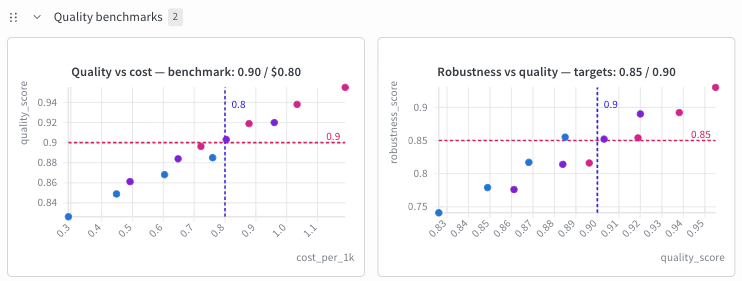
Add reference lines to scatter plots to highlight important thresholds, benchmarks, or target values on your charts. Configure up to five lines with customizable colors in the Reference lines tab of a plot’s settings.
-
Enhanced API key management for organizations and teams:
- From the API Keys tab of the Organization dashboard, admins can now edit or delete any API key in the organization.
- In both the Organization dashboard and team settings, admins can now bulk-delete API keys they have permission to manage.
-
Azure workload identities for BYOB storage in preview. To try it, upgrade the Operator Helm chart to v0.44.0+ before upgrading W&B.
-
Added support for filestream requests with
Content-Encoding: gzip. -
A W&B project with Weave data now shows active traces and evaluations on the project overview page.
Weave
- Weave now resolves BYOB storage references (
s3://,gs://,gcs://, andaz://) to short-lived signed URLs, unlocking several enhancements:- Improves cost efficiency and data sensitivity by removing the need to ingest remote media into Weave.
- Media now appears inline in chat message text, the evaluation-comparison detail pane, the trace compare grid, and raw-call custom views. Dense grids like evaluation-comparison and dataset cells show a compact signed download link instead of rendering inline.
- Audio references render with the inline waveform player.
- Agent traces and spans now render and visualize referenced media.
- Agent views now support search and filtering. Specify multiple
ORfilters on the same field forORexpressions or filters against different fields forAND. In addition, you can now drag to resize columns. - Improved the Agent view conversation-detail experience with a compact, duration-aware turn timeline and a more usable detail layout. Errors now show directly in the conversation, conversations link directly to the corresponding span in the trace view, and scored turns now include per-turn dots.
- Managing signal tags is faster and cleaner.
- Create a signal directly from the tag description without defining a system prompt, output schema, or other details. Changes save automatically.
- Streamlined badges have removal controls built directly into each badge. Hover over any badge to see tag provenance details in a tooltip.
- Unnecessary sections are hidden when no tags are applied, keeping your workspace uncluttered.
- When creating or editing a signal, the Inference provider selector now displays one entry per model for each third-party provider.
- Signals now link to parent conversations, and spans link back to their parent evaluations.
- In the evaluation-comparison table, cells that contain a list of numbers now render as histograms by default. Use the cell toolbar to change the view mode: Histogram, Bar Chart, Text, or Code. Click a cell to open a larger chart with summary statistics.
- The view mode you choose for a string cell (*Text, Code, or Markdown) now applies to every string cell in that column instead of only the cell you clicked. Cells keep their automatic defaults, such as Code for JSON, until you pick a mode explicitly.
- Custom providers have been renamed to custom runtimes, with an enriched UI. You can edit or remove custom runtimes as your experiments change.
- When Weave reports whether an inference provider is configured, user-scoped secrets are now counted, in addition to team secrets. A provider you set up with your own key now shows as available in the Playground model dropdown, the Providers tab, and Agents inference.
- For enhanced security, the remote scorer host allowlist now accepts wildcard suffix patterns on the Weave scoring worker. Set the
WF_SCORING_WORKER_REMOTE_SCORER_ALLOWED_HOSTSenvironment variable to a comma-separated list of patterns:- An entry such as
*.corp.example.commatches subdomains at any depth but not the apex domain, soa.corp.example.comanda.b.corp.example.commatch, but notcorp.example.com. - For safety, a wildcard must cover at least two DNS labels, so patterns like
*.comand*.internalare rejected.
- An entry such as
Performance improvements
- Improved the performance of loading query panels for runs with large numbers of sparse metrics.
- Weave scoring workers now adapt their concurrency per project when calling inference endpoints, reducing rate-limit errors for organizations with lower provider quotas.
Fixes
- When importing panels into a report, the full panel name always displays, instead of only on hover.
- The
NOToperator is no longer offered on the Weave Signals tab, where it was not supported. - Fixed a redundant not-equals symbol appearing in a Weave dashboard filter chip.