
September 23, 2026
Tip: These notes are also available at https://docs.wandb.ai/release-notes/server-releases#v0-85-0.
W&B Server 0.85 expands BYOB storage options with AWS-to-AWS S3 role assumption and a configurable IP address range for Azure Blob Storage signed URLs. In Weave, calls and agent spans now link to each other in both directions. Also in this release: collapsed workspace sections keep their controls within reach, you can choose how line plots display single-point metrics, and query panels have a new parallelism budget that lets deployments trade some request concurrency for lower peak memory.
Support and end of life
- W&B Server v0.73 has reached end of life.
Features
-
Added support for AWS-to-AWS S3 role assumption for BYOB storage. Instead of granting a W&B AWS identity direct access to your bucket and KMS key, you can let a specific W&B workload temporarily assume a role that you own, which then accesses the bucket and key.
-
For BYOB storage in Azure Blob Storage, you can now restrict the IP address range that can use signed URLs by setting the
GORILLA_AZURE_PRESIGNED_URL_IP_RANGEenvironment variable. Azure Blob Storage enforces this restriction when a client accesses a blob. It is independent of any IP allowlist for the W&B application and API. -
A collapsed workspace section now keeps its settings, overflow menu, and pin control visible, so you can use them without expanding the section.
-
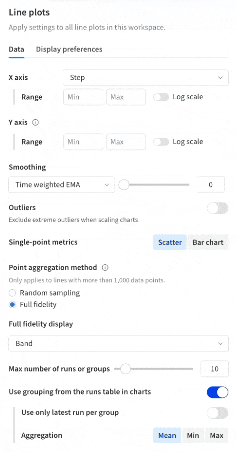
Choose whether line plots display single-point metrics as scatter plots or bar charts. Set Single-point metrics to Scatter or Bar chart in the Data settings tab of a workspace, section, or panel. By default, automated workspaces show bar charts and manual workspaces show scatter plots. In scatter plots, larger markers make single data points easier to find and inspect.
-
Line mode for full-fidelity line plots is now available for grouped line plots. To use it, set Full fidelity display to Line on the panel itself. A grouped panel that inherits a Line setting from its section or workspace continues to display in Band mode.
-
To reduce peak memory usage when processing large, text-heavy
wandb.Tablefiles, you can now configure the process-wide parallelism budget for mapped operations, at the cost of some request concurrency. Set theQUERY_ENGINE_PARALLELISM_BUDGETenvironment variable to1,2,4,8, or16. Lower values reduce concurrent conversion work and can help avoid out-of-memory errors in Weave workloads that load many large table files at once. The default is16, so behavior is unchanged unless you set the variable.
Sweeps
- The
Sweep.priorRunsfield in the GraphQL API now supports pagination options, for more scalable access to previous runs. - Requests to the sweep provider now retry automatically, so sweeps recover more gracefully from transient network failures.
Weave
- A Weave call now links to the agent spans it produced, and an agent span now links to the Weave calls it invoked.
- When you create a custom signal, you now define only its tags, and W&B composes the rest of the judge prompt for you.
This prevents accidental changes to required scoring instructions. Editing existing signals is unchanged.
Performance improvements
- Ungrouped line plots now render the newest lines first and fill in lines incrementally. This speeds up loading a works
pace or report and reduces load on your deployment. - Highlighting a line in a line plot no longer rebuilds the underlying plot, and hidden tooltip copies are no longer ren
dered.
Fixes
- Fixed bugs that could cause tooltips, including bounding-box tooltips, or axis labels to appear outside the chart area
, be obstructed, or cover plotted data. - Fixed a bug where X-axis labels on line plots and scatter plots did not update immediately or accurately.
- The smoothing slider now resets when you change the smoothing type, to prevent stale settings and produce more predict
able results.