Repository navigation
Exceptions Register
Ignore rules pile up. The exceptions register publishes every ignore rule to an Azure DevOps wiki page: what is waived, why, where the rule is defined, and what it currently suppresses.
tf-snag -check all -plan plan.json -plan-log plan.jsonl -baseline prev.sarif \
  -ado-url https://dev.azure.com/my-org/my-project -ado-work-items=false \
  -wiki-page /tf-snag/Exceptions
-ado-work-items=false uses -ado-url only to find the project, for when you want the register without raising work items. In a pipeline, set the tf-snag@0 task's wikiPage input.
Try -wiki-dry-run first: it prints the page and reports what would be written, without writing it.
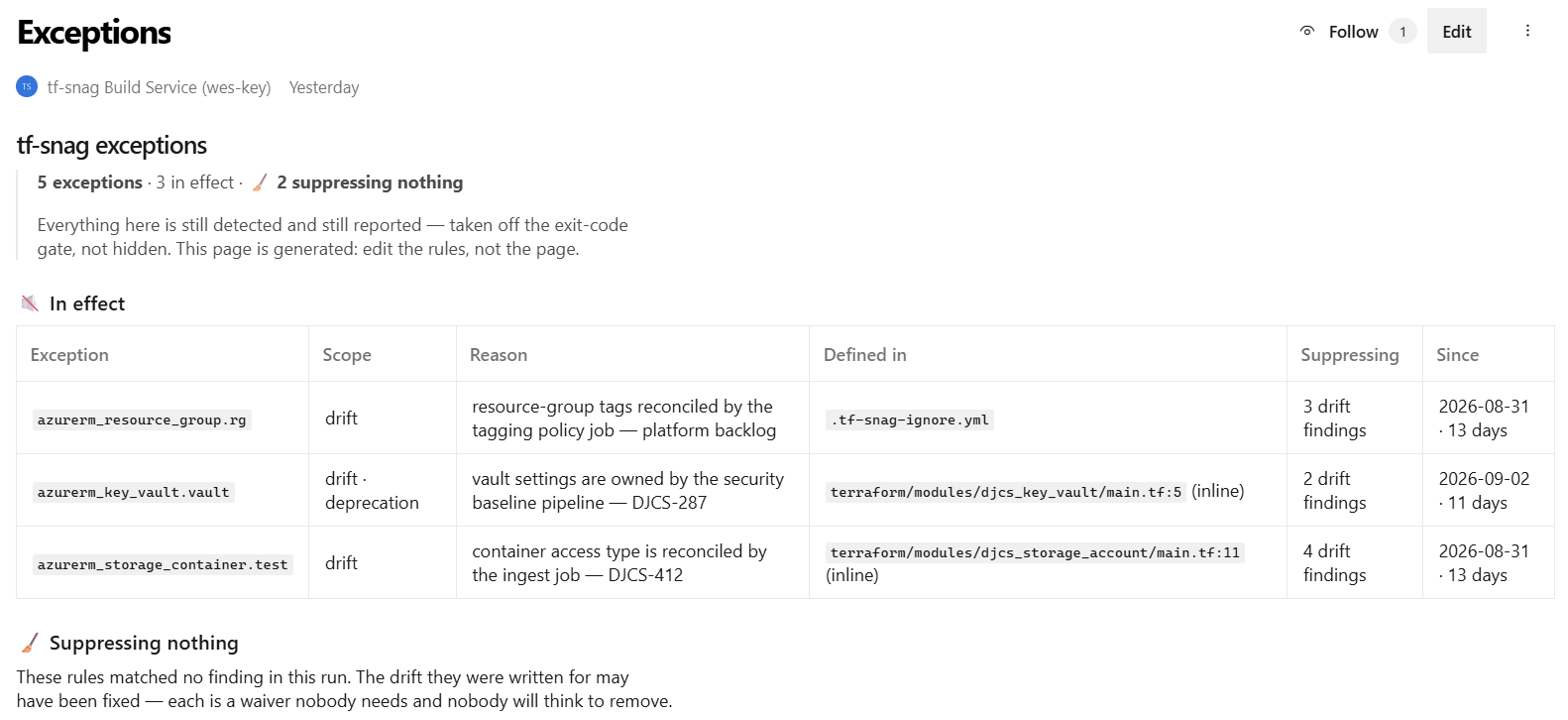
Rules are split into two tables:
-
In effect: rules suppressing a finding in this run, with how long that finding has been there (the age needs
-baseline) - Suppressing nothing: the rest. A waiver whose drift has since been fixed is a rule nobody needs and nobody will think to remove, which is the main reason to read the page
Each rule shows whether it is an inline comment or in the ignore file. A rule without a reason is flagged.
The page is generated. Edits to it are overwritten on the next run, so change the rules instead.
It is only written when something changed. The generated-at footer is left out of the comparison, so a daily run does not bury the wiki revisions that matter.
-wiki names the wiki's repository, by name or id. It defaults to <project>.wiki, the repository behind a project wiki. For a code wiki, name the repository it is published from. If a name does not resolve, use the repository id, which always does and is worth pinning in a pipeline.
tf-snag logs the repository and branch it writes to.
The page is written as a commit to the wiki's Git repository, not through the Wiki API. Both reach the same pages, but a pipeline's System.AccessToken can push to a repository and does not appear to be able to use the Wiki API. That is what lets the build service publish without a PAT.
The identity needs Contribute on the wiki's repository. Grant it from the wiki's ⋯ → Wiki security, or under Project settings → Repos → Repositories if the wiki repository is listed there. Work item permissions are separate, so an identity that raises items can still be refused here.
This is the one that costs people a day. The setting Limit job authorization scope to referenced Azure DevOps repositories limits a job's token to the repositories its pipeline names. The wiki is a separate repository, so unless the pipeline names it, the token never reaches it, whatever permissions the build service has.
Either declare it in the pipeline, which grants access to this pipeline only and says so in the YAML:
resources:
  repositories:
    - repository: wiki
      type: git
      name: <Project>.wiki

jobs:
  - job: drift
    uses:
      repositories: [wiki]   # declared, not checked out
    steps: ...
Or turn the setting off under Project settings → Pipelines → Settings. That is one toggle, but it gives every pipeline in the project access to every repository, and leaves nothing in the YAML to explain why the wiki works. Prefer the first.
Azure DevOps hides what an identity cannot see rather than refusing it, so a missing permission arrives as a 404, as if the wiki, repository or page did not exist. Compare what you can see with what the pipeline's identity can see.