Repository navigation
Releases
ED Outrider 2026.11.08: The System Map Release

ED Outrider is an exploration companion for Elite Dangerous that reads your journals as you play and keeps a browser tab (and a tablet) up to date with what's around you, what's in the system you're in, what your unsold data is worth, and whether you're about to leave something behind. It runs on your own machine; it uploads nothing unless you switch on sharing with EDDN, EDSM or Inara. See the README and the guide for everything it does.
Install on your game PC
Download the source (below), or clone the repository, then start it with Python 3.11 or newer installed:
- Linux and macOS:
./launch_outrider.sh - Windows: double-click
launch_outrider.bat
The first run sets up a Python environment, then it starts Outrider at once every time after. Open http://127.0.0.1:8025/ and go fly.
On the game PC everything works. Auto honk, auto-target and the tablet's control rail press keys on the game PC: solid on Linux, experimental on Windows (not yet tried in-game there, so reports are welcome). The co-pilot button is Linux only for now.
Run it as a server in Docker
The image is on GitHub's container registry, ghcr.io/weslocke/ed-outrider. In a folder of its own on the server:
curl -fsSLO https://github.com/weslocke/ED-Outrider/releases/latest/download/docker-compose.yml
curl -fsSL -o .env https://github.com/weslocke/ED-Outrider/releases/latest/download/env.example
nano .env                                  # set JOURNALS to your shared journal folder, and UID/GID (id -u, id -g)
mkdir -p docker/data docker/config         # your database, backups, voices and config live here
docker compose up -d                       # downloads the image the first time
Then open http://<server>:8025/, set a password in Settings → Server, and run docker compose restart. To update later: docker compose pull && docker compose up -d. The journal folder comes from the game PC over NFS or CIFS. Mount NFS with actimeo=1: by default NFS caches a file's size for up to a minute, so the alerts arrive late and all at once (Outrider warns at start); the guide's Docker section has the details. Inside the container Outrider always listens on 8025: to use another port, set PORT in .env.
Offline, without the registry: ed-outrider-docker-2026.11.08-amd64.tgz below is the same image with a compose file that runs it (docker load -i ed-outrider-image.tar; its INSTALL.txt has the steps).
In Docker, the automatic functions are off: auto honk, auto-target, the tablet's control rail, the co-pilot button, the Highway's clipboard copy, screenshots, sound played on the PC and the in-game overlay all need Outrider on the game PC. Run Outrider there if you use them (you can run both).
Do not expose Outrider to the internet; use a VPN to reach it away from home.
On a tablet
Open http://<your PC>:8025/tablet, or use ED Outrider for Android for a full-screen app with a "Hey Vespa" wake word. Eleven themes, game controls on a rail, and the voice on the tablet if you like.
In this version (since 2026.10.30): The System Map Release
The first start re-reads your journals once (each ship you fought or mined in, kills on foot, your sample runs' English names in any game language, massacre kills and bounty vouchers): a few seconds, or a few minutes for years of journals. Outrider backs up your database first. From this release on a version is its release date.
- 🪐 The system map: the system you are in drawn in 3D on Now and in Here, each body where it is on its orbit now, with the suggested order numbered on it, each leg's distance, and where you have been this visit as a grey trail. The stops are listed beside it; tap one for why it is on the list, with Skip and Do first.
- 🧭 The suggested order by where the bodies really are, re-planned from the body you are at, its legs in light seconds; the debrief, the leaving warning and the targeted body say the whole mapped value with and without your bonuses.
- 🛣 The Plotted route pane (thanks to Psilovybin, issue #22): 🛣 Show route in Nearby or the Overview lists the route the game plotted, system by system, with Nearby's columns.
- 🌿 On the surface: the surface map zooms out to 50 km and fits the whole body; finished species stay as small × marks; Unscanned lists the biology you have not touched yet; pins drop at Guardian and Thargoid pickups; a screenshot filed as a codex picture is said; Here can hide the orbital distance.
- 🎙 Voice: Speak with this browser's voice, as well as Piper; a moved Outrider folder no longer leaves Piper "not installed" (thanks to docfallingapart, issue #21).
- ⛏ Mining: "the best yet" for the richest rock of the stint, and a recap as you leave or dock with where it sells best.
- ⚔ Combat and missions: a massacre's kills counted, your bounty vouchers and combat bonds with where to hand them in, merits this Powerplay cycle, your Community Goals, a bounty on you said with the nearest Interstellar Factors, the wrong suit for sampling; CMDR → Sessions shows the ship you fought or mined in, or "On foot" (thanks to Kurbo26, issue #23).
- 🧰 Running it: Now easier to read at a glance; the trip so far in Markdown from History; Settings keeps you from leaving an edit unsaved and checks a journal folder you type; the first start opens the page in your browser.
- 🔧 Fixes from three review rounds: games in other languages, a long carrier trip in the route pane, a species lost in a death, massacres in conflict zones, a planetary port's layout, an unnamed ship.
The player's view of every release: What's new.
ED Outrider 2026.10.30: The Misc Release
ED Outrider is an exploration companion for Elite Dangerous that reads your journals as you play and keeps a browser tab (and a tablet) up to date with what's around you, what's in the system you're in, what your unsold data is worth, and whether you're about to leave something behind. It runs on your own machine; it uploads nothing unless you switch on sharing with EDDN, EDSM or Inara. See the README and the guide for everything it does.
Install on your game PC
Download the source (below), or clone the repository, then start it with Python 3.11 or newer installed:
- Linux and macOS:
./launch_outrider.sh - Windows: double-click
launch_outrider.bat
The first run sets up a Python environment, then it starts Outrider at once every time after. Open http://127.0.0.1:8025/ and go fly.
On the game PC everything works. Auto honk, auto-target and the tablet's control rail press keys on the game PC: solid on Linux, experimental on Windows (not yet tried in-game there, so reports are welcome). The co-pilot button is Linux only for now.
Run it as a server in Docker
The image is on GitHub's container registry, ghcr.io/weslocke/ed-outrider. In a folder of its own on the server:
curl -fsSLO https://github.com/weslocke/ED-Outrider/releases/latest/download/docker-compose.yml
curl -fsSL -o .env https://github.com/weslocke/ED-Outrider/releases/latest/download/env.example
nano .env                                  # set JOURNALS to your shared journal folder, and UID/GID (id -u, id -g)
mkdir -p docker/data docker/config         # your database, backups, voices and config live here
docker compose up -d                       # downloads the image the first time
Then open http://<server>:8025/, set a password in Settings → Server, and run docker compose restart. To update later: docker compose pull && docker compose up -d. The journal folder comes from the game PC over NFS or CIFS. Mount NFS with actimeo=1: by default NFS caches a file's size for up to a minute, so the alerts arrive late and all at once (Outrider warns at start); the guide's Docker section has the details. Inside the container Outrider always listens on 8025: to use another port, set PORT in .env.
Offline, without the registry: ed-outrider-docker-2026.10.30-amd64.tgz below is the same image with a compose file that runs it (docker load -i ed-outrider-image.tar; its INSTALL.txt has the steps).
In Docker, the automatic functions are off: auto honk, auto-target, the tablet's control rail, the co-pilot button, the Highway's clipboard copy, screenshots, sound played on the PC and the in-game overlay all need Outrider on the game PC. Run Outrider there if you use them (you can run both).
Do not expose Outrider to the internet; use a VPN to reach it away from home.
On a tablet
Open http://<your PC>:8025/tablet, or use ED Outrider for Android for a full-screen app with a "Hey Vespa" wake word. Eleven themes, game controls on a rail, and the voice on the tablet if you like.
In this version (since 2026.10.29): The Misc Release
The first start re-reads your journals once (your squadron's carrier, the stations your stored modules and ships are at, deposits into your carrier's bank, each sample's colour in any game language): a few seconds, or a few minutes for years of journals. Outrider backs up your database first.
Behind a proxy on the Outrider PC? nginx adds no forwarding header by itself, so every device behind it skipped the password: add
proxy_set_header X-Forwarded-For $proxy_add_x_forwarded_for;beside itsproxy_passand check once from a phone that the page asks for the password (the guide).
- 🛸 Your squadron's carrier (thanks to Hiner399, discussion #3): on the Carrier tile with an FC | SC switch beside your own (where it is, how far, 🎯 and 🛣, UC and Vista; the tritium and countdown for an officer), in the sell lists and Now's sell line, and in Nearest place to dock as "your squadron's".
- 🧑🚀 Your commanders and fleet: choose the commander you follow from a list (thanks to Hiner399, discussion #18), with the data on board and the Log following it; CMDR → Inventory names the station your stored modules and ships are at (thanks to docfallingapart, discussion #17).
- 💱 ⛏ Selling and mining: Sell all ranks stations for the whole hold; Now's at-risk line names where to sell, with 🎯 and 🛣; your record at a hotspot as you drop in, and this stint's hits on Now; how many limpets you can synthesise.
- 🔭 Exploring: known Guardian and geology sites from Canonn in a body's 📍 Pins, each one tap from a pin; the schematic gives the orbit's distance too (thanks to Hiner399); sweep ticks on the checklists' 🔍 nearby lists.
- 🎙 Voice: "nearest scoopable star", "show the highway" and "open plot route"; Piper's voices use far less CPU.
- 🧰 Running it: the tablet's rail presses only into Elite's window ("click into the game"); auto-target reads the galaxy map's controls from your General Controls preset; no false "journal files are gone" before a re-read (thanks to Kurbo26, issue #16); the docking pad on Now at once with a pad delay (thanks to Kurbo26);
git pullno longer stops on "local changes" to the exobiology rules; the Docker image holds only what runs Outrider. - 🔧 About 150 fixes from a complete code review of the whole of Outrider: games in other languages (sell lookups, checklist colours, Bark Mounds), exobiology values before the DSS, the Map's card on a tablet, the overlay on Linux and Windows, routes, pins and the voice's words.
The player's view of every release: What's new.
ED Outrider 2026.10.29: Build Your Own Codex
ED Outrider is an exploration companion for Elite Dangerous that reads your journals as you play and keeps a browser tab (and a tablet) up to date with what's around you, what's in the system you're in, what your unsold data is worth, and whether you're about to leave something behind. It runs on your own machine; it uploads nothing unless you switch on sharing with EDDN, EDSM or Inara. See the README and the guide for everything it does.
Install on your game PC
Download the source (below), or clone the repository, then start it with Python 3.11 or newer installed:
- Linux and macOS:
./launch_outrider.sh - Windows: double-click
launch_outrider.bat
The first run sets up a Python environment, then it starts Outrider at once every time after. Open http://127.0.0.1:8025/ and go fly.
On the game PC everything works. Auto honk, auto-target and the tablet's control rail press keys on the game PC: solid on Linux, experimental on Windows (not yet tried in-game there, so reports are welcome). The co-pilot button is Linux only for now.
Run it as a server in Docker
The image is on GitHub's container registry, ghcr.io/weslocke/ed-outrider. In a folder of its own on the server:
curl -fsSLO https://github.com/weslocke/ED-Outrider/releases/latest/download/docker-compose.yml
curl -fsSL -o .env https://github.com/weslocke/ED-Outrider/releases/latest/download/env.example
nano .env                                  # set JOURNALS to your shared journal folder, and UID/GID (id -u, id -g)
mkdir -p docker/data docker/config         # your database, backups, voices and config live here
docker compose up -d                       # downloads the image the first time
Then open http://<server>:8025/, set a password in Settings → Server, and run docker compose restart. To update later: docker compose pull && docker compose up -d. The journal folder comes from the game PC over NFS or CIFS. Mount NFS with actimeo=1: by default NFS caches a file's size for up to a minute, so the alerts arrive late and all at once (Outrider warns at start); the guide's Docker section has the details. Inside the container Outrider always listens on 8025: to use another port, set PORT in .env.
Offline, without the registry: ed-outrider-docker-2026.10.29-amd64.tgz below is the same image with a compose file that runs it (docker load -i ed-outrider-image.tar; its INSTALL.txt has the steps).
In Docker, the automatic functions are off: auto honk, auto-target, the tablet's control rail, the co-pilot button, the Highway's clipboard copy, screenshots, sound played on the PC and the in-game overlay all need Outrider on the game PC. Run Outrider there if you use them (you can run both).
Do not expose Outrider to the internet; use a VPN to reach it away from home.
On a tablet
Open http://<your PC>:8025/tablet, or use ED Outrider for Android for a full-screen app with a "Hey Vespa" wake word. Eleven themes, game controls on a rail, and the voice on the tablet if you like.
In this version (since 2026.10.28): Build Your Own Codex
The first start re-reads your journals once (geology positions, green gas giants told apart by your first FSS scan, mining places): a few seconds, or a few minutes for years of journals. Outrider backs up your database first.
Screenshots need the optional Pillow package on the game PC. The launcher installs it by itself at the first start after updating; if it could not, it says so (then start once with
OUTRIDER_REINSTALL=1).
- 📷 Screenshots (⚙ Settings → Screenshots, game PC, off until ticked): each F10 and HighRes shot turned from the game's BMP into a PNG, JPG or WebP named after where it was taken, in a folder per commander (and system); medium, small and cropped copies to post; one of them on the clipboard, ready for Discord (never over 3,840 px); a surface shot near a plant you sampled or a formation you logged knows what it shows, in its name and its metadata. Find them again with 📷 in Here, on the hover card and in the body panel. Hide UI, Screenshot and HighRes buttons on every rail.
- 🖼 Your own codex: tagged shots also saved into
Biology/<genus>/<species>/<colour>/andGeology/<group>/<formation>/folders (a copy, or their own full-size format), and the Bio/Geo checklists show one of your own pictures (a fresh pick each click) in place of Canonn's, captioned with where and when you took it. 📷 marks the entries you have, and Here marks a species whose colour you already have. - 🔭 Exploring: possible new codex entries said as the FSS finds them (on by default, its own tick); Your records (hottest, biggest, fastest spin, farthest from Sol…) with 🏆 in Here, Nearby and Boxel view; five more curiosities; a 📋 Markdown system summary for Reddit or Discord; a green gas giant your codex logged confirmed; catalogued sights near you from EDAstro's GEC; who first reported a system to EDSM; Search for "at least N" bodies of a kind and rings with 2+ hotspots; what a body orbits and how far (thanks to Hiner399, discussion #3).
- 🌍 On the surface: your trail and a compass grid on the surface map and the overlay's radar.
- ⛽ ⛏ 🗺 Elsewhere: seconds to a full tank while scooping; per-mineral prospector thresholds and the best price for a body's hotspot minerals; Boxel view's systems open in Here with the hover card, and a boxel you have run out of numbers in is marked done by itself; Plot Route says when a route has nothing to visit.
- 🛠 Install: the launchers pick a Python that Piper's voices work with (3.11 to 3.14; thanks to Call-me-EnvY, issue #13).
- 🔧 Over 100 fixes from seven code reviews.
The player's view of every release: What's new.
ED Outrider 2026.10.28: The Mining Release
ED Outrider is an exploration companion for Elite Dangerous that reads your journals as you play and keeps a browser tab (and a tablet) up to date with what's around you, what's in the system you're in, what your unsold data is worth, and whether you're about to leave something behind. It runs on your own machine; it uploads nothing unless you switch on sharing with EDDN, EDSM or Inara. See the README and the guide for everything it does.
Install on your game PC
Download the source (below), or clone the repository, then start it with Python 3.11 or newer installed:
- Linux and macOS:
./launch_outrider.sh - Windows: double-click
launch_outrider.bat
The first run sets up a Python environment, then it starts Outrider at once every time after. Open http://127.0.0.1:8025/ and go fly.
On the game PC everything works. Auto honk, auto-target and the tablet's control rail press keys on the game PC: solid on Linux, experimental on Windows (not yet tried in-game there, so reports are welcome). The co-pilot button is Linux only for now.
Run it as a server in Docker
The image is on GitHub's container registry, ghcr.io/weslocke/ed-outrider. In a folder of its own on the server:
curl -fsSLO https://github.com/weslocke/ED-Outrider/releases/latest/download/docker-compose.yml
curl -fsSL -o .env https://github.com/weslocke/ED-Outrider/releases/latest/download/env.example
nano .env                                  # set JOURNALS to your shared journal folder, and UID/GID (id -u, id -g)
mkdir -p docker/data docker/config         # your database, backups, voices and config live here
docker compose up -d                       # downloads the image the first time
Then open http://<server>:8025/, set a password in Settings → Server, and run docker compose restart. To update later: docker compose pull && docker compose up -d. The journal folder comes from the game PC over NFS or CIFS. Mount NFS with actimeo=1: by default NFS caches a file's size for up to a minute, so the alerts arrive late and all at once (Outrider warns at start); the guide's Docker section has the details. Inside the container Outrider always listens on 8025: to use another port, set PORT in .env.
Offline, without the registry: ed-outrider-docker-2026.10.28-amd64.tgz below is the same image with a compose file that runs it (docker load -i ed-outrider-image.tar; its INSTALL.txt has the steps).
In Docker, the automatic functions are off: auto honk, auto-target, the tablet's control rail, the co-pilot button, the Highway's clipboard copy, sound played on the PC and the in-game overlay all need Outrider on the game PC. Run Outrider there if you use them (you can run both).
Do not expose Outrider to the internet; use a VPN to reach it away from home.
On a tablet
Open http://<your PC>:8025/tablet, or use ED Outrider for Android for a full-screen app with a "Hey Vespa" wake word. Eleven themes, game controls on a rail, and the voice on the tablet if you like.
In this version (since 2026.10.27): The Mining Release
The first start re-reads your journals once (your mining sessions, past deaths, samples and first scans put right): a few seconds, or a few minutes for years of journals. Outrider backs up your database first.
- ⛏ Ring mining: a new Settings → Mining section (rings you watch for, said as the FSS resolves them; what lasers and cores give per ring type), a reminder to take limpets, the prospector call-out (your minerals and percentage, motherlodes), the mining line on Now and the overlay (tons an hour, hold, limpets, minutes to full) with hold-full warnings and the best price nearby, and your hotspot record in CMDR → Sessions and Here's rings.
- 🎯 Auto-target: its own Settings section with the galaxy map's steps editable (↺ default, a Macro cheatsheet, ▶ test now against a system you type). A name with several search results now works (thanks to Kurbo26, discussion #12): if you changed the submit steps, press ↺ default. A route's next stop is targeted rather than plotted, a pause between keys, a search wait that grows with the distance, and runs that no longer trip over Status.json's lag. Linux: paste uses
xclipwhere there is an X display. - ⚙ Settings: 15 sections with related ones together, Alerts in named groups, Server down to what has no other home, new fields for auto honk and the overlay, and out-of-range numbers refused in words.
- 🎙 Voice: "say that again", "where am I", "bookmark this system", "remove the bookmark", "show the map" (switches the tablet's page; ED Outrider for Android 1.3.3 handles them), and "next stop" follows whichever route you follow.
- 🔭 Exploring: clear to sample while flying the ship (thanks to Offshorepred, discussion #3), a composition scan names the species at once, the scans lost with a ship named when you come back for them, low suit oxygen or health on foot, what Vista Genomics actually paid, Geology finds nearby, a finished route clears itself at the next jump out.
- 🛣 Routes and the carrier: ↻ Re-plot from here, the time to go at your pace, no-fuel-scoop and permit warnings, ← destination from the game's target; the carrier's upkeep counted down to today with a card, the depot followed between readings, the tritium in your ship counted toward a shortfall.
- 🧰 Running it: more than one commander in a journal folder handled (
[journals] commander), uploads held instead of lost while a key is missing, launchers that start when an optional package will not install, clearer start-up failures, Backups' disk use, faster History, Left behind and Log search. - 🔧 Over 100 fixes from code reviews, among them: inside a container the password is never skipped (rootless Docker and Podman delivered every device as "this PC"); a failed Spansh boxel ask no longer loops; an error in one upload round no longer stops that service for the session; History's "Since your last sale" no longer counts the sale itself; a death on foot no longer clears your mined ore; the light theme's marks read on white.
The player's view of every release: What's new.
ED Outrider 2026.10.27 (bug fix release)
ED Outrider is an exploration companion for Elite Dangerous that reads your journals as you play and keeps a browser tab (and a tablet) up to date with what's around you, what's in the system you're in, what your unsold data is worth, and whether you're about to leave something behind. It runs on your own machine; it uploads nothing unless you switch on sharing with EDDN, EDSM or Inara. See the README and the guide for everything it does.
Install on your game PC
Download the source (below), or clone the repository, then start it with Python 3.11 or newer installed:
- Linux and macOS:
./launch_outrider.sh - Windows: double-click
launch_outrider.bat
The first run sets up a Python environment, then it starts Outrider at once every time after. Open http://127.0.0.1:8025/ and go fly.
On the game PC everything works. Auto honk, auto-target and the tablet's control rail press keys on the game PC: solid on Linux, experimental on Windows (not yet tried in-game there, so reports are welcome). The co-pilot button is Linux only for now.
Run it as a server in Docker
The image is on GitHub's container registry, ghcr.io/weslocke/ed-outrider. In a folder of its own on the server:
curl -fsSLO https://github.com/weslocke/ED-Outrider/releases/latest/download/docker-compose.yml
curl -fsSL -o .env https://github.com/weslocke/ED-Outrider/releases/latest/download/env.example
nano .env                                  # set JOURNALS to your shared journal folder, and UID/GID (id -u, id -g)
mkdir -p docker/data docker/config         # your database, backups, voices and config live here
docker compose up -d                       # downloads the image the first time
Then open http://<server>:8025/, set a password in Settings → Server, and run docker compose restart. To update later: docker compose pull && docker compose up -d. The journal folder comes from the game PC over NFS or CIFS. Mount NFS with actimeo=1: by default NFS caches a file's size for up to a minute, so the alerts arrive late and all at once (Outrider warns at start); the guide's Docker section has the details. Inside the container Outrider always listens on 8025: to use another port, set PORT in .env.
Offline, without the registry: ed-outrider-docker-2026.10.27-amd64.tgz below is the same image with a compose file that runs it (docker load -i ed-outrider-image.tar; its INSTALL.txt has the steps).
In Docker, the automatic functions are off: auto honk, auto-target, the tablet's control rail, the co-pilot button, the Highway's clipboard copy, sound played on the PC and the in-game overlay all need Outrider on the game PC. Run Outrider there if you use them (you can run both).
Do not expose Outrider to the internet; use a VPN to reach it away from home.
On a tablet
Open http://<your PC>:8025/tablet, or use ED Outrider for Android for a full-screen app with a "Hey Vespa" wake word. Eleven themes, game controls on a rail, and the voice on the tablet if you like.
In this version (since 2026.10.26): a bug fix release
The first start re-reads your journals once (mining income, your fleet's places): a few seconds, or a few minutes for years of journals. Outrider backs up your database first.
- Spansh data from before Odyssey called out (thanks to Kurbo26, discussion #11): a system whose Spansh data all predates Odyssey's surface data may read "fully scanned" while its thin-atmosphere worlds were never landable and their life never reported. Nearby marks it 🪦 pre-Odyssey (hover for the worlds that may hold life), Here's header gives the date, Now says "Rescan for Bio", and the briefing and the overlay's strip say it too.
- The geology a body could show: its card and details name the kinds its volcanism allows, the ones new to your codex marked.
- 🎯 on Search's results, as on Bookmarks and Nearby.
- The Anaconda Mk II is known: its name, and a large pad for the nearest-place-to-dock filter.
- Limpets bought, sold and launched now move your hold.
- 28 fixes from a full code review, among them: Outrider could fail to start on a non-English Windows with EDMC installed; newer uploads could overtake ones being retried (and reach Inara inside its "slow down" hour); Now and the overlay measured the target's jump from the system Nearby was set around; the "away 3 days" login greeting never came; the voice lab could freeze Outrider for a moment; ship↔SRV transfers and depot tritium counted as mined income; the overlay kept the last system's panels when Outrider had a problem; Now could name the previous target while the new one was looked up; a pin from the map's legend could land on the wrong system.
The player's view of every release: What's new.
ED Outrider 2026.10.26: The Release with Personality
ED Outrider is an exploration companion for Elite Dangerous that reads your journals as you play and keeps a browser tab (and a tablet) up to date with what's around you, what's in the system you're in, what your unsold data is worth, and whether you're about to leave something behind. It runs on your own machine; it uploads nothing unless you switch on sharing with EDDN, EDSM or Inara. See the README and the guide for everything it does.
Install on your game PC
Download the source (below), or clone the repository, then start it with Python 3.11 or newer installed:
- Linux and macOS:
./launch_outrider.sh - Windows: double-click
launch_outrider.bat
The first run sets up a Python environment, then it starts Outrider at once every time after. Open http://127.0.0.1:8025/ and go fly.
On the game PC everything works. Auto honk, auto-target and the tablet's control rail press keys on the game PC: solid on Linux, experimental on Windows (not yet tried in-game there, so reports are welcome). The co-pilot button is Linux only for now.
Run it as a server in Docker
The image is on GitHub's container registry, ghcr.io/weslocke/ed-outrider. In a folder of its own on the server:
curl -fsSLO https://github.com/weslocke/ED-Outrider/releases/latest/download/docker-compose.yml
curl -fsSL -o .env https://github.com/weslocke/ED-Outrider/releases/latest/download/env.example
nano .env                                  # set JOURNALS to your shared journal folder, and UID/GID (id -u, id -g)
mkdir -p docker/data docker/config         # your database, backups, voices and config live here
docker compose up -d                       # downloads the image the first time
Then open http://<server>:8025/, set a password in Settings → Server, and run docker compose restart. To update later: docker compose pull && docker compose up -d. The journal folder comes from the game PC over NFS or CIFS. Mount NFS with actimeo=1: by default NFS caches a file's size for up to a minute, so the alerts arrive late and all at once (Outrider warns at start); the guide's Docker section has the details. Inside the container Outrider always listens on 8025: to use another port, set PORT in .env.
Offline, without the registry: ed-outrider-docker-2026.10.26-amd64.tgz below is the same image with a compose file that runs it (docker load -i ed-outrider-image.tar; its INSTALL.txt has the steps).
In Docker, the automatic functions are off: auto honk, auto-target, the tablet's control rail, the co-pilot button, the Highway's clipboard copy, sound played on the PC and the in-game overlay all need Outrider on the game PC. Run Outrider there if you use them (you can run both).
Do not expose Outrider to the internet; use a VPN to reach it away from home.
On a tablet
Open http://<your PC>:8025/tablet, or use ED Outrider for Android for a full-screen app with a "Hey Vespa" wake word. Eleven themes, game controls on a rail, and the voice on the tablet if you like.
In this version (since 2026.10.25): The Release with Personality
No journal re-read: it starts as usual.
🎭 Eight new personalities, over 70,000 lines
Down to business, sarcastic and sweet now have company: US Navy and Royal Navy (by the book), Vulcan (dry, precise, a little disappointed in its human captain), Ivanova (Station Cmdr) (fatalistic, bored by routine, full of tall tales), Good Ol' Boy and Southern Belle (warm, playful, full of family sayings), Klingon (exploration as the hunt) and Scoundrel (a cocky smuggler who cares about credits). Each is a whole character, with its own lines for every alert, its own way of addressing you and (all but Vulcan) a swearing version.
That's over 70,000 spoken lines between the eleven personalities (the last release had about 14,000), every one reviewed before release. Main personality sits beside Main voice in Settings → Voice (one, or a mix), and personalities are now files you can add or edit yourself (data/personalities/).
🎙 The crew as characters
With the crew on, each of the nine stations (XO, Navigator, Science, Exobiologist, Engineer, Quartermaster, Comms, Tactical, Mining) can be a different personality as well as a different voice: a Klingon at Tactical, a Vulcan in Science, a Scoundrel as Quartermaster. You know who is talking, and what about, before the sentence ends.
💬 Space chatter (off by default)
After a while with no alert, someone says something: in supercruise, or on a planet with the ship nearby or in orbit. With the crew on, the stations talk among themselves, about their work or, now and then, about home, family and life before this ship. Five steps from Rare to Non-stop; never in danger, while docked, with a map or scanner open, or with the game closed.
📻 Other players' chat, read aloud (off by default)
The Comms Officer reads squadron, wing and direct messages (local and voice chat if you tick them), paced and summed up when busy; a message that mentions you is read at once. Chat is never stored, cached or logged.
📍 Surface pins
Named points on a body (a wreck, ruins, a spot to come back to), by coordinates, "Pin here" or a site on the surface map. The Navigator guides you in from orbit: the way to turn and the distance, at 10 km, 1 km and 100 m, and on arrival. Every pin is in Bookmarks.
🚀 Carrier trips
Plot Route → Carrier plans your fleet carrier's trip with Spansh's carrier router: the legs, the tritium, where the hold tops up the depot, each system one 📋 from the carrier map. The Carrier tile follows the trip and counts down the cooldown, and the Quartermaster says when the next leg is ready. The tile itself is tighter.
🪨 And more
- A terraformable worlds route in Plot Route, beside Earth-like and ammonia.
- The terminal's log starts each line with the time.
- Fixes: chatter could keep talking after the game closed; a species scanned twice showed twice in Here; a tagged plant vanished from the surface map at 3 km and the tablet's Map pill was hard to read in some themes (thanks, Kurbo26).
The player's view of every release: What's new.
ED Outrider 2026.10.25 (bug fix release)
ED Outrider is an exploration companion for Elite Dangerous that reads your journals as you play and keeps a browser tab (and a tablet) up to date with what's around you, what's in the system you're in, what your unsold data is worth, and whether you're about to leave something behind. It runs on your own machine; it uploads nothing unless you switch on sharing with EDDN, EDSM or Inara. See the README and the guide for everything it does.
Install on your game PC
Download the source (below), or clone the repository, then start it with Python 3.11 or newer installed:
- Linux and macOS:
./launch_outrider.sh - Windows: double-click
launch_outrider.bat
The first run sets up a Python environment, then it starts Outrider at once every time after. Open http://127.0.0.1:8025/ and go fly.
On the game PC everything works. Auto honk, auto-target and the tablet's control rail press keys on the game PC: solid on Linux, experimental on Windows (not yet tried in-game there, so reports are welcome). The co-pilot button is Linux only for now.
Run it as a server in Docker
The image is on GitHub's container registry, ghcr.io/weslocke/ed-outrider. In a folder of its own on the server:
curl -fsSLO https://github.com/weslocke/ED-Outrider/releases/latest/download/docker-compose.yml
curl -fsSL -o .env https://github.com/weslocke/ED-Outrider/releases/latest/download/env.example
nano .env                                  # set JOURNALS to your shared journal folder, and UID/GID (id -u, id -g)
mkdir -p docker/data docker/config         # your database, backups, voices and config live here
docker compose up -d                       # downloads the image the first time
Then open http://<server>:8025/, set a password in Settings → Server, and run docker compose restart. To update later: docker compose pull && docker compose up -d. The journal folder comes from the game PC over NFS or CIFS. Mount NFS with actimeo=1: by default NFS caches a file's size for up to a minute, so the alerts arrive late and all at once (Outrider warns at start); the guide's Docker section has the details. Inside the container Outrider always listens on 8025: to use another port, set PORT in .env.
Offline, without the registry: ed-outrider-docker-2026.10.25-amd64.tgz below is the same image with a compose file that runs it (docker load -i ed-outrider-image.tar; its INSTALL.txt has the steps).
In Docker, the automatic functions are off: auto honk, auto-target, the tablet's control rail, the co-pilot button, the Highway's clipboard copy, sound played on the PC and the in-game overlay all need Outrider on the game PC. Run Outrider there if you use them (you can run both).
Do not expose Outrider to the internet; use a VPN to reach it away from home.
On a tablet
Open http://<your PC>:8025/tablet, or use ED Outrider for Android for a full-screen app with a "Hey Vespa" wake word. Eleven themes, game controls on a rail, and the voice on the tablet if you like.
In this version (since 2026.10.24): a bug fix release
No journal re-read: it starts as usual.
- The overlay no longer breaks the game's mouse lock (Linux). The overlay window used to lie over the whole game, and Elite could not lock the mouse on foot or in the DSS: the cursor ran off onto the next monitor. Now each panel has a small window of its own, and there is none while nothing is drawn.
- Hide the overlay on foot and in the DSS (Settings → In-game overlay), and a Foot box per panel to hide it on foot.
- The landing pad's delay after docking is granted is a setting: Settings → Voice (0 to 20 s, 5 to start).
- The fleet carrier diagram: pads 7 and 8 no longer poke out of the bow.
- Nearby in a narrow pane keeps its status and notable tags in their columns until there is really no room.
- Settings uses more of a big screen, in two columns (three on 4K).
- Updating a plain install without losing your keys: the install guide's new Updating section (keep
dataanded_outrider.toml). - Fixes from a code review: stored ships shown at the wrong station after the last re-read (until your next shipyard visit), Nearby's Focus/Lock on your carrier, Engineering's material link, Focus/Lock in Boxel mode, the Nearest dialog's labels.
The player's view of every release: What's new.
ED Outrider 2026.10.24
ED Outrider is an exploration companion for Elite Dangerous that reads your journals as you play and keeps a browser tab (and a tablet) up to date with what's around you, what's in the system you're in, what your unsold data is worth, and whether you're about to leave something behind. It runs on your own machine; it uploads nothing unless you switch on sharing with EDDN, EDSM or Inara. See the README and the guide for everything it does.
Install on your game PC
Download the source (below), or clone the repository, then start it with Python 3.11 or newer installed:
- Linux and macOS:
./launch_outrider.sh - Windows: double-click
launch_outrider.bat
The first run sets up a Python environment, then it starts Outrider at once every time after. Open http://127.0.0.1:8025/ and go fly.
On the game PC everything works. Auto honk, auto-target and the tablet's control rail press keys on the game PC: solid on Linux, experimental on Windows (not yet tried in-game there, so reports are welcome). The co-pilot button is Linux only for now.
Run it as a server in Docker
The image is on GitHub's container registry, ghcr.io/weslocke/ed-outrider. In a folder of its own on the server:
curl -fsSLO https://github.com/weslocke/ED-Outrider/releases/latest/download/docker-compose.yml
curl -fsSL -o .env https://github.com/weslocke/ED-Outrider/releases/latest/download/env.example
nano .env                                  # set JOURNALS to your shared journal folder, and UID/GID (id -u, id -g)
mkdir -p docker/data docker/config         # your database, backups, voices and config live here
docker compose up -d                       # downloads the image the first time
Then open http://<server>:8025/, set a password in Settings → Server, and run docker compose restart. To update later: docker compose pull && docker compose up -d. The journal folder comes from the game PC over NFS or CIFS. Mount NFS with actimeo=1: by default NFS caches a file's size for up to a minute, so the alerts arrive late and all at once (Outrider warns at start); the guide's Docker section has the details. Inside the container Outrider always listens on 8025: to use another port, set PORT in .env.
Offline, without the registry: ed-outrider-docker-2026.10.24-amd64.tgz below is the same image with a compose file that runs it (docker load -i ed-outrider-image.tar; its INSTALL.txt has the steps).
In Docker, the automatic functions are off: auto honk, auto-target, the tablet's control rail, the co-pilot button, the Highway's clipboard copy, sound played on the PC and the in-game overlay all need Outrider on the game PC. Run Outrider there if you use them (you can run both).
Do not expose Outrider to the internet; use a VPN to reach it away from home.
On a tablet
Open http://<your PC>:8025/tablet, or use ED Outrider for Android for a full-screen app with a "Hey Vespa" wake word. Eleven themes, game controls on a rail, and the voice on the tablet if you like.
In this version (since 2026.10.23)
The first start re-reads your journals once (each sale's station and ship and the ore you mined, for Earnings): a backup is taken first and the page shows the progress; your bookmarks, sample points, routes and settings are kept.
Thanks to weidercs (the Commander tab, pull request #5), Rainmangames (the ideas behind Focus/Lock, pull request #8), Kurbo26 (docking, the route strip and paste, discussion #3), javeliuswt (earnings, discussion #7) and the report of a too-large overlay on a 4K TV.
The CMDR tab: who you are (credits, ranks with progress, reputation, ships, career), your inventory (each ship's build in EDSY and Coriolis, stored modules, locker, suits, and a picture of a ship when you rest the mouse on it), engineering against the materials you hold, missions and sessions.
Earnings: what exploration, exobiology and mining paid you, all time, by year or month, with a monthly chart; every sale with where you sold it and the ship you flew, top species and stations, each ship's figures, the stars, planets and species you met most, and a CSV of every sale. Mining counts the ore you mined, also when you stored it on your carrier first; estimates say they are estimates.
Docking: your pad said every time ("Pad 34.") and shown large on Now and in the overlay; at a starport or carrier where it is ("at the back, up on your right") with a diagram; said a few seconds after the grant so it doesn't talk over the station, and quiet when the docking computer takes over; why a station refused, when it isn't obvious; on the tablet, Now comes up until you have docked. Try one without docking: !sppad 34 in the game's chat (pad layouts from bgol's LandingPad plugin).
Routes: 🛣 on the Carrier tile plots an exact route to your carrier at once; the In-Game Route's chips copy their system and ⛽ marks how far your fuel goes, keeping 5 % of the tank in reserve; the route line shows on every tab; 📋 paste fills a system field from the game PC's clipboard (handy on a touchscreen that never takes focus, and in the Android app).
Nearby: Focus/Lock lists the systems around your destination, carrier, next stop, a locked system or one you name, with a From you column; filters for mass code and no scan data, and Copy visible.
The overlay: smaller for big screens (All Panels: Theme · Text Size · Scale, panels down to 20 %, text never under 9 px, a text size per panel), and the system strip shows a populated system's security and your reputation there.
And more: the game's own icons for the target button, carriers, Titans, the next stop, engineers and missions; a choice of header tiles; weeks of carrier upkeep; the list of voice commands; HTTPS with the system's certificates plus certifi's and a plain message when a certificate check fails (issue #9).
What's new for players, in full: docs/guide/whats-new.md; the full history: docs/CHANGELOG.md.
ED Outrider 2026.10.23
ED Outrider is an exploration companion for Elite Dangerous that reads your journals as you play and keeps a browser tab (and a tablet) up to date with what's around you, what's in the system you're in, what your unsold data is worth, and whether you're about to leave something behind. It runs on your own machine; it uploads nothing unless you switch on sharing with EDDN, EDSM or Inara. See the README and the guide for everything it does.
Install on your game PC
Download the source (below), or clone the repository, then start it with Python 3.11 or newer installed:
- Linux and macOS:
./launch_outrider.sh - Windows: double-click
launch_outrider.bat
The first run sets up a Python environment, then it starts Outrider at once every time after. Open http://127.0.0.1:8025/ and go fly.
On the game PC everything works. Auto honk, auto-target and the tablet's control rail press keys on the game PC: solid on Linux, experimental on Windows (not yet tried in-game there, so reports are welcome). The co-pilot button is Linux only for now.
Run it as a server in Docker
The image is on GitHub's container registry, ghcr.io/weslocke/ed-outrider. In a folder of its own on the server:
curl -fsSLO https://github.com/weslocke/ED-Outrider/releases/latest/download/docker-compose.yml
curl -fsSL -o .env https://github.com/weslocke/ED-Outrider/releases/latest/download/env.example
nano .env                                  # set JOURNALS to your shared journal folder, and UID/GID (id -u, id -g)
mkdir -p docker/data docker/config         # your database, backups, voices and config live here
docker compose up -d                       # downloads the image the first time
Then open http://<server>:8025/, set a password in Settings → Server, and run docker compose restart. To update later: docker compose pull && docker compose up -d. The journal folder comes from the game PC over NFS or CIFS. Mount NFS with actimeo=1: by default NFS caches a file's size for up to a minute, so the alerts arrive late and all at once (Outrider warns at start); the guide's Docker section has the details. Inside the container Outrider always listens on 8025: to use another port, set PORT in .env.
Offline, without the registry: ed-outrider-docker-2026.10.23-amd64.tgz below is the same image with a compose file that runs it (docker load -i ed-outrider-image.tar; its INSTALL.txt has the steps).
In Docker, the automatic functions are off: auto honk, auto-target, the tablet's control rail, the co-pilot button, the Highway's clipboard copy, sound played on the PC and the in-game overlay all need Outrider on the game PC. Run Outrider there if you use them (you can run both).
Do not expose Outrider to the internet; use a VPN to reach it away from home.
On a tablet
Open http://<your PC>:8025/tablet, or use ED Outrider for Android for a full-screen app with a "Hey Vespa" wake word. Eleven themes, game controls on a rail, and the voice on the tablet if you like.
In this version (since 2026.10.22): the Massive Tweak Update
The first start re-reads your journals once (a backup is taken first, and the page shows the progress); your bookmarks, sample points, routes and settings are kept. Without a server password, any device on your network can do whatever the page does, including restarting Outrider, using your stored EDSM/Inara keys and pressing keys on the game PC: set
[server] passwordif others share your network.
A crew of voices (Settings → Voice → Crew, off by default): split the alerts among nine roles — Navigator, Science Officer, Exobiologist, Chief Engineer, Quartermaster, Comms, Tactical, Mining and the XO — each with its own name, personality, voice and speaker. The XO is your main voice and stands in for anyone whose voice can't speak; danger lines always come from Tactical. With the crew on, 390 new lines have crew members mention each other by name. Voices kept loaded shows the memory a setup needs and lets you choose how many voices stay loaded.
🎯 on any system: Nearby, bookmarks, Nearest rows, the header's next stop, checklist finds and a click on the Map target a system in the galaxy map — and Outrider now brings the game to the front itself, never pressing a key into another window. The co-pilot button targets every "next system", a boxel's included.
The overlay: a Target panel (the body you are near, else the target, shown over the galaxy map), an Alerts panel, numbered stops ①②③ matching Here's schematic, an overlay pill beside the link pill, "keep showing when Elite is not the active window" (still hidden when covered), and per-panel hiding in combat mode or while docked.
Routes and fuel: one fuel line for an exact route ("scoop to at least A t, at most B t"), the last scoopable star before a dry stretch, a wrong-target check on the route line, survey routes that skip finished systems, Earth-like and ammonia-world routes, a "🧹 Plot a sweep" through ticked systems, Search and Nearest "Around" another system, the route drawn on the Map, and an In-Game Route line that copes when the game forgets to write its route file.
Exobiology: a run's value from the first sample, geology ✦ new to your codex, species other commanders reported (👥), your own runs in the guess's hover, "🔍 nearby" for a missing species, potential green gas giants by search and voice.
Carrier, cargo, materials: weeks of upkeep, tritium for the carrier's trip to you (checked against its own jumps), suspended services marked ✗, your carrier among the places to sell, one shipload at a time, typo-proof recounts, synthesis recipes grouped, material traders in the finder.
Uploads: each service's recent sends, Try again on a hold, an outage card, "Spansh unavailable", Check buttons for your keys, upload marks in the Log, filling gaps in EDSM's flight log, and importing your EDSM log from before your journals.
Server and setup: Show log, a notices banner for start-up problems, Restart from Settings, a backups list with the restore command, a backup before every journal re-read, start with the computer, a progress page while journals are read, and auto honk readiness.
Voice and Settings: sector names said the usual way, hush for a set time by voice, new questions (FSD injections, how far today, this body, left behind), Questions asked, a voice per personality, Find a setting, any tab in its own window (↗), bookmark import, and the Babylon 5 - Shadows theme.
What's new for players, in full: docs/guide/whats-new.md; the full history: docs/CHANGELOG.md.
ED Outrider 2026.10.22
ED Outrider is an exploration companion for Elite Dangerous that reads your journals as you play and keeps a browser tab (and a tablet) up to date with what's around you, what's in the system you're in, what your unsold data is worth, and whether you're about to leave something behind. It runs on your own machine; it uploads nothing unless you switch on sharing with EDDN, EDSM or Inara. See the README and the guide for everything it does.
Install on your game PC
Download the source (below), or clone the repository, then start it with Python 3.11 or newer installed:
- Linux and macOS:
./launch_outrider.sh - Windows: double-click
launch_outrider.bat
The first run sets up a Python environment, then it starts Outrider at once every time after. Open http://127.0.0.1:8025/ and go fly.
On the game PC everything works. Auto honk, auto-target and the tablet's control rail press keys on the game PC: solid on Linux, experimental on Windows (not yet tried in-game there, so reports are welcome). The co-pilot button is Linux only for now.
Run it as a server in Docker
The image is on GitHub's container registry, ghcr.io/weslocke/ed-outrider. In a folder of its own on the server:
curl -fsSLO https://github.com/weslocke/ED-Outrider/releases/latest/download/docker-compose.yml
curl -fsSL -o .env https://github.com/weslocke/ED-Outrider/releases/latest/download/env.example
nano .env                                  # set JOURNALS to your shared journal folder, and UID/GID (id -u, id -g)
mkdir -p docker/data docker/config         # your database, backups, voices and config live here
docker compose up -d                       # downloads the image the first time
Then open http://<server>:8025/, set a password in Settings → Server, and run docker compose restart. To update later: docker compose pull && docker compose up -d. The journal folder comes from the game PC over NFS or CIFS. Mount NFS with actimeo=1: by default NFS caches a file's size for up to a minute, so the alerts arrive late and all at once (Outrider warns at start); the guide's Docker section has the details. Inside the container Outrider always listens on 8025: to use another port, set PORT in .env.
Offline, without the registry: ed-outrider-docker-2026.10.22-amd64.tgz below is the same image with a compose file that runs it (docker load -i ed-outrider-image.tar; its INSTALL.txt has the steps).
In Docker, the automatic functions are off: auto honk, auto-target, the tablet's control rail, the co-pilot button, the Highway's clipboard copy, sound played on the PC and the in-game overlay all need Outrider on the game PC. Run Outrider there if you use them (you can run both).
Do not expose Outrider to the internet; use a VPN to reach it away from home.
On a tablet
Open http://<your PC>:8025/tablet, or use ED Outrider for Android for a full-screen app with a "Hey Vespa" wake word. Ten themes, game controls on a rail, and the voice on the tablet if you like.
In this version (since 2026.10.21)
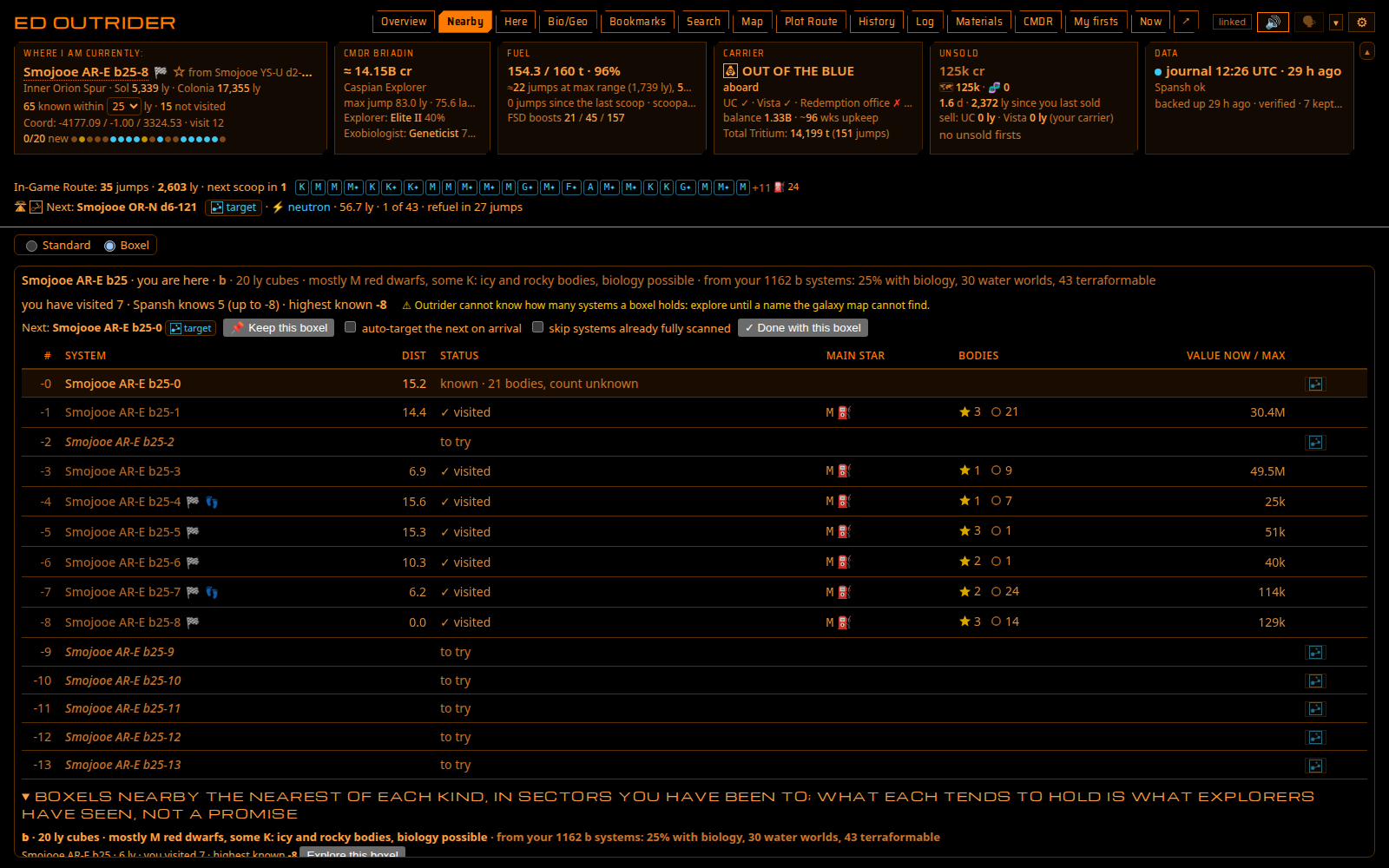
Boxel exploration: Nearby has a Standard / Boxel switch. Boxel mode lists the boxel you are in by number: systems you visited with your scans, the ones Spansh knows with how much anyone reported ("known · 3 of 14 bodies"), the rest to try. Next with 🎯 targets the lowest number you have not visited (game PC), even a system nobody has visited. Probable ends, ✓ complete and ✓ done, keep a boxel, auto-target the next on arrival and skip fully scanned systems (opt-in), recommended boxels nearby by kind, and a sector map of your sector's boxels.
Rare finds, called out: rare stars, notable stellar phenomena (how many, which you visited), surface sites (Guardian, Thargoid, the planetary anomaly), signals worth a detour (Titans, Guardian beacons, generation ships, listening posts) and potential green gas giants (the community's seven-layer ladder model): marked on Nearby and Here, a line on Now, each announced once with its own switch. ✦ on star and planet types new to your codex in the region (✪: anywhere), Spansh's bodies included.
Inara uploads (opt-in, with your Inara key): what EDMC's Inara plugin sends — travel, ranks, credits, statistics, ships, fleet and stored modules, reputation, inventory, community goals, missions, combat, friends and suits. Never your carrier.
The voice lab moves into the page (Settings → Voice): any installed voice and speed, several-person voices with a speaker picker, random lines and an audition, your own words with Save WAV. More voices lists every Piper voice, sorted by name, quality or size, with Piper's samples before you download. How is it said: exobiology names said the usual way from a shipped table of 120 words (a first pass: change any word your way).
Also: Now and the overlay's Now panel say where the next jump goes (the route's next stop, a kept boxel's Next); 🎯 beside your carrier's system; Here shows a finished species as one line with its colour's word in colour; the Babylon 5 - Vorlon theme; the overlay stays hidden while the game loads; a carrier's late market still goes to EDDN; the carrier's tritium jumps no longer count a buy order's reserved space as cargo; many fixes from code reviews; the guide brought up to date with new screenshots.
The first start re-reads your journals once (the start-up log says why; a few minutes for years of journals); your bookmarks, sample points, routes and settings are kept. Nothing else to change, Docker included. What's new for players: docs/guide/whats-new.md; the full history: docs/CHANGELOG.md.