Small library that helps with Android form validations
Library was written in scope of post: Android form validation - the right way
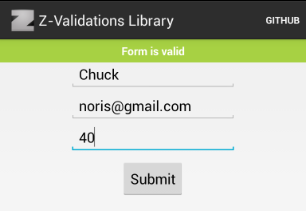
- NotEmpty - checks if field is not blank
- IsEmail - checks if field is valid email
- IsPositiveInteger - checks if fiels value is integer and if
value > 0 - InRange - checks if field value is integer and is in range
min < value < max - HasMinimumLength - checks if field value lenght is
value.lenght >= min
You can easily create your own validations, just implement ua.org.zasadnyy.zvalidations.validation.Validation interface
Include into your project. If you're using gradle simply copy z-validations-library folder into your project and update your build.gradle dependencies list
    dependencies {
        compile project(':z-validations-library')
        ...
    }
Create validation form and add some validations
    Form mForm = new Form(mActivity);
    mForm.addField(Field.using(mNameEditText).validate(NotEmpty.build(mContext)));
    mForm.addField(Field.using(mEmailEditText).validate(NotEmpty.build(mContext)).validate(IsEmail.build(mContext)));
    mForm.addField(Field.using(mAgeEditText).validate(InRange.build(mContext, 0, 120)));
Check if form is valid
    private void submit() {
        if (mForm.isValid()) {
            Toast.makeText(this, "Form is valid", Toast.LENGTH_SHORT).show();
        }
    }
Since v.0.2 you can change how validation errors are displayed. Library includes error renderers using TextView errors (used by default) and Toasts. You can create your own by implementing ua.org.zasadnyy.zvalidations.ValidationFailedRenderer interface
mForm.setValidationFailedRenderer(new TextViewValidationFailedRenderer(mContext));Checkout sample project for full usage example or install it from Google Play
Current version: 0.2
v.0.2.1
- Added HasMinimumLength validation (thanks TheoTzaferis for pull request)
v.0.2
- Code refactoring (thanks tadfisher for pull request)
- Added ability to change how validation errors are displayed
- Moved Crouton dependency from library to sample project
- Published Demo application on Google Play
v.0.1
- Initial release
