Repository navigation
Releases: whiteg2030-alt/-PS-win-psd-
Release list
AIPS 0.2.0 — Windows 中文版 / Windows release

中文
AIPS 0.2.0 — Windows 中文开源图像编辑器
源自 Robbie Tilton 的 Mac 版 Compositor,在 IAmTheBlurr 的 Windows 移植基础上增加中文界面、PSD/PSB 导入和 PS 常用快捷键适配。保留原作者、Windows 移植作者及 MIT 许可证。本项目不是 Adobe Photoshop,也不是原作者发布的官方版本。
安装
下载 AIPS-0.2.0-Windows-x64.zip → 全部解压 → 双击 Install-AIPS.cmd → 从桌面 AIPS 启动。无需管理员权限。也可直接运行 AIPS/AIPS.exe。
支持 Windows 11 x64 / Windows 10 22H2 x64(19045+),Intel/AMD;本次只提供 Windows 安装包。运行库和离线模型随包提供,尚未数字签名,手动更新。
本次内容
- 使用维护者提供的角色图片作为 AIPS 程序图标,更新名称、窗口标题和文件属性。
- 默认简体中文,
--english可启动英文界面。 - Ctrl+O 导入支持的 PSD/PSB 图层和分组,也提供保存合成图的导入方式。
- Alt+左键点击图层眼睛独显,再次操作恢复原显隐;支持分组、撤销/重做。
- Alt+滚轮围绕鼠标缩放;补齐常用 PS Windows 按键,附快捷键表。
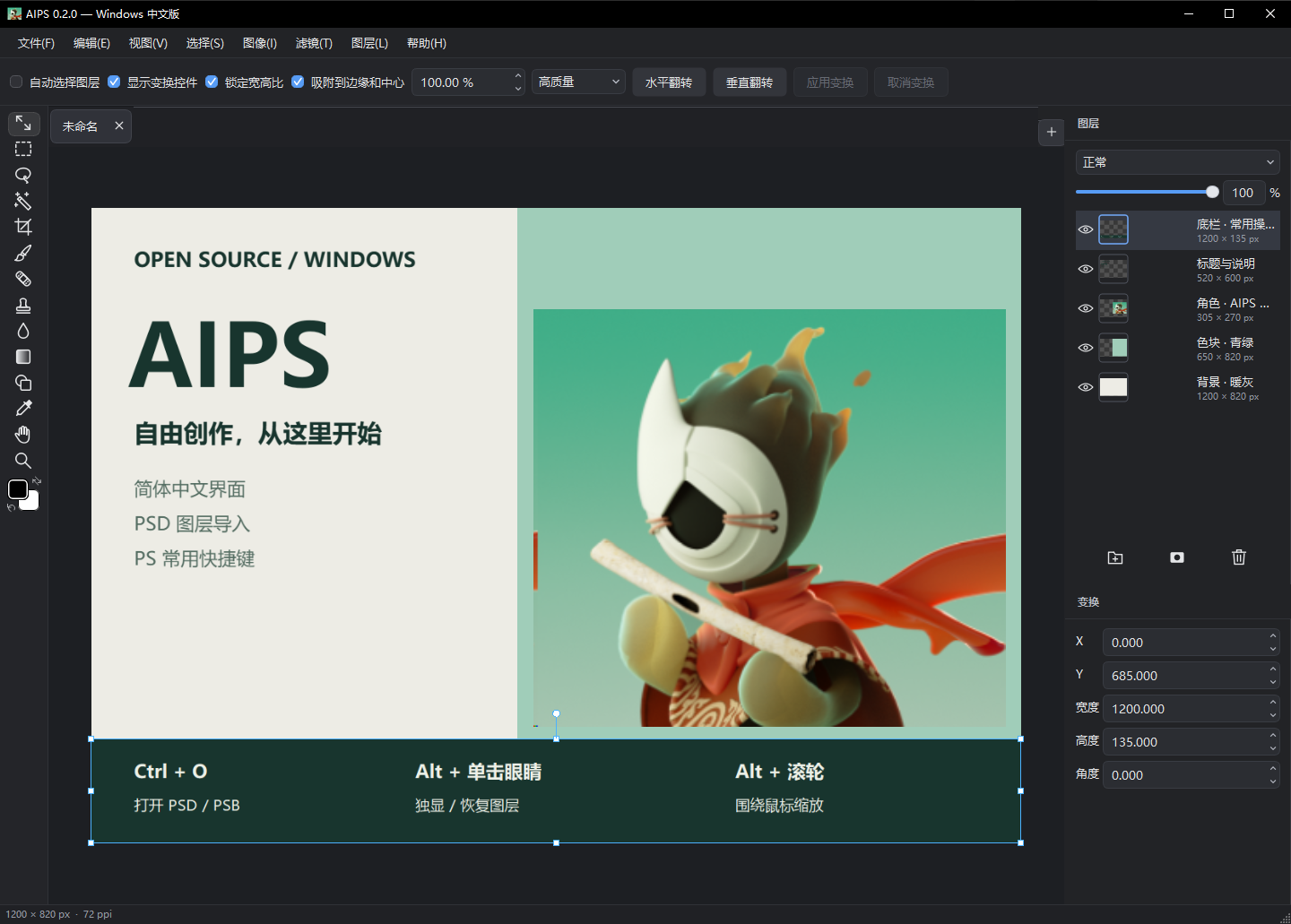
- 提供真实 Windows 界面截图、五图层示例工程、源码、依赖许可和安装说明。
兼容边界: 支持 RGB/灰度 8/16 位 PSD/PSB;文字、智能对象和矢量使用缓存像素。部分高级效果可能有差异,CMYK/Lab/32 位等暂不支持。保存为 .comp 工程,不能写回 PSD。常用快捷键适配不等于完整 PS 功能兼容。
验证:23 项针对性测试、运行库/离线模型健康检查、18 项原生编辑流程通过。安装脚本已在 Windows PowerShell 5.1 和本机 Windows 10 22H2 实际运行;Windows 11 未在本轮单独实机复测。
English
AIPS 0.2.0 — an open-source Windows image editor with Chinese localization, PSD import and Photoshop-style shortcuts.
AIPS builds on IAmTheBlurr's Windows port of Robbie Tilton's Mac Compositor (Mac baseline 1.0.4, Windows baseline 0.1.4). Original MIT attribution and third-party notices are preserved. This is an independent derivative, not Adobe Photoshop or an official upstream release.
Download the Windows x64 ZIP, extract everything, and run Install-AIPS.cmd, or launch AIPS/AIPS.exe for portable use. Windows 11 x64 / Windows 10 22H2 x64 (19045+), Intel/AMD. Runtime libraries and the offline model are bundled. No administrator rights or development tools required. This build is unsigned and updated manually.
Changes include the owner-provided AIPS icon and branding, Chinese UI, native layered/composite PSD/PSB import, Alt-click eye solo/restore, pointer-anchored Alt-wheel zoom, and common Windows Photoshop key bindings. Real native screenshots, an editable five-layer demo and corresponding source are included.
PSD support covers RGB/grayscale 8/16-bit files. Text, smart objects and vectors use saved raster pixels; some advanced effects may differ. Saving uses .comp project directories, not PSD. Full Photoshop parity is not claimed. The release passed 23 focused tests, runtime/model health and 18 native editing checks on the development Windows 10 machine.
Screenshot
Checksums
AIPS-0.2.0-Windows-x64.zip SHA256: 4d7a3693ebd99e473bfecfa6f930679cfdf11e065f9317fe6c08255e8c553e6c
Corresponding source commit: 3d02efd141a8b896327d6c898c1eabe1919b8a0c. The separately attached source ZIP matches the source ZIP inside the runtime package.