| layout | post |
|---|---|
| lastchange | 25-09-18 v024 + aws cli :README.md |
| url | https://github.com/wilsonmar/python-aws/blob/main/README.md |
This repo guides Python developers to use AWS cloud resources securely and efficiently by leveraging the AWS CLI, AWS CDK, and the AWS Boto3 (among other Python libraries).
This README adapts instructions from AWS with use of uv instead of pip. https://realpython.com/videos/run-project-with-uv/
For quick reference here, after successful and configuration described below:
The programs can be run using a choice of several ways:
| command | Note |
|---|---|
| ./app.py | References the first line of the file to specify the Python interpreter. |
| python run app.py | Invokes the Python interpreter and ignore that first interpreter line. |
| uv run app.py | Invokes the uv package manager utility to automatically resolve package dependencies. |
The last option above is our recommended approach.
The default standard output from the program is to show what is commonly known as INFO level information that satisfies the objective of the program. For example, sample code from AWS creates shortened URLs by building a Lambda function, as described by its creators.
The most run common commands and parameters during development is:
uv run app.py -v -vv -s
Parameters to control programs:
| abbr. | Parm | Explanation |
|---|---|---|
| -s | --summary | Show summary statistics at the beginning and end of the run. |
| -q | --quiet | Withhold INFO, ERROR, FATAL, summary messages. |
| -v | --verbose | Show messages about internal calculations for debugging, such as the path of input and output files. |
| -vv | --debug | Show details for debugging. |
| -L | --log | Log events to a telemetry system (used during productive runs). |
| -a | --alert | Send alerts (used during productive runs). |
| -e | --env filepath | Override the path to default .env file containing configuration settings and secrets (API keys). |
| -D | --destroy | Destroy resources after processing. |
Sample results returned:
app.py started: 2025-09-16 19:06:18.153274Z
DEBUG: psutil.Process(pid=13849, name='Python', status='running', started='19:06:15')
DEBUG: pgm_memory used()=414.84375 MiB being used.
DEBUG: pgm_diskspace_free()=368.20 GB
0.046875 MB memory consumed during run in psutil.Process(pid=13849, name='Python', status='running', started='19:06:15').
0.000042 GB disk space consumed during run.
SUMMARY: Ended while attempting loop 0 in 0:00:00.092067 seconds.
Z in dates signify that the date is set to UTC/GMT time zone so that all servers would issue timestamps that would not have potential errors from going back and forth Daylight Savings Summertime.
This program was tested to be installed and run on macOS, Raspian Linux, and Windows 10 & 11.
-
Install package manager: On macOS, it's Homebrew:
/bin/bash -c "$(curl -fsSL https://raw.githubusercontent.com/Homebrew/install/HEAD/install.sh)"on Windows, it's Chocolatey:
???on Raspian:
# Update package index and install pip if needed (Debian/Ubuntu example)
sudo apt update
sudo apt install -y python3-pip
on RedHat:
sudo su - yum install gcc openssl-devel bzip2-devel libffi-devel -
Install GitHub utilities:
brew install git brew install gh -
Setup SSH in GitHub. ???
-
Setup SSH for GitHub signing of verified commits.
-
Install NodeJs which comes with npm (Node Package Manager) used by AWS CDK (Cloud Development Kit): On macOS:
brew info node
brew install node    # from https://nodejs.org/
On Linux:
sudo apt install -y nodejs npm -
Install AWS-CDK using NPM, on all platforms:
npm install -g aws-cdk -
Verify CDK:
cdk --version 2.1029.1 (build b45b1ab) -
Confirm Python
python --versionPython 3.13.6
NOTE: The preferred version is defined in the pyproject.toml file.
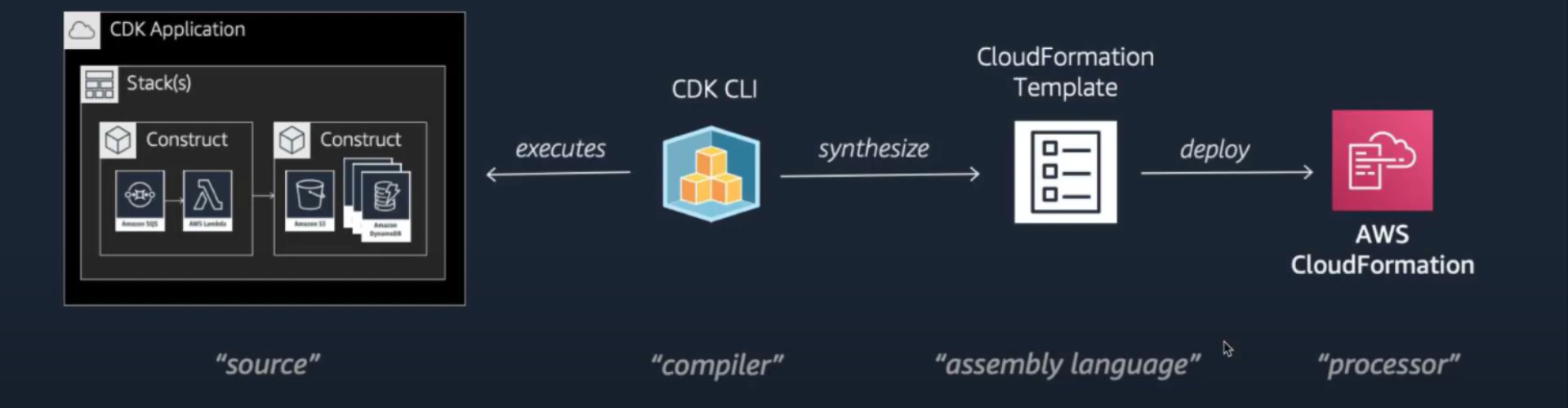
VIDEO: "AWS CDK Crash Course for Beginners" (using TypeScript), followup to this from 2021. CTO Werner Vogels explains.
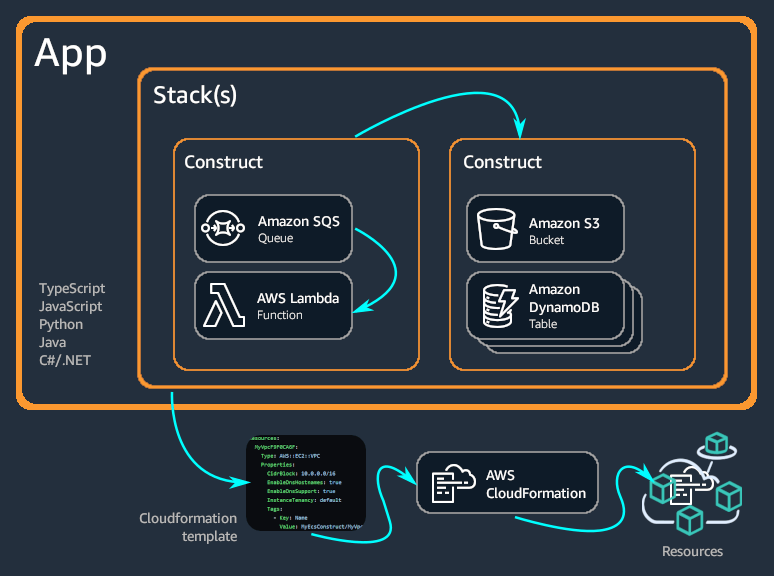
Amazon created their proprietary platform illustrated above to enable access into the vast variety of AWS cloud resources using several application programming languages: TypeScript, JavaScript, Java, C# (.NET), Go, as well as Python, as described in the AWS CDK Developer Guide and How-To.
App code define, for a user accounts within designated regions, one or more Constructs defined to manage AWS cloud resources such as S3 buckets, SQS, Lambda, DynamoDB databases, etc. Details about the full range of each resource managed by CDK is in its API Reference.
Each of one or more Stacks group constructs, such as "Storage", "Dashboard", etc.
Stacks and Construct definitions are "synthesized" to AWS proprietary CloudFormation template files which AWS excutes to create and manage actual resources in the AWS Cloud.
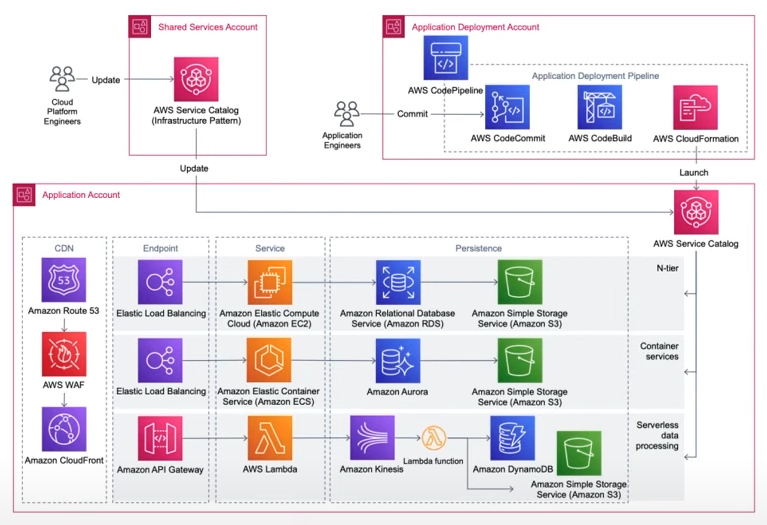
Due to its complexity, among Sample CDK Python programs is How to enable the (still "experimental") CDK Validator for CFNGuard of Proactive Controls enforced by the AWS Control Tower, which can stop the deployment of non-compliant resources deployed via CloudFormation.
AWS CDK reduces the complexity by code such as this:
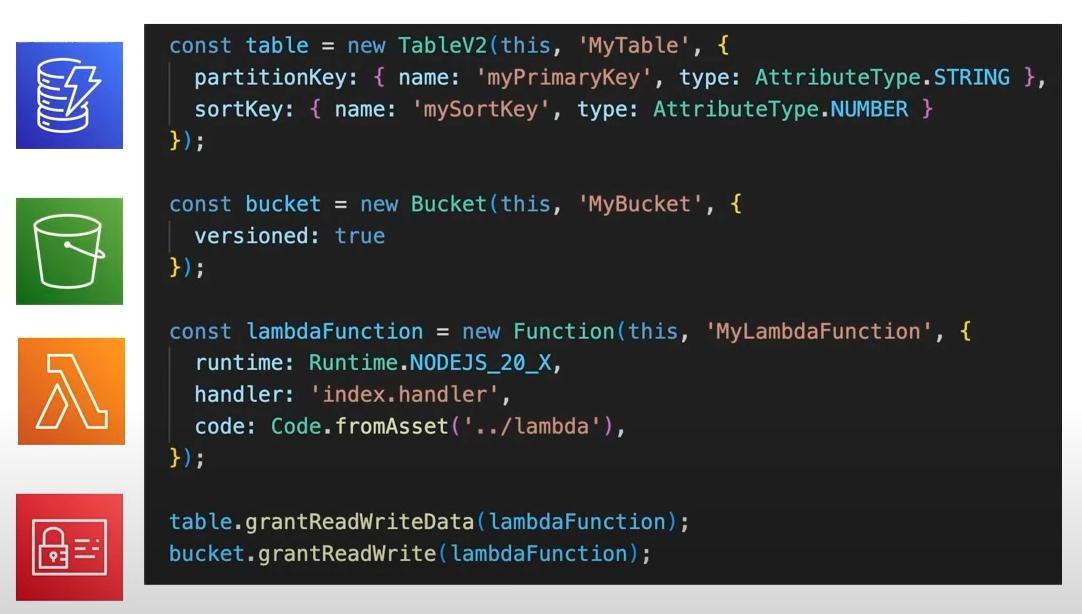
Constructs can be defined at three levels of specificity (detail level).
- Level 1 (L1) is low-level where everything can be specified. Most don't go here.
- Level 2 (L2) is the "curated" level of "sensible" defaults, Security Best Practices, and helper methods which can be overrrided. Most commonly work at this level.
- Level 3 (L3) are called "Patterns" that define a whole pre-made architecture.
PROTIP: Alternatives to AWS CDK is Terraform, which are declarative statements of static cloud resources, so utilities can check for security issues even before the resources are provisioned.
HashiCorp also developed the dynamic code "CDK for Terraform" to compete with Pulumi. Each of those platforms support other cloud and SaaS providers using similar techniques. This detailed comparison.
The Construct Hub website at https://constructs.dev/ has crowd-sourced example code for several platforms in one place.
QUESTION: Vide coding and MCP agents?
-
Open a Terminal to create a project folder to hold this project:
cd "$HOME" cd wilsonmar # folder holding all repos within my github account. -
Clone
git clone https://github.com/wilsonmar/python-aws
cd python-aws
The repo contains files created based on following https://docs.aws.amazon.com/cdk/v2/guide/work-with-cdk-python.html AWS Cloud Development Kit in the section below.
-
Notice the files and folders:
README.md (this file describing the repo).
CONTRIBUTING.md defines policies and procedures for making git commits and Push Requests to this repo.
.editorconfig (no file extension) defines coding styles and text editor configurations in order to maintain consistentcy for multiple developers working on the same project across various editors and IDEs. It's described at EditorConfig.org.
WARP.md file was created by the Warp CLI utility for its AI assist capabilities.
LICENSE (no file extension) defines the Apache Version 2.0 license governing use of this intellectual property, copied from a template.
-
Click configuration here to skip past the Create Blank CDK project below which describes how the repo was created initially.
-
Initialize a blank Python project and initialize AWS CDK project:
MY_PROJ_FOLDER="python-aws"   # folder holding the repo for this project.
mkdir "$MY_PROJ_FOLDER"
cd "$MY_PROJ_FOLDER"
pwd               # confirm that you're at like "/Users/johndoe/wilsonmar/python-aws"
cdk init app --language python
ls -al
Contents of the created folder:
.git          # folder to retain history and contains hook scripts
.gitignore    #
.venv         # folder
<a href="#app.py">app.py</a>       # starter Python program
cdk.context.json      # ?
cdk.json      # tells the CDK Toolkit how to execute your app.
requirements-dev.txt
requirements.txt
source.bat    # for Windows to run.
python_aws    # folder contains __init.py and python_aws_stock.py
tests         # folder
Additionally, these are created by uv and pip:
.cdk.staging # CDK asset staging directory *.swp package-lock.json __pycache__ .pytest_cache *.egg-info -
Acknowledge:
cdk acknowledge 34892 -
PROTIP: Rename the "master" branch to "main" (to be politically correct).
git branch
git branch -m main
See this video for an explanation of why and how to use uv.
-
PROTIP: To better manage modules, we use the more modern uv utility, which needs to be initialized by this:
uv init --no-readmeThat's instead of requirements.txt created and referenced by pip.
uv init creates these starter files:
.gitignore # see its contents below. .python-version main.py # A "hello world" pyproject.toml # configuration README.md # empty (if created) -
Copy the .python-version, main.py, pyproject.toml files to the folder created by aws cdk.
-
Contents of the .gitignore file generated by uv should be combined with the contents of .gitignore generated by aws cdk:
# Python-generated files __pycache__/ *.py[oc] build/ dist/ wheels/ *.egg-info # Virtual environments .venv -
Files requirements.txt and requirements-dev.txt can be deleted because we prefer to generate files at the beginning of each work session so that we get the very latest versions of all modules and thus detect integration issues as soon as possible.
-
See https://docs.aws.amazon.com/cdk/latest/guide/environments.html
-
Edit file app.py to "specialize" the current "stack" consisting of the AWS Account and Region you want to use. But instead of un-commenting the line specifying CDK_DEFAULT_ACCOUNT (such as 123456789012) and CDK_DEFAULT_REGION (such as 'us-east-1').
env=cdk.Environment(account=os.getenv('CDK_DEFAULT_ACCOUNT'), region=os.getenv('CDK_DEFAULT_REGION')), -
We've edited file app.py to use a try/exception coding convention to send out a console message when external dependencies have not been imported properly.
uv add aws-cdk-lib constructs boto3 putilsTechnical notes:
# This uv dependency metadata for your import of PythonAwsStack, use an inline script header at the top of your Python file. This lets uv automatically manage and install the package needed for the import when you run the script.
# /// script
# dependencies = ["python_aws"]
# ///
-
For testing: PROTIP: There is some conflict using aws-cdk-assertions, so:
uv add --dev pytest -
REMEMBER: Pytest looks for and automatically runs function names starting with "test_...".
-
TODO: GenAI that creates test functions.
- Every time you prepare to run the program, define a virtual environment the new uv way:
That's instead of what AWS recommends in their (outdated) docs:
uv venv .venv source .venv/bin/activateOn Windows:python3 -m venv .venv source .venv/bin/activate.venv\Scripts\activate.bat - To download imports specified within the program:
Instead of:
uv add aws_cdk uv venv .venv source .venv/bin/activateOn Windows:python3 -m venv .venv source .venv/bin/activate.venv\Scripts\activate.bat
-
AWS URLs and GUI on an internet browser.
-
Feduciary responsbilities for email, credit card, and other private info.
-
Infrastructure as Code (IaC) options.
-
Strategies and policies in assiging permissions to working Users and Roles.
-
Locking down Global Administrator user account.
PROTIP: Configure a different profile for each point in the system lifecycle.
-
Install AWS CLI for the IAM Console.
-
Secrets Manager usage.
-
Managing compute environments (EC2 & Fargate).
-
Managing Relational SQL databases (RDS, etc.).
(sections removed for editing)
https://docs.aws.amazon.com/cli/latest/userguide/getting-started-install.html
-
on macOS, at any folder, install the AWSCLIV2.pkg :
brew install awsclion Linux:
curl "https://awscli.amazonaws.com/AWSCLIV2.pkg" -o "AWSCLIV2.pkg"
sudo installer -pkg AWSCLIV2.pkg -target /
Response:
installer: Package name is AWS Command Line Interface installer: Installing at base path / installer: The install was successful. -
Confirm:
aws --versionAt time of writing:
aws-cli/2.28.10 Python/3.13.6 Darwin/24.6.0 source/arm64 -
Verify: on macOS or Linux:
which aws/usr/local/bin/aws
-
PROTIP: Configure a different profile for each point in the system lifecycle.
This prompts for AWS Access Key ID, Secret Access Key, default region, and output format:
aws configure --profile dev aws configure --profile qa aws configure --profile prod -
Interactively configure through the IAM Identity Center: see https://docs.aws.amazon.com/cli/latest/userguide/cli-configure-sso.html
aws configure sso

SSO session name (Recommended): my-sso
SSO start URL [None]: https://my-sso-portal.awsapps.com/start
SSO region [None]:us-east-1

Attempting to automatically open the SSO authorization page in your default browser.

There are 2 AWS accounts available to you.
> DeveloperAccount, developer-account-admin@example.com (111122223333)
ProductionAccount, production-account-admin@example.com (444455556666)

Using the account ID 111122223333

There are 2 roles available to you.
> ReadOnly
FullAccess

Using the role name "ReadOnly"

CLI default client Region [None]: us-west-2
CLI default output format [None]: json
CLI profile name [123456789011_ReadOnly]: user1
- Confirm:
The expected response is like:
aws sts get-caller-identity{ "UserId": "DSDFIVEEIJVKWEWV82", "Account": "123456789012", "Arn": "arn:aws:iam::448292842/CICDUser" } - Bootstrap:
The expected response is like:
cdk bootstrap aws://123456789012/us-west-2Trusted accounts for deployment: (none) Trusted accounts for lookup: (none) Using default execution policy of 'arn:aws:iam::aws:policy/AdministratorAccess'. Pass '--cloudformation-execution-policies' to customize.
https://github.com/aws-samples/aws-cdk-examples/tree/main/python
session, resource,client,collections,waiters and paginators
Within the repo's apps folder:
- Use ChatGPT to create VIDEO
You are
Based on AWS-samples repo URL Shortener.
Webotron is a script that syncs a local directory to an s3 bucket, and optionally configure Route 53 and cloudfront as well. It has these features:
- List bucket
- List contents of a bucket
- Create and set up bucket
- Sync directory tree to bucket
- Set AWS profile with --profile=
- Configure route 53 domain
Notify Slack users of changes to your AWS account based on CloudWatch Event triggers.
This folder houses assets from the hands-on tutorial from Courseara course: "DevOps and AI on AWS: AIOps" at: https://www.coursera.org/learn/aiops-aws/ which has these hands-on Tasks using AWS Training instances:
- Install and start the ADOT collector (adot1.sh)
- Instrument the application with Python OpenTelemetry Auto-instrumentation
- Observe X-Ray traces and trace map
- Manually setting trace attributes
-
cdk helplist all commands for cdk CLI program -
cdk docsopen CDK documentation -
cdk lslist all stacks in the app -
cdk synthemits the synthesized CloudFormation template -
cdk diffcompare deployed stack with current state -
cdk deploydeploy the stack to your default AWS account/region -
cdk destroydestroy (remove) resources
contains import aws_cdk as cdk for synth command. from python_aws.python_aws_stack import PythonAwsStack
What does app.synth() do?
-
Synthesize the CloudFormation template for the code:
cdk synth -
On CLI Terminal: Execute CDK to create resources:
cdk deploy -
On AWS Console GUI: view resources created
-
List resources! From GUI:
Using Python Boto3 code ???
-
Specify a parmeter when executing app.py, such as
-D
-
On CLI Terminal: Execute CDK to create resources:
cdk destroy -
On AWS Console GUI: view resources removed.
cdk destroydestroy (remove) resources
By DevOps With Namdev on YouTube:
By Cloud Quick Labs on YouTube:
- VIDEO: AWS CDK in Python | How To Use AWS CDK in Python to Provision AWS Cloud Infrastructure Resource (on Windows)
By Alfredo Deza and Noah Gift from Pragmatic AI Labs
- 7m AWS CDK 2.8 with Python Deploy Hello World Lambda 2022 (using AWS Cloud9 editor runnig cdk-workshop)
- 1hr Hello World IAC with AWS CDK (using TypeScript on AWS Cloud9 editor)
- Assimilate AWS Cloud Development Kit (CDK) Dec 2022
Be A Better Dev:
- AWS Just Changed Everything: Meet AWS MCP 2026
- https://youtu.be/D4Asp5g4fp8
- https://courses.beabetterdev.com/courses/web-scraping-bot
- VIDEO: Should you start using AWS CDK?
- Playlist "Getting Started with AWS CDK and Python | Step by Step Tutorial" 2022
Program with Akshay on YouTube:
- "AWS CDK MasterClass" Playlist 2024 using NodeJs.
Train to Code:
by Tech With Yeshwanth AWS Automation with Python Boto3 - 8 video playlist:
-
https://github.com/yeshwanthlm/Boto3-Course-YouTube/tree/main/Project-1
-
https://docs.google.com/document/d/1-34IR_hz1ngwLWET9t5XSwOWEPULcDByQTp0buqJvqk/edit?usp=sharing Notes/Documentation can be found here:
-
AWS Playlist: https://youtube.com/playlist?list=PLjl2dJMjkDjmMEptUtRFA1ZMQ9MReTX_f
https://www.youtube.com/watch?v=3DRiruDUhiA Using Python to Automate AWS Services | Lambda and EC2
https://medium.com/kpmg-uk-engineering/aws-automation-using-python-and-boto3-1a15b1ffc96b AWS Automation using python and Boto3 | by Srinath Krishnamoorthy
https://github.com/rahuls512/python-scripts-for-aws rahuls512/python-scripts-for-aws: Automating AWS Tasks ... - GitHub
https://dev.to/aws-builders/aws-with-python-a-powerful-duo-for-cloud-automation-15a1 AWS with Python: A Powerful Duo for Cloud Automation
https://www.reddit.com/r/devops/comments/wdycmr/how_to_learn_python_for_aws_or_devops_use_cases/ How to learn Python for AWS or DevOps use cases - Reddit
https://aws.amazon.com/blogs/infrastructure-and-automation/category/programing-language/python/ Python | Integration & Automation - AWS Oct 2, 2019