Repository navigation
Database design and implementation
📑 Chapter summary
In this section students must design and implement the database structure (mainly the data model).In this section you must implement:
- The database table structure.
- The data models (ORM)
- Data models access methods (if needed)
- Populating the database using the models you have created
- Understand database basics
- Understand how to use ORM to create database schema and populate a database
- Setup and configure database
- Implement database backend
✔️ Chapter evaluation (max 5 points)
You can get a maximum of 5 points after completing this section. More detailed evaluation is provided in the evaluation sheet in Lovelace.We have used MySQL for creating the following database model. We use this for tracking or auditing the emails that are being sent through the API and keeping their records.
- A name and a short description of each database model. Describe in one or two sentences what the model represents.
- An enumeration of the attributes (columns) of each model. Each attribute must include:
- Its type and restrictions (values that can take)
- A short description of the attribute whenever the name is not explicit enough. E.g. If you are describing the users of a "forum", it is not necessary to explain the attributes "name", "surname" or "address" because their meanings are obvious.
- Characteristics of this attribute (e.g. if it is unique, if it contains default values)
- Connection with other models (primary keys and foreign keys)
- Other keys
For this section you can use a visual tool to generate a diagram. Be sure that the digram contains all the information provided in the models. Some tools you can use include: https://dbdesigner.net/, https://www.lucidchart.com/pages/tour/ER_diagram_tool, https://dbdiffo.com/
✏️ The table can have the following structure
We use the JSON type for databases because it allows us to store complex data structures in a single field, making it more efficient and easier to manage. This type is also supported in MySQL, making it a popular choice for web applications. By using JSON, we can avoid the complexity and time-consuming process of creating separate fields for each section of the data, such as 'to', 'cc', and 'bcc' in an email message.
The system consists of three different databases: Recipient Database, Template Email Notification Audit Database, and Template Database.
- Recipient Database
- This table contains information about recipients of email notifications. It includes data such as the recipient's name, email addresses, active status, and timestamps indicating when the recipient was created and modified.
| Name | Type | Restrictions | Description | Characteristics | Links |
|---|---|---|---|---|---|
| recipient_id | int | NOT NULL | primary key of the table | AUTO_INCREMENT | Primary key |
| recipient_name | varchar(255) | NOT NULL | name of the recipient | ||
| email_addresses | json | NOT NULL | list of email addresses for the recipient | ||
| active | tinyint | NOT NULL | flag to indicate if the recipient is active or inactive | ||
| created_date | timestamp | NOT NULL | timestamp indicating when the recipient was created | ||
| modified_date | timestamp | DEFAULT NULL | timestamp indicating when the recipient was last modified |
- Template Email Notification Audit Database
- This table records data on the email notifications sent to recipients. It includes information such as the email subject, recipient ID, template ID, and timestamps for when the notification was created and modified. It also includes a request ID for the Simple Email Service (SES).
| Name | Type | Restrictions | Description | Characteristics | Links |
|---|---|---|---|---|---|
| email_notification_audit_id | int(11) | NOT NULL | primary key of the table | AUTO_INCREMENT | Primary key |
| email_subject | varchar(255) | NOT NULL | subject of the email table | DEFAULT '' | |
| recipient_id | int | foreign key referencing recipient table | Foreign key | ||
| template_id | int | foreign key referencing template table | Foreign key | ||
| request_id | varchar(150) | DEFAULT NULL | ses request id | ||
| created_date | timestamp | NOT NULL | |||
| modified_date | timestamp | DEFAULT NULL |
- Template Database
- This table contains the templates used for email notifications. It includes data such as the template name, body, active status, and timestamps indicating when the template was created and modified. It also includes a field for the subject of the email template.
| Name | Type | Restrictions | Description | Characteristics | Links |
|---|---|---|---|---|---|
| template_id | int | NOT NULL | primary key of the table | AUTO_INCREMENT | Primary key |
| template_name | varchar(255) | NOT NULL | name of the template | ||
| template_body | json | body of the template | |||
| active | tinyint | NOT NULL | flag to indicate if the template is active or inactive | ||
| created_date | timestamp | NOT NULL | timestamp indicating when the template was created | ||
| modified_date | timestamp | DEFAULT NULL | timestamp indicating when the template was last modified | ||
| template_subject | varchar(255) | subject of the email template |
The Recipient Database table contains recipient-related information, such as their unique ID, name, email addresses, and other details. The Template Database table, on the other hand, contains the templates for email messages, including the template ID, template name, body of the template, and other relevant information. The Template Email Notification Audit Database table stores audit logs of sent email notifications, including the email notification ID, email subject, recipient ID, template ID, SES request ID, and other details.
The Recipient Database and Template Email Notification Audit Database tables are linked to the Template Database table through foreign keys. The recipient ID column in the Template Email Notification Audit Database table and Recipient Database table link the two tables, while the template ID column in the Template Email Notification Audit Database table and the Template Database table link those two tables. This structure allows for easy tracking of sent email notifications and ensures that templates and recipients are linked to the correct emails.
✏️ Do not forget to include a diagram presenting the relations
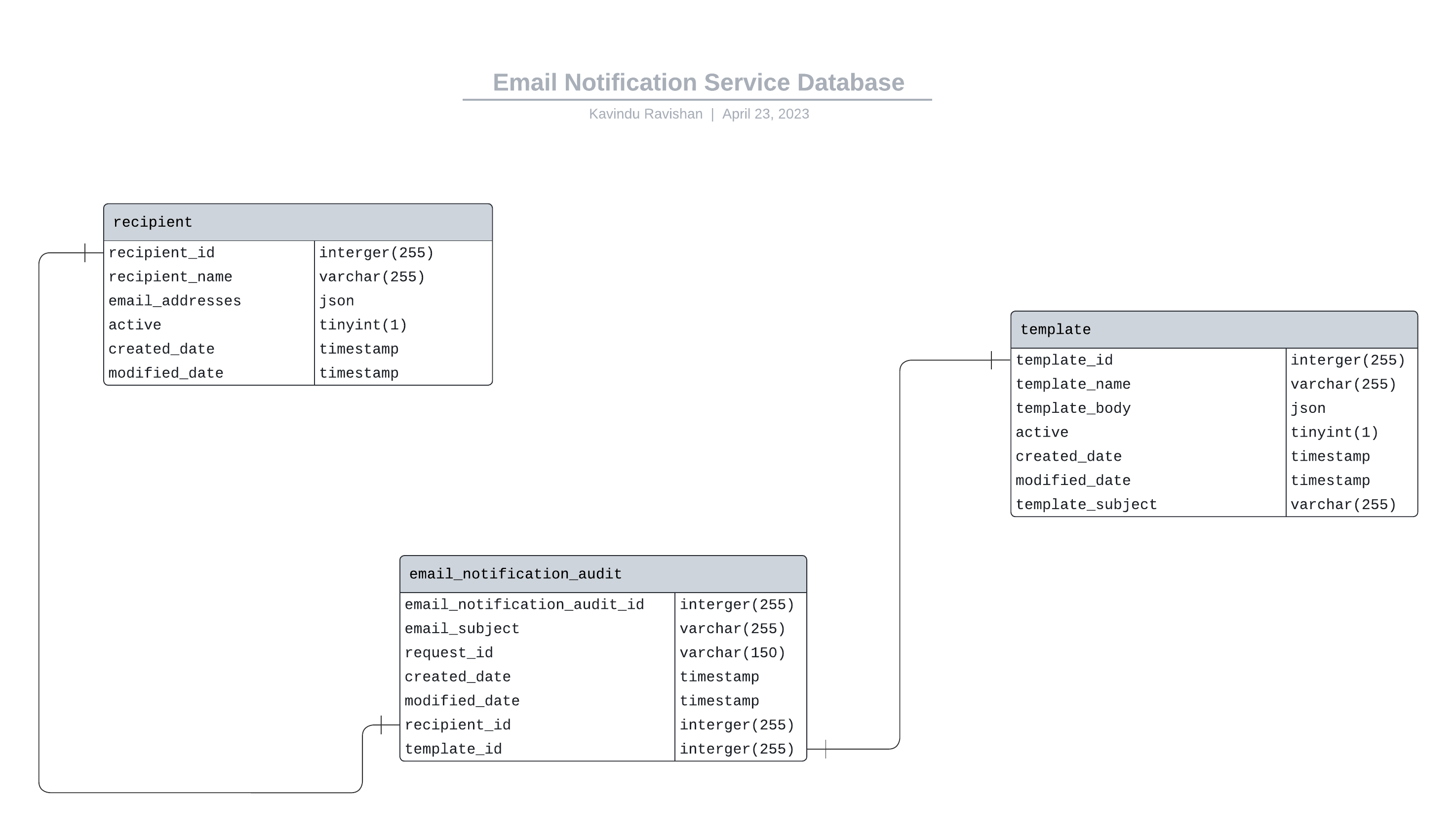
ER diagram that represent relationships among the entities

💻 TODO: SOFTWARE TO DELIVER IN THIS SECTION
The code repository must contain:- The ORM models and functions
- A .sql dump (or similar data structure) of a database or the .db file (if you are using SQlite). The provided document must contain enough information to replicate your database. You must provide a populated database in order to test your models.
- The scripts used to generate your database (if any)
- A README.md file containing:
- All dependencies (external libraries) and how to install them
- Define database (MySQL, SQLite, MariaDB, MongoDB...) and version utilized
- Instructions how to setup the database framework and external libraries you might have used, or a link where it is clearly explained.
- Instructions on how to setup and populate the database.
- If you are using python a `requirements.txt` with the dependencies
✏️ You do not need to write anything in this section, just complete the implementation.
| Task | Student | Estimated time |
|---|---|---|
| Database Implementation & WiKi | Kavindu Ravishan | 10 hours |
| Documentation of Database Design & README.md | Windula Kularatne | 15 hours |
| Database Testing Implementation | Achira Hendalage | 10 hours |
| Database Testing Documentation | Sameera Gamage | 10 hours |
| Discussion | Everybody | 12 hours |