This is a backend API built with FastAPI that monitors and manages worker processes. The API provides endpoints for registering workers, tracking their health, creating and ending processes, and updating task statuses. Additionally, it offers real-time dashboards to visualize workers, processes, and tasks.
- Worker Registration: Register new workers and track their processes.
- Health Check: Monitor the health status of workers.
- Process Management: Start, track, and end processes dynamically.
- Task Management: Update task statuses and fetch task details.
- Dashboard: Real-time overview of workers, processes, and tasks through a dashboard API.
- Authentication: Basic authentication using a token in headers.
- CORS Support: CORS middleware configured to allow cross-origin requests from any source.
- Current Version: v1.1
-
Key Features
-
API Version
-
Requirements
-
Installation
-
Running the Application
-
API Endpoints
- Version
- Worker Registration
- Health Check
- Process Management
- Task Management
- Dashboard
-
Authentication
-
Error Handling
-
Contributing
-
License
- Python 3.7+
- FastAPI
- Uvicorn (for local development)
- Pydantic (for data validation)
- A database configured for worker and task tracking
- Docker
- Docker Compose
create a file: docker-compose.yaml
version: "3.9"
services:
  monitor_backend:
    image: wisrovi/wpipe_api:v1.0
    ports:
      - "8418:8000"
    environment:
      - MYSQL_USER=process_monitor
      - MYSQL_PASSWORD=process_monitor
      - MYSQL_DATABASE=process_monitor
      - SERVER=db:3306
      - TOKEN=mysecrettoken
    command: gunicorn -w 4 -k uvicorn.workers.UvicornWorker --bind 0.0.0.0:8000 api:app
    # command: tail -f /dev/null
    restart: always

  monitor_frontend:
    image: wisrovi/wpipe_api_dashboard:v1.0
    ports:
      - "8050:8050"
    environment:
      - BACKEND=monitor_backend:8000
    depends_on:
      - "monitor_backend"
    command: python demo_dashboard_base.py
    restart: always

  db:
    image: mariadb
    restart: always
    labels:
      "autoheal": "true"
      Author: "https://www.linkedin.com/in/wisrovi-rodriguez/"
    environment:
      - MYSQL_RANDOM_ROOT_PASSWORD=yes
      - MYSQL_USER=process_monitor
      - MYSQL_PASSWORD=process_monitor
      - MYSQL_DATABASE=process_monitor
    volumes:
      - backup_db:/var/lib/mysql
    healthcheck:
      test: ["CMD", "mysqladmin", "ping", "--silent"]
      interval: 10s
      timeout: 10s
      retries: 5
    ports:
      - 3306:3306

volumes:
  backup_db:
so, execute:
docker-compose up -d - Clone the Repository:
git clone git@github.com:wisrovi/wpipe-api.git
cd wpipe-api
- Build Environment (docker):
docker-compose build- Start service:
docker-compose up -d This will start 3 services:
- the backend on port
8418, - the frontend (dashboard) on port
8050 - the database on port
3306.
This will spin up both the FastAPI backend and the Dash frontend.
The Dash app will be available at http://localhost:8050 and the FastAPI backend at http://localhost:8000.
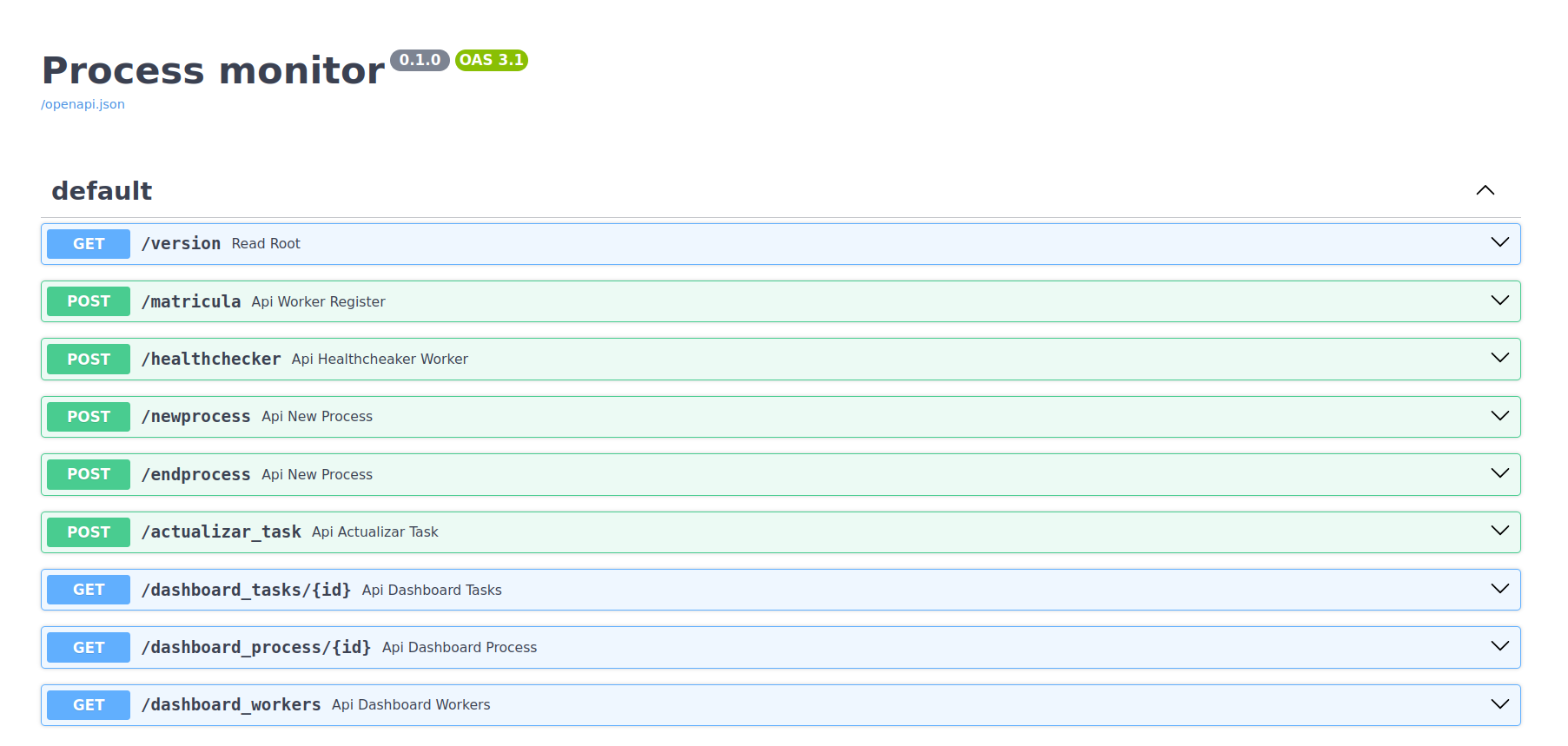

GET /version
- Returns the current version of the API.
{
  "version": "v1.1"
}POST /matricula
Registers a new worker process and returns the worker ID.
- Request (example)
{
  "name": "worker_name",
  "version": "v1.0",
  "tasks": [
    {"name": "task1", "version": "1.0"},
    {"name": "task2", "version": "2.0"}
  ]
}- Response (example)
{
  "id": "123e4567-e89b-12d3-a456-426614174000"
}POST /healthchecker
Checks the health status of a worker.
- Request (example)
{
  "id": "123e4567-e89b-12d3-a456-426614174000"
}- Response (example)
{
  "health": 1
}POST /newprocess
Starts a new process for a worker.
- Request (example)
{
  "id": "worker_id"
}- Response (example)
{
  "father": "worker_id",
  "sons": [...]
}
POST /endprocess
Ends a process and provides details.
- Request (example)
{
  "id": "process_id",
  "details": "Details about the end of the process"
}- Response (example)
{
  "status": true
}
POST /actualizar_task
Updates the status of a task.
- Request (example)
{
  "task_id": "task_id",
  "status": "completed",
  "details": "Task completed successfully"
}- Response (example)
{
  "status": "ok"
}GET /dashboard_tasks/{id}
Fetches the dashboard for tasks related to a specific worker.
- Response (example)
[
  {
    "id": "task_id",
    "name": "task_name",
    "state": "in_progress",
    "received": "2024-09-13T12:34:56",
    ...
  }
]
GET /dashboard_workers
Fetches the overall worker dashboard.
All API endpoints (except /version and /dashboard_workers) require a Bearer Token for authentication. Include it in the header:
Authorization: Bearer mysecrettokenIf the token is invalid, the API will respond with:
{
  "detail": "Unauthorized"
}The API raises HTTP exceptions with appropriate status codes:
- 401 Unauthorized: If the token is missing or invalid.
- 400 Bad Request: For invalid data.
- 404 Not Found: If the requested resource is not found.
This project is a process monitoring application that uses a FastAPI backend to manage workers' processes and tasks, and a Dash frontend to visualize the status of workers, processes, and tasks in real-time.
The application has a main dashboard that displays three tables that automatically update every 15 seconds:
- Workers Table: Displays the status of workers. You can select a worker to view their associated processes.

- Processes Table: Displays processes linked to the selected worker, including their current status (running, error, success).

- Tasks Table: Displays tasks related to the selected process, showing the state of each task.

- Web - callbacks

- Dash: Framework for creating interactive web interfaces.
- Dash Bootstrap Components: Used for styling the interface with Bootstrap components.
- REST API: Communicates with the FastAPI backend to retrieve workers, processes, and task data.
- Auto-Refresh: The tables auto-refresh every 15 seconds using the dcc.Interval component.
- fetch_workers_data: Retrieves workers' data from the backend.
- fetch_process_data: Fetches process data for a specific worker.
- fetch_task_data: Fetches tasks associated with a process.
- Callbacks: Dash callbacks are used to refresh the workers, processes, and tasks tables.
The dashboard communicates with a FastAPI backend, which exposes the following relevant endpoints:
- GET
/dashboard_workers: Returns the status of all workers. - GET
/dashboard_process/{id}: Returns the list of processes associated with a worker. - GET
/dashboard_tasks/{id}: Returns the list of tasks associated with a process.
Ensure that the backend is running properly and accessible for the dashboard to work as expected.
- Fork the repository.
- Create a feature branch (git checkout -b feature/new-feature).
- Commit your changes (git commit -am 'Add new feature').
- Push to the branch (git push origin feature/new-feature).
- Open a pull request.
This project is licensed under the MIT License. See the LICENSE file for more details.