Runbook
For when the server is broken and you need it back.
Open XCSV GUARD. Its Overview tab runs the pre-flight checks below automatically, every poll. If it is already telling you what is wrong, believe it before you believe the RPT.
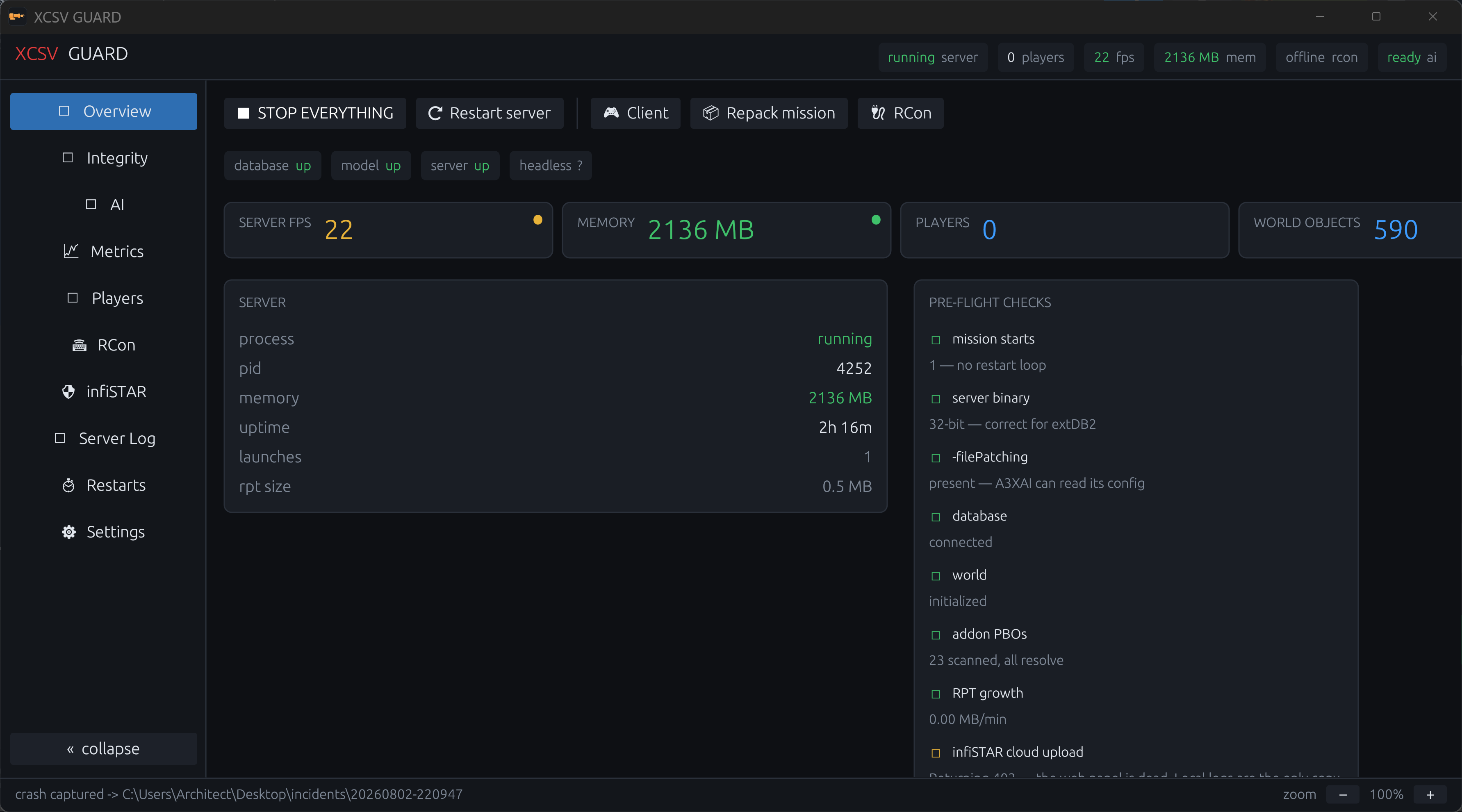
Then, from a shell:
D:\XCSV_GUARD\tools\doctor.ps1          # executable assertions
D:\XCSV_GUARD\tools\doctor.ps1 -Json # same, machine-readable, exit codesCount mission starts before reading a single error.
Select-String -Path <newest .rpt> -Pattern 'Starting mission:' | Measure-Object- 1 — the server started once. Errors after it are probably real.
- more than 1 — you are in a restart loop. Only the first error is real. Everything after it, including every database error, is a symptom.
Two messages that are always symptoms and never causes:
-
extDB2 is already setup & locked— extDB2 locks after a successful init, so this only appears on a second pass, which means a loop. -
Unknown Protocol— same story.
In order of how often it has actually been the answer here:
-
PBO entry paths. A PBO whose entries all begin with
\passes a checksum verify and still breaks everything — Arma resolves<prefix>+\path, finds nothing, and the server core never loads. Check the entry table, not the checksum:No entry may begin withE:\ExileRepo\tools\pbo\pbo.ps1 List -Path <pbo>
\or/. XCSV GUARD's Integrity tab does this for every loaded PBO and refuses to start the server if any fails. -
Wrong database bridge. Production is
arma3server_x64.exe+ extDB3. If x64 is running, verify@ExileServer\extDB3_x64.dll,@ExileServer\extdb3-conf.ini, and@ExileServer\sql_custom\exile.ini. -
Missing
-filePatching. A3XAI readsa3xai_config.sqfas a loose file and silently ends the mission during world init without it. -
Database reachable? MariaDB up, credentials in
extdb3-conf.inicurrent. -
A config parse error in the mission. One bad brace in
config.cppends the mission before anything else runs.
XCSV GUARD's log guard watches MB/min and alerts. If it is climbing:
- Confirm the active process is
arma3server_x64.exeand capture a baseline. - Check the newest RPT for a repeating line; a single addon in a tight failure loop can write hundreds of MB.
- Old RPTs are safe to delete. The live one is not.
Use XCSV GUARD's Restarts tab, which issues #shutdown, not #restart.
#restart reloads the mission inside the same process and never returns memory.
Use #shutdown so the x64 process exits cleanly and comes back under the
current launch parameters.
Production is arma3server_x64.exe + extDB3 with -maxMem=12288.
E:\ExileRepo\tools\diagnostics\x64-baseline.ps1
E:\ExileRepo\tools\database\test-extdb3-persistence.ps1
E:\ExileRepo\tools\database\backup-exile-db.ps1 -WhatIf
If the latest server RPT contains No more slot to add connection, the headless
client did not claim an HC slot. GUARD doctor reports this as hc-join.
The Start Everything button brings up, in order: database → integrity gate → server → headless client → local model. Stop Everything takes them down cleanly in reverse.
If the server will not start, the integrity gate is the first thing to check — by design it will block a start rather than let a corrupt PBO produce a loop.
Repacking is the single most dangerous routine operation here.
E:\ExileRepo\tools\pbo\pbo.ps1 Pack -Path <src> -Out <dst> -Prefix <prefix>
E:\ExileRepo\tools\pbo\pbo.ps1 List -Path <dst>      # ALWAYS. Read the paths.
The packer once used Resolve-Path, which hands a path back in whatever form it
was given — so a source path containing an 8.3 short name
(C:\Users\ARCHIT~1\…) stayed short while directory enumeration returned the
long form (C:\Users\Architect\…). One character of difference left a separator
on every entry path. It now uses Get-Item -LiteralPath and refuses to pack a
bad entry, but verify anyway.
The corruption is arithmetically visible — broken files are exactly one byte larger per entry.
- Live player list, kick, ban, message — XCSV GUARD Players tab.
- Who connected — BattlEye connection history is the only local record of who reached a publicly listed box.
- Object count run away? In-game, as an admin, use the scroll action XCSV: World census — it buckets and maps every simulated object, locally to you only.
If the process is up, the ports are bound, the mission started and the database connected — and nothing can connect anyway — check the Steam build ids before anything else. Arma refuses cross-version joins and the server logs nothing when a client fails the handshake, so this fault is invisible from the server's own logs. It caused the 2026-08-11 outage.
XCSV GUARD checks this before every launch and will refuse to start on a mismatch (Overview shows a red banner; the toggle is on the Integrity tab).
Compare the game version, never the Steam build id. The server is app 233780 and the client is app 107410 — different applications, whose build ids are independent counters that never match even when the installs do. Right after the 2026-08-11 update, with both sides on 2.22.153995 and joining fine, the manifests read 24610432 and 24672225.
To check by hand, compare the two banners:
# server
Get-Content (Get-ChildItem E:\arma3server\profiles\arma3server*.rpt |
  Sort LastWriteTime -Desc | Select -First 1).FullName -TotalCount 12
# client / HC
Get-Content (Get-ChildItem E:\arma3server\profiles_hc2\arma3_x64*.rpt |
  Sort LastWriteTime -Desc | Select -First 1).FullName -TotalCount 12
Or read the Steam manifests directly, which needs nothing running:
Select-String E:\arma3server\steamapps\appmanifest_233780.acf  -Pattern '"buildid"'
Select-String E:\SteamLibrary\steamapps\appmanifest_107410.acf -Pattern '"buildid"'
Fixing a mismatch. Steam auto-updates the retail client; the dedicated server is a separate SteamCMD app (233780) and does not follow. Update it:
E:\SteamCMD\steamcmd.exe +force_install_dir E:\arma3server +login <steam-user> +app_update 233780 validate +quit
+login anonymous does not work for 233780 — it fails with
No subscription. The app requires a Steam account that owns Arma 3, and the
login is interactive (password, then Steam Guard), so it cannot be driven from
a non-interactive shell or a scheduled task.
Stop the stack before updating, and stop XCSV GUARD first — GUARD is the parent of the server process and will respawn it within seconds otherwise.