In this lab, students will learn how to ethically hack the flash memory of a ESP32 through it's UART port.
There are three serial ports on the original ESP32. UART0 is often used for programming and communication with devices outside of the ESP32 while the other two UART ports are unused. The Micro-USB connector of our IoT kit is connected to UART0 through a USB-UART bridge chip. If there is no protection of the UART0 interface, a hacker can access the flash through UART0. The access to UART can be protected by a password. That is, a user must enter the correct password to upload firmware and communicate with the IoT kit.
If the UART ports and flash of a device are not protected, various exploits are possible.
In this lab, we will work on the WiFi station example in our environment located at /home/iot/esp/esp-idf/examples/wifi/getting_started/station/. This ESP-IDF project has been included in this repository for the students convince. On our Ubuntu VM, through VS Code, we can build this project, which connects the IoT kit to a wireless router (often called AP), and flash the firmware onto the IoT kit.
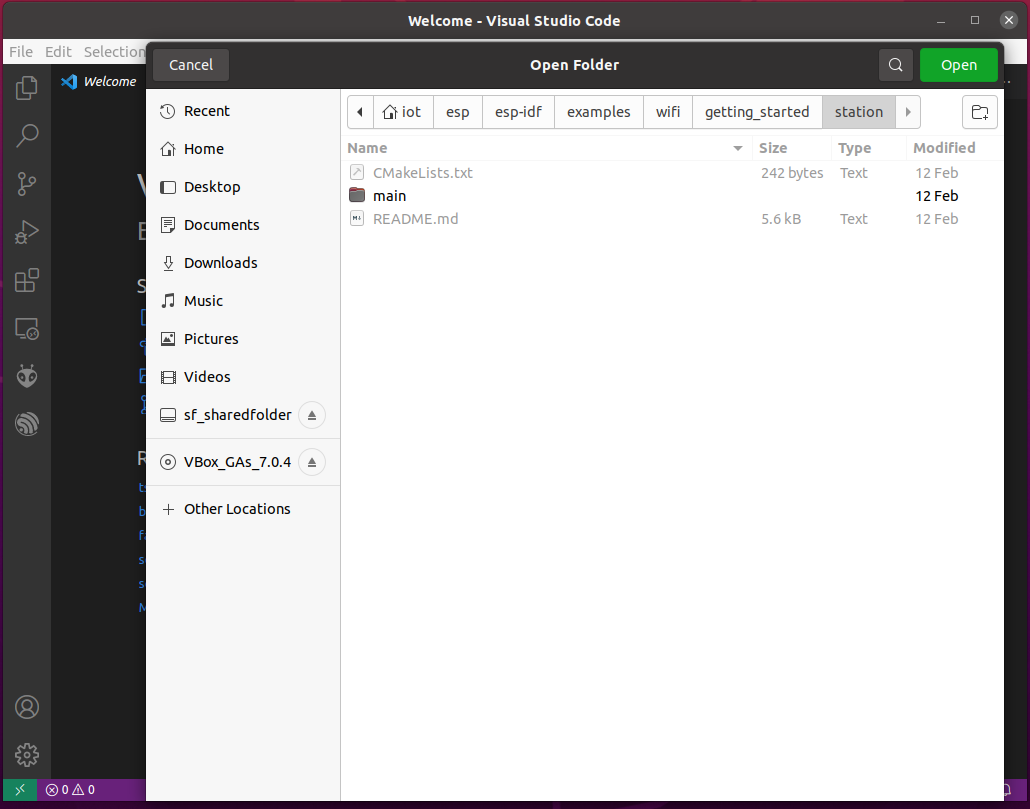
Within VS Code, open the tab File -> Open Folder -> Navigate to /home/iot/esp/esp-idf/examples/wifi/getting_started/station/ -> Open
Once the WiFi station example project is opened, within VS Code, click the ESP-IDF menuconfig icon as shown in the screenshot below, then use the search bar to find the WiFi options. Configure the WiFi SSID and WiFi Password then Save as shown in the screenshot below.

A smartphone's hotspot can be used as a WiFi router/AP. For iPhone, the "Maximize Compatibility" shall be enabled.

Please refer to the screenshot above, build the project, flash device and monitor device.
- Build Project. Show Running Tasks to see the progress while building the project.
- Flash device. Choose the right USB port, e.g., /dev/ttyACM0.
- Monitor device. You shall see the ESP32 device is connected to the WiFi as the screenshot shown below.

We now can perform the ethical hacking of the IoT kit, we will try to obtain the WiFi credentials embedded in the firmware and even modify the firmware. This has to be done within a terminal. We will use the Linux terminal to do it.
Close VS Code. Otherwise, there will be errors?
Open a Linux terminal. Within the terminal, run the following command to set environment variables for all the ESP-IDF tools.
. $HOME/esp/esp-idf/export.shPlease refer to the use of esptool.py for more information. The following command will retrieve the partition table of the IoT kit flash in the binary format:
esptool.py read_flash 0x8000 0xc00 ptable.img
where 0x8000 is the start address of the partition table and 0xc00 is the length of the partition table. The binary partition table is saved in ptable.img.
Note: Some esp-idf versions have a bug with the Python tool esptool.py while our VM is configured right. They will need the following shebang line added to the start of the code at /home/iot/esp/esp-idf/components/esptool_py/esptool/esptool.py if the shebang line is missing. Any text editor can be used to add this line, one example is nano.
#!/usr/bin/env python
Please refer to the use of gen_esp32part.py for more information. The following command will print out the partition table of our IoT kit in the CSV (comma-separated values) format. The partition table shows how the flash memory of the ESP32 is partitioned.
gen_esp32part.py ptable.imgThe following command retrieves the entire flash memory of the device although students can also refer to the partition table and print out only the occupied part of the flash.
esptool.py read_flash 0 0x400000 flash_contents.binThe first numeric value 0 is the starting address and 0x400000 is the length of the flash to copy which is the total size of the ESP32-WROOM-32 surface-mount module board's flash that our IoT kit uses. The entire flash in the binary format will be saved in the flash_contents.bin file.
Students can use a hex editor (e.g. wxhexeditor) to search the WiFi credentials in the flash dump.
wxhexeditor is already installed in our Ubuntu VM. You don't have to reinstall the program if it is already present. However, if needed, you can use the following commands to install and set up wxhexeditor.
sudo apt-get install wxhexeditor                      #Install wxhexeditor  and then run wxHexEditor
sudo ln -s /usr/bin/wxHexEditor /usr/bin/wxhexeditor  #Create a symbolic to use the lowercase command wxhexeditor
This can be launched from the application page of Ubuntu, or the Terminal. The following is how to launch wxhexeditor and open a file "flash_contents.bin" from the Terminal.
wxhexeditor flash_contents.binThe following screenshot shows how to use Edit -> Find within wxhexeditor to search for some text.

Notice: When you run wxhexeditor, you may get an error when using the find utility as shown below. Click Continue, otherwise the program will exit.

The hex editor (e.g. wxhexeditor) can be used to change the flash dump. The changed flash dump can be flashed back into the IoT kit. Another different firmware may be written to the device as well. The esptool.py program can be used to write the modified firmware back to the ESP32.
# Write to device
esptool.py write_flash 0 flash_contents_all_changed.bin
It should be noted that the ESP32 utilizes a checksum hash to verify the factory APP partition. Unless this value is changed, the bootloader will panic on startup, and fail to run the changed APP partition. It is possible for us to modify the bootloader if secure-boot is not enabled.
The option is locating the checksum hash, modifying it, and writing the modified firmware to the device.
The option involves configuring the project bootloader to not verify the APP partition using menuconfig. This is accessed through the gear button at the bottom of the VS Code page, or through the command idf.py menuconfig in a terminal.
# Bootloader Config -> Skip image validation always
idf.py menuconfig
After this, we can re-flash the entire firmware, and re-extract the binary, modify it, and write it with the command below.
# Extract Firmware
esptool.py read_flash 0 0x40000 flash_contents_all.bin

# Write to device
esptool.py write_flash 0 flash_contents_all_changed.binHxD is a better freeware hex editor and disk editor for Windows than wxhexeditor.