Repository navigation
Examples
What each release brought, shown in code: a section to each release, the newest first. Every block on this page is written against the library as it is now and compiled by a test together with every other block of this wiki, so what you copy from here builds. Each example says what you should see when you run it. The page starts at 1.19.0; the changelog says what every release changed and why, including the fixes that ask nothing new of your code.
| Release | What it brought |
|---|---|
| 1.23.0 | A third and fourth Y axis, stacked outward two to a side, each keeping any series kind through JSON and its own share of zoom/pan/Home; technical indicators take one OhlcvBars value instead of separate high/low/close/open/volume arrays. |
| 1.22.0 | Series that share one colour instead of each taking the next one: a Kaplan-Meier curve's confidence band and censor marks, and two new verbs, Raincloud (a half violin, a box and a group's raw points in one colour) and Horizon (a signed series folded into bands of two hues). |
| 1.21.0 | Every chart type and every axes setting back from JSON as itself: a treemap's, sunburst's, dendrogram's and clustermap's trees, a Sankey's nodes and links, a polar chart's data, a tree grid's rows, a streaming chart's points, a planar 3-D bar, and an axes' Z axis, 3-D pane colours and tooltip switch. The MCP server lists and accepts all eight chart types it had refused by name. |
| 1.20.0 | Fifteen charts in one call each (lollipop, dumbbell, Pareto, slope graph, dot plot, parallel coordinates, Marimekko, ridgeline, Q-Q plot, Kaplan-Meier, bump chart, control chart, stream graph, calendar heatmap, spy plot), a figure that comes back from JSON as the picture it was, NaN as the one missing value, a PNG drawn at the figure's dpi, and horizontal bars, log-axis bars and waterfall totals that draw what they say. |
| 1.19.0 | A line named where it ends instead of in the legend, an axis coloured to match its line in one call, and secondary axes that take their tick settings, keep their colours through JSON, answer a legend click and report their own values. |
A technical indicator that reads a candle's open, high, low, close and volume used to take those as separate
array parameters; it now takes one OhlcvBars value, built with the factory that names the columns the
indicator actually uses.
using MatPlotLibNet;
using MatPlotLibNet.Indicators;

double[] close = [.. Enumerable.Range(0, 60).Select(i => 100 + 5 * Math.Sin(i / 6.0) + i * 0.2)];
double[] open  = [.. close.Select((c, i) => i == 0 ? c : close[i - 1])];
double[] high  = [.. close.Select((c, i) => Math.Max(c, open[i]) + 1)];
double[] low   = [.. close.Select((c, i) => Math.Min(c, open[i]) - 1)];

Plt.Create()
   .WithSize(800, 500)
   .AddSubPlot(2, 1, 1, ax => ax.Candlestick(open, high, low, close))
   .AddSubPlot(2, 1, 2, ax => ax.WilliamsR(OhlcvBars.Hlc(high, low, close)))
   .TightLayout()
   .Save("williams_r_ohlcv_bars.svg");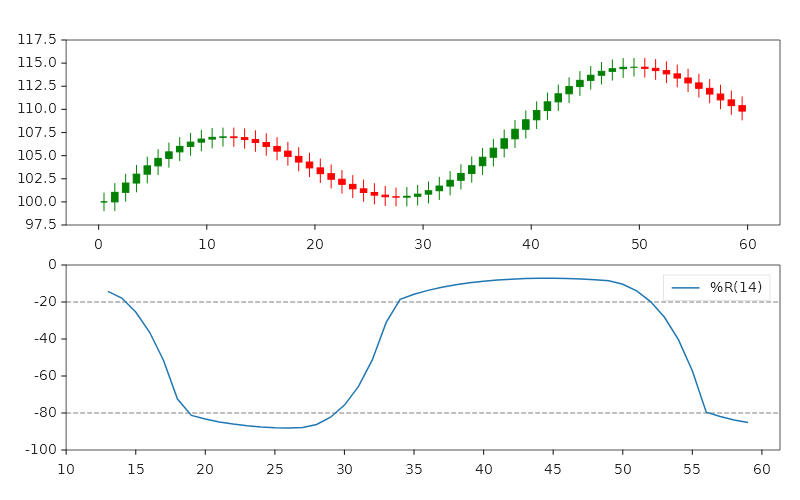
WilliamsR pins its own axes to [-100, 0] — a candlestick and a bounded oscillator never share one Y-scale, so
they take their own subplot each, the panel below reading the same OhlcvBars.Hlc the top one plots directly.
The chart is identical to the one WilliamsR(high, low, close) drew before — OhlcvBars.Hlc wraps the same
three arrays, checking they are the same length before the indicator ever sees them. An indicator that only reads
two of the five columns (ForceIndex, Vpin) takes OhlcvBars.Cv(close, volume); one that reads four
(KlingerVolumeOscillator, TwiggsMoneyFlow) takes OhlcvBars.Hlcv(high, low, close, volume). Underneath, the
close to a hundred chart verbs the fluent API builds from now live one-per-file as extension members on Axes
instead of sharing one class — a file-layout refactor only; no call in this example, or any other, changed shape
because of it.
Four Y axes, two to a side. WithOutwardYAxis stacks one more Y axis past the one before it, on either side —
two to the left of the main axis and two to the right, each with its own range, ticks and series, the way
matplotlib moves a twin's spine outward (ax.spines['right'].set_position(('outward', N))). WithSecondaryYAxis
still reaches the first right-hand axis; WithOutwardYAxis(AxisSide.Right, ...) reaches the one past it, and
WithOutwardYAxis(AxisSide.Left, ...) the one past the main axis on the left.
using MatPlotLibNet;
using MatPlotLibNet.Models;
using MatPlotLibNet.Styling;

double[] hour = [0, 4, 8, 12, 16, 20, 24];
double[] temperature = [12, 10, 14, 21, 23, 17, 13];
double[] humidity    = [88, 92, 75, 52, 47, 63, 81];
double[] windSpeed   = [8, 6, 9, 14, 18, 11, 7];
double[] pressure    = [1013, 1015, 1012, 1008, 1006, 1010, 1014];

Plt.Create()
    .WithSize(800, 450)
    .AddSubPlot(1, 1, 1, ax => ax
        .Plot(hour, temperature, s => { s.Label = "Temperature"; s.Color = Colors.Crimson; })
        .SetYLabel("Temperature (°C)")
        .SetYAxisColor(Colors.Crimson)
        .SetXLabel("Hour of the day")
        .WithSecondaryYAxis(right => right
            .Plot(hour, humidity, s => { s.Label = "Humidity"; s.Color = Colors.SteelBlue; })
            .SetYLabel("Relative humidity (%)")
            .SetYAxisColor(Colors.SteelBlue))
        .WithOutwardYAxis(AxisSide.Right, outer => outer
            .Plot(hour, windSpeed, s => { s.Label = "Wind speed"; s.Color = Colors.ForestGreen; })
            .SetYLabel("Wind speed (km/h)"))
        .WithOutwardYAxis(AxisSide.Left, left => left
            .Plot(hour, pressure, s => { s.Label = "Pressure"; s.Color = Css4Colors.DarkOrange; })
            .SetYLabel("Pressure (hPa)"))
        .WithLegend())
    .TightLayout()
    .Save("four_axes.svg");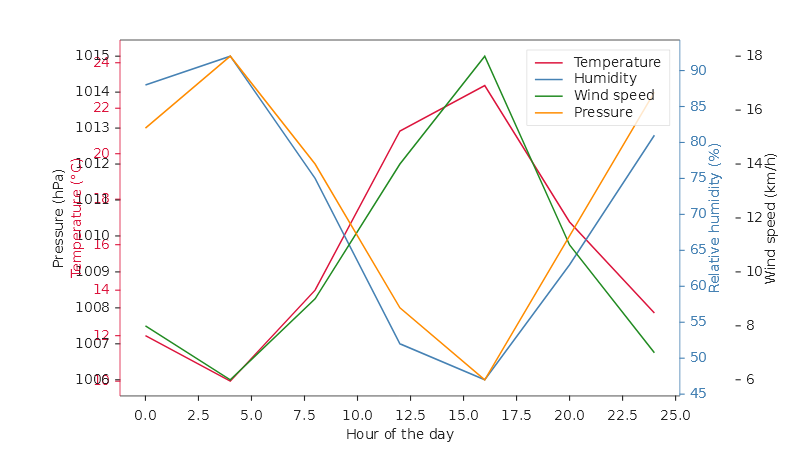
Temperature and Humidity sit where a secondary axis always has, against the plot's own edges; Pressure and Wind speed stack past them. A series on any of the four axes keeps its own legend entry, its own colour slot, and restores through JSON whatever kind it is — a bar or an area works here exactly as a line does. Zoom, pan and Home move all four axes' own ranges together, each by its own proportional amount.
Several series can now share one colour from the theme's cycle instead of each taking the next one. A verb that draws several series as one group asks the axes for a fresh colour group and sets it on each series it adds; every renderer and the legend's swatch read the group, and a series with no group still takes the theme's next colour exactly as before.
A Kaplan-Meier curve's confidence band and censor marks. The same KaplanMeier call from 1.20.0 now also draws
a Greenwood confidence band around each curve and a mark at every time a subject left without an event, both in
the curve's own colour — no new argument to pass.
using MatPlotLibNet;
using MatPlotLibNet.Models.Series;

SurvivalGroup[] arms =
[
    new("Treatment", [6, 7, 10, 15, 19, 25, 32, 34], [true, true, false, true, false, true, false, false]),
    new("Placebo", [1, 2, 3, 4, 5, 8, 8, 11], [true, true, true, false, true, true, true, true]),
];

Plt.Create()
    .WithSize(600, 400)
    .WithTitle("Time to relapse")
    .AddSubPlot(1, 1, 1, ax => ax
        .KaplanMeier(arms)
        .SetXLabel("Weeks"))
    .Save("relapse_kaplan_meier_band.svg");
The shaded band around each curve is its Greenwood confidence interval, widest where the fewest subjects are still
at risk; the + marks (at week 19 and 32 on the treatment curve, week 4 on the placebo curve) stand at the curve's
own level at the moment a subject left without an event. Curve, band and marks share one colour group, so they read
as the one group's survival estimate.
A raincloud. Raincloud draws a half violin, a narrow box and every group's raw, jittered points side by side
at the group's own index, all three sharing one colour. A group is a NamedSample, exactly as Ridgeline takes
them.
using MatPlotLibNet;
using MatPlotLibNet.Models.Series;

NamedSample[] routes =
[
    new("Highway", [22, 24, 23, 26, 25, 28, 24, 23, 27, 25, 30, 26]),
    new("Backroads", [18, 29, 15, 35, 20, 32, 17, 24, 21, 30, 16, 27]),
];

Plt.Create()
    .WithSize(600, 400)
    .WithTitle("Commute time by route")
    .AddSubPlot(1, 1, 1, ax => ax
        .Raincloud(routes)
        .SetYLabel("Minutes"))
    .Save("routes_raincloud.svg");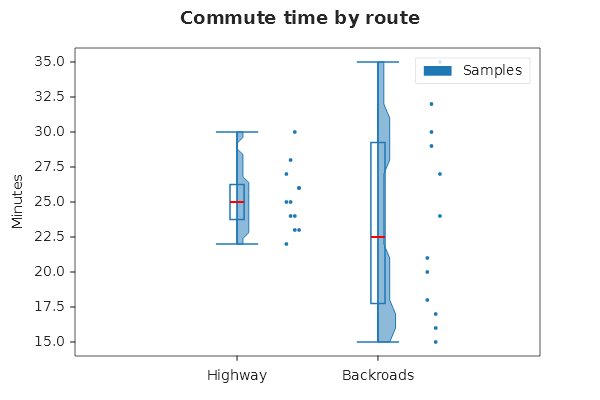
Highway's box runs 22 to 30 minutes with a median of 25; Backroads spreads wider, 15 to 35 with a median of 22.5 —
the shorter route on average, but the less predictable one. Only the violin carries a label ("Samples"), so one
legend swatch names the trio rather than standing, falsely, for two differently coloured groups; the routes
themselves are named along the X axis. The callback receives RaincloudParts (Violin, Box, Points).
A horizon chart. Horizon folds a signed series into a stack of bands so a long series fits a short strip: each
band is a slice of the series' own peak, in a deeper shade of its band's colour.
using MatPlotLibNet;

double[] day = [.. Enumerable.Range(0, 60).Select(i => (double)i)];
double[] anomaly = [.. day.Select(d => 40 * Math.Sin(d / 5.0))];

Plt.Create()
    .WithSize(700, 160)
    .WithTitle("Temperature anomaly")
    .AddSubPlot(1, 1, 1, ax => ax
        .Horizon(day, anomaly, bands: 4)
        .SetXLabel("Day"))
    .Save("anomaly_horizon.svg");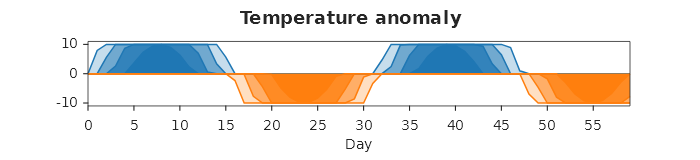
The series peaks within a hair of 40, so four bands fold it into steps of 10 each; the non-negative part folds in
blue and the negative part in orange, two separate colour groups, so the one signed series reads as two hues
instead of one. The callback receives HorizonParts (Positive, Negative), each the bands of its side, lowest
first.
Every chart type and every axes setting now comes back from JSON as itself. A treemap's, sunburst's, dendrogram's
and clustermap's trees, a Sankey's nodes and links, a polar chart's data, a tree grid's rows, a streaming chart's
current points and a planar 3-D bar's data all used to come back as a placeholder or a plain series; the
MCP server lists and accepts all eight chart types it had
refused by name. An axes' Z axis, its 3-D pane colours and its tooltip switch now travel through JSON too. The one
series this release does not reach is MatPlotLibNet.Geo's GeoPolygonSeries, whose projection carries
construction parameters of its own that need a shape in the wire format first.
A treemap's tree comes back whole. The same holds for a sunburst's and a dendrogram's tree, a clustermap's row
and column trees, a Sankey's nodes and links, a polar chart's r and theta, and a tree grid's rows: each now
travels through JSON as itself.
using MatPlotLibNet;
using MatPlotLibNet.Models;

var root = new TreeNode
{
    Label = "Root",
    Children =
    [
        new TreeNode
        {
            Label = "Fruit",
            Value = 60,
            Children =
            [
                new TreeNode { Label = "Apples", Value = 35 },
                new TreeNode { Label = "Pears", Value = 25 },
            ],
        },
        new TreeNode { Label = "Vegetables", Value = 40 },
    ],
};

var figure = Plt.Create()
    .AddSubPlot(1, 1, 1, ax => ax.Treemap(root))
    .Build();

var copy = ChartSerializerDefault.Current.FromJson(figure.ToJson());
Console.WriteLine(copy.ToSvg() == figure.ToSvg());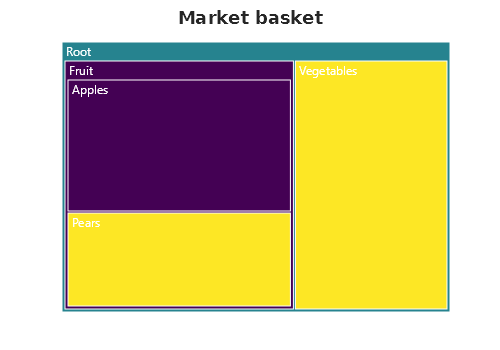
It prints True. Before this release the reader ignored the document's tree and built one node labelled "Root",
so the copy drew a single blank rectangle, and the MCP server refused the spec by name rather than draw it wrong.
A streaming chart reads back as the same streaming chart. A StreamingLineSeries, StreamingScatterSeries,
StreamingCandlestickSeries and StreamingSignalSeries each write a snapshot of their current points under their
own name now; the same holds for a planar 3-D bar's data and settings.
using MatPlotLibNet;
using MatPlotLibNet.Models.Series.Streaming;

StreamingLineSeries? series = null;

var figure = Plt.Create()
    .AddSubPlot(1, 1, 1, ax => { series = ax.StreamingPlot(capacity: 500); })
    .Build();

for (var i = 0; i < 20; i++)
{
    series!.AppendPoint(i, Math.Sin(i * 0.3));
}

var copy = ChartSerializerDefault.Current.FromJson(figure.ToJson());
Console.WriteLine(copy.ToSvg() == figure.ToSvg());
It prints True. Before this release the four streaming kinds shared one wire name, or had none at all, so the
copy came back with no streaming behaviour and none of its points.
An axes' Z axis, 3-D pane colours and tooltip switch travel too.
using MatPlotLibNet;
using MatPlotLibNet.Styling;

var figure = Plt.Create()
    .AddSubPlot(1, 1, 1, ax => ax
        .Scatter3D([1.0, 2.0, 3.0], [4.0, 5.0, 6.0], [7.0, 8.0, 9.0])
        .SetZLabel("Depth")
        .WithPane3D(p => p with { FloorColor = Colors.Black })
        .WithTooltips())
    .Build();

var copy = ChartSerializerDefault.Current.FromJson(figure.ToJson());
Console.WriteLine(copy.SubPlots[0].ZAxis.Label);
Console.WriteLine(copy.SubPlots[0].EnableTooltips);
Console.WriteLine(copy.ToSvg() == figure.ToSvg());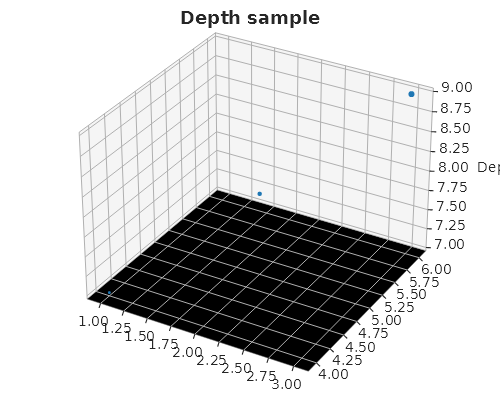
It prints Depth, True and True. Before this release these were drawn from but never written, so the copy came
back with the library's default Z axis label, tooltips switched off and the theme's default pane colours
regardless of what the figure set.
Fifteen charts that took a page of hand-written code are one call each on the axes builder now. They are extension
methods in the namespace MatPlotLibNet, so the using MatPlotLibNet; every program has brings them in, and they sit
in four classes named for the data they take: values keyed by names (CategoricalAxesExtensions), a sample to
estimate from (DistributionAxesExtensions), values over x positions (XYAxesExtensions) and the cells of a grid
(GridAxesExtensions). Each verb builds its chart from series the library already has, one series for each thing it
draws, so a legend click hides one thing. Its last argument, configure, styles those series after the verb has set
them up, so what you set there wins. A refused call throws before it adds anything. Written to JSON, a composed chart
is its parts, and the MCP server and every transport carry it as such.
A lollipop chart. Lollipop draws one stem for each category, on the centre of the category's slot, with the
categories named on the X axis.
using MatPlotLibNet;
using MatPlotLibNet.Styling;

string[] products = ["Alpha", "Beta", "Gamma", "Delta", "Epsilon"];
double[] scores = [82.5, 67.3, 91.1, 54.8, 73.0];

Plt.Create()
    .WithSize(600, 380)
    .AddSubPlot(1, 1, 1, ax => ax
        .Lollipop(products, scores, s => s.StemColor = Colors.SteelBlue)
        .SetYLabel("Score"))
    .Save("scores_lollipop.svg");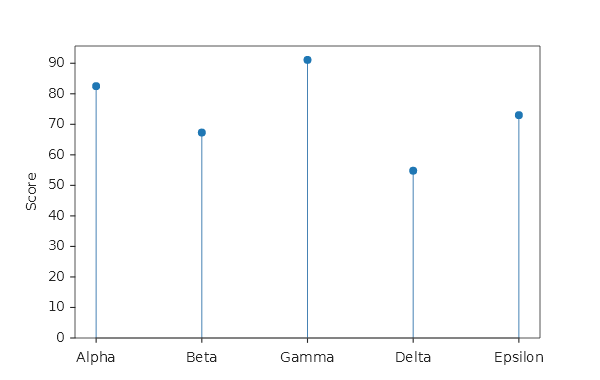
Five stems stand on the baseline at 0, Gamma the tallest at 91.1, each with a round head and its name under it. The chart is one stem series: one colour, one legend entry. The verb sets no axis limits, and the first and last heads keep the axis margin, so both are whole circles.
A dumbbell chart. Dumbbell puts two dots on each category, one for each BarGroup, and joins them.
using MatPlotLibNet;
using MatPlotLibNet.Models;
using MatPlotLibNet.Models.Series;

string[] products = ["A", "B", "C", "D"];

Plt.Create()
    .WithSize(600, 380)
    .AddSubPlot(1, 1, 1, ax => ax
        .Dumbbell(products,
            new BarGroup("2024", [62.0, 78.5, 83.0, 55.0]),
            new BarGroup("2025", [74.0, 82.0, 79.5, 48.0]))
        .SetYLabel("Satisfaction (%)")
        .WithLegend(LegendPosition.LowerLeft))
    .Save("satisfaction_dumbbell.svg");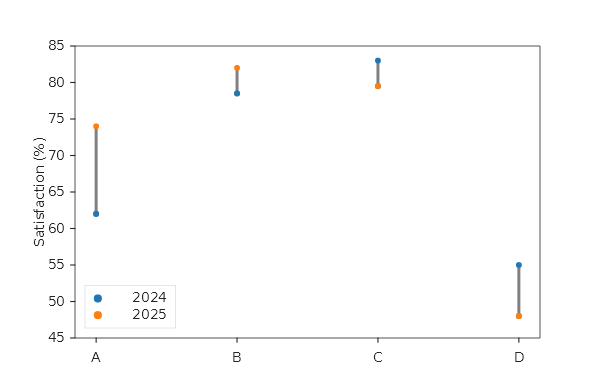
The 2024 dots are blue and the 2025 dots orange, named in the legend by their groups. A grey connector joins the two
dots of every product, also where the value fell (C from 83.0 to 79.5, D from 55 to 48): it runs from the lower value to
the higher. The connector has no legend entry, so a click on "2024" hides the blue dots and leaves the connectors. The
callback receives DumbbellParts (Connector, From, To).
A Pareto chart. Pareto sorts the categories by count, draws them as bars and adds the running share of the total
as a line on a right-hand axis.
using MatPlotLibNet;

string[] defects = ["Dents", "Scratches", "Stains", "Cracks", "Warp"];
double[] counts = [98, 142, 45, 67, 9];

Plt.Create()
    .WithSize(700, 420)
    .WithTitle("Defects by kind")
    .AddSubPlot(1, 1, 1, ax => ax
        .Pareto(defects, counts, parts => parts.Bars.Label = "Defects")
        .SetXLabel("Kind of defect"))
    .Save("defects_pareto.svg");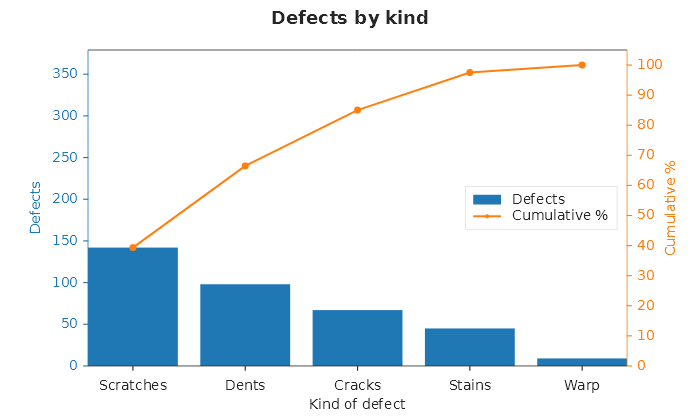
The bars run from Scratches (142) down to Warp (9). The orange line starts on top of the first bar at 39.3 % and ends at exactly 100 %. Both Y axes are one scale, 0 to 1.05 times the total of 361 on the left and 0 to 105 % on the right, so a count on the left reads its share on the right. The left axis is blue and titled "Defects", the name the callback gave the bars; the right axis is orange and titled "Cumulative %". The legend stands right of centre, between the short bars and the line.
A slope graph. SlopeGraph draws a line for each category between two moments, named by the two groups.
using MatPlotLibNet;
using MatPlotLibNet.Models.Series;

string[] regions = ["North", "South", "East", "West"];

Plt.Create()
    .WithSize(600, 420)
    .WithTitle("Sales by region")
    .AddSubPlot(1, 1, 1, ax => ax
        .SlopeGraph(regions,
            new BarGroup("2015", [42.0, 55.0, 38.0, 61.0]),
            new BarGroup("2025", [51.0, 49.0, 44.0, 66.0]))
        .SetYLabel("Sales"))
    .Save("regions_slope.svg");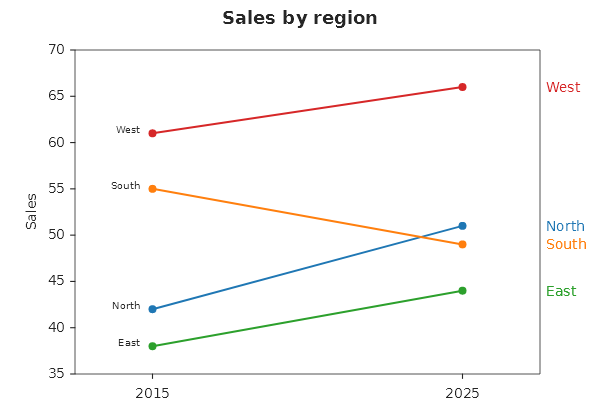
Each region is named at both ends: right of its end point in the line's colour, and left of its start point in the theme's text colour, so there is no legend. South is the one line that falls. The start names are drawn in the smaller size every annotation has; the Roadmap lists annotations that take the theme's text size.
A dot plot. DotPlot draws a Cleveland dot plot: the categories down the Y axis, a dot for each group.
using MatPlotLibNet;
using MatPlotLibNet.Models.Series;

string[] languages = ["Ruby", "Go", "Rust", "Java", "Python"];

Plt.Create()
    .WithSize(600, 380)
    .WithTitle("Programming languages")
    .AddSubPlot(1, 1, 1, ax => ax
        .DotPlot(languages,
        [
            new BarGroup("2015", [31.0, 48.0, 62.0, 55.0, 80.0]),
            new BarGroup("2025", [35.0, 52.0, 60.0, 58.0, 84.0]),
        ])
        .SetXLabel("Share of developers (%)"))
    .Save("languages_dot_plot.svg");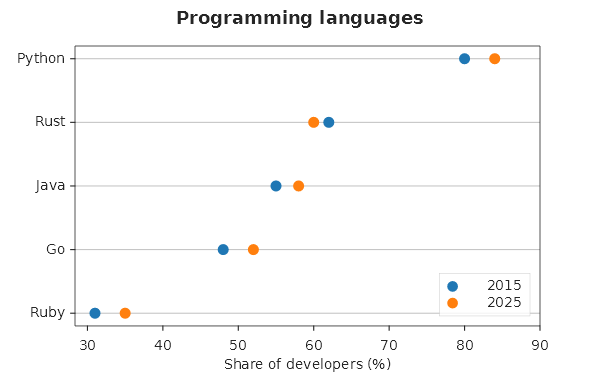
The rows are in the order of the first group, largest on top: Python, Rust, Java, Go, Ruby. The guide line through each row is the theme's grid, and the legend stands in the lower right corner, which the order leaves empty.
Parallel coordinates. ParallelCoordinates draws an axis for each dimension and a line for each row; rows that
share a name are one class.
using MatPlotLibNet;
using MatPlotLibNet.Models;
using MatPlotLibNet.Models.Series;

string[] measures = ["Sepal length", "Sepal width", "Petal length", "Petal width"];

Plt.Create()
    .WithSize(760, 400)
    .WithTitle("Three species of iris")
    .TightLayout()
    .AddSubPlot(1, 1, 1, ax => ax
        .ParallelCoordinates(measures,
        [
            new BarGroup("setosa", [5.1, 3.5, 1.4, 0.2]),
            new BarGroup("setosa", [4.9, 3.0, 1.4, 0.2]),
            new BarGroup("setosa", [4.7, 3.2, 1.3, 0.2]),
            new BarGroup("versicolor", [7.0, 3.2, 4.7, 1.4]),
            new BarGroup("versicolor", [6.4, 3.2, 4.5, 1.5]),
            new BarGroup("versicolor", [5.5, 2.3, 4.0, 1.3]),
            new BarGroup("virginica", [6.3, 3.3, 6.0, 2.5]),
            new BarGroup("virginica", [5.8, 2.7, 5.1, 1.9]),
            new BarGroup("virginica", [7.1, 3.0, 5.9, 2.1]),
        ])
        .WithLegend(LegendPosition.OutsideRight))
    .Save("iris_parallel.svg");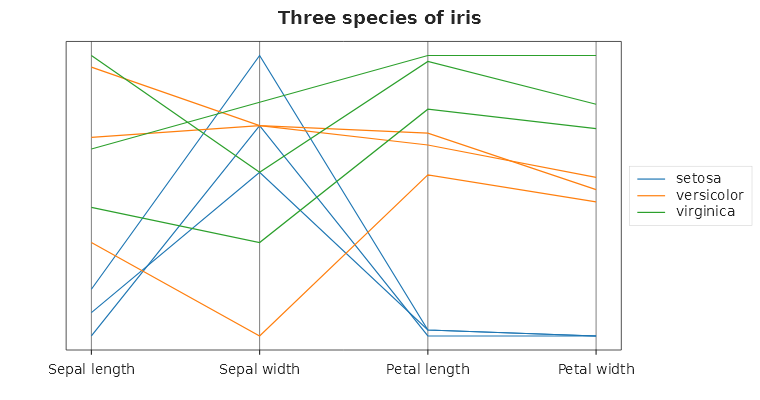
Nine rows make three lines of three colours, one legend entry for each species. Each column is scaled to 0..1 by its own smallest and largest value, so the Y axis carries no ticks; the four grey axis lines are the dimensions. The setosa rows run low on the two petal axes, where the other two species stand apart.
A Marimekko chart. Marimekko makes each column as wide as its share of the total and divides it into the
segments' shares.
using MatPlotLibNet;
using MatPlotLibNet.Models;
using MatPlotLibNet.Models.Series;

string[] channels = ["Retail", "Online", "Wholesale"];

Plt.Create()
    .WithSize(700, 420)
    .WithTitle("Market by channel and brand")
    .TightLayout()
    .AddSubPlot(1, 1, 1, ax => ax
        .Marimekko(channels,
        [
            new BarGroup("Brand A", [30, 15, 5]),
            new BarGroup("Brand B", [20, 25, 10]),
            new BarGroup("Brand C", [10, 20, 15]),
        ])
        .SetXLabel("Channel (width: its share of the market)")
        .WithLegend(LegendPosition.OutsideRight))
    .Save("market_marimekko.svg");
Retail and Online hold 60 of the 150 each, so they are 40 % wide, and Wholesale 20 %. Brand A is the lowest cell of every column: 50 % of Retail, 25 % of Online, 16.7 % of Wholesale. The area of a cell is its share of the whole market, and the Y axis reads in percent of the column.
A ridgeline. Ridgeline estimates the density of each group and draws it as a ridge on a baseline of its own. A
group is a NamedSample: a name and a sample of any length.
using MatPlotLibNet;
using MatPlotLibNet.Models.Series;

NamedSample[] months =
[
    new("January", [2.1, 3.4, 1.8, 0.9, 2.6, 3.0, 1.2]),
    new("April", [9.8, 12.1, 11.4, 8.7, 10.9, 13.2]),
    new("July", [21.5, 24.0, 19.8, 23.1, 22.7, 25.3, 20.4, 22.0]),
];

Plt.Create()
    .WithSize(600, 400)
    .WithTitle("Daily highs")
    .AddSubPlot(1, 1, 1, ax => ax
        .Ridgeline(months, configure: ridge => ridge.Alpha = 0.6)
        .SetXLabel("Temperature (°C)"))
    .Save("highs_ridgeline.svg");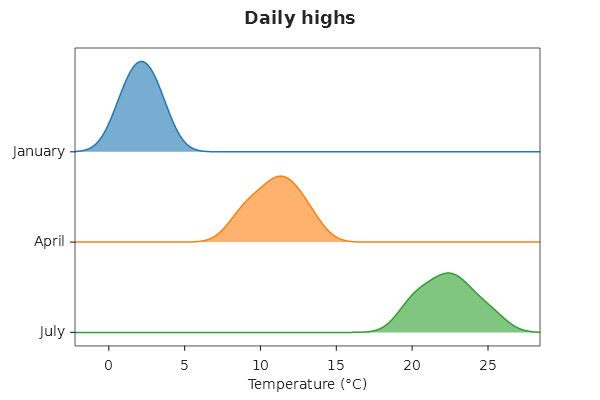
January is on top and July at the bottom, the group names on the Y axis. Every ridge is estimated on one grid with one
bandwidth, the mean of the groups' own Silverman bandwidths (ggridges' rule), so the ridges compare; pass bandwidth
to set the smoothing yourself. The tallest ridge reaches the next baseline.
A Q-Q plot. QQPlot plots a sample against the quantiles of the normal distribution, with scipy's conventions
(scipy.stats.probplot).
using MatPlotLibNet;

double[] returns = [0.8, -1.2, 0.3, 2.1, -0.4, 0.9, -2.6, 0.1, 1.4, -0.7, 0.5, -0.2];

Plt.Create()
    .WithSize(600, 420)
    .WithTitle("Daily returns against the normal distribution")
    .AddSubPlot(1, 1, 1, ax => ax
        .QQPlot(returns)
        .SetYLabel("Daily return (%)"))
    .Save("returns_qq.svg");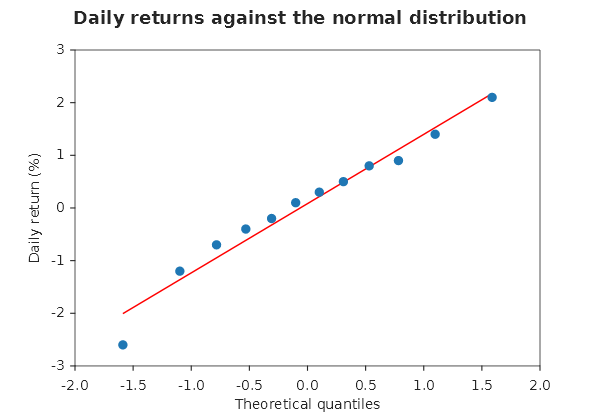
The twelve returns stand along the red least-squares line, the lowest one, -2.6, below it. The X axis is titled
"Theoretical quantiles"; the Y title set after the call replaces the verb's "Sample quantiles". The callback receives
QQPlotParts (Points, Reference).
A Kaplan-Meier curve. KaplanMeier draws the survival curve of each group. A SurvivalGroup holds each
subject's follow-up time and whether its event was seen there (true) or the subject was censored (false).
using MatPlotLibNet;
using MatPlotLibNet.Models.Series;

SurvivalGroup[] arms =
[
    new("Treatment", [6, 7, 10, 15, 19, 25, 32, 34], [true, true, false, true, false, true, false, false]),
    new("Placebo", [1, 2, 3, 4, 5, 8, 8, 11], [true, true, true, false, true, true, true, true]),
];

Plt.Create()
    .WithSize(600, 400)
    .WithTitle("Time to relapse")
    .AddSubPlot(1, 1, 1, ax => ax
        .KaplanMeier(arms)
        .SetXLabel("Weeks"))
    .Save("relapse_kaplan_meier.svg");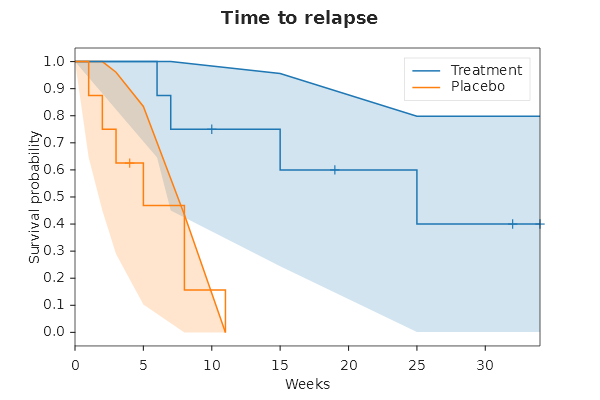
Both curves start at 1 and step down at each event. The placebo curve drops by two thirds at week 8, where two events fall among three subjects at risk, and reaches 0 at week 11; the treatment curve holds at 0.4 from week 25 to its last follow-up at week 34. The Y axis is titled "Survival probability". The verb draws the curve only: no confidence band, censor marks or risk table.
A bump chart. BumpChart draws each group's rank over time, rank 1 on top, each group named at the end of its
line.
using MatPlotLibNet;
using MatPlotLibNet.Models.Series;
using MatPlotLibNet.Rendering.TickLocators;

double[] seasons = [2021, 2022, 2023, 2024];

Plt.Create()
    .WithSize(600, 380)
    .WithTitle("League table")
    .AddSubPlot(1, 1, 1, ax => ax
        .BumpChart(seasons,
        [
            new BarGroup("Hawks", [1, 2, 3, 3]),
            new BarGroup("Owls", [2, 1, 1, 2]),
            new BarGroup("Wrens", [3, 3, 2, 1]),
        ])
        .SetXTickLocator(new MultipleLocator(1))
        .SetXLabel("Season")
        .SetYLabel("Rank"))
    .Save("league_bump.svg");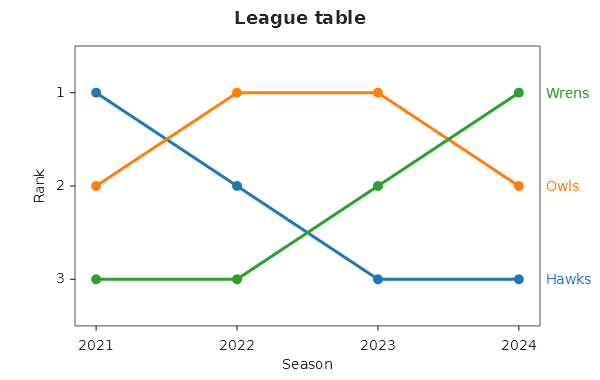
The Wrens climb from third to first, the Hawks fall from first to third. The Y axis is ticked at the whole ranks 1, 2
and 3, with half a rank of room at each end so the markers on the first and last rank are whole. The names stand at
the line ends in the lines' colours, so there is no legend. MultipleLocator(1) gives the seasons whole-number ticks.
A control chart. ControlChart draws an individuals chart: the values, the centre line and the two control
limits, with every value beyond a limit marked.
using MatPlotLibNet;

double[] day = [1, 2, 3, 4, 5, 6, 7, 8, 9, 10];
double[] fill = [50.2, 49.8, 50.1, 50.4, 49.9, 50.0, 53.9, 50.3, 49.7, 50.1];

Plt.Create()
    .WithSize(650, 400)
    .WithTitle("Fill weight")
    .AddSubPlot(1, 1, 1, ax => ax
        .ControlChart(day, fill)
        .SetXLabel("Day")
        .SetYLabel("Weight (g)"))
    .Save("fill_control_chart.svg");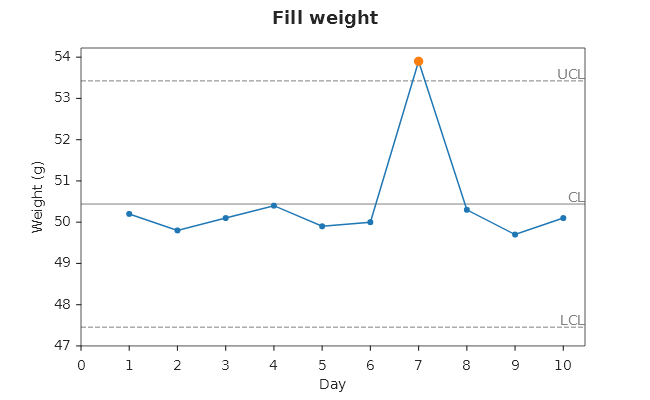
The limits are estimated from the values: the centre is the mean, 50.44, and sigma is the average moving range over
1.128, which puts the limits at 47.46 and 53.42. Day 7, at 53.9, is beyond the upper limit and drawn as an orange dot.
new ControlLimits(center, lower, upper) as the third argument draws limits you already have; the callback receives
ControlChartParts.
A stream graph. StreamGraph stacks its layers around the middle of the plot instead of on zero.
using MatPlotLibNet;
using MatPlotLibNet.Models;
using MatPlotLibNet.Models.Series;
using MatPlotLibNet.Rendering.TickLocators;

double[] year = [2019, 2020, 2021, 2022, 2023];

Plt.Create()
    .WithSize(700, 400)
    .WithTitle("Listening by genre")
    .TightLayout()
    .AddSubPlot(1, 1, 1, ax => ax
        .StreamGraph(year,
        [
            new BarGroup("Rock", [8, 7, 6, 5, 4]),
            new BarGroup("Pop", [3, 5, 7, 8, 9]),
            new BarGroup("Jazz", [2, 2, 3, 3, 4]),
        ])
        .SetXTickLocator(new MultipleLocator(1))
        .SetXLabel("Year")
        .WithLegend(LegendPosition.OutsideRight))
    .Save("genres_stream_graph.svg");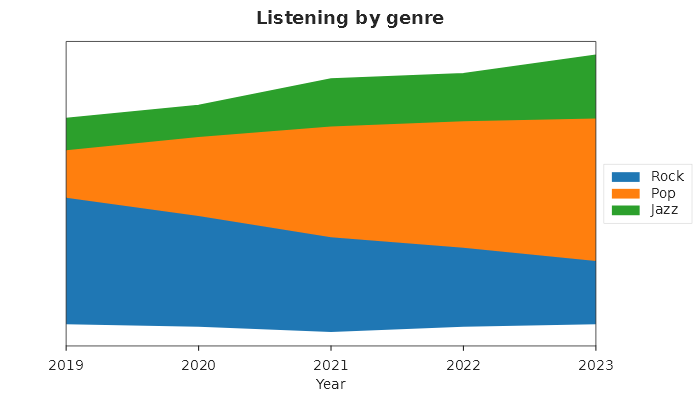
Rock, the first layer, is the lowest stream and thins from 8 to 4 while Pop swells from 3 to 9. A layer's value is the
thickness of its stream, so the Y axis has no ticks. The baseline is matplotlib's wiggle; StackedBaseline as the
third argument picks WeightedWiggle, Symmetric or Zero.
A calendar heatmap. CalendarHeatmap draws one cell for each day, in seven weekday rows by one column for each
week.
using MatPlotLibNet;
using MatPlotLibNet.Styling.ColorMaps;

var first = new DateTime(2025, 1, 1);
DateTime[] days = [.. Enumerable.Range(0, 365).Select(d => first.AddDays(d))];
double[] commits = [.. days.Select(d => (double)(d.DayOfYear * 37 % 11))];

Plt.Create()
    .WithSize(1100, 300)
    .WithTitle("Commits in 2025")
    .AddSubPlot(1, 1, 1, ax => ax
        .CalendarHeatmap(days, commits, configure: s => s.ColorMap = ColorMaps.Viridis))
    .Save("commits_calendar.svg");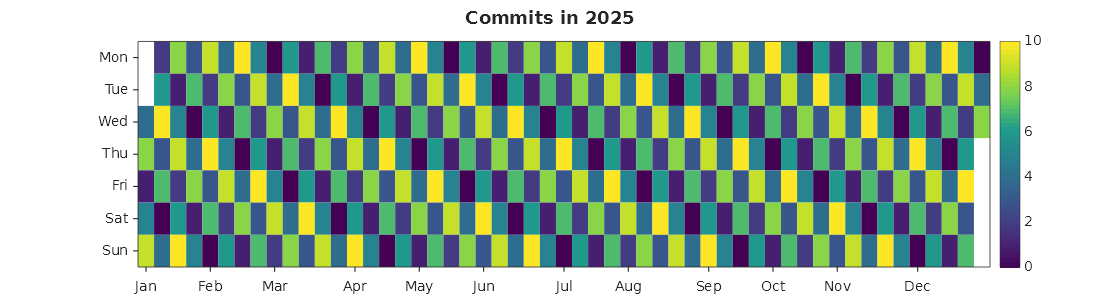
The year is 53 week columns, Monday on top. 2025 starts and ends on a Wednesday, so the first column is blank on Monday and Tuesday and the last from Thursday to Sunday: 6 of its 371 cells. A blank day has no colour, while a day with 0 commits wears the bottom of the colour map. Each month is named under the column that holds its 1st. The week starts on the day the call names (Monday unless you pass another), never on the machine's culture, so the picture is the same everywhere.
A spy plot. Spy marks every cell of a matrix whose magnitude is above a threshold, 0 unless you give one.
using MatPlotLibNet;

// A banded matrix: the diagonal and the two diagonals beside it.
var band = new double[20, 20];
for (int r = 0; r < 20; r++)
{
    for (int c = Math.Max(0, r - 1); c <= Math.Min(19, r + 1); c++)
    {
        band[r, c] = 1;
    }
}

Plt.Create()
    .WithSize(500, 500)
    .WithTitle("A tridiagonal matrix")
    .AddSubPlot(1, 1, 1, ax => ax.Spy(band, configure: s => s.MarkerSize = 12))
    .Save("band_spy.svg");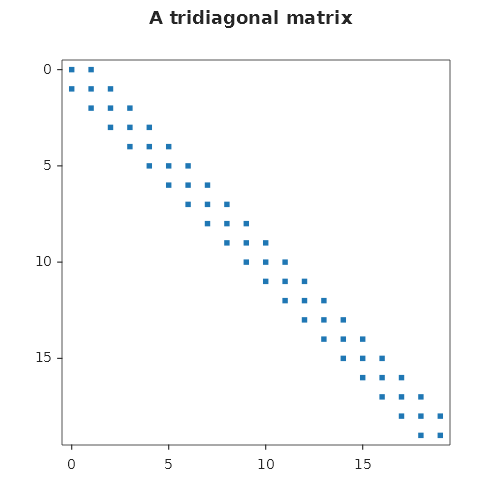
The 58 cells of the band are square markers, row 0 at the top as a matrix is written. The axes run half a cell past the
matrix and are ticked in whole cells, every 5 for 20 columns. A marker is a size in points, not in cells, so a larger
matrix needs a smaller MarkerSize.
A figure comes back from JSON as the picture it was. ToJson and FromJson, the MCP server and every transport
now carry every setting a figure draws: the theme, a colour map built in code, tick locators and formatters, the
legend, the colour bar, and NaN.
using MatPlotLibNet;
using MatPlotLibNet.Styling;
using MatPlotLibNet.Styling.ColorMaps;

double[,] load = { { 0.2, 0.5, double.NaN }, { 0.7, 0.9, 0.4 } };
var map = new LinearColorMap("white-to-teal", [Colors.White, Colors.Teal]) { BadColor = Colors.LightGray };

var figure = Plt.Create()
    .WithTheme(Theme.Ggplot)
    .AddSubPlot(1, 1, 1, ax => ax
        .Heatmap(load, s => s.ColorMap = map)
        .WithColorBar())
    .Build();

var copy = ChartSerializerDefault.Current.FromJson(figure.ToJson());
Console.WriteLine(copy.ToSvg() == figure.ToSvg());
It prints True: the copy is drawn under ggplot, with the colour map's grey in the missing cell. Before this release
ToJson threw on the NaN. Without it, the copy came back on the default theme, and the colour map, written by a name
nobody had registered, came back as none.
A NaN breaks a line. A missing value leaves a gap, as in matplotlib, where the line used to be drawn straight across it.
using MatPlotLibNet;
using MatPlotLibNet.Styling;

double[] hour = [0, 1, 2, 3, 4, 5, 6, 7];
double[] reading = [12.1, 12.4, double.NaN, double.NaN, 13.0, 13.4, 13.1, 12.8];

Plt.Create()
    .WithSize(600, 350)
    .AddSubPlot(1, 1, 1, ax => ax
        .Plot(hour, reading, s => s.Marker = MarkerStyle.Circle)
        .SetXLabel("Hour")
        .SetYLabel("Reading"))
    .Save("sensor_gap.svg");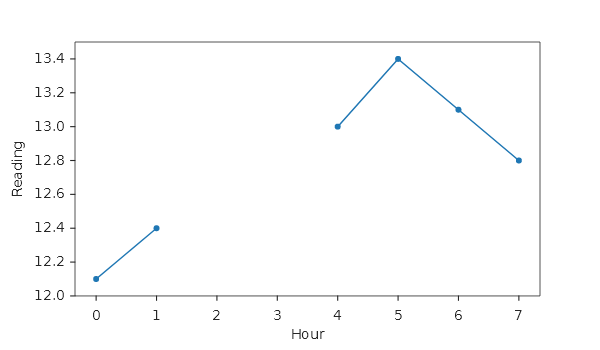
The line is drawn in two pieces, hours 0 to 1 and 4 to 7, and nothing stands at hours 2 and 3. The Y axis spans the readings that are there. An infinity, and a value a log axis cannot place, break the line the same way.
The resolution reaches the file. WithDpi and SaveOptions were kept and read by no export. A figure is laid out
in pixels at 96 dpi, and a PNG is now drawn with dpi / 96 pixels for each of them.
using MatPlotLibNet;

double[] quarter = [1, 2, 3, 4];
double[] revenue = [12, 15, 14, 18];

var figure = Plt.Create()
    .WithSize(500, 350)
    .WithDpi(192)
    .Plot(quarter, revenue)
    .Build();

figure.Save("revenue.png");
figure.Save("revenue_print.png", new SaveOptions { Dpi = 300, Title = "Revenue", Author = "Finance" });
figure.Save("revenue.svg", new SaveOptions { PrettifySvg = true, SvgDecimalPrecision = 2 });
With MatPlotLibNet.Skia installed, revenue.png is 1000 × 700 pixels with the layout of the 500 × 350 figure, drawn
finer; revenue_print.png is 1563 × 1094 at 300 dpi and carries the title and the author as text in the file. The SVG
is indented one element to a line, with its positions rounded to two decimals. An SVG, a PDF page and JSON have no
pixels, so the resolution changes nothing there.
Horizontal bars lie along the values. A horizontal bar chart drew its bars thousands of pixels long and a few pixels thick, with the names under the X axis.
using MatPlotLibNet;
using MatPlotLibNet.Models.Series;

string[] teams = ["Alpha", "Bravo", "Charlie", "Delta"];
double[] closed = [12500, 8200, 15100, 6400];

Plt.Create()
    .WithSize(600, 320)
    .AddSubPlot(1, 1, 1, ax => ax
        .Bar(teams, closed, s => s.Orientation = BarOrientation.Horizontal)
        .WithBarLabels()
        .SetXLim(0, 18000)
        .SetXLabel("Tickets closed"))
    .Save("tickets_horizontal.svg");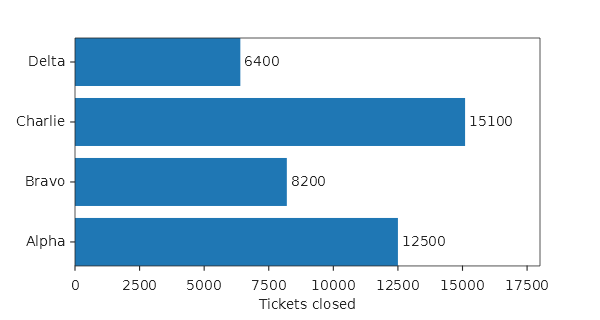
The values run along X and the names stand on the Y axis, Alpha at the bottom as matplotlib's barh puts the first;
SetYLim(4, 0) puts it on top. The left margin holds the longest name. A value label shows up to six significant
digits, so 12500 reads 12500 where it read 1.25E+04.
Bars on a log axis reach the bottom edge. A log axis has no place for 0, so a bar standing on it was not drawn at all.
using MatPlotLibNet;
using MatPlotLibNet.Models;

string[] payload = ["1 MB", "10 MB", "100 MB", "1 GB"];
double[] milliseconds = [15, 120, 1300, 9800];

Plt.Create()
    .WithSize(500, 350)
    .AddSubPlot(1, 1, 1, ax => ax
        .Bar(payload, milliseconds)
        .SetYScale(AxisScale.Log)
        .SetYLabel("Upload time (ms)"))
    .Save("upload_log_bars.svg");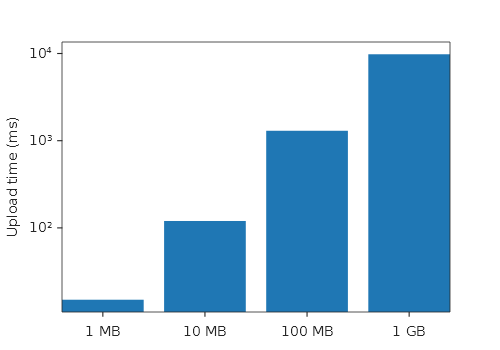
Each bar runs from the bottom edge, where the axis begins, up to its value, as matplotlib's log scale clips it. The axis starts a margin below the shortest bar, as matplotlib's does, so the 15 ms of the first one shows. A histogram, a filled area, a box and a violin on a log axis follow the same rule.
A waterfall marks its totals and names its steps. TotalIndices names the steps that are totals; TotalColor was
a setting nothing read.
using MatPlotLibNet;

string[] steps = ["Opening", "Sales", "Refunds", "Costs", "Closing"];
double[] amounts = [500, 320, -40, -180, 600];

Plt.Create()
    .WithSize(600, 380)
    .AddSubPlot(1, 1, 1, ax => ax
        .Waterfall(steps, amounts, s => s.TotalIndices = [0, 4])
        .SetYLabel("Cash (k€)"))
    .Save("cash_waterfall.svg");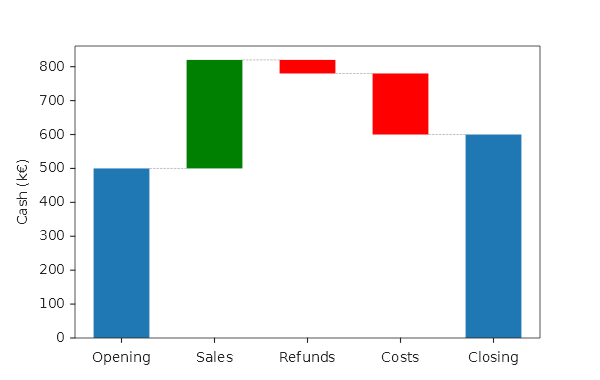
Opening and Closing stand on zero in the total colour, at the levels they hold, 500 and 600; Sales rises in green, Refunds and Costs fall in red. A total is stated, not summed: the step after it starts from its level. The steps are named under their bars, where the axis used to number them.
A threshold above the data shows its line and its zone. A line drawn across the plot now widens the automatic
range, as matplotlib's axhline does; a threshold's zone is cut at the plot edge.
using MatPlotLibNet;
using MatPlotLibNet.Models;
using MatPlotLibNet.Styling;

double[] hour = [0, 1, 2, 3, 4, 5, 6, 7];
double[] load = [42, 55, 61, 68, 64, 59, 52, 47];

Plt.Create()
    .WithSize(600, 380)
    .AddSubPlot(1, 1, 1, ax => ax
        .Plot(hour, load, s => s.Label = "CPU load %")
        .Threshold(80.0, Orientation.Horizontal, ThresholdBreach.Above, color: Colors.Red, label: "Alarm")
        .WithLegend(LegendPosition.LowerRight)
        .SetXLabel("Hour")
        .SetYLabel("Load %"))
    .Save("load_threshold.svg");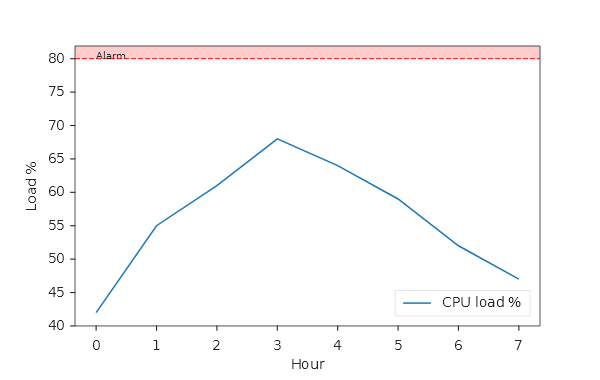
The load peaks at 68, yet the Y axis reaches past 80, so the dashed alarm line is drawn and the band above it is shaded up to the top of the plot. Before, the line stood off the plot and the band was never drawn.
Violins and boxes stand where Positions puts them. Their automatic range ignored Positions and Widths, so
violins at 10, 20 and 30 were drawn hundreds of pixels past the right edge.
using MatPlotLibNet;
using MatPlotLibNet.Styling;

double[][] waits =
[
    [4, 5, 5, 6, 7, 7, 8, 9, 12],
    [2, 3, 3, 4, 4, 5, 5, 6, 8],
    [6, 7, 9, 9, 10, 11, 12, 14, 15],
];

Plt.Create()
    .WithSize(600, 380)
    .AddSubPlot(1, 1, 1, ax => ax
        .Violin(waits, s => { s.Positions = [10, 20, 30]; s.Widths = 6; s.Side = ViolinSide.High; })
        .SetXLabel("Floor")
        .SetYLabel("Wait (min)"))
    .Save("waits_violins.svg");
The X axis runs from 5 to 35 and holds all three half violins, each drawn on the right of its position. A box plot
with Positions follows the same rule, lying down too.
Also fixed, with nothing new to call:
- Category names on the X axis are tick labels: hidden ticks hide them, a label size, colour or rotation applies to them, and a theme's grid draws one line through each category.
- The X axis title has room in both layouts, and tick labels turned by a rotation, or by the 30 degrees crowded labels turn, are measured turned, so the title no longer crosses them.
- A theme's property cycler draws its line styles, markers and widths, not only its colours; see Styling#propcycler.
- A heatmap's cells follow
SetXLim,SetYLimand a zoom, under names that stay over the right cells. - A scatter draws its
Alpha, the contour levels named inLevelValuesare the levels drawn, and a pie, a donut, a funnel and a stacked area take the figure's theme.
Name a line where it ends. WithDirectLabel() writes the name of the line added just before it at the right end
of that line, in the line's colour, and leaves it out of the legend. A reader no longer has to match a swatch to a
line.
using MatPlotLibNet;
using MatPlotLibNet.Models;

double[] month = [1, 2, 3, 4, 5, 6, 7, 8];
double[] oslo = [-4.3, -4.0, -0.2, 4.5, 10.8, 15.2, 16.4, 15.2];
double[] madrid = [6.3, 7.9, 11.2, 12.9, 16.7, 22.2, 25.6, 25.1];
double[] rome = [7.5, 8.5, 10.9, 13.6, 17.6, 21.6, 24.4, 24.5];
double[] average = [3.2, 4.1, 7.3, 10.3, 15.0, 19.7, 22.1, 21.6];

Plt.Create()
    .WithSize(700, 400)
    .AddSubPlot(1, 1, 1, ax => ax
        .Plot(month, oslo, s => s.Label = "Oslo").WithDirectLabel()
        .Plot(month, madrid, s => s.Label = "Madrid").WithDirectLabel()
        .Plot(month, rome, s => s.Label = "Rome").WithDirectLabel()
        .Plot(month, average, s => s.Label = "Average of the three")   // no WithDirectLabel: stays in the legend
        .WithLegend(LegendPosition.UpperLeft)
        .SetXLabel("Month")
        .SetYLabel("Mean temperature (°C)"))
    .Save("direct_labels.svg");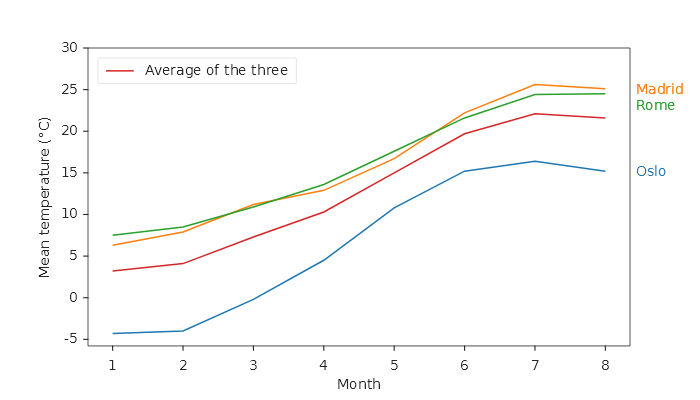
Oslo, Madrid and Rome stand in a column right of the plot, each in its line's colour, at the height where its line ends. Madrid and Rome end 0.6 °C apart, yet their names stand one above the other without touching, in the order the lines end. The legend holds a single entry: Average of the three. The figure keeps its size; the plot narrows to make room for the names.
Show the last value beside the name, or set the placement on the series. WithDirectLabel() is a shorthand for
LabelPlacement = SeriesLabelPlacement.LineEnd. With WithLegendValues() the label carries the value it stands next
to, as the legend entry would.
using MatPlotLibNet;
using MatPlotLibNet.Models.Series;

double[] day = [1, 2, 3, 4, 5];
double[] visitors = [120, 135, 128, 150, 162];
double[] orders = [31, 38, 35, 44, 47];

Plt.Create()
    .AddSubPlot(1, 1, 1, ax => ax
        .Plot(day, visitors, s => { s.Label = "Visitors"; s.LabelPlacement = SeriesLabelPlacement.LineEnd; })
        .Plot(day, orders, s => { s.Label = "Orders"; s.LabelPlacement = SeriesLabelPlacement.LineEnd; })
        .WithLegendValues())
    .Save("last_values.svg");
The two labels read Visitors = 162.00 and Orders = 47.00, with a decimal point whatever the culture of the
machine. A live line from StreamingPlot takes the same setting. Polar and 3-D axes draw no end labels, so there a
line keeps its legend entry.
Colour an axis to match its line. SetYAxisColor and SetXAxisColor colour an axis' spine, tick marks, tick
labels and title in one call. They exist on the axes builder (left and bottom axis) and on the secondary-axis builders
(right and top axis). A line on the right-hand axis is named at its end as well.
using MatPlotLibNet;
using MatPlotLibNet.Styling;

double[] hour = [0, 4, 8, 12, 16, 20, 24];
double[] temperature = [12, 10, 14, 21, 23, 17, 13];
double[] humidity = [88, 92, 75, 52, 47, 63, 81];

var figure = Plt.Create()
    .WithSize(700, 400)
    .AddSubPlot(1, 1, 1, ax => ax
        .Plot(hour, temperature, s => { s.Label = "Temperature"; s.Color = Colors.Crimson; }).WithDirectLabel()
        .SetYLabel("Temperature (°C)")
        .SetYAxisColor(Colors.Crimson)
        .SetXLabel("Hour of the day")
        .WithSecondaryYAxis(right => right
            .Plot(hour, humidity, s => { s.Label = "Humidity"; s.Color = Colors.SteelBlue; })
            .WithDirectLabel()
            .SetYLabel("Relative humidity (%)")
            .SetYAxisColor(Colors.SteelBlue)))
    .TightLayout()
    .Build();

figure.Save("axis_colors.svg");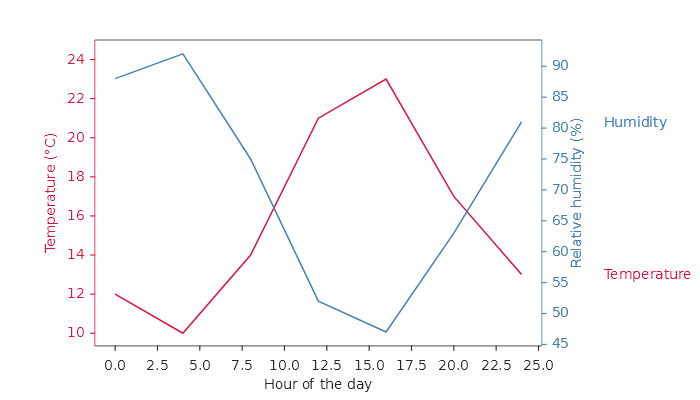
The left spine, its ticks, its numbers and its title are crimson; the right ones are steel blue. Both names stand right of the plot, past the right-hand numbers and title, each at the height where its own line ends. Everything else on the axes (tick length, font size, spine width) stays as it was. Keep an axis title that names the series and its unit, so the colour is never the only thing that tells a reader which axis a line belongs to.
Keep it through JSON. REST, SignalR, Blazor and the MCP server hand a figure on as JSON. The axis colours and the label placement now travel with it; JSON written by an earlier version reads as no colour and a legend entry.
using MatPlotLibNet.Models.Series;

var copy = ChartSerializerDefault.Current.FromJson(figure.ToJson());
var axes = copy.SubPlots[0];

Console.WriteLine(axes.Spines.Right.Color?.ToHex());                         // #4682B4
Console.WriteLine(axes.SecondaryYAxis!.MajorTicks.LabelColor?.ToHex());      // #4682B4
Console.WriteLine(((LineSeries)axes.SecondarySeries[0]).LabelPlacement);     // LineEnd
It prints #4682B4 twice and LineEnd. A top axis made with WithSecondaryXAxis, with its label, limits and series,
survives the trip as well; before this release it was lost on the way.
Colour the top axis, and the title makes room for it. A second X axis along the top reads the same measurements in another unit. Its numbers and title now get room of their own, and the axes title stands above them.
using MatPlotLibNet;
using MatPlotLibNet.Styling;

double[] celsius = [-10, 0, 10, 20, 30, 40];
double[] fahrenheit = [14, 32, 50, 68, 86, 104];
double[] efficiency = [71, 80, 88, 93, 90, 82];

Plt.Create()
    .WithSize(700, 450)
    .AddSubPlot(1, 1, 1, ax => ax
        .Plot(celsius, efficiency, s => s.Color = Colors.Teal)
        .SetXLabel("Outdoor temperature (°C)")
        .SetXAxisColor(Colors.Teal)
        .SetYLabel("Efficiency (%)")
        .WithTitle("Heat pump efficiency")
        .WithSecondaryXAxis(top => top
            .ScatterXSecondary(fahrenheit, efficiency, s => s.Color = Colors.Chocolate)
            .SetXLabel("Outdoor temperature (°F)")
            .SetXAxisColor(Colors.Chocolate)))
    .Save("top_axis.svg");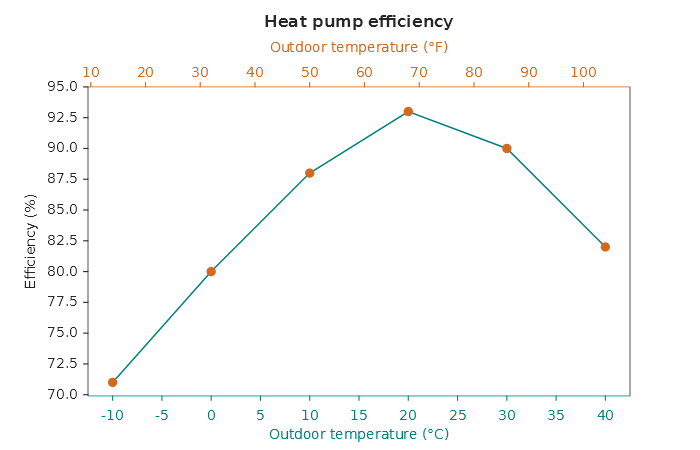
The teal line is read in °C on the bottom axis; the chocolate dots, the same measurements read in °F on the top axis, sit on the line. The title stands above the top numbers and the top axis title, and nothing overlaps.
A secondary axis takes its tick settings. The ticks of the right-hand and the top axis follow that axis' own
MajorTicks: direction, length, width, colour, label size, label colour, padding, rotation and Visible = false. Before
this release every one of those settings was ignored there.
using MatPlotLibNet;
using MatPlotLibNet.Styling;

double[] hour = [0, 4, 8, 12, 16, 20, 24];
double[] load = [310, 280, 420, 560, 610, 480, 330];
double[] price = [0.21, 0.18, 0.27, 0.34, 0.38, 0.30, 0.22];

var figure = Plt.Create()
    .AddSubPlot(1, 1, 1, ax => ax
        .Plot(hour, load)
        .SetYLabel("Load (MW)")
        .WithSecondaryYAxis(right => right
            .Plot(hour, price, s => s.Color = Colors.Tab10Orange)
            .SetYLabel("Price (EUR/kWh)")))
    .Build();

var right = figure.SubPlots[0].SecondaryYAxis!;
right.MajorTicks = right.MajorTicks with { Direction = TickDirection.In, Length = 8, LabelSize = 12, LabelColor = Colors.Navy };

figure.Save("right_ticks.svg");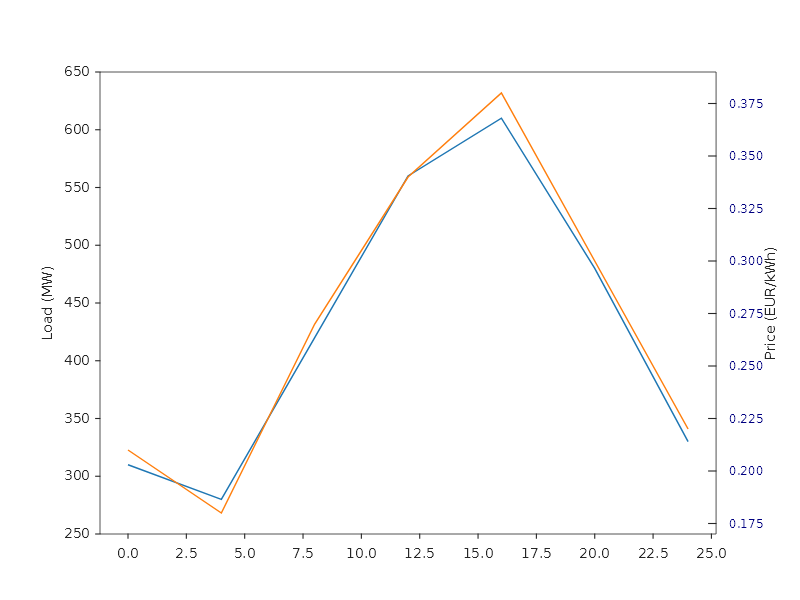
The right-hand marks point into the plot and are 8 px long, and their numbers are larger and navy. Left untouched, a secondary axis now looks like the primary one: marks 4.86 px long and 1.11 px wide, numbers 9.72 px from the spine.
Mirrored ticks are drawn, and the layout makes room for them. WithXTicksMirrored() repeats the X ticks along the
top edge, where before it set a flag nothing read. Mirrored Y ticks point away from the plot on the right edge, as they
do on the left.
using MatPlotLibNet;

double[] depth = [0, 50, 100, 150, 200, 250];
double[] pressure = [101325, 605000, 1110000, 1615000, 2120000, 2625000];

Plt.Create()
    .WithSize(600, 400)
    .AddSubPlot(1, 1, 1, ax => ax
        .Plot(depth, pressure)
        .WithTitle("Pressure under water")
        .SetXLabel("Depth (m)")
        .SetYLabel("Pressure (Pa)")
        .WithXTicksMirrored()
        .WithYTicksMirrored())
    .TightLayout()
    .Save("mirrored_ticks.svg");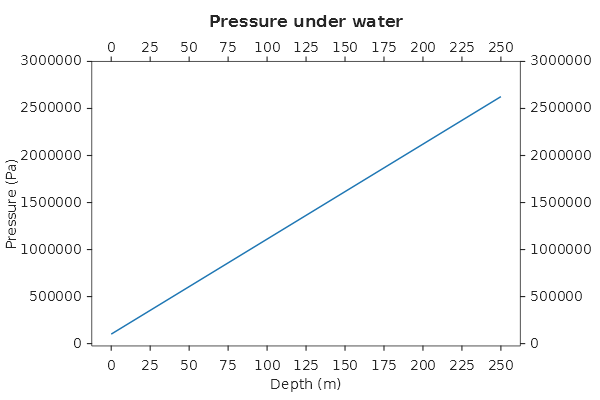
The depth numbers appear along the top as well as the bottom, and the title stands above them instead of on them. The pressure numbers appear on both sides, and the right margin is as wide as the widest of them. A secondary axis with series takes its edge for its own ticks, so the mirrored ticks are not drawn on that edge.
A legend click hides a line on a secondary axis. A line on the right-hand or the top axis is drawn in a series group of its own, like a line on the main axes. The legend toggle, the hover highlight and a streaming update all find it there.
using MatPlotLibNet;

double[] hour = [0, 4, 8, 12, 16, 20, 24];
double[] temperature = [12, 10, 14, 21, 23, 17, 13];
double[] humidity = [88, 92, 75, 52, 47, 63, 81];

Plt.Create()
    .WithBrowserInteraction()
    .AddSubPlot(1, 1, 1, ax => ax
        .Plot(hour, temperature, s => s.Label = "Temperature")
        .SetYLabel("Temperature (°C)")
        .WithSecondaryYAxis(right => right
            .Plot(hour, humidity, s => s.Label = "Humidity")
            .SetYLabel("Relative humidity (%)"))
        .WithLegend())
    .Save("legend_toggle.svg");
Open legend_toggle.svg in a browser and click Humidity in the legend: the right-hand line disappears, and a second
click brings it back. Before this release the click hid nothing. A click on a plotted line no longer toggles it either;
only a click on a legend entry does.
A theme's colour cycle reaches a secondary line. The colour a line is drawn in and the colour of its legend swatch are decided in one place, for the main axes and the secondary ones alike.
using MatPlotLibNet;
using MatPlotLibNet.Styling;

double[] x = [1, 2, 3, 4, 5];
double[] sales = [12, 15, 14, 18, 21];
double[] margin = [0.31, 0.29, 0.33, 0.35, 0.34];

var theme = Theme.CreateFrom(Theme.Default)
    .WithPropCycler(new PropCyclerBuilder().WithColors(Colors.Red, Colors.Green, Colors.Blue).Build())
    .Build();

Plt.Create()
    .WithTheme(theme)
    .AddSubPlot(1, 1, 1, ax => ax
        .Plot(x, sales, s => s.Label = "Sales")
        .WithSecondaryYAxis(right => right.Plot(x, margin, s => s.Label = "Margin"))
        .WithLegend())
    .Save("cycled_secondary.svg");
Sales is drawn red and Margin green (#008000), and the legend swatches show the same two colours. Before, the
right-hand line took the plain colour cycle (#FF7F0E) while its swatch showed green. Tooltips (WithTooltips()) and
theme settings reach series on a secondary axis too.
A click on a secondary line reports its own values. With the server data cursor, a click on a line on the right-hand axis reports Y in right-hand units, a line on the top axis reports X in top-axis units, and every click is measured against the plot area and the range the axes actually show. Hover, Shift-drag selection, wheel zoom and drag pan work in the units of the axes under the pointer too.
using MatPlotLibNet;
using MatPlotLibNet.AspNetCore;
using Microsoft.AspNetCore.Builder;
using Microsoft.Extensions.DependencyInjection;

var builder = WebApplication.CreateBuilder(args);
builder.Services.AddMatPlotLibNetSignalR();
var app = builder.Build();
app.MapChartHub();

double[] hour = [0, 4, 8, 12, 16, 20, 24];
double[] temperature = [12, 10, 14, 21, 23, 17, 13];
double[] humidity = [88, 92, 75, 52, 47, 63, 81];

var figure = Plt.Create()
    .AddSubPlot(1, 1, 1, ax => ax
        .Plot(hour, temperature, s => s.Label = "Temperature")
        .WithSecondaryYAxis(right => right.Plot(hour, humidity, s => s.Label = "Humidity")))
    .WithServerInteraction("weather", i => i.EnableDataCursor())
    .Build();

app.Services.GetRequiredService<FigureRegistry>().Register("weather", figure, options => options
    .OnDataCursor(evt =>
    {
        Console.WriteLine($"{evt.Annotation.SeriesLabel}: {evt.Annotation.DataX:0.#} h, {evt.Annotation.DataY:0.#}");
        return ValueTask.CompletedTask;
    }));

app.Run();
A click on the humidity line at noon prints a value near Humidity: 12 h, 52, read on the right-hand axis in percent;
a click on the temperature line reads the left axis in °C. Before this release every click was converted with the left
axis' limits over the whole picture, so an autoscaled chart reported numbers that matched neither axis. See
Bidirectional SignalR for the page this figure is shown on.