Repository navigation
Releases: yoouTaro/rgrip
Release list
rgrip 0.0.7-alpha

New
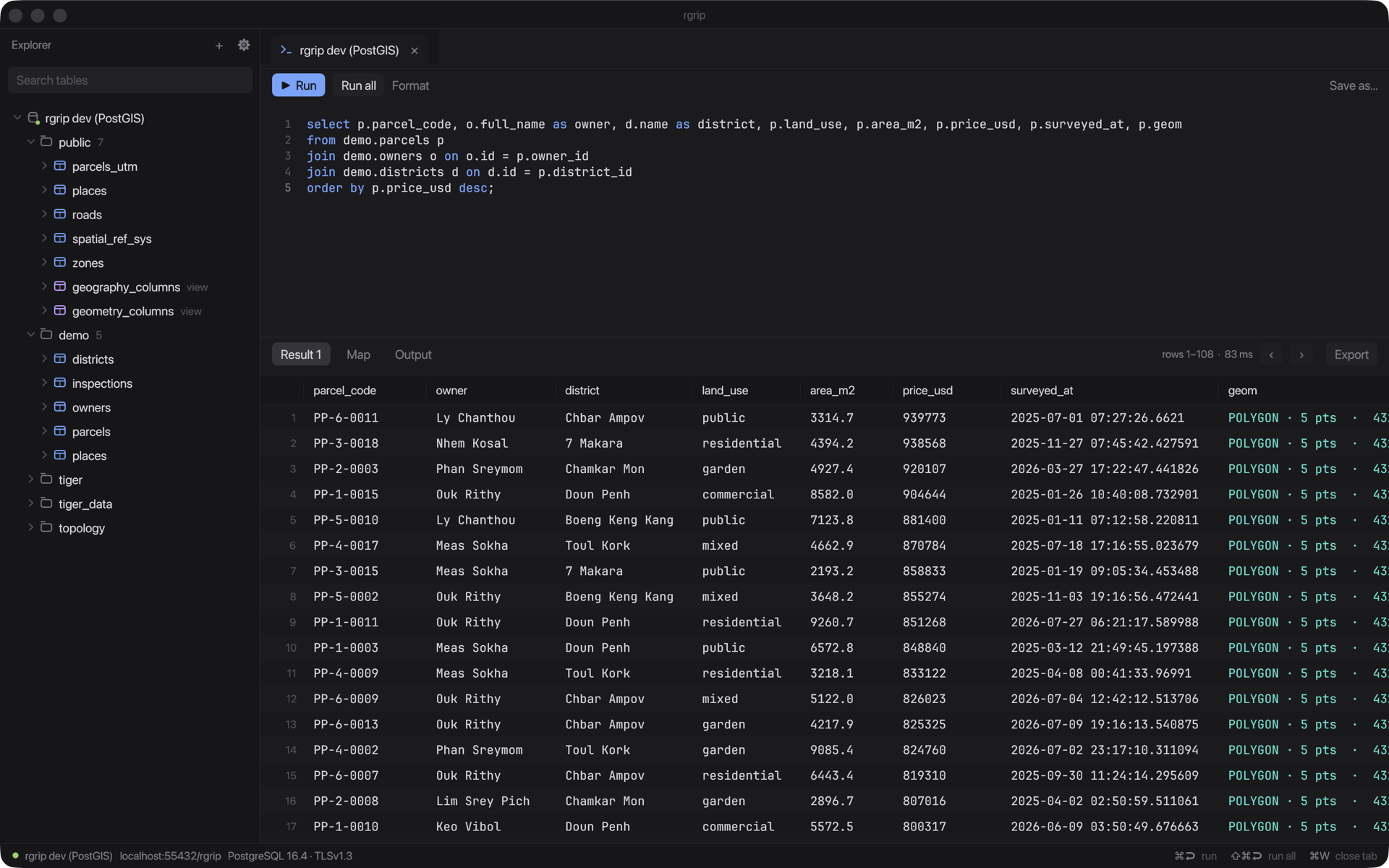
- Date/time picker when editing a cell, matched to the column type: a calendar for
date, calendar + time fortimestamp/timestamptz(offset kept), time fields fortime/timetz. Today / Now uses your local time. You can still type the value. - Related rows: right-click row(s) → Related → follow foreign keys both ways, e.g. → users (user_id) or ← posts (user_id). The rows open in a popup over your tab; chain further, ‹ Back, or Open as tab. Self-references and multi-column keys work.
- Freeze columns: right-click a column header → Freeze column. Frozen columns stay on the left with the row numbers while you scroll sideways, and stay frozen across reloads, paging and re-runs.
Fixes
- Map: polygons with a repeated vertex no longer draw spikes across the whole map.
Project
- New website: https://yoouTaro.github.io/rgrip/
- Licensed MIT OR Apache-2.0, with a README, changelog, contributing guide and issue templates.
Install
On 0.0.2-alpha or later: ⚙ → Check for updates… → Install & restart.
Otherwise download the zip below (macOS 11+, Apple silicon). The app isn't notarized, so on first launch right-click rgrip.app → Open.
SHA-256: 0a503a6a1db6e81cecb8bff44a9f3c545977973bf9118c366c38c3d23e896a78
rgrip 0.0.6-alpha
New
- Edit cells inline (table tabs): double-click a cell, type, Enter to keep (Esc cancels). Right-click a cell for Edit cell, Set NULL and Revert cell.
- Changed cells are highlighted; the toolbar shows N changes · Save · Discard. Save (⌘S) writes one
UPDATEper row, matched on the primary key, in a single transaction: if any row was changed or deleted meanwhile, nothing is saved. - Tables without a primary key (and views) are read-only. Geometry columns aren't editable. Paging, sorting and filtering wait until you Save or Discard.
- Changed cells are highlighted; the toolbar shows N changes · Save · Discard. Save (⌘S) writes one
- Copy as image: right-click rows → Copy as image (or Export → Copy as → Image (PNG)) puts a clean table picture on the clipboard. Paste straight into Telegram, Slack, Notes…
Fixes
- Khmer in table images renders correctly (stacked consonants, mixed Latin/Khmer like
<div>ផ្លូវ…, no dropped letters). - No more empty boxes in Khmer text (zero-width spaces, stray vowel marks).
- Map popup: proper copy and close icons, lined up in one column.
Install
On 0.0.2-alpha or later: ⚙ → Check for updates… → Install & restart.
Otherwise download the zip below (macOS 11+, Apple silicon). The app isn't notarized, so on first launch right-click rgrip.app → Open.
SHA-256: e3b5ba7204efd30377cba946ae8fd091cd66c11f3a811dc537bfdb7921ce9bc5
rgrip 0.0.5-alpha
New
- Format query: ⇧⌘F or the Format button formats the selection, or the whole editor. Slash command lines and comments are kept.
- SVG table export: right-click rows → Save rows as → SVG table… (or Copy as → SVG table to paste into Figma). A clean, readable table: bold header, zebra rows, right-aligned numbers, grey NULLs, geometries as WKT. Also in Export → Save as / Export all rows as.
Slash commands
- Always expand to a complete query:
/con_4326alone givesselect t.*, ST_Transform(t.shape, 4326) as shape_4326 from table_name t; /con_mercsource SRID now defaults to 32648 (UTM 48N); add a number to override, e.g./con_merc parcels 3857.- Table names match regardless of case, and a table the catalog doesn't know is used as typed (
/con_4326_2 parcel shape,/count parcel). - Run / Run all expand slash command lines before sending.
Fixes
- A
-- commentafter the final;no longer causes a syntax error. - Trailing
/* … */comments are no longer treated as a separate statement.
Install
On 0.0.2-alpha or later: ⚙ → Check for updates… → Install & restart.
Otherwise download the zip below (macOS 11+, Apple silicon). The app isn't notarized, so on first launch right-click rgrip.app → Open.
SHA-256: be78f5b876a98cc0f2bf5d8e0dbd8cee65c9327e0ab25f761af3de0f16652a9a
rgrip 0.0.4-alpha
New
- Slash commands: type
/in the editor, then Tab to expand (or ⌘↩ to expand and run):/con_4326→ST_Transform(shape, 4326)/con_4326_2→ST_SetSRID(st_astext(shape)::text, 4326)(ArcGIS via text)/con_merc→ Web Mercator (3857/102100) via text → 4326- Add a field (
/con_4326 geom) or a table (/con_4326_2 parcels) to write the whole query,select t.*, … as shape_4326 from parcels t; - Also
/srid,/top,/count
- ArcGIS
st_geometrycolumns get the same conversions as autocomplete suggestions. - Connection strings: paste a
postgres://URL, ahost=… dbname=…string or ajdbc:postgresql://URL into the new URL field. Right-click a connection → Copy connection URL. - Multi-row selection: click, ⇧-click and ⌘-click rows, ⌘A, ⌘C. Right-click → Copy as CSV / JSON / Markdown / GeoJSON / SQL INSERT /
where id in (…), Copy for AI agent (query + column types + rows as Markdown), or Save rows as… - ⌘N opens a new query.
Map
- Features with a vertex far from the rest (e.g. swapped lat/lon), which draw as long spikes, are flagged (⚠ N far off · Hide), and Fit zooms to the real data.
- The feature popup is selectable, with copy buttons (geometries copy as WKT).
- Queries from
/con_*show their*_4326column automatically.
Install
On 0.0.2-alpha or later: ⚙ → Check for updates… → Install & restart.
Otherwise download the zip below (macOS 11+, Apple silicon). The app isn't notarized, so on first launch right-click rgrip.app → Open.
SHA-256: 8f1d2bb0734e655f022ffd307665f7dba62f8396e612814d3e0e43dea6367054
rgrip 0.0.3-alpha
New
- PostGIS autocomplete:
ST_*functions with their arguments, plus generated SQL for each geometry column based on its SRID. For ageomstored in 32648, you're offeredST_Transform(geom, 4326) AS geom,ST_AsGeoJSON(…)in WGS84,ST_AsText(geom)and a Web Mercator transform. Typingp.on an alias producesST_Transform(p.geom, 4326). - Reproject to 4326: when the map can't draw a geometry's SRID itself, one click re-runs the query with
ST_Transform(…, 4326)added in PostGIS. - Light basemap: a clean white canvas (Esri Light Gray), the default in light themes.
- Settings: a System / Light / Dark switch with icons, and compact theme lists with color swatches.
Fixed
- The theme menu no longer stretches across the whole window.
- PostGIS helper schemas (
tiger,topology) no longer clutter autocomplete.
Install
If you're on 0.0.2-alpha, use ⚙ → Check for updates… → Install & restart.
Otherwise download rgrip-0.0.3-alpha-macos-arm64.zip (macOS 11+, Apple silicon). The app isn't notarized, so on first launch right-click rgrip.app → Open.
SHA-256: a171053a7f76152c67402ebe05f27d1129d5c0061d6a6943bb194ffe69ab69a3
rgrip 0.0.2-alpha
New
- Themes: ⚙ → Appearance (System / Light / Dark), with VS Code-style themes: Dracula, Nord, One Dark Pro, Tokyo Night, Monokai, Catppuccin Mocha & Latte, Gruvbox Dark, GitHub Dark & Light, Solarized Dark & Light, One Light. System follows macOS and switches live.
- Over-the-air updates: rgrip checks GitHub Releases on launch (you can turn this off) or via ⚙ → Check for updates…. Install & restart downloads the update, verifies its SHA-256, and replaces the app in place. This is the first version with the updater; future versions can install themselves from here.
- Saved queries are
.sqlfiles in~/Library/Application Support/dev.rgrip.rgrip/queries/. Right-click → Reveal in Finder, open the folder with ↗, edit them in any editor, and deleting moves them to the Trash.
Fixed
- The app icon now has a transparent background (no white square in the Dock).
Install
rgrip-0.0.2-alpha-macos-arm64.zip: macOS 11+ on Apple silicon. The app is ad-hoc signed and not notarized. On first launch, right-click rgrip.app → Open, or run xattr -dr com.apple.quarantine rgrip.app.
SHA-256: c555fdaaa82bb1c47c288de5ea3f087bbe2e090176bb5c14884f1f310abeb51b
rgrip 0.0.1-alpha
First alpha of rgrip, a minimal DataGrip-style PostgreSQL client written in Rust.
Download
rgrip-0.0.1-alpha-macos-arm64.zip: macOS 11+ on Apple silicon.
The app is ad-hoc signed but not notarized, so macOS will block the first launch. Right-click rgrip.app → Open, or run:
xattr -dr com.apple.quarantine rgrip.appWhat's in it
- Connections: SSL from
disabletoverify-full, custom CA and client certificates; SSH tunnels with a password or key - Explorer: schemas, tables, views and columns, plus saved queries
- Console: syntax highlighting, line numbers and context-aware autocomplete; ⌘↩ runs a statement, ⇧⌘↩ runs everything, ⌘S saves the query
- Results: a fast virtualized grid with 1,000-row server-side paging, sorting and filtering
- Export: CSV, TSV, JSON, GeoJSON, Markdown and SQL INSERT, for the current page or all rows
- PostGIS: readable geometry cells and a built-in map (dark, streets and satellite basemaps), with WGS84, Web Mercator and UTM reprojected automatically
- Khmer: correctly shaped text in the grid, explorer and map
Known limitations
- Passwords are stored in plain text in
~/Library/Application Support/dev.rgrip.rgrip/connections.toml(file mode 0600) - Khmer typed into the SQL editor isn't shaped yet
- Intel Macs, Windows and Linux builds aren't published yet; build from source with
cargo run --release -p rgrip
SHA-256: bcf0e04e428a0550756ddf7d9ca597a0c8000d3d304e4212d5701987ff91df4d