Releases: york9675/flexnote-app
Release list
V 1.2

✅ 更新內容
+ 新增右鍵選單

+ 現可在程式中檢查GitHub中有無新版本可更新
Full Changelog: v1.1...v1.2
⚠️ 請注意
1. 若您的防毒軟體或下載器等說此軟體可能存在風險等訊息,請忽略並放心地保留此程式。此程式絕無任何不安全或是有病毒的地方,你可以在原始碼中看到。謝謝使用!
2. v1.2 版本暫未支援英文及Linux版本,如有需要請先使用 v1.1-linux 版本。 (英文及Linux版本將在稍晚釋出,造成不便深感抱歉)
2. v1.2 version does not currently support English and Linux versions. If necessary, please use v1.1-linux version. (English and Linux versions will be released later, we apologize for the inconvenience)
⬇️ 安裝步驟
🪟 Windows (8.1以上)
-
下載
-
打開
FlexNote_1.2_Windows.exe -
盡情使用!
Now Supports Linux
更新內容 | What's New?
-
現在支援Linux作業系統 (此
v1.1-linux更新相比於先前v1.1釋出除此之外無其他變更) | Now supports Linux (Thisv1.1-linuxupdate has no other changes compared to the previousv1.1release) -
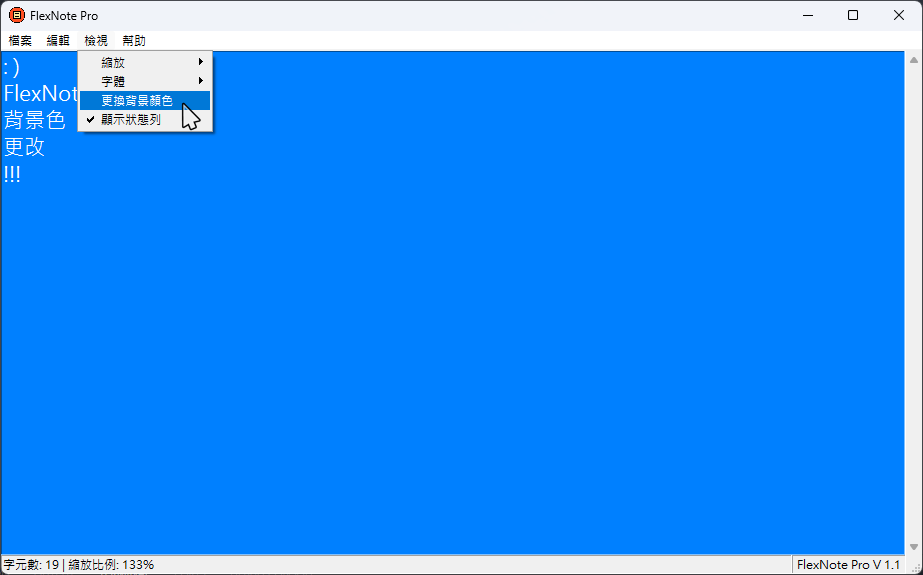
新增了背景顏色更換功能 | Added background color changing function
-
修改了"幫助"選單 | Modified "Help" menu
-
程式碼優化 | Code optimization
-
Bug修復 | Bug fixes
Full Changelog: v1.1...v1.1-linux
⚠️ 請注意 | Note⚠️
若您的防毒軟體或下載器等說此軟體可能存在風險等訊息,請忽略並放心地保留此程式。此程式絕無任何不安全或是有病毒的地方,你可以在原始碼中看到。謝謝使用!
If your anti-virus software or downloader says that this program may be risky, please ignore it and keep this program with confidence. There is absolutely nothing unsafe or virusy about this program, as you can see in the source code. Thanks for using it!
安裝步驟 | Installation
Windows (8.1以上 | 8.1 and above)
-
下載 | Download
-
打開
FlexNote_1.1_Windows.exe| OpenFlexNote_1.1_ENG_Windows.exe -
盡情使用! | Enjoy!
Linux (使用GUI | With the GUI)
-
下載 | Download
-
前往您的下載資料夾 -> 找到
FlexNote_1.1_Linux.AppImage檔案 | Go to your Download folder and findFlexNote_1.1_ENG_Linux.AppImagefile -
對該檔案按下右鍵叫出選單 | Right-click on the file and
-
點選"屬性" | Click the ‘Properties’ entry
-
前往"屬性"視窗中的"權限"分頁 | Switch to the Permissions tab and
-
如果您使用的是基於Nautilus 的檔案管理器(Files、Nemo、Caja),請按一下「允許檔案作為程式執行」勾選框;如果您使用的是Dolphin,請按一下「可執行」勾選框;如果您使用 PCManFM,請更改「執行」下拉式選單至「任何人」 | Click the ‘Allow executing file as program’ checkbox if you are using a Nautilus-based file manager (Files, Nemo, Caja), or click the ‘Is executable’ checkbox if you are using Dolphin, or change the ‘Execute’ drop down list to ‘Anyone’ if you are using PCManFM
-
關閉"屬性"視窗 | Close the dialog
-
直接雙擊開啟
FlexNote_1.1_Linux.AppImage| Double-click on theFlexNote_1.1_ENG_Linux.AppImagefile to run -
盡情使用! | Enjoy!

(The above teaching and GIF installation instructions are referenced from the AppImage Discourse)
Linux (使用指令 | On the command line)
-
下載 | Download
-
前往您的下載資料夾 | Go to your Download folder
-
在該位置開啟終端機並輸入以下命令 | Open a terminal at this location and enter the following command
若您下載繁體中文版本:
chmod a+x FlexNote_1.1_Linux.AppImageIf you downloaded English version:
chmod a+x FlexNote_1.1_ENG_Linux.AppImage-
直接雙擊開啟
FlexNote_1.1_Linux.AppImage| Double-click on theFlexNote_1.1_ENG_Linux.AppImagefile to run -
盡情使用! | Enjoy!
V 1.1 Update
FlexNote
一個非常簡單的記事本程式,簡單易使用,沒有其他複雜功能。
A very simple notepad program, easy to use with no other complicated features.
更新內容 | What's New?
- 新增了背景顏色更換功能
- 修改了"幫助"選單
- 程式碼優化
- Bug修復
介紹 | Introduction
詳細介紹請前往介紹網站。
For detailed information, please go to the introduction website.
安裝步驟 | Installation
-
下載 Scorce code (zip) | Download Scorce code (zip)
-
解壓縮 | Unzip
-
前往Release資料夾 -> 打開 FlexNote.exe | Go to release folder and open FlexNoteEN.exe
-
盡情使用! | Enjoy!
螢幕截圖 | Screenshot
Full Changelog: v1.0...v1.1
V1.0 First Release
FlexNote
一個非常簡單的記事本程式,簡單易使用,沒有其他複雜功能。
A very simple notepad program, easy to use with no other complicated features.
介紹 | Introduction
詳細介紹請前往介紹網站。
For detailed information, please go to the introduction website.
安裝步驟 | Installation
-
下載 Scorce code (zip) | Download Scorce code (zip)
-
解壓縮 | Unzip
-
前往Release資料夾 -> 打開 FlexNote.exe | Go to release folder and open FlexNoteEN.exe
-
盡情使用! | Enjoy!
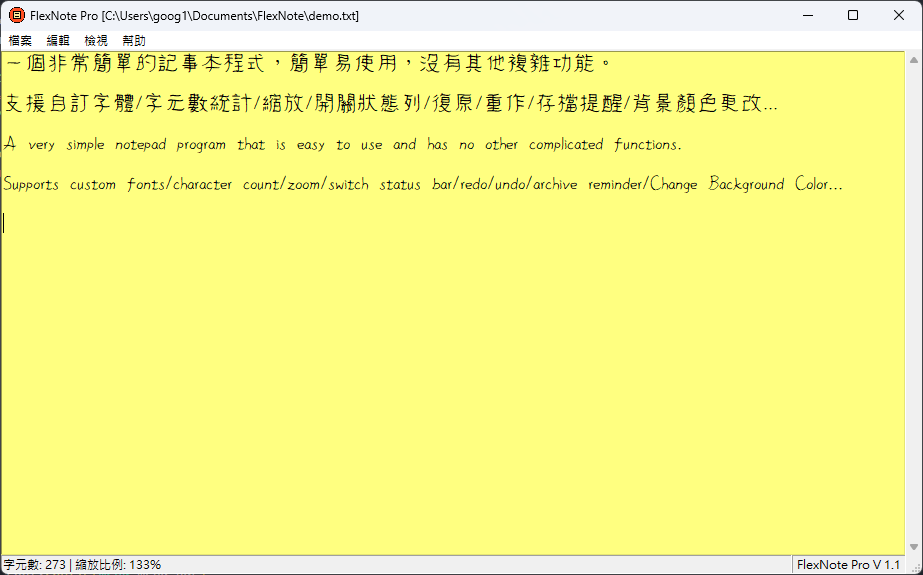
螢幕擷取畫面 | Screenshots
Full Changelog: https://github.com/york9675/flexnote-app/commits/v1.0