Releases: yuters/omarchy-flight-radar
Release list
Flight Radar 1.0.0

1.0
Marking the radar 1.0 ahead of Omarchy Quattro. Coordinates, credentials and panel settings all live under ~/.local/state/omarchy/settings, and the panel's keyboard shortcuts now follow the same conventions Omarchy's own panels use.
Since 0.3.1:
- Clicking an overhead or inbound notification opens the panel. The notification registers the libnotify default action that Omarchy's notification service invokes on a click, so the toast takes you straight to the scope.
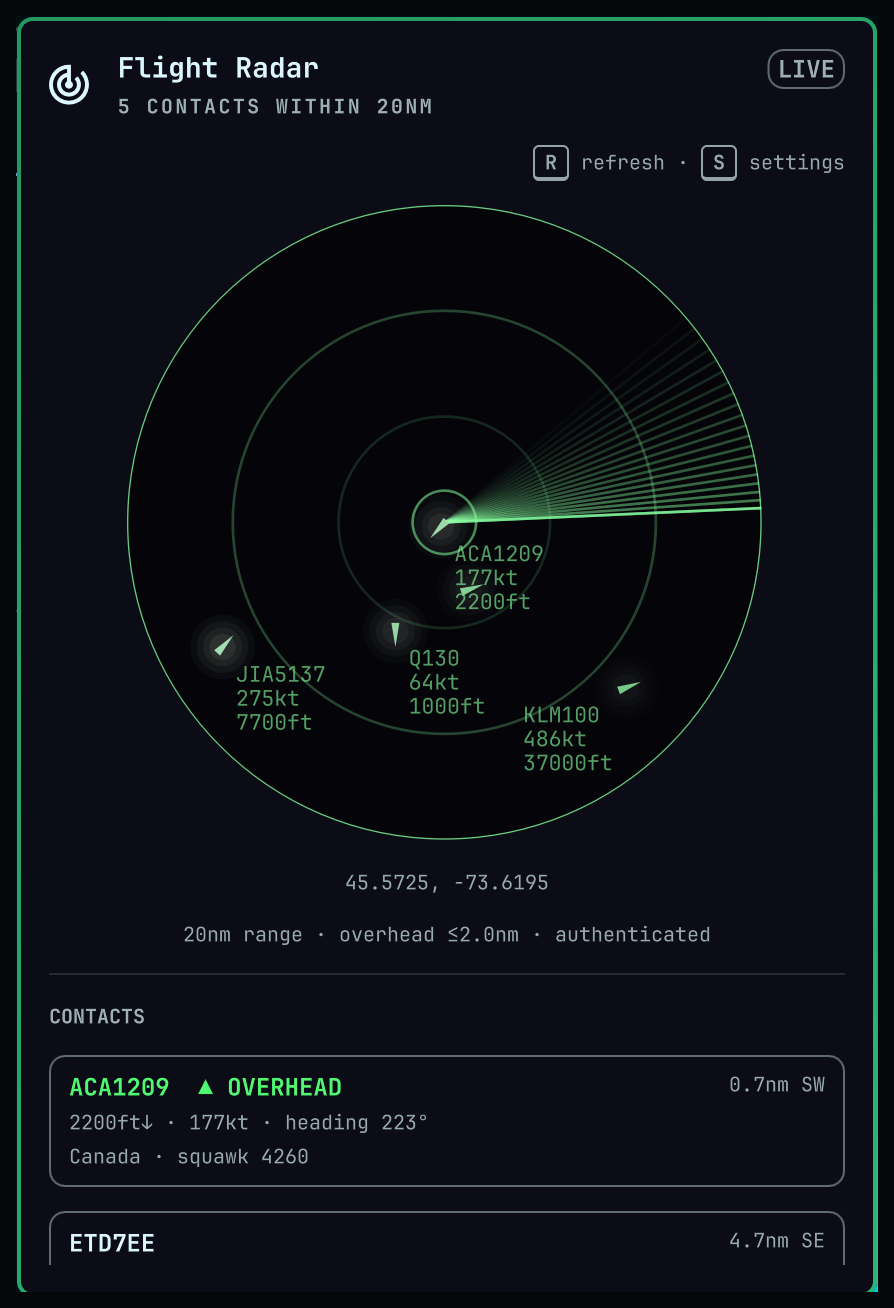
- T toggles the radar from the panel, alongside R to refresh and S for settings — the same key the Tailscale panel uses for its own toggle. It writes the same setting as the switch in the panel header, so the status pill and background polling follow.
- Holding any of those keys now acts once per press. Auto-repeat reached the panel as an ordinary keypress, so a held key refetched, rewrote the settings file or flipped the panel for as long as it was down.
Flight Radar 0.3.1
The contact list groups by what it is showing
- Contacts were listed by distance alone, so an aircraft actually overhead could sit below a run of traffic that merely happened to be nearer than the rest. The list now reads overhead first, then the ones forecast inbound, then everything else — each group still nearest first.
- The order is ranked from the same verdicts the rows are labelled with, so nothing sorts up among the overhead ones without wearing the badge. The scope and the contact count are unchanged.
Flight Radar 0.3.0
The radar can be switched off
- A power switch sits at the top right of the panel, where first-party panels keep theirs. Off stops polling, clears the contacts and the overhead badge, silences notifications and hides the sweep; the bar icon fades and its tooltip goes quiet. Switching back on refreshes straight away rather than waiting for the sweep to come round.
- The LIVE indicator has moved down beside the refresh and settings hints.
Smoother contacts
- A contact lit by the sweep used to appear at full brightness and full halo width in a single frame, then sit still for a whole revolution before jumping to its next position. The halo now brightens and opens out past its resting width before settling, and the blip slides onto each new fix instead of snapping to it.
Fixes
- The poll timers wait for the settings file to load. An install that had been switched off polled once on every start, before its own setting had arrived.
Flight Radar 0.2.3
Changes
- Settings and credentials now live in
~/.local/state/omarchy/settings/flight-radar.json, alongside the file Omarchy's own weather widget keeps there. They used to sit in the plugin folder, which Omarchy watches for code changes — so saving either one reloaded every plugin, every service, and the desktop wallpaper along with them. This went unnoticed for a while because my own install is a symlink into a working copy, and the directory watcher does not follow symlinks: writes landed outside the watched tree, so the reload never fired here and only showed up on an ordinary install. - The panel writes credentials itself instead of handing them to a helper script, so they never appear in a process's arguments. The file is kept private to your user account.
Upgrading
- Your settings carry over on their own; nothing is moved or copied, the old file is simply read until the first time you save.
- OpenSky credentials must be entered again. Until you do, the radar uses anonymous access, limited to 400 requests a day. You do not need to generate new ones — the existing pair is still readable at
~/.config/omarchy/plugins/yuters.flight-radar/opensky.json. Copy theclientIdandclientSecretfrom there into settings, reachable with S while the panel is open.
Flight Radar 0.2.2
Fixes
- Hovering the scope no longer sets off a binding loop on every pointer movement. It filled the shell's log continuously and re-ran the contact hit test far more often than drawing the cursor required.
Changes
- There is an easter egg somewhere in how the panel renders itself.
Flight Radar 0.2.1
Fixes
- The scope no longer rearranges itself a moment after the panel opens, and closing the panel leaves nothing stale behind for the next time it is opened.
- The contact list, the overhead check and flyby forecasts read the current position estimate rather than one still easing into place.
Changes
- A grouped notification now carries its count and the time to the closest aircraft. The list it replaced was clipped by the notification daemon, so most of a busy group was never shown.
Flight Radar 0.2.0
Flyby forecasts
- Stable inbound tracks are predicted up to ten minutes ahead, with the estimated time and distance at closest approach shown in the contact list and counted in the section header.
- An advance alert is raised as an aircraft is predicted to arrive, and again promptly when it enters the overhead radius. Advance alerts are on by default and can be turned off in the panel settings.
- Forecasts are withheld when the position is stale, when speed or heading are missing, or when the heading has changed between updates.
- Alerts raised in the same minute are grouped into one notification, so a busy pass stays readable without dropping aircraft.
Fixes
- The overhead radius is capped at the scope range. Beyond it, aircraft were never fetched and never counted, while the panel claimed to be watching them.
- Saved coordinates are respected at startup: the panel no longer resolves a location from your IP address before its settings have loaded.
- Aircraft are no longer extrapolated indefinitely when data stops, which could raise an alert for an aircraft that was never there.
- The overhead state is cleared while data is unavailable, so a stale contact cannot suppress the real arrival once it recovers.
- Requests near the 180th meridian are split into two valid boxes instead of being silently truncated.
Requests and credits
- Polling is paced against the credit balance OpenSky reports, spread over the time until it refills, and a rate-limited response is honoured for as long as it asks.
- The interval floor is derived from what a request actually costs, which depends on the area of the query box.
Performance
- The sweep is turned by a transform instead of being redrawn, and rings and labels sit on their own layer, cutting the cost of an open panel by roughly half again.
- Contact rows keep their identity across a refresh.
Also
- Opening a contact on the OpenSky map arrives at a usable zoom.
- Regression tests cover the model and the fetch helper.
Flight Radar 0.1.4
Fixes
- Typing in a settings field and pressing Save now takes effect without leaving the field first.
- Clearing the coordinates and saving asks for a fresh location instead of a cached one.
- Settings saved in the panel are no longer overridden by
omarchy bar set. - Coordinates can no longer be wiped by saving before the stored config has loaded.
Changes
- The overhead radius steps in half nautical miles.
- R and Save redraw every contact where it is now, rather than waiting for the sweep. Background polling still waits for it.
Performance
- Rings and labels moved to their own canvas: an open panel costs about half the CPU it did.
- Contact rows keep their identity across a refresh, so a row no longer flickers under the cursor every two seconds.
Flight Radar 0.1.3
Mostly fixes to the scope's motion and to the settings, plus a tidier settings panel.
Fixed
- The scope no longer jumps when a poll lands. Contacts were repainted at their position as of the moment the sweep last passed them, but a fresh fix resets the blend origin, so every contact snapped forward at once — the opposite of what the sweep synchronisation was for.
- A hold is no longer tied to the projection it was taken under. Changing the scope range or the centre left already-swept contacts drawn at their old pixel positions, at the wrong radius, until the sweep reached them again.
- The sweep now erases as well as paints. An aircraft that left the range kept its last blip on the scope indefinitely; it now lingers only until the line reaches it. Conversely, an aircraft entering the range no longer appears before the sweep has found it.
omarchy bar set <id> <key> falseworks. It stores the value as a string unless given--json, and every boolean read tested forfalseexactly — sowatch,notify,sweep,labels,trianglesandaviationUnitscould not be turned off from the command line at all.- The overhead badge no longer lies. With
watchoff, both timers stop when the panel closes, leaving the bar badge frozen on its last count forever. - Saving writes the file once, not once per setting — five atomic replaces per Save, with four intermediate states on disk.
- Saving before opening the settings no longer clears saved coordinates. Empty coordinate fields mean "locate automatically", which was true even before the fields had been filled from the stored values.
Changed
- The settings panel has SETTINGS and OPENSKY NETWORK ACCOUNT headers, each with a rule above it.
- A crosshairs button beside the coordinates blanks both fields; the centre is handed back to the locate helper when you press Save, like every other setting.
- Once credentials are stored the section collapses to ✓ Authenticated and a Remove button — no empty fields and no Save button with nothing to save. Removing brings them back.
- The version sits at the foot of the settings and links to this repository.
- The update time is gone from the header, and R and S are drawn as keycaps.
- The scope is projected once per animation frame rather than once per pointer movement — deciding which cursor to draw used to reproject every tracked aircraft.
Upgrade
omarchy plugin update yuters.flight-radar
omarchy restart shell
The restart is needed because Omarchy's plugin rescan cannot reload compiled QML.
Flight Radar 0.1.2
Housekeeping. No change to what the radar does.
Changed
- Settings loading is just
settings.json. 0.1.1 read the old~/.config/omarchy/radar.jsonfirst and moved it across on the way — a second file watcher, a process to delete the old file, and the sequencing between them, sitting in the path every startup takes. That is a lot of permanent machinery for a one-time move between two releases hours apart, so it is gone.
Upgrading
Coming from 0.1.1, there is nothing to do — your settings already moved.
Coming from 0.1.0 directly, this release will not move them for you. Either:
mv ~/.config/omarchy/radar.json ~/.config/omarchy/plugins/yuters.flight-radar/settings.jsonor open the panel, press S, and set the coordinates and ranges again.
omarchy plugin update yuters.flight-radar
omarchy restart shell
The restart is needed because Omarchy's plugin rescan cannot reload compiled QML.