Interceptors
拦截器一种很好很强大的机制,通过拦截器可以监听、重写和重试call。下面是一个简单例子,实现了打印请求和响应的内容。
class LoggingInterceptor implements Interceptor {
  @Override public Response intercept(Interceptor.Chain chain) throws IOException {
    Request request = chain.request();

    long t1 = System.nanoTime();
    logger.info(String.format("Sending request %s on %s%n%s",
        request.url(), chain.connection(), request.headers()));

    Response response = chain.proceed(request);

    long t2 = System.nanoTime();
    logger.info(String.format("Received response for %s in %.1fms%n%s",
        response.request().url(), (t2 - t1) / 1e6d, response.headers()));

    return response;
  }
}
chain.proceed(request) 的调用是每个拦截器实现的关键部分。这个看起来很简单的方法实际用处是HTTP工作、产生对应一个请求的响应。OkHttp使用列表维护跟踪拦截器,并且按顺序依次调用拦截器。
拦截器可以被连接起来。你可以设想你有一个数据压缩拦截器和一个统计总量拦截器:你需要确定是先压缩再统计还是先统计再压缩。
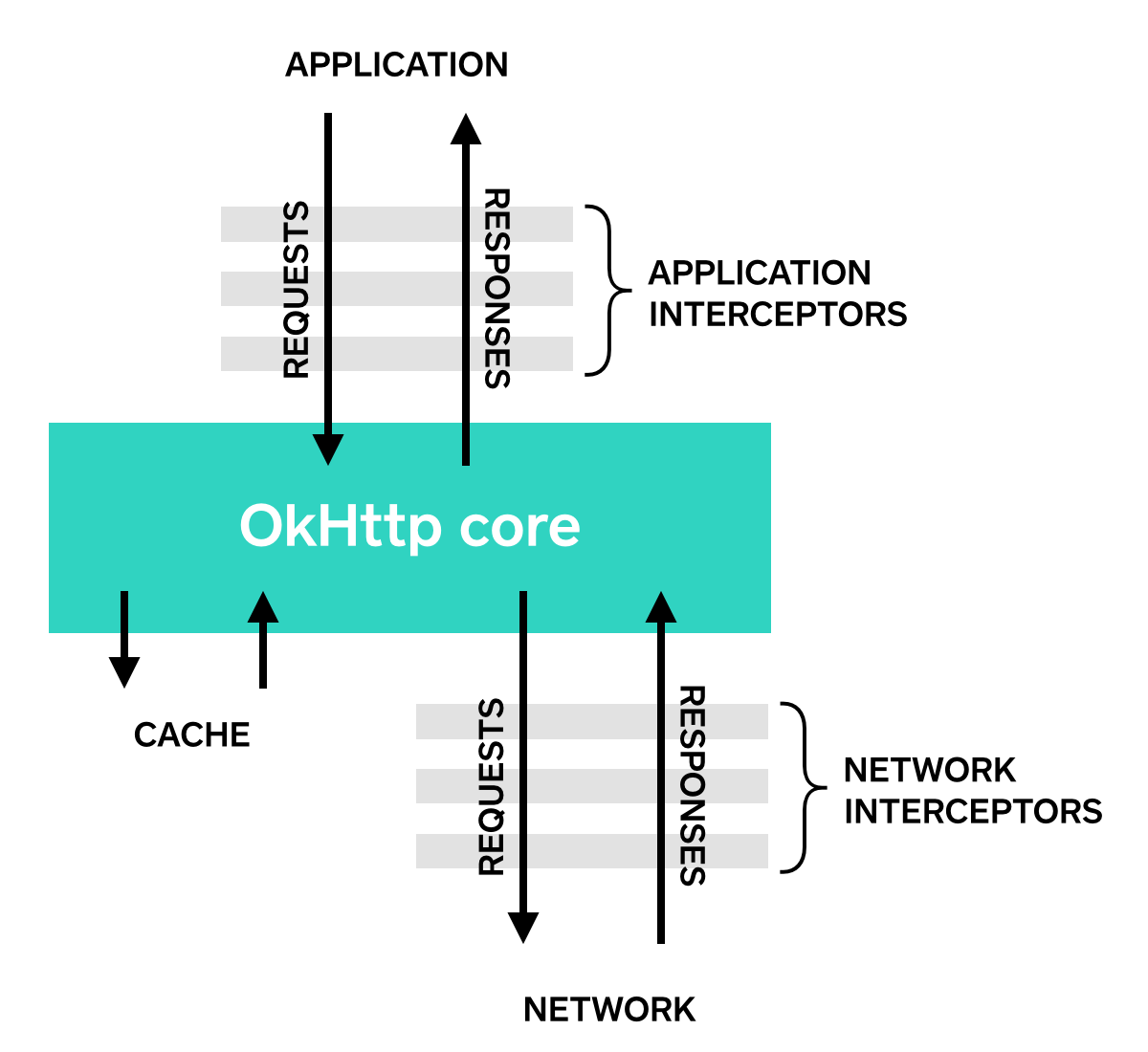
拦截器有两种注册类型:应用拦截器( application interceptor)和网络拦截器(network interceptor)。下面我们通过上面定义过的LoggingInterceptor来区分下两种拦截器的不同。
调用OkHttpClient.Builder的addInterceptor()方法栏注册一个应用拦截器(application interceptor):
OkHttpClient client = new OkHttpClient.Builder()
    .addInterceptor(new LoggingInterceptor())
    .build();

Request request = new Request.Builder()
    .url("http://www.publicobject.com/helloworld.txt")
    .header("User-Agent", "OkHttp Example")
    .build();

Response response = client.newCall(request).execute();
response.body().close();http://www.publicobject.com/helloworld.txt这个URL会重定向到https://publicobject.com/helloworld.txt,OkHttp会自动重定向。这个应用拦截器只会被调用一次,并且chain.proceed()返回的响应中包含了重定向之后的响应:
INFO: Sending request http://www.publicobject.com/helloworld.txt on null
User-Agent: OkHttp Example

INFO: Received response for https://publicobject.com/helloworld.txt in 1179.7ms
Server: nginx/1.4.6 (Ubuntu)
Content-Type: text/plain
Content-Length: 1759
Connection: keep-alive
因为 response.request().url()和request.url()不同,所以我们可以知道请求已经被重定向了。
调用addNetworkInterceptor()已替代之前的addInterceptor()方法可以注册一个网络拦截器:
OkHttpClient client = new OkHttpClient.Builder()
    .addNetworkInterceptor(new LoggingInterceptor())
    .build();

Request request = new Request.Builder()
    .url("http://www.publicobject.com/helloworld.txt")
    .header("User-Agent", "OkHttp Example")
    .build();

Response response = client.newCall(request).execute();
response.body().close();当运行代码后,我们可以发现拦截器执行了两次。初始的请求指向http://www.publicobject.com/helloworld.txt,第二个请求重定向到https://publicobject.com/helloworld.txt。
INFO: Sending request http://www.publicobject.com/helloworld.txt on Connection{www.publicobject.com:80, proxy=DIRECT hostAddress=54.187.32.157 cipherSuite=none protocol=http/1.1}
User-Agent: OkHttp Example
Host: www.publicobject.com
Connection: Keep-Alive
Accept-Encoding: gzip

INFO: Received response for http://www.publicobject.com/helloworld.txt in 115.6ms
Server: nginx/1.4.6 (Ubuntu)
Content-Type: text/html
Content-Length: 193
Connection: keep-alive
Location: https://publicobject.com/helloworld.txt

INFO: Sending request https://publicobject.com/helloworld.txt on Connection{publicobject.com:443, proxy=DIRECT hostAddress=54.187.32.157 cipherSuite=TLS_ECDHE_RSA_WITH_AES_256_CBC_SHA protocol=http/1.1}
User-Agent: OkHttp Example
Host: publicobject.com
Connection: Keep-Alive
Accept-Encoding: gzip

INFO: Received response for https://publicobject.com/helloworld.txt in 80.9ms
Server: nginx/1.4.6 (Ubuntu)
Content-Type: text/plain
Content-Length: 1759
Connection: keep-alive
这次的网络请求包含了更多数据,例如由为了表明客户端可接受压缩后的请求,OkHttp自动添加了Accept-Encoding: gzip请求头。网络拦截器的Chain中包含一个非空的Connection ,可以通过Connection查询我们是使用什么IP地址、TLS配置来连接Web服务的。
两种拦截器各有优缺点。
应用拦截器
- 不需要担心响应是中间响应。比如重定向和重试就会产生一些中间响应。
- 拦截器永远只会被调用一次,即使是从缓存中产生的HTTP响应。
- 遵循应用的初始目的。无需考虑类似
If-None-Match这种由OkHttp注入的请求头。(这块没太看懂) - 允许直接短路,不调用
Chain.proceed()。 - 允许重试,允许在实现中多次调用
Chain.proceed()。
网络拦截器
- 可以操作中间响应,比如重定向和重试产生的中间响应。
- 当响应是在缓存中时,不会调用拦截器。
- 只会关注网络传输的数据。
- 可以访问携带请求信息的
Connection。
拦截器可以增加、移除或者替换请求头,也可以转换请求体。举个例子:如果已知Web服务支持压缩,则你可以使用应用拦截器对请求体进行压缩替换原请求提,设置原请求中的请求头表示内容已被压缩,再发送新的请求。
/** This interceptor compresses the HTTP request body. Many webservers can't handle this! */
final class GzipRequestInterceptor implements Interceptor {
  @Override public Response intercept(Interceptor.Chain chain) throws IOException {
    Request originalRequest = chain.request();
    if (originalRequest.body() == null || originalRequest.header("Content-Encoding") != null) {
      return chain.proceed(originalRequest);
    }

    Request compressedRequest = originalRequest.newBuilder()
        .header("Content-Encoding", "gzip")
        .method(originalRequest.method(), gzip(originalRequest.body()))
        .build();
    return chain.proceed(compressedRequest);
  }

  private RequestBody gzip(final RequestBody body) {
    return new RequestBody() {
      @Override public MediaType contentType() {
        return body.contentType();
      }

      @Override public long contentLength() {
        return -1; // We don't know the compressed length in advance!
      }

      @Override public void writeTo(BufferedSink sink) throws IOException {
        BufferedSink gzipSink = Okio.buffer(new GzipSink(sink));
        body.writeTo(gzipSink);
        gzipSink.close();
      }
    };
  }
}对应的,拦截器也可以重写响应头或者转换响应体。但是这种操作相比重写请求头更加危险,因为重写响应头可能导致客户端的行为违背Web服务的初衷!
如果你在负责的环境中准备处理返回的结果,重写响应头将会是一个解决问题的不错方法。举个例子:如果服务端返回的响应头中缺失了Cache-Control,你可以通过重写补上这个响应头,这样就使响应缓存生效了:
/** Dangerous interceptor that rewrites the server's cache-control header. */
private static final Interceptor REWRITE_CACHE_CONTROL_INTERCEPTOR = new Interceptor() {
  @Override public Response intercept(Interceptor.Chain chain) throws IOException {
    Response originalResponse = chain.proceed(chain.request());
    return originalResponse.newBuilder()
        .header("Cache-Control", "max-age=60")
        .build();
  }
};
不过还是服务端补上这个响应头更合理一些!
OkHttp的拦截器这个特性只有在2.2或者更高的版本中才支持。不幸的是,拦截器无法与OkUrlFactory配合使用,也无法和一些基于它构建的库,包括:Retrofit ≤ 1.8和Picasso ≤ 2.4。