Releases: zmactep/patinae
Release list
Release v0.4.4

Patinae v0.4.4
Patinae 0.4.4 is a foundations release. The visible pieces are practical: richer plugin panels, a more reliable macOS viewport on external displays, faster renderer memory-budget planning, and the Slint/WGPU dependency migration needed to keep the app current.
The larger piece is the first molecular-mechanics engine crate. This release adds the internal machinery for force-field parsing, parametrization, MM/GBSA-style energy evaluation, minimization, hydrogen and side-chain building, caps, mutations, rotamers, protonation variants, and scoring. It is not yet presented as a complete end-user molecular-design workflow, but the core is now in-tree, isolated from plugin and UI layers, and ready to become shared infrastructure for future design tools.
Highlights
Molecular-mechanics core lands in-tree
Patinae now has a dedicated patinae-mm crate for molecular-mechanics work.
The new crate includes parsers and embedded data for GROMACS-style force fields, including Amber19SB, CHARMM27, and OPLS-AA families. It can build parameterized systems from loaded molecular structures, evaluate molecular-mechanics and implicit-solvent energy terms, and expose the building blocks needed for later design workflows.
The crate is deliberately independent of the command layer, plugin host, and GUI. That keeps force-field parsing, parametrization, scoring, minimization, side-chain work, and mutation support testable as plain Rust library code.
Structure editing helpers for design workflows
patinae-mol now has helpers for appending atoms and regrouping residues.
That is small API surface, but important plumbing: molecular-design operations need to add hydrogens, caps, rebuilt side chains, or mutation products without treating molecule objects as immutable loader output.
Plugin panels become real layouts
Plugin panels can now render richer declarative layouts instead of only simple control lists.
The plugin UI contract now supports more expressive panel content, including grouped controls, rows, headings, text, select controls, buttons, sliders, numeric fields, collapsible sections, and text-area style surfaces. The desktop Slint renderer for plugin panels was expanded accordingly.
The raytracer panel is the first visible consumer: its controls are organized into a denser, more structured panel with resolution presets, output actions, quality controls, lighting, and edge settings.
macOS external-display redraw reliability
The desktop app now uses a macOS CVDisplayLink render heartbeat.
This fixes a class of redraw stalls seen with external displays, where the viewport could stop receiving a steady render cadence even though the app was still alive. The display-link path gives the renderer a native frame heartbeat on macOS and keeps display recovery logic simpler.
Renderer budget estimation gets cheaper
The renderer's representation memory-budget estimators now use closed-form upper bounds for expensive cartoon and surface paths.
That keeps the memory policy work from becoming its own performance problem: Patinae can still make conservative allocation decisions under constrained profiles, but the estimator no longer has to walk the costly path just to decide whether the costly path fits.
Slint 1.17.1 and WGPU 29
Patinae has moved to Slint 1.17.1 and WGPU 29.
The migration updates renderer, web, benchmark, raytracer, and desktop integration code for the newer GPU stack while preserving the memory-profile and recovery behavior added in 0.4.3.
New features
- Molecular-mechanics engine crate: new
patinae-mmcrate for force-field loading, parametrization, energy evaluation, gradients, minimization, hydrogens, caps, side chains, mutations, rotamers, protonation variants, and scoring. - Embedded force-field data: Amber19SB, CHARMM27, and OPLS-AA style GROMACS force-field assets are now included for the MM core.
- Structure-building primitives: support for hydrogen planning, ACE/NME caps, ideal side chains, side-chain planning, rotamer optimization, and mutation construction.
- MM scoring APIs: binding, stability, and total-energy scoring entry points are exposed through the new engine crate.
- Atom append and residue regroup helpers: molecule data structures now have editing helpers needed by design and rebuilding workflows.
- Rich plugin panel layouts: plugin UI declarations can describe structured panels with grouped controls instead of flat, minimal toolbars.
- Expanded raytracer panel: the raytracer plugin now uses the richer panel renderer for resolution, quality, lighting, edge, and output controls.
- macOS display-link heartbeat: the desktop app now has a native render heartbeat for more reliable viewport redraws on external-display setups.
Bug fixes and improvements
- External-display rendering: macOS viewport redraws are more reliable when the app is running on or across external displays.
- Faster memory-budget planning: cartoon and surface budget estimators now use cheap closed-form upper bounds instead of expensive estimation paths.
- WGPU 29 compatibility: renderer pipelines, compute passes, picking, postprocess, web GPU setup, benchmarks, and raytracer code were updated for the newer WGPU APIs.
- Slint 1.17.1 compatibility: desktop UI and viewport integration were migrated to the current Slint stack.
- Renderer recovery cleanup: obsolete memory-recovery wiring was removed as part of the WGPU migration and display-heartbeat work.
- Plugin loader compatibility: plugin host loading was adjusted for the dependency update.
- Stable formatting and lint cleanup: the new MM code and render estimator changes were brought in line with stable rustfmt and clippy.
Downloads
Bundles (recommended)
Self-contained packages with the app, plugins, and runtime pieces. Unzip or mount and run.
| Platform | Architecture | Download |
|---|---|---|
| macOS | Apple Silicon | Patinae.dmg |
| Windows | x86_64 | patinae-bundle-windows-x86_64.zip |
| Windows | ARM64 | patinae-bundle-windows-arm64.zip |
Standalone executables
Bare binaries for advanced users. Plugins can be installed separately.
| Platform | Architecture | Executable | Plugins |
|---|---|---|---|
| macOS | Apple Silicon | patinae-macos-arm64.tar.gz | patinae-plugins-macos-arm64.tar.gz |
| Windows | x86_64 | patinae-windows-x86_64.zip | patinae-plugins-windows-x86_64.zip |
| Windows | ARM64 | patinae-windows-arm64.zip | patinae-plugins-windows-arm64.zip |
| Linux | x86_64 | patinae-linux-x86_64.tar.gz | patinae-plugins-linux-x86_64.tar.gz |
| Linux | ARM64 | patinae-linux-arm64.tar.gz | patinae-plugins-linux-arm64.tar.gz |
Python and web
| Package | Download |
|---|---|
| Python wheels | pip install patinae or see release assets below |
| Web viewer (WASM + JS) | patinae-web.tar.gz |
Full Changelog: v0.4.3...v0.4.4
Release v0.4.3
Patinae v0.4.3
When I started this project, I was frustrated with PyMOL on Apple Silicon Mac. I tried Chimera, MolStar, and a few other tools, but I never found a molecular visualizer that felt both convenient for my own daily work and hackable enough for the experiments I wanted to run. So I decided to write my own, and the first version was naturally tuned around the machine I had in front of me: a MacBook Pro M4 Max with 128 GB of unified memory.
Patinae now runs on a much wider range of hardware than that one configuration, and some of the most useful issues have come from setups very different from my original one: lower-VRAM GPUs, integrated and shared-memory adapters, Windows bundles, and devices with tighter WebGPU limits. This release is about treating all of those as first-class targets rather than edge cases.
Patinae 0.4.3 turns renderer memory from an implicit assumption into an explicit resource. The renderer now has memory profiles, GPU-memory accounting, budget-aware representation planning, SceneStore compaction, OOM recovery, startup/web/benchmark profile overrides, registered memory settings, and a much clearer performance HUD. The goal is not to pretend that every enormous molecular scene now fits on every GPU. The goal is better: use the headroom when it's there, scale down deliberately when it isn't, and tell the user what changed instead of failing mysteriously.
Highlights
Renderer memory profiles
Patinae now has renderer memory profiles:
performance: the full native path for machines with generous GPU headroom.balanced: lower scratch-target and capacity pressure while preserving normal interaction.lite: a constrained profile that gates or disables allocation-heavy optional features.manual:<MiB>: the constrained policy with an explicit memory budget.
When no override is provided, Patinae selects a policy from adapter facts, backend, platform, and GPU limits. Requested WGPU limits are clamped to the selected adapter before device creation, so Patinae no longer requests limits that a smaller adapter cannot satisfy.
Memory profiles are selected when the renderer is created. Changing the active profile means restarting the desktop app, recreating the web viewer, or rerunning the benchmark process.
Desktop startup can force a profile with PATINAE_RENDER_MEMORY_PROFILE:
PATINAE_RENDER_MEMORY_PROFILE=balanced patinae protein.pdb
PATINAE_RENDER_MEMORY_PROFILE=lite patinae protein.pdb
PATINAE_RENDER_MEMORY_PROFILE=manual:1024 patinae protein.pdb
The render_loop benchmark accepts the same profile syntax through BENCH_MEMORY_PROFILE.
The regular command/settings registry also understands the memory knobs:
set render_memory_profile, balanced
set render_memory_profile, lite
set render_memory_profile, manual
set render_memory_budget, 1024
unset render_memory_profile
unset render_memory_budget
Those settings go through the normal set/get/unset path and are useful for command/session consistency, but they do not hot-swap an already-created renderer in this release.
For web embeds, ViewerOptions.memoryProfile and the <patinae-viewer memory-profile="..."> attribute can force auto, performance, balanced, lite, or manual:<MiB> at initialization.
Representation builds now respect memory budgets
Large representation builds are now planned before the renderer allocates GPU buffers.
The renderer estimates memory for built-in representations, checks the active policy, and can downgrade or skip expensive work under constrained profiles. Sticks, cartoons, surfaces, silhouettes, AO, picking, overlays, postprocess scratch targets, shadows, atlases, and native handoff buffers all participate in the policy instead of blindly taking the largest path first.
When Patinae has to degrade, it can emit renderer warnings through the native warning bus and the web command-output/REPL path. Scenes that exceed the active budget should now fail smaller and more honestly: fewer surprise OOMs, more visible explanations.
Selections also remain visible in low-memory cases through lightweight selected-atom dots, even when full overlay targets are denied.
SceneStore compaction and OOM recovery
SceneStore now tracks live, allocated, orphaned, slack, and reclaimed bytes. After load/replace/remove churn, it can compact stale ranges, rewrite CPU staging buffers, discard old GPU buffers, and let the next flush allocate dense buffers again.
On confirmed WGPU or surface out-of-memory failures, Patinae now tries a recovery ladder: force SceneStore compaction, retry once, and temporarily lower the effective memory profile from the captured baseline. Validation errors, device loss, and ordinary surface churn stay out of that ladder, so the fallback path is reserved for real memory pressure.
Memory diagnostics you can actually read
PATINAE_PERF=1 now shows a sectioned telemetry HUD:
- live FPS;
- average, 1% low, and 0.1% low frame times;
- memory profile badge;
- memory total/live numbers;
- budget usage bar for explicitly budgeted profiles;
- per-pass GPU timings.
The same renderer memory snapshots also flow into timing logs, render-loop benchmark output, web performance snapshots, and SceneStore churn diagnostics.
The numbers behind the profile work
On the validation machine (Apple M4 Max, Metal, 1024x1024 benchmark viewport), constrained profiles reduced estimated renderer memory substantially:
1fsd classic_large:litereduced the snapshot from 38.3 MiB to 20.0 MiB.3J3Q sticks_heavy:performancewas 1701.6 MiB,balancedwas 1424.0 MiB, andlitewas 565.2 MiB.3J3Q surface_cartoon_large:performancewas 11555.4 MiB,balancedwas 1355.9 MiB, andlitewas 565.2 MiB.3J3Q skripkin_silhouettes:performancewas 2577.5 MiB,balancedwas 1403.9 MiB, andlitewas 598.2 MiB.
These are renderer estimates from the local smoke matrix, not a universal hardware promise. They are useful because they prove the new policy stack is not cosmetic: it changes what Patinae allocates before the driver has to say no.
Windows startup is less opaque
Windows startup now uses Slint's automatic WGPU path with DX12 as the default backend, prepares bundled Python runtime paths before plugin loading, and logs device limits and uncaptured WGPU errors more usefully.
If Patinae cannot find a hardware-accelerated WGPU adapter, it no longer disappears behind a silent startup failure or continues into a CPU/WARP/llvmpipe software path that cannot support the interactive viewport. It shows a startup error window through Slint's software renderer and exits with a clear message that software WGPU rendering is disabled for the main renderer.
New features
- Renderer memory profiles: automatic, performance, balanced, lite, and explicit
manual:<MiB>policies for renderer construction. - GPU memory ledger: deterministic accounting for renderer-owned buffers, textures, frame targets, representation buffers, picking resources, SceneStore capacity, and desktop handoff textures.
- Budget-aware representation planning: large built-in representations are estimated before allocation and can be downgraded, skipped, or warned under constrained profiles.
- SceneStore compaction: live render objects can be retained while stale ranges are compacted and GPU buffers are rebuilt densely after churn.
- OOM recovery ladder: confirmed allocation pressure can trigger compaction, retry, and temporary profile lowering instead of immediate redraw failure.
- Startup, web, and benchmark memory overrides: desktop, web, and render-loop benchmark hosts can force a renderer memory policy at initialization.
- Registered memory settings:
render_memory_profileandrender_memory_budgetnow use the regular command/settings path for set/get/unset and session consistency. - Web memory profile controls: TypeScript viewer options and the custom element
memory-profileattribute can select the renderer memory policy at initialization. - PATINAE_PERF memory HUD: the performance overlay now includes a readable memory section with profile, live usage, total estimate, and budget fill when a budget exists.
- Renderer memory warnings: native and web hosts can surface renderer degradation decisions through normal warning/output channels.
- Selected-atom dots fallback: low-memory scenes can keep selection feedback visible without full overlay targets.
- Expanded benchmark coverage: render-loop scenarios now cover profile comparisons, churn diagnostics, Skripkin silhouettes, warnings, and memory snapshots.
Bug fixes and improvements
- Lower-limit GPU startup: WGPU required limits are clamped to adapter capabilities, reducing startup failures on smaller or integrated adapters.
- Optional viewport allocation gates: SSAO, FXAA scratch, picking resources, selection overlays, shadows, atlases, native handoff buffers, and postprocess targets now respect memory policy.
- Representation capacity caps: constrained profiles can reduce stick/sphere/cartoon/surface capacity before allocating the expensive path.
- Picking under pressure: hit-test resources are allocated lazily from current headroom and can be disabled when the budget does not fit.
- Memory warning dedupe: repeated non-build representation decisions avoid spamming the same warning.
- GPU OOM classification: real out-of-memory and surface OOM errors are separated from validation errors, device loss, and ordinary surface churn.
- Theme consistency: dark-mode menu colors now follow the same theme mode as the rest of the app.
- Chain palette consistency: light theme chain B/C colors now match the dark theme ordering instead of swapping green and blue.
- Windows bundle startup: bundl...
Release v0.4.2
Patinae v0.4.2
This version spends its budget on the small promises a molecular viewer makes every day:
- If a structure file contains several logical molecules, Patinae should load them, not quietly pick a favorite.
- If an older PRS session carries awkward representation state, Patinae should recover what it can and tell you when compatibility rules were used.
- If a PDB chain ID is blank, generated selections should still be real selections.
- If a large surface is already on the GPU, the raytracer should not turn that into unnecessary traffic.
- If the machine has less graphics headroom, Patinae should avoid waste before it asks for more.
This is also the first visible piece of a longer hardware-comfort story. 0.4.2 does not pretend that every huge scene now fits on every computer. Instead it removes some of the obvious pressure points: compact surface triangle storage, visible-surface culling before BVH construction, GPU-resident ray metadata, and a streaming fallback for devices that do not expose buffer binding arrays. It is the kind of work that makes Patinae less dependent on a generously overbuilt workstation.
Highlights
Files with more than one molecule stop losing context
Patinae now reads all logical molecules produced by built-in structure loaders and plugin loaders.
For PDB, CIF, and BinaryCIF, the loader distinguishes between models that belong together and models that should become separate objects. Compatible model ensembles remain states of one object. Incompatible models and multiple data blocks become separate logical molecules with derived object names.
The load command now consumes every returned molecule, applies DSS assignment to each one, and reports a concise multi-object summary. The first loaded object still follows the existing replacement behavior, so the common workflow does not get noisier just because the loader became more complete.
Updated PRS with old sessions compatibility behavior
Patinae now tracks draw-mask states it explicitly hid, materializes atom bits only when that is the safe interpretation, and surfaces compatibility warnings through the load command output. Native PRS saves use a v2 envelope with producer metadata, while raw session fallback loading remains available.
Legacy PRS files can encode object-level representation masks that do not match the atom-level bits Patinae expects today. A special compatibility mode is entered when this case is detected, preparing the session for restoration by materializing atom bits as best as possible.
Ray tracing keeps more of the work where it belongs
0.4.1 moved ray tracing onto renderer-owned GPU artifacts. 0.4.2 tightens the path around large surfaces and warm viewport rays.
Viewport ray output can now stay GPU-resident, with pixel readback reserved for explicit export. Artifact triangle counts, visible surface counts, and indirect dispatch planning move through GPU metadata rather than becoming synchronization points.
Bond generation stops rediscovering amino acids the slow way
Molecule assembly now starts canonical amino-acid residues from known heavy-atom topologies before the spatial distance pass.
That skips a large amount of redundant intra-residue pair checking for common residues while keeping the distance-based path for incomplete residues, hydrogens, OXT, peptide and disulfide links, CCD ligands, and everything outside the canonical shortcut.
A new bond-generation benchmark keeps this path measurable: minus 1 second of load time for 3J3Q (PDB) monster!
New features
- Multi-molecule structure loading: PDB, CIF, BinaryCIF, and plugin structure readers can now return multiple logical molecules from a single file.
- Topology-aware model grouping: compatible model ensembles remain states of one object, while incompatible models and multiple data blocks are loaded as separate objects.
- PRS v2 session envelope: native PRS saves now include producer metadata, making future compatibility handling more explicit.
- User-visible compatibility warnings: legacy PRS recovery can now report through the load command output instead of disappearing into backend logs.
- GPU-resident ray metadata: artifact counts, visible surface counts, and indirect dispatch planning can stay on the GPU during warm ray paths.
- Large-surface streaming fallback: devices without buffer binding arrays can still ray trace large surface artifacts through a bounded streaming path.
- Canonical amino-acid bond templates: common residue topologies are seeded before spatial bonding, reducing redundant work during molecule assembly.
- Focused profiling coverage: new raytrace procedure benchmarks, a 3J3Q surface profiling script, and a bond-generation benchmark make the heavy paths easier to measure.
Bug fixes and improvements
- Large surface ray tracing: surface artifacts now use active draw counts instead of allocation capacity, keeping oversized allocations from confusing ray-tracing geometry counts.
- Compact surface triangle storage: artifact triangles now use a smaller layout, reducing memory pressure in large-surface ray tracing.
- Pre-BVH visibility culling: invisible surface triangles are culled before BVH construction, so the raytracer spends less work on geometry that cannot contribute to the image.
- Surface alpha preservation: per-atom surface alpha is preserved in the artifact ray-tracing path.
- PRS draw-mask restoration: old sessions no longer restore object-level representation masks as if matching atom-level bits were guaranteed.
- Representation toggle consistency: selection-scoped
show,hide, andshow_aspaths now keep command behavior, scene state, GUI summaries, and redraw invalidation aligned. - Blank-chain selections: generated selectors now emit blank PDB chain IDs as quoted empty-chain clauses instead of malformed commands.
- Surface transparency control: the representation popover now writes
surface_transparencydirectly instead of going through the deprecated generic transparency alias. - Display recovery cleanup: redraw recovery state, helper logic, and diagnostics moved into a focused module while preserving the existing app-level behavior.
- Renderer contract cleanup: effective representation queries live on
MoleculeObject, and cartoon/ribbon retained-backbone behavior is named more clearly. - Plugin loader coverage: plugin host registration and wire-contract behavior gained additional tests.
Downloads
Bundles (recommended)
Self-contained packages with the app, plugins, and runtime pieces. Unzip or mount and run.
| Platform | Architecture | Download |
|---|---|---|
| macOS | Apple Silicon | Patinae.dmg |
| Windows | x86_64 | patinae-bundle-windows-x86_64.zip |
| Windows | ARM64 | patinae-bundle-windows-arm64.zip |
Standalone executables
Bare binaries for advanced users. Plugins can be installed separately.
| Platform | Architecture | Executable | Plugins |
|---|---|---|---|
| macOS | Apple Silicon | patinae-macos-arm64.tar.gz | patinae-plugins-macos-arm64.tar.gz |
| Windows | x86_64 | patinae-windows-x86_64.zip | patinae-plugins-windows-x86_64.zip |
| Windows | ARM64 | patinae-windows-arm64.zip | patinae-plugins-windows-arm64.zip |
| Linux | x86_64 | patinae-linux-x86_64.tar.gz | patinae-plugins-linux-x86_64.tar.gz |
| Linux | ARM64 | patinae-linux-arm64.tar.gz | patinae-plugins-linux-arm64.tar.gz |
Python and web
| Package | Download |
|---|---|
| Python wheels | pip install patinae or see release assets below |
| Web viewer (WASM + JS) | patinae-web.tar.gz |
Release scale
Compared with v0.4.1, this release touches 88 files, with 10,299 insertions and 1,842 deletions. The main work is in structure loading, session compatibility, representation-state handling, molecule bonding, display recovery, and the raytracer's GPU artifact path.
Full Changelog: v0.4.1...v0.4.2
Release v0.4.1
Patinae v0.4.1
Want to ray trace a 2.5-million-atom-class structure in 4K with 8x antialiasing, real shadows, transparent surfaces, and enough ambition to make your GPU sit up straight?
That is the mood of Patinae 0.4.1.

This release is about taking the beautiful but expensive thing and making it feel like it belongs in the normal workflow. The ray command is no longer a side quest where the renderer hands a mountain of geometry back to the CPU before the raytracer can begin. Large molecular scenes now stay where they should: on the GPU.
The headline change is ray tracing. The ray command no longer has to stream full displayed geometry through the CPU before it can render a large scene. Patinae now exposes renderer-owned GPU artifacts to plugins through a validated opaque-handle ABI, and the raytracer consumes those artifacts directly: spheres, sticks, lines, cartoons, ribbons, and surfaces become GPU ray primitives, the BVH is built on the GPU, antialiasing downsample runs on the GPU, and only the final image is read back.
For large structures this is a different class of pipeline. Instead of moving the whole molecular scene out of the renderer and then rebuilding it for ray tracing, Patinae now traces the data where it already lives. Heavy structures should see a radical improvement in ray-tracing startup time and total render time, especially when representation data is already resident on the renderer GPU.
The second major step is the Plugin API. 0.4.1 turns the new 0.4.0 plugin platform into a portable GPU runtime surface with textures, samplers, render pipelines, offscreen render passes, cached pipeline objects, renderer artifact snapshots, and stricter host-side validation. Plugins still own their domain logic; Patinae owns the GPU objects and keeps the ABI safe across process, device, and command boundaries.
Highlights
Ray tracing for large structures is radically faster
The raytracer now runs on renderer artifacts through the plugin GPU ABI instead of the old displayed-geometry hot path.
In practical terms:
- Large scene data stays on the renderer GPU
- Spheres, sticks, lines, cartoons, ribbons, and surfaces are converted into ray primitives without CPU geometry streaming
- Mixed sphere, cylinder, capsule, and triangle buffers feed one GPU BVH path
- Scene colors are resolved through the renderer color LUT
- BVH construction, ray dispatch, and antialiasing downsample run on the GPU
- Readback is limited to the final image
This fixes the large-structure ray-tracing bottleneck tracked in #9 and makes ray much better suited to serious molecular scenes.
Ray-traced sticks now match realtime sticks
Sticks are now ray-traced as capsules rather than open cylinders. That restores the rounded end caps users see in the realtime viewport, so ray-traced stick images no longer lose the visual shape of the source representation.
Plugin API grows a real GPU runtime
The Plugin API now includes a portable, host-validated GPU runtime for advanced plugins:
- Renderer artifact snapshots for consuming native Patinae representation data
- Opaque command-scoped GPU handles
- Texture, texture-view, and sampler creation
- Storage and sampled texture bindings
- Buffer-texture and texture-texture copy commands
- Offscreen render pipeline and render pass descriptors
- Cached shader module, bind-group layout, pipeline layout, compute pipeline, and render pipeline creation
- Host validation for usage flags, formats, copy extents, dynamic offsets, attachment formats, and device-generation lifetime
The raytracer is the first heavy user of this API, but the contract is general: plugins can ask Patinae for safe GPU services without owning raw wgpu objects themselves.
External plugin documentation
docs/make-your-own-plugin.md is now a full external plugin tutorial. It walks through building a plugin outside the workspace, registering commands, using dynamic settings, installing shared libraries, handling panels and polling, working with script and format handlers, and understanding the GPU/runtime requirements used by advanced plugins.
Safer settings and command plumbing
Built-in settings and dynamic plugin settings now flow through one resolved setting facade. Commands, completions, panels, and reference plugins share the same read, parse, display, and default behavior, while the plugin host keeps the lower-level dynamic registry available for runtime synchronization.
New features
- Native GPU artifact ray tracing: the raytracer consumes renderer-owned sphere, stick, line, cartoon, ribbon, and surface artifacts through the Plugin API instead of streaming displayed geometry through the CPU
- Plugin GPU texture ABI: plugins can create textures, views, samplers, storage and sampled texture bindings, and copy between buffers and textures through host-validated runtime calls
- Plugin render pipeline ABI: plugins can create offscreen render pipelines and record render pass batches without direct ownership of swapchain or renderer targets
- Cached plugin GPU pipelines: shader modules, layouts, and compute/render pipelines can be cached across commands with plugin identity, descriptor fingerprints, layout versions, and device generations included in the cache key
- Renderer artifact contracts: Patinae now documents and validates artifact roles, strides, count sources, color LUT usage, and renderer staleness rules for plugin consumers
- External plugin tutorial: a new long-form guide covers the full path from a minimal command plugin to panels, handlers, dynamic settings, and GPU artifact integration
Bug fixes and improvements
- Intel and lower-limit GPU startup: Patinae now clamps requested
wgpulimits to the selected adapter capabilities instead of unconditionally requesting a very large storage-buffer binding range. This should prevent startup failures on GPUs with lower limits, including Intel integrated graphics. - Oversized cartoon buffers: cartoon storage buffers are skipped against the actual device cap before they can trigger allocation or bind-group validation failures.
- Live viewport background color: desktop and web live viewports now clear with opaque alpha so
bg_coloris visible even when transparent export behavior is available for PNG capture. - REPL undo/redo safety: stale Slint
TextInputundo history is intercepted after command submission, so Cmd/Ctrl-Z or Ctrl-Z cannot replay old prompt text into an empty REPL. - Ray-traced stick shape: native stick artifacts now route to capsule primitives, keeping rounded stick end caps in ray-traced output.
- Zero-count primitive validation: empty primitive classes keep valid typed storage buffers so
wgpuvalidation does not fail on placeholder bindings. - GPU runtime internals: plugin host runtime helpers, render artifact handling, GPU validation, and raytracer artifact GPU code have been split into smaller modules.
Downloads
Bundles (recommended)
Self-contained packages with the app, plugins, and runtime pieces. Unzip or mount and run.
| Platform | Architecture | Download |
|---|---|---|
| macOS | Apple Silicon | Patinae.dmg |
| Windows | x86_64 | patinae-bundle-windows-x86_64.zip |
| Windows | ARM64 | patinae-bundle-windows-arm64.zip |
Standalone executables
Bare binaries for advanced users. Plugins can be installed separately.
| Platform | Architecture | Executable | Plugins |
|---|---|---|---|
| macOS | Apple Silicon | patinae-macos-arm64.tar.gz | patinae-plugins-macos-arm64.tar.gz |
| Windows | x86_64 | patinae-windows-x86_64.zip | patinae-plugins-windows-x86_64.zip |
| Windows | ARM64 | patinae-windows-arm64.zip | patinae-plugins-windows-arm64.zip |
| Linux | x86_64 | patinae-linux-x86_64.tar.gz | patinae-plugins-linux-x86_64.tar.gz |
| Linux | ARM64 | patinae-linux-arm64.tar.gz | patinae-plugins-linux-arm64.tar.gz |
Python and web
| Package | Download |
|---|---|
| Python wheels | pip install patinae or see release assets below |
| Web viewer (WASM + JS) | patinae-web.tar.gz |
Release scale
Compared with v0.4.0, this release touches 82 files, with 16,347 insertions and 2,074 deletions. Most of that work is concentrated in the raytracer, the plugin host, the wire SDK, renderer artifacts, and the new plugin...
Release v0.4.0 — Patinae
Patinae v0.4.0
PyMOL-RS is now Patinae.
With 0.4.0 the project gets a new name and a reorganized codebase. The GPU-first remake is no longer a prototype living inside another project; it now stands on its own as a native desktop app, a reusable rendering stack, a plugin platform, a Python package, and a WebGPU viewer, all under one name.
The rename is the visible change. The bigger one is structural. The old egui desktop shell and the pymol-* crates are gone, replaced by a Patinae platform with fully recreated renderer. Scene, commands, framework, settings, plugins, Python, and web are still dedicated crates that can be used independently. The molecular workflows you already know still work; the machinery underneath them has been rebuilt to achieve the greatest perfomance.
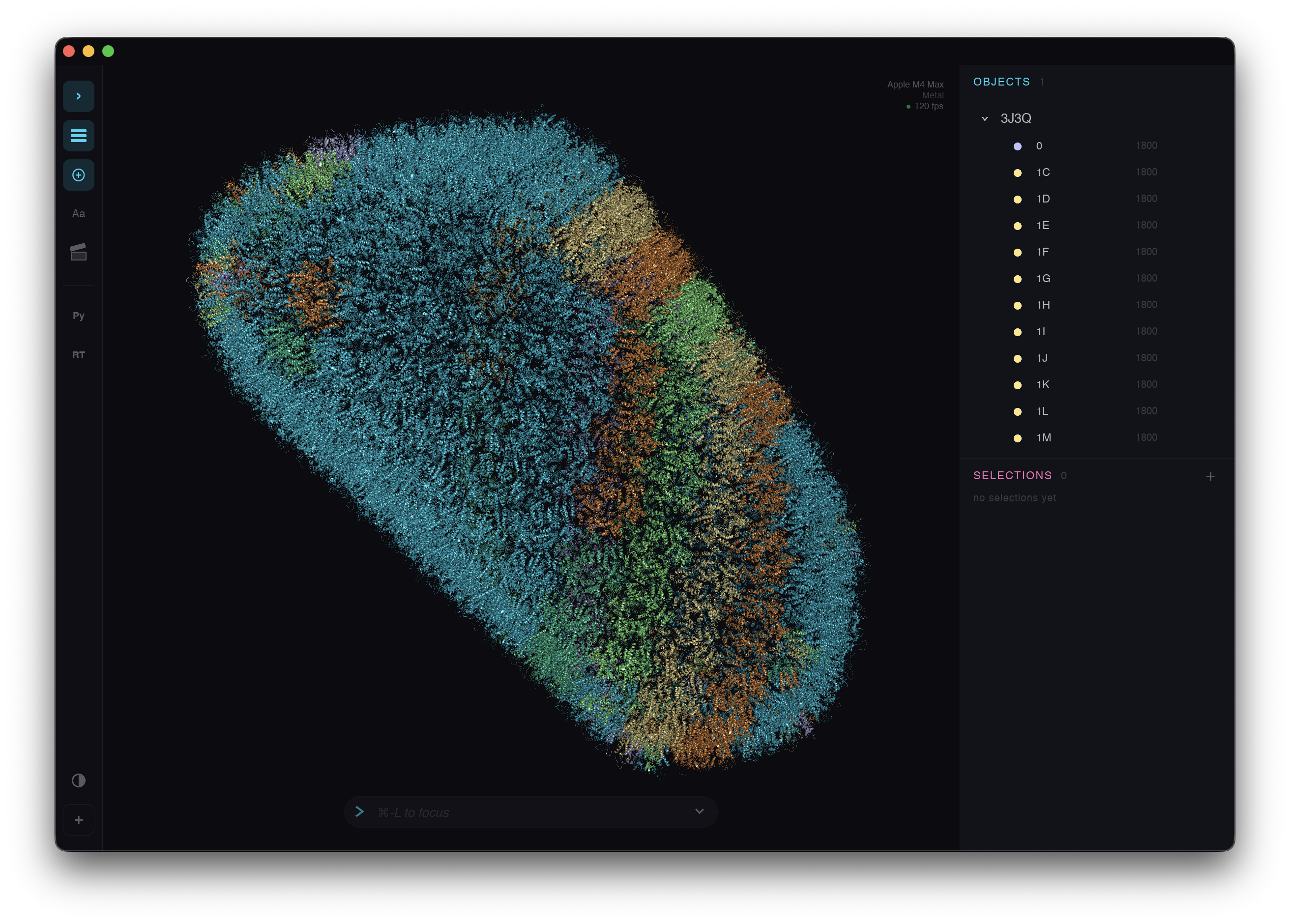
Highlights
PyMOL-RS is now Patinae
The rename runs across the whole product surface:
- The desktop app and binary are now
patinae - Rust crates now live under the
patinae-*namespace - The Python package is now
patinae - The notebook widget imports from
patinae.widget - The web viewer package is now
@patinae/viewer - Icons, launchers, README text, workflows, release assets, packaging metadata, and screenshots have all been updated for the new name
Patinae stays compatible with familiar command and session workflows where that helps. It is not a wrapper around PyMOL and not an official PyMOL project. It is an independent rendering and application stack.
A native desktop app
The desktop experience is rebuilt as a native Slint application. The new shell owns the application kernel, renderer bridge, shared GPU device handling, native menu and file actions, docked panels, object and selection lists, representation and color popovers, sequence and movie panels, command output, rich completions, fetch dialog, recent files, recent thumbnails, clipboard integration, theme detection, titlebar color integration, and direct REPL focus routing.
The result feels like an application rather than a renderer with panels bolted on.
Renderer and scene stack rebuilt
The rendering system now sits behind a dedicated patinae-render and patinae-scene boundary. The new frame flow includes:
- Representation catalogs and scene-store synchronization
- GPU build and culling flows
- Depth prepass, shadows, WBOIT transparency, FXAA, SSAO, marking, and silhouette post-processing
- Picking readback and reprojection
- Capture and geometry export paths
- Shader-source validation
The renderer covers dots, lines, sticks, spheres, cartoons, ellipsoids, maps, surfaces, and mesh wireframes through this same frame architecture.
Large scenes
Expensive work now runs on reusable GPU paths: atom-instance dots, viewport-aware sphere and stick Auto-LOD, tiled surface rebuilds, fast representation toggles, cached render bridge data, async GPU color-ID picking, and stable hover and selection overlays.
Tested heavily on 3J3Q.
Commands, models, and molecular semantics
The command and runtime layer now has structured help, source tracking, richer completion items, setting-value hints, native command routing, startup rc handling through Patinae paths, lifecycle quit handling, trajectory loading, PNG export, map commands, timing badges, and safer preservation of raw Python-backed command arguments.
The molecular model gained stronger foundations too: CCD-backed and covalent bonding, altloc-aware bond handling, natural subchain ordering, bond-aware HET grouping, subchain modeling, dirty tracking, atom iterators, spectrum and color helpers, scene models, sequence models, movie models, settings storage, and recent-file storage.
Plugin platform
Patinae has a new plugin SDK. The plugin crates define FFI and wire protocols, registration, host loading, runtime paths, panel events, generated plugin UI controls, panel snapshots, panic isolation, and tests.
Reference plugins moved with the platform:
hellois still the minimal lifecycle and command-registration exampleipcis still available for external process integrationpythonnow has a real panel and runtime split inside the native appraytracerkeeps its BVH-accelerated GPU ray tracing, shadows, transparency, and edge detection, but runs on new GPU-based geometry
Python, notebooks, and web
The Python surface is now:
pip install patinaefrom patinae import cmd
from patinae.widget import ViewerThe notebook widget still ships the WebGPU viewer into Jupyter through anywidget. The browser viewer moves to the new renderer and bridge APIs with wgpu 28, cached picking parity, local performance examples, TypeScript API updates, and the @patinae/viewer package name.
New features
- Native Patinae app: new Slint desktop shell with docked panels, object list, sequence viewer, movie panel, plugin panels, fetch dialog, REPL output, completions, native menus, and native file actions
- Patinae renderer: explicit frame, pass, pipeline, compute, picking, post-process, capture, and geometry-export flows
- Plugin SDK and host: new
patinae-pluginandpatinae-plugin-hostcrates with dynamic plugin loading, panel UI, event routing, FFI and wire protocols, runtime paths, and panic isolation - Map rendering commands:
isomesh,isosurface, andisodotare part of the command and rendering surface - Python package rename:
pymol-rs/pymol_rsbecomespatinae - Web package rename: the embeddable web viewer is now
@patinae/viewer - Notebook widget alignment: widget assets are built from the same web bundle and included in Python wheels
- Native package identity: macOS and Windows launchers, icons, app metadata, release asset names, and packaging workflows now use Patinae branding
Breaking changes and renames
This release deliberately changes public names:
| Old | New |
|---|---|
pymol-rs executable |
patinae |
pymol_rs Python import |
patinae |
pip install pymol-rs |
pip install patinae |
pymol-* Rust crates |
patinae-* Rust crates |
| PyMOL-RS app/bundle names | Patinae app/bundle names |
0.3.x is the final PyMOL-RS-branded release line. 0.4.0 is the first Patinae release.
Downloads
Bundles (recommended)
Self-contained packages with the app, plugins, and runtime pieces. Unzip or mount and run.
| Platform | Architecture | Download |
|---|---|---|
| macOS | Apple Silicon | Patinae.dmg |
| Windows | x86_64 | patinae-bundle-windows-x86_64.zip |
| Windows | ARM64 | patinae-bundle-windows-arm64.zip |
Standalone executables
Bare binaries for advanced users. Plugins can be installed separately.
| Platform | Architecture | Executable | Plugins |
|---|---|---|---|
| macOS | Apple Silicon | patinae-macos-arm64.tar.gz | patinae-plugins-macos-arm64.tar.gz |
| Windows | x86_64 | patinae-windows-x86_64.zip | patinae-plugins-windows-x86_64.zip |
| Windows | ARM64 | patinae-windows-arm64.zip | patinae-plugins-windows-arm64.zip |
| Linux | x86_64 | patinae-linux-x86_64.tar.gz | patinae-plugins-linux-x86_64.tar.gz |
| Linux | ARM64 | patinae-linux-arm64.tar.gz | patinae-plugins-linux-arm64.tar.gz |
Python and web
| Package | Download |
|---|---|
| Python wheels | pip install patinae or see release assets below |
| Web viewer (WASM + JS) | patinae-web.tar.gz |
Full Changelog: v0.3.3...v0.4.0
Release v0.3.3
PyMOL-RS v0.3.3
A Windows-first release — after setting up dedicated Windows virtual machines (x86_64 and ARM64) for hands-on testing, the entire Windows experience has been reworked: proper app bundling, native icon, no console flash, correct DLL resolution, and ARM64 builds. From this release forward, every release ships bundles for macOS (Apple Silicon), Windows x86_64, and Windows ARM64.
This is also the first release published to PyPI — pip install pymol-rs now works out of the box.
Highlights
Windows Bundles
PyMOL-RS now ships self-contained Windows bundles for both x86_64 and ARM64. Each bundle includes the executable, plugins, an embedded Python environment, and a VBScript launcher that sets up paths and launches the app cleanly — no console window flash, no manual PATH configuration. Just unzip and double-click.
Windows ARM64 Support
ARM64 Windows joins the release matrix as a first-class target. Executables, plugins, and Python wheels are now built natively on windows-11-arm runners — no emulation layer, no x86_64 fallback.
PyPI Publishing
Python wheels are now automatically published to PyPI as part of the release pipeline. Install the Python bindings and Jupyter widget with a single command:
pip install pymol-rsApplication Icon
The PyMOL-RS icon is now embedded directly in the Windows executable via winresource (visible in Explorer, taskbar, and Alt+Tab) and set at runtime via winit on Windows and Linux. The app finally looks like an app, not a generic executable.
Transitive DLL Resolution
A new .deps file convention solves the "DLL not found" problem that plagued plugin loading on Windows. Any plugin can ship a companion .deps file with commands whose stdout resolves directories containing transitive DLL dependencies (e.g. python3XX.dll). The plugin manager prepends these to PATH before loading. The mechanism is generic — future plugins with native dependencies (Lua, R, etc.) just add their own .deps file without core changes.
New Features
- Console-free Windows builds — Release builds use
windows_subsystem = "windows"sopymol-rs.exeno longer spawns a console window - Auto-derived plugin versions —
pymol_plugin!macro now defaultsversion:toenv!("CARGO_PKG_VERSION"), keeping plugin versions in sync withCargo.tomlwithout manual duplication - Build tooling auto-install —
wasm-packis now an npm devDependency (no manual install), andmaturinruns viauvx— contributors can build immediately after clone
Bug Fixes
- Windows site-packages path — Fixed the Python plugin probing the wrong
site-packagesdirectory on Windows (site.getsitepackages()[0]returns the bare prefix on Windows, not the actual packages path) - IPC plugin excluded on Windows — Unix domain sockets are not available on Windows; the IPC plugin is now conditionally excluded from Windows builds
- TLS provider simplified — Switched from
aws-lc-rstoringas the rustls crypto provider, removing the cmake + C compiler build dependency - WASM build fixed —
ring/rustlsgated behindfetchfeatures so they don't leak intowasm32-unknown-unknownbuilds where they cannot compile - Raytracer plugin in releases — The raytracer plugin was missing from release builds; now included in the plugin build matrix
- wgpu/naga log noise — Suppressed shader dump spam that filled INFO-level logs
Under the Hood
- CI caching — APT packages, npm dependencies, wasm-pack, and Cargo all cached across CI workflows for faster builds
web/package-lock.jsontracked — Committed lockfile ensures reproducible web builds across machines and CI- Makefile cross-platform — Build targets for plugins, widget assets, and bundling use PowerShell on Windows and shell on Unix
- GitHub Actions updated —
upload-artifactv7,download-artifactv8,checkoutv6,setup-pythonv6
Downloads
Bundles (recommended)
Self-contained packages with the app, plugins, and an embedded Python environment. Unzip/mount and run — no setup required.
| Platform | Architecture | Download |
|---|---|---|
| macOS | Apple Silicon | PyMOL-RS.dmg |
| Windows | x86_64 | pymol-rs-bundle-windows-x86_64.zip |
| Windows | ARM64 | pymol-rs-bundle-windows-arm64.zip |
Standalone executables
Bare binaries for advanced users. Plugins must be installed separately.
| Platform | Architecture | Executable | Plugins |
|---|---|---|---|
| macOS | Apple Silicon | pymol-rs-macos-arm64.tar.gz | plugins-macos-arm64.tar.gz |
| Windows | x86_64 | pymol-rs-windows-x86_64.zip | plugins-windows-x86_64.zip |
| Windows | ARM64 | pymol-rs-windows-arm64.zip | plugins-windows-arm64.zip |
| Linux | x86_64 | pymol-rs-linux-x86_64.tar.gz | plugins-linux-x86_64.tar.gz |
| Linux | ARM64 | pymol-rs-linux-arm64.tar.gz | plugins-linux-arm64.tar.gz |
Python & Web
| Package | Download |
|---|---|
| Python wheels | pip install pymol-rs or see assets below |
| Web viewer (WASM + JS) | pymol-rs-web.tar.gz |
Full Changelog: v0.3.2...v0.3.3
Release v0.3.2
PyMOL-RS v0.3.2
A Jupyter integration release — an interactive notebook widget brings the full WASM viewer into Jupyter, while Windows plugin fixes improve cross-platform reliability.

Highlights
Jupyter Notebook Widget
An anywidget-based widget embeds the PyMOL-RS WASM + WebGPU viewer directly in Jupyter notebooks. The widget ships the WASM binary inline (base64-encoded), so it works in JupyterLab, Jupyter Notebook, VS Code, and Google Colab — anywhere anywidget runs.
from pymol_rs.widget import Viewer

view = Viewer()
view.show()
cmd = view.get_cmd()
cmd.fetch("1CRN")
cmd.show("cartoon")
cmd.color("green", "chain A")
Features:
- Fire-and-forget commands —
cmd.fetch(),cmd.show(),cmd.color(), etc. via traitlet sync - Synchronous queries — request/response channel for commands that return data
- Local file loading — load structures from the local filesystem into the browser viewer
- Picking support — optional click-to-select atoms (
Viewer(picking=True)) - Configurable layout —
widthandheightparameters with sensible defaults
Bug Fixes
- Windows Python plugin loading — Fixed hardcoded Unix assumptions in the Python plugin:
Scripts/vsbin/for venv paths,;vs:for path list separators (PYTHONPATH,PYTHONHOME), andpython.exelookup order - MSVC delay-load removed — MSVC
/DELAYLOADcannot handle data symbol imports like_Py_NoneStruct(used by PyO3 forPy_None), causing LNK1194 at link time. Removed delay-loading; Python must now be on PATH when the plugin is loaded - Web viewer DSS on fetch — Secondary structure assignment now runs automatically after
fetchin the web viewer, matching native behavior
Under the Hood
- CI caching — Rust dependency caching added to all CI workflows (build, test, release)
- Widget assets in wheels — Release workflow updated to include WASM build artifacts in Python wheel builds
- Clippy clean — Resolved warnings in
web/andpython/crates
Full Changelog: v0.3.1...v0.3.2
Release v0.3.1
PyMOL-RS v0.3.1
A customization and Windows release — startup scripts, Python keybindings, and plugin auto-loading give users control over their environment, while Windows-specific fixes bring the platform to full parity.
Highlights
Startup Script (pymolrc)
PyMOL-RS now executes ~/.pymol-rs/pymolrc as PML on launch. The script runs after GPU initialization and plugin loading but before any CLI-specified files, so user defaults (colors, settings, representations) apply to all subsequently loaded structures — matching PyMOL's pymolrc behavior.
Python Keybindings
Plugins can now register keyboard shortcuts from Python via cmd.set_key() and cmd.unset_key(). Hotkey strings (e.g. "ctrl+s", "F5") are parsed on the GUI side into proper winit key codes. Cmd is mapped to Ctrl on macOS for cross-platform consistency. Python callbacks execute on the worker thread when the key is pressed.
Plugin Auto-Loading
Each plugin directory is scanned for a python/ subdirectory at startup. All .py files found there are automatically executed after backend installation, in alphabetical order for deterministic behavior. This enables plugins to ship Python extensions that self-install without user intervention.
New Features
- Configurable paths — Config directory, plugin directory, and pymolrc path are now overridable via environment variables (
PYMOL_RS_CONFIG_DIR,PYMOL_RS_PLUGIN_DIR,PYMOL_RS_PYMOLRC). Defaults remain~/.pymol-rs,~/.pymol-rs/plugins, and~/.pymol-rs/pymolrc - DSSP benchmark — Criterion benchmark for the Kabsch & Sander DSSP implementation alongside the existing PyMolDss benchmark for direct performance comparison
Bug Fixes
- Windows menu bar — The native menu bar (muda) was only initialized for macOS (
init_for_nsapp) but never attached to the window on Windows, resulting in no menu bar. Now callsinit_for_hwndon the winit window handle - Windows path backslashes — Backslashes in file paths from Windows file dialogs and pymolrc loading are now normalized to forward slashes before reaching the command parser, fixing "Unknown file format" errors (fixes #3)
Under the Hood
- Centralized paths — Hardcoded
~/.pymol-rspaths inpymol-guireplaced withpymol_settings::pathsmodule, making all path logic testable and overridable from a single location dirspromoted —dirscrate moved to a workspace dependency
Full Changelog: v0.3.0...v0.3.1
Release v0.3.0
PyMOL-RS v0.3.0
An algorithmic independence release — core algorithms rewritten from published papers and public specifications, replacing PyMOL-derived implementations. CE structural alignment, cartoon rendering, secondary structure assignment, and crystallographic space groups are now clean-room code with full academic citations. New coloring features, a DSSP implementation, and command UX improvements round out the release.

Highlights
CE Structural Alignment Rewrite
The Combinatorial Extension (CE) algorithm has been completely rewritten from the original Shindyalov & Bourne (1998) paper. Function names and parameters now map directly to the paper's notation — distance_matrix, afp_similarity_matrix, extend_paths, select_best_path — with inline comments referencing equations 1–11. Z-score normalization follows Zhang & Skolnick (2004).
The align command now supports multi-object alignment: when the mobile selection matches multiple objects via wildcards, each is independently superimposed onto the target.
DSSP Secondary Structure Assignment
A full implementation of the Kabsch & Sander (1983) DSSP algorithm provides an alternative to the existing PyMOL-compatible DSS assigner:
- H-bond detection — Electrostatic energy model with the standard coupling constant (q₁ × q₂ × f = 27.888 kcal/mol)
- Spatial hashing — O(n) average-case H-bond detection using 5.5 Å grid cells on carbonyl oxygen atoms
- Full classification — Turn detection (3/4/5-turn patterns), parallel and antiparallel bridge/ladder detection, bend analysis (>70° Cα angle), priority-ordered state assignment
- Quantization — Eight-state DSSP output collapsed to helix/sheet/loop to match PyMOL DSS semantics
A new SecondaryStructureAssigner trait makes the algorithm pluggable at runtime via set dss_algorithm, dssp|pymol|none.
Space Groups from CCP4
All crystallographic space group definitions (16,000+ lines) have been regenerated from CCP4's syminfo.lib, the canonical machine-readable encoding of the International Tables for Crystallography, Vol. A. This replaces data previously sourced from PyMOL's xray.py, correcting several space group definitions in the process.
A new scripts/generate_space_groups.py script makes the data fully reproducible from the source authority, with a --verify flag for round-trip validation.
New Features
set_colorcommand — Define custom named colors with RGB values (set_color mywhite, [255, 255, 255]) or remove them by name. Aliases:set_colour- Residue coloring schemes — Two new
colormodes:residue_type(amino acids colored by chemical property — hydrophobic green, positive blue, negative red, polar magenta, cysteine yellow) andresidue_index(rainbow spectrum from blue through green to red). Aliases:aa_type,spectrum,rainbow - Sequence panel viewer colors — A "Color by viewer" toggle in the sequence panel matches residue letter colors to the 3D viewport coloring scheme. Uses FNV-1a checksums to detect color-only changes efficiently
- Tab-completion hints —
arg_hints()implementations added to 21 commands that were previously missing autocompletion (fetch, group, rename, delete, dss, zoom, clip, rotate, translate, and more) - Infix distance operators —
within,beyond, andnear_tonow work as infix operators:chain A within 5 of chain B. The existing prefix form (within 5 of chain B) continues to work unchanged
Bug Fixes
- Viewport click selection restored — Fixed atom selection-by-clicking broken by egui event handling; replaced
egui_consumedflag withegui_ctx.is_using_pointer()for correct mouse input gating - Context menu click isolation — Context menu clicks in the sequence viewer that overlapped the 3D viewport no longer clear the current selection
- Empty selection cleanup — Named selections that evaluate to zero atoms are now automatically deleted instead of stored as empty entries
- Sequence viewer highlight — Selection highlight switched from text color override to semi-transparent background, preserving the residue's original coloring (element, chain, etc.)
Under the Hood
- Column-major Mat4 — All 4×4 matrices switched from row-major to column-major layout, aligning with
lin_alg's native representation. Customleft_multiply_mat4,transform_mat4, andis_identity_mat4helpers deleted in favor of the library's*operator. Raw[f32; 3/9/16]arrays replaced with typed Vec3/Mat3/Mat4 across Kabsch, CE, crystal symmetry, and space group code - Command argument deduplication — New
str_arg_or(),int_arg_or(),float_arg_or()accessors onParsedCommandreplace ~134 boilerplateget_str(i).or_else(|| get_named_str("name"))patterns. Extractedset_visibility()andcamera_to_model_vec()shared helpers. Net reduction: 686 lines across 15 command modules - Wildcard consolidation — Duplicated
glob_match/is_object_patternhelpers replaced withPattern::Wildcardmatching inObjectRegistryandSelectionManager - Clippy clean — All workspace clippy warnings resolved
- CI — Removed DMG build from release workflow
Full Changelog: v0.2.8...v0.3.0
Release v0.2.8
PyMOL-RS v0.2.8
A native menu bar and selection performance release — platform-native menus bring familiar File/Edit/View workflows, while selection caching eliminates redundant per-frame parsing.

Highlights
Native Menu Bar
A platform-native menu bar via muda integrates with the OS (macOS system menu bar, Windows/Linux window menu), providing familiar desktop workflows:
- File — Run Script, Open (with trajectory routing), Fetch PDB, Save, Export PNG/Movie
- Edit — Undo, Redo, Select All Atoms, Deselect All
- View — Reset, Zoom All, Orient, Center, Background (Opaque toggle + White/Black), Transparent Panels toggle, dynamic Panels submenu, Fullscreen
- Help — Command Reference
A new Fetch PDB dialog queries the RCSB GraphQL API to show structure metadata before downloading.
Selection Caching
Selection results are now cached at define time and reused during rendering, eliminating per-frame re-parsing overhead. A multi-pass fixed-point resolver handles inter-selection dependencies, ensuring cached results stay consistent when selections reference each other.
Under the Hood
- Native menu bar event loop integration with egui app lifecycle (
pymol-gui) rt_toolbarcommand removed — panel visibility is now managed via the View → Panels menu
Full Changelog: v0.2.7...v0.2.8