Repository navigation
Releases: zmd22/diskos-disco
Release list
diskOS Disco! 1.3.1

diskOS Disco! 1.3.1
A little bigger. A lot nicer to use.
The album cover is still the interface. This release gives the things you touch and read more
room: confident buttons, clearer type, an album back sleeve and a queue that gets out of your way.
Built on 1.3.0, with its left-handed layout, scroll styles and signed SD updates intact.
The polish
- Song Info becomes an album back sleeve. A cover stamp, title and artist above a readable
metadata card. Tap the title on Music, then Info (the circled i). Immersive remains available
by holding the title with Title Hold set to Immersive, or through a shortcut. - A cleaner Queue. Bigger Play, icon-only Random and Clear controls. The current song stays
highlighted above a separator; upcoming songs follow without tiny explanatory text or duplicate
headings. Empty controls dim and disable; Random needs at least two queued songs. Clear still
requires two taps, and dragging to reorder still works. - Action menus you can read. Track, album, artist, genre and file/folder menus get 56 px
targets, 24 px icons and 16 px captions. Music's menu uses 70 px circles and 18 px captions.
Confirmation controls are larger too. The compact Queue action still means Add to queue. - Bigger Shortcuts. 50 px rows, 20 px labels and wider pills. All apps uses the same treatment;
long names stay on one line. Pressed Quick Settings, Modes and shortcut buttons show a clear
accent border and raised fill. - Two new Music fonts. Settings > Display > Disco Options > Music Screen > Track Font:
Original, Inter Semibold, or Nunito Bold. Alternatives use 30 px titles and 22 px artists,
with international and CJK fallbacks. Applying uses the existing UI restart; music keeps playing. - An EQ with breathing room. Ten bands span the screen, with larger labels, a bigger preset
pill and Choose a band. The < control beside the preset returns from the editor. - Find your place again. Library remembers the last twelve views' positions during the UI
session. Long lists briefly show position/count; long queues reuse their summary for this.
Highlighted long titles reveal briefly, then settle back to ellipsis.
Small cost, better feel
Fonts are pre-rendered bitmaps: no runtime TTF loading or synthetic bold. Scroll memory lives
in RAM, with no flash writes while browsing. Feedback uses existing widgets; list position
reuses the existing timer and queue position uses a short, delayed fade. No continuous idle
animation was added. Battery consumption has not been measured separately.
Install
Download mq_ui and SHA256SUMS, verify the binary, and sign it with the same owner keys
trusted by your Disc. Copy the complete diskos-update folder to the SD root, eject safely,
then Settings > System > Maintenance > Update from SD Card. About should show 1.3.1.
Let the trial run for at least three minutes and accept it before restarting.
See the complete update guide. UI updates do not reinstall Album Roulette.
Validation
The owner tested the polished3 UI on the Disc and approved it for release. The final 1.3.1
version rebuild is checked for the static MIPS32r2 / FP64 / NaN2008 ABI, embedded version,
theme and punctuation gates. LVGL renders cover dark/right and light/left layouts, fonts,
action menus, Queue and Shortcuts; interaction checks cover Info navigation, queue confirmation,
empty controls, scrolling and font fallbacks. The separate Album Roulette app remains 1.3.1.
UI fingerprint
SHA-256 (mq_ui):
4f63e119c3a71982b1756311a147be0eee2732e77edeea112ce2ab2a9811574b
MD5: e70d63c7d06b3c82c6a807de576a4303. Size: 5,167,276 bytes.
diskOS Disco! 1.3.0
diskOS Disco! 1.3.0
A round-screen interface for the FiiO Snowsky Disc. 1.3.0 makes Disco yours to hold the way you like:
a left-handed layout, three ways for lists to scroll, tidier Settings and a proper welcome when nothing is
playing.
New
- Left-handed mode. Settings › Display › Disco Options › Layout › Side: pick Left and tap Apply.
The navigation circle moves to the left rim and everything arranged around it follows: Quick Settings,
Weather, Working mode, Shortcuts, the Equalizer, Battery, list edges and the scroll dots. The back swipe
starts at the right edge. The progress arc still runs clockwise, from just above the circle to just below it. - Scroll styles. Disco Options › Layout › Scroll: Classic (rows follow the screen's edge),
Straight (flat rows) or Disco (rows swing around the navigation circle like light on a CD; times stay in
one straight column). - A welcome screen. When nothing is playing, Music shows a CD with a rainbow shine instead of an empty
cover, and Go to Library in place of the title. Tap it to pick something. - Hide the clock with a hold. Hold the top of Music to show or hide the clock, weather and status icons
(same as Disco Options › Music Screen › Show Clock). - Tag a whole album. Hold an album in the Library and choose Tags to look up tags for every track.
- Bitrate in Song Info, next to the file size (the file's average for FLAC and other variable formats).
Changed
- Settings, reorganised. Display, Disco Options and System are split into short pages, so you scroll far
less: Display › Theme, Text & Layout, Standby, Online & Extras; Disco Options › Music Screen, Colours,
Layout; System › Power, Date & Time, Library, Controls, Maintenance, About. - Disco hold menus (songs, albums, files, folders) use glass buttons and accent icons over the cover.
- Battery: "Since full charge" now starts at 95% (the Disc seldom shows 100%), or 80% with Charging Limit.
- About shows Disco! 1.3.0. The old upstream version line is gone from About and Device Info.
Fixed
- New settings could fail with "Couldn't save settings" on a well-used Disc: the settings store was full.
It now holds twice as many.
Install
Flash payload/mq_ui with the installer, or sign mq_ui from this release with your own keys and install it
from the SD card. The update guide has every step. A UI update doesn't reinstall Album
Roulette.
diskOS Disco! 1.2.3
diskOS Disco! 1.2.3
Larger Modes controls and fixes for Immersive transitions, app shortcuts, editor
cancellation and file operations. Album Roulette remains a separate user app at
version 1.3.1. The underlying diskOS version remains 1.2.4.
- Modes uses 56px rows and 22px labels, with the bottom button fitting closer to the rim.
- Disco Immersive keeps its cover opaque during the return to Music, preventing the
shared Ring layout from flashing through. No-track entry stays on the current screen,
and rapid reopening cancels stale close callbacks. - Music Assistant server and weather location settings survive cancellation. Saving
an empty server field still deliberately selects Auto. - App shortcuts identify installed apps by directory, supporting duplicate and long
display names. Unique legacy shortcuts remain compatible; ambiguous ones need reassignment. - Copies preserve pre-existing
.partfiles. Replacement copies finish staging before
modifying the original destination, restore it on failed installation, and retain the
backup if restoration fails. Replacement moves need room for a staged copy. - Playing replacement destinations, including folders, are protected in the picker
and worker. Source playback protection is rechecked before worker operations. - Signed SD update documentation now covers existing keys, signing, verification,
trial acceptance, rollback and diagnostics.
Validation: 44 actual-LVGL scenarios and focused filesystem, shortcut, configuration
and playback-state tests passed. Production MIPS build, MIPS32r2/FP64/NaN2008 ABI,
embedded version, theme/punctuation gates and signed-update verification passed.
Physical-device verification remains necessary.
Install the updated mq_ui using your existing owner keys and the signed SD workflow
in UPDATING.md. A UI update does not reinstall Album Roulette.
This local candidate has not been committed, tagged or published.
diskOS Disco! 1.2.2
diskOS Disco! 1.2.2
Album Roulette now ships as a separate user app alongside mq_ui, rather than
being embedded in the firmware executable. The main-menu vinyl icon, themed
landing screen, Apps/shortcut routing, smooth scrolling and other UI changes remain.
Download the complete release ZIP for mq_ui, apps/album-roulette, installation
instructions and corresponding app source. Install both components as described
in INSTALL.md. A signed UI-only update no longer installs or updates Roulette.
Existing app installations and settings are not modified by firmware startup.
Album Roulette 1.3.1 includes the memory fix: shared fallback artwork, a bounded
uncached-image heap, and destination allocation deferred until after decoding.
The 37-album pool and decoder safety guards remain. Low available RAM can still
result in placeholders; this prevents placeholder allocations accumulating until
preparation aborts.
Validation: production MIPS build and theme gate passed; the focused 37-cover,
three-cycle low-memory regression passed. Physical-device verification remains
necessary. Existing owner signing keys are required for SD-card UI updates.
diskOS Disco! 1.2.1
diskOS Disco! 1.2.1
Album Roulette is now included, not just linked from the menu.
This patch release includes all 1.2.0 scrolling, navigation, Quick Settings and landing-page improvements,
and bundles Album Roulette 1.3.0 inside the compiled mq_ui. It therefore arrives with fresh firmware installs
and normal UI-only updates, including signed updates made with your owner keys.
On startup, missing app files are installed under /usr/data/apps/album-roulette. An existing executable and
configuration are preserved. The app does not auto-launch. Select Album Roulette from the main menu, Apps or
shortcuts, tap I feel lucky!, then Surprise me to spin your local album collection.
Round covers fly past and settle on a winner. Tap Play! or the cover to start the album; hold the cover to return
for another spin. Albums with fewer than four indexed tracks are excluded. See the
tour.
The app's complete corresponding source and dependency licenses are included under corresponding-source/.
The larger mq_ui contains the app; installation writes a separate approximately 3.8 MiB app executable to user
storage only when missing. Normal launches do not rewrite an existing app.
App/UI compilation, the theme gate and a focused host installation check passed. No final physical-device test
was performed here. Use the existing installation/update guides; owner signing keys are still required for
signed SD-card update packages.
diskOS Disco! 1.2.0
diskOS Disco! 1.2.0
Let chance choose your next album, and enjoy smoother scrolling across the UI.
Album Roulette
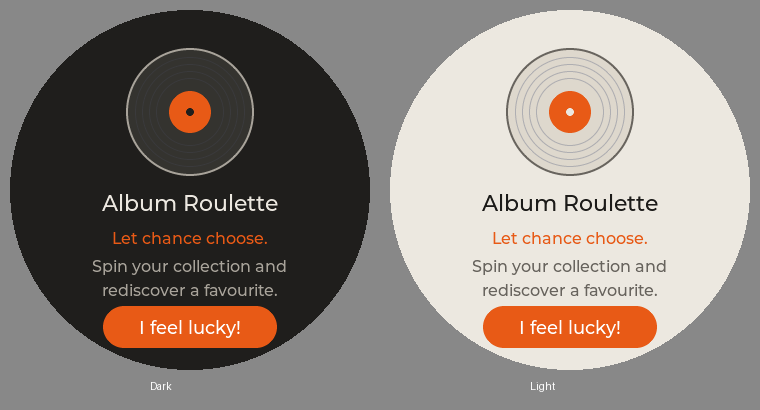
A vinyl icon brings Album Roulette into the configurable Disco main menu. Its new landing page follows the theme
and accent, with a short introduction and I feel lucky! button. Main menu, Apps and shortcuts all use this page.
Add the entry under Settings > Display > Disco Menu. Install Album Roulette separately at
/usr/data/apps/album-roulette/app; this firmware release includes the integration, not the standalone app.
Smoother scrolling
The 10 px drag threshold matches Disc Shelf's lighter touch response. Library and shared curved lists, including
Settings and its submenus, now resize continuously as they move. Large-list virtualization, A-Z jumps, rim
scrolling and the existing momentum settings remain intact. Straight-row themes keep their layout.
The navigation drawer uses a quick position-only animation and continues from its current position when reversed.
No blur, scaling or perpetual animation was added.
More comfortable controls
- Quick Settings Wi-Fi/Bluetooth pills move 4 px upward.
- Working mode rows grow to 52 px, with 20 px labels, 22 px icons and 18 px status glyphs. All five stay in view.
- Settings > System > About identifies this build as Disco! 1.2.0, based on diskOS 1.2.4.
Downloads and installation
mq_ui is the same ready-built binary committed as payload/mq_ui. SHA256SUMS and MD5SUMS are generated by the
existing release workflow. GitHub's source archives contain the firmware source, installer and compiled payload.
Use the existing installation guide or
update guide. Signed SD-card update packages
still require your own signing keys; this binary is not itself a signed update package.
Validation
Static MIPS32r2 FP64 NaN2008 compilation and the production theme gate passed. Landing previews use actual LVGL
rendering. The final 1.2.0 binary has not been physically tested here. Existing V2.57 compatibility scope is unchanged.
Release binary SHA-256: 61062875f7ad0121561a51af5e7de807831fb73969e50c9c9e96f7cbae6bffdd
diskOS Disco! 1.1.1

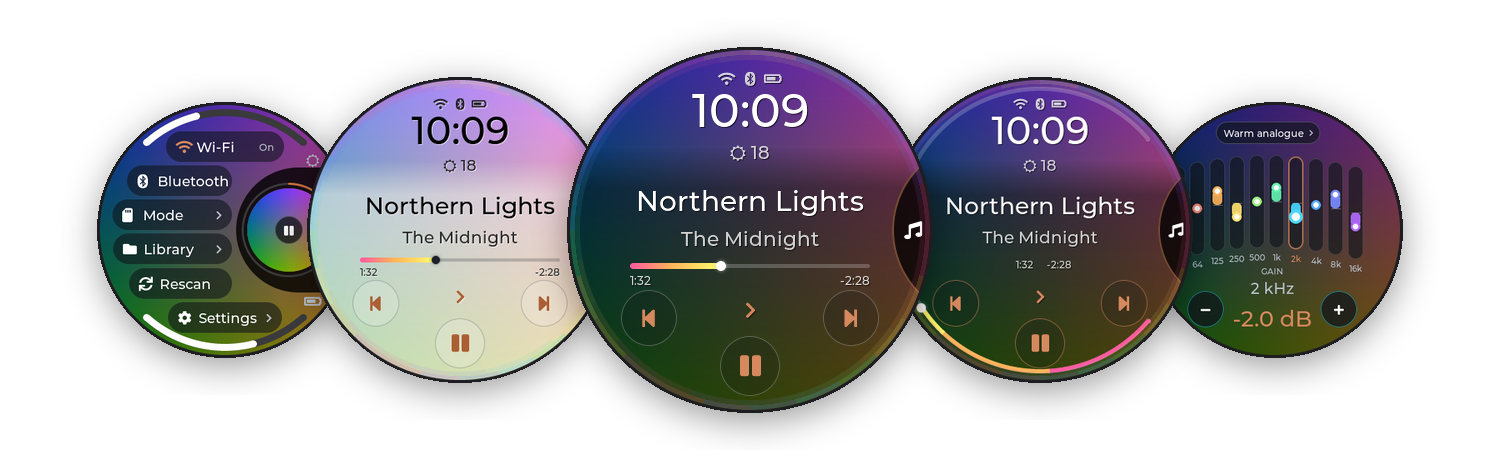
The album cover is the interface. diskOS Disco! 1.1.1 is a touch interface for the FiiO Snowsky Disc's round
screen, built on b0hemia's diskOS 1.2.4.
Testing release, as-is, no liability. Flashing rewrites the Disc's root filesystem. Back up your music and
keep the saved stock image safe. Not affiliated with FiiO, Snowsky or Ingenic.
Downloads
| File | What it is |
|---|---|
| Source code (zip / tar.gz) | Everything you need to flash: the installer, and the ready-built interface in payload/mq_ui |
mq_ui |
The interface on its own (the same file as payload/mq_ui), for SD-card updates of an existing install |
SHA256SUMS, MD5SUMS |
Checksums of mq_ui |
mq_ui md5: e651f0c3c8915341b37712151515ac69
Flash it (first install)
You need a Disc on FiiO firmware V2.57, the official V2.57 firmware ZIP, a Linux computer and a good USB cable.
- Download Source code (tar.gz) below and unpack it (or
git clone https://github.com/zmd22/diskos-disco). - Optional, but recommended: make your own update keys, so you can install later versions from the SD card.
sh ui/tools/owner-keys/diskos-keys.sh
cp diskos-keys/diskos-root.pub.pem payload/
- Flash:
Power the Disc off, hold Volume Down and plug in USB. With a key, check that the
./install.sh                     # first time only: host setup
./diskos-installer install \
  --firmware SNOWSKY_DISC_update_20260909_v257.zip \
  --variant public \
  --ui payload/mq_ui \
  --ota-key payload/diskos-root.pub.pem      # leave this line out if you skipped step 2
ota: ON … key sha256line
matchessha256sum payload/diskos-root.pub.pembefore you answery.
Update an existing install from the SD card
Download mq_ui, then sign it with your keys and copy the folder to the card:
sh ui/tools/owner-keys/diskos-sign.sh mq_ui 1.1.1 # -> ./diskos-update/On the Disc: Settings › System › Update from SD Card › Update, then restart. It runs as a trial and rolls back
by itself if it doesn't start. More: docs/UPDATING.md.
What's new in 1.1.1
Small things, mostly asked for after 1.1:
- A - Z in Folders, and a bigger A - Z pill everywhere.
- Battery: playing and screen-on time since the last full charge (80% with Charging Limit on).
- Back to Artists lands on the artist you came from.
- Add to queue / Playlist on an artist now takes all of the artist's songs (album-artist mode and shared credits
were missed). - MA Sendspin tells you when Wi-Fi is off; the Bluetooth codec list explains the SBC fallback.
- Ring button rings follow your picked Accent; Braun knob pointers are consistent; a one-time Menu hint
points at the navigation circle.
If you're on 1.0.x or flashed with an older installer, flash this release once (see above): the flash brings the
start-up script that makes a fresh flash win over builds kept from SD-card updates.
In 1.1
- MA Sendspin (experimental): the Disc as a Music Assistant speaker. Music
shows what Music Assistant plays (title, artist, cover, progress, Immersive) and its buttons control it; the Disc
stays awake while it plays. Settings > Network > MA Sendspin (Server: Auto or an address, Player Name, Sync Delay
-2000 to +2000 ms); add Sendspin to the navigation circle in Disco Options > Disco Menu. The sound goes through
the Disc's own AirPlay. Experimental: made for Music Assistant 2.10's "legacy" Sendspin connection; a later Music
Assistant that drops it will need a Disco update. The physical buttons still control the built-in player. - Quick Settings: five rows of bigger pills; Wi-Fi and Bluetooth side by side with round On/Off badges, showing
the real radio state. - A big keyboard for typing (Wi-Fi password, Sendspin, playlist names), like Search's, with capitals and symbols.
- Track Number option (Disco Options): "3. Northern Lights" on Music.
- Volume Keys submenu in Settings > System; online updates removed (SD card or flash only); a tidier
Bluetooth Codec row.
Also in 1.0.2
Fixes the "Player didn't respond" message that still appeared a few seconds after start-up: a background request to the
player (switching off its own idle power-off) now waits for the player quietly. And flashing now always runs the build
you flashed: older builds kept from SD-card updates no longer take over after a flash.
Also in 1.0.1
A CD look for Immersive (Disco Options > Immersive: Vinyl or CD), a tidier Working mode ("Playback", spinning
arrows while switching), and a stability fix: no more "Player didn't respond" at start-up, and starting a song or a list no longer sometimes fails.
Commands to the player now wait for it while it's busy (starting up, rebuilding a playlist) instead of being dropped.
Details in the changelog.
What's in 1.0 (unchanged)
- Disco theme (default): the cover fills the screen, a navigation circle slides out of the right edge, Music with
a rainbow progress line or a progress arc around the rim, the title menu (Favourite, Album, Artist, Queue, Lyrics,
Immersive), Disco Options, and Disco versions of Quick Settings, Equalizer, Volume, Standby, Weather, Search,
Queue, Battery and more. - Ring, Braun and Stone themes included.
- SD-card updates fixed, safer helpers, and a round of bug fixes.
Take the tour · read the
changelog.
Thanks to b0hemia for diskOS, and to everyone credited in the README.
diskOS Disco! 1.1
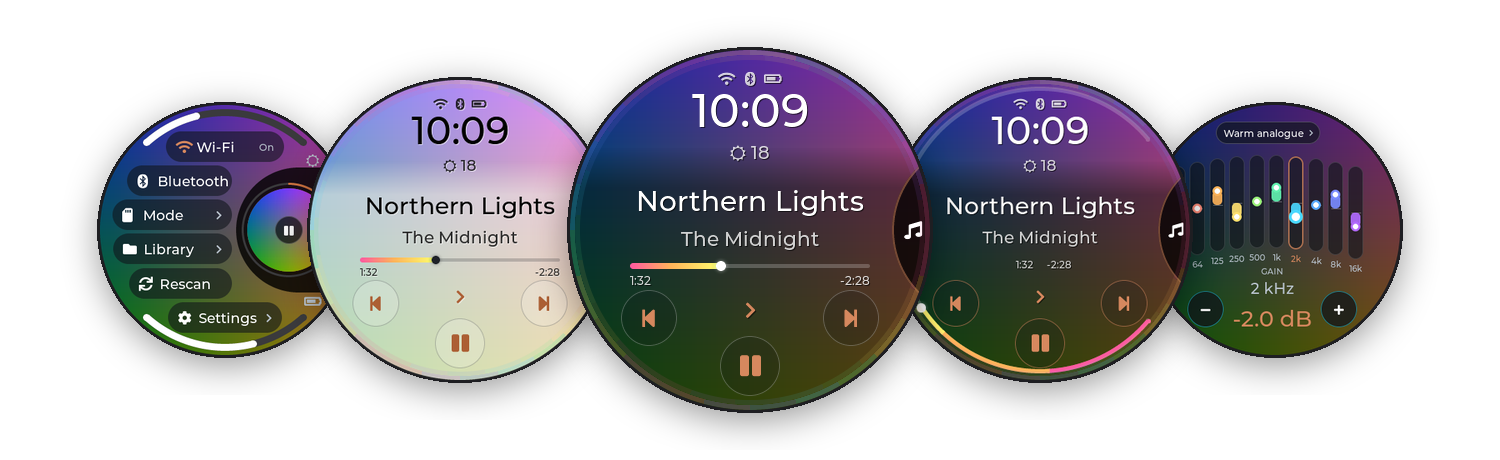
The album cover is the interface. diskOS Disco! 1.1 is a touch interface for the FiiO Snowsky Disc's round
screen, built on b0hemia's diskOS 1.2.0
Testing release, as-is, no liability. Flashing rewrites the Disc's root filesystem. Back up your music and
keep the saved stock image safe. Not affiliated with FiiO, Snowsky or Ingenic.
Downloads
| File | What it is |
|---|---|
| Source code (zip / tar.gz) | Everything you need to flash: the installer, and the ready-built interface in payload/mq_ui |
mq_ui |
The interface on its own (the same file as payload/mq_ui), for SD-card updates of an existing install |
SHA256SUMS, MD5SUMS |
Checksums of mq_ui |
mq_ui md5: ad5f2ec529ae8d298ddc60b24df55d59
Flash it (first install)
You need a Disc on FiiO firmware V2.57, the official V2.57 firmware ZIP, a Linux computer and a good USB cable.
- Download Source code (tar.gz) below and unpack it (or
git clone https://github.com/zmd22/diskos-disco). - Optional, but recommended: make your own update keys, so you can install later versions from the SD card.
sh ui/tools/owner-keys/diskos-keys.sh
cp diskos-keys/diskos-root.pub.pem payload/
- Flash:
Power the Disc off, hold Volume Down and plug in USB. With a key, check that the
./install.sh                     # first time only: host setup
./diskos-installer install \
  --firmware SNOWSKY_DISC_update_20260909_v257.zip \
  --variant public \
  --ui payload/mq_ui \
  --ota-key payload/diskos-root.pub.pem      # leave this line out if you skipped step 2
ota: ON … key sha256line
matchessha256sum payload/diskos-root.pub.pembefore you answery.
Update an existing install from the SD card
Download mq_ui, then sign it with your keys and copy the folder to the card:
sh ui/tools/owner-keys/diskos-sign.sh mq_ui 1.1 # -> ./diskos-update/On the Disc: Settings › System › Update from SD Card › Update, then restart. It runs as a trial and rolls back
by itself if it doesn't start. More: docs/UPDATING.md.
Flash this one if you can
1.1 is best installed with a fresh flash from this release's source (step "Flash it" above): the flash also brings the
start-up script that makes a fresh flash win over builds kept from earlier SD-card updates. SD-card updates of
mq_ui still work.
What's new in 1.1
- MA Sendspin (experimental): the Disc as a Music Assistant speaker. Music
shows what Music Assistant plays (title, artist, cover, progress, Immersive) and its buttons control it; the Disc
stays awake while it plays. Settings > Network > MA Sendspin (Server: Auto or an address, Player Name, Sync Delay
-2000 to +2000 ms); add Sendspin to the navigation circle in Disco Options > Disco Menu. The sound goes through
the Disc's own AirPlay. Experimental: made for Music Assistant 2.10's "legacy" Sendspin connection; a later Music
Assistant that drops it will need a Disco update. The physical buttons still control the built-in player. - Quick Settings: five rows of bigger pills; Wi-Fi and Bluetooth side by side with round On/Off badges, showing
the real radio state. - A big keyboard for typing (Wi-Fi password, Sendspin, playlist names), like Search's, with capitals and symbols.
- Track Number option (Disco Options): "3. Northern Lights" on Music.
- Volume Keys submenu in Settings > System; online updates removed (SD card or flash only); a tidier
Bluetooth Codec row.
Also in 1.0.3
Ogg Opus (.opus/.oga) files are indexed and played, with their tags and lengths (ported from diskOS PR #19 by
ingvarr777), and AirPlay and Bluetooth streaming switch on again from Working mode.
Also in 1.0.2
Fixes the "Player didn't respond" message that still appeared a few seconds after start-up: a background request to the
player (switching off its own idle power-off) now waits for the player quietly. And flashing now always runs the build
you flashed: older builds kept from SD-card updates no longer take over after a flash.
Also in 1.0.1
A CD look for Immersive (Disco Options > Immersive: Vinyl or CD), a tidier Working mode ("Playback", spinning
arrows while switching), and a stability fix: no more "Player didn't respond" at start-up, and starting a song or a list no longer sometimes fails.
Commands to the player now wait for it while it's busy (starting up, rebuilding a playlist) instead of being dropped.
Details in the changelog.
What's in 1.0 (unchanged)
- Disco theme (default): the cover fills the screen, a navigation circle slides out of the right edge, Music with
a rainbow progress line or a progress arc around the rim, the title menu (Favourite, Album, Artist, Queue, Lyrics,
Immersive), Disco Options, and Disco versions of Quick Settings, Equalizer, Volume, Standby, Weather, Search,
Queue, Battery and more. - Ring, Braun and Stone themes included.
- SD-card updates fixed, safer helpers, and a round of bug fixes.
Take the tour · read the
changelog.
Thanks to b0hemia for diskOS, and to everyone credited in the README.
diskOS Disco! 1.0.3
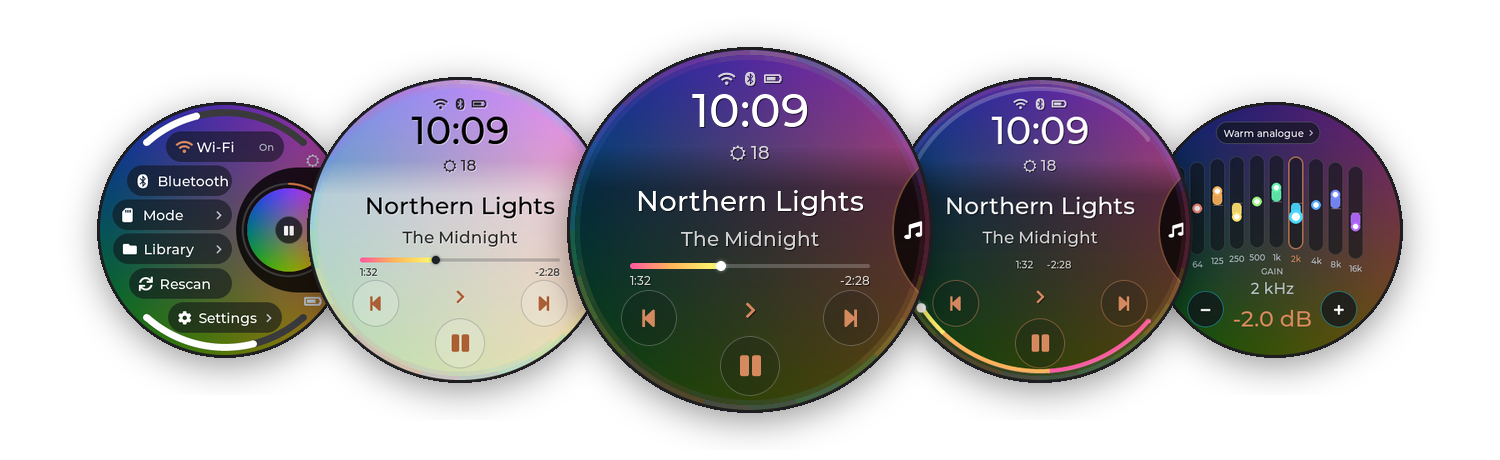
The album cover is the interface. diskOS Disco! 1.0.3 is a touch interface for the FiiO Snowsky Disc's round
screen, built on b0hemia's diskOS 1.2.4.
Testing release, as-is, no liability. Flashing rewrites the Disc's root filesystem. Back up your music and
keep the saved stock image safe. Not affiliated with FiiO, Snowsky or Ingenic.
Downloads
| File | What it is |
|---|---|
| Source code (zip / tar.gz) | Everything you need to flash: the installer, and the ready-built interface in payload/mq_ui |
mq_ui |
The interface on its own (the same file as payload/mq_ui), for SD-card updates of an existing install |
SHA256SUMS, MD5SUMS |
Checksums of mq_ui |
mq_ui md5: ac03d61f3e07b55a2ebbd7d639986a71
Flash it (first install)
You need a Disc on FiiO firmware V2.57, the official V2.57 firmware ZIP, a Linux computer and a good USB cable.
- Download Source code (tar.gz) below and unpack it (or
git clone https://github.com/zmd22/diskos-disco). - Optional, but recommended: make your own update keys, so you can install later versions from the SD card.
sh ui/tools/owner-keys/diskos-keys.sh
cp diskos-keys/diskos-root.pub.pem payload/
- Flash:
Power the Disc off, hold Volume Down and plug in USB. With a key, check that the
./install.sh                     # first time only: host setup
./diskos-installer install \
  --firmware SNOWSKY_DISC_update_20260909_v257.zip \
  --variant public \
  --ui payload/mq_ui \
  --ota-key payload/diskos-root.pub.pem      # leave this line out if you skipped step 2
ota: ON … key sha256line
matchessha256sum payload/diskos-root.pub.pembefore you answery.
Update an existing install from the SD card
Download mq_ui, then sign it with your keys and copy the folder to the card:
sh ui/tools/owner-keys/diskos-sign.sh mq_ui 1.0.3 # -> ./diskos-update/On the Disc: Settings › System › Update from SD Card › Update, then restart. It runs as a trial and rolls back
by itself if it doesn't start. More: docs/UPDATING.md.
What's new in 1.0.3
- Ogg Opus (.opus/.oga) files are now indexed and played, with their tags and lengths - ported from diskOS PR #19
by ingvarr777. - AirPlay and Bluetooth streaming switch on again from Working mode.
Also in 1.0.2
Fixes the "Player didn't respond" message that still appeared a few seconds after start-up: a background request to the
player (switching off its own idle power-off) now waits for the player quietly. And flashing now always runs the build
you flashed: older builds kept from SD-card updates no longer take over after a flash.
Also in 1.0.1
A CD look for Immersive (Disco Options > Immersive: Vinyl or CD), a tidier Working mode ("Playback", spinning
arrows while switching), and a stability fix: no more "Player didn't respond" at start-up, and starting a song or a list no longer sometimes fails.
Commands to the player now wait for it while it's busy (starting up, rebuilding a playlist) instead of being dropped.
Details in the changelog.
What's in 1.0 (unchanged)
- Disco theme (default): the cover fills the screen, a navigation circle slides out of the right edge, Music with
a rainbow progress line or a progress arc around the rim, the title menu (Favourite, Album, Artist, Queue, Lyrics,
Immersive), Disco Options, and Disco versions of Quick Settings, Equalizer, Volume, Standby, Weather, Search,
Queue, Battery and more. - Ring, Braun and Stone themes included.
- SD-card updates fixed, safer helpers, and a round of bug fixes.
Take the tour · read the
changelog.
Thanks to b0hemia for diskOS, and to everyone credited in the README.
diskOS Disco! 1.0

The album cover is the interface. diskOS Disco! 1.0 is a touch interface for the FiiO Snowsky Disc's round
screen, built on b0hemia's diskOS 1.2.0.
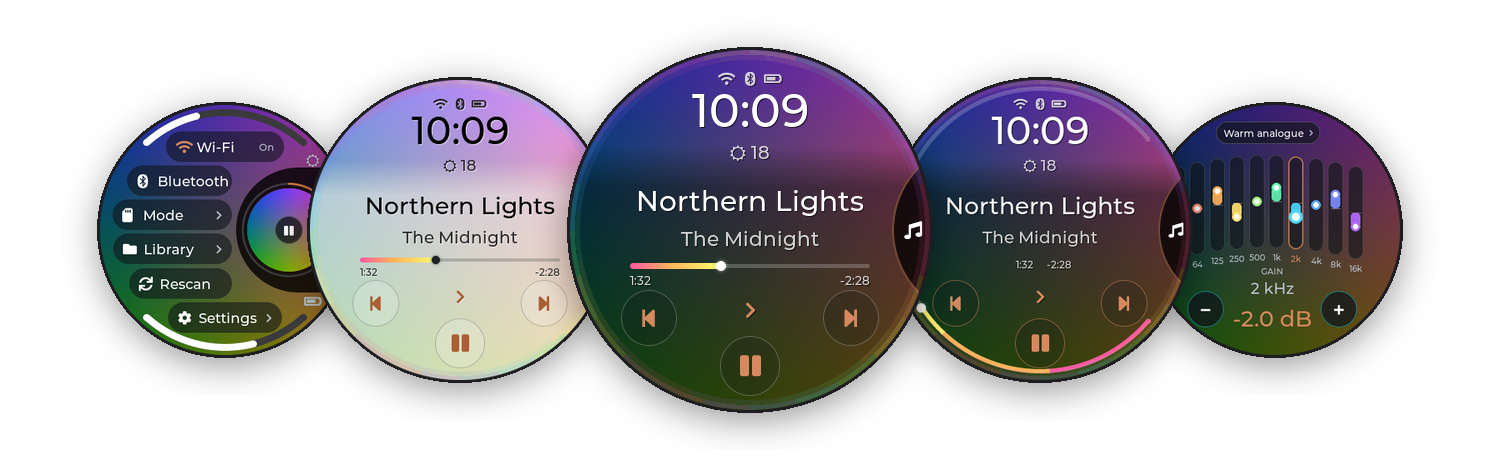
Testing release, as-is, no liability. Flashing rewrites the Disc's root filesystem. Back up your music and
keep the saved stock image safe. Not affiliated with FiiO, Snowsky or Ingenic.
Downloads
| File | What it is |
|---|---|
| Source code (zip / tar.gz) | Everything you need to flash: the installer, and the ready-built interface in payload/mq_ui |
mq_ui |
The interface on its own (the same file as payload/mq_ui), for SD-card updates of an existing install |
SHA256SUMS, MD5SUMS |
Checksums of mq_ui |
mq_ui md5: e92cd2c8143d51aee671d540ca91cadc
Flash it (first install)
You need a Disc on FiiO firmware V2.57, the official V2.57 firmware ZIP, a Linux computer and a good USB cable.
- Download Source code (tar.gz) below and unpack it (or
git clone https://github.com/zmd22/diskos-disco). - Optional, but recommended: make your own update keys, so you can install later versions from the SD card.
sh ui/tools/owner-keys/diskos-keys.sh
cp diskos-keys/diskos-root.pub.pem payload/
- Flash:
Power the Disc off, hold Volume Down and plug in USB. With a key, check that the
./install.sh                     # first time only: host setup
./diskos-installer install \
  --firmware SNOWSKY_DISC_update_20260909_v257.zip \
  --variant public \
  --ui payload/mq_ui \
  --ota-key payload/diskos-root.pub.pem      # leave this line out if you skipped step 2
ota: ON … key sha256line
matchessha256sum payload/diskos-root.pub.pembefore you answery.
Update an existing install from the SD card
Download mq_ui, then sign it with your keys and copy the folder to the card:
sh ui/tools/owner-keys/diskos-sign.sh mq_ui 1.0 # -> ./diskos-update/On the Disc: Settings › System › Update from SD Card › Update, then restart. It runs as a trial and rolls back
by itself if it doesn't start. More: docs/UPDATING.md.
What's in 1.0
- Disco theme (default): the cover fills the screen, a navigation circle slides out of the right edge, Music with
a rainbow progress line or a progress arc around the rim, the title menu (Favourite, Album, Artist, Queue, Lyrics,
Immersive), Disco Options, and Disco versions of Quick Settings, Equalizer, Volume, Standby, Weather, Search,
Queue, Battery and more. - Ring, Braun and Stone themes included.
- SD-card updates fixed, safer helpers, and a round of bug fixes.
Take the tour · read the
changelog.
Thanks to b0hemia for diskOS, and to everyone credited in the README.