Repository navigation
T3Notch 1.0.0

Your agents, under the notch. First release.
Install
- Download
T3Notch-1.0.0-arm64.zip, unzip it, and drag T3Notch.app to/Applications. - The app is ad-hoc signed and not notarized, so Gatekeeper will refuse it the first
time. Right-click it → Open → Open, or clear the quarantine flag yourself:xattr -d com.apple.quarantine /Applications/T3Notch.app
- Launch it. A quick start window explains the three things worth knowing and tests
the connection to T3 Code for real, step by step.
Needs macOS 26 or later, Apple silicon, and T3 Code running with its local
server on 127.0.0.1:3773. A session token is minted for you via
t3 auth session issue --token-only and kept in the Keychain.
What it does
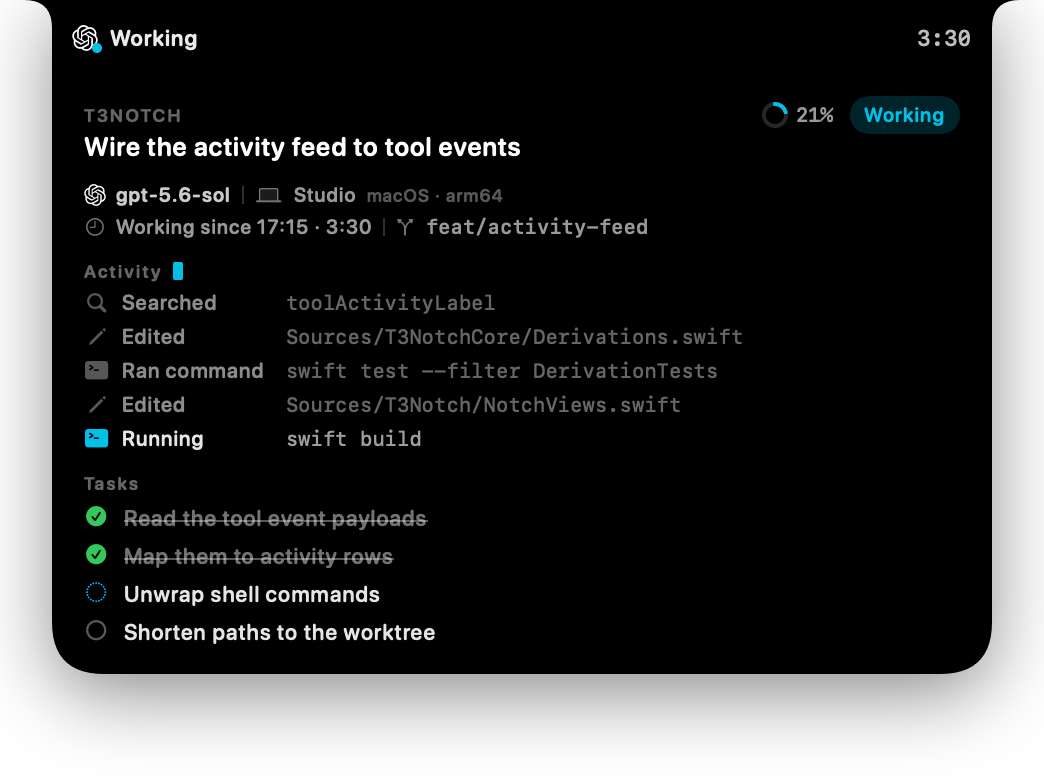
- Shows the provider's logo and model, the machine the work runs on, the branch, and
how long the current turn has been going. - An activity feed of the last few things the agent did — commands it ran, files it
changed — with whatever is still in flight tinted. - The agent's task list, with a tick animation as steps land.
- Approvals and questions answered in the notch, one slide at a time.
- One pressable card per agent when several run at once, grouped by project.
- Finished agents stay pinned until you have actually looked at them.
- A banner when a plan finishes and confetti when a branch lands, including squash
merges found throughgh. - A control panel for attention, animations, row counts, and which display it lives on.
Notes
- Apple silicon only. There is no Intel build.
- It talks to T3 Code's local server over the HTTP orchestration API by polling. The
optional merge check shells out togitlocally and togh, which does reach
GitHub to ask whether a pull request was merged; turn Ask GitHub about pull
requests off in Settings to keep everything local. - Being ad-hoc signed, Launch at login may fail to register. The settings row
reports what actually happened rather than pretending, and offers to open Login
Items instead.
sha256 of the zip: 73aeb23ee76f5bf98f05aae9e5692fc28ff48087e1973f27b1e6de501b20af93