Repository navigation
Releases: zubSero/StremioBox
Release list
Intel NUC Preview — English Home

Intel NUC Preview — English Home
The current image includes English Home 1.1 and all platform fixes from the initial public image.
Tested configuration: Intel NUC10i5FNH, Intel UHD Comet Lake GT2, Intel AX201 Bluetooth, Homatics B21 and an LG HDR TV. Android 16 / LineageOS 23.2, with the original signed Stremio TV 1.10.4 x86_64 app.
Download and install
Download tooling updated 2026-10-06: native helpers now assemble the original ISO without Python. Existing ISO parts, image hashes and the Home APK are unchanged. The old Python helper remains available for existing users.
- Download the native download ZIP and extract it.
- Windows: double-click
Download-StremioBox.cmd. Linux/macOS: runbash tools/download.sh --output downloadsin the extracted folder. No Python required. - Allow about 6 GB free. The helper downloads two parts, checks their hashes and assembles one bootable ISO.
- Follow the installation guide and try live USB boot first. The destructive disk installer is still unvalidated; back up before installing.
Updating an existing installation with Dutch Home
Download English Home 1.1, open a terminal in its folder and use your authorized ADB connection:
adb install -r StremioBoxHome-1.1-en.apkThis signed app update changes Home on the existing StremioBox installation. Its English labels and version were verified after reboot. Installing the launcher alone does not add the platform fixes to another OS.
Detailed changes and testing
Published 2026-10-05 · Home 1.1 · Android 16 / LineageOS 23.2
Download · Installation and existing-device update · Validation
Changed: the Home interface is English
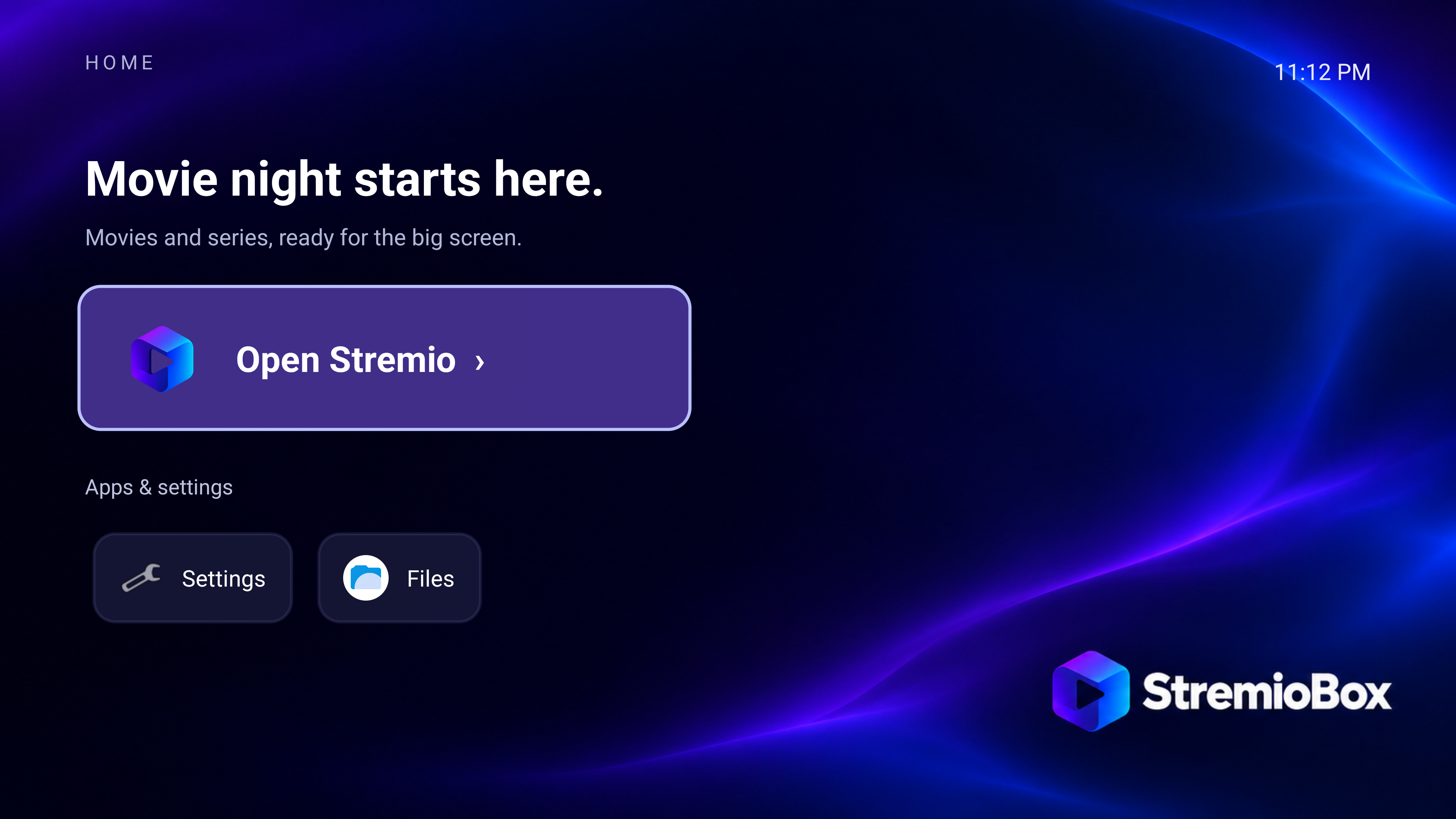
- Replaced the Dutch Home heading, introductory text, app section, Settings label and app-unavailable message with English text. Home now shows “Movie night starts here.”, “Apps & settings” and “Settings”.
- Raised Home to 1.1 / version code 2, signed with the existing release certificate. Android accepts it as an update to the original Home app.
- Included Home 1.1 in the installation image. New installations start with the English launcher.
- Published
StremioBoxHome-1.1-en.apkfor existing installations. Updating this APK changes Home without reinstalling Android. - Replaced the public Home screenshot with a capture of the English interface running on the physical NUC.
Image changes and verification
- Repacked the initial image with exactly one changed system file:
system/product/app/StremioBoxHome/StremioBoxHome.apk. - Verified 19,581 other system entries retained their contents, permissions, ownership, extended attributes and symlink targets. Kernel, initrd, recovery, native playback code and boot artwork retain their previous hashes. Filesystem delta.
- Added the portable
repack_home.pyhelper and exercised it on the published base image. It checks the input image, compares extracted filesystems and checks the rebuilt ISO's boot structures. Repack instructions. - Updated the download manifest and helper to retrieve the English image and verify both parts plus the reconstructed ISO.
What was tested for this update
- Installed the signed Home update on the physical NUC, checked its version and visible English labels, rebooted, then checked that the update and labels persisted.
- Booted the final ISO through UEFI in a diskless QEMU/KVM guest with fresh Android data. Android completed boot, selected Home 1.1 and installed the original signed Stremio TV APK with the expected hash.
- Confirmed the English Home activity and guest screenshot. The VM's graphics has a red/blue channel swap; correct artwork colors and the public screenshot were checked on the physical Intel GPU. Boot record.
- Verified published asset hashes and public download URLs.
Test boundary: the physical NUC received the Home app update; it was not reflashed with the new ISO. The full HDR/audio/Bluetooth acceptance matrix was not rerun for this launcher-only change. The Initial Release test results describe the same preserved binaries. The fresh-data VM test provisioned temporary guest settings to reach Home; it does not certify the complete setup wizard or disk installer.
Upgrade guidance
Existing installations with Dutch Home can use the signed APK described in the update guide. For a new installation, use this English image. The original public download remains available with Dutch Home 1.0 for traceability.
Download identity
The technical tag is r6. Filenames and download URLs retain that identifier; the descriptive release title explains what changed.
StremioBox-Android16-r6-nuc10_tv.iso
Bytes: 2874343424
SHA-256: f5e8642165e732c0a44dac4a87a36e56b297ed3e1c928f39d2f4dec8e1783550
Release files
| File | Use |
|---|---|
| Native download ZIP 1.1 | Start here: Windows double-click or Linux/macOS shell, no Python |
| Native helper 1.1 SHA256SUMS | Checksum for the newly added native download ZIP |
| Legacy Python helper ZIP | Original optional helper; its bytes are preserved |
| ISO parts 001 and 002 | Raw pieces used by the helper; neither boots separately |
| Home APK | Signed launcher package for a compatible installation |
| Source ZIP | Selected source tree, all 17 patches, product overlay, Home source and artwork |
| JSON records | Download identity, image verification and source hashes |
| SHA256SUMS | Hashes for the release assets and reconstructed ISO |
This is an independent userdebug preview with permissive SELinux and authenticated ADB on TCP 5555. Use a trusted network. There is no automatic OS update channel. Other hardware, Dolby Vision, HLG, AV1, VLC/ExoPlayer, 4K60, HDMI passthrough, true S3 sleep and HDMI-CEC remain unverified. No personal accounts, ADB authorization keys or Bluetooth bonds are included.
Complete changelog · Hardware · Test report · Build guide · Licenses
Intel NUC Preview — Initial Release
Intel NUC Preview — Initial Release
Historical image with Dutch Home 1.0. For a new installation, use the English Home preview.
Tested configuration: Intel NUC10i5FNH, Intel UHD Comet Lake GT2, Intel AX201 Bluetooth, Homatics B21 and an LG HDR TV. Android 16 / LineageOS 23.2, with the original signed Stremio TV 1.10.4 x86_64 app.
Download and install
- Download the download helper ZIP and extract it.
- Open a terminal in the extracted folder. With Python 3.10+, run
py tools/download.py --output downloadson Windows, orpython3 tools/download.py --output downloadson Linux/macOS. - Allow about 6 GB free. The helper downloads two parts, checks their hashes and assembles one bootable ISO.
- Follow the installation guide and try live USB boot first. The destructive disk installer is still unvalidated; back up before installing.
Detailed changes and testing
Published 2026-10-05 · Home 1.0 · Android 16 / LineageOS 23.2
Historical download · Hardware · Physical test report
This was the first publicly downloadable image for the Intel NUC10i5FNH, with Intel UHD Comet Lake GT2 graphics, Intel AX201 Bluetooth, a Homatics B21 remote and an LG HDR TV. It packages platform fixes developed and tested before publication. Those fixes were already compiled into the development base; this release added Home, branding and clean first-boot app installation through a verified image repack.
Video decoding, color and HDR10
- Integrated Intel's hardware video path for the tested HEVC Main10 stream. Android MediaCodec passes decoded 10-bit P010 buffers through the GPU rather than requiring software decoding for that case. Codec output patch.
- Added Android 10-bit native visual support in Mesa and HDR10 capabilities, output mode and HDMI metadata handling in the display composer. The tested output carries BT.2020 color and PQ transfer information, and the LG TV reports HDR mode.
- Added stable identities for recycled hardware codec buffers to address stale buffer reuse in the rendering path. Buffer identity patch.
- Integrated the HDR surface helper with Stremio's existing mpv player. The ordinary controls and seek bar remain available.
- Observed result: 4K HEVC Main10 HDR10 playback around 24 fps with correct picture and audible sound confirmed on the test TV. This does not establish universal codec support or HDR support in every player.
HDMI audio
- Configured HDMI as the primary output for the dedicated NUC TV product, resolving the no-sound behavior seen on the test setup. The x86 audio service otherwise tried to open an unavailable default speaker output. Product configuration.
- Checked active Android AudioTrack output and advancing ALSA playback counters, with audible film sound confirmed before and after display standby.
- An AC3 5.1 source was used, but the test did not establish receiver bitstream passthrough or certification for surround formats.
Bluetooth remote and display standby
- Included the Homatics power/wake key mapping and product-specific Bluetooth scan settings used on the Intel AX201 test system.
- Verified that ordinary Homatics keys reconnect after a full Android reboot without repeating the pairing-button combination.
- Changed the suspend service to avoid synthetic wake behavior that interfered with the TV power sequence. Display standby keeps Android, Bluetooth and playback processes running while the display is off. Standby patch.
- Checked film picture and sound recovery after synthetic Android sleep/wake commands, with confirmation on the physical TV. “No signal” can appear while HDMI output is off.
- A separate final-image test of repeated physical Homatics power-button cycles remains pending. True ACPI S3 suspend and HDMI-CEC were not validated.
Subtitle state in Stremio
- Added synchronization between Stremio's subtitle selection and the mpv subtitle state. Disabled is applied to the player, including around subtitle-language and audio-track changes.
- Verified that disabling external SRT subtitles returns
sid=noand removes the overlay. Eight Java regression cases passed during development. - The packaged integration retains the original Stremio UI. Embedded formats and every stream combination are outside the completed test scope. Subtitle helper source.
Boot persistence and app compatibility
- Packaged the player adapter, HDR/subtitle helpers, native patches and init services in the image so the integration is reapplied after boot.
- Added a compatibility check against the installed Stremio app's expected Java fields and native library layout before binding the adapter. An incompatible app layout is rejected instead of treated as supported.
- Checked a same-version reinstall of the original signed Stremio TV 1.10.4 APK: app data and compatible integration were retained. A deliberately incompatible test fixture was rejected.
- Enabled authenticated ADB on TCP 5555 at boot for maintenance. Each user authorizes their own host; personal trusted ADB keys are not included.
Home, branding and first setup
- Added StremioBox Home 1.0 with D-pad navigation to Stremio, Android settings and installed apps. This initial version used Dutch labels.
- Added the StremioBox logo, blue/violet wallpaper, boot animation and ISO boot-menu artwork.
- Added first-boot installation of the original signed Stremio TV 1.10.4 x86_64 APK after Android's package scan. Existing app data is preserved.
- Published a clean system image without personal accounts, Bluetooth bonds or configured content add-ons.
Platform and build changes
The image includes 17 source patches, published with the product overlay and pinned source manifest. In addition to playback and standby changes, these cover:
- Bounded SurfaceFlinger console-thread shutdown, composer service naming and a const-correct composer query.
- Configurable build concurrency, kernel tool paths, host memory limits, output-path handling and bootstrap environment fixes.
- ISO title/label parameters, preserving the relationship between the image volume label and boot-time root discovery.
- An upstream SQLite tokenizer bracket fix and a pre-generated source manifest for the read-only build sandbox.
See the complete patch-by-patch inventory and build guide. The exported manifest has 1,216 pinned projects; applying the upstream proprietary-project filter produces the embedded 1,215-project manifest and its exact hash. A clean full Android build from the public repository remains pending.
Validation at publication
| Check | Result and scope |
|---|---|
| HDR playback | 179.679 seconds; 12 displayed-frame drops, 0 decoder drops |
| Playback after standby | 173.506 seconds; 6 displayed-frame drops, 0 decoder drops; counters reset between samples |
| H.264 SDR | 640 × 360 sample for 4.458 seconds, 0 drops |
| Bluetooth after reboot | Ordinary Homatics keys worked without re-pairing |
| HDMI sound and standby recovery | Confirmed on the physical TV |
| Vulkan | Seven Skia UI frames rendered using the Intel driver; a smoke test, not conformance testing |
| Clean-data ISO boot | Diskless UEFI VM reached setup, Home and Stremio sign-in after app seeding |
| Download integrity | Two release parts reassembled with the public helper into the exact original ISO hash |
Full methods and limitations · Image verification record
Known limitations carried into the English Home release
- One physical hardware configuration is verified. Other NUCs, GPUs, Bluetooth adapters and remotes require reports and testing.
- Dolby Vision, HLG, AV1, 4K60, VLC, ExoPlayer, HDMI audio passthrough, HDMI-CEC, true S3 sleep and subscription-service DRM are unverified.
- Multi-hour playback/thermal tests, the separate physical power-button retest and destructive disk installation on a spare drive are pending.
- The preview uses permissive SELinux and userdebug maintenance access. There is no managed OTA channel or consumer security certification.
- Future Stremio versions need compatibility review; the packaged bridge does not guarantee support for arbitrary app updates.
Download identity
The technical tag is r5. Filenames and download URLs retain that identifier; the descriptive release title explains what changed.
StremioBox-Android16-r5-nuc10_tv.iso
Bytes: 2873884672
SHA-256: 37a6aa352809ba4960842b90dfd83ad89fc82dc1c82fe24828cdf2f63c576265
Release files
| File | Use |
|---|---|
| Download helper ZIP | Start here to download, verify and assemble the ISO |
| ISO parts 001 and 002 | Raw pieces used by the helper; neither boots separately |
| Home APK | Signed launcher package for a compatible installation |
| Source ZIP | Selected source tree, all 17 patches, product overlay, Home ... |