

-
|
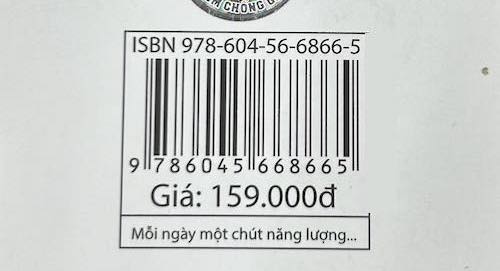
I'm trying to read this barcode:
I figured out that zxing-cpp can't read this because of the black-line box around the barcode. Actually it's because of the right side of the box. If I remove that, zxing-cpp read the barcode instantly.
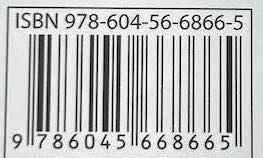
If I crop the image into this:
then zxing-cpp can reads but still very hard (tried multiple times/positions of camera). Read directly from image still can't work. So is there anyway for zxing-cpp to improve reading in this case? Before use zxing-cpp, I used another port of zxing (ZXingObjC) and it works fine. I don't know much about c++ and barcodes, but will try to help if I can, thanks. |

Beta Was this translation helpful? Give feedback.
Replies: 1 comment

-
|
The problem is the insufficient quiet zone on the right side of the symbol. The standard requires 7 modules, the library enforces at least 6 and this symbol has more like 4. So this is technically an invalid EAN-13 symbol. See here. Reducing this value is possible but could lead to more false positives. If I reduced the 6 to 4, it still fails to decode, though. If you set the minLineCount to 1, it reads a value but the value is wrong. If I scan this with my phone off the monitor, it ready just fine, due to some increased resolution, I believe. Note: if you scan this with your phone off the monitor and rotate the phone slightly, then the success rate increases because scanning slightly diagonally makes the quiet zone "virtually" larger. Bottomline: I don't have a solution for you that makes this image read successfully as is. |
Beta Was this translation helpful? Give feedback.


The problem is the insufficient quiet zone on the right side of the symbol. The standard requires 7 modules, the library enforces at least 6 and this symbol has more like 4. So this is technically an invalid EAN-13 symbol.
See here. Reducing this value is possible but could lead to more false positives. If I reduced the 6 to 4, it still fails to decode, though. If you set the minLineCount to 1, it reads a value but the value is wrong. If I scan this with my phone off the monitor, it ready just fine, due to some increased resolution, I believe.
Note: if you scan this with your phone off the monitor and rotate the phone slightly, then the success rate increases because scanning slightly dia…