
VServer SSH Stats v1.4.13
Summary
This release significantly improves Docker support, performance on slower systems such as Raspberry Pi Zero devices, and the organization of entities in Home Assistant.
Host metrics, Docker containers, and integration actions are now clearly separated. Each monitored server remains available as its own Home Assistant device, while every Docker container is represented as an individual child device with its related sensors and controls grouped together.
New Device Structure
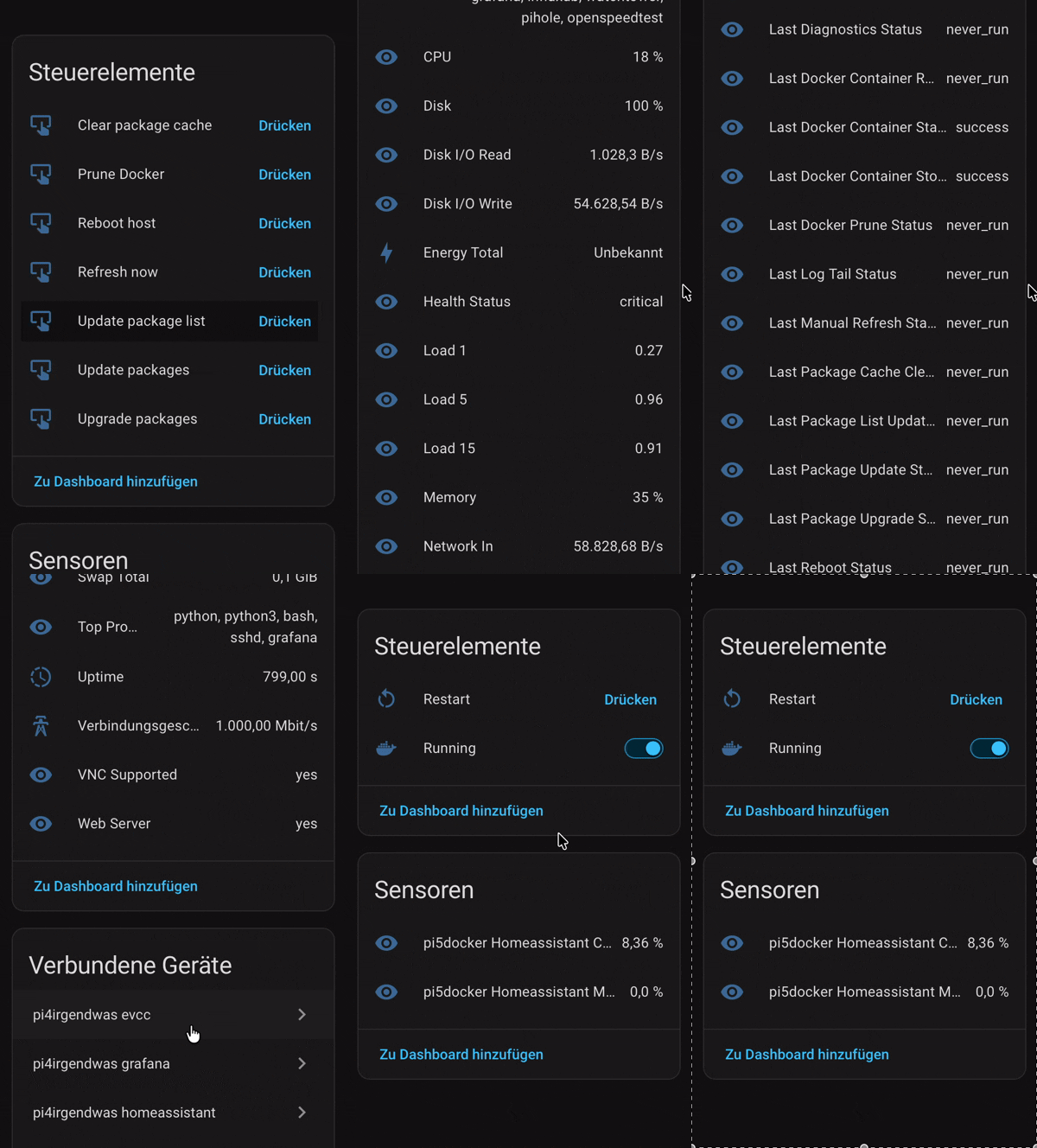
The monitored Raspberry Pi, server, or vServer remains the primary device and continues to contain host-level information such as CPU, memory, disks, network traffic, package updates, health information, and general integration actions.
Each Docker container is now created as a separate device connected to its host through Home Assistant's device hierarchy. Container-specific entities no longer clutter the main server device.
Each container device can include:
- CPU usage
- Memory usage
- Running switch
- Restart button
- Docker image and container metadata
- Runtime status, health state, restart count, restart policy, ports, Compose project/service, and Swarm service attributes
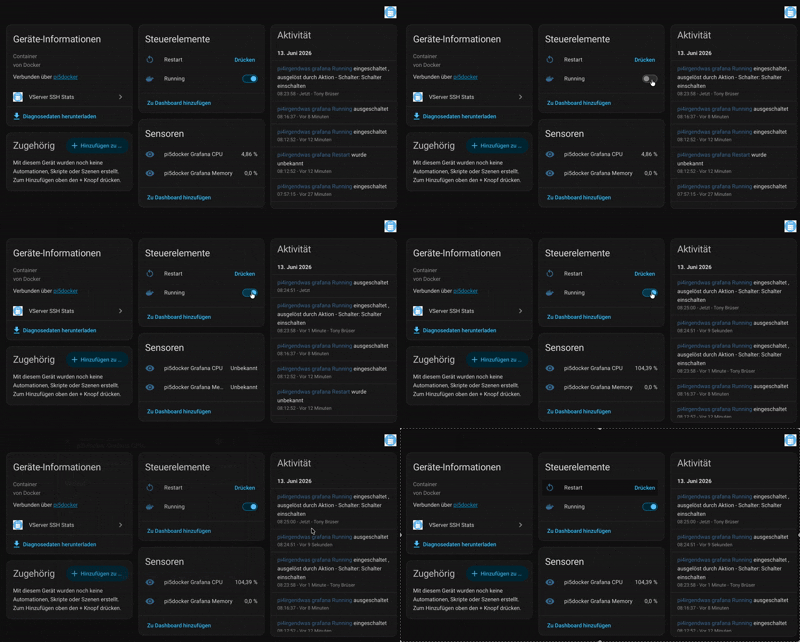
Existing entity unique IDs remain unchanged. Home Assistant should therefore retain entity history, dashboard references, custom names, and automations while moving the entities to their new devices.
Docker Container Controls
Docker containers can now be controlled directly from Home Assistant.
- Use the Running switch to start or stop a container.
- Use the Restart button to restart a container.
- Stopped containers remain visible and can be started again.
- Dedicated services are available for starting, stopping, and restarting containers.
- Diagnostic action-status sensors report the latest start, stop, and restart result.
- Successful actions trigger an immediate Docker refresh so the displayed state is synchronized with the remote host.
Container stopping has been hardened for Docker restart policies and Compose-managed containers. The integration verifies that the container remains stopped instead of reporting success while Docker immediately starts it again. Previous restart policies are retained and restored when appropriate.
Improved Docker Metrics
Docker CPU and memory collection is now more reliable across different Docker versions, locales, permissions, and slower hardware.
- Container statistics are matched by stable container ID instead of relying only on names.
- Only running containers are passed to
docker stats, reducing unnecessary work. - Decimal values using either a dot or comma are supported.
- Invalid percentage output is treated as unavailable instead of being converted to a false
0%reading. - Suspicious all-zero snapshots are retried before being accepted.
- Failed or incomplete snapshots no longer overwrite the last valid CPU and memory values.
- The collector falls back to passwordless
sudo -n dockerwhen the SSH user cannot access the Docker socket directly. - Manual refresh now waits for the Docker collector to finish before reporting completion.
Faster Polling on Slow Systems
Slow package and Docker commands have been separated from the regular host collection cycle. This prevents expensive operations from blocking frequent CPU, memory, load, disk, network, and availability updates on slower SBCs.
The collectors now use independent configurable schedules:
- Fast host metrics: every 30 seconds by default
- Package metrics: every 12 hours by default
- Docker metrics: every 30 minutes by default
- Slow collector timeout: 180 seconds by default
The intervals and timeout can be adjusted from the integration options. Package and Docker collection run independently in the background, allowing frequent base polling without repeatedly executing expensive commands.
This resolves the reported issue where pending package updates remained at 0 and the package list stayed empty because package collection could not finish within the regular command timeout on Raspberry Pi and other slower systems.
Package Update Reliability
- Package update count and package list now use the dedicated slow collector.
- Package and security update values are only replaced after a completed collection.
- Slow or failed package-manager commands no longer silently publish misleading empty results.
- Package metadata can be refreshed manually without delaying normal server metrics.
Host and Integration Entities
The main server device continues to provide host-wide sensors, binary sensors, diagnostics, and action buttons. This includes health status, CPU, memory, swap, disks, disk I/O, network traffic, uptime, temperature, package updates, Docker summary information, systemd failures, journal errors, port checks, and collector timing/error diagnostics.
Integration actions remain grouped on the host device, including:
- Refresh now
- Update package list
- Update packages
- Upgrade packages
- Clear package cache
- Prune Docker
- Reboot host
- Related action-status sensors
Automated Validation and Security
The repository now includes an expanded GitHub Actions setup for HACS and Home Assistant integrations:
- Hassfest validation
- HACS integration validation
- Unit tests on supported Python versions
- Import testing against the current Home Assistant release
- Python compilation and Ruff checks
- YAML validation
- Embedded remote Bash syntax and ShellCheck validation
- CodeQL security scanning
- Dependency review with severity enforcement
- Workflow security auditing with Zizmor
- Automated version bumps
- Release archive validation and build provenance attestation
- Release-note validation
Compatibility
- Designed for current Home Assistant releases and HACS installations.
- Existing host and container entity unique IDs are preserved.
- Existing automations, history, dashboards, and locally customized entity IDs should continue to work.
- Docker commands require either direct Docker socket access for the configured SSH user or passwordless
sudo -n dockeraccess. - Stopped containers remain available as devices and controls, while CPU and memory values may be unavailable until the container is running again.
Upgrade Notes
- Update the integration through HACS or replace the integration files manually.
- Restart Home Assistant or reload the VServer SSH Stats integration.
- Press Refresh now once to immediately collect the new Docker inventory and metrics.
- Open the integration device list to see the monitored host and its individual Docker container devices.
No manual recreation of existing entities should be required.
Support the Project
If this integration saves you time, feel free to support development with a donation:
Thank you for your support!
What's Changed
Other Changes
- Bump actions/download-artifact from 4.3.0 to 8.0.1 by @dependabot[bot] in #124
- Bump actions/attest-build-provenance from 43d14bc2b83dec42d39ecae14e916627a18bb661 to 977bb373ede98d70efdf65b84cb5f73e068dcc2a by @dependabot[bot] in #125
- Bump github/codeql-action from 411bbbe57033eedfc1a82d68c01345aa96c737d7 to 8aad20d150bbac5944a9f9d289da16a4b0d87c1e by @dependabot[bot] in #127
- Bump actions/upload-artifact from 4.6.2 to 7.0.1 by @dependabot[bot] in #126
New Contributors
- @dependabot[bot] made their first contribution in #124
Full Changelog: v1.4.7...v1.4.8
