Signing on mobile v2: design decisions
Links
Mobile signing v2 #380 🐱
Settings UI changes after user tests #388 🐱
2021-01-07 Kick off: Mobile signing v2 📆
Platform: iOS, Android.
App version: tbd.
Which problem do we solve?
See Gnosis Safe - 5 Inconvenient multisig signature collection on-the-go 📆
What are the metrics and KPIs we will be measuring for this feature?
See tracking in Mobile signing v2 #380 🐱.
Is there user research or quantitative data informing decisions made here?
#27 Signing On Mobile Insights 💡
#28 Live Signing script & notes 📋
#28 Live Signing insights 💡
1. Import owner key
2. Discoverability
3. Sign transaction – the last confirmation before execution
4. Sign transaction – not the last confirmation before execution
5. Remove owner


Reasoning:
- This was recommended after user tests. A user expected their Metamask balances to be added to Safe assets.
- Users wondered if we store a private key or a seed phrase and how secure is that.
- We only support hardware wallets and Metamask, it should be explicitly stated somewhere.
The alternative was to show onboarding slides with the same information:

Single screen was selected because:
- This is an overused pattern and people click through these screens without reading. With a single screen it’s more likely that people will read.
Show it every time the user imports an owner. Reasoning:
- Faster shipping: not implementing additional logic.

In v2 to view derived keys you have to tap ‘Show more derived keys’. The first version displayed derived keys upfront. Reasoning:
- It’s an advanced feature. Less advanced users were confused about derived keys during user tests.
- Most users will import a default owner key.
In the first version you could only import a seed phrase. We don’t store seed phrase in the app, we only store private key. In v2 you can enter either a seed phrase or a private key.

Reasoning:
- Seed phrase import was chosen for faster shipping in v1, we agreed to add more options later.
- It is more convenient to export private key from MetaMask than a seed phrase.
- Security: it may be more secure to import just a private key without seed phrase because seed phrase will provide access to all derived keys.
5. Allow users to select what they want to import – seed or private key? Single field or separate fields?
Initially there was a version where the user chooses what they want to import and they are taken to the respective flow.

When importing a private key they were supposed to paste their private key from clipboard. When importing seed phrase they were supposed to type their seed phrase manually.

We decided for a combined input field where you can both paste by long tap and type manually.

Reasoning:
- It’s possible to implement.
- No need for additional step (choosing what you want to import).
It wasn’t clear for the users that execution is not possible in the mobile app. After user tests it was recommended to add info about where execution needs to happen.
Final decision: add an alert icon and text to confirmation timeline.

The alternative was to add screens with a horizontal timeline (like in confirmation popups in the web interface). The timeline shows where the user is in the process of submitting a transaction:

Decision: don’t add these screens for faster shipping.
In v1 the entry point for importing an owner was in the app settings. It’s not the most prominent place. Not that many users imported an owner (source 📣). After user tests it was recommended to add more entry points for better discoverability.
The options were:
- Offer to import an owner on Success screen after loading Safe. Only applies to users who load Safe.
- Banner on Assets. Only applies to users who have Safes loaded.
- Ask before loading the first Safe what they want to do, do they want to load a Safe only or an owner key too. Only applies to new users who don't have Safes loaded.
- Onboarding with info about features before we offer to load the first Safe. Only applies to new users who don't have Safes loaded.

Decision: options 1 – offer to import an owner after loading Safe and 2 – banner.
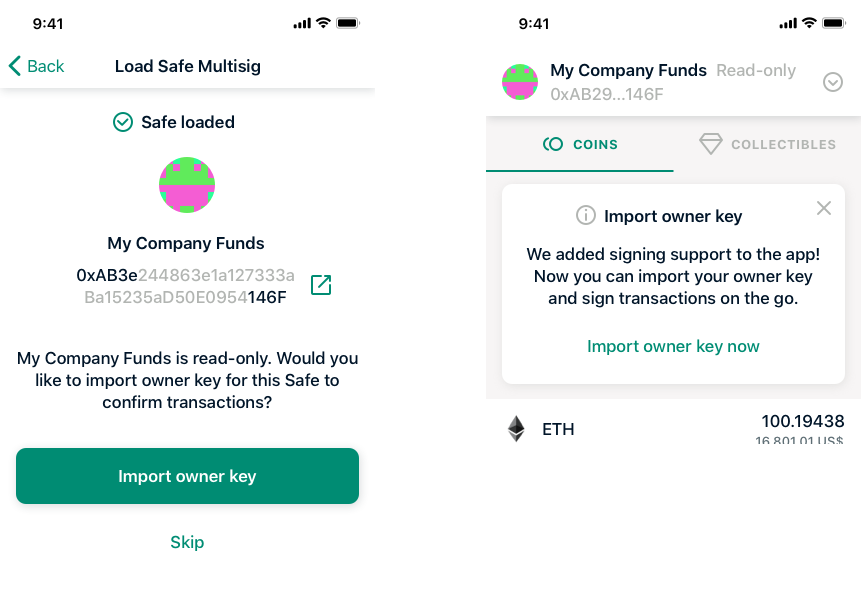
Reasoning:
- These options cover both new users and users who have Safes loaded.
- Straightforward and rather prominent.
- People have to dismiss the banner so they will most likely read it.
- Banner on assets tab was used in the legacy app to offer contract upgrade.
- There were 6 votes for option 1 and 4 votes for option 2.
Importing an owner is offered if no owner key has ever been added. Only offer once, don't show anything for subsequent Safes.
If the user already imported an owner key and is adding a new Safe, don’t offer to import an owner key.
If the user had a key imported in the past but removed it, don’t offer to import an owner key.
There is a ‘Close’ button. The banner is shown to users who already have a Safe and never imported an owner key and never dismissed the banner. Only show once.
Rename ‘contract version’ to ‘Safe version’ in Safe settings.
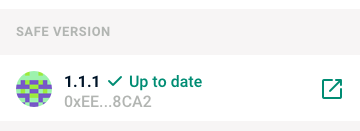
Reasoning:
- One user didn’t know what a contract version is.
- In the web interface it’s called ‘Safe version’.
Add link to help article in advanced app settings.
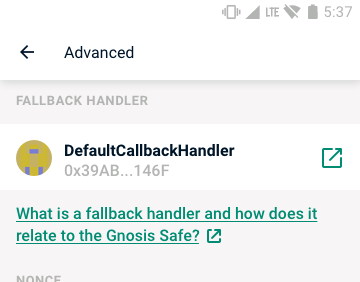
Reasoning:
- One user didn’t know what fallback handler is.
Don’t use ‘Overline 2’ type style on Android and ‘Caption 2’ on iOS, use larger styles instead.
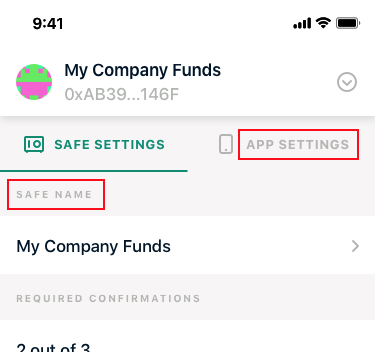
Reasoning:
- One user failed to connect ‘reverse record not set’ text with its section header ‘ENS name’.
tbd
tbd