Describe the bug
This issue can be best observed using long sections of active time ("not-afk") which will not appear in charts filtered with "Exclude AFK time". But I am willing to bet this happens with other watchers too.
To Reproduce
- Log over an hour of uninterrupted non-afk time.
- Go to the activity dashboard.
- Add a bar chart to make the issue more visible.
- Notice the section of active time is missing from the bar chart.
- Open the Filter menu.
- Uncheck "Exclude AFK time"
- Observe, the recorded 1hr+ of non-afk does not appear in the bar chart.
Expected behavior
Exclude AFK time does not filter out long sections of active non-afk time.
Documentation
Exclude AFK time:
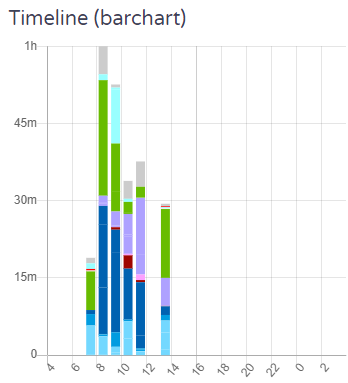
Unchecked:
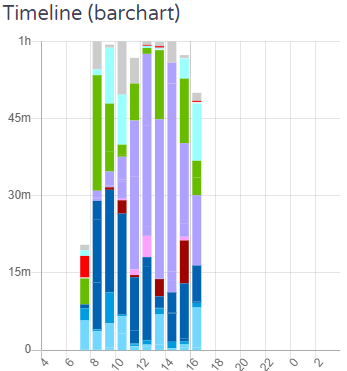
Timeline:

##Additional Context
This can be worked around by manually splitting the "non-afk" time at the hour marks.
I am on the latest ActivityWatch version.
I have searched the issues of this repo and believe that this is not a duplicate.
OS name and version: Windows 10.0.19042 Build 19042
ActivityWatch version: v0.11.0
Describe the bug
This issue can be best observed using long sections of active time ("not-afk") which will not appear in charts filtered with "Exclude AFK time". But I am willing to bet this happens with other watchers too.
To Reproduce
Expected behavior
Exclude AFK time does not filter out long sections of active non-afk time.
Documentation
Exclude AFK time:

Unchecked:

Timeline:

##Additional Context
This can be worked around by manually splitting the "non-afk" time at the hour marks.