Repository navigation
Releases: AlexAllocated/QuestTogether
Release list
QuestTogether 6.5.9

More reliable party updates, cleaner player maps, and fixes for hiding the UI with Alt+Z.
Party Quest Log and windows
- Hiding and restoring the UI with Alt+Z now preserves pending quest-focus confirmations and the class-colored backgrounds behind player names.
- Party Quest Log requests recover more reliably after reloads, loading screens, or missing message pages, instead of leaving players stuck on Loading.
- Window layouts and personal progress bubbles fit smaller displays more reliably. Resetting layouts preserves pending dialog choices.
Maps and party updates
- Location, party, and quest-focus updates reject outdated messages so delayed replies cannot revive departed players or overwrite newer data.
- QT sends a departure notice when leaving the world so other players can clear your dot sooner when the notice arrives. Normal expiration still handles missed notices, and party join availability recovers after loading screens.
- Party members now use Blizzard's own map and minimap markers without duplicate QT dots. Players shown on maps offers All QuestTogether players, Players looking for questing partners, or None; sharing your own location remains separate.
Tracking and communication
- Quest tracking recovers when the quest log is incomplete at login, and busy quest events no longer keep postponing pending refreshes.
- Outgoing messages share a paced queue, and developer-request verification runs in small steps to reduce frame stalls. Turning off diagnostic sharing cancels queued diagnostic work.
- Large diagnostic replies have more time to finish. Older requesters receive an explicit size-limit response when a report cannot fit, instead of silently timing out.
Install: extract QuestTogether-6.5.9.zip into Interface/AddOns, preserving the single QuestTogether folder.
Source commit: 39886e1883c9ad04dce62e7935e3fabb52c570ae. Private library: libchev 1.2.4 at 22ac914101983edb4da5726e07795450c68e74ad.
QuestTogether 6.5.8
Native WoW dropdowns, clearer map controls, and developer diagnostics.
Settings and player maps
- All nine settings dropdowns now use native WoW controls with gold selected text, black menus, and previous/next buttons.
- Players shown on maps replaces the separate visibility and party-override checkboxes. Choose all QT players, players looking for questing partners with or without your party, party only, or None. Existing preferences are retained; sharing your own location stays separate.
- The new Developer settings category contains Open Debug Window, Rescan Quest Log, and the diagnostic-sharing option.
Diagnostic replies
- Share diagnostic data with the developer is enabled by default. It allows authenticated developer requests for QT diagnostics, addon settings, and in-game character, party, and location data, even when public location sharing is off. Disable it under Developer to stop sharing this data.
- Diagnostic replies use private addon whispers, split into paced pages so larger replies retain their fields. Remote diagnostics requires both players to use 6.5.8 or newer; published 6.5.7 clients cannot answer these requests.
Install: extract QuestTogether-6.5.8.zip into Interface/AddOns, preserving the single QuestTogether folder.
Source commit: 95a09916da8809d60bfa882a679a4dbfa64bf0fe. Private library: libchev 1.2.4 at 22ac914101983edb4da5726e07795450c68e74ad.
QuestTogether 6.5.7
Minimap targeting and clearer party icons.
Player dots and party icons
- Outside combat, left-click a minimap player dot to target that player when the game can target them. Right-click still opens the menu, with Target first. World-map dot menus keep their existing behavior.
- Looking-for-partners icons now have a much bolder gold outline. Party rosters in tooltips also show the glowing QT logo for members with an active looking-for-partners status.
- Quest focus symbols in Party Quest Log now render on their own foreground layer so the button backgrounds cannot cover them.
Install: extract QuestTogether-6.5.7.zip into Interface/AddOns, preserving the single QuestTogether folder.
Source commit: b759a4e5751da573bc206f89784819702e94daf6. Private library: libchev 1.2.4 at 22ac914101983edb4da5726e07795450c68e74ad.
QuestTogether 6.5.6
See who is looking for questing partners in your logs.
Looking for questing partners
- The LFQP icon has a brighter gold outline and stronger glow, making it easier to spot at small sizes in the log.
- The QT icon prefix in log lines now glows when the player is looking for questing partners. Quest-specific icons and chat-bubble icons keep their usual appearance.
Install: extract QuestTogether-6.5.6.zip into Interface/AddOns, preserving the single QuestTogether folder.
Source commit: 3e76905416b3234b98221413edede95539dc6457. Private library: libchev 1.2.4 at 22ac914101983edb4da5726e07795450c68e74ad.
QuestTogether 6.5.5
A fix for missing quest icons in Party Quest Log.
Party Quest Log icons
- Fixed quest focus buttons sometimes appearing as empty circles after scrolling or updating the list. Reused buttons now reset their artwork correctly, with a fallback icon if the requested artwork cannot be applied.
Install: extract QuestTogether-6.5.5.zip into Interface/AddOns, preserving the single QuestTogether folder.
Source commit: 41a42e0a8a3ceaaf7e46b8799e0a8499acf58ccc. Private library: libchev 1.2.4 at 22ac914101983edb4da5726e07795450c68e74ad.
QuestTogether 6.5.4
QuestTogether 6.5.3
A closer look at Party Quest Log: compare quests, coordinate your next objective, and follow a teammate’s quest focus. This patch expands the guide and adds three screenshots; gameplay is unchanged. The screenshots show Forever preview data with simulated teammates.
Your party at a glance
- Left-click the QT minimap button to open or close Party Quest Log. Your column stays first, class colors distinguish teammates, and a crown marks the leader. Each quest shows who has it, who is missing it, and how many players are ready to turn it in. Share and Request Share appear where supported; Not shareable and Shareability unknown explain unavailable actions. Sharing still depends on Blizzard’s rules and the recipient’s eligibility.
Forever
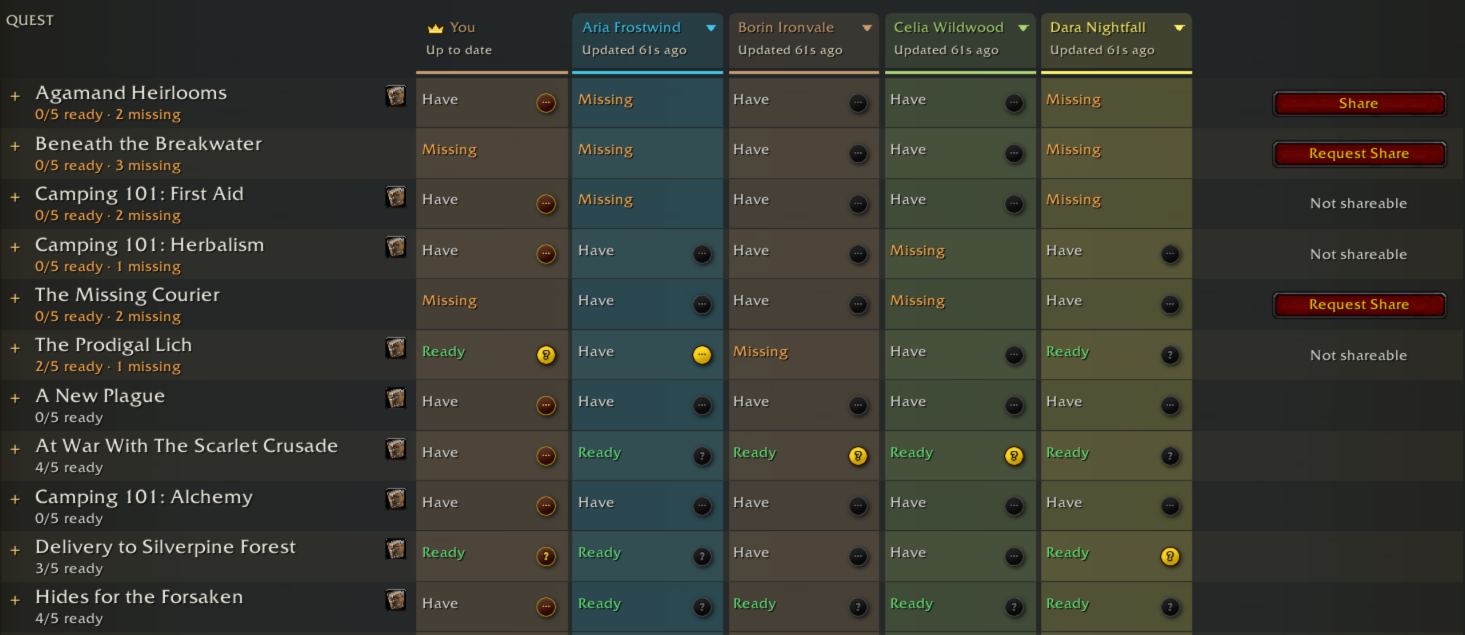
Choose your quest or follow a teammate
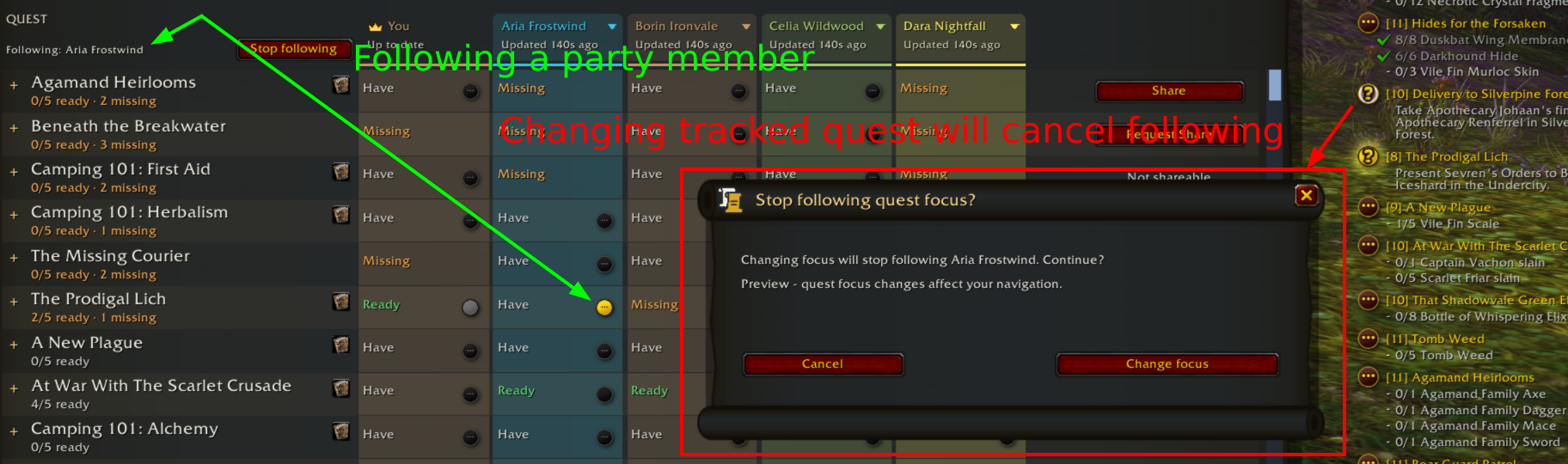
- The small quest buttons show each player’s focus. Click one in your column to change your Blizzard super-tracked quest, or click a teammate’s active quest to follow them. While following, only their active button stays colored; other teammates’ active buttons remain clickable to switch targets. Following matches new focus updates for quests you own and survives reloads. If you lack their next quest, QT stops following and offers to open Party Quest Log.
Forever

Change focus with confidence
- The Following indicator identifies your target, with Stop following beside it. Choosing your own quest or another teammate asks before ending the current follow. Changing or clearing quest focus in Blizzard’s tracker also asks: QT restores the followed focus while you decide. Cancel keeps following; Change focus applies your choice. Clearing the followed player’s focus leaves your current quest alone. Leaving the party or converting to a raid ends following.
Forever
Expand progress and find the right quest
- Click a quest row to expand each member’s objective details, counts, and progress bars. Several quests can stay expanded at once. Search and Filters narrow the list by ownership, progress, and available actions. The small book button opens a quest you own in Blizzard’s Quest Log. Remote quest progress is a snapshot: check its age beneath the player’s name and use Refresh for an update.
Try following without a real party
- Run /qt preview compare to combine your real quest log with four simulated teammates and a few extra missing quests. Its focus buttons change your real navigation; sharing stays simulated. Use a teammate’s name menu and Preview next focused quest to test automatic following and missing-quest handling. Changing focus in Blizzard’s tracker tests the confirmation too. Closing the preview resumes an existing real-party follow. Use /qt preview unfollow to preview only the warning dialog.
Install: extract QuestTogether-6.5.3.zip into Interface/AddOns, preserving the single QuestTogether folder.
Source commit: 83f219ee62991c36149dcf4f7ffde3a782deab0a. Private library: libchev 1.2.4 at 22ac914101983edb4da5726e07795450c68e74ad.
QuestTogether 6.5.2
Clearer quest focus buttons, safer changes while following, and icons that match the native quest tracker.
Clear focus controls
- While following, only the followed player’s active quest button stays colored. Without a follow, your buttons and teammates’ active quests stay colored. All other buttons are gray, with no fading. Teammates’ active quests remain clickable to start or switch following.
Confirm before changing focus
- Choosing your own quest or switching teammates asks before ending the current follow. Changing or clearing quest focus through Blizzard’s tracker now asks too: QT restores the followed focus while you decide. Cancel keeps following; Change focus applies your choice. Preview the dialog with /qt preview unfollow.
Matching quest icons
- Quest readiness now uses the same completion query as Blizzard’s tracker, fixing delivery quests that showed an in-progress icon instead of a question mark. The corrected Ready status is also included in shared Party Quest Log snapshots.
Test with your own quests
- The compare preview now uses your real quest log with four simulated teammates and extra missing quests. Focus controls change your real Blizzard navigation; sharing stays simulated. Use a teammate’s name menu to advance their focused quest. Quests that cannot be shared now show a centered Not shareable or Shareability unknown label instead of a blank action column. Closing the preview resumes any existing real-party follow.
Install: extract QuestTogether-6.5.2.zip into Interface/AddOns, preserving the single QuestTogether folder.
Source commit: 3a60f70dd22cd218dc6bac245bc628055f22efb6. Private library: libchev 1.2.4 at 22ac914101983edb4da5726e07795450c68e74ad.
QuestTogether 6.5.0
Control quest focus directly in Party Quest Log, and keep following your party through reloads.
Quest focus buttons
- Blizzard-style quest buttons now appear in each player’s quest column, replacing focused quest titles in the headers. Click a button in your column to change your super-tracked quest. Selected buttons show each teammate’s focus; click theirs to follow them.
Following that lasts
- Your follow choice is saved per character across reloads and waits through temporary data gaps. Fresh party updates keep your focus matched when you own the quest. Choosing your own navigation stops following, as do a departed teammate, a disbanded party, or conversion to a raid.
When you are missing the quest
- If the player you follow focuses a quest you do not have, following stops without changing your navigation. A themed dialog explains and opens Party Quest Log so you can request the quest and follow again. Try /qt preview focus for the dialog, or /qt preview compare to test the buttons and simulated focus changes.
Install: extract QuestTogether-6.5.0.zip into Interface/AddOns, preserving the single QuestTogether folder.
Source commit: 761cc4f0a3dffa2afa4689489a91a4628d24b420. Private library: libchev 1.2.4 at 22ac914101983edb4da5726e07795450c68e74ad.
QuestTogether 6.4.3
Fixes for quest focus and party tooltips, plus simpler map display settings.
Your quest focus
- Your Party Quest Log header now reads your own focused quest directly, including while solo or with quest-focus sharing off. Changing your super-tracked quest updates the header without needing Refresh.
Party tooltip rosters
- Small-party tooltips immediately list the hovered player alongside the leader while the full roster loads. The loading message appears only when other members are still missing; groups larger than five still show only the leader.
Simpler map settings
- One Show other players on the map and minimap checkbox now controls both displays. Sharing your own location stays independent. Existing settings keep display enabled if either map was enabled, or disabled if both were off.
Install: extract QuestTogether-6.4.3.zip into Interface/AddOns, preserving the single QuestTogether folder.
Source commit: df2d6f2c715b224f74083d3c7007c1492920762e. Private library: libchev 1.2.4 at 22ac914101983edb4da5726e07795450c68e74ad.