Repository navigation
QuestTogether 6.5.3

A closer look at Party Quest Log: compare quests, coordinate your next objective, and follow a teammate’s quest focus. This patch expands the guide and adds three screenshots; gameplay is unchanged. The screenshots show Forever preview data with simulated teammates.
Your party at a glance
- Left-click the QT minimap button to open or close Party Quest Log. Your column stays first, class colors distinguish teammates, and a crown marks the leader. Each quest shows who has it, who is missing it, and how many players are ready to turn it in. Share and Request Share appear where supported; Not shareable and Shareability unknown explain unavailable actions. Sharing still depends on Blizzard’s rules and the recipient’s eligibility.
Forever
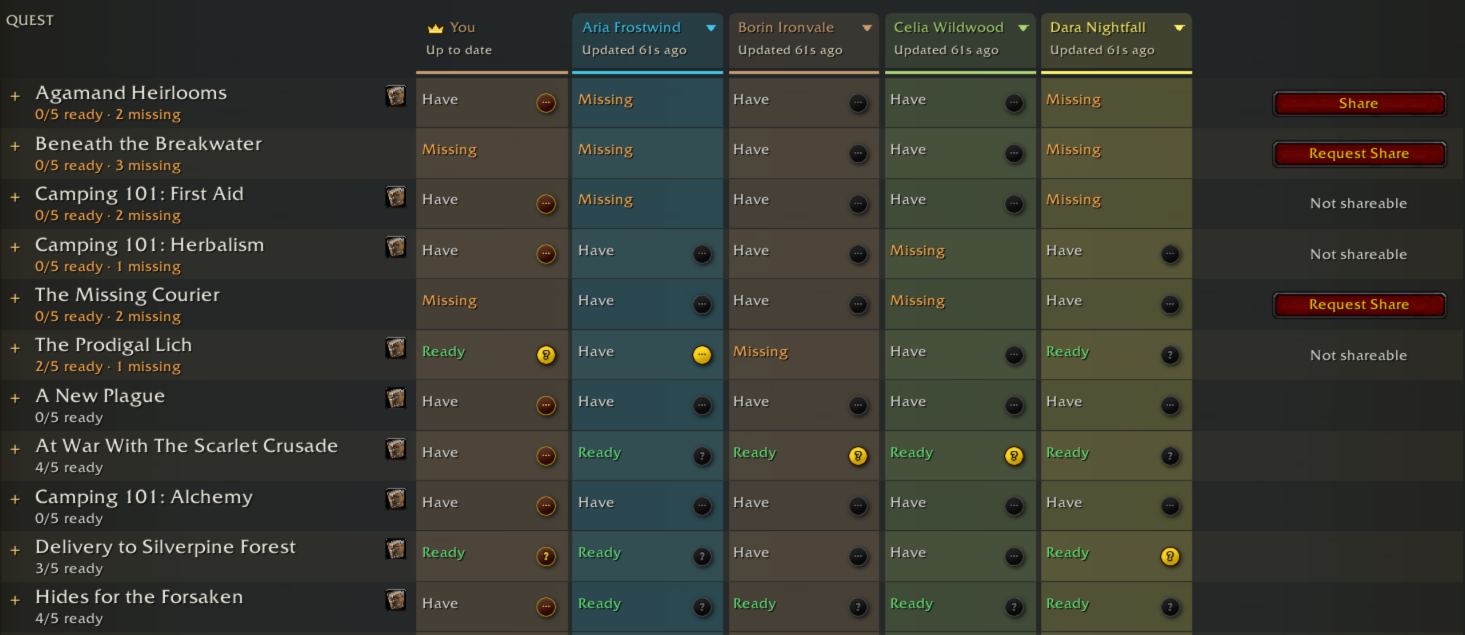
Choose your quest or follow a teammate
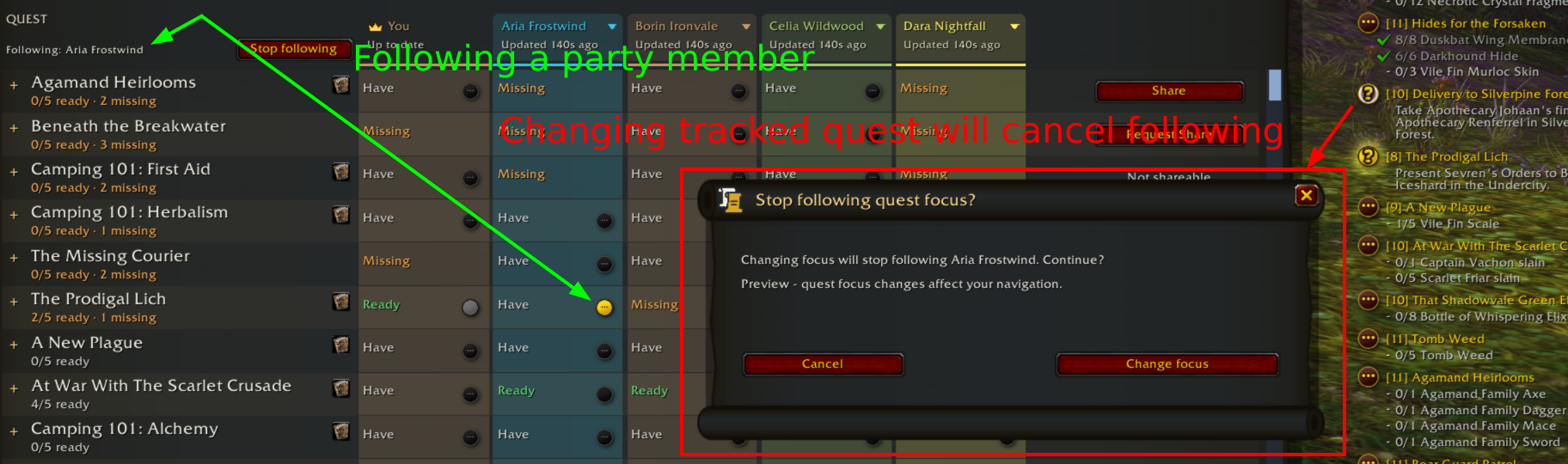
- The small quest buttons show each player’s focus. Click one in your column to change your Blizzard super-tracked quest, or click a teammate’s active quest to follow them. While following, only their active button stays colored; other teammates’ active buttons remain clickable to switch targets. Following matches new focus updates for quests you own and survives reloads. If you lack their next quest, QT stops following and offers to open Party Quest Log.
Forever

Change focus with confidence
- The Following indicator identifies your target, with Stop following beside it. Choosing your own quest or another teammate asks before ending the current follow. Changing or clearing quest focus in Blizzard’s tracker also asks: QT restores the followed focus while you decide. Cancel keeps following; Change focus applies your choice. Clearing the followed player’s focus leaves your current quest alone. Leaving the party or converting to a raid ends following.
Forever
Expand progress and find the right quest
- Click a quest row to expand each member’s objective details, counts, and progress bars. Several quests can stay expanded at once. Search and Filters narrow the list by ownership, progress, and available actions. The small book button opens a quest you own in Blizzard’s Quest Log. Remote quest progress is a snapshot: check its age beneath the player’s name and use Refresh for an update.
Try following without a real party
- Run /qt preview compare to combine your real quest log with four simulated teammates and a few extra missing quests. Its focus buttons change your real navigation; sharing stays simulated. Use a teammate’s name menu and Preview next focused quest to test automatic following and missing-quest handling. Changing focus in Blizzard’s tracker tests the confirmation too. Closing the preview resumes an existing real-party follow. Use /qt preview unfollow to preview only the warning dialog.
Install: extract QuestTogether-6.5.3.zip into Interface/AddOns, preserving the single QuestTogether folder.
Source commit: 83f219ee62991c36149dcf4f7ffde3a782deab0a. Private library: libchev 1.2.4 at 22ac914101983edb4da5726e07795450c68e74ad.