Repository navigation
YetAnotherPDFReader v0.2.0 — 页面编辑、水印与密码保护,新增 Linux · Page editing, watermarks, passwords & Linux


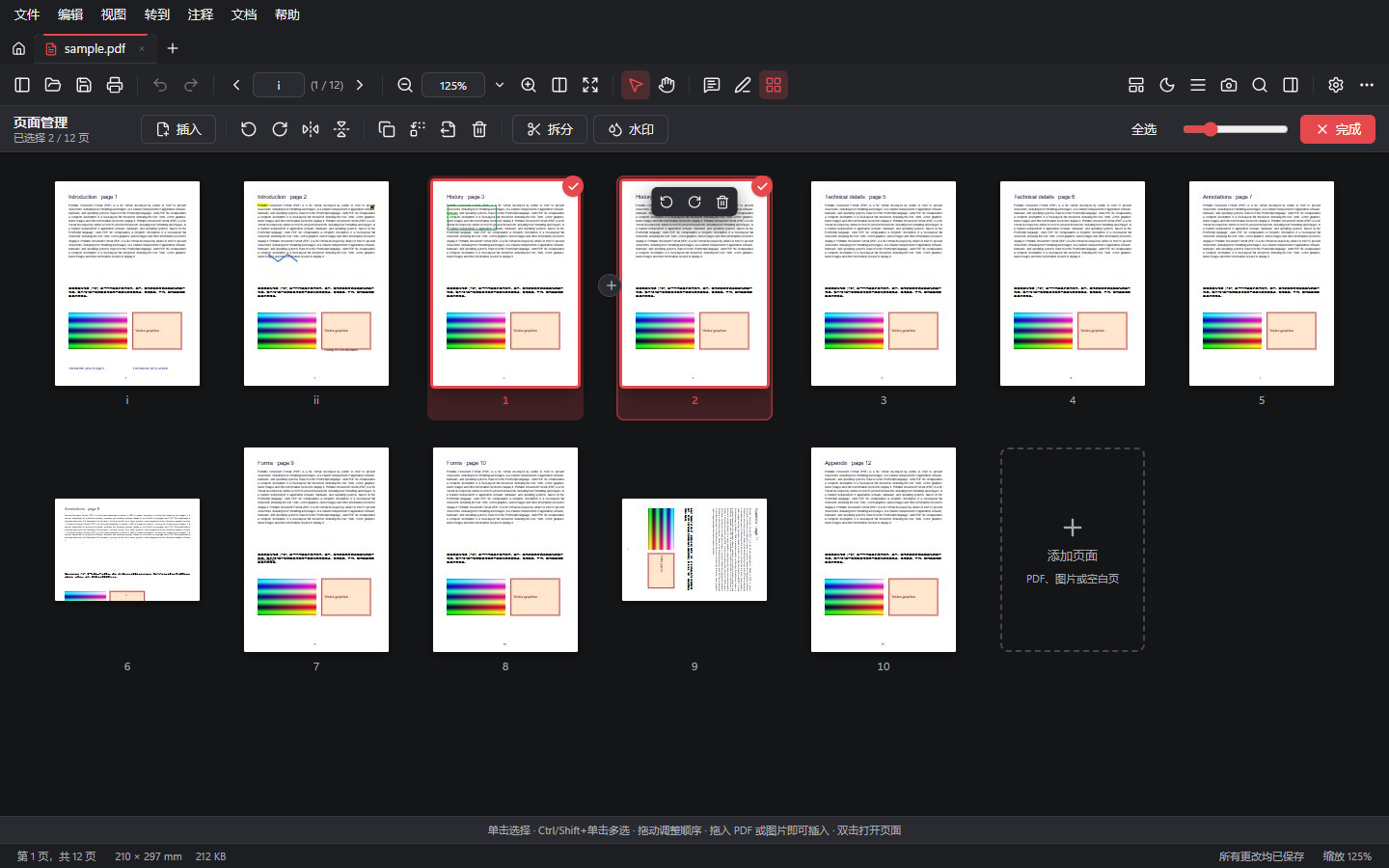
页面编辑、合并、水印与密码保护 · Page editing, merging, watermarks and password protection
🐧 Linux
本版本起提供 Linux 版本(deb、rpm、AppImage)· Linux builds are available from this release on (deb, rpm, AppImage).
✨ 新功能 · New
- 🗂️ 页面管理(
Ctrl+Shift+O):大缩略图网格;多选、拖动排序、悬停快捷操作;从资源管理器拖入文件即可插入;快捷键R/Ctrl+D/Delete
Page organizer: large thumbnail grid, multi-select, drag to reorder, hover actions, drop files from Explorer to insert,R/Ctrl+D/Delete - 📎 合并多个 PDF 和图片(JPG、PNG、WebP、GIF、BMP),可为每个 PDF 选择页码范围,图片可适应 A4、Letter 或当前页尺寸,JPEG 照片不重新压缩并按 EXIF 方向摆正
Combine PDFs and pictures with per-file page ranges; pictures fit A4, Letter or the current page; JPEGs embedded unchanged and upright (EXIF) - 🔄 旋转选中或全部页面、水平或垂直翻转、复制、替换、拆分文档
Rotate selected or all pages, flip, duplicate, replace, split documents - 💧 水印:文字或图片,九宫格位置或平铺,不透明度、角度、上下层可调,实时预览
Watermarks: text or picture, nine positions or tiled, opacity, angle, above or behind, live preview - 🔐 密码保护(AES-256):打开密码、权限限制、密码强度提示、一键移除
Password protection (AES-256): open password, permissions, strength meter, one-step removal
🛠️ 改进 · Improved
- 加密文档在页面操作或撤销后不再重复要求输入密码 · Protected documents no longer ask for the password again after page operations
- 剪贴板被其他程序短暂占用时,截图会自动重试复制 · Snapshots retry when the clipboard is briefly busy
完整更新日志 · Full changelog:CHANGELOG.md
📥 下载 · Downloads
| 文件 · File | 说明 · Notes |
|---|---|
YetAnotherPDFReader_0.2.0_x64-setup.exe |
安装版(推荐),无需管理员权限 · Installer (recommended), no admin rights |
YetAnotherPDFReader_0.2.0_x64_en-US.msi |
MSI 安装包 · MSI package |
YetAnotherPDFReader_0.2.0_x64_portable.zip |
便携版:解压即用 · Portable: unzip and run |
🐧 YetAnotherPDFReader_0.2.0_amd64.deb |
Debian / Ubuntu / Linux Mint:sudo apt install ./YetAnotherPDFReader_0.2.0_amd64.deb |
🐧 YetAnotherPDFReader-0.2.0-1.x86_64.rpm |
Fedora / openSUSE:sudo dnf install ./YetAnotherPDFReader-0.2.0-1.x86_64.rpm |
🐧 YetAnotherPDFReader_0.2.0_amd64.AppImage |
任意发行版,chmod +x 后直接运行 · any distribution: chmod +x and run |
系统要求 · Requirements:Windows 10 / 11 x64(Microsoft Edge WebView2);Linux x86_64,glibc 2.35+(Ubuntu 22.04、Debian 12、Fedora 36 及更新版本),WebKitGTK 4.1。安装包暂未签名,如出现 SmartScreen 提示,请点「更多信息」→「仍要运行」· Not code-signed yet; on SmartScreen choose "More info" → "Run anyway".
🔐 SHA-256
457629d20e6cd950e742244749a07d46dcd8d556376dbcfe8acd758d26b05faf  YetAnotherPDFReader_0.2.0_x64-setup.exe
d1cfb2708463a632d31110b73a4b110d8bc8b139db6e6af6cca6cf8fd1057a2d  YetAnotherPDFReader_0.2.0_x64_en-US.msi
f8ee4641979acf5266e91cfd49f642e422d47757a09ea08c5d05cf5c20e9cc1d  YetAnotherPDFReader_0.2.0_x64_portable.zip
2629350b1fdf2ff95641d8241144eb8486167761fd9966cc43b2c799f5beae25  YetAnotherPDFReader_0.2.0_amd64.deb
233480d750070eba5483abf67675f89933b2073896430b9d39be0dc8f7dc5d33  YetAnotherPDFReader-0.2.0-1.x86_64.rpm
af0decb74482221bb818ead4d07069c2709affa4f2e6115a74bbec74ef42a7c3  YetAnotherPDFReader_0.2.0_amd64.AppImage