Repository navigation
Releases: AlexEisie/YetAnotherPDFReader
Release list
YetAnotherPDFReader v0.4.0 — 使用说明与检查更新 · User guide & update check


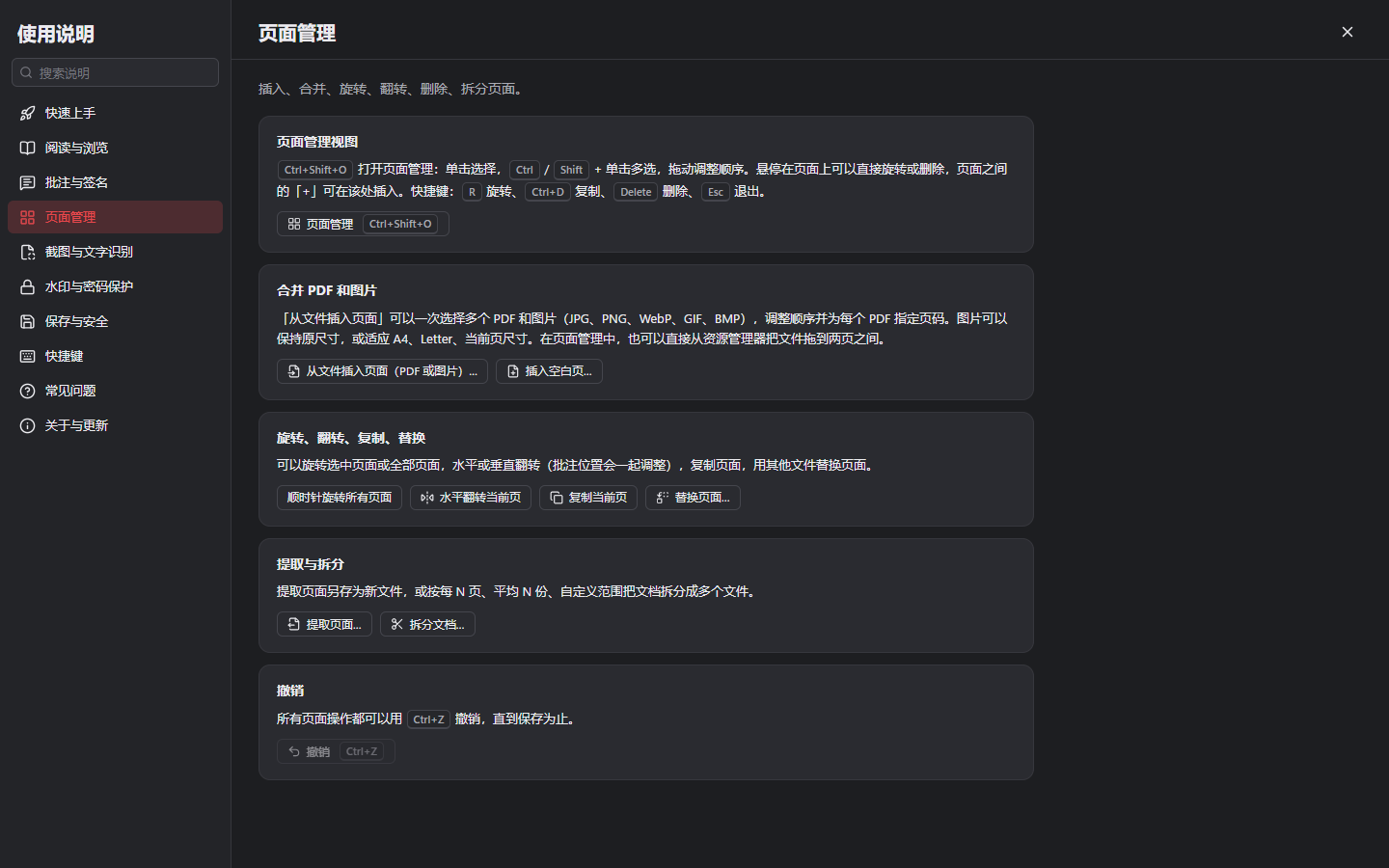
使用说明、检查更新与新功能介绍 · User guide, update check and what's new
✨ 新功能 · New
- 📖 应用内使用说明(
F1):10 个主题介绍各项功能,可以搜索;说明旁的按钮可直接打开对应功能;快捷键列表随自定义设置实时更新
In-app user guide (F1): 10 topics with search; buttons next to the explanations open the features; the shortcut list follows your customisations - 🔄 检查更新(「帮助 ▸ 检查更新」):显示新版本的更新说明,并按安装方式(安装版、便携版、deb、rpm、AppImage)给出下载链接;可以跳过某个版本
Check for updates (Help ▸ Check for Updates): release notes and the right download for how the app was installed (installer, portable, deb, rpm, AppImage); a version can be skipped - ⏰ 可选每天 / 每周自动检查,发现新版本时显示通知。默认关闭,只访问 GitHub,不发送任何个人数据
Optional daily / weekly automatic check with a notification. Off by default; it only contacts GitHub and sends no personal data - 🎉 新功能介绍:以后每次更新后第一次启动,会分条列出从你上次使用的版本到新版本的主要变化;也可以在「帮助 ▸ 新功能介绍」中查看
What's new: from now on, the first start after an update lists the main changes since the version you used before; also under Help ▸ What's New - ℹ️ 「关于」页面整合了版本信息、项目链接、数据和日志文件夹、开源许可 · The About page gathers the version, links, data and log folders and licences
完整更新日志 · Full changelog:CHANGELOG.md
📥 下载 · Downloads
| 文件 · File | 说明 · Notes |
|---|---|
YetAnotherPDFReader_0.4.0_x64-setup.exe |
Windows 安装版(推荐),无需管理员权限 · Windows installer (recommended), no admin rights |
YetAnotherPDFReader_0.4.0_x64_en-US.msi |
Windows MSI 安装包 · Windows MSI package |
YetAnotherPDFReader_0.4.0_x64_portable.zip |
Windows 便携版:解压即用 · Windows portable: unzip and run |
🐧 YetAnotherPDFReader_0.4.0_amd64.deb |
Debian / Ubuntu / Linux Mint:sudo apt install ./YetAnotherPDFReader_0.4.0_amd64.deb |
🐧 YetAnotherPDFReader-0.4.0-1.x86_64.rpm |
Fedora / openSUSE:sudo dnf install ./YetAnotherPDFReader-0.4.0-1.x86_64.rpm |
🐧 YetAnotherPDFReader_0.4.0_amd64.AppImage |
任意发行版,chmod +x 后直接运行 · any distribution: chmod +x and run |
系统要求 · Requirements:Windows 10 / 11 x64(Microsoft Edge WebView2);Linux x86_64,glibc 2.35+(Ubuntu 22.04、Debian 12、Fedora 36 及更新版本),WebKitGTK 4.1。安装包暂未签名,如出现 SmartScreen 提示,请点「更多信息」→「仍要运行」· Not code-signed yet; on SmartScreen choose "More info" → "Run anyway".
🔐 SHA-256
25ad83ac233749f301c288cb812ad96eabd8c0a93a8dab575182476dd90e8b96  YetAnotherPDFReader_0.4.0_x64-setup.exe
8d7002ba408befe94026a62ee13f836b87325c41ce4d664396cf5e564483d834  YetAnotherPDFReader_0.4.0_x64_en-US.msi
4b5e9061373aa0b48c895722938153a3483bc6d6c5be757ada26c0d5c440be41  YetAnotherPDFReader_0.4.0_x64_portable.zip
b1744243d0fbf7fcf95f4c716e4d74c9e0f3a5d4706eae494af8564442dce5f6  YetAnotherPDFReader_0.4.0_amd64.deb
e15f99a50dc9ecb511bc1cbb0d87cdcd807a1c00a6950fbd0130221a6f7e5d98  YetAnotherPDFReader-0.4.0-1.x86_64.rpm
a3ad9577420d9e6eead72f586e7e0e250e7575b3461d4b69bd5b166ade0dcb60  YetAnotherPDFReader_0.4.0_amd64.AppImage
YetAnotherPDFReader v0.3.0 — 离线文字识别(OCR)· Offline OCR
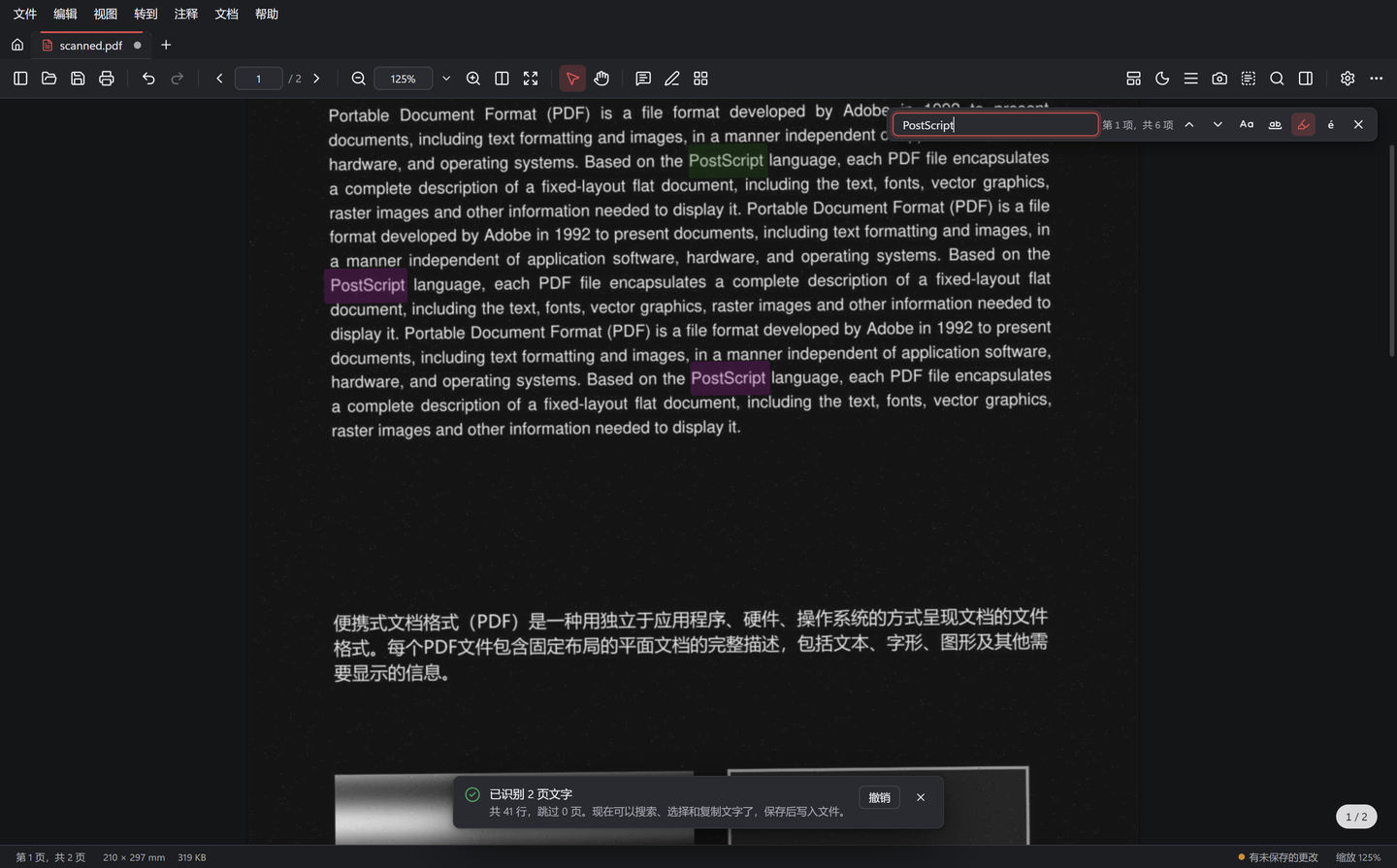
离线文字识别(OCR) · Offline text recognition (OCR)
✨ 新功能 · New
- 🔎 框选识别文字(
Ctrl+Alt+T):在任意页面(包括扫描件和图片)上框选区域,识别结果可修改后一键复制
Recognize text in a region (Ctrl+Alt+T): drag over any page, scans and pictures included, then edit and copy the text - 📄 让扫描件可搜索:「文档 ▸ 文字识别(OCR)」为页面添加不可见的文字层,扫描件随即可以搜索、选择和复制,页面外观不变;默认跳过已有文字的页面,显示进度并可随时取消,保存前可撤销
Searchable scans: Document ▸ Recognize Text (OCR) adds an invisible text layer, so scans can be searched, selected and copied without changing how they look. Pages with text are skipped by default; progress and cancel; undoable until saved - 💡 打开扫描文档时自动提示进行识别(可在「设置 ▸ 阅读」中关闭)· Scanned documents are detected when opened (can be turned off in Settings ▸ Reading)
- 🔒 完全离线:采用 PaddleOCR PP-OCRv6 模型和 ONNX Runtime,中文、英文印刷体识别准确,约 0.2 秒/页,不上传任何内容
Fully offline: PaddleOCR PP-OCRv6 on ONNX Runtime, accurate for printed Chinese and English, ~0.2 s per page, nothing is uploaded
实测对比(字符错误率)· Benchmark (character error rate):PP-OCRv6 tiny 2.55%(中文扫描页 0%,0.17 秒/页)· Tesseract 4 4.77%(中文扫描页 10.8%,1.14 秒/页)。详见 · Details: docs/ocr.md
安装包增大到约 15 MB(Linux deb/rpm 约 19 MB),增加的部分是离线 OCR 引擎。
The installer grows to ~15 MB (Linux deb/rpm ~19 MB); the extra size is the offline OCR engine.
完整更新日志 · Full changelog:CHANGELOG.md
📥 下载 · Downloads
| 文件 · File | 说明 · Notes |
|---|---|
YetAnotherPDFReader_0.3.0_x64-setup.exe |
Windows 安装版(推荐),无需管理员权限 · Windows installer (recommended), no admin rights |
YetAnotherPDFReader_0.3.0_x64_en-US.msi |
Windows MSI 安装包 · Windows MSI package |
YetAnotherPDFReader_0.3.0_x64_portable.zip |
Windows 便携版:解压即用 · Windows portable: unzip and run |
🐧 YetAnotherPDFReader_0.3.0_amd64.deb |
Debian / Ubuntu / Linux Mint:sudo apt install ./YetAnotherPDFReader_0.3.0_amd64.deb |
🐧 YetAnotherPDFReader-0.3.0-1.x86_64.rpm |
Fedora / openSUSE:sudo dnf install ./YetAnotherPDFReader-0.3.0-1.x86_64.rpm |
🐧 YetAnotherPDFReader_0.3.0_amd64.AppImage |
任意发行版,chmod +x 后直接运行 · any distribution: chmod +x and run |
系统要求 · Requirements:Windows 10 / 11 x64(Microsoft Edge WebView2);Linux x86_64,glibc 2.35+(Ubuntu 22.04、Debian 12、Fedora 36 及更新版本),WebKitGTK 4.1。安装包暂未签名,如出现 SmartScreen 提示,请点「更多信息」→「仍要运行」· Not code-signed yet; on SmartScreen choose "More info" → "Run anyway".
🔐 SHA-256
6c8eabd0bc9723cff41243fbccc5cb9ea6af76f65385a9540d6db96af1fe4dda  YetAnotherPDFReader_0.3.0_x64-setup.exe
600815a6f35391835730955515b6660729bd6230173be83bf1ab551f627e7e56  YetAnotherPDFReader_0.3.0_x64_en-US.msi
828918082f9b710f67a0a9345fb7142b1450c4ebc33fa959ac6a7045c29cffb9  YetAnotherPDFReader_0.3.0_x64_portable.zip
172e5cdb9ace6a1c22e25dc3f22afd960729d48f5bdb418a542a0c80a75bdde4  YetAnotherPDFReader_0.3.0_amd64.deb
706df1ce46161d46a2d6c04f1ec2394466589ec6095c2d4f32e423bf608fa41e  YetAnotherPDFReader-0.3.0-1.x86_64.rpm
733f883dc28e788f749a10ab7ba3011322917c56f5e759fb836c22c941d2136e  YetAnotherPDFReader_0.3.0_amd64.AppImage
YetAnotherPDFReader v0.2.0 — 页面编辑、水印与密码保护,新增 Linux · Page editing, watermarks, passwords & Linux
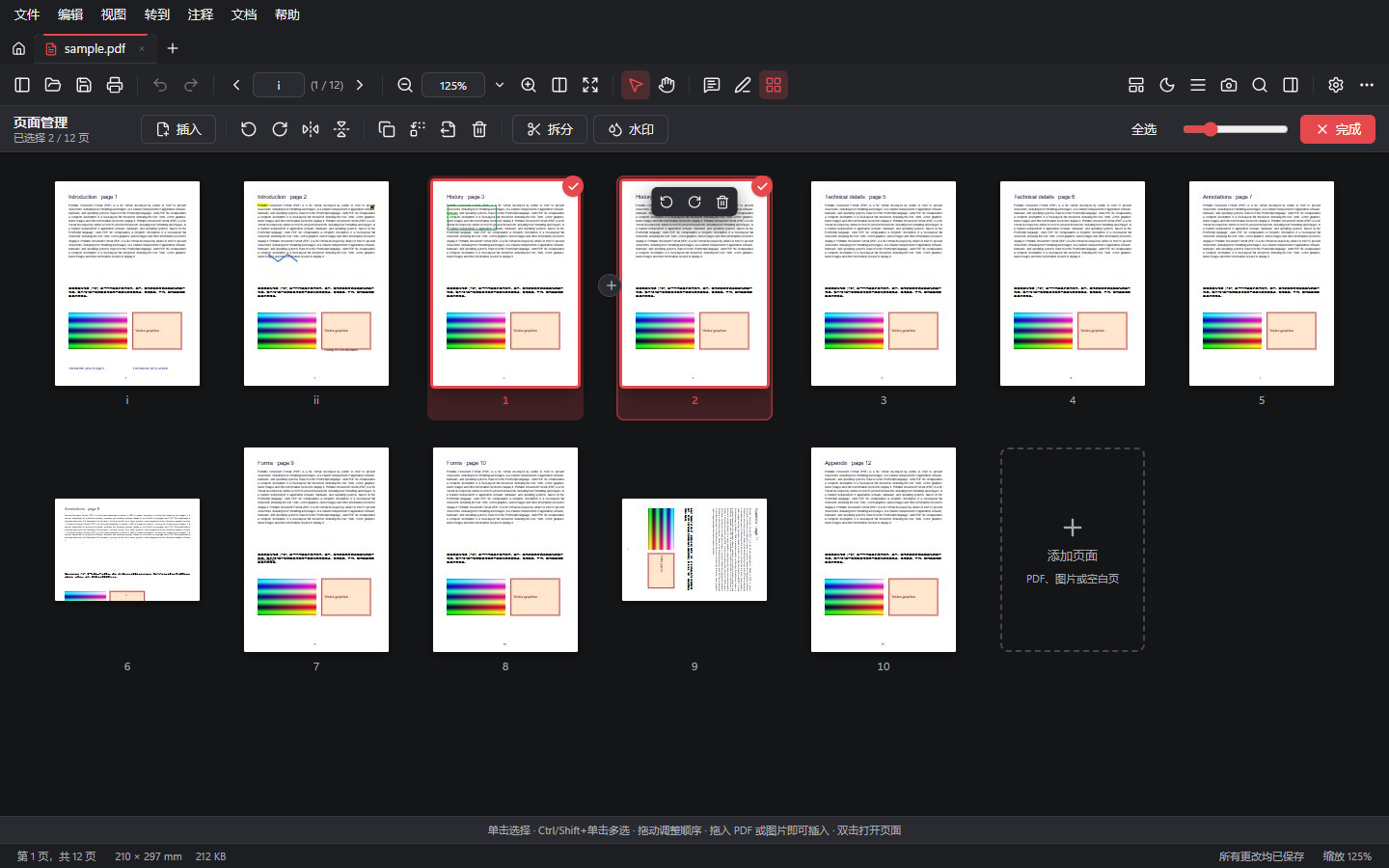
页面编辑、合并、水印与密码保护 · Page editing, merging, watermarks and password protection
🐧 Linux
本版本起提供 Linux 版本(deb、rpm、AppImage)· Linux builds are available from this release on (deb, rpm, AppImage).
✨ 新功能 · New
- 🗂️ 页面管理(
Ctrl+Shift+O):大缩略图网格;多选、拖动排序、悬停快捷操作;从资源管理器拖入文件即可插入;快捷键R/Ctrl+D/Delete
Page organizer: large thumbnail grid, multi-select, drag to reorder, hover actions, drop files from Explorer to insert,R/Ctrl+D/Delete - 📎 合并多个 PDF 和图片(JPG、PNG、WebP、GIF、BMP),可为每个 PDF 选择页码范围,图片可适应 A4、Letter 或当前页尺寸,JPEG 照片不重新压缩并按 EXIF 方向摆正
Combine PDFs and pictures with per-file page ranges; pictures fit A4, Letter or the current page; JPEGs embedded unchanged and upright (EXIF) - 🔄 旋转选中或全部页面、水平或垂直翻转、复制、替换、拆分文档
Rotate selected or all pages, flip, duplicate, replace, split documents - 💧 水印:文字或图片,九宫格位置或平铺,不透明度、角度、上下层可调,实时预览
Watermarks: text or picture, nine positions or tiled, opacity, angle, above or behind, live preview - 🔐 密码保护(AES-256):打开密码、权限限制、密码强度提示、一键移除
Password protection (AES-256): open password, permissions, strength meter, one-step removal
🛠️ 改进 · Improved
- 加密文档在页面操作或撤销后不再重复要求输入密码 · Protected documents no longer ask for the password again after page operations
- 剪贴板被其他程序短暂占用时,截图会自动重试复制 · Snapshots retry when the clipboard is briefly busy
完整更新日志 · Full changelog:CHANGELOG.md
📥 下载 · Downloads
| 文件 · File | 说明 · Notes |
|---|---|
YetAnotherPDFReader_0.2.0_x64-setup.exe |
安装版(推荐),无需管理员权限 · Installer (recommended), no admin rights |
YetAnotherPDFReader_0.2.0_x64_en-US.msi |
MSI 安装包 · MSI package |
YetAnotherPDFReader_0.2.0_x64_portable.zip |
便携版:解压即用 · Portable: unzip and run |
🐧 YetAnotherPDFReader_0.2.0_amd64.deb |
Debian / Ubuntu / Linux Mint:sudo apt install ./YetAnotherPDFReader_0.2.0_amd64.deb |
🐧 YetAnotherPDFReader-0.2.0-1.x86_64.rpm |
Fedora / openSUSE:sudo dnf install ./YetAnotherPDFReader-0.2.0-1.x86_64.rpm |
🐧 YetAnotherPDFReader_0.2.0_amd64.AppImage |
任意发行版,chmod +x 后直接运行 · any distribution: chmod +x and run |
系统要求 · Requirements:Windows 10 / 11 x64(Microsoft Edge WebView2);Linux x86_64,glibc 2.35+(Ubuntu 22.04、Debian 12、Fedora 36 及更新版本),WebKitGTK 4.1。安装包暂未签名,如出现 SmartScreen 提示,请点「更多信息」→「仍要运行」· Not code-signed yet; on SmartScreen choose "More info" → "Run anyway".
🔐 SHA-256
457629d20e6cd950e742244749a07d46dcd8d556376dbcfe8acd758d26b05faf  YetAnotherPDFReader_0.2.0_x64-setup.exe
d1cfb2708463a632d31110b73a4b110d8bc8b139db6e6af6cca6cf8fd1057a2d  YetAnotherPDFReader_0.2.0_x64_en-US.msi
f8ee4641979acf5266e91cfd49f642e422d47757a09ea08c5d05cf5c20e9cc1d  YetAnotherPDFReader_0.2.0_x64_portable.zip
2629350b1fdf2ff95641d8241144eb8486167761fd9966cc43b2c799f5beae25  YetAnotherPDFReader_0.2.0_amd64.deb
233480d750070eba5483abf67675f89933b2073896430b9d39be0dc8f7dc5d33  YetAnotherPDFReader-0.2.0-1.x86_64.rpm
af0decb74482221bb818ead4d07069c2709affa4f2e6115a74bbec74ef42a7c3  YetAnotherPDFReader_0.2.0_amd64.AppImage
YetAnotherPDFReader v0.1.0 — 首个 Windows 版本 · First Windows release
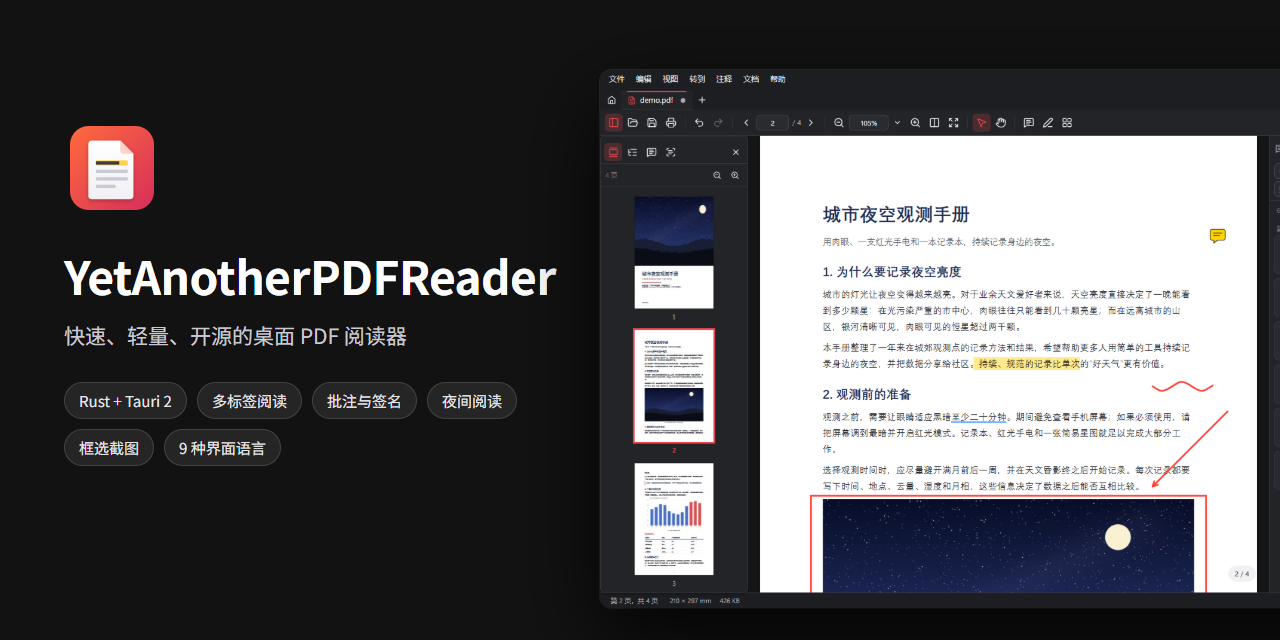
YetAnotherPDFReader 的第一个 Windows 版本! · The first Windows release of YetAnotherPDFReader!
📥 下载 · Downloads
| 文件 · File | 说明 · Notes |
|---|---|
YetAnotherPDFReader_0.1.0_x64-setup.exe |
安装版(推荐):安装到当前用户,无需管理员权限,自动关联 .pdf Installer (recommended): per-user, no admin rights, registers .pdf |
YetAnotherPDFReader_0.1.0_x64_en-US.msi |
MSI 安装包,适合批量部署 · MSI package for managed deployment |
YetAnotherPDFReader_0.1.0_x64_portable.zip |
便携版:解压即用,数据保存在程序旁的 data 文件夹Portable: unzip and run; data stays in a data folder next to the program |
系统要求 · Requirements:Windows 10 / 11 x64,Microsoft Edge WebView2(Windows 11 已内置 · built into Windows 11)。
安装包暂未签名,如出现 SmartScreen 提示,请点「更多信息」→「仍要运行」。
The binaries are not code-signed yet; if SmartScreen warns, choose "More info" → "Run anyway".
✨ 主要功能 · Highlights
- 🪶 约 5 MB 安装包,完全离线,无账号、无广告、无遥测 · ~5 MB installer, fully offline, no account / ads / telemetry
- 📑 多标签、多种页面布局、书签 / 缩略图 / 批注 / 附件 / 图层 / 全文搜索侧栏 · Tabs, page layouts, sidebar with thumbnails, bookmarks, comments, attachments, layers and search
- ✍️ 高亮、便笺与回复、图形、手绘、图章、签名,文件中已有的批注也可编辑 · Highlights, notes with replies, shapes, ink, stamps, signatures — existing comments are editable too
- 📄 免费页面整理:插入、删除、旋转、重排、提取,全部可撤销 · Free page organisation (insert, delete, rotate, reorder, extract) with undo
- 🛡️ 增量 + 原子保存,数字签名保持有效;崩溃恢复;检测外部修改 · Incremental, atomic saving that keeps signatures valid; crash recovery; external change detection
- 🌙 深色 / 夜间(图片保持原色)/ 棕褐 / 护眼 / 自定义页面配色 · Dark, night (natural images), sepia, green and custom page colours
- 📸 框选截图:按 PDF 重新渲染(最高 600 DPI)直接复制到剪贴板 · Region snapshots re-rendered from the PDF (up to 600 DPI), copied to the clipboard
- ⌨️ 命令面板、自定义快捷键、9 种界面语言 · Command palette, customisable shortcuts, 9 UI languages
完整介绍见 · See the README(中文) / README (English)。
🔐 SHA-256
c708e1aca7865dd22b816a0bcea6cc703e3936c48609313e223e682e69dd9918  YetAnotherPDFReader_0.1.0_x64-setup.exe
cf6b821810d8503685c3036e1b7ac14b40802c2f2122d5518c676892949a8266  YetAnotherPDFReader_0.1.0_x64_en-US.msi
de6e17ea879b773aee3e5081942255daa66c3fc6d256b010ef273ff4b58840ef  YetAnotherPDFReader_0.1.0_x64_portable.zip