Repository navigation
YetAnotherPDFReader v0.3.0 — 离线文字识别(OCR)· Offline OCR


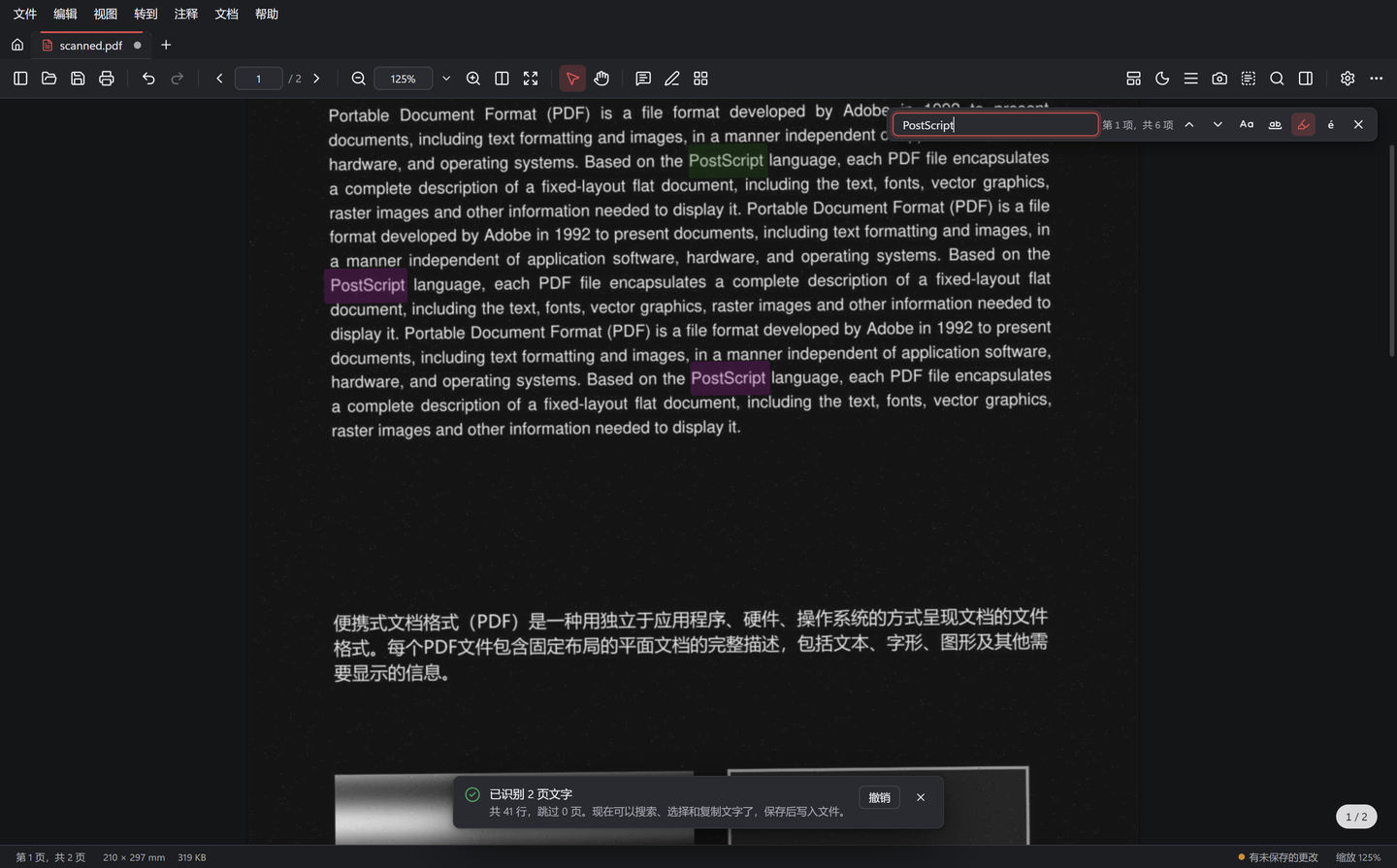
离线文字识别(OCR) · Offline text recognition (OCR)
✨ 新功能 · New
- 🔎 框选识别文字(
Ctrl+Alt+T):在任意页面(包括扫描件和图片)上框选区域,识别结果可修改后一键复制
Recognize text in a region (Ctrl+Alt+T): drag over any page, scans and pictures included, then edit and copy the text - 📄 让扫描件可搜索:「文档 ▸ 文字识别(OCR)」为页面添加不可见的文字层,扫描件随即可以搜索、选择和复制,页面外观不变;默认跳过已有文字的页面,显示进度并可随时取消,保存前可撤销
Searchable scans: Document ▸ Recognize Text (OCR) adds an invisible text layer, so scans can be searched, selected and copied without changing how they look. Pages with text are skipped by default; progress and cancel; undoable until saved - 💡 打开扫描文档时自动提示进行识别(可在「设置 ▸ 阅读」中关闭)· Scanned documents are detected when opened (can be turned off in Settings ▸ Reading)
- 🔒 完全离线:采用 PaddleOCR PP-OCRv6 模型和 ONNX Runtime,中文、英文印刷体识别准确,约 0.2 秒/页,不上传任何内容
Fully offline: PaddleOCR PP-OCRv6 on ONNX Runtime, accurate for printed Chinese and English, ~0.2 s per page, nothing is uploaded
实测对比(字符错误率)· Benchmark (character error rate):PP-OCRv6 tiny 2.55%(中文扫描页 0%,0.17 秒/页)· Tesseract 4 4.77%(中文扫描页 10.8%,1.14 秒/页)。详见 · Details: docs/ocr.md
安装包增大到约 15 MB(Linux deb/rpm 约 19 MB),增加的部分是离线 OCR 引擎。
The installer grows to ~15 MB (Linux deb/rpm ~19 MB); the extra size is the offline OCR engine.
完整更新日志 · Full changelog:CHANGELOG.md
📥 下载 · Downloads
| 文件 · File | 说明 · Notes |
|---|---|
YetAnotherPDFReader_0.3.0_x64-setup.exe |
Windows 安装版(推荐),无需管理员权限 · Windows installer (recommended), no admin rights |
YetAnotherPDFReader_0.3.0_x64_en-US.msi |
Windows MSI 安装包 · Windows MSI package |
YetAnotherPDFReader_0.3.0_x64_portable.zip |
Windows 便携版:解压即用 · Windows portable: unzip and run |
🐧 YetAnotherPDFReader_0.3.0_amd64.deb |
Debian / Ubuntu / Linux Mint:sudo apt install ./YetAnotherPDFReader_0.3.0_amd64.deb |
🐧 YetAnotherPDFReader-0.3.0-1.x86_64.rpm |
Fedora / openSUSE:sudo dnf install ./YetAnotherPDFReader-0.3.0-1.x86_64.rpm |
🐧 YetAnotherPDFReader_0.3.0_amd64.AppImage |
任意发行版,chmod +x 后直接运行 · any distribution: chmod +x and run |
系统要求 · Requirements:Windows 10 / 11 x64(Microsoft Edge WebView2);Linux x86_64,glibc 2.35+(Ubuntu 22.04、Debian 12、Fedora 36 及更新版本),WebKitGTK 4.1。安装包暂未签名,如出现 SmartScreen 提示,请点「更多信息」→「仍要运行」· Not code-signed yet; on SmartScreen choose "More info" → "Run anyway".
🔐 SHA-256
6c8eabd0bc9723cff41243fbccc5cb9ea6af76f65385a9540d6db96af1fe4dda  YetAnotherPDFReader_0.3.0_x64-setup.exe
600815a6f35391835730955515b6660729bd6230173be83bf1ab551f627e7e56  YetAnotherPDFReader_0.3.0_x64_en-US.msi
828918082f9b710f67a0a9345fb7142b1450c4ebc33fa959ac6a7045c29cffb9  YetAnotherPDFReader_0.3.0_x64_portable.zip
172e5cdb9ace6a1c22e25dc3f22afd960729d48f5bdb418a542a0c80a75bdde4  YetAnotherPDFReader_0.3.0_amd64.deb
706df1ce46161d46a2d6c04f1ec2394466589ec6095c2d4f32e423bf608fa41e  YetAnotherPDFReader-0.3.0-1.x86_64.rpm
733f883dc28e788f749a10ab7ba3011322917c56f5e759fb836c22c941d2136e  YetAnotherPDFReader_0.3.0_amd64.AppImage