Distributed configuration management system with controller, agent, and worker services.
- Overview
- Prerequisites
- Quick Start
- System Design Principles
- Services
- Architecture & Components
- Project Structure
- Libraries & Packages
- Development
- API Documentation
- Documentation
- License
Service Distribute Management is a distributed system for managing and distributing configuration across multiple locations. It consists of three core services:
- Controller: Central management hub that stores configurations and manages agent registrations
- Agent: Polling service that bridges Controller and Worker, fetching and forwarding configuration updates
- Worker: Execution service that receives configurations and proxies HTTP requests to target URLs
The system supports both push-based (Redis pub/sub) and poll-based configuration distribution with automatic fallback for resilience.
- Docker Engine: 20.10 or higher
- Docker Compose: 2.0 or higher
- Ports: 8080 (Controller), 8082 (Worker), 6379 (Redis - optional)
- Go: 1.25.0 or higher (download)
- Make: For build automation (optional but recommended)
- swag: For Swagger documentation generation
go install github.com/swaggo/swag/cmd/swag@latest
- Git: For version control
- SQLite: Included in Go dependencies (no separate installation needed)
-
Clone the repository:
git clone <repository-url>
cd service-distribute-management
-
Create environment file:
cp .env.example .env.local # Or use the .env file created during setup -
Edit
.envand set secure passwords:# IMPORTANT: Change default passwords! ADMIN_PASSWORD=your-secure-password AGENT_PASSWORD=your-secure-agent-password REDIS_PASSWORD=your-secure-redis-password -
Start all services:
docker-compose up -d
-
Verify services are running:
docker-compose ps
-
Test the controller API:
curl -u admin:your-password http://localhost:8080/controller/config
-
Test the controller API:
curl -u admin:your-password http://localhost:8080/health
For detailed Docker documentation, see docs/DOCKER.md.
# Clone repository
git clone <repository-url>
cd service-distribute-management

# Download dependencies
go mod download
# Or use Make
make install# Build all services
make build service=controller
make build service=agent
make build service=worker
# Binaries will be in ./app/ directory# Create .env file or export variables
export CONTROLLER_ADDR=:8080
export DATABASE_PATH=./data/controller.db
export ADMIN_USER=admin
export ADMIN_PASSWORD=admin
export AGENT_USER=agent
export AGENT_PASSWORD=agentpassSee docs/ENVIRONMENT.md for complete environment variable reference.
# Terminal 1: Start Controller
make run service=controller
# Or directly
./app/controller

# Terminal 2: Start Worker
make run service=worker

# Terminal 3: Start Agent
export CONTROLLER_URL=http://localhost:8080
export WORKER_URL=http://localhost:8082
make run service=agent# Check Controller health
curl http://localhost:8080/health
# Check Worker health
curl http://localhost:8082/health
# Check Agent health (if accessible)
curl http://localhost:8081/healthThe Service Distribute Management system follows modern software architecture patterns and Go best practices.
The codebase follows a clean, three-layer architecture pattern:
Handler Layer (HTTP)
    ↓ DTOs
UseCase Layer (Business Logic)
    ↓ Domain Models
Repository Layer (Data Access)
Benefits:
- Clear separation of concerns
- Testability through interface mocking
- Independent layer evolution
- Easy to understand and maintain
Implementation:
- Handler Layer (
internal/server/*/handler/): HTTP request/response handling using Fiber framework - UseCase Layer (
internal/server/*/usecase/): Business logic orchestration, validation, and coordination - Repository Layer (
internal/server/*/repository/): Data persistence (SQLite) and external API clients - DTO Layer (
internal/server/*/dto/): Data Transfer Objects for API contracts
Centralized dependency management through the deps.App struct provides:
- Explicit dependencies (no globals)
- Easy testing with mock implementations
- Lifecycle management (startup/shutdown)
- Resource sharing (database, logger, middleware)
Example:
type App struct {
    Fiber      *fiber.App
    Logger     *logger.Logger
    Database   *gorm.DB
    Middleware *middleware.Middleware
    Poller     poll.Poller
    PubSub     pubsub.PubSub
}Interfaces enable flexibility and testability:
- Repository interfaces for data access abstraction
- UseCase interfaces for business logic mocking
- Poller and PubSub interfaces for strategy pattern
- Middleware interfaces for pluggable authentication
Example:
type Repository interface {
    CreateAgent(agent *models.Agent) error
    GetAgent(agentID string) (*models.Agent, error)
    UpdateAgent(agent *models.Agent) error
}| Pattern | Implementation | Purpose |
|---|---|---|
| Repository | repository/repository.go |
Data access abstraction |
| Factory | New*() constructors |
Object creation |
| Dependency Injection | deps.App struct |
Dependency management |
| Middleware Chain | Fiber middleware | Request processing pipeline |
| Strategy | Poller/PubSub interfaces | Pluggable polling/push mechanisms |
| Observer | Redis pub/sub | Event notification |
| Retry with Backoff | pkg/retry |
Resilient external calls |
Consistent error handling with:
- Structured error responses (
pkg/wrapper) - HTTP status code mapping
- Validation error translation
- Centralized error middleware
- Contextual logging with Zap
Configuration updates are idempotent using ETags:
- Prevents redundant updates when configuration hasn't changed
- Reduces network traffic and processing
- Safe to retry operations
Port: 8080 | Purpose: Central management hub
The Controller is the heart of the system, responsible for:
- Agent Management: Registration, authentication, heartbeat monitoring, and lifecycle management
- Configuration Storage: SQLite database for configurations and agent metadata
- Configuration Distribution: Serves configurations to agents via REST API
- Push Notifications (optional): Redis pub/sub for instant configuration delivery
- Admin API: Management endpoints for configuration updates and agent administration
Key Features:
- Basic Auth for registration and admin operations
- Token-based auth for registered agents
- SQLite database with GORM for data persistence
- Configurable polling intervals per agent
- Agent heartbeat monitoring for health tracking
- Token rotation for security
API Endpoints:
POST /register- Agent registrationGET /controller/config- Get configuration (agents)PUT /controller/config- Update configuration (admin)POST /heartbeat- Agent heartbeatGET /agents- List all agents (admin)PUT /agents/:id/poll-interval- Update poll intervalPOST /agents/:id/token/rotate- Rotate agent tokenGET /health- Health check
Port: 8081 (internal) | Purpose: Configuration polling and forwarding
The Agent acts as a bridge between Controller and Worker:
- Polling: Fetches configuration from Controller at configurable intervals
- Push Support: Subscribes to Redis pub/sub for instant updates (optional)
- Hybrid Mode: Combines push notifications with fallback polling for resilience
- Registration: Self-registers with Controller using exponential backoff retry
- Heartbeat: Sends periodic heartbeats to Controller for health monitoring
- Configuration Forwarding: Delivers updates to Worker service
Key Features:
- Exponential backoff for registration retries
- ETag-based caching to avoid redundant updates
- Graceful fallback when Redis is unavailable
- HTTP client with configurable timeouts
- Token-based authentication after registration
- Concurrent request handling with errgroup
Resilience:
- Automatic retry on Controller connection failure
- Fallback to polling if Redis pub/sub fails
- Heartbeat mechanism detects disconnections
- Configurable timeouts and retry intervals
Port: 8082 | Purpose: Configuration execution and HTTP proxy
The Worker receives configurations from Agent and executes requests:
- Configuration Reception: Accepts configuration updates from Agent
- HTTP Proxy: Routes requests to target URLs based on configuration
- Idempotent Updates: Uses ETags to prevent redundant configuration processing
- No Authentication: Internal service, relies on network isolation
Key Features:
- ETag validation for idempotent config updates
- HTTP client for proxying to target URLs
- Configurable request timeouts
- Minimal resource footprint
API Endpoints:
POST /config- Receive configuration from AgentPOST /hit- Proxy HTTP request to targetGET /health- Health check
Port: 6379 | Purpose: Push notification pub/sub
Redis provides real-time configuration push:
- Pub/Sub channels for instant configuration delivery
- Reduces polling load on Controller by 80-90%
- Optional component - system works without it
- Fallback to polling ensures resilience
Benefits:
- Near-instant configuration propagation (< 1 second)
- Reduced network traffic and CPU usage
- Scalable to thousands of agents
- High availability with Redis Sentinel/Cluster
graph TB
    subgraph "External"
        Admin[Admin User]
    end

    subgraph "Controller Service :8080"
        API[REST API]
        Auth[Authentication]
        UC_Ctrl[UseCase Layer]
        Repo_Ctrl[Repository Layer]
        DB[(SQLite Database)]
        PubSub[Redis Publisher]
    end

    subgraph "Redis :6379 (Optional)"
        RedisServer[Redis Pub/Sub]
    end

    subgraph "Agent Service :8081"
        Poll[Poller]
        Subscribe[Redis Subscriber]
        UC_Agent[UseCase Layer]
        HTTPClient_A[HTTP Client]
    end

    subgraph "Worker Service :8082"
        API_Worker[REST API]
        UC_Worker[UseCase Layer]
        HTTPClient_W[HTTP Client]
        Target[Target URLs]
    end

    Admin -->|Basic Auth| API
    API --> Auth
    Auth --> UC_Ctrl
    UC_Ctrl --> Repo_Ctrl
    Repo_Ctrl --> DB
    UC_Ctrl -.Publish Config.-> PubSub
    PubSub -.-> RedisServer

    Poll -->|Poll /config| API
    RedisServer -.Subscribe.-> Subscribe
    Poll --> UC_Agent
    Subscribe --> UC_Agent
    UC_Agent --> HTTPClient_A
    HTTPClient_A -->|POST /config| API_Worker

    API_Worker --> UC_Worker
    UC_Worker --> HTTPClient_W
    HTTPClient_W -->|Proxy Request| Target

sequenceDiagram
    participant Agent
    participant Controller
    participant Database

    Agent->>Controller: POST /register (Basic Auth)
    Controller->>Controller: Validate Credentials
    Controller->>Database: Create Agent Record
    Controller->>Database: Generate & Store Token
    Controller-->>Agent: 200 OK + Agent Token

    Note over Agent: Store token for future requests

    loop Every Heartbeat Interval
        Agent->>Controller: POST /heartbeat (Bearer Token)
        Controller->>Database: Update LastHeartbeat
        Controller-->>Agent: 200 OK
    end

sequenceDiagram
    participant Admin
    participant Controller
    participant Redis
    participant Agent
    participant Worker

    Admin->>Controller: PUT /controller/config (Basic Auth)
    Controller->>Controller: Validate & Store Config
    Controller->>Redis: Publish Config Update

    par Push Notification
        Redis-->>Agent: Config Update Event
        Agent->>Controller: GET /controller/config (Bearer Token)
    and Polling (Fallback)
        loop Every Poll Interval
            Agent->>Controller: GET /controller/config (ETag)
            alt Config Changed
                Controller-->>Agent: 200 OK + New Config
            else Config Unchanged
                Controller-->>Agent: 304 Not Modified
            end
        end
    end

    Agent->>Worker: POST /config
    Worker->>Worker: Validate ETag
    alt New Config
        Worker->>Worker: Apply Configuration
        Worker-->>Agent: 200 OK
    else Same Config
        Worker-->>Agent: 304 Not Modified
    end
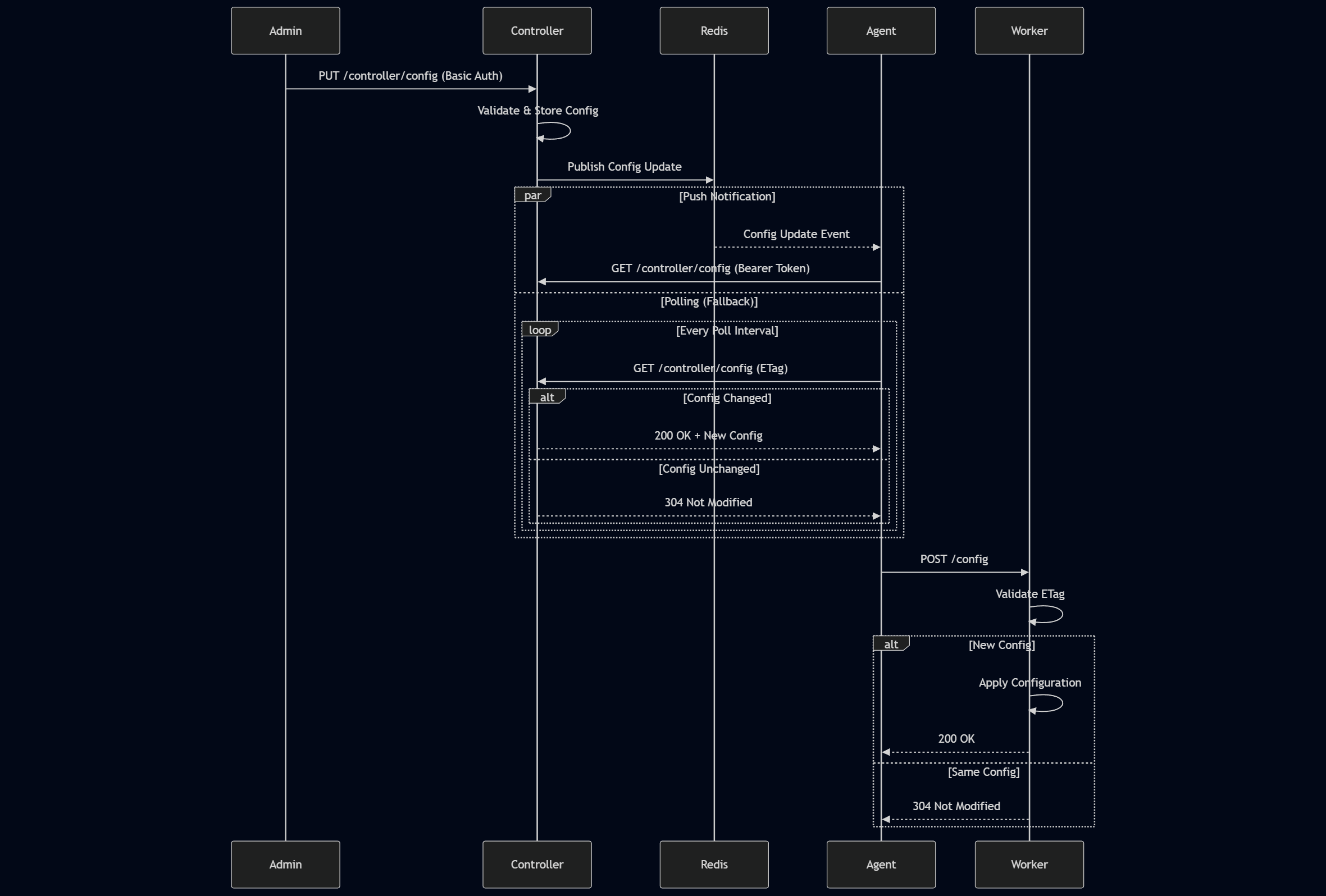
The system supports two modes for configuration distribution:
1. Poll-Only Mode (Redis disabled):
- Agent polls Controller at configurable interval (default: 5 seconds)
- ETag header prevents redundant updates
- Simple, reliable, no external dependencies
2. Hybrid Push/Pull Mode (Redis enabled):
- Controller publishes to Redis channel on config update
- Agents subscribe to Redis channel for instant notifications
- Fallback polling continues at longer interval (30-60 seconds)
- Best of both worlds: Real-time updates + resilience
Configuration:
# Poll-only (Simple)
REDIS_ENABLED=false
POLL_INTERVAL=5

# Hybrid (Recommended)
REDIS_ENABLED=true
POLL_INTERVAL=10  # Less frequent
FALLBACK_POLL_ENABLED=true
FALLBACK_POLL_INTERVAL=60 # Safety netExponential Backoff:
- Used for agent registration retries
- Configurable: initial backoff, max backoff, multiplier
- Optional jitter (±25%) prevents thundering herd
- Context-aware cancellation
Example Configuration:
REGISTRATION_MAX_RETRIES=10
REGISTRATION_INITIAL_BACKOFF=1s
REGISTRATION_MAX_BACKOFF=60s
REGISTRATION_BACKOFF_MULTIPLIER=2.0
Retry Sequence:
- Attempt 1: Immediate
- Attempt 2: 1s delay
- Attempt 3: 2s delay
- Attempt 4: 4s delay
- Attempt 5: 8s delay ...
- Attempt 10: 60s delay (capped at max)
Structured Logging with Uber Zap:
- Formats: JSON (production) or Console (development)
- Levels: Debug, Info, Warn, Error, Fatal
- Contextual Fields: agent_id, config_version, request_id
- HTTP Logging: Canonical logger middleware logs all requests
Example Log Entry (JSON):
{
  "level": "info",
  "ts": "2026-01-31T12:34:56.789Z",
  "caller": "handler/handler.go:123",
  "msg": "Configuration updated",
  "agent_id": "agent-001",
  "config_version": "v1.2.3",
  "status": 200,
  "duration_ms": 45
}
For detailed Docker documentation, see docs/DOCKER.md.
service-distribute-management/
├── cmd/                          # Service entry points
│   ├── controller/
│   │   └── main.go              # Controller service main
│   ├── agent/
│   │   └── main.go              # Agent service main
│   └── worker/
│       └── main.go              # Worker service main
│
├── internal/                     # Private application code
│   ├── config/
│   │   └── config.go            # Environment-based configuration
│   ├── models/
│   │   ├── agent.go             # Agent data model
│   │   ├── configuration.go     # Configuration data model
│   │   └── ...                  # Other models
│   └── server/                  # Server implementations
│       ├── controller/
│       │   ├── dto/             # Data Transfer Objects
│       │   ├── handler/         # HTTP handlers
│       │   ├── repository/      # Data access layer
│       │   └── usecase/         # Business logic
│       ├── agent/
│       │   └── ...              # Same structure
│       └── worker/
│           └── ...              # Same structure
│
├── pkg/                          # Reusable packages
│   ├── auth/                    # Authentication service
│   ├── database/                # Database utilities (SQLite)
│   ├── deps/                    # Dependency injection
│   ├── logger/                  # Structured logging (Zap)
│   ├── middleware/              # HTTP middleware
│   ├── poll/                    # Polling mechanism
│   ├── pubsub/                  # Redis pub/sub
│   ├── retry/                   # Exponential backoff
│   ├── validator/               # Request validation
│   └── wrapper/                 # API response wrapper
│
├── docs/                         # Documentation
│   ├── DOCKER.md                # Docker deployment guide
│   ├── ENVIRONMENT.md           # Environment variables reference
│   ├── PERFORMANCE.md           # Performance tuning guide
│   ├── SECURITY.md              # Security best practices
│   ├── DEPLOYMENT.md            # Deployment examples
│   ├── controller/              # Controller API docs (Swagger)
│   ├── worker/                  # Worker API docs (Swagger)
│   └── agent-worker/            # Agent+Worker deployment docs
│
├── docker/                       # Dockerfiles
│   ├── controller/
│   │   └── Dockerfile
│   ├── agent/
│   │   └── Dockerfile
│   └── worker/
│       └── Dockerfile
│
├── data/                         # SQLite database storage
├── app/                          # Compiled binaries (created by build)
├── docker-compose.yml            # All-in-one deployment
├── docker-compose.controller.yml # Standalone controller
├── docker-compose.agent-worker.yml # Agent+Worker pair
├── go.mod                        # Go module dependencies
├── go.sum                        # Dependency checksums
├── Makefile                      # Build automation
└── README.md                     # This file
| Directory | Purpose |
|---|---|
| cmd/ | Main applications - entry points for each service |
| internal/ | Private application code - not importable by other projects |
| internal/config/ | Configuration loading from environment variables |
| internal/models/ | Database models (GORM entities) |
| internal/server/ | Service implementations with layered architecture |
| pkg/ | Public, reusable packages that could be imported by other projects |
| docs/ | Comprehensive documentation including API specs |
| docker/ | Dockerfile definitions for each service |
| data/ | Runtime data storage (SQLite database files) |
| Library | Version | Purpose |
|---|---|---|
| Fiber | v2.52.6 | Fast, Express-inspired HTTP web framework |
| GORM | v1.25.12 | ORM library for database operations |
| go-sqlite3 | v1.14.24 | SQLite driver for database/sql |
| Zap | v1.27.0 | Blazing fast, structured logging |
| validator | v10.24.0 | Struct and field validation |
| go-redis | v9.0.0 | Type-safe Redis client |
| uuid | v1.6.0 | UUID generation and parsing |
| goquery | v1.11.0 | HTML parsing (jQuery-like) |
| swag | v1.16.6 | Swagger documentation generation |
Purpose: Authentication service for Basic Auth validation
Features:
- Username/password validation
- WWW-Authenticate header generation
- Used by middleware for auth enforcement
Purpose: SQLite database initialization and utilities
Features:
- GORM database setup
- Auto-migration for models
- WAL mode for better concurrency
- Connection management
Purpose: Dependency injection container
Features:
- Centralized
Appstruct - Lifecycle management
- Shared resource access (DB, Logger, etc.)
Purpose: Structured logging with Uber Zap
Features:
- JSON or Console output format
- Configurable log levels
- Contextual fields support
- Performance-optimized
Usage:
logger.Info("Message", "field1", value1, "field2", value2)Purpose: HTTP middleware components
Components:
- BasicAuth: Basic authentication middleware
- AgentTokenAuth: Bearer token validation
- CanonicalLogger: Structured HTTP request logging
- ErrorHandler: Centralized error response handling
Purpose: Configurable polling mechanism
Features:
- Interval-based polling
- Multiple fetch functions
- Dynamic interval updates
- Graceful start/stop
- Context cancellation
Usage:
poller := poll.NewPoller(ctx, 5*time.Second)
poller.AddFetch("config", fetchConfigFunc)
poller.Start()Purpose: Redis pub/sub abstraction
Features:
- Subscribe to channels
- Publish messages
- Health check support
- Connection pooling
- Interface-based (mockable)
Purpose: Exponential backoff retry logic
Features:
- Configurable backoff parameters
- Optional jitter (±25% randomness)
- Max retry limit
- Context-aware cancellation
Usage:
backoff := retry.NewExponentialBackoff(
    5,              // max retries
    1*time.Second,  // initial backoff
    30*time.Second, // max backoff
    2.0,            // multiplier
    true,           // jitter
)

err := backoff.Retry(ctx, func() error {
    return register()
})Purpose: Request validation using go-playground/validator
Features:
- Struct tag validation
- Custom error messages
- Integration with Fiber
Usage:
type RegisterRequest struct {
    AgentID string `json:"agentId" validate:"required,min=3"`
}Purpose: Standardized API response format
Features:
- Consistent JSON structure
- Success/error responses
- HTTP status code mapping
Response Format:
{
  "success": true,
  "data": { ... },
  "message": "Operation successful"
}# Build specific service
make build service=controller
make build service=agent
make build service=worker
# Build all services
make build-all
# Build Docker images
make build-docker service=controller# Run specific service locally
make run service=controller
make run service=agent
make run service=worker
# Run with Docker Compose
make run-docker
# Or
docker-compose up -d# Format code
make format
# Or
go fmt ./...
# Tidy dependencies
make tidy
# Or
go mod tidy
# Run tests
make test
# Or
go test ./...Generate or update API documentation after changing handlers or DTOs:
# Generate all Swagger docs
make swagger-generate

# Generate Controller docs only
make swagger-controller

# Generate Worker docs only
make swagger-workerFor local development, create a .env file or export environment variables:
# Example .env for local development
CONTROLLER_ADDR=:8080
DATABASE_PATH=./data/controller.db
ADMIN_USER=admin
ADMIN_PASSWORD=admin
AGENT_USER=agent
AGENT_PASSWORD=agentpass
POLL_INTERVAL=5
LOG_FORMAT=console
LOG_LEVEL=debug
Load .env file:
export $(cat .env | xargs)See docs/ENVIRONMENT.md for complete environment variable reference.
# Run all tests
go test ./...

# Run tests with coverage
go test -cover ./...

# Run tests for specific package
go test ./pkg/retry

# Run with verbose output
go test -v ./...

# Run specific test
go test -v -run TestExponentialBackoff ./pkg/retryVS Code Launch Configuration (.vscode/launch.json):
{
  "version": "0.2.0",
  "configurations": [
    {
      "name": "Debug Controller",
      "type": "go",
      "request": "launch",
      "mode": "auto",
      "program": "${workspaceFolder}/cmd/controller",
      "env": {
        "CONTROLLER_ADDR": ":8080",
        "DATABASE_PATH": "./data/controller.db",
        "ADMIN_PASSWORD": "admin",
        "LOG_LEVEL": "debug"
      }
    },
    {
      "name": "Debug Agent",
      "type": "go",
      "request": "launch",
      "mode": "auto",
      "program": "${workspaceFolder}/cmd/agent",
      "env": {
        "CONTROLLER_URL": "http://localhost:8080",
        "WORKER_URL": "http://localhost:8082",
        "LOG_LEVEL": "debug"
      }
    }
  ]
}| Command | Description |
|---|---|
make run service=<name> |
Run service locally |
make build service=<name> |
Build binary to ./app |
make build-docker service=<name> |
Build Docker image |
make run-docker |
Start all services with Docker Compose |
make format |
Format Go code |
make test |
Run tests |
make tidy |
Tidy dependencies |
make install |
Download dependencies |
make swagger-generate |
Generate all Swagger docs |
make swagger-controller |
Generate Controller docs |
make swagger-worker |
Generate Worker docs |
- Controller: http://localhost:8080 - Central management service
- Worker: http://localhost:8082 - Configuration execution service
- Agent: Internal client connecting controller and worker
- Redis: http://localhost:6379 - Optional pub/sub for push notifications
# Controller
go build ./cmd/controller

# Agent
go build ./cmd/agent

# Worker
go build ./cmd/worker# Set environment variables
export CONTROLLER_ADDR=:8080
export DATABASE_PATH=./data.db
export ADMIN_USER=admin
export ADMIN_PASSWORD=admin
# Start controller
./controllerThis project includes interactive Swagger/OpenAPI documentation for both Controller and Worker APIs.
Controller API Documentation:
- URL: http://localhost:8080/swagger/index.html
- Authentication Required: Yes (for testing protected endpoints)
- Credentials:
- Agent endpoints:
agent/agentpass(Basic Auth for registration) - Agent authenticated: Bearer token (after registration)
- Admin endpoints:
admin/password(Basic Auth)
- Agent endpoints:
Worker API Documentation:
- URL: http://localhost:8082/swagger/index.html
- Authentication: No authentication required (internal service)
Controller API (Port 8080):
GET /health- Health check (no auth)POST /register- Agent registration (Basic Auth: agent)GET /controller/config- Get configuration (Bearer Token)PUT /controller/config- Update configuration (Basic Auth: admin)POST /heartbeat- Agent heartbeat (Bearer Token)GET /agents- List all agents (Basic Auth: admin)GET /agents/:id- Get agent details (Basic Auth: admin)PUT /agents/:id/poll-interval- Update poll interval (Basic Auth: admin)POST /agents/:id/token/rotate- Rotate agent token (Basic Auth: admin)DELETE /agents/:id- Delete agent (Basic Auth: admin)
Worker API (Port 8082):
GET /health- Health checkPOST /config- Receive configuration from AgentPOST /hit- Proxy HTTP request to target URL
After modifying any API handlers or DTOs, regenerate the Swagger documentation:
# Regenerate all documentation
make swagger-generate

# Or regenerate individually
make swagger-controller
make swagger-worker
Manual regeneration:
swag init -g cmd/controller/main.go -o docs/controller
swag init -g cmd/worker/main.go -o docs/worker
The generated files are located in:
docs/controller/- Controller API documentation (docs.go, swagger.json, swagger.yaml)docs/worker/- Worker API documentation (docs.go, swagger.json, swagger.yaml)
- Docker Deployment Guide - Complete Docker deployment instructions for all scenarios
- Environment Variables Reference - All environment variables for Controller, Agent, Worker, and Redis
- Performance Guide - Performance tuning, scaling strategies, resource limits, and benchmarking
- Security Best Practices - Authentication, credential management, network security, and compliance
- Deployment Examples - Architecture examples: all-in-one, standalone controller, distributed, and HA setups
- Controller API - Standalone Controller deployment
- Worker API Swagger - Interactive API documentation (when running)
- Controller API Swagger - Interactive API documentation (when running)
- Agent-Worker Deployment - Distributed Agent+Worker pair deployment