Releases: AnalyseDeCircuit/oxideterm
Release list
OxideTerm Native 2.0.23

English
OxideTerm 2.0.23 adds terminal-output triggers, substantially improves terminal throughput, strengthens cross-device Cloud Sync conflict handling, and fixes several SSH, Quick Command, semantic-highlighting, editor, and native-window workflows.
✨ Terminal Triggers and Toolbar Workflows
- Added a global trigger rule library with per-session temporary toggles. Rules can be managed from Terminal settings and opened directly from the terminal toolbar, context menu, or Command Palette without losing the source pane.
- Added literal and regular-expression matching with case sensitivity, whole-word matching, named captures, immediate or next-line execution, optional delay, and a per-rule cooldown to prevent echo loops and repeated bursts.
- Added trigger actions for sending text to the matching terminal, running an existing Quick Command, and launching a local program. Direct-program arguments preserve argument boundaries, while Shell execution requires a separate explicit authorization and warning.
- Added scopes for all terminals, local terminals, or selected saved SSH, Telnet, Mosh, and Serial connections. Delayed and confirmed actions remain attached to the pane that produced the match and are cancelled if the pane, session, or rule is no longer valid.
- Kept trigger scanning incremental and bounded across fragmented UTF-8, ANSI control sequences, line rewrites, and chunk boundaries. Sessions without active rules retain a dedicated no-op path and do not enable full terminal-output events.
- Consolidated Record Session and Open Recording into one terminal-toolbar control with a compact action popover.
⚡ Terminal Performance
- Optimized terminal output processing and high-density scrolling by eliminating repeated scanning, copying, scheduling, layout, and rendering work while preserving protocol detection and terminal compatibility.
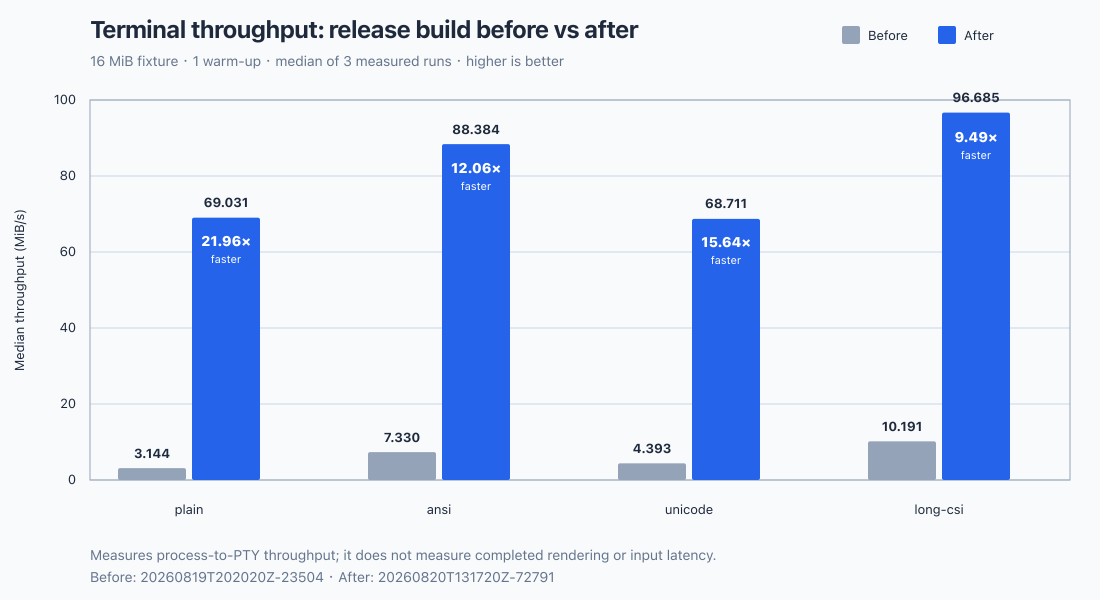
- In OxideTerm's reproducible 16 MiB release-build benchmark, median process-to-PTY throughput increased from 3.144 to 69.031 MiB/s for plain text, from 7.330 to 88.384 MiB/s for ANSI output, from 4.393 to 68.711 MiB/s for Unicode output, and from 10.191 to 96.685 MiB/s for long CSI sequences. These results correspond to speedups of 21.96×, 12.06×, 15.64×, and 9.49× respectively.
- The comparison used the same fixture size, one warm-up, and the median of three measured runs. It measures process-to-PTY throughput rather than completed rendering or input latency.
☁️ Cloud Sync Reliability
- Corrected structured synchronization when another device publishes an empty section, so deletions and empty baselines are applied instead of being skipped and later reported as false conflicts.
- Repaired conflict preview selection for empty connection, Quick Command, forwarding, profile, credential, application-setting, and plugin-setting sections.
- Kept Pull & Preview available when a real conflict needs inspection, and added a separately confirmed Force Upload choice for users who intentionally want the local state to replace the remote state.
🔐 SSH and Connection Workflows
- Imported OpenSSH
RemoteCommandinto the existing post-connect command field, including supported token expansion and source-aware refresh behavior when~/.ssh/configchanges. - Fixed editing saved password authentication: typing or pasting now replaces the keychain-backed value without loading it into the form, while clearing an unfinished replacement restores the protected saved-password placeholder.
- Preserved jump-host and proxy-chain routes when saved connections are edited, synchronized, imported, exported, or opened through supported public connection workflows.
- Reorganized advanced SSH explanations into the existing information popovers for connection timeout, per-terminal authentication, agent forwarding, X11 forwarding, and legacy-server compatibility, reducing permanent form text without removing guidance.
🛠️ Terminal, Editor, and Window Fixes
- Preserved semantic highlighting across wide and multi-column characters, including complete localized dates such as
6月22instead of styling only part of the value. - Restored scrollable Quick Command category lists and the confirmation view for commands that require approval, including long commands that exceed the visible panel height.
- Restored persisted normal, maximized, and full-screen window state after Wayland and macOS window-state transitions.
- Painted editor selections across empty lines and clipped horizontally scrolled editor content at the gutter boundary.
🧰 Linux Build Maintenance
- Removed obsolete GTK, JavaScriptCoreGTK, Soup, and WebKitGTK development packages from the Linux dependency installer while retaining the DBus development files required by system-keyring integration. OxideTerm's native GPUI interface continues to render directly to the GPU and does not require a WebView runtime.
中文
OxideTerm 2.0.23 新增终端输出触发器,显著提升终端吞吐量,加强跨设备云同步冲突处理,并修复多项 SSH、快捷命令、语义高亮、编辑器和原生窗口问题。
✨ 终端触发器与工具栏工作流
- 新增全局触发器规则库及当前会话临时开关。用户可在终端设置中管理规则,也可从终端工具栏、右键菜单或命令面板直接进入,并保持来源窗格不变。
- 新增普通文本与正则表达式匹配,支持区分大小写、完整单词、命名捕获、立即或下一次换行时执行、可选延迟,以及用于避免回显循环和短时重复触发的规则级最小间隔。
- 新增向匹配终端发送文本、运行已有快捷命令及启动本机程序的触发动作。直接程序模式会保持参数边界;Shell 执行则必须单独明确授权并经过风险提示。
- 新增全部终端、本地终端或指定已保存 SSH、Telnet、Mosh、串口连接的适用范围。延迟及待确认动作始终绑定产生匹配的窗格;当窗格、会话或规则不再有效时会自动取消。
- 触发器扫描可在拆分的 UTF-8、ANSI 控制序列、行覆写及输出分块之间进行有界增量处理。没有活动规则的会话继续使用专用空操作路径,也不会开启完整终端输出事件。
- 将“录制会话”和“打开录制”合并为一个终端工具栏控件,并通过紧凑气泡菜单选择具体操作。
⚡ 终端性能
- 优化终端输出处理及高密度滚动,减少重复扫描、复制、调度、布局和绘制工作,同时保持协议探测能力及终端兼容性。
- 在 OxideTerm 可复现的 16 MiB 发布构建基准中,纯文本的进程到 PTY 吞吐量中位数由 3.144 MiB/s 提升至 69.031 MiB/s,ANSI 输出由 7.330 MiB/s 提升至 88.384 MiB/s,Unicode 输出由 4.393 MiB/s 提升至 68.711 MiB/s,长 CSI 序列由 10.191 MiB/s 提升至 96.685 MiB/s,分别达到原来的 21.96 倍、12.06 倍、15.64 倍和 9.49 倍。
- 对比采用相同的测试数据规模、一次预热及三次测量的中位数。该结果衡量进程到 PTY 的吞吐量,不代表绘制完成耗时或输入延迟。
☁️ 云同步可靠性
- 修复其他设备发布空结构化分区时的同步行为,使删除结果和空基线能够正确应用,不再被跳过并在后续同步中误报冲突。
- 修复空连接、快捷命令、端口转发、各类配置、凭据、应用设置及插件设置分区的冲突预览选择。
- 当真实冲突需要检查时保持“拉取并预览”可用,并为确实希望用本地状态替换远端状态的用户新增需要单独确认的“强制上传”选项。
🔐 SSH 与连接工作流
- 将 OpenSSH 的
RemoteCommand导入现有连接后命令字段,并支持相应的令牌展开,以及~/.ssh/config变化时按配置来源更新。 - 修复已保存密码认证的编辑流程:输入或粘贴新密码时会替换钥匙串中的值,而不会先将旧密码载入表单;清空尚未完成的替换内容时会恢复受保护的已保存密码占位状态。
- 在编辑、同步、导入导出已保存连接,以及通过受支持的公共连接工作流打开连接时,完整保留跳板主机与代理链路由。
- 将连接超时、每个终端单独认证、SSH Agent 转发、X11 转发及旧版服务器兼容性的高级说明统一收进现有信息提示中,在保留帮助内容的同时减少表单中的常驻文字。
🛠️ 终端、编辑器与窗口修复
- 修复宽字符和多列字符两侧语义高亮丢失的问题,使
6月22等本地化日期能够完整着色,而不是只处理其中一部分。 - 恢复快捷命令分类列表的滚动及需要批准的命令确认界面,并正确处理超过面板可见高度的长命令。
- 修复 Wayland 与 macOS 窗口状态切换后普通、最大化和全屏状态无法正确持久化的问题。
- 修复编辑器选区跨越空行时未完整绘制的问题,并在水平滚动时将编辑器内容正确裁剪在行号栏边界内。
🧰 Linux 构建维护
- 从 Linux 依赖安装脚本中移除已不再需要的 GTK、JavaScriptCoreGTK、Soup 和 WebKitGTK 开发包,同时保留系统钥匙串集成所需的 DBus 开发文件。OxideTerm 的原生 GPUI 界面继续直接通过 GPU 绘制,不依赖 WebView 运行时。
📥 Download for your system
| Operating system | x64 | ARM64 |
|---|---|---|
| Windows | Setup (.exe) | Setup (.exe) |
| macOS | DMG (Intel) | DMG (Apple Silicon) |
| Linux | AppImage · DEB · RPM | AppImage · DEB · RPM |
Portable archives, signatures, and sha256sums.txt remain available in the release assets below.
📌 Installation Tips / 安装提示
macOS
Downloaded .dmg files may be quarantined by Gatekeeper. Run in Terminal:
xattr -cr ~/Downloads/OxideTerm_*.dmg
# or after install / 或安装后
xattr -cr /Applications/OxideTerm.app
Windows
If SmartScreen warns, click More info -> Run anyway.
若 SmartScreen 弹出警告,点击 更多信息 -> 仍要运行。
Linux
# AppImage
chmod +x OxideTerm_*_linux_*.AppImage && ./OxideTerm_*_linux_*.AppImage

# Debian/Ubuntu
sudo dpkg -i OxideTerm_*_linux_*.deb && sudo apt-get install -f

# Fedora/RHEL-compatible systems
sudo dnf install ./OxideTerm_*_linux_*.rpm
🔗 Links
- Documentation: https://oxideterm.app
- GitHub Issues: https://github.com/AnalyseDeCircuit/oxideterm/issues
- Changelog: https://github.com/AnalyseDeCircuit/oxideterm/blob/main/.github/release-notes/stable-changelog.md
OxideTerm Native 2.0.22
English
OxideTerm 2.0.22 is a feature-heavy update with several subsystem-level additions. It introduces independent and remote-to-remote SFTP workflows, a complete configurable terminal semantic-coloring system, richer saved connection profiles, and broad terminal, remote-desktop, editor, and native-window improvements while intentionally remaining on the 2.0 release line.
✨ Standalone SFTP and Connection Workflows
- Added standalone SFTP profiles for cases where an SFTP endpoint must not reuse a saved SSH host, including servers with different SSH and SFTP ports or credentials.
- Added both local-to-remote and remote-to-remote transfer modes. Remote-to-remote profiles expose two independently authenticated endpoints, each with its own host, port, username, authentication method, initial directory, timeout,
ProxyCommand, and upstream proxy settings. - Added a dedicated advanced SFTP workspace that reuses the dual-pane file-transfer experience, keeps endpoint settings visually separated, and supports creating, saving, reopening, and editing standalone profiles.
- Added application-managed relays between two remote SFTP endpoints with bounded buffering and concurrency, so large transfers do not require loading an entire file or directory into memory.
- Added persisted restart recovery for single-file remote relays. Resume validates the profile, both endpoints, source identity, partial destination, and staging metadata before continuing; directory relays retain bounded in-session scheduling but do not yet resume after an application restart.
- Integrated standalone SFTP profiles with the Session Manager and connection-opening flows and preserved them through
.oxideimport and export, Cloud Sync, and the shared connection data model. - Added a compact editable path field to the SFTP sidebar with remote directory completion, keyboard navigation, direct path submission, and synchronization with normal folder navigation without using the wider breadcrumb component.
- Added optional multiline notes to every saved connection type except local terminals. Notes survive editing, import and export, Cloud Sync, and public or command-line connection data paths, with a clear warning not to store passwords, private keys, or other credentials.
- Added SSH
ProxyCommandconfiguration and persistence, and reorganized connection forms so transport selection precedes the endpoint-specific fields it controls.
🎨 Terminal Semantic Coloring and Highlighting
- Added a semantic-coloring engine for otherwise unstyled terminal text while preserving explicit ANSI foreground colors, backgrounds, and text attributes emitted by terminal applications.
- Added distinct semantic classes and colors for commands, keywords, options, operators, strings, variables, comments, links, paths, network addresses, timestamps, numbers, errors, warnings, successes, and informational values instead of routing unrelated matches through one accent color.
- Expanded structured recognition for IPv4 and IPv6 addresses, MAC addresses, UUIDs, POSIX and Windows paths, URLs, localized dates, 12-hour and 24-hour times, elapsed and long-duration values, assignments,
key=valuefields, and common log status expressions. - Added command syntax recognition for Bash, Zsh, Fish, and PowerShell and a specialized
psoutput parser that distinguishes process identifiers, resource values, states, dates, elapsed times, options, assignments, commands, and paths by column and context. - Added punctuation and operator styling for pipes, assignment signs, separators, asterisks, and related shell symbols, including separate punctuation inside structured values such as the colon in a time.
- Added balanced multi-level bracket coloring for parentheses, square brackets, braces, and supported full-width pairs. Nested levels cycle through distinct colors, and unmatched delimiters are handled without recursively scanning the terminal buffer.
- Added built-in balanced and conservative schemes plus user-managed custom semantic schemes with per-class colors and create, import, export, select, and delete workflows.
- Added transient command-context highlighting that extracts literal query terms from
grepandrg, limits each term to the corresponding command output block, and automatically expires it for later commands instead of creating a persistent rule. - Reorganized the terminal highlight menu into semantic coloring, persistent keyword or regular-expression rules, and
greporrgcommand-context highlighting. Each layer can be controlled independently and overridden for the active session. - Semantic coloring is disabled by default and remains available as an explicit global or per-session choice from the terminal highlight controls.
- Updated terminal row timestamps with clearer bracketed presentation while keeping timestamp display separate from text semantic coloring.
⚙️ Compatibility, Performance, and Reliability
- Reduced redundant terminal scheduling, layout, and rendering work; bounded output draining and byte-aware backpressure; and reused scroll snapshots, rows, and layout results more effectively during high-output sessions.
- Kept semantic analysis limited to relevant visible logical lines, reused compiled schemes and cached layouts, and skipped semantic work entirely when the feature is disabled or the terminal is in an alternate-screen application.
- Added an RDP graphics-pipeline compatibility option for servers that render Progressive RemoteFX incorrectly, allowing those profiles to fall back to bitmap updates without changing the endpoint itself.
- Compactly reorganized remote-desktop session feature controls while retaining saved RDP and VNC behavior.
- Rebuilt stale GPU scenes after graphics-device recovery, stabilized Windows fallback-font identity, and applied the configured system-font fallback consistently.
- Restored native Linux client-window edge resizing and added a horizontal overflow scrollbar to the editor for long lines and wide content.
- Restored printable terminal input when the active shell remains visible but Workspace temporarily owns keyboard focus, matching the existing Enter, Tab, navigation, and protocol-key fallback without intercepting shortcuts or IME composition.
- Preserved shifted text correctly in Kitty keyboard mode, kept long Quick Commands editable, and prevented forwarding statistics events from feeding back into repeated updates.
- Preserved stored terminal options when command-line connection specifications are cloned.
- Preserved backslashes in Windows drive-letter and UNC private-key paths imported from SSH configuration files.
- Added copyable external MCP stdio JSON configuration so supported external clients can be connected without manually reconstructing the launch configuration.
- Refined the local-terminal form and editor selection behavior for consistency with the other connection workflows.
🧰 Release Maintenance
- Consolidated redundant and low-value tests, replaced repeated setup with shared defaults or builders, and moved runtime-dependent PTY, network, thread, and platform behavior into integration coverage while retaining security, credential, persistence, migration, protocol-compatibility, and data-loss protection.
- Restored standalone SFTP synchronization snapshots and localization completeness checks across supported languages.
- Made stable release notes bilingual, with aligned English and Chinese sections for each new release.
中文
OxideTerm 2.0.22 是一次包含多项子系统级新增能力的功能密集型更新。在继续保持 2.0 版本线的同时,本次更新引入独立及双远程 SFTP 工作流、完整且可配置的终端语义着色系统、更丰富的连接配置,并广泛改进终端、远程桌面、编辑器和原生窗口体验。
✨ 独立 SFTP 与连接工作流
- 新增独立 SFTP 配置,适用于 SFTP 端点不应复用已保存 SSH 主机的场景,包括 SSH 与 SFTP 端口或凭据不同的服务器。
- 新增本地与远程、远程与远程两种传输方式。双远程配置包含两个独立认证的端点,每个端点都可分别设置主机、端口、用户名、认证方式、初始目录、超时、
ProxyCommand和上游代理。 - 新增专用高级 SFTP 工作区,复用双栏文件传输体验,清晰分隔不同端点的设置,并支持创建、保存、重新打开和编辑独立配置。
- 新增两个远程 SFTP 端点之间由应用管理的中继,并限制缓冲区及并发量,传输大文件或大型目录时无需将全部内容一次性载入内存。
- 新增单文件远程中继的持久化重启恢复。续传前会校验配置、两个端点、源文件身份、部分目标文件及暂存元数据;目录中继继续使用会话内的有界调度,但暂不支持应用重启后续传。
- 将独立 SFTP 配置接入会话管理器和连接打开流程,并在
.oxide导入导出、云同步及共享连接数据模型中完整保留。 - 在 SFTP 侧栏新增紧凑的可编辑路径,支持远程目录补全、键盘导航、直接提交路径,并与普通目录导航同步,无需复用占用空间较大的面包屑组件。
- 为除本地终端外的所有已保存连接类型新增可选多行备注。备注可在编辑、导入导出、云同步及公共或命令行连接数据链路中保留,并明确提醒不要存储密码、私钥或其他凭据。
- 新增 SSH
ProxyCommand的配置和持久化,并重新组织连接表单,使传输方式选择先于其控制的端点表单展开。
🎨 终端语义着色与高亮
- 新增用于处理终端无样式文本的语义着色引擎,同时保留终端应用显式发送的 ANSI 前景色、背景色及文字属性。
- 为命令、关键字、选项、运算符、字符串、变量、注释、链接、路径、网络地址、时间戳、数字、错误、警告、成功和信息值提供独立语义类别与颜色,不再让无关内容共用同一种强调色。
- 扩展 IPv4、IPv6、MAC 地址、UUID、POSIX 与 Windows 路径、网址、本地化日期、十二小时制与二十四小时制时间、运行时长、长耗时、赋值、
key=value字段及常见日志状态短语的结构化识别。 - 新增 Bash、Zsh、Fish 和 PowerShell 命令语法识别,并加入专用的
ps输出解析器,可按列和上下文区分进程标识、资源数值、状态、日期、运行时间、选项、赋值、命令和路径。 - 新增管道符、赋值号、分隔符、星号及相关 Shell 符号的标点和运算符着色,并可独立处理时间中冒号等结构化值内部的标点。
- 新增圆括号、方括号、花括号和受支持全角括号的多层平衡着色。嵌套层级会循环使用不同颜色,未配对分隔符也不会触发对整个终端缓冲区的递归扫描。
- 新增内置的均衡与保守方案,并支持用户管理自定义语义方案,可按类别设置颜色以及创建、导入、导出、选择和删除方案。
- 新增临时命令上下文高亮,可从
grep和rg提取字面查询词,仅在对应命令的输出块内生效,并在后续命令中自动失效,而不是创建永久规则。 - 将终端高亮菜单重新组织为语义着色、持久化关键词或正则规则、
grep或rg命令上下文高亮三层。每层均可独立控制,并可对当前会话进行覆盖。 - 语义着色默认关闭,用户可从终端高亮控制中明确选择全局开启或仅对当前会话开启。
- 更新终端行时间戳的括号样式,同时继续将时间戳界面与文本语义着色分开处理。
⚙️ 兼容性、性能与可靠性
- 减少终端调度、布局和渲染中的重复工作,限制高输出场景的单次排空量并采用按字节计算的背压,同时更有效地复用滚动快照、行和布局结果。
- 将语义分析限制在相关的可见逻辑行,复用已编译方案和布局缓存,并在功能关闭或终端运行全屏交互应用时完全跳过语义处理。
- 新增 RDP 图形管线兼容选项;当服务器无法正确渲染 Progressive RemoteFX 时,可让相应配置回退到位图更新,而无需修改端点本身。
- 紧凑重组远程桌面会话功能控制,同时保留已保存的 RDP 与 VNC 行为。
- 修复图形设备恢复后 GPU 场景未正确重建的问题,稳定 Windows 后备字体标识,并一致应用用户配置的系统字体回退。
- 恢复 Linux 原生客户端窗口的边缘缩放,并为编辑器长行和宽内容增加横向溢出滚动条。
- 修复活动终端仍可见但键盘焦点暂时由工作区持有时普通字符无法输入的问题,使其与已有的回车、制表、导航和协议按键后备路径一致,同时不拦截快捷键或输入法组合输入。
- 修复 Kitty 键盘模式中的移位文本保留,确保较长的快捷命令仍可编辑,并阻止端口转发统计事件形成重复更新回路。
- 在复制命令行连接规格时保留已存储的终端选项。
- 修复从 SSH 配置导入 Windows 盘符路径和 UNC 私钥路径时反斜杠丢失的问题。
- 新增可复制的外部 MCP 标准输入输出 JSON 配置,使受支持的外部客户端无需手工重建启动参数即可连接。
- 调整本地终端表单和编辑器选区行为,使其与其他连接工作流保持一致。
🧰 发布维护
- 合并重复及低价值测试,使用共享默认值或构建器替代重复初始化,并将依赖 PTY、网络、线程和平台运行时的行为移至集成测试,同时保留安全、凭据、持久化、迁移、协议兼容和数据丢失防护测试。
- 恢复独立 SFTP 的同步快照及全部受支持语言的本地化完整性检查。
- 将稳定版发布说明改为中英双语,并让每个新版本的英文与中文内容逐项对应。
📥 Downl...
OxideTerm Native 2.0.21
OxideTerm 2.0.21 adds controlled external MCP access, expands ACP and plugin interoperability, and improves SFTP, remote-desktop, Cloud Sync, and native window workflows.
✨ Highlights
- Added authenticated External MCP Control for editors, command-line agents, and other clients, with loopback HTTP and stdio access to explicitly granted connection, terminal, SFTP, transfer, forwarding, remote-desktop, recording, IDE workspace, Quick Command, addon, Cloud Sync, and Host Tools workflows.
- Added ACP presets for Gemini CLI and OpenCode, and allowed the built-in Codex and Claude Code adapters to consume session-scoped HTTP MCP servers without placing authorization values in process arguments.
- Added a searchable native plugin marketplace with compatibility, platform, checksum, installation, and update checks, and moved the complete Host Tools Dashboard example into the official plugin catalog.
- Added an embedded SFTP sidebar browser with a remembered sidebar, tab, or ask-each-time presentation preference while keeping transfers and shared SSH connections owned independently from the visible surface.
- Added SSH jump and proxy-chain support to saved RDP and VNC connections, direct CLI opening of saved SSH connections, and complete Telnet profile coverage in
.oxideimport, export, and Cloud Sync.
🛠️ Fixes
- Restored the main window's normal bounds, maximized state, and full-screen state across launches, retained valid secondary-display placement, and recentered windows that would otherwise reopen off screen.
- Initialized the OneDrive application folder before creating nested Cloud Sync objects, reused existing parents, and recovered cleanly when another client created the same folder concurrently.
- Preserved every saved connection profile type during structured synchronization and kept background MCP mutations, cancellations, revocations, and dependent refreshes aligned with their committed application state.
- Removed the unintended divider above installed plugins and retired the obsolete downloadable Wasm runtime installer from builds that do not include Wasm plugin support.
🔒 Security
- Kept external MCP credentials digest-only and device-local, required explicit tool-group grants, retained in-app approval for elevated access requests, and cancelled active work and released capabilities immediately when access is revoked.
📥 Download for your system
| Operating system | x64 | ARM64 |
|---|---|---|
| Windows | Setup (.exe) | Setup (.exe) |
| macOS | DMG (Intel) | DMG (Apple Silicon) |
| Linux | AppImage · DEB · RPM | AppImage · DEB · RPM |
Portable archives, signatures, and sha256sums.txt remain available in the release assets below.
📌 Installation Tips / 安装提示
macOS
Downloaded .dmg files may be quarantined by Gatekeeper. Run in Terminal:
xattr -cr ~/Downloads/OxideTerm_*.dmg
# or after install / 或安装后
xattr -cr /Applications/OxideTerm.app
Windows
If SmartScreen warns, click More info -> Run anyway.
若 SmartScreen 弹出警告,点击 更多信息 -> 仍要运行。
Linux
# AppImage
chmod +x OxideTerm_*_linux_*.AppImage && ./OxideTerm_*_linux_*.AppImage

# Debian/Ubuntu
sudo dpkg -i OxideTerm_*_linux_*.deb && sudo apt-get install -f

# Fedora/RHEL-compatible systems
sudo dnf install ./OxideTerm_*_linux_*.rpm
🔗 Links
- Documentation: https://oxideterm.app
- GitHub Issues: https://github.com/AnalyseDeCircuit/oxideterm/issues
- Changelog: https://github.com/AnalyseDeCircuit/oxideterm/blob/main/.github/release-notes/stable-changelog.md
OxideTerm Native 2.0.20
OxideTerm 2.0.20 adds native Mosh and local-terminal workflows, refreshes session and start-page management, improves remote-desktop and Cloud Sync reliability, and expands terminal feedback and SSH controls.
✨ Highlights
- Added native Mosh sessions with SSH bootstrap, adaptive prediction, saved-profile editing, Session Manager and sidebar integration,
.xoideimport and export, and Cloud Sync support. - Redesigned the start page around recent connections, local terminals, imports, Session Manager, and Cloud Sync, with responsive layouts for narrow workspaces and a clearer view of standalone active connections.
- Expanded Session Manager selection and batch group operations to saved serial, Telnet, Mosh, and remote-desktop profiles, and added complete in-place editing for serial and Telnet settings without disturbing active sessions.
- Added millisecond terminal timestamps, richer matched-text or logical-line highlight controls, and an optional accent for background tabs with unread terminal output.
- Added direct local-terminal launch from the connection flow, refined the terminal Git workflow with inline commit messages and clearer action grouping, and updated DeepSeek v4 reasoning support.
- Redesigned the connection runtime overview around pool usage, consumers, health attention, and refresh status, and allowed approved OxideSens tools to update non-secret Cloud Sync configuration.
🛠️ Fixes
- Improved RDP automatic reconnect and frame uploads, preserved sparse update regions through presentation, and reduced RDP and VNC work for incremental framebuffer changes.
- Repaired HTTP JSON Cloud Sync revision baselines, preserved configuration drafts across provider changes, reused snapshot encryption keys within one operation, and batched macOS credential authorization during imports.
- Made SSH connection timeouts configurable across saved connections, SSH config import,
.xoidetransfer, Cloud Sync, and CLI specifications while preserving imported timeout values. - Preserved serial and Telnet profile identity and automatic-open metadata when editing, and ensured Telnet changes mark Cloud Sync state dirty.
📥 Download for your system
| Operating system | x64 | ARM64 |
|---|---|---|
| Windows | Setup (.exe) | Setup (.exe) |
| macOS | DMG (Intel) | DMG (Apple Silicon) |
| Linux | AppImage · DEB · RPM | AppImage · DEB · RPM |
Portable archives, signatures, and sha256sums.txt remain available in the release assets below.
📌 Installation Tips / 安装提示
macOS
Downloaded .dmg files may be quarantined by Gatekeeper. Run in Terminal:
xattr -cr ~/Downloads/OxideTerm_*.dmg
# or after install / 或安装后
xattr -cr /Applications/OxideTerm.app
Windows
If SmartScreen warns, click More info -> Run anyway.
若 SmartScreen 弹出警告,点击 更多信息 -> 仍要运行。
Linux
# AppImage
chmod +x OxideTerm_*_linux_*.AppImage && ./OxideTerm_*_linux_*.AppImage

# Debian/Ubuntu
sudo dpkg -i OxideTerm_*_linux_*.deb && sudo apt-get install -f

# Fedora/RHEL-compatible systems
sudo dnf install ./OxideTerm_*_linux_*.rpm
🔗 Links
- Documentation: https://oxideterm.app
- GitHub Issues: https://github.com/AnalyseDeCircuit/oxideterm/issues
- Changelog: https://github.com/AnalyseDeCircuit/oxideterm/blob/main/.github/release-notes/stable-changelog.md
OxideTerm Native 2.0.19
OxideTerm 2.0.19 improves native window and terminal behavior, repairs Windows PowerShell and OneDrive compatibility, and simplifies supported update channels.
✨ Highlights
- Added native full-screen shortcuts with F11 on Windows and Linux and Control-Command-F on macOS, exposed the action in shortcut settings, and made macOS title-bar double-clicks follow the system preference.
🛠️ Fixes
- Prevented Windows PowerShell 5.1 from displaying OSC 7 directory-reporting bytes as visible
e]7;...text in local and remote Shell integration. - Made detached tab windows movable through native Windows caption handling, and made closing a detached window close its tab and local terminal instead of leaving the terminal active in the background; shared SSH node connections remain independently owned.
- Kept typed keys and pasted text flowing to selected broadcast terminals without re-entering the GPUI workspace entity during synchronous input delivery.
- Repaired OneDrive app-folder hierarchy creation by sending Microsoft Graph conflict behavior through the supported request URL annotation.
🧰 Release Maintenance
- Retired the GPUI Preview channel from runtime settings, updater selection, help content, and plugin compatibility while preserving Stable and Beta updates and safely migrating older saved channel settings.
📥 Download for your system
| Operating system | x64 | ARM64 |
|---|---|---|
| Windows | Setup (.exe) | Setup (.exe) |
| macOS | DMG (Intel) | DMG (Apple Silicon) |
| Linux | AppImage · DEB · RPM | AppImage · DEB · RPM |
Portable archives, signatures, and sha256sums.txt remain available in the release assets below.
📌 Installation Tips / 安装提示
macOS
Downloaded .dmg files may be quarantined by Gatekeeper. Run in Terminal:
xattr -cr ~/Downloads/OxideTerm_*.dmg
# or after install / 或安装后
xattr -cr /Applications/OxideTerm.app
Windows
If SmartScreen warns, click More info -> Run anyway.
若 SmartScreen 弹出警告,点击 更多信息 -> 仍要运行。
Linux
# AppImage
chmod +x OxideTerm_*_linux_*.AppImage && ./OxideTerm_*_linux_*.AppImage

# Debian/Ubuntu
sudo dpkg -i OxideTerm_*_linux_*.deb && sudo apt-get install -f

# Fedora/RHEL-compatible systems
sudo dnf install ./OxideTerm_*_linux_*.rpm
🔗 Links
- Documentation: https://oxideterm.app
- GitHub Issues: https://github.com/AnalyseDeCircuit/oxideterm/issues
- Changelog: https://github.com/AnalyseDeCircuit/oxideterm/blob/main/.github/release-notes/stable-changelog.md
OxideTerm Native 2.0.18
OxideTerm 2.0.18 makes remote Shell integration safer across terminal clients, restores terminal and SSH interaction workflows, and repairs Windows Cloud Sync and OneDrive behavior.
✨ Highlights
- Migrated remote SSH directory reporting to standard OSC 7 while retaining legacy protocol parsing and in-place upgrades for existing integration packages; private editor enhancements now activate only for marked OxideTerm channels and safely remain unavailable when the server rejects the optional marker.
- Added complete editing for saved SSH proxy chains, preserving unchanged hop credentials, copying credentials into independent owners when needed, and resolving saved proxy authentication when connecting.
🛠️ Fixes
- Restored terminal input broadcasting for typed text, protocol keys, and paste operations without rebroadcast loops or widening AI and credential input scope.
- Prevented Tab Rename input from reaching the terminal behind its dialog, restored pane focus after the dialog closes, and stopped UTF-8 prompt glyphs such as
❯from being mistaken for terminal control bytes. - Preserved terminal-driven SFTP directory navigation when shared-session readiness or an older listing completes after a newer path request.
- Recovered valid Windows credentials when malformed chunk metadata exists, allowed damaged metadata to be replaced or deleted, and retained safe platform error context for Cloud Sync diagnosis.
- Repaired OneDrive app-folder uploads with supported create-conflict semantics, more precise permission and conflict classification, and actionable operation and request identifiers.
🔒 Security
- Suppressed private editor OSC messages in tmux, GNU screen, and Zellij shared panes, removed private OSC clipboard payloads from terminal recordings across fragmented and oversized messages, and zeroized captured payload buffers after use.
📥 Download for your system
| Operating system | x64 | ARM64 |
|---|---|---|
| Windows | Setup (.exe) | Setup (.exe) |
| macOS | DMG (Intel) | DMG (Apple Silicon) |
| Linux | AppImage · DEB · RPM | AppImage · DEB · RPM |
Portable archives, signatures, and sha256sums.txt remain available in the release assets below.
📌 Installation Tips / 安装提示
macOS
Downloaded .dmg files may be quarantined by Gatekeeper. Run in Terminal:
xattr -cr ~/Downloads/OxideTerm_*.dmg
# or after install / 或安装后
xattr -cr /Applications/OxideTerm.app
Windows
If SmartScreen warns, click More info -> Run anyway.
若 SmartScreen 弹出警告,点击 更多信息 -> 仍要运行。
Linux
# AppImage
chmod +x OxideTerm_*_linux_*.AppImage && ./OxideTerm_*_linux_*.AppImage

# Debian/Ubuntu
sudo dpkg -i OxideTerm_*_linux_*.deb && sudo apt-get install -f

# Fedora/RHEL-compatible systems
sudo dnf install ./OxideTerm_*_linux_*.rpm
🔗 Links
- Documentation: https://oxideterm.app
- GitHub Issues: https://github.com/AnalyseDeCircuit/oxideterm/issues
- Changelog: https://github.com/AnalyseDeCircuit/oxideterm/blob/main/.github/release-notes/stable-changelog.md
OxideTerm Native 2.0.17
OxideTerm 2.0.17 strengthens Windows SSH, SFTP, and RDP workflows, adds terminal tab naming and optional SSH close-confirmation suppression, and improves AI provider compatibility and settings polish.
✨ Highlights
- Added terminal tab renaming from attached or detached windows while preserving the existing pane and session.
- Added direct custom model ID entry for AI providers and consolidated system monitoring into the Host Tools sidebar instead of a duplicate full-page health view.
- Added an opt-out checkbox to SSH close and disconnect confirmations, persisting the preference only after the user confirms the action.
🛠️ Fixes
- Preserved credentials entered during SSH connection tests when saving a connection, allowed unavailable X11 forwarding to fall back to a normal shell, and applied saved X11 policy changes to subsequent shells without restarting the application.
- Made RDP display resizing recover through a controlled reconnect with stale-frame isolation instead of leaving the remote view stalled or incorrectly sized.
- Prevented SFTP downloads from silently overwriting local files, strengthened collision and resume validation, and restored text-editor keyboard input on Windows.
- Stored oversized Windows Credential Manager values, including long OneDrive tokens, in bounded chunks and restored them transparently.
- Kept AI model chips visible in narrow provider cards, showed successful SSH connection tests with the success color, and stopped broad conversational wording from forcing unnecessary AI tool calls.
🧰 Release Maintenance
- Added an artifact-repair workflow that can republish successfully built native packages without rebuilding unaffected platforms.
- Updated issue intake to close reports from superseded major versions with a bilingual upgrade notice while retaining reminders for older stable patch releases.
📥 Download for your system
| Operating system | x64 | ARM64 |
|---|---|---|
| Windows | Setup (.exe) | Setup (.exe) |
| macOS | DMG (Intel) | DMG (Apple Silicon) |
| Linux | AppImage · DEB · RPM | AppImage · DEB · RPM |
Portable archives, signatures, and sha256sums.txt remain available in the release assets below.
📌 Installation Tips / 安装提示
macOS
Downloaded .dmg files may be quarantined by Gatekeeper. Run in Terminal:
xattr -cr ~/Downloads/OxideTerm_*.dmg
# or after install / 或安装后
xattr -cr /Applications/OxideTerm.app
Windows
If SmartScreen warns, click More info -> Run anyway.
若 SmartScreen 弹出警告,点击 更多信息 -> 仍要运行。
Linux
# AppImage
chmod +x OxideTerm_*_linux_*.AppImage && ./OxideTerm_*_linux_*.AppImage

# Debian/Ubuntu
sudo dpkg -i OxideTerm_*_linux_*.deb && sudo apt-get install -f

# Fedora/RHEL-compatible systems
sudo dnf install ./OxideTerm_*_linux_*.rpm
🔗 Links
- Documentation: https://oxideterm.app
- GitHub Issues: https://github.com/AnalyseDeCircuit/oxideterm/issues
- Changelog: https://github.com/AnalyseDeCircuit/oxideterm/blob/main/.github/release-notes/stable-changelog.md
OxideTerm Native 2.0.16
OxideTerm 2.0.16 adds searchable settings, contextual nested session groups, and secure SSH X11 forwarding while improving terminal startup, remote previews, remote-desktop compatibility, and modem transfers.
✨ Highlights
- Added localized settings search with ranked results and direct navigation to matching sections and controls.
- Expanded Session Manager group management with contextual creation, child-group creation without typing full paths, rename and delete actions, and made the tree layout the default and first view option.
- Added persistent trusted and untrusted X11 forwarding for SSH connections, including OpenSSH configuration import and synchronization, local display and xauth preparation, spoofed-cookie handling, forwarding timeouts, and connection-owned channel routing.
- Allowed user-configured MCP server commands without a built-in executable allowlist while retaining structural validation and explicit settings ownership.
🛠️ Fixes
- Restored output-independent terminal polling so first and subsequent SSH terminal panes no longer wait for remote output or the deferred PTY timeout before applying their real viewport size.
- Kept terminal processing bounded under heavy output with incremental snapshots, asynchronous search and image preparation, render caches, and byte-aware backpressure while preserving responsive startup scheduling.
- Reused the full text editor for SFTP text and Markdown previews, restoring consistent keyboard, selection, scrolling, and rendering behavior.
- Accepted RDP progressive graphics updates that legitimately omit an optional context and launched local Zsh sessions as non-login shells to avoid duplicate login initialization.
- Strengthened X/Y/ZMODEM transfers with transactional downloads, collision-safe file persistence, stricter frame validation, peer cancellation, resume handling, and safer filename processing.
📥 Download for your system
| Operating system | x64 | ARM64 |
|---|---|---|
| Windows | Setup (.exe) | Setup (.exe) |
| macOS | DMG (Intel) | DMG (Apple Silicon) |
| Linux | AppImage · DEB · RPM | AppImage · DEB · RPM |
Portable archives, signatures, and sha256sums.txt remain available in the release assets below.
📌 Installation Tips / 安装提示
macOS
Downloaded .dmg files may be quarantined by Gatekeeper. Run in Terminal:
xattr -cr ~/Downloads/OxideTerm_*.dmg
# or after install / 或安装后
xattr -cr /Applications/OxideTerm.app
Windows
If SmartScreen warns, click More info -> Run anyway.
若 SmartScreen 弹出警告,点击 更多信息 -> 仍要运行。
Linux
# AppImage
chmod +x OxideTerm_*_linux_*.AppImage && ./OxideTerm_*_linux_*.AppImage

# Debian/Ubuntu
sudo dpkg -i OxideTerm_*_linux_*.deb && sudo apt-get install -f

# Fedora/RHEL-compatible systems
sudo dnf install ./OxideTerm_*_linux_*.rpm
🔗 Links
- Documentation: https://oxideterm.app
- GitHub Issues: https://github.com/AnalyseDeCircuit/oxideterm/issues
- Changelog: https://github.com/AnalyseDeCircuit/oxideterm/blob/main/.github/release-notes/stable-changelog.md
OxideTerm Native 2.0.15
OxideTerm 2.0.15 substantially expands OxideSens with application-aware tools, background tasks, Agent Skills, and modern MCP interoperability while improving AI context accuracy, terminal efficiency, and remote-session reliability.
✨ Highlights
- Expanded OxideSens tools across interactive terminal control, prompt and command completion waits, RDP, VNC, serial and Telnet sessions, Host Tools, forwarding, plugins, Cloud Sync, credentials, and scoped memory, with the same capabilities available to ACP backends through the application bridge.
- Added cancellable one-shot, interval, and condition-based background tasks owned by each conversation, including visible task state and bounded execution rules.
- Added bounded Agent Skills discovery, explicit skill and resource loading, chat completion, settings visibility, and a portable
skillsdirectory that is preserved across application updates. - Added dual-era MCP negotiation that discovers modern servers first and falls back to legacy initialization, with protocol-specific tool and resource handling for compatibility across server generations.
🛠️ Fixes
- Corrected AI context accounting across system instructions, tool definitions, skills, ACP handoff, compaction, and continuation turns, and changed conversation history badges to report logical user turns instead of raw stored message rows.
- Improved the AI input surface with correctly layered skill and mention completion, clearer context-capacity feedback, responsive status controls, stable IME composition, and multiline placeholders that no longer interfere with editing.
- Added terminal control and navigation keys, TUI-aware output waits, and tracked command completion and exit status so AI workflows can operate interactive programs without relying on blind text submission.
- Reduced terminal memory and high-output pressure by loading the optional CJK font only when required, coalescing redundant wakeups, and bounding layout caching.
- Restored authentication for additional SSH terminal sessions, SFTP editor keyboard ownership, and Cloud Sync form focus, and updated the remote-desktop codec dependency for broader progressive-codec compatibility.
🔒 Security
- Added a read-only AI safety mode and category-level tool policy controls, keeping observation separate from mutating, destructive, credential, and interactive operations while preserving explicit approval boundaries.
📥 Download for your system
| Operating system | x64 | ARM64 |
|---|---|---|
| Windows | Setup (.exe) | Setup (.exe) |
| macOS | DMG (Intel) | DMG (Apple Silicon) |
| Linux | AppImage · DEB · RPM | AppImage · DEB · RPM |
Portable archives, signatures, and sha256sums.txt remain available in the release assets below.
📌 Installation Tips / 安装提示
macOS
Downloaded .dmg files may be quarantined by Gatekeeper. Run in Terminal:
xattr -cr ~/Downloads/OxideTerm_*.dmg
# or after install / 或安装后
xattr -cr /Applications/OxideTerm.app
Windows
If SmartScreen warns, click More info -> Run anyway.
若 SmartScreen 弹出警告,点击 更多信息 -> 仍要运行。
Linux
# AppImage
chmod +x OxideTerm_*_linux_*.AppImage && ./OxideTerm_*_linux_*.AppImage

# Debian/Ubuntu
sudo dpkg -i OxideTerm_*_linux_*.deb && sudo apt-get install -f

# Fedora/RHEL-compatible systems
sudo dnf install ./OxideTerm_*_linux_*.rpm
🔗 Links
- Documentation: https://oxideterm.app
- GitHub Issues: https://github.com/AnalyseDeCircuit/oxideterm/issues
- Changelog: https://github.com/AnalyseDeCircuit/oxideterm/blob/main/.github/release-notes/stable-changelog.md
OxideTerm Native 2.0.14
OxideTerm 2.0.14 unifies ACP and ordinary AI conversations, makes long chats and privilege prompts more reliable, and improves portable credentials, SSH Agent routing, terminal input, and remote compatibility.
✨ Highlights
- Integrated ACP agents into the existing OxideSens chat surface, allowing ordinary models and ACP backends to alternate within one conversation while preserving message ownership, incremental handoff, cancellation, and session lifecycle.
- Added an authoritative, capability-scoped AI runtime context so approved terminal, SFTP, IDE, connection, and workspace state is projected consistently without exposing internal runtime handles or unredacted secret-bearing data.
- Added configurable custom SSH Agent endpoints to new and edited SSH connections, including imported
IdentityAgentvalues, while preserving automatic system Agent discovery when no override is selected.
🛠️ Fixes
- Rebuilt sudo and su password-prompt detection at the decoded local and SSH session boundary, so the first prompt is available immediately even for shell-history commands, split output, localized prompts, and retry flows without leaking full terminal output into the UI event path.
- Virtualized long AI conversation rendering, preserved per-message backend attribution, and limited tool-result progress indicators to the tool call that is actually being summarized.
- Migrated portable Vault credentials to stable account identifiers, allowing managed SSH keys, connection passwords, private-key passphrases, and privilege credentials to remain accessible after moving the portable directory to another machine or operating-system account.
- Restored clipboard editing in managed SSH key dialogs and added an optional right-click terminal paste setting alongside the existing middle-click behavior.
- Restored the compact command input layout and cursor behavior, cleared submitted commands correctly, and kept QuickBar commands on a single horizontal row.
- Updated the RDP ClearCodec dependency to decode valid short vertical-band regions that previously failed during compatible remote-desktop sessions.
🔒 Security
- Kept privilege-prompt classification independent from credential retrieval: terminal sessions emit only bounded semantic prompt events, while scoped secret lookup, confirmation, zeroization, and direct PTY writes remain owned by the application boundary.
📥 Download for your system
| Operating system | x64 | ARM64 |
|---|---|---|
| Windows | Setup (.exe) | Setup (.exe) |
| macOS | DMG (Intel) | DMG (Apple Silicon) |
| Linux | AppImage · DEB · RPM | AppImage · DEB · RPM |
Portable archives, signatures, and sha256sums.txt remain available in the release assets below.
📌 Installation Tips / 安装提示
macOS
Downloaded .dmg files may be quarantined by Gatekeeper. Run in Terminal:
xattr -cr ~/Downloads/OxideTerm_*.dmg
# or after install / 或安装后
xattr -cr /Applications/OxideTerm.app
Windows
If SmartScreen warns, click More info -> Run anyway.
若 SmartScreen 弹出警告,点击 更多信息 -> 仍要运行。
Linux
# AppImage
chmod +x OxideTerm_*_linux_*.AppImage && ./OxideTerm_*_linux_*.AppImage

# Debian/Ubuntu
sudo dpkg -i OxideTerm_*_linux_*.deb && sudo apt-get install -f

# Fedora/RHEL-compatible systems
sudo dnf install ./OxideTerm_*_linux_*.rpm
🔗 Links
- Documentation: https://oxideterm.app
- GitHub Issues: https://github.com/AnalyseDeCircuit/oxideterm/issues
- Changelog: https://github.com/AnalyseDeCircuit/oxideterm/blob/main/.github/release-notes/stable-changelog.md