OxideTerm Native 2.0.23

English
OxideTerm 2.0.23 adds terminal-output triggers, substantially improves terminal throughput, strengthens cross-device Cloud Sync conflict handling, and fixes several SSH, Quick Command, semantic-highlighting, editor, and native-window workflows.
✨ Terminal Triggers and Toolbar Workflows
- Added a global trigger rule library with per-session temporary toggles. Rules can be managed from Terminal settings and opened directly from the terminal toolbar, context menu, or Command Palette without losing the source pane.
- Added literal and regular-expression matching with case sensitivity, whole-word matching, named captures, immediate or next-line execution, optional delay, and a per-rule cooldown to prevent echo loops and repeated bursts.
- Added trigger actions for sending text to the matching terminal, running an existing Quick Command, and launching a local program. Direct-program arguments preserve argument boundaries, while Shell execution requires a separate explicit authorization and warning.
- Added scopes for all terminals, local terminals, or selected saved SSH, Telnet, Mosh, and Serial connections. Delayed and confirmed actions remain attached to the pane that produced the match and are cancelled if the pane, session, or rule is no longer valid.
- Kept trigger scanning incremental and bounded across fragmented UTF-8, ANSI control sequences, line rewrites, and chunk boundaries. Sessions without active rules retain a dedicated no-op path and do not enable full terminal-output events.
- Consolidated Record Session and Open Recording into one terminal-toolbar control with a compact action popover.
⚡ Terminal Performance
- Optimized terminal output processing and high-density scrolling by eliminating repeated scanning, copying, scheduling, layout, and rendering work while preserving protocol detection and terminal compatibility.
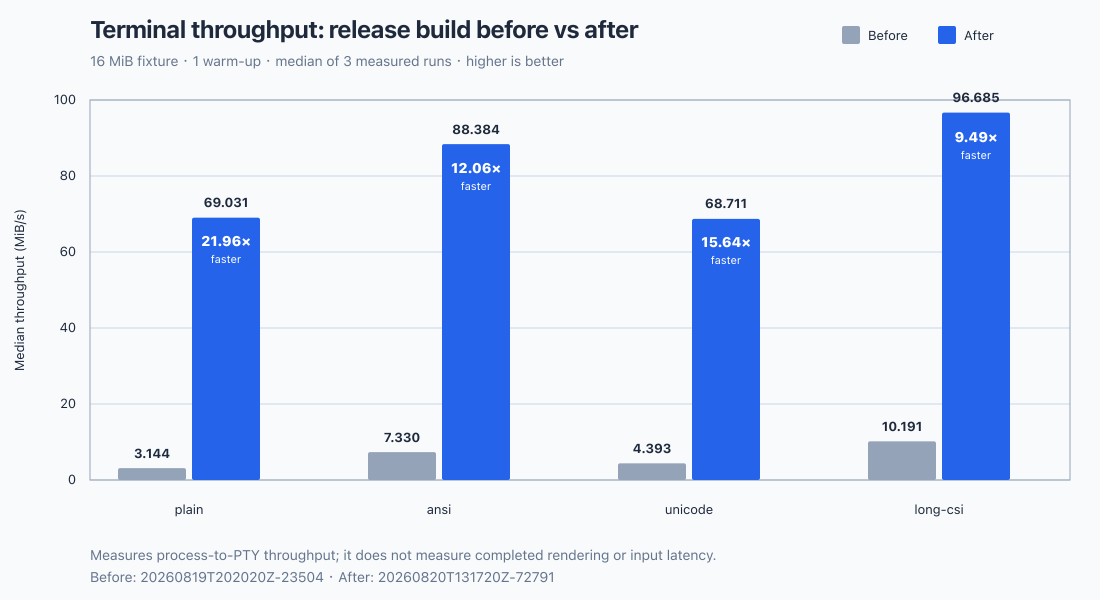
- In OxideTerm's reproducible 16 MiB release-build benchmark, median process-to-PTY throughput increased from 3.144 to 69.031 MiB/s for plain text, from 7.330 to 88.384 MiB/s for ANSI output, from 4.393 to 68.711 MiB/s for Unicode output, and from 10.191 to 96.685 MiB/s for long CSI sequences. These results correspond to speedups of 21.96×, 12.06×, 15.64×, and 9.49× respectively.
- The comparison used the same fixture size, one warm-up, and the median of three measured runs. It measures process-to-PTY throughput rather than completed rendering or input latency.
☁️ Cloud Sync Reliability
- Corrected structured synchronization when another device publishes an empty section, so deletions and empty baselines are applied instead of being skipped and later reported as false conflicts.
- Repaired conflict preview selection for empty connection, Quick Command, forwarding, profile, credential, application-setting, and plugin-setting sections.
- Kept Pull & Preview available when a real conflict needs inspection, and added a separately confirmed Force Upload choice for users who intentionally want the local state to replace the remote state.
🔐 SSH and Connection Workflows
- Imported OpenSSH
RemoteCommandinto the existing post-connect command field, including supported token expansion and source-aware refresh behavior when~/.ssh/configchanges. - Fixed editing saved password authentication: typing or pasting now replaces the keychain-backed value without loading it into the form, while clearing an unfinished replacement restores the protected saved-password placeholder.
- Preserved jump-host and proxy-chain routes when saved connections are edited, synchronized, imported, exported, or opened through supported public connection workflows.
- Reorganized advanced SSH explanations into the existing information popovers for connection timeout, per-terminal authentication, agent forwarding, X11 forwarding, and legacy-server compatibility, reducing permanent form text without removing guidance.
🛠️ Terminal, Editor, and Window Fixes
- Preserved semantic highlighting across wide and multi-column characters, including complete localized dates such as
6月22instead of styling only part of the value. - Restored scrollable Quick Command category lists and the confirmation view for commands that require approval, including long commands that exceed the visible panel height.
- Restored persisted normal, maximized, and full-screen window state after Wayland and macOS window-state transitions.
- Painted editor selections across empty lines and clipped horizontally scrolled editor content at the gutter boundary.
🧰 Linux Build Maintenance
- Removed obsolete GTK, JavaScriptCoreGTK, Soup, and WebKitGTK development packages from the Linux dependency installer while retaining the DBus development files required by system-keyring integration. OxideTerm's native GPUI interface continues to render directly to the GPU and does not require a WebView runtime.
中文
OxideTerm 2.0.23 新增终端输出触发器,显著提升终端吞吐量,加强跨设备云同步冲突处理,并修复多项 SSH、快捷命令、语义高亮、编辑器和原生窗口问题。
✨ 终端触发器与工具栏工作流
- 新增全局触发器规则库及当前会话临时开关。用户可在终端设置中管理规则,也可从终端工具栏、右键菜单或命令面板直接进入,并保持来源窗格不变。
- 新增普通文本与正则表达式匹配,支持区分大小写、完整单词、命名捕获、立即或下一次换行时执行、可选延迟,以及用于避免回显循环和短时重复触发的规则级最小间隔。
- 新增向匹配终端发送文本、运行已有快捷命令及启动本机程序的触发动作。直接程序模式会保持参数边界;Shell 执行则必须单独明确授权并经过风险提示。
- 新增全部终端、本地终端或指定已保存 SSH、Telnet、Mosh、串口连接的适用范围。延迟及待确认动作始终绑定产生匹配的窗格;当窗格、会话或规则不再有效时会自动取消。
- 触发器扫描可在拆分的 UTF-8、ANSI 控制序列、行覆写及输出分块之间进行有界增量处理。没有活动规则的会话继续使用专用空操作路径,也不会开启完整终端输出事件。
- 将“录制会话”和“打开录制”合并为一个终端工具栏控件,并通过紧凑气泡菜单选择具体操作。
⚡ 终端性能
- 优化终端输出处理及高密度滚动,减少重复扫描、复制、调度、布局和绘制工作,同时保持协议探测能力及终端兼容性。
- 在 OxideTerm 可复现的 16 MiB 发布构建基准中,纯文本的进程到 PTY 吞吐量中位数由 3.144 MiB/s 提升至 69.031 MiB/s,ANSI 输出由 7.330 MiB/s 提升至 88.384 MiB/s,Unicode 输出由 4.393 MiB/s 提升至 68.711 MiB/s,长 CSI 序列由 10.191 MiB/s 提升至 96.685 MiB/s,分别达到原来的 21.96 倍、12.06 倍、15.64 倍和 9.49 倍。
- 对比采用相同的测试数据规模、一次预热及三次测量的中位数。该结果衡量进程到 PTY 的吞吐量,不代表绘制完成耗时或输入延迟。
☁️ 云同步可靠性
- 修复其他设备发布空结构化分区时的同步行为,使删除结果和空基线能够正确应用,不再被跳过并在后续同步中误报冲突。
- 修复空连接、快捷命令、端口转发、各类配置、凭据、应用设置及插件设置分区的冲突预览选择。
- 当真实冲突需要检查时保持“拉取并预览”可用,并为确实希望用本地状态替换远端状态的用户新增需要单独确认的“强制上传”选项。
🔐 SSH 与连接工作流
- 将 OpenSSH 的
RemoteCommand导入现有连接后命令字段,并支持相应的令牌展开,以及~/.ssh/config变化时按配置来源更新。 - 修复已保存密码认证的编辑流程:输入或粘贴新密码时会替换钥匙串中的值,而不会先将旧密码载入表单;清空尚未完成的替换内容时会恢复受保护的已保存密码占位状态。
- 在编辑、同步、导入导出已保存连接,以及通过受支持的公共连接工作流打开连接时,完整保留跳板主机与代理链路由。
- 将连接超时、每个终端单独认证、SSH Agent 转发、X11 转发及旧版服务器兼容性的高级说明统一收进现有信息提示中,在保留帮助内容的同时减少表单中的常驻文字。
🛠️ 终端、编辑器与窗口修复
- 修复宽字符和多列字符两侧语义高亮丢失的问题,使
6月22等本地化日期能够完整着色,而不是只处理其中一部分。 - 恢复快捷命令分类列表的滚动及需要批准的命令确认界面,并正确处理超过面板可见高度的长命令。
- 修复 Wayland 与 macOS 窗口状态切换后普通、最大化和全屏状态无法正确持久化的问题。
- 修复编辑器选区跨越空行时未完整绘制的问题,并在水平滚动时将编辑器内容正确裁剪在行号栏边界内。
🧰 Linux 构建维护
- 从 Linux 依赖安装脚本中移除已不再需要的 GTK、JavaScriptCoreGTK、Soup 和 WebKitGTK 开发包,同时保留系统钥匙串集成所需的 DBus 开发文件。OxideTerm 的原生 GPUI 界面继续直接通过 GPU 绘制,不依赖 WebView 运行时。
📥 Download for your system
| Operating system | x64 | ARM64 |
|---|---|---|
| Windows | Setup (.exe) | Setup (.exe) |
| macOS | DMG (Intel) | DMG (Apple Silicon) |
| Linux | AppImage · DEB · RPM | AppImage · DEB · RPM |
Portable archives, signatures, and sha256sums.txt remain available in the release assets below.
📌 Installation Tips / 安装提示
macOS
Downloaded .dmg files may be quarantined by Gatekeeper. Run in Terminal:
xattr -cr ~/Downloads/OxideTerm_*.dmg
# or after install / 或安装后
xattr -cr /Applications/OxideTerm.app
Windows
If SmartScreen warns, click More info -> Run anyway.
若 SmartScreen 弹出警告,点击 更多信息 -> 仍要运行。
Linux
# AppImage
chmod +x OxideTerm_*_linux_*.AppImage && ./OxideTerm_*_linux_*.AppImage

# Debian/Ubuntu
sudo dpkg -i OxideTerm_*_linux_*.deb && sudo apt-get install -f

# Fedora/RHEL-compatible systems
sudo dnf install ./OxideTerm_*_linux_*.rpm
🔗 Links
- Documentation: https://oxideterm.app
- GitHub Issues: https://github.com/AnalyseDeCircuit/oxideterm/issues
- Changelog: https://github.com/AnalyseDeCircuit/oxideterm/blob/main/.github/release-notes/stable-changelog.md