Codex Lid Keeper v0.2.0 App Alpha|原生 macOS App 测试版
Pre-release
Codex Lid Keeper v0.2.0 App Alpha
MacBook testers wanted / 正在招募 MacBook 实机测试者
We need careful, supervised tests across MacBook models and macOS versions.
我们希望收集不同 MacBook、不同 macOS 版本的受控合盖测试结果。
English
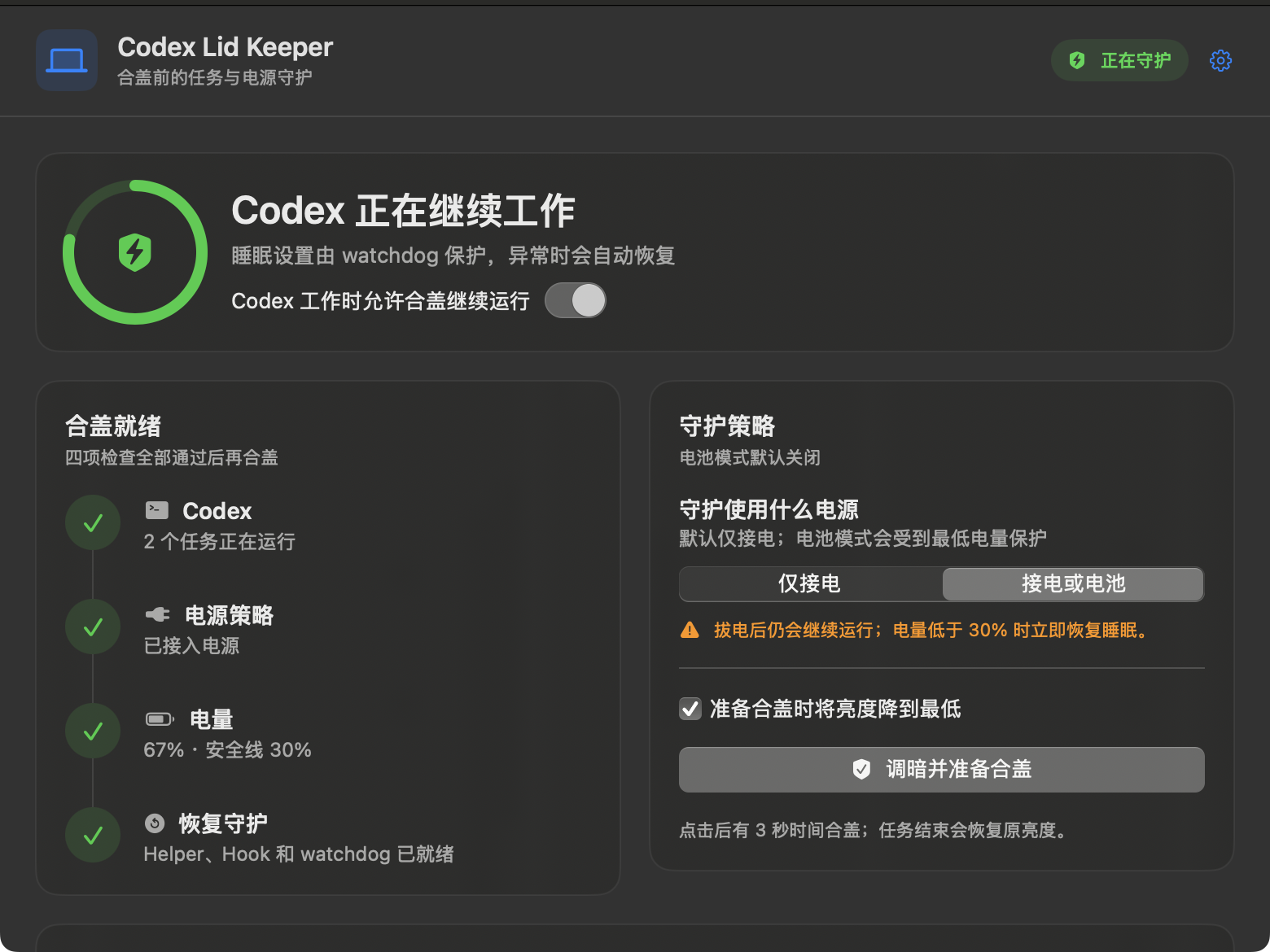
Codex Lid Keeper is now a native macOS app. It watches actual local Codex task
lifecycles, keeps eligible work running after the lid closes, and restores the
previous sleep policy and display brightness after the final task ends.
Highlights
- Native SwiftUI dashboard, menu-bar panel, and Settings.
- Live Codex task count, AC state, and battery percentage.
- Read-only bootstrap detection for tasks already running before installation,
merged with Hook leases without double-counting. - Four clear readiness checks before the app allows closed-lid preparation.
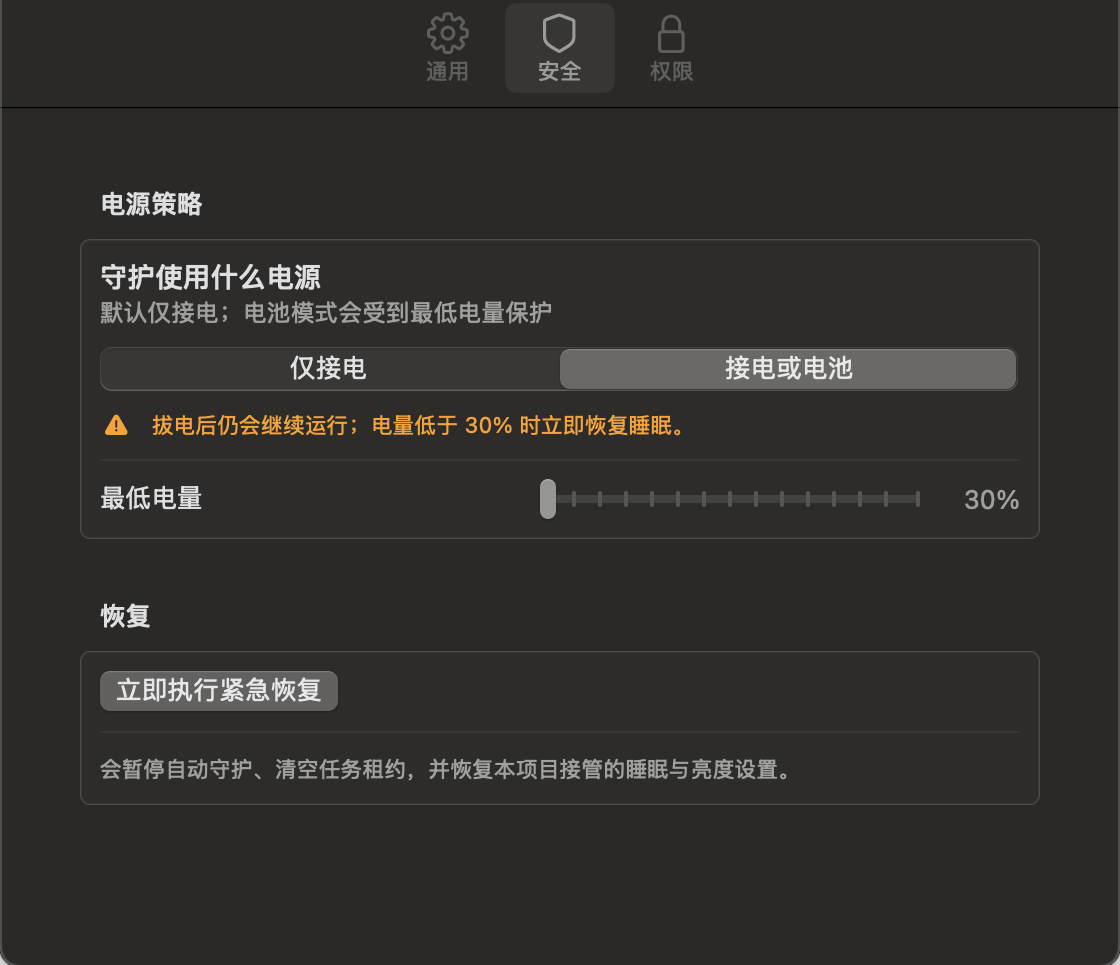
- AC only mode, enabled by default.
- AC or battery mode with a configurable 30–100% charge floor.
- Three-second prepare-to-close action that saves and dims the built-in
display, then restores the original brightness. - Root watchdog with a two-minute heartbeat timeout and fixed 30% battery
safety floor. - Exact restoration of prior AC and battery
disablesleepprofiles. - Five non-blocking, privacy-minimal Codex lifecycle Hooks.
Accuracy and privacy
Task count combines read-only Codex turn-state metadata with active
session_id + turn_id Hook leases, then deduplicates by session. An open Codex
window is not counted as work, tasks started before installation are detected,
and two concurrent tasks show 2. If neither local source is available, the
app shows — instead of a made-up number. Battery percentage comes directly
from macOS.
The runtime query does not select task titles, prompts, responses, tool inputs,
or tool outputs, and the project does not persist them.
Install from source
git clone https://github.com/Apex-Studio-He/codex-lid-keeper.git
cd codex-lid-keeper
./scripts/install.sh
The installer runs all non-privileged tests before asking for administrator
access, then installs the app, helper, launchd jobs, exact sudoers rule, and
merged Hooks. Open /hooks in Codex and trust the five new definitions if
prompted.
Verification baseline
- 44/44 native Swift self-tests
- 5/5 Hook merge tests
- isolated non-blocking dry-run lifecycle test
- warnings-as-errors release build
- shell, plist, app-bundle, and code-signature validation
- automated tests never enable the live sleep override
Please test
Start with the
bilingual testing guide.
We especially need:
- Apple Silicon and Intel MacBooks;
- macOS 13, 14, 15, and newer;
- one and multiple concurrent Codex tasks;
- AC-only and battery-capable behavior;
- closed-lid progress and networking;
- final sleep-policy and brightness restoration;
- temperature observations on an open desk.
Use the
tester issue forms
for sanitized results.
Safety
This Alpha uses the undocumented pmset disablesleep behavior. Never test in
a bag, sleeve, drawer, bed, sofa, or enclosed shelf. Keep the first test
supervised on a hard, open, well-ventilated desk.
Emergency restore:
./scripts/emergency-restore.shThis build is ad-hoc signed and is not yet Developer ID signed or notarized.
Review the source and
security model
before installation.
中文
Codex Lid Keeper 现在有原生 macOS 图形界面了。它根据真实的本地 Codex 任务
生命周期判断是否需要守护;最后一个任务结束后,会恢复原来的睡眠设置和屏幕亮度。
这一版有什么
- SwiftUI 主窗口、菜单栏面板和设置页;
- 实时 Codex 任务数、供电状态和系统电量;
- 安装前已在运行的任务也能通过只读检测补上,并与 Hook 去重;
- Codex、电源策略、电量、恢复守护四项合盖检查;
- 默认开启的“仅接电”模式;
- 可主动选择的“接电或电池”模式,最低电量可设为 30%—100%;
- 合盖准备倒计时三秒,先保存亮度,再把内置屏幕调到最低;
- 两分钟心跳兜底和不可降低的 30% root watchdog 安全线;
- AC、电池原配置分别记录、分别恢复;
- 五个非阻塞、只记录最少信息的 Codex Hook。
数字从哪里来
任务数会合并 Codex 的只读 turn 状态与 session_id + turn_id Hook 租约,再按
session 去重。只打开 Codex 窗口不算任务,安装前已经在跑的任务也能补上,两个
并发任务会准确显示 2。两条本地链路都不可用时才显示 —,不会拿演示数据
冒充。电量直接读取 macOS。
只读查询不会选取任务标题、提示词、回复正文、工具输入或工具输出,程序也不会
保存这些内容。
从源码安装
git clone https://github.com/Apex-Studio-He/codex-lid-keeper.git
cd codex-lid-keeper
./scripts/install.sh
脚本会先跑完不提权的自动测试,再申请一次管理员权限,安装 App、Helper、
launchd、固定 sudoers 规则和合并后的 Hook。如果 Codex 提示 Hook 发生变化,
请打开 /hooks 检查并信任五个新定义。
当前验证基线
- 44/44 项 Swift 自测
- 5/5 项 Hook 合并测试
- 隔离的非阻塞 dry-run 生命周期测试
- release 模式 warnings-as-errors 构建
- shell、plist、App Bundle 与代码签名检查
- 自动测试绝不会开启真实 sleep override
希望你帮忙测试
请先按双语测试指南
操作。我们尤其想知道:
- Apple Silicon 和 Intel MacBook 的表现;
- macOS 13、14、15 以及更新版本;
- 单任务和多个并发任务;
- 仅接电模式与电池模式;
- 合盖后的任务进度和网络;
- 任务结束后睡眠设置与亮度是否恢复;
- 开放桌面环境下的温度。
请通过测试反馈表
提交打码后的结果。
安全提醒
本项目依赖没有公开文档的 pmset disablesleep。不要在背包、内胆包、抽屉、
床铺、沙发或封闭柜子里测试。第一次测试必须放在坚硬、通风的桌面上,人留在
旁边观察。
紧急恢复:
./scripts/emergency-restore.sh当前 App 只有 ad-hoc 签名,还没有 Developer ID 签名和 notarization。安装前
请检查源码和安全说明。