Releases: Apex-Studio-He/codex-lid-keeper
Release list
Codex Lid Keeper v0.3.0 Public Alpha|Universal DMG · 招募 MacBook 实机测试

Codex Lid Keeper v0.3.0 App Alpha
English | 简体中文
Warning
Public Alpha for supervised MacBook testing. The App is ad-hoc signed and
is not Developer ID signed or Apple-notarized. The ad-hoc signature does not
authenticate the publisher; verify the GitHub Release SHA-256. Never test a
running, closed MacBook in a bag or another poorly ventilated space.
English
Download
| Asset | Purpose |
|---|---|
Codex-Lid-Keeper-v0.3.0-universal.dmg |
Universal Apple Silicon + Intel installer |
SHA256SUMS |
Download integrity verification |
After downloading both files into the same directory:
shasum -a 256 -c SHA256SUMSExpected:
Codex-Lid-Keeper-v0.3.0-universal.dmg: OK
Open the DMG, Control-click Install Codex Lid Keeper.command, and choose
Open. Terminal requests administrator access through standard macOS
sudo; the App never reads or stores the password. After installation, open
/hooks in Codex, review the five handlers, and trust them.
Do not drag only the App to /Applications: the guard also requires its
fixed-function Helper, recovery watchdog, user agent, exact sudoers rule, and
Codex Hooks.
What is new
- Direct-download Universal DMG for Apple Silicon and Intel.
- Complete bundled installer and uninstaller.
- In-app system-component repair when the root Helper or recovery watchdog is
missing. - Native Swift Hook install, exact verification, scoped removal, timestamped
backup, private mode-0600write, conflict detection, and schema-aware
atomic replacement. - The “ready to close” control now verifies that the root recovery LaunchDaemon
is loaded, the user Agent is running with a live PID and held daemon lock,
and the root-owned power heartbeat is fresh. It checks again immediately
before dimming the display. - A launchd startup failure leaves no user agent or Hooks active and gives an
explicit repair path. - No Python, Swift, Xcode, or Command Line Tools requirement for Release users.
- Inside-out ad-hoc Hardened Runtime signing and strict bundle verification.
- Root power commands ignore test ownership-path overrides when privileged.
- Uninstall now removes the login item as well as Helper, launchd jobs,
sudoers rule, and project Hooks.
Verification evidence
58/58native Swift self-tests passed.8/8Hook compatibility tests passed.- Isolated non-blocking dry-run lifecycle test passed.
- Both GUI and CLI binaries contain
arm64andx86_64slices. - The Release SHA-256 and the DMG's internal checksum verify.
- The mounted App passes strict deep code-signature verification.
- All bundled shell/command files pass syntax checks.
- Native Hook install → verify → remove passes from the mounted DMG.
- Automated checks do not enable the live sleep override.
What to test
The most useful reports cover:
- one, two, and three simultaneous Codex tasks;
- task count rising and falling within a few seconds;
- final-task-only restoration;
- AC-only and AC-or-battery modes;
- unplug and low-charge restoration;
- emergency restore;
- supervised closed-lid networking and progress; and
- temperature on an open, hard, well-ventilated desk.
Start with the
v0.3.0 testing guide,
then use the
hardware test form.
Do not upload prompts, transcripts, full Hook files, session IDs, or
unsanitized paths.
Important limitations
- No Developer ID signing or Apple notarization.
- No automatic updater or temperature cutoff.
- The graphical interface is currently Simplified Chinese only.
- Uses undocumented
pmset disablesleepbehavior. - Automated tests do not prove closed-lid networking or thermals on every
model. - Not intended for unattended or enclosed-space operation.
The included
29-second UI screenshot overview
summarizes the real interface and safety controls. It is not presented as
physical closed-lid proof.
简体中文
Warning
这是招募 MacBook 实机测试者的公开 Alpha。App 目前只有 ad-hoc 签名,还没有
Developer ID 签名和 Apple notarization;ad-hoc 签名不能证明发布者身份,请
核对 GitHub Release 同页的 SHA-256。合盖运行时不要把电脑放进包里或其他不通风
的地方。
下载与安装
Release 里有两个需要下载的文件:
| 文件 | 用途 |
|---|---|
Codex-Lid-Keeper-v0.3.0-universal.dmg |
Apple Silicon / Intel 通用安装包 |
SHA256SUMS |
校验下载有没有损坏或被替换 |
放进同一个目录后执行:
shasum -a 256 -c SHA256SUMS正常会看到:
Codex-Lid-Keeper-v0.3.0-universal.dmg: OK
打开 DMG,按住 Control 点击 Install Codex Lid Keeper.command,选择“打开”。
管理员密码只会由终端里的 macOS 标准 sudo 读取,App 看不到,也不会保存。
安装完成后,在 Codex 里打开 /hooks,检查并信任五个新 Hook。
不要只把 App 拖进 /Applications。核心功能还需要 Helper、恢复 watchdog、
用户后台任务、固定 sudoers 规则和 Codex Hooks;随包安装器会把它们一起装好。
这一版补齐了什么
- 提供可以直接下载的 Universal DMG;
- DMG 内有完整安装器和卸载器;
- root Helper 或恢复 watchdog 缺失时,可以从 App 的“权限”页直接补装系统组件;
- Hook 安装、精确校验、定向移除、备份、
0600私有写入和原子替换改成原生
Swift,并增加并发冲突与 Codex 配置格式检查; - “准备合盖”现在会确认系统恢复 LaunchDaemon 已加载、用户 Agent 有存活 PID
并持有 daemon 锁、root 电源心跳仍然新鲜,并在调暗屏幕前再检查一次; - launchd 启动失败时不会留下用户 Agent 或 Hooks 半运行,并会给出明确修复入口;
- 下载 Release 的用户不需要 Python、Swift、Xcode 或 Command Line Tools;
- App 和包内 CLI 分别完成 ad-hoc Hardened Runtime 签名,再严格验整个 Bundle;
- root 电源命令不再信任测试用所有权路径;
- 卸载时会一起注销登录项。
已完成的自动验证
58/58项 Swift 原生自测通过;8/8项 Hook 兼容测试通过;- 隔离 dry-run 生命周期测试通过;
- GUI 与 CLI 都同时包含
arm64和x86_64; - DMG 文件校验和、镜像内部校验都通过;
- 挂载后的 App 通过严格签名完整性检查;
- 所有随包 shell / command 文件通过语法检查;
- 从挂载 DMG 执行原生 Hook 安装 → 校验 → 移除通过;
- 自动测试不会开启真实 sleep override。
最希望你帮忙测
- 同时运行 1、2、3 个 Codex 任务时,数量是否及时变化;
- 先结束一个任务时是否继续守护,最后一个结束后才恢复;
- “仅接电”和“接电或电池”两种模式;
- 拔电、低电量与紧急恢复;
- 人在旁边观察时,合盖后的联网与任务进度;
- 开阔、坚硬、通风桌面上的温度。
先按
v0.3.0 测试指南
操作,再通过
实机测试表
反馈。不要上传提示词、聊天内容、完整 Hook、session ID 或没有打码的路径。
仍然要注意
- 没有 Developer ID 签名和 Apple notarization;
- 没有自动更新和温度自动退出;
- 依赖没有公开文档的
pmset disablesleep; - 自动测试不能替所有机型证明合盖网络与散热;
- 不支持无人值守或封闭空间运行。
29 秒界面预览
由真实界面截图制作,用来说明安全控制,不会冒充合盖实机证明。
Codex Lid Keeper v0.2.2 App Alpha — Completion Recovery / 结束恢复修复
Codex Lid Keeper v0.2.2 App Alpha
English | 简体中文
We are looking for MacBook testers. Please use an open, hard,
well-ventilated desk and read the testing guide before trying closed-lid
operation.
English
What changed
This release closes a recovery gap between the two local activity sources.
If Codex writes a rollout task_complete marker but the matching Stop Hook
never arrives, Codex Lid Keeper now removes that exact stale Hook lease
immediately. Previously, the stale lease could keep closed-lid guarding active
until its hard timeout.
The cleanup key is the full session_id + turn_id, not just the session. A
late completion from an older turn therefore cannot cancel newer work in the
same Codex task. The main app applies the same evidence during live status
refresh, so the displayed count corrects itself without waiting for a daemon
write.
Why this matters
- missed, timed-out, or not-yet-trusted
StopHooks recover automatically; - sleep and brightness restoration are no longer delayed by that stale lease;
- newer work in the same session remains protected;
- rollout, Hook, and compatibility-log observations stay deduplicated.
Verification
48/48native Swift self-tests passed;- release binaries build with warnings treated as errors;
- isolated Hook configuration tests and dry-run lifecycle tests pass;
- the app remains source-built and ad-hoc signed.
Install or update
git clone https://github.com/Apex-Studio-He/codex-lid-keeper.git
cd codex-lid-keeper
./scripts/install.sh
For an existing checkout:
git pull
./scripts/install.sh
The standard macOS sudo prompt appears in Terminal. The app does not read or
store your administrator password. Existing app configuration is retained.
Please test
The most useful reports include:
- MacBook model and chip;
- macOS and Codex versions;
- AC-only or battery-enabled mode;
- whether one, two, and three concurrent tasks are counted correctly;
- whether the count falls immediately when each task ends;
- whether work continues after a supervised lid close;
- whether sleep policy and display brightness restore after the final task.
Use the
Alpha testing guide
and submit results through the
tester issue form.
Do not post prompts, transcripts, full Hook files, or unsanitized local paths.
Safety
This is experimental software using the undocumented macOS
pmset disablesleep setting. Never run a closed MacBook inside a bag, sleeve,
drawer, bed, sofa, or other enclosed space. Keep the first test supervised and
stop if the machine becomes unusually warm.
简体中文
这个版本仍在招募 MacBook 实机测试者。合盖测试前请先阅读测试指南,并把电脑
放在坚硬、开阔、通风良好的桌面上。
这次修了什么
这次补上了两条本地任务信号之间的一个恢复缺口:Codex 已经在 rollout 里写下
task_complete,但对应的 Stop Hook 因超时、尚未信任或其他原因没有送达时,
Codex Lid Keeper 现在会立刻清掉那一条残留租约。旧版本可能要等到硬超时后才
退出守护。
清理使用完整的 session_id + turn_id,不会只按会话粗略处理。因此旧 turn
迟到的结束信号,不会误伤同一会话里刚开始的新任务。主界面的实时状态也会马上
采用这条完成证据,不用等后台进程下一次写回。
你会得到什么
StopHook 偶尔漏送时可以自动恢复;- 不会因为一条陈旧租约拖延睡眠设置和亮度恢复;
- 同一会话里的新任务仍会继续受到守护;
- rollout、Hook 和兼容日志仍然会正确去重。
已完成的验证
48/48项 Swift 自测通过;- release 构建开启 warnings-as-errors 后通过;
- Hook 配置测试和隔离 dry-run 生命周期测试通过;
- App 仍然是本机源码构建和 ad-hoc 签名。
安装或更新
首次安装:
git clone https://github.com/Apex-Studio-He/codex-lid-keeper.git
cd codex-lid-keeper
./scripts/install.sh
已有仓库:
git pull
./scripts/install.sh
管理员密码仍由 macOS 在终端里通过标准 sudo 流程询问,App 不会读取或保存
密码。更新不会清空现有配置。
希望你帮忙测试
反馈里最好包含:
- MacBook 型号和芯片;
- macOS 与 Codex 版本;
- 使用“仅接电”还是“允许电池”模式;
- 1、2、3 个并发任务的数量是否准确;
- 每个任务结束后,数量是否及时减少;
- 人在旁边观察时,合盖后任务是否继续;
- 最后一个任务结束后,睡眠设置和屏幕亮度是否恢复。
请先阅读
Alpha 测试指南,
再通过
测试反馈表
提交结果。不要上传提示词、对话内容、完整 Hook 文件或没有处理过的本机路径。
安全提醒
这是实验性软件,依赖 macOS 没有公开文档的 pmset disablesleep。不要把合盖
运行中的 MacBook 放进背包、内胆包、抽屉、床铺、沙发或其他不通风的空间。
第一次测试请全程观察,机器异常发热时立即停止。
Codex Lid Keeper v0.2.1 App Alpha — Accurate Task Counts / 任务计数修复
Codex Lid Keeper v0.2.1 App Alpha
MacBook testers wanted / 正在招募 MacBook 实机测试者
This patch focuses on one thing that must be trustworthy before a MacBook lid
closes: the running-task count.
这一版只盯住一个合盖前必须可信的问题:正在运行的任务数。
What was wrong / 原来的问题
A tester had three Codex tasks running at the same time. Open Island correctly
showed 3, while Codex Lid Keeper temporarily showed 2.
实机反馈中,同一时刻有三个 Codex 任务。Open Island 正确显示 3,但
Codex Lid Keeper 一度只显示 2。
The old runtime detector used Codex turn-state logs as its bootstrap source.
Those logs are accurate eventually, but a fresh turn may not emit the first
matching progress record until the agent reaches a later reasoning or tool
boundary. In the captured case:
- the missing task began at
10:52:34; - its first matching turn-state log arrived at
10:53:49; - the UI therefore lagged by about 75 seconds.
旧检测器依赖 turn 状态日志来补记任务。这类日志最后会变正确,但新任务可能要
等到后面的推理或工具节点才写出第一条匹配记录。实机里:
- 漏掉的任务在
10:52:34开始; - 第一条可用 turn 日志到
10:53:49才出现; - 界面因此慢了约 75 秒。
What changed / 现在怎么判断
Codex Lid Keeper now treats the lifecycle records already written to the local
rollout as the immediate source:
task_startedadds the matchingsession_id + turn_id;task_completeremoves it immediately;- the previous turn-state query remains as a compatibility fallback;
- trusted Hooks remain an independent safety path;
- all observations are deduplicated by Codex session.
现在会优先跟随本地 rollout 已经写下的生命周期标记:
task_started立即加入对应的session_id + turn_id;task_complete立即移除;- 原来的 turn 状态查询保留为兼容兜底;
- 受信任的 Hook 仍是一条独立安全链路;
- 所有来源最后按 Codex session 去重。
This also fixes the opposite failure: when a completion marker is already
present but an older log row still says “running,” the completed rollout state
wins. A finished task no longer stays counted just because the fallback log is
late.
反过来的误差也一起修了:如果 rollout 已经结束,但旧日志还停在“运行中”,以
结束标记为准,不会因为兜底日志慢半拍而继续多算。
Privacy boundary / 隐私边界
The new path is read-only and intentionally narrow:
- only recent non-archived thread identity, rollout path, working directory,
and update metadata are selected from Codex state; - no more than the final 4 MiB of each recent rollout is examined;
- ordinary lines are rejected before JSON decoding;
- the decoder models only the
event_msgenvelope, lifecycle event type, and
turn_id; - thread titles, previews, prompts, responses, and tool payloads are not
modeled or persisted; - the full working directory is reduced to its final component before it
enters Keeper state.
新链路是只读的,而且范围刻意压得很小:
- 线程库只取近期未归档任务的标识、rollout 路径、工作目录和更新时间;
- 每个近期 rollout 最多检查末尾 4 MiB;
- 普通行在 JSON 解码前就会被跳过;
- 解码结构只有
event_msg外层、生命周期类型和turn_id; - 任务标题、预览、提示词、回复和工具内容不会建立字段,也不会保存;
- 完整工作目录进入 Keeper 状态前只保留最后一级项目名。
Verification / 验证结果
45/45native Swift self-tests passed5/5Hook configuration tests passed- isolated dry-run lifecycle test passed
- Release build passed with warnings treated as errors
- app bundle plist and ad-hoc signature checks passed
- exact regression covered: three active rollouts while the fallback log sees
only two - completion regression covered: rollout completion suppresses a stale active
log record - same-moment local comparison matched Codex Desktop:
2 active / 2 active
after the third task finished
对应中文:
45/45项 Swift 自测通过;5/5项 Hook 配置测试通过;- 隔离 dry-run 生命周期测试通过;
- Release 构建在“警告视为错误”下通过;
- App plist 与 ad-hoc 签名检查通过;
- 已覆盖“三个 rollout 正在运行、兼容日志只看到两个”的精确回归;
- 已覆盖“rollout 已结束、旧日志仍显示运行”的回归;
- 第三个任务结束后,与 Codex Desktop 同刻对照均为
2 active。
Install or update / 安装或更新
This remains a source-built, ad-hoc-signed Alpha:
git clone https://github.com/Apex-Studio-He/codex-lid-keeper.git
cd codex-lid-keeper
./scripts/install.sh
If you already cloned the repository:
git pull
./scripts/install.sh
The installer asks for the administrator password through the normal macOS
Terminal sudo prompt. The app never reads or stores that password.
安装或更新时,管理员密码仍由终端里的 macOS 标准 sudo 流程询问。App 不会
读取或保存密码。
Please test / 希望你帮忙测试
The most useful test for this patch is:
- run two or three Codex tasks at the same time;
- keep Codex Lid Keeper open beside Codex Desktop;
- start one more turn and confirm the count changes within a few seconds;
- let one task finish and confirm the count drops again;
- only then proceed to the supervised closed-lid test in
TESTING.md.
这一版最希望大家帮忙验证:
- 同时运行两到三个 Codex 任务;
- 把 Codex Lid Keeper 与 Codex Desktop 放在一起对照;
- 再启动一个任务,确认几秒内加一;
- 等一个任务结束,确认数量及时减一;
- 数量稳定后,再按 TESTING.md 做有人看守的合盖测试。
Please include Mac model, chip, macOS version, Codex version, power mode, and
the before/after task counts in a
test report.
反馈时请带上 Mac 型号、芯片、macOS 版本、Codex 版本、供电模式,以及任务开始 /
结束前后的数量变化。
Alpha warning / Alpha 提醒
Codex Lid Keeper still depends on undocumented macOS behavior and is not
Developer ID signed or notarized. Never test a running closed MacBook in a bag,
sleeve, drawer, bed, sofa, or other poorly ventilated space. Keep the first
test supervised on an open desk and stop if the computer becomes unusually
warm.
项目仍依赖 macOS 未公开行为,也还没有 Developer ID 签名和 notarization。
不要把合盖运行中的 MacBook 放进包、内胆、抽屉、床铺、沙发或其他不通风环境。
第一次测试请放在开阔桌面并有人看守,机器异常发热就立即停止。
Codex Lid Keeper v0.2.0 App Alpha|原生 macOS App 测试版
Codex Lid Keeper v0.2.0 App Alpha
MacBook testers wanted / 正在招募 MacBook 实机测试者
We need careful, supervised tests across MacBook models and macOS versions.
我们希望收集不同 MacBook、不同 macOS 版本的受控合盖测试结果。
English
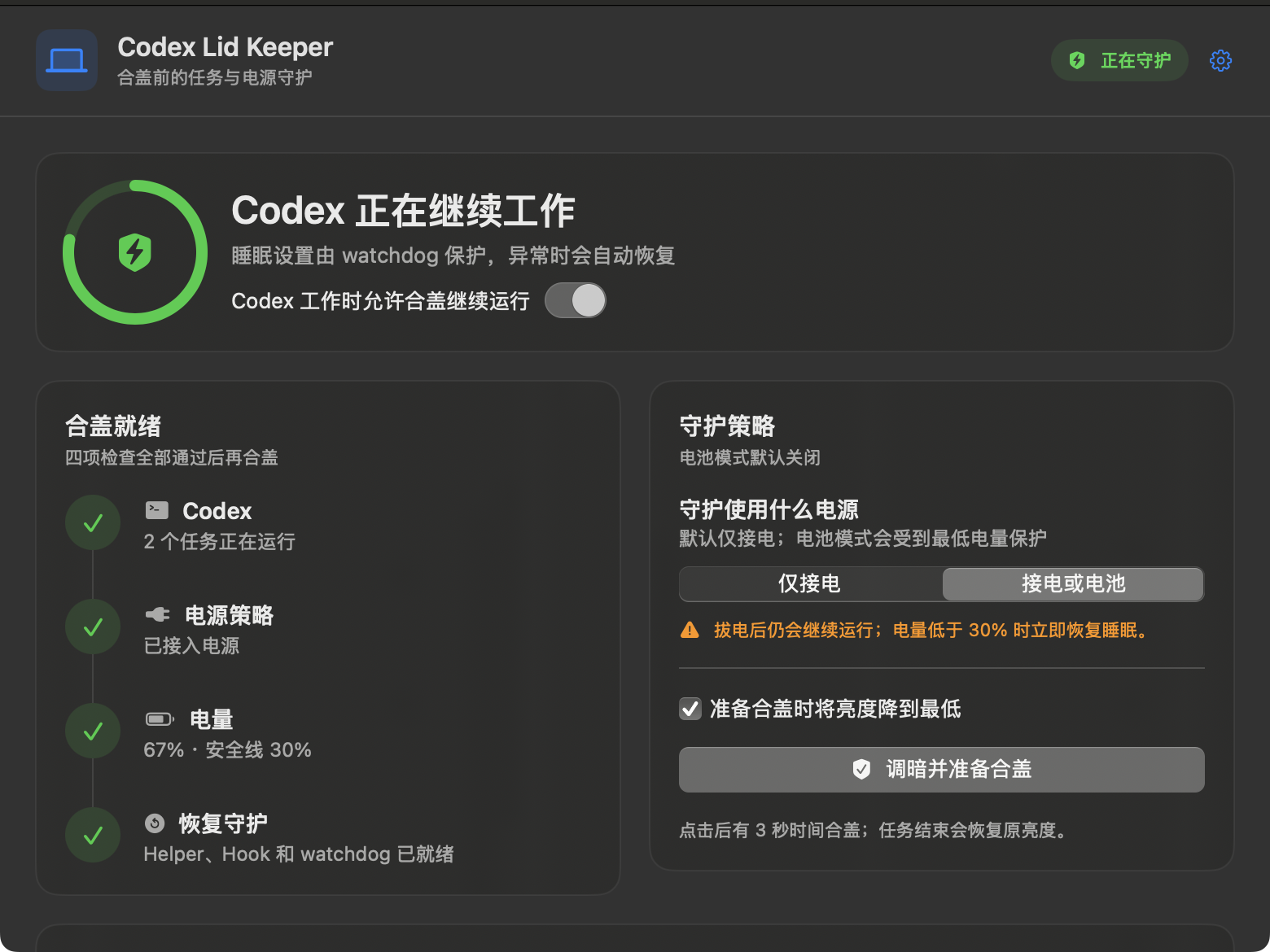
Codex Lid Keeper is now a native macOS app. It watches actual local Codex task
lifecycles, keeps eligible work running after the lid closes, and restores the
previous sleep policy and display brightness after the final task ends.
Highlights
- Native SwiftUI dashboard, menu-bar panel, and Settings.
- Live Codex task count, AC state, and battery percentage.
- Read-only bootstrap detection for tasks already running before installation,
merged with Hook leases without double-counting. - Four clear readiness checks before the app allows closed-lid preparation.
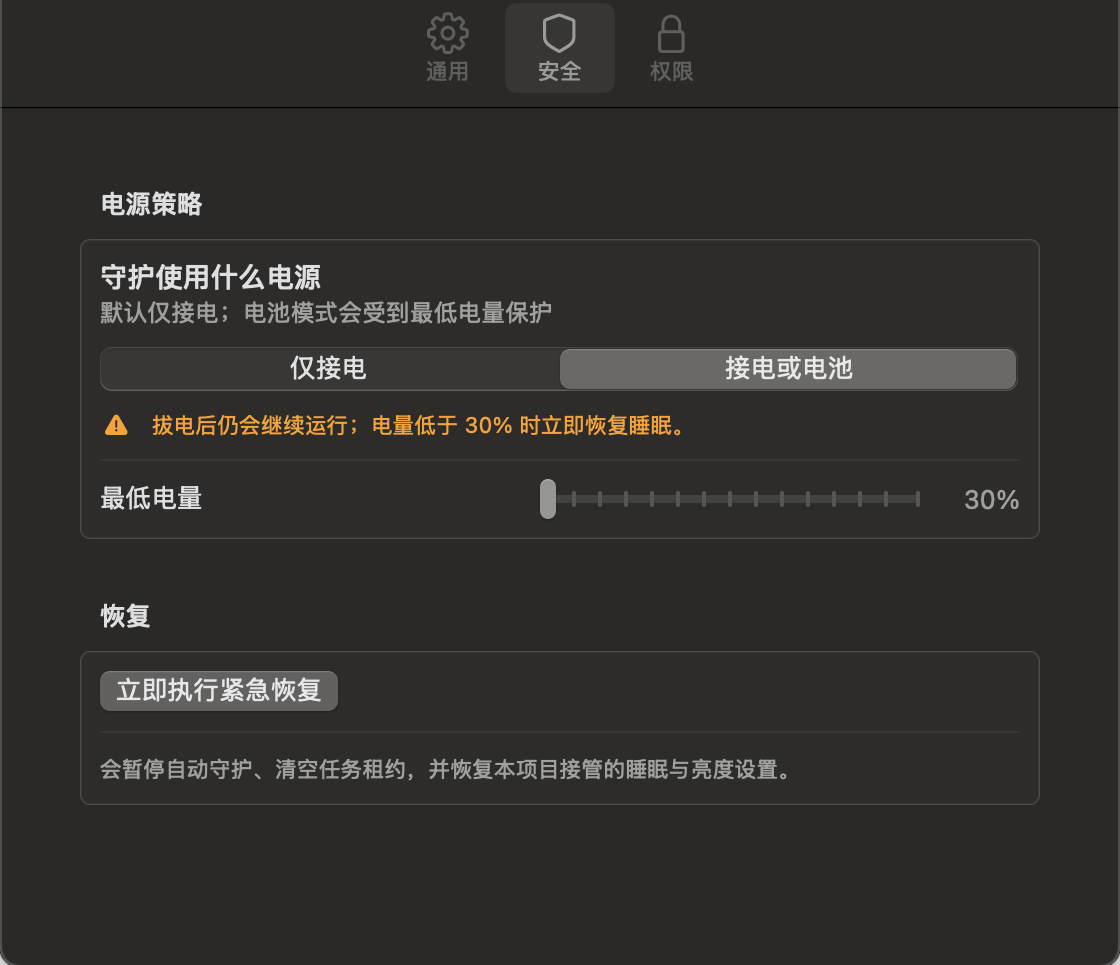
- AC only mode, enabled by default.
- AC or battery mode with a configurable 30–100% charge floor.
- Three-second prepare-to-close action that saves and dims the built-in
display, then restores the original brightness. - Root watchdog with a two-minute heartbeat timeout and fixed 30% battery
safety floor. - Exact restoration of prior AC and battery
disablesleepprofiles. - Five non-blocking, privacy-minimal Codex lifecycle Hooks.
Accuracy and privacy
Task count combines read-only Codex turn-state metadata with active
session_id + turn_id Hook leases, then deduplicates by session. An open Codex
window is not counted as work, tasks started before installation are detected,
and two concurrent tasks show 2. If neither local source is available, the
app shows — instead of a made-up number. Battery percentage comes directly
from macOS.
The runtime query does not select task titles, prompts, responses, tool inputs,
or tool outputs, and the project does not persist them.
Install from source
git clone https://github.com/Apex-Studio-He/codex-lid-keeper.git
cd codex-lid-keeper
./scripts/install.sh
The installer runs all non-privileged tests before asking for administrator
access, then installs the app, helper, launchd jobs, exact sudoers rule, and
merged Hooks. Open /hooks in Codex and trust the five new definitions if
prompted.
Verification baseline
- 44/44 native Swift self-tests
- 5/5 Hook merge tests
- isolated non-blocking dry-run lifecycle test
- warnings-as-errors release build
- shell, plist, app-bundle, and code-signature validation
- automated tests never enable the live sleep override
Please test
Start with the
bilingual testing guide.
We especially need:
- Apple Silicon and Intel MacBooks;
- macOS 13, 14, 15, and newer;
- one and multiple concurrent Codex tasks;
- AC-only and battery-capable behavior;
- closed-lid progress and networking;
- final sleep-policy and brightness restoration;
- temperature observations on an open desk.
Use the
tester issue forms
for sanitized results.
Safety
This Alpha uses the undocumented pmset disablesleep behavior. Never test in
a bag, sleeve, drawer, bed, sofa, or enclosed shelf. Keep the first test
supervised on a hard, open, well-ventilated desk.
Emergency restore:
./scripts/emergency-restore.shThis build is ad-hoc signed and is not yet Developer ID signed or notarized.
Review the source and
security model
before installation.
中文
Codex Lid Keeper 现在有原生 macOS 图形界面了。它根据真实的本地 Codex 任务
生命周期判断是否需要守护;最后一个任务结束后,会恢复原来的睡眠设置和屏幕亮度。
这一版有什么
- SwiftUI 主窗口、菜单栏面板和设置页;
- 实时 Codex 任务数、供电状态和系统电量;
- 安装前已在运行的任务也能通过只读检测补上,并与 Hook 去重;
- Codex、电源策略、电量、恢复守护四项合盖检查;
- 默认开启的“仅接电”模式;
- 可主动选择的“接电或电池”模式,最低电量可设为 30%—100%;
- 合盖准备倒计时三秒,先保存亮度,再把内置屏幕调到最低;
- 两分钟心跳兜底和不可降低的 30% root watchdog 安全线;
- AC、电池原配置分别记录、分别恢复;
- 五个非阻塞、只记录最少信息的 Codex Hook。
数字从哪里来
任务数会合并 Codex 的只读 turn 状态与 session_id + turn_id Hook 租约,再按
session 去重。只打开 Codex 窗口不算任务,安装前已经在跑的任务也能补上,两个
并发任务会准确显示 2。两条本地链路都不可用时才显示 —,不会拿演示数据
冒充。电量直接读取 macOS。
只读查询不会选取任务标题、提示词、回复正文、工具输入或工具输出,程序也不会
保存这些内容。
从源码安装
git clone https://github.com/Apex-Studio-He/codex-lid-keeper.git
cd codex-lid-keeper
./scripts/install.sh
脚本会先跑完不提权的自动测试,再申请一次管理员权限,安装 App、Helper、
launchd、固定 sudoers 规则和合并后的 Hook。如果 Codex 提示 Hook 发生变化,
请打开 /hooks 检查并信任五个新定义。
当前验证基线
- 44/44 项 Swift 自测
- 5/5 项 Hook 合并测试
- 隔离的非阻塞 dry-run 生命周期测试
- release 模式 warnings-as-errors 构建
- shell、plist、App Bundle 与代码签名检查
- 自动测试绝不会开启真实 sleep override
希望你帮忙测试
请先按双语测试指南
操作。我们尤其想知道:
- Apple Silicon 和 Intel MacBook 的表现;
- macOS 13、14、15 以及更新版本;
- 单任务和多个并发任务;
- 仅接电模式与电池模式;
- 合盖后的任务进度和网络;
- 任务结束后睡眠设置与亮度是否恢复;
- 开放桌面环境下的温度。
请通过测试反馈表
提交打码后的结果。
安全提醒
本项目依赖没有公开文档的 pmset disablesleep。不要在背包、内胆包、抽屉、
床铺、沙发或封闭柜子里测试。第一次测试必须放在坚硬、通风的桌面上,人留在
旁边观察。
紧急恢复:
./scripts/emergency-restore.sh当前 App 只有 ad-hoc 签名,还没有 Developer ID 签名和 notarization。安装前
请检查源码和安全说明。
Codex Lid Keeper v0.1.0-alpha — Public Alpha / 首个公开测试版
Codex Lid Keeper v0.1.0-alpha
Public Alpha / 首个公开测试版
Warning
This is an experimental, source-only Alpha for macOS. It installs privileged
system integration and uses the undocumented pmset disablesleep setting.
Review the source and testing guide before installation. Never place a
running, closed MacBook in a bag or other poorly ventilated space.
这是公开 Alpha,只提供源码。安装后会加入需要 root 权限的系统项,并用到 macOS
没有公开文档的 pmset disablesleep。动手前请先看代码和测试指南。合盖运行时
一定别把 MacBook 塞进包里或放到不通风的地方。
English
What is this?
Codex Lid Keeper tracks actual local Codex task activity through lifecycle
Hooks. While at least one eligible task is active, the MacBook is connected to
AC power, and battery level is safe, it owns an AC-only sleep override. After
the final task finishes—or when a safety condition fails—it restores the
captured prior AC setting.
This is a headless engineering preview, not a polished end-user application.
There is no menu-bar UI, signed app, notarized installer, DMG, or automatic
update channel.
Why this design is safer than a simple pmset 1/0 wrapper
- Non-blocking Hooks: Hook execution only decodes minimal fields and
atomically queues an event. It never waits forsudoor power reconciliation. - Concurrent leases: overlapping sessions and turns remain independent;
restoration happens only after the last lease ends. - Prior-state ownership: the root helper captures whether AC
disablesleepwas already enabled. Restoration writes that captured value,
not an assumed0. - AC-only changes: battery-profile policy is never modified.
- Independent watchdog: a root LaunchDaemon restores owned state after a
stale heartbeat, missing AC power, unknown power state, or low battery. - Hard expiry: missing terminal Hook events cannot create a permanent lease.
- Narrow privilege: sudoers permits only two exact command vectors against
a root-owned executable. - Privacy-minimal persistence: prompts, transcripts, model responses, tool
inputs, and tool outputs are not stored.
Included in v0.1.0-alpha
- Swift 6 macOS command-line helper and reusable core module
- five Codex lifecycle Hook integrations
- private, atomic, idempotent lifecycle event spool
- renewable multi-task leases with delayed release
- native IOKit AC and battery sampling
- root-owned AC prior-state record
- user LaunchAgent and root recovery LaunchDaemon
- exact-command sudoers integration
- status, pause, resume, clear, emergency restore, and uninstall workflows
- bounded queue, state, configuration, and rotating log behavior
- English and Simplified Chinese documentation
- bilingual bug/feature templates and contribution guidance
Verification evidence
The release commit was validated before tagging with:
- release build with Swift warnings treated as errors
- 35/35 native Swift self-tests
- 5/5 Hook configuration tests
- isolated non-blocking dry-run lifecycle test
- idle-daemon no-rewrite regression
- concurrent queue, crash replay, malformed event, future timestamp, clock
rollback, AC removal, low battery, and ownership restoration regressions - launchd plist validation
- exact sudoers fragment validation with
visudo - shell syntax and whitespace checks
- before/after comparison proving the automated suite did not change live
pmsetconfiguration
These checks do not replace real closed-lid acceptance on each Mac model.
How to test
-
Read TESTING.md.
-
Clone the repository and check out the tag:
git clone https://github.com/Apex-Studio-He/codex-lid-keeper.git cd codex-lid-keeper git checkout v0.1.0-alpha -
Run the non-privileged checks:
./scripts/build.sh
/usr/bin/python3 scripts/test_hooks_config.py
/usr/bin/python3 scripts/test_e2e.py --binary .build/release/codex-lid-keeper
-
Review the installer, uninstaller, launchd files, and security model.
-
Install with
./scripts/install.sh. -
Open
/hooksin Codex, review the five new handlers, and trust them. -
Complete the open-lid matrix before attempting the controlled closed-lid
test.
Emergency restore
From the repository:
./scripts/emergency-restore.shOr after installation:
/Library/PrivilegedHelperTools/com.zundu.codex-lid-keeper emergency-restoreKeep this command available during the first hardware test.
Known limitations
- Depends on undocumented macOS behavior that Apple may change.
- Source build requires Command Line Tools and administrator access.
- The installed executable is locally built and not code-signed or notarized.
- Closed-lid networking and thermal behavior varies by Mac model.
- Hosted tool coverage depends on which lifecycle Hooks Codex emits.
- No UI, notifications, automatic updates, or compatibility database.
- Not suitable for unattended deployment in this Alpha.
Reporting feedback
Use the bilingual GitHub Issue forms and include:
- Mac model, macOS version, architecture, and Codex version
- AC/battery state and test-case identifier
- sanitized
status --jsonoutput - expected vs observed behavior
- whether emergency restore worked
- whether live power settings changed unexpectedly
Do not upload prompts, transcripts, secrets, full Hook files, or personal paths.
Report vulnerabilities privately through GitHub Security Advisories.
中文说明
先用一句话讲清楚
Codex Lid Keeper 会在本地 Codex 任务运行时临时接管合盖睡眠,让任务继续跑;
最后一个任务结束以后,再把 Mac 原来的设置恢复回来。
它不是一个成熟 App,而是第一版公开测试代码。现在没有菜单栏界面、签名安装包、
DMG 或自动更新。我们先把最重要的三件事做好:判断任务、守住安全条件、可靠恢复。
为什么不直接写两行 pmset
因为“开始时写 1,结束时写 0”很容易把用户原来的设置盖掉,也扛不住任务并发、
进程崩溃和结束事件丢失。
这一版做了这些保护:
- Hook 很轻。 只把任务事件写进本地队列,不在 Hook 里等 sudo。
- 同时跑几个任务也没关系。 每个任务单独记账,最后一个结束才恢复。
- 先记原值,再做修改。 AC 模式下原本就是
disablesleep 1的话,恢复后仍然
是 1,不会被我们强行改成 0。 - 电池配置不动。 只修改接电时的配置。
- 后台挂了还有兜底。 root watchdog 发现心跳断了、已经拔电或电量太低,会
主动恢复。 - 结束事件丢了也不会永久唤醒。 每个任务都有最长八小时的过期时间。
- sudo 只开两条命令。 Hook 没法借这个权限去执行别的操作。
- 聊天内容不落盘。 不保存提示词、模型回复、工具参数和工具输出。
这次发布里有什么
- Swift 6 编写的 macOS CLI 和 Core
- 五类 Codex 生命周期 Hook
- 支持去重、排序和崩溃重放的私有事件队列
- 支持并发任务、结束缓冲和强制过期的租约
- IOKit 接电与电量检测
- root 管理的 AC 原值记录
- 用户 LaunchAgent 和 root 恢复 LaunchDaemon
- 只允许固定参数的 sudoers 规则
- 状态查看、暂停、恢复、清理、紧急恢复和卸载命令
- 队列上限、日志轮转和空闲写盘优化
- 中英文说明、测试手册和 Issue 模板
发出来之前做了哪些检查
标签对应的代码通过了:
- release 构建,并把 Swift warning 当成错误处理
- 35/35 项 Swift 自测
- 5/5 项 Hook 配置测试
- 在临时目录里完整跑了一遍 dry-run 流程
- 空闲 daemon 不重复写状态文件的回归测试
- 并发队列、崩溃重放、异常事件、系统时间回拨、拔电、低电量和恢复测试
- launchd plist、sudoers、shell 语法和空白检查
- 自动测试前后的真实
pmset对比,结果没有变化
这些检查能证明代码路径正常,但不能替代真实 MacBook 的合盖、网络和散热测试。
怎么开始测试
先看一遍测试指南。
不要跳过安装前自测,也不要一安装就直接合盖。
git clone https://github.com/Apex-Studio-He/codex-lid-keeper.git
cd codex-lid-keeper
git checkout v0.1.0-alpha

./scripts/build.sh
/usr/bin/python3 scripts/test_hooks_config.py
/usr/bin/python3 scripts/test_e2e.py --binary .build/release/codex-lid-keeper
自测通过后:
- 看一遍安装、卸载脚本和安全说明;
- 执行
./scripts/install.sh; - 在 Codex 里打开
/hooks,确认并信任五个新增 Hook; - 先做开盖测试、并发测试、拔电和紧急恢复;
- 最后才在通风桌面上做两到五分钟的合盖测试。
出问题先恢复
仓库目录里执行:
./scripts/emergency-restore.sh或者使用安装后的完整路径:
/Library/PrivilegedHelperTools/com.zundu.codex-lid-keeper emergency-restore第一次上真实机器测试前,请先把这条命令留在手边。
现在还不适合做什么
- 不要放进背包、内胆包或其他不通风的地方运行;
- 不要把这个 Alpha 当成无人值守工具;
- 不要假设一台 Mac 测过,其他型号就一定一样;
- 不要跳过系统大版本升级后的重新测试;
- 不要把本地构建的 Helper 当成已经签名、notarized 的正式软件。
另外,Hosted tool 能不能续任务状态,取决于 Codex 实际会不会为它发出对应 Hook。
怎么反馈
用仓库里的双语 Issue 表单就行。请写上:
- Mac 型号、macOS 版本、芯片架构和 Codex 版本
- 当时是否接电、电量多少
- 测到了哪一步
- 打码后的
status --json - 预期发生什么、实际发生什么
- 紧急恢复有没有成功
pmset有没有出现意外变化
不要上传提示词、聊天记录、密钥、完整 Hook 文件或个人路径。安全漏洞请走 GitHub
Security Advisory,不要发公开 Issue。
Thank you for testing carefully. / 感谢你谨慎测试。