KAM Capture Tool 1.2.0 - updates itself

KAM Capture Tool now tells you when there is a new version, and installs it when you say so.
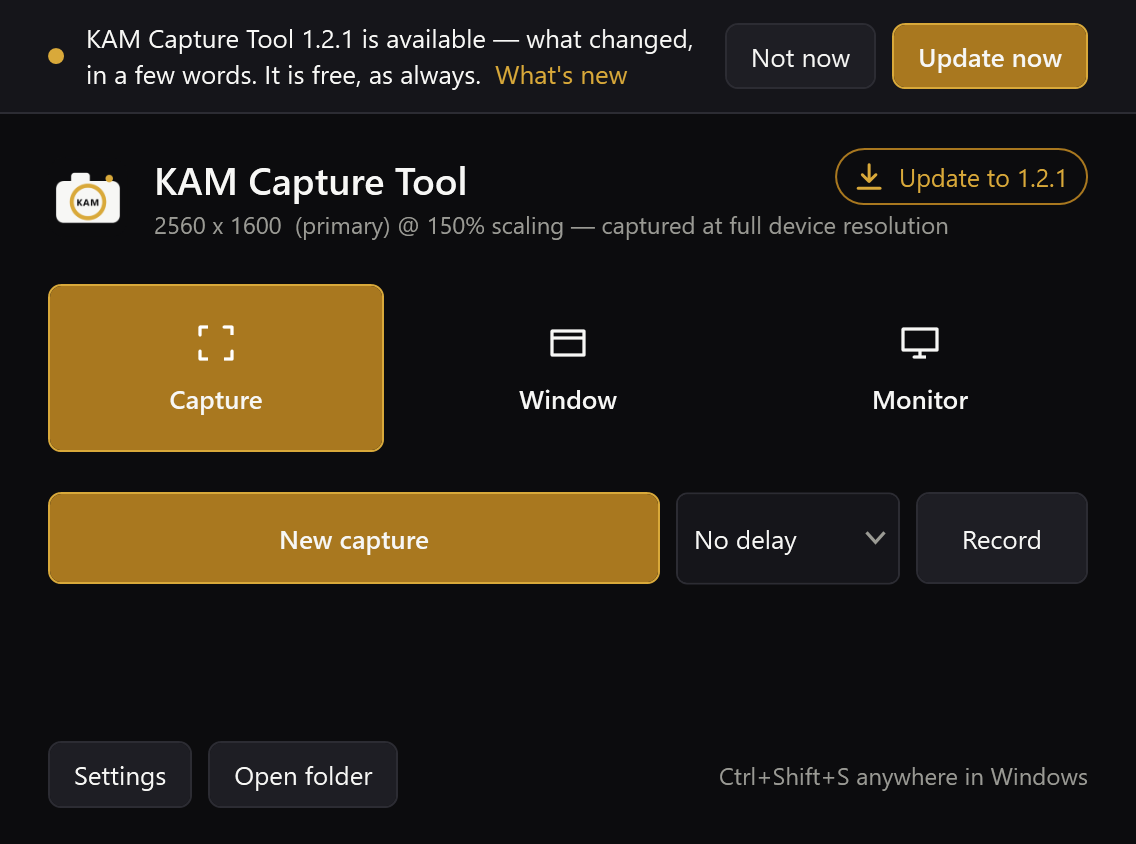
It updates itself. The circular arrow at the top right of the home window checks GitHub for a newer release, and it checks by itself as well — a few seconds after starting, then every six hours. When there is one, the arrow becomes a gold Update to x.y.z button and a bar says what changed, with What's new, Not now and Update now. If the window is closed, a tray notice says it once. Update now downloads the new version, checks it against the SHA-256 GitHub publishes for it, closes the running copy and opens the new one in its place — same folder, same shortcuts, same startup choice. Not now leaves that version alone until a newer one lands.
Opening a newer download while it runs now works. Before, the download handed itself to the copy already running and quit, so all that happened was the old window appearing. Now it offers the update, and closes the running copy only once you agree. That is also how you get this version: open the 1.2.0 download while 1.1.x is running and it takes over.
Two smaller fixes. Closing the home window with the X closed it for good, and opening it again from the tray then failed with an error; it now hides, as a tray app should. And if swapping in a new version ever fails part-way, the old program is put back rather than leaving the install folder empty.
Tested, not assumed. scripts/test-update.ps1 runs the whole update between two builds in a sandbox: a download with the wrong checksum is refused with nothing changed, and a good one ends with the new version running where the old one was. The checks guarding the fixes were each run against the old behaviour first, to watch them fail, and the install and update checks now run in CI. A copy of this build asked the real GitHub and read this release correctly.
Not yet tried for real: an update from one published release to the next. This is the first version with the updater, so the first real one is whatever comes after it.
The update check is one request to GitHub's releases API. It carries the tool's version and nothing about you or your captures, and it can be switched off in Settings.
Install: download KamCapture.exe below and run it. It asks where to install — per-user, never as administrator — or runs where it stands. The .NET runtime is inside it, so there is nothing to install first. Recording also needs ffmpeg: winget install Gyan.FFmpeg
It is not code signed, so SmartScreen warns the first time: More info, then Run anyway. The SHA-256 is published beside it in SHA256SUMS.txt, and Get-FileHash KamCapture.exe should match it:
8AD70399F13CF64B91F2D86E45801EBB2FD10018D4B6254F6FD857ED14786B8F KamCapture.exe
Full Changelog: v1.1.2...v1.2.0