Repository navigation
Adding Columns
The migration framework delegates all operations to your RDBMS-specific adapter, which creates the exact SQL needed for your RDMBS.
Because migrations are portable across RDMBSs, the definitions for tables and columns need to be expressed in a higher-level "language", and not RDBMS-specific SQL.
This page documents the syntax for adding and modifying columns in your database.
All columns in a database are really just specific types of a generalized form.
That is, a varchar(32) column is really just a string that happens to have
a max-length of 32. Same for int(8), its just a number with a maximum value
of 99999999.
The framework can take advantage of this fact to offer generalized types (with sane defaults) and the support for specifying exact details.
NOTE: The documentation below for adding columns is the same whether you are
adding a column via a TableDefinition result object (using the column()
method on the result object of a createTable()) or directly using the
addColumn() method.
For MySQL, the supported types are:
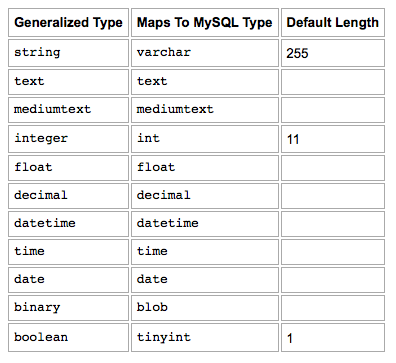
All column types have defaults with support for specifying details. For example,
all columns declared as string will default to 255 characters.
Default assumptions All column definitions start out with some default assumptions, which you can override as needed.
- Columns are
NULLby default
Lets see an example to get started (all examples below, assume that $users
is the result of calling $this->createTable("users");):
Example A:
Create a column called first_name with a default length of 255:
<?php
   $users->column("first_name", "string");
?>
This generates the SQL:
`first_name` varchar(255) NULLExample B:
Create a column called first_name with a max-length of 32 ( implicitly
allow NULL values):
<?php
    $users->column("first_name", "string", array('limit' => 32));
?>
This generates the SQL:
`first_name` varchar(32) NULLExample C:
Create a column called first_name with a max-length of 64, a default value
of 'mr.' and do not allow NULL values:
<?php
    $users->column("first_name", "string", array('limit' => 64, 'default' => 'mr.', 'null' => false));
?>
This generates the SQL:
`first_name` varchar(64) DEFAULT 'mr.' NOT NULLExample D:
Create a numeric column called post_count with a max-length of 4 digits, a default value of 0 and NULL values not allowed:
<?php
    $users->column("post_count", "integer", array('limit' => 4, 'default' => 0, 'null' => false));
?>
This generates the SQL:
`post_count` integer(4) DEFAULT 0 NOT NULLExample E:
Create a datetime column called created_at and NULL values not allowed:
<?php
    $users->column("created_at", "datetime", array('null' => false));
?>
This generates the SQL:
`created_at` datetime NOT NULLExample F: Specify your own key primary key. By default the framework will
generate an 'id' column as a primary key, but if you would like to specify your
own primary key column pass a value of Boolean true into the primary_key
option. This requires that you in turn specify 'id' => false into the
createTable options.
<?php
    $t = $this->createTable('users', array('id' => false, 'options' => 'Engine=InnoDB'));
    $t->column('guid', 'string', array('primary_key' => true));
    $t->finish();
?>