Repository navigation
3. Generic Integration Guidelines
When integrating the eMandates Creditor Libraries into your own solution, you should follow the guidelines described in the following sections.
When receiving the package, you will notice a set of files:
-
net.emandates.merchant.library.jar: this file is the actually library itself, which you can integrate into your code. More details in the next paragraph. -
emandates-config-example.xml: this file contains an example of configuration settings that you need to provide in order for the library to function correctly. Some of these settings (such as eMandates.Merchant.Id) have a specific value that you have received from your Creditor Bank.
First, you need to have an existing project (for example, an Java web application) into which to add the library. Then, unpack the library files into some folder. A subfolder of your project would be a good choice.
Some acquirers use a second certificate so the Java library has added support to authenticate the incoming messages with it. The second certificate can be registered as the first one. The library can check if a message was authenticated with one of these two certificates.
In order to use TLS 1.2, you must specify this in Java arguments, by adding the following argument at runtime: -Dhttps.protocols=TLSv1.2. Also, a change is needed in the configuration XML file. You need to add <add key="eMandates.TLS12.Enabled" value="true" /> inside <appSettings>.
After that, you need to create a configuration file in your project, so the library can load your desired settings. Here are a few screenshots which show how to do that in Netbeans:
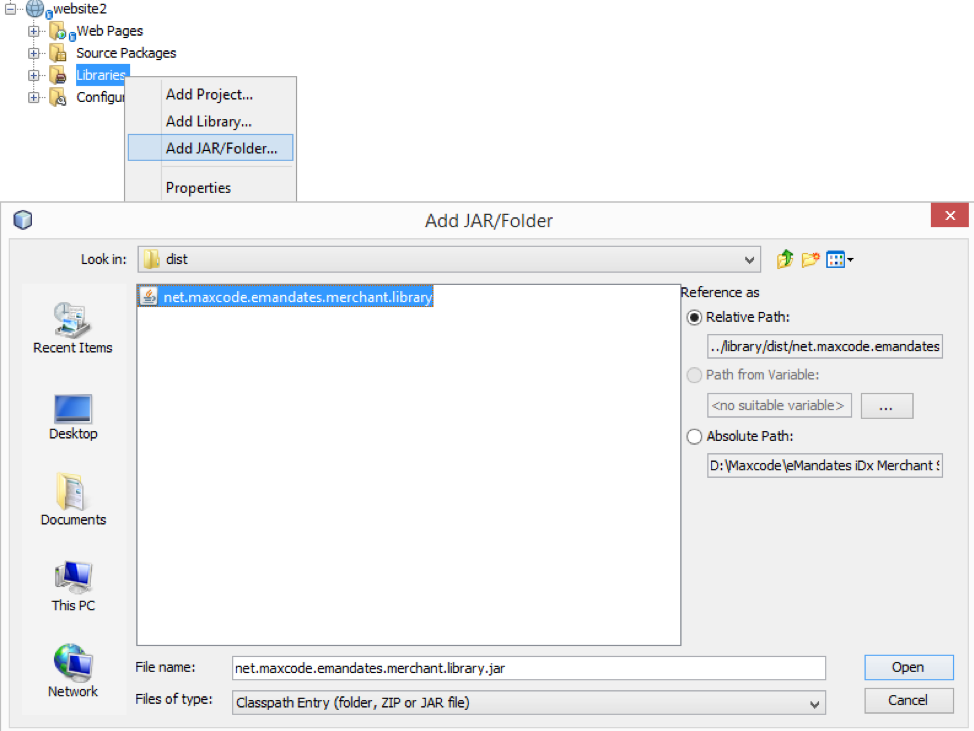
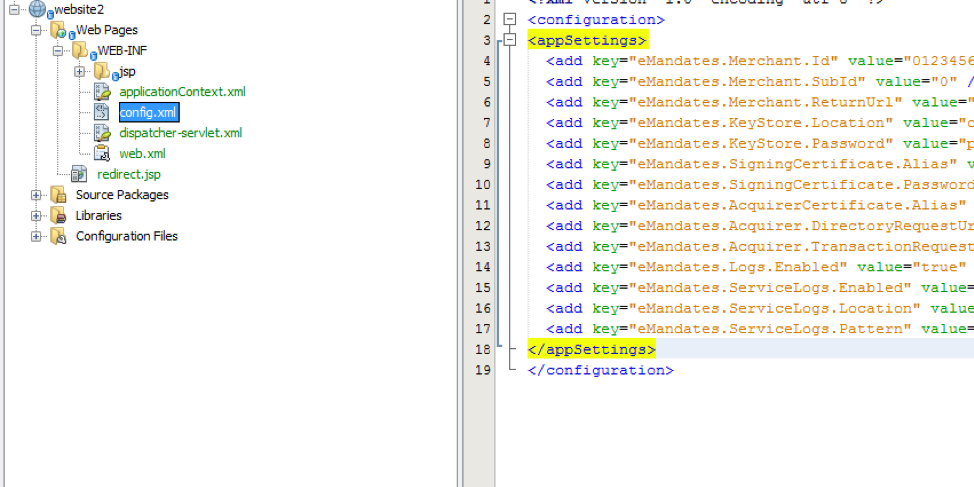
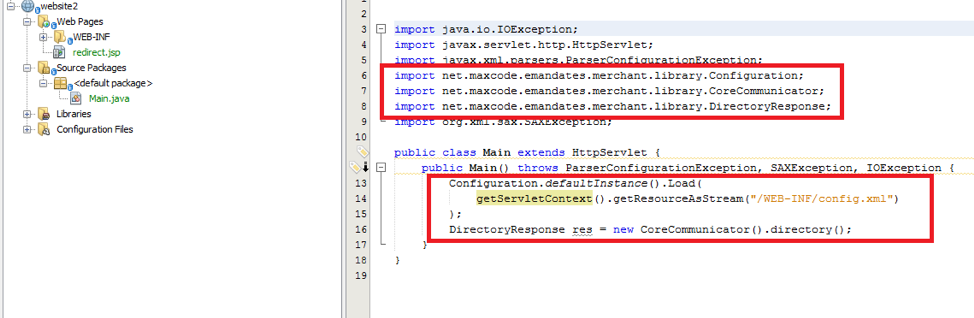
You are now ready to use the library to perform directory requests, issue new eMandates, amend existing eMandates or cancel existing eMandates (cancellation is available only for B2B). You can check section 5 – “Integration workflow” in this manual on more information on how to perform these operations.
You can copy/paste the following code snippet into a new console application project to start using the library right away. Make sure the namespace and class names are conformant to the names you’ve chosen when you set up the project, and change the configuration settings as necessary (check section 4.2 in this manual for more information about specific settings):
package console;

import java.io.IOException;
import net.emandates.merchant.library.Configuration;
import net.emandates.merchant.library.CoreCommunicator;
import net.emandates.merchant.library.DirectoryResponse;

public class Console {
    public static void main(String[] args) throws IOException {

        Configuration.defaultInstance().Setup(new Configuration(
              "111111111"
            , 0
            , "https://my.web.shop/transaction/return"
            , "keystore.jks"
            , "keystore_password"
            , "signing_certificate_alias"
            , "privatekey_password"
            , "acquirer_certificate_alias"
            , "acquirer_alternate_certificate_alias"
            , "https://my.bank/url_for_directory_requests"
            , "https://my.bank/url_for_transaction_requests"
            , true
            , true
            , "D:\\My.Logs\\ServiceLogs"
            , "%Y-%M-%D\\%h%m%s.%f-%a.xml"
        ));

        DirectoryResponse res = new CoreCommunicator().directory();
        if (res.getIsError()) {
            System.out.println(res.getErrorResponse().getErrorMessage());
        }
        else {
            for (DirectoryResponse.DebtorBank debtorBank : res.getDebtorBanks()) {
                System.out.println(debtorBank.getDebtorBankCountry() + " " +
                                    debtorBank.getDebtorBankId() + " " +
                                    debtorBank.getDebtorBankName());
            }
        }
    }
}Most eMandate messages from the creditor to the creditor bank contain a field called MessageId. If you do not have a method to generate your own message ID, you can instruct the library to do so, by using MessageIdGenerator.New(). This method will return a 16-character string which you can then assign to the MessageId field.