Repository navigation
5. Integration Workflow
This chapter contains integration guidelines and sample code for each of the main operations specific to the eMandates service.
To facilitate an integration process, the sample code from the package illustrates how a web application could integrate with an eMandates library. Parts of this code are presented below as an example for each of the eMandates service specific operations.
The sample code is a basic webshop integration with the libraries where the user can choose a Debtor Bank, initiate a transaction (either issuing a new eMandate, amending an existing eMandate or cancelling an eMandate) and request the transaction status. The basic webshop provides a clean interface without shopping cart functionality and storage support for payment transactions and authorization results. It can be used to validate a Creditor account and perform transactions.
The Directory request involves querying the Creditor Bank, so that it returns a list of Debtor Banks. A customer on the web shop will then select a Debtor Bank to which he has an account and the payment process goes on. You are also required to not make more than 1 directory request per 24 hours, so the response should be saved, for example in a local database, so it can be retrieved from there when needed. When issuing the request, you don’t have to specify any additional parameters. The response will include the following parameters:
-
IsError: field that allows you to check if an error occurred. -
Error: an ErrorResponse object containing error information, if one occurred. -
DirectoryDateTimestamp: this field contains the date when this directory was last changed by the Creditor bank’s Routing Service, and allows you to know the earliest time when you can perform another directory request. -
DebtorBanks: the returned list of Debtor banks, each described by an identifier, country name and bank name. -
RawMessage: the actual xml message received from the acquirer.
Below you can find an example of how to perform a directory request, check the response and display the result.
To perform a directory request, instantiate a CoreCommunicator or a B2BCommunicator object, and call the directory() method:
// You can instantiate the CoreCommunicator with or without a Configuration
// object. If not present, the Configuration. defaultInstance() is used.
DirectoryResponse response = new CoreCommunicator().directory();
if (response.getIsError()) {
    // log error, show error message
}
else {
    // handle response: display list of issuing banks
}
Here is the structure of the directory response:
public class DirectoryResponse {
    public boolean getIsError();
    public ErrorResponse getErrorResponse();
    public XMLGregorianCalendar getDirectoryDateTimestamp();
    public final List<DebtorBank> getDebtorBanks();
    public String getRawMessage();
}
Once retrieved, here is an example of how to display the list of issuing banks in Java Server Pages:
<!--
    request.setAttribute("Model", new CoreCommunicator().directory());
-->
<select class="form-control" id="issuer" name="issuer">
    <c:forEach items="${Model.getDebtorBanksByCountry().keySet()}" var="country">
        <optgroup label="${country}">
            <c:forEach items="${Model.getDebtorBanksByCountry().get(country)}" var="bank">
                <option value="${bank.getDebtorBankId()}">${bank.getDebtorBankName()}</option>
            </c:forEach>
        </optgroup>
    </c:forEach>
</select>
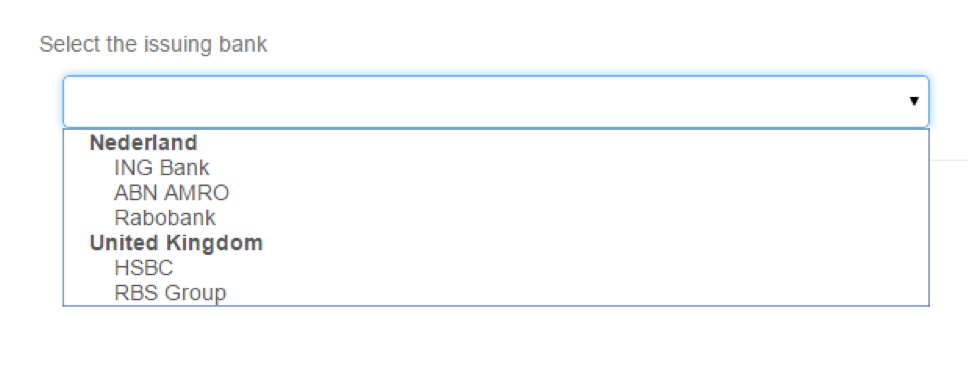
This will generate HTML markup for a drop-down list with all the available debtor banks, grouped by country, just like in the figure below:
The process of issuing a new eMandate is initiated on the Creditor’s website by the Debtor. Issuing a new eMandate is supported through the use of the ISO pain.009 message type. This message contains the eMandate proposal that is created by the Creditor.
The Creditor enters the mandate information in the message and this information set is then completed with Creditor information (by the Routing Service), and with Debtor information (by the Validation Service/Debtor Bank). The complete eMandate proposal is approved by the signer (or signers in case of multiple signing). Signers must be authorized to approve the eMandate on behalf of the Debtor party. After approval by the signer (or after the last signer has approved), the Debtor Bank adds an electronic signature to the eMandate on behalf of the Debtor.
Issuing a new eMandate is in order, if the Debtor chooses to pay for a product or service via the eMandate product. To facilitate this process for the Debtor, you must combine both an eMandate container and an iDx message into a single message. The ISO pain.009 describes all the fields in the eMandate container, and the iDx protocol defines the AcquirerTrxReq element for the iDx part.
The library simplifies this by requiring input for only a limited number of fields, with the rest being filled in automatically. Request parameters:
-
DebtorBankId: The identifier of the Debtor Bank. -
Language: This field enables the Debtor Bank’s website or mobile app to select the Debtor’s preferred language (e.g. the language that was selected on the Creditor’s website or mobile app), if this language is supported by the Debtor Bank’s website or mobile app. The code list according to ISO 639-1. (e.g. ‘en’ for English, ‘nl’ for Dutch) should be used. If a non-supported or non-existing language is entered, the standard language of the Debtor Bank is used. -
ExpirationPeriod: If specified, the customer must approve this transaction in the specified number of minutes. The transaction request’s period of validity measured from the receipt by the Issuer. The Debtor must complete the transaction within this period; otherwise, the Debtor Bank sets the transaction status to “Expired”. It is recommended to Creditors to not enter a value for this field (Optional). -
eMandateId: Unique identifier that corresponds to this specific eMandate. -
MessageId: Message identifier for the message. You can either specify your own MessageId, or you can instruct the library to generate a 16-character string (see section 3.2 in this manual). -
SequenceType: Specifies if this is a one-off or recurring eMandate. -
eMandateReason: The reason for issuing this eMandate. Specifies the product or service for which this mandate was originally issued, to add context to the transaction in the Debtor’s administration (Optional). -
DebtorReference: A reference ID that identifies the Debtor to Creditor (Optional). -
PurchaseId: PurchaseID of the eMandate; a number that indicates which purchase was associated with the issuance of this eMandate for the Creditor administration (Optional).
Note: MaxAmount is only relevant for B2B eMandates, and optional. eMandateReason, DebtorReference and PurchaseId are optional and need not be included by the Creditor. It is recommended to Creditors to leave ExpirationPeriod empty.
Response parameters:
-
IsError: True if there was an error, or false if the response was received without errors. -
Error: an ErrorResponse object containing error information, of one occurred. -
IssuerAuthenticationUrl: an URL given by the Debtor bank, to which you will have to redirect the Debtor to, so they can authenticate and authorize this transaction -
TransactionId: the identifier assigned by the Debtor bank to this transaction -
TransactionCreateDateTimestamp: the specific date and time when this transaction was created -
RawMessage: the actual xml message received from the acquirer
Below you can find examples of how to perform an issue mandate request and check the response.
To perform an issue mandate request, instantiate either a CoreCommunicator or a B2BCommunicator object, and call the newMandate() method (please take note that the data used here is only provided as an example):
NewMandateRequest nmr = new NewMandateRequest(
    "EntranceCode",
    "nl",
    null,
    "1234567890123456",
    "webshop purchase",
    "1234-TEST",
    "ING2NLA",
    "1234567890123456",
    SequenceType.OOFF,
    null
);

// You can instantiate the CoreCommunicator with or without a Configuration
// object. If not present, the Configuration. defaultInstance() is used.
NewMandateResponse response = new CoreCommunicator().newMandate(nmr);
if (response.getIsError()) {
    // log or display error message
}
else {
    // redirect to response.getIssuerAuthenticationURL()
}
Here is the structure of the issue mandate request:
public class NewMandateRequest {
    public void setEntranceCode(String entranceCode);
    public void setLanguage(String language);
    public void setExpirationPeriod(Duration expirationPeriod);
    public void setMessageID(String messageID);
    public void setDebtorBankID(String debtorBankID);
    public void seteMandateID(String eMandateID);
    public void setSequenceType(SequenceType sequenceType);
    public void seteMandateReason(String eMandateReason);
    public void setPurchaseID(String purchaseID);
    public void setMaxAmount(Double maxAmount);
    public void setDebtorReference(String debtorReference);
}
And this is the structure of the issue mandate response:
public class NewMandateResponse {
    public boolean getIsError();
    public ErrorResponse getErrorResponse();
    public String getIssuerAuthenticationURL();
    public String getTransactionID();
    public XMLGregorianCalendar getTransactionCreateDateTimestamp();
    public String getRawMessage();
}To verify whether an eMandate transaction was successful, the Creditor will start the status protocol by sending a status request to the Routing Service. Transaction status should be retrieved no later than fourteen days from the transaction creation date (TransactionCreateDateTimestamp) available in the Debtor’s response. The Creditor may always assume the expiration time to be 30 minutes and can perform a status request after 30 minutes (assuming the redirect to the Creditor has not occurred so there has not been a trigger to request the status yet). When multiple signing is required, the transaction gets the status “Pending”. The Creditor may then request the status of the transaction once every day. After 7 days, the status of the transaction becomes final (“Expired”) if not all required signers have approved the eMandate transaction. To avoid unnecessary system load, status requests should not be made unnecessarily.
Upon completion of any eMandate message (Issue, Amend, Cancel) in the transaction protocol, it is forwarded to the Validation Service. After approval of the eMandate by the Debtor, the acceptance report is retrieved by the Creditor (through the Routing Service) at the Validation Service by sending a status request. The acceptance report contains the eMandate and the digital signature.
Request parameters:
-
TransactionId: the transaction ID. This value is previously returned by other requests (issue eMandate, amend eMandate, cancel eMandate).
Response parameters:
-
IsError: True if there was an error, or false if the response was received without errors. -
Error: AnErrorResponseobject that contains error-related information if an error occurs, or null if there was no error. -
TransactionId: Transaction ID for this specific transaction. -
Status: String that contains the status message and can be one of the following, where ‘transaction’ can represent either the Issuing, Amendment or Cancellation of the eMandate:-
Success: Positive result; the transaction is or has been executed. -
Cancelled: Negative result due to cancellation by Consumer; the transaction will not be executed. -
Expired: Negative result due to expiration of the transaction; the transaction will not be executed. -
Failure: Negative result due to other reasons; the transaction will not be executed. -
Open: Final result not yet known. -
Pending: Transaction has not yet been completed and is awaiting approval by one or more additional signers. Status may be requested daily.
-
-
StatusDateTimestamp: Field set to the time of the transaction’s status change. -
RawMessage: the actual xml message received from the acquirer. -
AcceptanceReport: An object that contains more information about the acceptance report. This field is only present when Status is “Success”.
Here are the fields in the acceptance report:
-
MessageId: Message identification. -
DateTime: Message timestamp. -
ValidationReference: Validation reference. -
OriginalMessageId: Original Message ID. -
MessageNameId: Refers to the type of validation request that preceded the acceptance report. -
AcceptedResult: Whether or not the mandate is accepted by the debtor. -
OriginalMandateId: Original mandate ID. -
MandateRequestId: Mandate request ID. -
ServiceLevelCode: Value is always “SEPA”. -
LocalInstrumentCode: Core or B2B, should always be in conformance with ProductId. -
SequenceType: Sequence Type; one-off or recurring. -
MaxAmount: Maximum amount (Optional). -
eMandateReason: Reason for eMandate (Optional). -
CreditorId: Direct Debit ID of the Creditor. -
SchemeName: Value is always “SEPA”. -
CreditorName: Name of the Creditor. -
CreditorCountry: Country of the postal address of the Creditor. -
CreditorAddressLine: The Creditor’s address: P.O. Box or street name + building + add-on; if 70 characters are exceeded in the first line, the second line is used as well. -
CreditorTradeName: Name of the company (or daughter-company, or label etc.) for which the Creditor is processing eMandates. May only be used when meaningfully different from Creditor.Name (Optional). -
DebtorAccountName: Account holder name of the account that is used for the eMandate. -
DebtorReference: Reference ID that identifies the Debtor to the Creditor. Issued by the Creditor (Optional). -
DebtorIBAN: Debtor’s bank account number. -
DebtorBankId: BIC of the Debtor bank. -
DebtorSignerName: Name of the person signing the eMandate. In case of multiple signing, all signer names must be included in this field, separated by commas. If the total would exceed the maximum of 70 characters, the names are cut off at 65 characters and “e.a.” is added after the last name. -
PurchaseId: PurchaseID of the eMandate (Optional).
Below you can find examples of how to perform an issue mandate request and check the response.
To perform a status request, instantiate either a CoreCommunicator or B2BCommunicator object, and call the getStatus() method (please take note that the data used here is only provided as an example):
StatusRequest sr = new StatusRequest("1234567890");

// You can instantiate the CoreCommunicator with or without a Configuration
// object. If not present, the Configuration. defaultInstance() is used.
StatusResponse response = new CoreCommunicator().getStatus(sr);
if (response.getIsError()) {
    // log or display error message
}
else {
    if (response.getStatus() == StatusResponse.Success
        && response.getAcceptanceReport().isAcceptedResult()) {
        // extract information from response.getAcceptanceReport()
    }
}
Here is the structure of the status request:
public class StatusRequest {
    public void setTransactionID(String transactionID);
}
Here is the structure of the status response:
public class StatusResponse {
    public boolean getIsError();
    public ErrorResponse getErrorResponse();
    public String getTransactionID();
    public String getStatus();
    public XMLGregorianCalendar getStatusDateTimestamp();
    public String getRawMessage();
    public AcceptanceReport getAcceptanceReport();
}There can only be two reasons for wanting to amend an existing eMandate: when the Debtor wishes to change his bank account number for Direct Debits, within the same bank or to a different bank, or when the maximum amount changes or ought to change for B2B eMandates. Amendment of existing eMandates is supported through use of the ISO pain.010 message type. The ISO pain.010 message contains referrals to the original (existing) eMandate, such as eMandate ID and IBAN. When receiving an eMandate-amendment request, the Debtor Bank does not perform any checks on the validity of the original eMandate. These checks can’t be performed since the original, signed eMandate is not part of this amendment message. The Debtor Bank must instruct the Debtor to check the entire amended eMandate before approval.
Request parameters:
-
DebtorBankId: The identifier of the debtor bank. -
EntranceCode: This is an ‘authentication identifier’ created by the Creditor to facilitate continuation of the session between Creditor and Debtor, even if the existing session has been lost (e.g. because the cookie expired). It is used by the Debtor Bank in the ReturnURL so that it enables the Creditor to recognize the Debtor associated with a (completed) transaction. The entrance code should have a minimum variation of one million, and it should comprise letters and/or digits (maximum 40 positions). -
Language: This field enables the Debtor Bank’s website or mobile app to select the Debtor’s preferred language (e.g. the language that was selected on the Creditor’s website or mobile app), if this language is supported by the Debtor Bank’s website or mobile app. The code list according to ISO 639-1. (e.g. ‘en’ for English, ‘nl’ for Dutch) should be used. If a non-supported or non-existing language is entered, the standard language of the Debtor Bank is used. -
ExpirationPeriod: If specified, the customer must approve this transaction in the specified number of minutes. The transaction request’s period of validity measured from the receipt by the Issuer. The Debtor must complete the transaction within this period; otherwise, the Debtor Bank sets Transaction.status to “Expired”. It is recommended to Creditors to not enter a value for this field (Optional). -
MessageId: Message identifier for the pain message. You can either specify your own MessageId, or you can instruct the library to generate a 16-character string (see section 3.2 in this manual). -
eMandateId: Unique identifier that corresponds to this specific eMandate. -
SequenceType: Specifies if this is a one-off or recurring eMandate. -
eMandateReason: The reason for issuing this eMandate. Specifies the product or service for which this mandate was originally issued, to add context to the transaction in the Debtor’s administration (Optional). -
DebtorReference: A reference ID that identifies the Debtor to Creditor (Optional). -
PurchaseId: Purchase ID of the eMandate. Number that indicates which purchase was associated with the issuance of this eMandate for the Creditor administration (Optional). -
OriginalIBAN: IBAN of the original Mandate. -
OriginalDebtorBankId: Bank ID of the original Mandate.
Note: eMandateReason, DebtorReference and PurchaseId are optional and need not be included by the Creditor. It is recommended to Creditors to leave ExpirationPeriod empty.
Response parameters:
-
IsError: True if there was an error, or false if the response was received without errors. -
Error: anErrorResponseobject containing error information, of one occurred. -
IssuerAuthenticationUrl: an URL given by the Debtor bank, to which you will have to redirect the Debtor to, so they can authenticate and authorize this transaction -
TransactionId: the identifier assigned by the Debtor bank to this transaction -
TransactionCreateDateTimestamp: the specific date and time when this transaction was created -
RawMessage: the actual xml message received from the acquirer
Below you can find examples of how to perform an issue mandate request and check the response.
To perform an amendment request, instantiate either a CoreCommunicator or a B2BCommunicator object, and call the amend() method (please take note that the data used here is only provided as an example):
AmendmentRequest ar = new AmendmentRequest(
    "EntranceCode",
    "nl",
    null,
    "1234567890123456",
    "webshop purchase",
    "1234-TEST",
    "ING2NLA",
    "1234567890123456",
    SequenceType.OOFF,
    "NL01ZZZ12345678",
    "TESTNL20"
);

// You can instantiate the CoreCommunicator with or without a Configuration
// object. If not present, the Configuration. defaultInstance() is used.
AmendmentResponse response = new CoreCommunicator().amend(ar);
if (response.getIsError()) {
    // log or display error message
}
else {
    // redirect to response.getIssuerAuthenticationURL()
}
Here is the structure of the amendment request:
public class AmendmentRequest {
    public void setEntranceCode(String entranceCode);
    public void setLanguage(String language);
    public void setExpirationPeriod(Duration expirationPeriod);
    public void setMessageID(String messageID);
    public void seteMandateID(String eMandateID);
    public void seteMandateReason(String eMandateReason);
    public void setDebtorReference(String debtorReference);
    public void setDebtorBankID(String debtorBankID);
    public void setPurchaseID(String purchaseID);
    public void setSequenceType(SequenceType sequenceType);
    public void setOriginalIBAN(String originalIBAN);
    public void setOriginalDebtorBankID(String originalDebtorBankID);
}
Here is the structure of the amendment response:
public class AmendmentResponse {
    public boolean getIsError();
    public ErrorResponse getErrorResponse();
    public String getIssuerAuthenticationURL();
    public String getTransactionID();
    public XMLGregorianCalendar getTransactionCreateDateTimestamp();
    public String getRawMessage();
}Cancelling an eMandate is done using the ISO pain.011 message and is only allowed in the B2B scheme. The process is initiated at the Creditor website and the cancellation is approved in the Debtor Bank domain. An eMandate can only be cancelled at the Debtor Bank where it was previously approved, and only by a signer who has access to the account number in the eMandate.
The Debtor Bank registers the cancellation of the eMandate by matching the eMandate ID to a previously registered eMandate ID in its own database. This will usually be an offline process. If the match can’t be made, this implies the eMandate was never registered at the Debtor Bank or the Creditor has sent the wrong eMandate ID. In the latter case, the eMandate that should have been removed remains registered at the Debtor Bank, allowing the Creditor to perform unjust direct debits. For this reason, if the match can’t be made the Debtor Bank alerts the signer(s) to check the eMandate registration at the Debtor Bank to confirm the cancelled eMandate is not registered (anymore).
A cancellation of an eMandate is confirmed by the Debtor Bank to the Creditor by sending an eMandate acceptance report that contains the entire cancelled eMandate, together with an indicator marking the response as the result of a cancellation request. When cancelling an eMandate, the Debtor isn’t allowed to select a different Debtor Bank than the one at which the eMandate was originally issued.
Request parameters:
-
EntranceCode: This is an ‘authentication identifier’ created by the Creditor to facilitate continuation of the session between Creditor and Debtor, even if the existing session has been lost (e.g. because the cookie expired). It is used by the Debtor Bank in the ReturnURL so that it enables the Creditor to recognize the Debtor associated with a (completed) transaction. The entrance code should have a minimum variation of one million, and it should comprise letters and/or digits (maximum 40 positions). -
Language: This field enables the Debtor Bank’s website or mobile app to select the Debtor’s preferred language (e.g. the language that was selected on the Creditor’s website or mobile app), if this language is supported by the Debtor Bank’s website or mobile app. The code list according to ISO 639-1. (e.g. ‘en’ for English, ‘nl’ for Dutch) should be used. If a non-supported or non-existing language is entered, the standard language of the Debtor Bank is used. -
ExpirationPeriod: If specified, the customer must approve this transaction in the specified number of minutes. The transaction request’s period of validity measured from the receipt by the Issuer. The Debtor must complete the transaction within this period; otherwise, the Debtor Bank sets Transaction.status to “Expired”. It is recommended to Creditors to not enter a value for this field. -
DebtorBankId: The identifier of the Debtor Bank. -
MessageId: Message identifier for the pain message. You can either specify your ownMessageId, or you can instruct the library to generate a 16-character string (see section 3.2 in this manual). -
eMandateId: Unique identifier that corresponds to this specific eMandate. -
SequenceType: Specifies if this is a one-off or recurring eMandate. -
eMandateReason: The reason for issuing this eMandate. Specifies the product or service for which this mandate was originally issued, to add context to the transaction in the Debtor’s administration (Optional). -
DebtorReference: A reference ID that identifies the Debtor to Creditor (Optional). -
PurchaseId: Purchase ID of the eMandate. Number that indicates which purchase was associated with the issuance of this eMandate for the Creditor administration (Optional). -
OriginalIBAN: IBAN of the original eMandate. -
MaxAmount: describes the maximum amount (Optional).
Note: MaxAmount, eMandateReason, DebtorReference and PurchaseId are optional and need not be included by the Creditor. It is recommended to Creditors to leave ExpirationPeriod empty.
Response parameters:
-
IsError: True if there was an error, or false if the response was received without errors. -
Error: an ErrorResponse object containing error information, of one occurred. -
IssuerAuthenticationUrl: an URL given by the Debtor bank, to which you will have to redirect the Debtor to, so they can authenticate and authorize this transaction -
TransactionId: the identifier assigned by the Debtor bank to this transaction -
TransactionCreateDateTimestamp: the specific date and time when this transaction was created -
RawMessage: the actual xml message received from the acquirer.
Below you can find examples of how to perform an issue mandate request and check the response.
To perform a cancellation request, instantiate a B2BCommunicator object, and call the cancel() method (please take note that the data used here is only provided as an example):
CancellationRequest cr = new CancellationRequest(
    "EntranceCode",
    "nl",
    null,
    "1234567890123456",
    "webshop purchase",
    "1234-TEST",
    "ING2NLA",
    "1234567890123456",
    SequenceType.OOFF,
    15.00d,
    "NL01ZZZ12345678"
);

CancellationResponse response = new B2BCommunicator().cancel(cr);
if (response.getIsError()) {
    // log or display error message
}
else {
    // redirect to response.getIssuerAuthenticationURL()
}
Here is the structure of the cancellation request:
public class CancellationRequest {
    public void setEntranceCode(String entranceCode);
    public void setLanguage(String language);
    public void setExpirationPeriod(Duration expirationPeriod);
    public void setMessageID(String messageID);
    public void seteMandateID(String eMandateID);
    public void seteMandateReason(String eMandateReason);
    public void setDebtorReference(String debtorReference);
    public void setDebtorBankID(String debtorBankID);
    public void setPurchaseID(String purchaseID);
    public void setSequenceType(SequenceType sequenceType);
    public void setMaxAmount(Double maxAmount);
    public void setOriginalIBAN(String originalIBAN);
}
Here is the structure of the cancellation response:
public class CancellationResponse {
    public boolean getIsError();
    public ErrorResponse getErrorResponse();
    public String getIssuerAuthenticationURL();
    public String getTransactionID();
    public XMLGregorianCalendar getTransactionCreateDateTimestamp();
    public String getRawMessage();
}